Package installation says FILENAME exists in filesystem; “Failed to commit transaction (conflicting files)”

I can’t install or update a package because I get (something like) this:

error: could not prepare transaction
error: failed to commit transaction (conflicting files)
libname: /insert/file/name/here exists in filesystem
Errors occurred, no packages were upgraded.

Why is this happening?

The package manager, pacman , has detected an unexpected file already exists on disk. By design it will not overwrite files that already exist. This is a design feature, not a flaw - package managers are designed to keep track of installed files.

This issue normally happens because you’ve manually added, copied, or created a file. It can also happen when you install software using a downloaded executable, run a make install , or use a third-party package system such as conda . It also occurs when you install an AUR package which installs files that conflict with a repo package.

When using a third-party installer you should always specify an alternative installation location, such as under your home directory, or under /opt or /usr/local/ . Never install directly under / or /usr .

How can I fix this?

The better way

The first step is to identify which, if any, package owns the file. This can be easily done with:

pacman -Qo /path/to/file

If this identifies a conflicting package you can decide to remove it with pacman -R . If no package is identified you can delete the file, e.g. rm /path/to/file (or move it to a backup location, e.g. mv /path/to/file /path/to/file.backup ).

The faster way

pacman has an --overwrite option which will allow it to overwrite files. If you are sure you want to, you can tell it to

sudo pacman -S $PACKAGE --overwrite path/to/*

This will (re)install the $PACKAGE and overwrite any files under the directory path/to/

This can be very useful if your local database has “lost” a package you’ve already installed (and so every file in the package “conflicts”).

The “I don’t care” way

sudo pacman -S $PACKAGE --overwrite '*'

Example

Here’s an example of how to decide what to write:
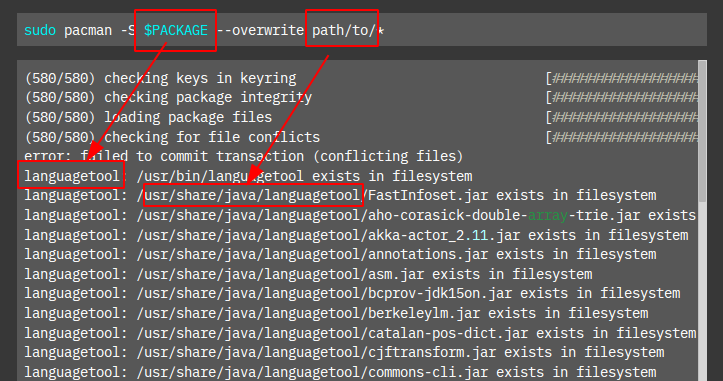
So the command could be:

sudo pacman -S languagetool --overwrite usr/bin/languagetool,usr/share/java/languagetool/*

Where can I read more?

This post was inspired by (and adapted from):

https://bbs.archlinux.org/viewtopic.php?id=56373

The above post also has links to further reading.

16 Likes
Problem with updates
Update Issue this morning (File conflicts found plasma-desktop knetattach)
Conflicting Files
Yay "exists in filesystem"
FAQ and Tutorials Table of Contents
Update backintime fail
Overwrite OK?
Unintentionally deleted chaotic-mirrorlist
Gnome update - adwaita conflict
Errors ! shoud i worry about this erorrs
Python-cairo error: failed to commit transaction (conflicting files)
Errors during update
Pacman update won't update
Python related issues while updating
Xen virtualization AUR installation conflicting files
Proton-GE broke update
Failed to prepare transaction(invalid or corrupted package)
Fresh install first update using garuda update
Grub doesn't detect garuda after upgrade
Cannot garuda-update, lots of linux-firmware errors
Unable to update since 1st. Sept 2023
Unable to install updates after running on the Linux LTS kernel
System update error show ho raha hai
Report on minor update issue
Cannot install python dependencies because files already "exist in filesystem"
Garuda-update fails due to "conflicting files"
Update crash cause of libcurl
Error: failed to commit transaction (conflicting files) rav1e: /usr/lib/librav1e.so.0.6 exists in filesystem
Updating Error. error: failed to commit transaction (conflicting files)
Virt-install update fail
Spinning icon around dragon at boot
System update is failing
Update Script fails when upgrading npm packages
Update aborts
Cannot update garuda Discord error
Problem with upgrade
File exists in filesystem | message on update
Errors occurred, no packages were upgraded
Gus Im Trying to install Davinci Resolve for my Garuda linux and always having this issue "WARNING: Failed to install the built packages."
System upgrade prevented by spice-vdagent
Garuda-dr460nized 4.5.8-4 breaks update | File exists in filesystem
Problem With Update
Garuda-Update fault - error: failed to commit transaction (conflicting files)
Installing ZSH in Dragonized Gaming Edition failing
Update Super Fail (play.it?)
Unable to update (conflicting file)
Conflicting Files
Failed to commit transaction (download library error)

Ah thanks, helped my issue with python-pip installation.