Hmm, seems like you kind of missed that one. This feels like a silly thing to have to explain, but just to clarify: in the original analogy, Garuda is the car.
At the risk of beating the analogy to death, all KDE users will be stuck in the same “traffic” on any Arch-based distro right now. Those who are choosing to switch distros to get away from the KDE 6 madness should be sure to pick a frozen pool distro like Fedora 39 or Kubuntu.
This is more likely to break your system than just taking the update. Also, issues arising from partial upgrades are often difficult or impossible to solve–you could permanently wreck your install.
Instead, just don’t update if you don’t want the new packages. Hold off till April or something. When it seems the issues have subsided, then take the update.
Fedora has announced that with 41 which will hit later this year, they will be dropping x11 support. As they are the leading lady with most Linux advancement, it’s about to get really real in hte next couple of year for Nvidia users if Nvidia doesn’t figure it out really quickly.
Yes, that’s right. A lot of folks mistakenly think they need to update every day or every week, but unless you need to bring in new packages it’s typically fine to go much longer between updates. I have even seen people successfully update a system after years have gone by: Arch installation updated after 3 years of neglect - EndeavourOS pub - EndeavourOS
Some of the grief that comes from updating after a long stretch is mitigated for folks taking advantage of the very excellent garuda-update tool, where a lot of the intervention required for getting through an update is taken care of for you with clever scripting. Garuda Update | Garuda Linux wiki
To be clear: Plasma 6 has introduced some changes that are not backwards compatible. When people finally update, there will be some manual adjustment required. No amount of postponing the update will change that. Still, anyone hoping to wait until the dust settles and some of the showstopping bugs are behind us should be fine to just hold off until April to update.
Sorry if this is not the place to ask, but we will see a new ISO release early this year because of plasma 6 ? I now they are released later, almost at the end of the calendar, but got me wondering. thanks.
Yes, I liked having the full app menu in the global menu there also, especially since Garuda already offers XFCE etc with streamlined drop down menus so if I had wanted that, I would have chosen it! Now what I found is having to hit the settings wheel from the main drop down menus and then the settings wheel again in the submenu - I guess I could make a hot key for it.
PROTON VPN Issue:
In case anyone is using protonvpn fyi it seems like the protonvpn GUI takes some time to sync. Trying to use it after the new updates would throw on the kill switch and appear to have the connection, but the network connection would not open through the secure core.
Rebooting after the updates, then also connecting the vpn using protonvpn-cli from the command line, seemed to do the trick in getting their python modules coordinated with the KDE.
I also noticed the geo location agent is not running automatically anymore, which I didn’t like and had not noticed effects from manually turning it off, so it looks like it got removed from the default startup apps. (THANK YOU) So that may have had something to do with the vpn getting running properly.
This is just my initial operational observations. I did not do any thorough systematic testing as such.
Lenovo Thinkpad Fn key quirk
I also noticed that after the new roll outs that the toggle for the fn key lock looks like it is on backwards/reversed on my old but good Lenovo Thinkpad. I.e., to adjust sound volume, brightness, etc., the fn key lock has to be ON vs. OFF. Everything works so I am grateful for that.
Do you suspect NVIDIA (or more specifically the hand in the NVIDIA glove) is partnering with ARM to get the inside monopolization-of-backdoors track? Here’s Johnny (One Flew Over the Cuckoo’s Nest) - What’s next: Whack-a-mole AI Bots? laughing:
the installation on Plasma 6 went well for me thanks to the migration assistant. I have previously connected a Thinkpad T560 to a Dell monitor in a docking station. This has always worked properly so far. Now I can adjust the monitor in the display settings, but when I close the laptop, no image appears on the monitor, only on the laptop. When docking and undocking with the laptop closed, it automatically switched to the Dell monitor. Now the login to the Dell monitor works and then it goes to standby.
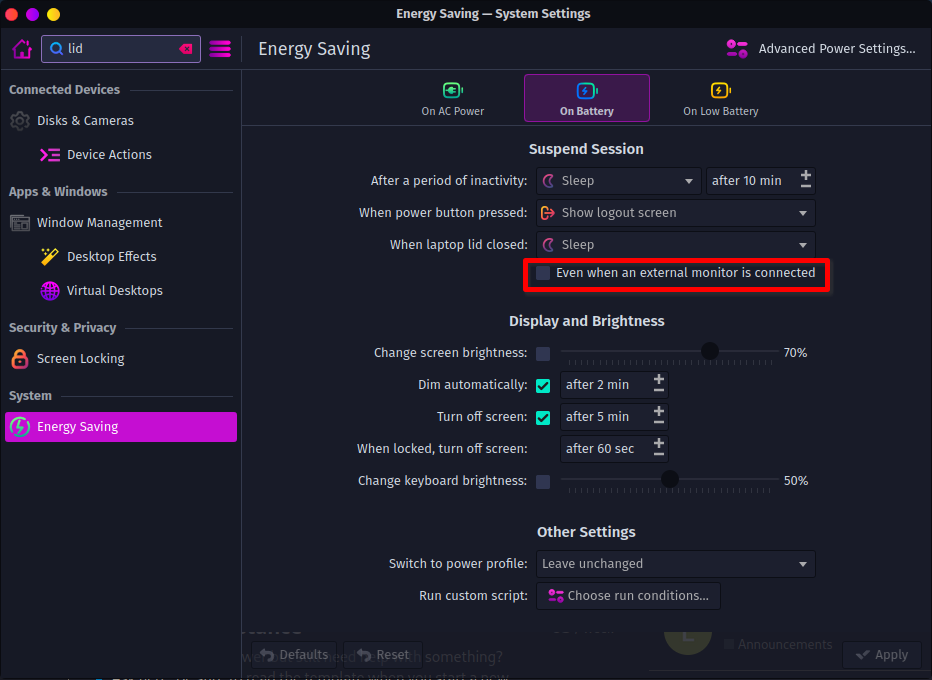
I’d bet the laptop is just going to sleep when you close the lid. Try having it not go to sleep when the lid is closed while an external monitor is connected.
I think virtually all of the problems will be fixed soon. Mesa 24.1 is supposed to have some additional fixed for Nvidia proprietary. Plus the open Nvidia driver is making incredibly fast progress.
I thought about ditching my Nvidia card but waiting a month, or two, or three seems like a more sensible and practical solution.
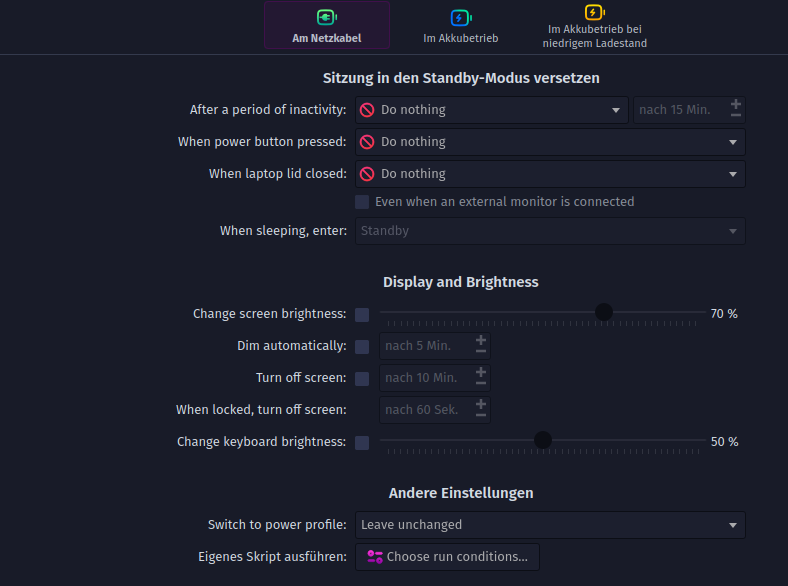
If I specify “On Battery” When laptop lid is closed: Do nothing in the menu, the same thing happens when docking and undocking.
What exactly needs to be selected in the menü On Battery to make it work again?
Hmm. I have my settings the same as in my screenshot above (which I believe are the default). I’m on x11 with an Nvidia GPU.
The external screen does go black for a few seconds when I open/close the lid, but it comes back without the laptop sleeping or anything. I think it just goes black while it enables/disables the laptop screen. It’s probably worth creating a separate thread for this issue, since it’s likely gonna take a bit of troubleshooting. If you do, don’t forget to post your garuda-inxi.
Ok, I had hired Wayland. With X11 everything works perfectly again. It’s a shame that under Wayland I had the feeling that somehow everything was smoother and faster on the screen. Thank you again.