I have Nvidia 1080 GTX Card.
after clean install with new .iso and 550 drivers , can say the Wayland clearly is NOT ready jet for stable use in KDE 6 !! … glitch, and rendering anomaly everywhere.
1 Like
I agree. I have NVIDIA RTX 3060 Card and it’s just not ready. I am a student and it’ll take a while until I make some money for AMD Card.
I think I’ll have to either stick to X11 or use my most hated Windows as a second boot for now.
I commented on here earlier saying everything is pretty much fine now, but now I’m getting nothing but glitches and bugs with both X11 and Wayland!!! I’ve had a panel be stretched across 2 monitors, then another panel just disappear. Both display programs worked fine for me before though… very frustrating.
I had something like this popup as well. My secondary monitor is to my left. It grabbed my top panel, and stretched it out on to my main display but only about 1/3 of the way.
I believe I had to shutdown, disconnect the monitor, boot up. I switched to Breeze Dark, and then reconnected the monitor, things have been ok thus far.
This is by design
have u tried to use the modeset settings ? it s needed with propiretary drivers
Upgrade went without a hinch. Only 2 annoying details:
- Only way to unmaximize a window is finding the tiny purple button (would use a hotkey instead, is there one?)
- Middle of the header has a very very very tiny text clock that is unreadable
- and no easy way to know the time anymore
Can’t use my right hand so thinkering around is a pain
@Hanuman Alt F3 - More Actions - Configure Special Window Settings - Add Property
Maximized Horizontally: No
Maximized Vertically: No
Do this with no application open.
[EDIT] Do this with at least one application opened, because if no application is opened, Alt F3 does nothing.
1 Like
All i did was restart and it fixed. I haven’t tried using wayland since though.
And I honestly wouldn’t try. Regardless of claims by the KDE devs Wayland IS NOT ready for primetime.
1 Like
If you use NVIDIA, its been working great on AMD.
That’s nice, but still means it’s not ready for primetime.
2 Likes
It’s been working almost flawlessly for me on nvidia (RTX 3070), wayland & Plasma 5 for almost a year.
I got an AMD card for when the new ISO is released though, so it won’t be a concern for me.
Someone brought this up on reddit and it seemed, in that subreddit at least, that a lot of people that were having trouble with nvidia / wayland were using old hardware, quite old (e.g. several generations) in at least some cases. It makes me wonder if how ever well or bad it performs might be dependent on ones hardware.
works fine on my computer
seriously, can we roll back from KDE 6 already? 
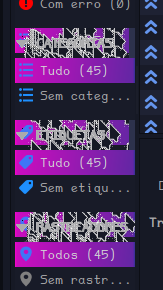
1 Like
you are probably using some kde5 based theming that hasn’t been updated to kde6. There is nothing less stable in kde 6 vs 5.27 you just need to use up to date stuff. There might even be KDE 6 versions of your stuff you might just need to switch to.
yeah it does. Nvidia just sucks on Linux because Nvidia are dkheads.
I literally installed from a fresh iso yesterday. If there’s something wrong, it’s still in the iso/update process =p but if you can help me solve this, I’ll be extremely grateful!
Well in the case of a brand new install my idea about kdr 5 vs 6 miscongruancy probably isn’t it or at least isn’t a useful observation, but I will say stock KDE 6 theming is much more mature vs dragonized theming as far as I am aware. What program is that which you had posted a screenshot of? When I upgraded to KDE 6 during the first hour it was out of testing into extra I made sure to remove all dragonized themes and changed to stock KDE and I had zero problems (except for a long standing mistake from before)
qbittorrent, but I see this happening in quite a few others, including the settings panel - transparency showing up where there shouldn’t be any, and when I pass my mouse over them, a trail is left behind