mv: der Aufruf von stat für ‘/etc/X11/xorg.conf’ ist nicht möglich: Datei oder Verzeichnis nicht gefunden
English:
mv: cannot call stat for ‘/etc/X11/xorg.conf’: file or directory not found
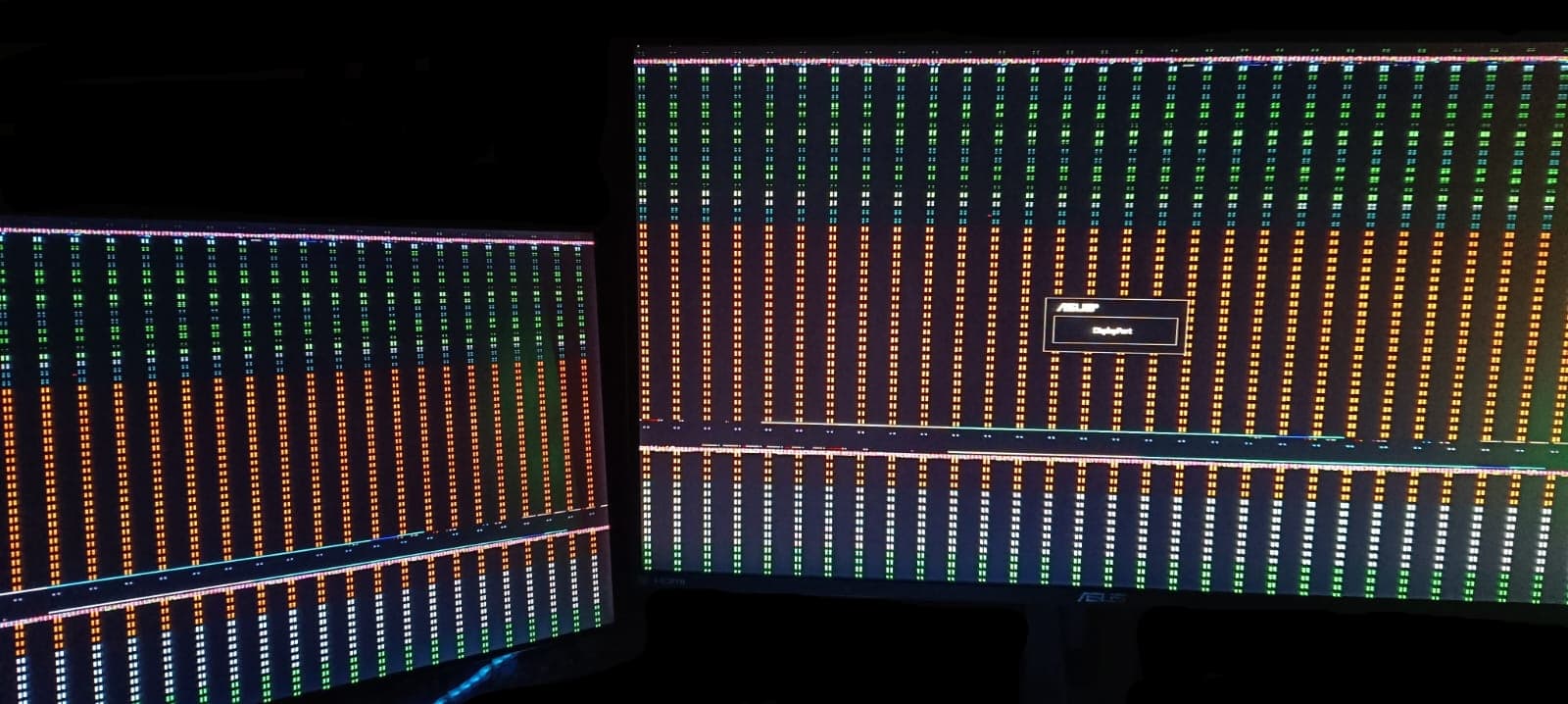
Also tried sudo modprobe nouveau from tty which resulted in some throwback to SDDM, let me log in normal but took some time everything has some gray veil over it with some high frequency flickering.
Second monitor responded though, even if it’s black screening until I go over with the mouse to see some colored artifact lines from left to right follow by normal readable
Garuda Linux 6.6.10-zen1-1-zen (tty2)
[hostname] login:
#!/bin/sh

userresources=$HOME/.Xresources
usermodmap=$HOME/.Xmodmap
sysresources=/etc/X11/xinit/.Xresources
sysmodmap=/etc/X11/xinit/.Xmodmap

# merge in defaults and keymaps

if [ -f $sysresources ]; then


    xrdb -merge $sysresources

fi

if [ -f $sysmodmap ]; then
    xmodmap $sysmodmap
fi

if [ -f "$userresources" ]; then


    xrdb -merge "$userresources"

fi

if [ -f "$usermodmap" ]; then
    xmodmap "$usermodmap"
fi

# start some nice programs

if [ -d /etc/X11/xinit/xinitrc.d ] ; then
 for f in /etc/X11/xinit/xinitrc.d/?*.sh ; do
  [ -x "$f" ] && . "$f"
 done
 unset f
fi

twm &
xclock -geometry 50x50-1+1 &
xterm -geometry 80x50+494+51 &
xterm -geometry 80x20+494-0 &
exec xterm -geometry 80x66+0+0 -name login
#!/bin/sh
exec /usr/bin/X -nolisten tcp "$@"
Empty rows from xinitrc are from the file itself, it’s not some formatting done by me
For my personal interest and to not accidentally mislead or make anything harder, I’m running right now from the zen1 kernel since I can log into the main user booted with it but until the problem arose I only used the zen3 kernel, is that relevant in this context?
The kernel in use is relevant, yes. Each kernel can potentially have different drivers, modules, bugs, patches, etc than each other. Your issue seems to be specifically related to your GPU, but again different kernels can use different drivers or different versions of the same driver for the same hardware in some cases.
Normally it is not so painful to switch back to the open-source drivers; something odd is happening with your system. Is it possible something has gone wrong with your GPU, physically or otherwise? Does the GPU work normally on your other OS?
Speaking of different kernels, let’s try installing the LTS kernel and see if you get a different result.
I reverted back to a working snapshot and continued from there forward, which was fine until a few days ago
Output from
Abhängigkeiten werden aufgelöst …
Nach in Konflikt stehenden Paketen wird gesucht …

Pakete (2) linux-lts-6.6.11-1  linux-lts-headers-6.6.11-1

Gesamtgröße des Downloads:             153,46 MiB
Gesamtgröße der installierten Pakete:  253,04 MiB

:: Installation fortsetzen? [J/n] j
:: Pakete werden empfangen …
linux-lts-headers-6.6.11-1-x86_64      24,8 MiB  2,38 MiB/s 00:10 [------------------------------------] 100%
linux-lts-6.6.11-1-x86_64             128,7 MiB  3,75 MiB/s 00:34 [------------------------------------] 100%
Gesamt (2/2)                          153,5 MiB  2,44 MiB/s 01:03 [------------------------------------] 100%
Fehler: Konnte Datei 'linux-lts-6.6.11-1-x86_64.pkg.tar.zst' nicht von archlinux.thaller.ws übertragen : The requested URL returned error: 404
Fehler: Konnte Datei 'linux-lts-headers-6.6.11-1-x86_64.pkg.tar.zst' nicht von archlinux.thaller.ws übertragen: The requested URL returned error: 404
Fehler: Konnte Datei 'linux-lts-6.6.11-1-x86_64.pkg.tar.zst' nicht von archlinux.mirror.server24.net übertragen : The requested URL returned error: 404
Fehler: Konnte Datei 'linux-lts-headers-6.6.11-1-x86_64.pkg.tar.zst' nicht von archlinux.mirror.server24.net übertragen : The requested URL returned error: 404
Fehler: Konnte Datei 'linux-lts-6.6.11-1-x86_64.pkg.tar.zst' nicht von repo.hyron.dev übertragen : The requested URL returned error: 404
Fehler: Konnte Datei 'linux-lts-headers-6.6.11-1-x86_64.pkg.tar.zst' nicht von repo.hyron.dev übertragen : Therequested URL returned error: 404
Fehler: Konnte Datei 'linux-lts-6.6.11-1-x86_64.pkg.tar.zst' nicht von theswissbay.ch übertragen : The requested URL returned error: 404
Fehler: Konnte Datei 'linux-lts-headers-6.6.11-1-x86_64.pkg.tar.zst' nicht von theswissbay.ch übertragen : Therequested URL returned error: 404
Fehler: Konnte Datei 'linux-lts-6.6.11-1-x86_64.pkg.tar.zst' nicht von mirror.quantum5.ca übertragen : The requested URL returned error: 404
Fehler: Konnte Datei 'linux-lts-headers-6.6.11-1-x86_64.pkg.tar.zst' nicht von mirror.quantum5.ca übertragen :The requested URL returned error: 404
Fehler: Konnte Datei 'linux-lts-headers-6.6.11-1-x86_64.pkg.tar.zst' nicht von mirror.telepoint.bg übertragen : The requested URL returned error: 404
Fehler: Konnte Datei 'linux-lts-6.6.11-1-x86_64.pkg.tar.zst' nicht von mirror.telepoint.bg übertragen : The requested URL returned error: 404
Fehler: Konnte Datei 'linux-lts-headers-6.6.11-1-x86_64.pkg.tar.zst' nicht von mirrors.qontinuum.space übertragen : Operation too slow. Less than 1 bytes/sec transferred the last 10 seconds
Fehler: Konnte Datei 'linux-lts-6.6.11-1-x86_64.pkg.tar.zst' nicht von mirrors.qontinuum.space übertragen : Operation too slow. Less than 1 bytes/sec transferred the last 10 seconds
Fehler: Konnte Datei 'linux-lts-headers-6.6.11-1-x86_64.pkg.tar.zst' nicht von mirrors.uni-plovdiv.net übertragen : The requested URL returned error: 404
Fehler: Konnte Datei 'linux-lts-6.6.11-1-x86_64.pkg.tar.zst' nicht von mirrors.uni-plovdiv.net übertragen : The requested URL returned error: 404
Fehler: Konnte Datei 'linux-lts-headers-6.6.11-1-x86_64.pkg.tar.zst' nicht von pkg.adfinis.com übertragen : The requested URL returned error: 404
Fehler: Konnte Datei 'linux-lts-6.6.11-1-x86_64.pkg.tar.zst' nicht von pkg.adfinis.com übertragen : The requested URL returned error: 404
Fehler: Konnte Datei 'linux-lts-6.6.11-1-x86_64.pkg.tar.zst' nicht von archlinux.ip-connect.vn.ua übertragen :Failed to connect to archlinux.ip-connect.vn.ua port 80 after 498 ms: Couldn't connect to server
Fehler: Konnte Datei 'linux-lts-headers-6.6.11-1-x86_64.pkg.tar.zst' nicht von archlinux.ip-connect.vn.ua übertragen : Failed to connect to archlinux.ip-connect.vn.ua port 80 after 507 ms: Couldn't connect to server
Fehler: Konnte Datei 'linux-lts-6.6.11-1-x86_64.pkg.tar.zst' nicht von mirror2.sl-chat.ru übertragen : The requested URL returned error: 404
Fehler: Konnte Datei 'linux-lts-headers-6.6.11-1-x86_64.pkg.tar.zst' nicht von mirror2.sl-chat.ru übertragen :The requested URL returned error: 404
Fehler: Konnte Datei 'linux-lts-headers-6.6.11-1-x86_64.pkg.tar.zst' nicht von ftp.nluug.nl übertragen : The requested URL returned error: 404
Fehler: Konnte Datei 'linux-lts-6.6.11-1-x86_64.pkg.tar.zst' nicht von ftp.nluug.nl übertragen : The requestedURL returned error: 404
Fehler: Konnte Datei 'linux-lts-headers-6.6.11-1-x86_64.pkg.tar.zst' nicht von arch.sakamoto.pl übertragen : The requested URL returned error: 404
Fehler: Konnte Datei 'linux-lts-6.6.11-1-x86_64.pkg.tar.zst' nicht von arch.sakamoto.pl übertragen : The requested URL returned error: 404
Fehler: Konnte Datei 'linux-lts-6.6.11-1-x86_64.pkg.tar.zst' nicht von mirror.t-home.mk übertragen : The requested URL returned error: 404
Fehler: Konnte Datei 'linux-lts-headers-6.6.11-1-x86_64.pkg.tar.zst' nicht von mirror.t-home.mk übertragen : The requested URL returned error: 404
Fehler: Konnte Datei 'linux-lts-6.6.11-1-x86_64.pkg.tar.zst' nicht von arch.kyberorg.fi übertragen : The requested URL returned error: 404
Fehler: Konnte Datei 'linux-lts-headers-6.6.11-1-x86_64.pkg.tar.zst' nicht von arch.kyberorg.fi übertragen : The requested URL returned error: 404
Fehler: Konnte Datei 'linux-lts-headers-6.6.11-1-x86_64.pkg.tar.zst' nicht von mirror3.sl-chat.ru übertragen :The requested URL returned error: 404
Fehler: Konnte Datei 'linux-lts-6.6.11-1-x86_64.pkg.tar.zst' nicht von mirror3.sl-chat.ru übertragen : The requested URL returned error: 404
Fehler: Konnte Datei 'linux-lts-6.6.11-1-x86_64.pkg.tar.zst' nicht von ftp.sh.cvut.cz übertragen : The requested URL returned error: 404
Fehler: Konnte Datei 'linux-lts-headers-6.6.11-1-x86_64.pkg.tar.zst' nicht von ftp.sh.cvut.cz übertragen : Therequested URL returned error: 404
Fehler: Konnte Datei 'linux-lts-headers-6.6.11-1-x86_64.pkg.tar.zst' nicht von archlinux.mailtunnel.eu übertragen : The requested URL returned error: 404
Fehler: Konnte Datei 'linux-lts-6.6.11-1-x86_64.pkg.tar.zst' nicht von archlinux.mailtunnel.eu übertragen : The requested URL returned error: 404
Fehler: Konnte Datei 'linux-lts-headers-6.6.11-1-x86_64.pkg.tar.zst' nicht von mirror1.sl-chat.ru übertragen :The requested URL returned error: 404
Fehler: Konnte Datei 'linux-lts-6.6.11-1-x86_64.pkg.tar.zst' nicht von mirror1.sl-chat.ru übertragen : The requested URL returned error: 404
Fehler: Konnte Datei 'linux-lts-headers-6.6.11-1-x86_64.pkg.tar.zst' nicht von mirrors.qontinuum.space übertragen : SSL connection timeout
Warnung: zu viele Fehlermeldungen von mirrors.qontinuum.space, überspringe den Rest des Vorgangs
Fehler: Konnte Datei 'linux-lts-6.6.11-1-x86_64.pkg.tar.zst' nicht von mirrors.qontinuum.space übertragen : SSL connection timeout
Fehler: Konnte Datei 'linux-lts-headers-6.6.11-1-x86_64.pkg.tar.zst' nicht von mirror.t-home.mk übertragen : The requested URL returned error: 404
Warnung: zu viele Fehlermeldungen von mirror.t-home.mk, überspringe den Rest des Vorgangs
Fehler: Konnte Datei 'linux-lts-6.6.11-1-x86_64.pkg.tar.zst' nicht von mirror.t-home.mk übertragen : The requested URL returned error: 404
Fehler: Konnte Datei 'linux-lts-6.6.11-1-x86_64.pkg.tar.zst' nicht von mirror.sunred.org übertragen : The requested URL returned error: 404
Fehler: Konnte Datei 'linux-lts-headers-6.6.11-1-x86_64.pkg.tar.zst' nicht von mirror.sunred.org übertragen : The requested URL returned error: 404
Fehler: Konnte Datei 'linux-lts-headers-6.6.11-1-x86_64.pkg.tar.zst' nicht von london.mirror.pkgbuild.com übertragen : The requested URL returned error: 404
Fehler: Konnte Datei 'linux-lts-6.6.11-1-x86_64.pkg.tar.zst' nicht von london.mirror.pkgbuild.com übertragen :The requested URL returned error: 404
Fehler: Konnte Datei 'linux-lts-headers-6.6.11-1-x86_64.pkg.tar.zst' nicht von mirror.ams1.nl.leaseweb.net übertragen : The requested URL returned error: 404
Fehler: Konnte Datei 'linux-lts-6.6.11-1-x86_64.pkg.tar.zst' nicht von mirror.ams1.nl.leaseweb.net übertragen : The requested URL returned error: 404
Fehler: Konnte Datei 'linux-lts-6.6.11-1-x86_64.pkg.tar.zst' nicht von mirror.jingk.ai übertragen : The requested URL returned error: 404
Fehler: Konnte Datei 'linux-lts-headers-6.6.11-1-x86_64.pkg.tar.zst' nicht von mirror.jingk.ai übertragen : The requested URL returned error: 404
Fehler: Konnte Datei 'linux-lts-headers-6.6.11-1-x86_64.pkg.tar.zst' nicht von europe.mirror.pkgbuild.com übertragen : The requested URL returned error: 404
Fehler: Konnte Datei 'linux-lts-6.6.11-1-x86_64.pkg.tar.zst' nicht von europe.mirror.pkgbuild.com übertragen :The requested URL returned error: 404
Fehler: Konnte Datei 'linux-lts-6.6.11-1-x86_64.pkg.tar.zst' nicht von arch.sakamoto.pl übertragen : The requested URL returned error: 404
Warnung: zu viele Fehlermeldungen von arch.sakamoto.pl, überspringe den Rest des Vorgangs
Fehler: Konnte Datei 'linux-lts-headers-6.6.11-1-x86_64.pkg.tar.zst' nicht von arch.sakamoto.pl übertragen : The requested URL returned error: 404
Fehler: Konnte Datei 'linux-lts-headers-6.6.11-1-x86_64.pkg.tar.zst' nicht von mirror.vinehost.net übertragen : The requested URL returned error: 404
Fehler: Konnte Datei 'linux-lts-6.6.11-1-x86_64.pkg.tar.zst' nicht von mirror.vinehost.net übertragen : The requested URL returned error: 404
Fehler: Konnte Datei 'linux-lts-6.6.11-1-x86_64.pkg.tar.zst' nicht von archimonde.ts.si übertragen : The requested URL returned error: 404
Fehler: Konnte Datei 'linux-lts-headers-6.6.11-1-x86_64.pkg.tar.zst' nicht von archimonde.ts.si übertragen : The requested URL returned error: 404
Fehler: Konnte Datei 'linux-lts-headers-6.6.11-1-x86_64.pkg.tar.zst' nicht von mirrors.pidginhost.com übertragen : The requested URL returned error: 404
Fehler: Konnte Datei 'linux-lts-6.6.11-1-x86_64.pkg.tar.zst' nicht von mirrors.pidginhost.com übertragen : Therequested URL returned error: 404
Fehler: Konnte Datei 'linux-lts-6.6.11-1-x86_64.pkg.tar.zst' nicht von mirror.tux.si übertragen : The requested URL returned error: 404
Fehler: Konnte Datei 'linux-lts-headers-6.6.11-1-x86_64.pkg.tar.zst' nicht von mirror.tux.si übertragen : The requested URL returned error: 404
Fehler: Konnte Datei 'linux-lts-headers-6.6.11-1-x86_64.pkg.tar.zst' nicht von muug.ca übertragen : The requested URL returned error: 404
Fehler: Konnte Datei 'linux-lts-6.6.11-1-x86_64.pkg.tar.zst' nicht von muug.ca übertragen : The requested URL returned error: 404
(2/2) Schlüssel im Schlüsselbund werden geprüft                    [------------------------------------] 100%
(2/2) Paket-Integrität wird überprüft                              [------------------------------------] 100%
(2/2) Paket-Dateien werden geladen                                 [------------------------------------] 100%
(2/2) Auf Dateikonflikte wird geprüft                              [------------------------------------] 100%
(2/2) Verfügbarer Festplattenspeicher wird ermittelt               [------------------------------------] 100%
:: Pre-transaction-Hooks werden gestartet …
(1/2) Performing snapper pre snapshots for the following configurations...
==> root: 243
(2/2) Saving Linux kernel modules...
:: Paketänderungen werden verarbeitet …
(1/2) Installiert wird linux-lts                                   [------------------------------------] 100%
Optionale Abhängigkeiten für linux-lts
wireless-regdb: to set the correct wireless channels of your country [Installiert]
linux-firmware: firmware images needed for some devices [Installiert]
(2/2) Installiert wird linux-lts-headers                           [------------------------------------] 100%
:: Post-transaction-Hooks werden gestartet …
( 1/12) Restoring Linux kernel modules...
++ uname -r
+ KVER=6.6.10-zen1-1-zen
+ test -e /usr/lib/modules/backup/6.6.10-zen1-1-zen
+ rsync -AHXal --ignore-existing /usr/lib/modules/backup/6.6.10-zen1-1-zen /usr/lib/modules/
+ rm -rf /usr/lib/modules/backup
( 2/12) Arming ConditionNeedsUpdate...
( 3/12) Updating module dependencies...
( 4/12) Install DKMS modules
==> dkms install --no-depmod vboxhost/7.0.12_OSE -k 6.6.11-1-lts
==> dkms install --no-depmod vmware-workstation/17.5.0_22583795 -k 6.6.11-1-lts
==> depmod 6.6.11-1-lts
( 5/12) Updating initramfs...
:: Building initramfs for linux-lts (6.6.11-1-lts)
:: Building fallback initramfs for linux-lts (6.6.11-1-lts)
( 6/12) Updating linux initcpios...
( 7/12) Foreign/AUR package notification
dotnet-runtime-6.0-bin 6.0.24.sdk416-1
huiontablet v15.0.0.121.202301131103-1
javafx-scenebuilder 20.0.0-1
libretro-duckstation 2105-2
monado-git 21.0.0.r3880.g026dea5c-1
xr-hardware 1.1.0-1
youtube-dl 2021.12.17-2
( 8/12) Orphaned package notification...
qt5-networkauth 5.15.12-1
re2 1:20231101-1
( 9/12) Checking for .pacnew and .pacsave files...
.pac* files found:
/etc/shells.pacnew
/etc/firewalld/firewalld.conf.pacnew
/etc/pacman.conf.pacnew
/etc/pacman.d/mirrorlist.pacnew
/etc/retroarch.cfg.pacnew
Please check and merge
(10/12) GRUB update after transactions...
GRUB-Konfigurationsdatei wird erstellt …
Thema gefunden: /usr/share/grub/themes/garuda-dr460nized/theme.txt
Linux-Abbild gefunden: /boot/vmlinuz-linux-zen
Initrd-Abbild gefunden: /boot/amd-ucode.img /boot/initramfs-linux-zen.img
Found fallback initrd image(s) in /boot:  amd-ucode.img initramfs-linux-zen-fallback.img
Linux-Abbild gefunden: /boot/vmlinuz-linux-lts
Initrd-Abbild gefunden: /boot/amd-ucode.img /boot/initramfs-linux-lts.img
Found fallback initrd image(s) in /boot:  amd-ucode.img initramfs-linux-lts-fallback.img
Linux-Abbild gefunden: /boot/vmlinuz-linux-amd-znver3
Initrd-Abbild gefunden: /boot/amd-ucode.img /boot/initramfs-linux-amd-znver3.img
Found fallback initrd image(s) in /boot:  amd-ucode.img initramfs-linux-amd-znver3-fallback.img
Warnung: Zur Erkennung anderer bootfähiger Partitionen wird os-prober ausgeführt.
Dessen Ausgabe wird zur Erkennung bootfähiger Programmdateien und Erzeugen neuer Boot-Einträge verwendet.
Windows Boot Manager auf /dev/nvme0n1p1@/efi/Microsoft/Boot/bootmgfw.efi gefunden
Detecting snapshots ...
Found snapshot: 2024-01-17 05:31:54 | @/.snapshots/243/snapshot | pre  | pacman -S linux-lts linux-lts-headers|
Found snapshot: 2024-01-17 03:42:46 | @/.snapshots/242/snapshot | post | garuda-nvidia-config gobject-introspection gwe lib32-opencl-nvidia libda |
Found snapshot: 2024-01-17 03:42:01 | @/.snapshots/241/snapshot | pre  | pacman -Rsc nvidia-dkms              |
Found snapshot: 2024-01-12 19:56:36 | @/.snapshots/240/snapshot | post | appstream appstream-qt5 azure-cli dbus dbus-daemon-units discord dvisvgm |
Found snapshot: 2024-01-12 19:54:29 | @/.snapshots/239/snapshot | pre  | pacman -Su                           |
Found snapshot: 2024-01-09 03:47:43 | @/.snapshots/238/snapshot | post | alacritty at-spi2-core autoconf avahic-ares candy-icons-git enchant ffm |
Found snapshot: 2024-01-09 03:44:12 | @/.snapshots/237/snapshot | pre  | pacman -Su                           |
Found snapshot: 2024-01-04 09:20:17 | @/.snapshots/236/snapshot | post | qt5-networkauth                      |
Found snapshot: 2024-01-04 09:20:15 | @/.snapshots/235/snapshot | pre  | pacman --sync --noconfirm -- extra/qt5-networkauth                       |
Found snapshot: 2024-01-03 14:36:53 | @/.snapshots/234/snapshot | post | alacritty bind blender bluez bluez-hid2hci bluez-libs bluez-plugins blue |
Found snapshot: 2024-01-03 14:32:41 | @/.snapshots/233/snapshot | pre  | pacman -Su                           |
Found snapshot: 2023-12-19 21:53:18 | @/.snapshots/232/snapshot | post | discord fastfetch garuda-fish-config github-desktop lib32-libva-mesa-dri |
Found snapshot: 2023-12-19 21:53:08 | @/.snapshots/231/snapshot | pre  | pacman -Su                           |
Found snapshot: 2023-12-18 04:33:46 | @/.snapshots/230/snapshot | post | appstream appstream-qt5 attica5 baloo5 bluez bluez-hid2hci bluez-libs bl |
Found snapshot: 2023-12-18 04:29:54 | @/.snapshots/229/snapshot | pre  | pacman -Su                           |
Found snapshot: 2023-12-14 00:53:00 | @/.snapshots/228/snapshot | post | alsa-card-profiles amd-ucode aom argyllcms ark azure-cli baloo-widgets b |
Found snapshot: 2023-12-14 00:49:17 | @/.snapshots/227/snapshot | pre  | pacman -Su                           |
Found snapshot: 2023-12-01 22:51:12 | @/.snapshots/226/snapshot | post | c-ares dxvk-mingw-git eza firewalld gnupg heroic-games-launcher-bin liba |
Found snapshot: 2023-12-01 22:51:07 | @/.snapshots/225/snapshot | pre  | pacman -Su                           |
Found snapshot: 2023-11-30 10:04:17 | @/.snapshots/224/snapshot | post | alsa-card-profiles android-udev appstream appstream-qt5 blas blender cbl |
Found snapshot: 2023-11-30 10:01:03 | @/.snapshots/223/snapshot | pre  | pacman -Su                           |
Found snapshot: 2023-11-26 15:24:54 | @/.snapshots/222/snapshot | post | avahi blas cblas cura-bin goverlay-git lapack libcmis libreoffice-fresh  |
Found snapshot: 2023-11-26 15:24:45 | @/.snapshots/221/snapshot | pre  | pacman -Su --config /tmp/tmp.urWsKNTUsM                                  |
Found snapshot: 2023-11-26 15:22:07 | @/.snapshots/220/snapshot | post | c-ares node-gyp nodejs nodejs-nopt npm semver                            |
Found snapshot: 2023-11-26 15:22:05 | @/.snapshots/219/snapshot | pre  | /usr/bin/pacman -S --noconfirm extra/npm                                 |
Found snapshot: 2023-11-25 19:48:03 | @/.snapshots/218/snapshot | post | qt5-networkauth                      |
Found snapshot: 2023-11-25 19:48:02 | @/.snapshots/217/snapshot | pre  | pacman -Rns qt5-networkauth          |
Found 27 snapshot(s)
Unmount /tmp/grub-btrfs.o12o1azDKQ .. Success
Found memtest86+ image: /boot/memtest86+/memtest.bin
abgeschlossen
(11/12) Performing snapper post snapshots for the following configurations...
==> root: 244
(12/12) Syncing all file systems...
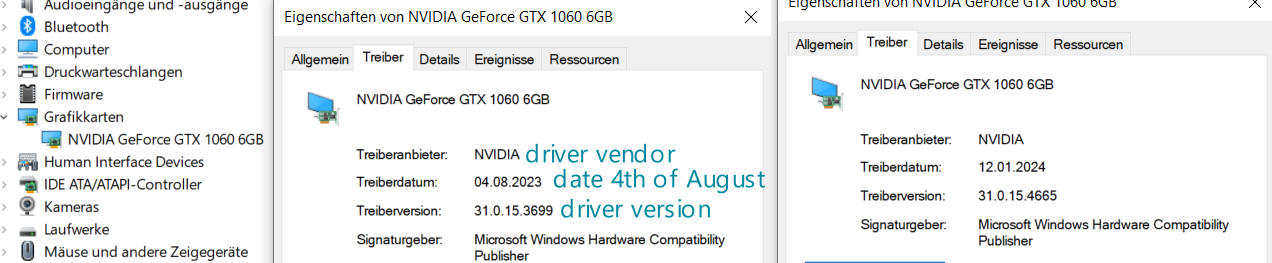
You’re speaking about this window, saw that my driver was kinda outdated, but was running without problems, even updated it just fine to the latest driver of 12th of January
On the picture thats attached I tried to use the somewhat same teal color that I see kind a few lines of when starting the system with the lts-kernel, will check after a restart if I can include these lines.
Starting the system back on zen3 kernel before we removed the nvidia driver, I got a system start(not every start up) preventing error that throw me a lot of these two lines alternating
[drm:nv_drm_atomic_commit [nvidia_drm]] ERROR [nvidia-drm] [GPU ID 0x00000d00] Flip event timeout in head 0
[drm:nv_drm_atomic_commit [nvidia_drm]] ERROR [nvidia-drm] [GPU ID 0x00000d00] Flip event timeout in head 1
Jan 18 03:54:19 [hostname] kglobalaccel5[38785]: MESA: error: ZINK: failed to choose pdev
Jan 18 03:54:19 [hostname] kglobalaccel5[38785]: glx: failed to create drisw screen
Jan 18 03:54:19 [hostname] kglobalaccel5[38785]: failed to load driver: zink
Jan 18 03:54:19 [hostname] kstart5[38785]: Omitting both --window and --windowclass arguments is not recommended
Jan 18 03:54:19 [hostname] systemd[5799]: Started konsole.
Jan 18 03:54:20 [hostname] kglobalaccel5[38853]: MESA: error: ZINK: failed to choose pdev
Jan 18 03:54:20 [hostname] kglobalaccel5[38853]: glx: failed to create drisw screen
Jan 18 03:54:20 [hostname] kglobalaccel5[38853]: failed to load driver: zink
And these were the teal color lines, probably, scrolling kinda fast
Jan 18 03:50:44 [hostname] kernel: Bluetooth: hci0: FW download error recovery failed (-19)
Jan 18 03:50:44 [hostname] kernel: Bluetooth: hci0: sending frame failed (-19)
Jan 18 03:50:44 [hostname] kernel: Bluetooth: hci0: Reading supported features failed (-19)
Jan 18 03:50:44 [hostname] kernel: Bluetooth: hci0: Error reading debug features
Jan 18 03:50:44 [hostname] kernel: Bluetooth: hci0: HCI LE Coded PHY feature bit is set, but its usage is not supported.
Jan 18 03:50:44 [hostname] kernel: Bluetooth: hci0: sending frame failed (-19)
Jan 18 03:50:44 [hostname] kernel: Bluetooth: hci0: Failed to read MSFT supported features (-19)
Jan 18 03:50:44 [hostname] kernel: iwlwifi 0000:05:00.0: Detected Intel(R) Wi-Fi 6 AX200 160MHz, REV=0x340
Jan 18 03:50:44 [hostname] kernel: thermal thermal_zone0: failed to read out thermal zone (-61)
It’s still not loading the Nouveau driver. I can’t think of why that would be, I just have no idea. I was curious to see if the Nouveau driver would work without issue, but if it won’t load then obviously it’s not much use to us.
Since you are already on the LTS kernel, maybe you can try the LTS drivers and see if you have any better luck. You can reinstall any other Nvidia packages you wish to have back at the same time, for example:
Did that, system was doing some display recognition in the background(assumption; the usal, display goes dark, comes back, does that a few cycles and showed me a mirrored desktop on the second display when stabilized).
Rebooted the system when done and can log in just fine with second display working again.
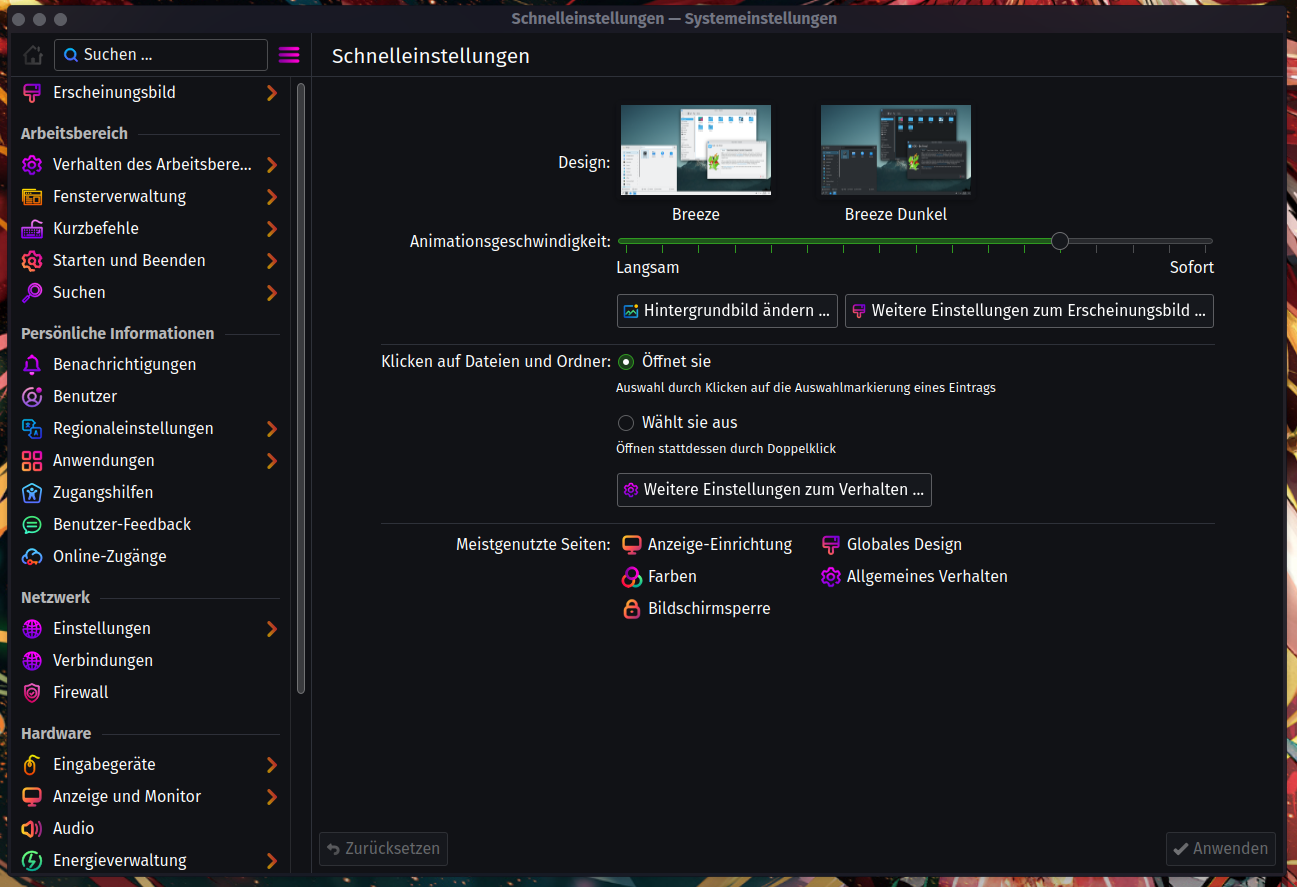
It was one of the windows I didn’t close just before the all dooming reboot, was rebooting cause I updated the system and played with theming in the meantime, but some folders had mixed up icons from different themes I switched through until I found my set of choice.
This window never came up again from the point where the freezes started to occur, sometimes the system loaded up more or less stuff, but never even once showed me this window until yet where the second display works again and the system no longer freezes after log in.
Could that be some potential root cause for my problems?
According this point:
Should I do this preemptive or just when it starts to happen again?
I sometimes, over the usage lifespan of the system, had a weird behavior with the second display, where sometimes folders would be visually duplicated, primarily a folder I store some work related ISOs in, sometimes other folders from the second display. They never where interactable nor would they be able to be selected, and if I moved the “root” folder all the duplicates moved with with it.
In extreme cases like 4+ scrolls down the desktop, while not even the first row of icons would be filled up (where oriented horizontally).
I don’t think so. I think the issue is caused by a new kernel, using a new version of the driver that has some bugs introduced and other problems. Other people also have problems with the most recent version of the Nvidia driver. I don’t think it is caused by anything you did, with this window or anything else.
I would not make the change unless the issue returns. If it is working well, let it be!
Thank you very much and I’m really grateful for you help. I can finally work with this system again and doesn’t need to rely on Windows, well still keeping it as a fallback.
I tried to boot the system with zen3 kernel just now, but that still hangs at the plymouth boot screen line, is there any fix you could think of?
Cause well, since it’s a zen3 based CPU I would believe the kernel is better optimized in that direction, but with my little understanding about kernels, I could be completely mistaken.
Unfortunately, the nvidia-lts package is only compatible with the LTS kernel. To use the other kernel, you must switch back to the nvidia-dkms package instead (which is the one that has the issues).
I would suggest for now to stick with the LTS kernel, and maybe in a few weeks try reinstalling nvidia-dkms to switch back to the other kernel and test if the issues have been resolved.
Well, that’s life sometimes, will do that in a few weeks.
If I grasp the vibe of the forum the right way, everything should stay in one topic, so if that time comes up and I try to get the zen3-kernel working again, it’s probably best to open up a new topic, referencing this one, in case I’m not able to do the process on my own after every reasonable effort taken, reasonable in the sense of not to destroy the base line any further if I feel I’m just doing this and doesn’t fix the original problem on my own?
And since your help lead to “a” solution, I’m kinda hesitant on what to mark here as “the” solution, cause it feels like a work around more than a solution.
But that may just be me
Yes, I agree it will be best to open a new topic in that case.
I know what you mean. In this case, the “true” solution will be for kernel devs and Nvidia driver devs to patch their respective code and fix the bugs. So in that sense, the fix we have implemented is very much a workaround. The actual issue has not been solved, only avoided for now.
However, the main purpose of marking a solution is to make it easier for people with a similar issue searching in the forum for ideas to find things they can try. If the “solution” is only “for now I switched to a different kernel that doesn’t have the issue,” I think that is okay because it still might help someone.