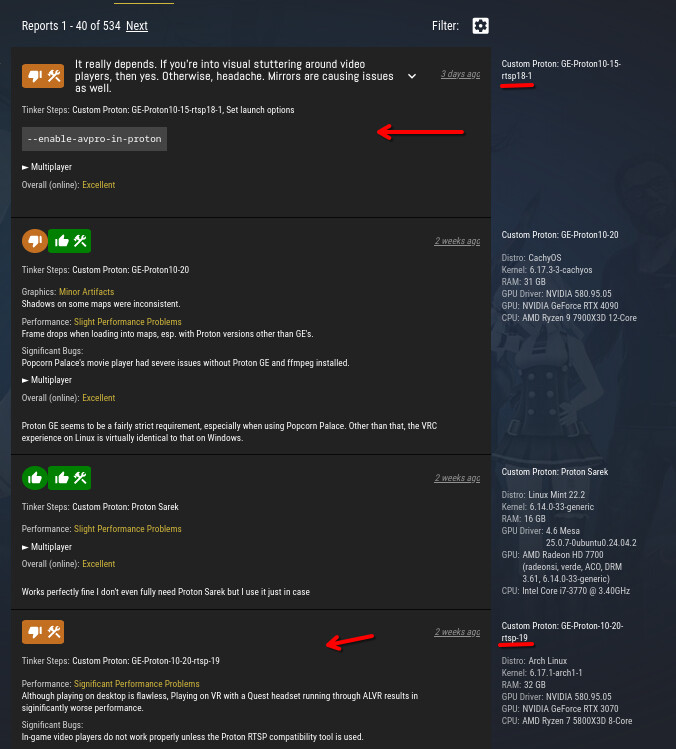
Hi Duke,
Yes the video & Song players are the reason why i did try out the latest GE-Proton-10-20-rtsp-19 but when i tryed not only did the song & video player still not work and the selfy Cam tracking ( what is at the only my only way of moving my arms and upper boday and such around in VRC) did not work neither ( so far it does not work with any Proton version though, but i as well could not even went to other worlds to meet friends. VRChat froze and had a black screen whenever i tryed.
For everyone who might have the same Issue ,
i use the Protogen 10.0-2 (beta) at the moment
Selfy Cam tracking - not working
World joining - working
Vid players - now and then working
copying and pasting youtube urls : not working
with the issues that Cam tracking is not working at all and Video / song players are only working now and then ( what is especially strange to me since why would it not work for the first couple of Youtube videos , then all of a sudden work for one and then again does not work for the next couple more videos ) . Joining Friends in other VR Worlds however luckily works again in this proton version.
But i am trying around to find a version that at least give me the Song Video players back
so i can see and listen when friends put Youtube Song and youtube Videos on the Players and such.
What is as well super strange , it seems that i cant copy and paste
anything into VRChat anymore. I noticed when i tryed to copy and paste a youtube
song in to see if the player would work shrugs
Here is my latest garuda-inxi :
Kernel: 6.17.6-zen1-1-zen arch: x86_64 bits: 64 compiler: gcc v: 15.2.1
clocksource: tsc avail: hpet,acpi_pm
parameters: BOOT_IMAGE=/@/boot/vmlinuz-linux-zen
root=UUID=6e8735d8-1e93-4551-9fd5-ed882145d94c rw rootflags=subvol=@
quiet resume=UUID=ce075bb5-91be-4872-8c26-780ad4d5fb6b loglevel=3
Desktop: KDE Plasma v: 6.5.1 tk: Qt v: N/A info: frameworks v: 6.19.0
wm: kwin_wayland vt: 1 dm: SDDM Distro: Garuda base: Arch Linux
Machine:
Type: Desktop Mobo: Micro-Star model: B550M PRO-VDH WIFI (MS-7C95) v: 1.0
serial: <superuser required> uuid: <superuser required> UEFI: American
Megatrends LLC. v: 2.60 date: 01/14/2021
CPU:
Info: model: AMD Ryzen 9 5900X bits: 64 type: MT MCP arch: Zen 3+ gen: 3
level: v3 note: check built: 2022 process: TSMC n6 (7nm) family: 0x19 (25)
model-id: 0x21 (33) stepping: 0 microcode: 0xA20102E
Topology: cpus: 1x dies: 1 clusters: 1 cores: 12 threads: 24 tpc: 2
smt: enabled cache: L1: 768 KiB desc: d-12x32 KiB; i-12x32 KiB L2: 6 MiB
desc: 12x512 KiB L3: 64 MiB desc: 2x32 MiB
Speed (MHz): avg: 4066 min/max: 567/4955 boost: enabled scaling:
driver: amd-pstate-epp governor: powersave cores: 1: 4066 2: 4066 3: 4066
4: 4066 5: 4066 6: 4066 7: 4066 8: 4066 9: 4066 10: 4066 11: 4066 12: 4066
13: 4066 14: 4066 15: 4066 16: 4066 17: 4066 18: 4066 19: 4066 20: 4066
21: 4066 22: 4066 23: 4066 24: 4066 bogomips: 177590
Flags-basic: avx avx2 ht lm nx pae sse sse2 sse3 sse4_1 sse4_2 sse4a ssse3
Vulnerabilities:
Type: gather_data_sampling status: Not affected
Type: ghostwrite status: Not affected
Type: indirect_target_selection status: Not affected
Type: itlb_multihit status: Not affected
Type: l1tf status: Not affected
Type: mds status: Not affected
Type: meltdown status: Not affected
Type: mmio_stale_data status: Not affected
Type: old_microcode status: Not affected
Type: reg_file_data_sampling status: Not affected
Type: retbleed status: Not affected
Type: spec_rstack_overflow mitigation: Safe RET
Type: spec_store_bypass mitigation: Speculative Store Bypass disabled via
prctl
Type: spectre_v1 mitigation: usercopy/swapgs barriers and __user pointer
sanitization
Type: spectre_v2 mitigation: Retpolines; IBPB: conditional; IBRS_FW;
STIBP: always-on; RSB filling; PBRSB-eIBRS: Not affected; BHI: Not
affected
Type: srbds status: Not affected
Type: tsa mitigation: Clear CPU buffers
Type: tsx_async_abort status: Not affected
Type: vmscape mitigation: IBPB before exit to userspace
Graphics:
Device-1: NVIDIA GA102 [GeForce RTX 3090] vendor: ASUSTeK driver: nvidia
v: 580.95.05 alternate: nouveau,nvidia_drm non-free: 550-580.xx+
status: current (as of 2025-08; EOL~2026-12-xx) arch: Ampere code: GAxxx
process: TSMC n7 (7nm) built: 2020-2023 pcie: gen: 4 speed: 16 GT/s
lanes: 16 ports: active: HDMI-A-2 empty: DP-1, DP-2, DP-3, HDMI-A-1
bus-ID: 2b:00.0 chip-ID: 10de:2204 class-ID: 0300
Device-2: Logitech C920 HD Pro Webcam driver: snd-usb-audio,uvcvideo
type: USB rev: 2.0 speed: 480 Mb/s lanes: 1 mode: 2.0 bus-ID: 3-1:2
chip-ID: 046d:0892 class-ID: 0102 serial: <filter>
Display: wayland server: X.org v: 1.21.1.20 with: Xwayland v: 24.1.9
compositor: kwin_wayland driver: X: loaded: nvidia
unloaded: modesetting,nouveau alternate: fbdev,nv,vesa
gpu: nv_platform,nvidia,nvidia-nvswitch display-ID: 0
Monitor-1: HDMI-A-2 model: Acer S242HL serial: <filter> built: 2017 res:
mode: 1920x1080 hz: 60 scale: 100% (1) dpi: 92 gamma: 1.2
size: 531x299mm (20.91x11.77") diag: 609mm (24") ratio: 16:9 modes:
max: 1920x1080 min: 640x480
API: EGL v: 1.5 hw: drv: nvidia platforms: device: 0 drv: nvidia device: 2
drv: swrast gbm: drv: nvidia surfaceless: drv: nvidia wayland: drv: nvidia
x11: drv: nvidia inactive: device-1
API: OpenGL v: 4.6.0 compat-v: 4.5 vendor: nvidia mesa v: 580.95.05
glx-v: 1.4 direct-render: yes renderer: NVIDIA GeForce RTX 3090/PCIe/SSE2
memory: 23.44 GiB display-ID: :1.0
API: Vulkan v: 1.4.328 layers: 15 device: 0 type: discrete-gpu
name: NVIDIA GeForce RTX 3090 driver: nvidia v: 580.95.05
device-ID: 10de:2204 surfaces: N/A device: 1 type: cpu name: llvmpipe
(LLVM 21.1.4 256 bits) driver: mesa llvmpipe v: 25.2.6-arch1.1 (LLVM
21.1.4) device-ID: 10005:0000 surfaces: N/A
Info: Tools: api: clinfo, eglinfo, glxinfo, vulkaninfo
de: kscreen-console,kscreen-doctor gpu: corectrl,nvidia-smi wl: wayland-info
x11: xdpyinfo, xprop, xrandr
Audio:
Device-1: NVIDIA GA102 High Definition Audio vendor: ASUSTeK
driver: snd_hda_intel v: kernel pcie: gen: 4 speed: 16 GT/s lanes: 16
bus-ID: 2b:00.1 chip-ID: 10de:1aef class-ID: 0403
Device-2: Advanced Micro Devices [AMD] Starship/Matisse HD Audio
vendor: Micro-Star MSI driver: snd_hda_intel v: kernel pcie: gen: 4
speed: 16 GT/s lanes: 16 bus-ID: 2d:00.4 chip-ID: 1022:1487 class-ID: 0403
Device-3: Logitech C920 HD Pro Webcam driver: snd-usb-audio,uvcvideo
type: USB rev: 2.0 speed: 480 Mb/s lanes: 1 mode: 2.0 bus-ID: 3-1:2
chip-ID: 046d:0892 class-ID: 0102 serial: <filter>
API: ALSA v: k6.17.6-zen1-1-zen status: kernel-api with: aoss
type: oss-emulator tools: N/A
Server-1: PipeWire v: 1.4.9 status: active with: 1: pipewire-pulse
status: active 2: wireplumber status: active 3: pipewire-alsa type: plugin
4: pw-jack type: plugin tools: pactl,pw-cat,pw-cli,wpctl
Network:
Device-1: Intel Dual Band Wireless-AC 3168NGW [Stone Peak] driver: iwlwifi
v: kernel pcie: gen: 1 speed: 2.5 GT/s lanes: 1 bus-ID: 29:00.0
chip-ID: 8086:24fb class-ID: 0280
IF: wlo1 state: down mac: <filter>
Device-2: Realtek RTL8111/8168/8211/8411 PCI Express Gigabit Ethernet
vendor: Micro-Star MSI driver: r8169 v: kernel pcie: gen: 1 speed: 2.5 GT/s
lanes: 1 port: f000 bus-ID: 2a:00.0 chip-ID: 10ec:8168 class-ID: 0200
IF: enp42s0 state: up speed: 100 Mbps duplex: full mac: <filter>
Info: services: NetworkManager, smbd, systemd-timesyncd, wpa_supplicant
Bluetooth:
Device-1: Intel Wireless-AC 3168 Bluetooth driver: btusb v: 0.8 type: USB
rev: 2.0 speed: 12 Mb/s lanes: 1 mode: 1.1 bus-ID: 1-9:9 chip-ID: 8087:0aa7
class-ID: e001
Report: btmgmt ID: hci0 rfk-id: 0 state: up address: <filter> bt-v: 4.2
lmp-v: 8 status: discoverable: no pairing: no class-ID: 6c0104
Drives:
Local Storage: total: 4.55 TiB used: 60.85 GiB (1.3%)
SMART Message: Unable to run smartctl. Root privileges required.
ID-1: /dev/nvme0n1 maj-min: 259:0 vendor: Samsung
model: SSD 970 EVO Plus 1TB size: 931.51 GiB block-size: physical: 512 B
logical: 512 B speed: 31.6 Gb/s lanes: 4 tech: SSD serial: <filter>
fw-rev: 2B2QEXM7 temp: 49.9 C scheme: GPT
ID-2: /dev/sda maj-min: 8:0 vendor: Toshiba model: HDWD240 size: 3.64 TiB
block-size: physical: 4096 B logical: 512 B speed: 6.0 Gb/s tech: HDD
rpm: 5400 serial: <filter> fw-rev: 0A scheme: GPT
Partition:
ID-1: / raw-size: 200 GiB size: 200 GiB (100.00%) used: 26.42 GiB (13.2%)
fs: btrfs dev: /dev/nvme0n1p2 maj-min: 259:2
ID-2: /boot/efi raw-size: 1024 MiB size: 1022 MiB (99.80%)
used: 664 KiB (0.1%) fs: vfat dev: /dev/nvme0n1p1 maj-min: 259:1
ID-3: /home raw-size: 714.51 GiB size: 714.51 GiB (100.00%)
used: 34.43 GiB (4.8%) fs: btrfs dev: /dev/nvme0n1p4 maj-min: 259:4
ID-4: /var/log raw-size: 200 GiB size: 200 GiB (100.00%)
used: 26.42 GiB (13.2%) fs: btrfs dev: /dev/nvme0n1p2 maj-min: 259:2
ID-5: /var/tmp raw-size: 200 GiB size: 200 GiB (100.00%)
used: 26.42 GiB (13.2%) fs: btrfs dev: /dev/nvme0n1p2 maj-min: 259:2
Swap:
Kernel: swappiness: 133 (default 60) cache-pressure: 100 (default) zswap: no
ID-1: swap-1 type: zram size: 62.71 GiB used: 348 KiB (0.0%) priority: 100
comp: zstd avail: lzo-rle,lzo,lz4,lz4hc,deflate,842 dev: /dev/zram0
ID-2: swap-2 type: partition size: 16 GiB used: 0 KiB (0.0%) priority: -2
dev: /dev/nvme0n1p3 maj-min: 259:3
Sensors:
System Temperatures: cpu: 51.2 C mobo: N/A
Fan Speeds (rpm): N/A
Repos:
Packages: 2002 pm: pacman pkgs: 1994 libs: 534
tools: gnome-software,octopi,paru pm: snap pkgs: 8
Active pacman repo servers in: /etc/pacman.d/chaotic-mirrorlist
1: https://cdn-mirror.chaotic.cx/$repo/$arch
2: https://geo-mirror.chaotic.cx/$repo/$arch
3: https://br-mirror.chaotic.cx/$repo/$arch
4: https://cl-mirror.chaotic.cx/$repo/$arch
5: https://cl-2-mirror.chaotic.cx/$repo/$arch
6: https://de-2-mirror.chaotic.cx/$repo/$arch
7: https://de-4-mirror.chaotic.cx/$repo/$arch
8: https://fr-mirror.chaotic.cx/$repo/$arch
9: https://gb-mirror.chaotic.cx/$repo/$arch
10: https://gr-mirror.chaotic.cx/$repo/$arch
11: https://in-mirror.chaotic.cx/$repo/$arch
12: https://in-2-mirror.chaotic.cx/$repo/$arch
13: https://in-4-mirror.chaotic.cx/$repo/$arch
14: https://kr-mirror.chaotic.cx/$repo/$arch
15: https://es-mirror.chaotic.cx/$repo/$arch
16: https://es-2-mirror.chaotic.cx/$repo/$arch
17: https://us-mi-mirror.chaotic.cx/$repo/$arch
18: https://us-ut-mirror.chaotic.cx/$repo/$arch
19: https://vn-mirror.chaotic.cx/$repo/$arch
Active pacman repo servers in: /etc/pacman.d/mirrorlist
1: https://mirror.osbeck.com/archlinux/$repo/os/$arch
2: https://de.arch.niranjan.co/$repo/os/$arch
3: http://mirror.ubrco.de/archlinux/$repo/os/$arch
4: http://archlinux.uk.mirror.allworldit.com/archlinux/$repo/os/$arch
5: https://mirrors.teamcloud.am/archlinux/$repo/os/$arch
6: https://theswissbay.ch/archlinux/$repo/os/$arch
7: http://mirrors.teamcloud.am/archlinux/$repo/os/$arch
8: https://europe.mirror.pkgbuild.com/$repo/os/$arch
9: https://at.arch.niranjan.co/$repo/os/$arch
10: http://mirror.accum.se/mirror/archlinux/$repo/os/$arch
11: http://ch.mirrors.cicku.me/archlinux/$repo/os/$arch
12: http://mirror.trap.moe/archlinux/$repo/os/$arch
13: https://jp.mirrors.cicku.me/archlinux/$repo/os/$arch
14: http://it.mirrors.cicku.me/archlinux/$repo/os/$arch
15: http://mirror.sahil.world/archlinux/$repo/os/$arch
16: https://at.arch.mirror.kescher.at/$repo/os/$arch
17: http://ftp.energotel.sk/pub/linux/arch/$repo/os/$arch
18: https://ftp.energotel.sk/pub/linux/arch/$repo/os/$arch
19: http://arch.midov.pl/arch/$repo/os/$arch
20: https://mirror.trap.moe/archlinux/$repo/os/$arch
21: http://ftp.sh.cvut.cz/arch/$repo/os/$arch
22: https://archlinux.koyanet.lv/archlinux/$repo/os/$arch
23: http://mirrors.dotsrc.org/archlinux/$repo/os/$arch
24: http://archlinux.koyanet.lv/archlinux/$repo/os/$arch
25: https://ro.arch.niranjan.co/$repo/os/$arch
26: https://mirror.1ago.be/archlinux/$repo/os/$arch
27: https://mirrors.dotsrc.org/archlinux/$repo/os/$arch
28: http://super.quantum-mirror.hu/mirrors/pub/archlinux/$repo/os/$arch
29: http://jp.mirrors.cicku.me/archlinux/$repo/os/$arch
30: https://arch.mirror.constant.com/$repo/os/$arch
31: https://london.mirror.pkgbuild.com/$repo/os/$arch
32: http://nova.quantum-mirror.hu/mirrors/pub/archlinux/$repo/os/$arch
33: http://mirror.nw-sys.ru/archlinux/$repo/os/$arch
34: https://fi.arch.niranjan.co/$repo/os/$arch
35: http://es.mirrors.cicku.me/archlinux/$repo/os/$arch
36: https://mirror.tux.si/arch/$repo/os/$arch
37: https://repo.hyron.dev/archlinux/$repo/os/$arch
38: https://arch.midov.pl/arch/$repo/os/$arch
39: http://arch.yhtez.xyz/$repo/os/$arch
40: http://mirror.1ago.be/archlinux/$repo/os/$arch
41: https://mirror.neuf.no/archlinux/$repo/os/$arch
42: https://mirrors.pidginhost.com/arch/$repo/os/$arch
43: http://arch.mirror.constant.com/$repo/os/$arch
44: https://es.mirrors.cicku.me/archlinux/$repo/os/$arch
45: https://it.mirrors.cicku.me/archlinux/$repo/os/$arch
46: https://mirrors.atviras.lt/archlinux/$repo/os/$arch
47: https://in.arch.niranjan.co/$repo/os/$arch
48: https://sg.arch.niranjan.co/$repo/os/$arch
49: http://mirror.neuf.no/archlinux/$repo/os/$arch
50: http://mirrors.atviras.lt/archlinux/$repo/os/$arch
51: http://mirror.quantum5.ca/archlinux/$repo/os/$arch
52: https://mirror.ditatompel.com/archlinux/$repo/os/$arch
53: http://repo.hyron.dev/archlinux/$repo/os/$arch
54: https://mirror.franscorack.com/archlinux/$repo/os/$arch
55: http://mirror.tux.si/arch/$repo/os/$arch
56: https://mirror.nw-sys.ru/archlinux/$repo/os/$arch
57: https://singapore.mirror.pkgbuild.com/$repo/os/$arch
58: http://mirror.ditatompel.com/archlinux/$repo/os/$arch
59: https://au.arch.niranjan.co/$repo/os/$arch
60: https://mirrors.jlu.edu.cn/archlinux/$repo/os/$arch
61: http://mirrors.jlu.edu.cn/archlinux/$repo/os/$arch
62: http://gsl-syd.mm.fcix.net/archlinux/$repo/os/$arch
Info:
Memory: total: 64 GiB note: est. available: 62.71 GiB used: 11 GiB (17.5%)
Processes: 561 Power: uptime: 39m states: freeze,mem,disk suspend: deep
avail: s2idle wakeups: 0 hibernate: platform avail: shutdown, reboot,
suspend, test_resume image: 25.02 GiB services: org_kde_powerdevil,
power-profiles-daemon, upowerd Init: systemd v: 258 default: graphical
tool: systemctl
Compilers: clang: 21.1.4 gcc: 15.2.1 Shell: fish v: 4.1.2
running-in: konsole inxi: 3.3.39 ~~~