I just tried it again to make sure, if you exchange the amd-ucode for the git version after the installation with chroot, it boots normally for me.
1 Like
Although I was having trouble with the main iso, off the website, I wonder if the random reboot during install problems I had might be related? I posted a report, but it might be in the wrong place… it’s under KDE because I’m using the KDE version, but it’s not a KDE problem. It is something to do with pacman. Oddly enough I am trying it out on my old laptop prior to putting on my Intel NUC… But as I see in the comments, it’s getting tested on NUCs, so it might be smooth sailing if I just put it on the NUC from the beginning.
Can confirm garuda-sway-linux-zen-240319.iso fresh install on its own ssd would go to grub hit enter it would flash once an stay in grub hit it one more time black screen then it would disable the keyboard an shut off its backlight. then sit there. open source driver, amd 3700x cpu.
Graphics:
Device-1: NVIDIA GM204 [GeForce GTX 980] driver: nvidia v: 550.67
Display: wayland server: X.org v: 1.21.1.11 with: Xwayland v: 23.2.4
compositor: kwin_wayland driver: X: loaded: nvidia
unloaded: modesetting,nouveau gpu: nvidia resolution: 3440x1440
API: EGL v: 1.5 drivers: nvidia,swrast,zink
platforms: gbm,wayland,x11,surfaceless,device
API: OpenGL v: 4.6.0 compat-v: 4.5 vendor: nvidia mesa v: 550.67
renderer: NVIDIA GeForce GTX 980/PCIe/SSE2
API: Vulkan v: 1.3.279 drivers: nvidia surfaces: xcb,xlib,wayland
I assume from up above, this is all known but just adding it just in case.
It would be more helpful to have your video card info. Do inxi -G in your terminal and post it here.
sorry about that was super late for me when i posted
If you are willing to test, I would be curious to see if installing amd-ucode-git resolves the issue for you as well. You would have to boot to the live environment and install it from a chroot.
I don’t think this bug is related to the video card at all.
2 Likes
This thread is for the new megarelease which are linked to in the first post of the thread.
The version you referred to from the website is the old version from October of last year.
Yes, installing amd-ucode-git allows you to boot into the system.
6 Likes
New ISO for testing (dr460nized only) the post-installation boot-up process on AMD devices:
It has microcode loading via GRUB disabled since Dracut already includes it. Double loading might cause our situation.
8 Likes
hi, booting the new iso works for me without any problems.
i can’t say it often enough, thank you all so much for all your work and support. 
╭─buccaneer@Garuda in ~
╰─λ garuda-inxi
System:
Kernel: 6.8.1-3-cachyos arch: x86_64 bits: 64 compiler: gcc v: 13.2.1
clocksource: tsc avail: hpet,acpi_pm
parameters: BOOT_IMAGE=/@/boot/vmlinuz-linux-cachyos
root=UUID=c24fc102-bfe9-4625-9d99-b8affc54a8f7 rw rootflags=subvol=@
quiet loglevel=3 ibt=off
Desktop: KDE Plasma v: 6.0.2 tk: Qt v: N/A info: frameworks v: 6.0.0
wm: kwin_wayland vt: 1 dm: SDDM Distro: Garuda base: Arch Linux
Machine:
Type: Desktop System: Gigabyte product: X670 GAMING X AX v: -CF
serial: <superuser required>
Mobo: Gigabyte model: X670 GAMING X AX v: x.x serial: <superuser required>
uuid: <superuser required> UEFI: American Megatrends LLC. v: F2
date: 09/12/2022
CPU:
Info: model: AMD Ryzen 9 7900X bits: 64 type: MT MCP arch: Zen 4 gen: 5
level: v4 note: check built: 2022+ process: TSMC n5 (5nm) family: 0x19 (25)
model-id: 0x61 (97) stepping: 2 microcode: 0xA601201
Topology: cpus: 1x cores: 12 tpc: 2 threads: 24 smt: enabled cache:
L1: 768 KiB desc: d-12x32 KiB; i-12x32 KiB L2: 12 MiB desc: 12x1024 KiB
L3: 64 MiB desc: 2x32 MiB
Speed (MHz): avg: 1083 high: 4173 min/max: 400/5733 scaling:
driver: amd-pstate-epp governor: powersave cores: 1: 400 2: 400 3: 400
4: 400 5: 400 6: 400 7: 3483 8: 400 9: 3622 10: 400 11: 400 12: 400
13: 400 14: 400 15: 400 16: 400 17: 400 18: 400 19: 400 20: 400 21: 4173
22: 3434 23: 400 24: 3692 bogomips: 225177
Flags: avx avx2 ht lm nx pae sse sse2 sse3 sse4_1 sse4_2 sse4a ssse3 svm
Vulnerabilities: <filter>
Graphics:
Device-1: AMD Navi 22 [Radeon RX 6700/6700 XT/6750 XT / 6800M/6850M XT]
vendor: XFX driver: amdgpu v: kernel arch: RDNA-2 code: Navi-2x
process: TSMC n7 (7nm) built: 2020-22 pcie: gen: 4 speed: 16 GT/s
lanes: 16 ports: active: HDMI-A-1 empty: DP-1, DP-2, DP-3, Writeback-1
bus-ID: 03:00.0 chip-ID: 1002:73df class-ID: 0300
Display: wayland server: X.org v: 1.21.1.11 with: Xwayland v: 23.2.4
compositor: kwin_wayland driver: X: loaded: amdgpu
unloaded: modesetting,radeon alternate: fbdev,vesa dri: radeonsi
gpu: amdgpu display-ID: 0
Monitor-1: HDMI-A-1 res: 3840x1080 size: N/A modes: N/A
API: EGL v: 1.5 hw: drv: amd radeonsi platforms: device: 0 drv: radeonsi
device: 1 drv: swrast gbm: drv: kms_swrast surfaceless: drv: radeonsi
wayland: drv: radeonsi x11: drv: radeonsi
API: OpenGL v: 4.6 compat-v: 4.5 vendor: amd mesa v: 24.0.3-arch1.2
glx-v: 1.4 direct-render: yes renderer: AMD Radeon RX 6750 XT (radeonsi
navi22 LLVM 17.0.6 DRM 3.57 6.8.1-3-cachyos) device-ID: 1002:73df
memory: 11.72 GiB unified: no display-ID: :1.0
API: Vulkan v: 1.3.279 layers: 3 device: 0 type: discrete-gpu name: AMD
Radeon RX 6750 XT (RADV NAVI22) driver: mesa radv v: 24.0.3-arch1.2
device-ID: 1002:73df surfaces: xcb,xlib,wayland device: 1 type: cpu
name: llvmpipe (LLVM 17.0.6 256 bits) driver: mesa llvmpipe
v: 24.0.3-arch1.2 (LLVM 17.0.6) device-ID: 10005:0000
surfaces: xcb,xlib,wayland
Audio:
Device-1: AMD Navi 21/23 HDMI/DP Audio driver: snd_hda_intel v: kernel pcie:
gen: 4 speed: 16 GT/s lanes: 16 bus-ID: 03:00.1 chip-ID: 1002:ab28
class-ID: 0403
Device-2: AMD Family 17h/19h HD Audio vendor: Gigabyte
driver: snd_hda_intel v: kernel pcie: gen: 4 speed: 16 GT/s lanes: 16
bus-ID: 17:00.6 chip-ID: 1022:15e3 class-ID: 0403
API: ALSA v: k6.8.1-3-cachyos status: kernel-api with: aoss
type: oss-emulator tools: N/A
Server-1: PipeWire v: 1.0.4 status: active with: 1: pipewire-pulse
status: active 2: wireplumber status: active 3: pipewire-alsa type: plugin
4: pw-jack type: plugin tools: pactl,pw-cat,pw-cli,wpctl
Network:
Device-1: Realtek RTL8125 2.5GbE vendor: Gigabyte driver: r8169 v: kernel
pcie: gen: 2 speed: 5 GT/s lanes: 1 port: e000 bus-ID: 10:00.0
chip-ID: 10ec:8125 class-ID: 0200
IF: enp16s0 state: up speed: 1000 Mbps duplex: full mac: <filter>
Device-2: MEDIATEK MT7922 802.11ax PCI Express Wireless Network Adapter
driver: mt7921e v: kernel pcie: gen: 2 speed: 5 GT/s lanes: 1
bus-ID: 11:00.0 chip-ID: 14c3:0616 class-ID: 0280
IF: wlp17s0 state: down mac: <filter>
Info: services: NetworkManager, smbd, systemd-timesyncd, wpa_supplicant
Bluetooth:
Device-1: MediaTek Wireless_Device driver: btusb v: 0.8 type: USB rev: 2.1
speed: 480 Mb/s lanes: 1 mode: 2.0 bus-ID: 3-7:3 chip-ID: 0e8d:0616
class-ID: e001 serial: <filter>
Report: btmgmt ID: hci0 rfk-id: 0 state: up address: <filter> bt-v: 5.2
lmp-v: 11 status: discoverable: no pairing: no class-ID: 6c0104
Drives:
Local Storage: total: 2.16 TiB used: 12.9 GiB (0.6%)
SMART Message: Unable to run smartctl. Root privileges required.
ID-1: /dev/nvme0n1 maj-min: 259:0 vendor: Samsung model: SSD 980 PRO 2TB
size: 1.82 TiB block-size: physical: 512 B logical: 512 B speed: 63.2 Gb/s
lanes: 4 tech: SSD serial: <filter> fw-rev: 5B2QGXA7 temp: 37.9 C
scheme: GPT
ID-2: /dev/sda maj-min: 8:0 vendor: Samsung model: SSD 860 EVO 250GB
size: 232.89 GiB block-size: physical: 512 B logical: 512 B speed: 6.0 Gb/s
tech: SSD serial: <filter> fw-rev: 1B6Q scheme: GPT
ID-3: /dev/sdb maj-min: 8:16 vendor: SanDisk model: SanDisk 3.2 Gen1
size: 120.28 GiB block-size: physical: 512 B logical: 512 B type: USB
rev: 2.1 spd: 480 Mb/s lanes: 1 mode: 2.0 tech: N/A serial: <filter>
fw-rev: DL17 scheme: GPT
SMART Message: Unknown USB bridge. Flash drive/Unsupported enclosure?
Partition:
ID-1: / raw-size: 1.82 TiB size: 1.82 TiB (100.00%) used: 12.9 GiB (0.7%)
fs: btrfs dev: /dev/nvme0n1p2 maj-min: 259:2
ID-2: /boot/efi raw-size: 300 MiB size: 299.4 MiB (99.80%)
used: 584 KiB (0.2%) fs: vfat dev: /dev/nvme0n1p1 maj-min: 259:1
ID-3: /home raw-size: 1.82 TiB size: 1.82 TiB (100.00%)
used: 12.9 GiB (0.7%) fs: btrfs dev: /dev/nvme0n1p2 maj-min: 259:2
ID-4: /var/log raw-size: 1.82 TiB size: 1.82 TiB (100.00%)
used: 12.9 GiB (0.7%) fs: btrfs dev: /dev/nvme0n1p2 maj-min: 259:2
ID-5: /var/tmp raw-size: 1.82 TiB size: 1.82 TiB (100.00%)
used: 12.9 GiB (0.7%) fs: btrfs dev: /dev/nvme0n1p2 maj-min: 259:2
Swap:
Kernel: swappiness: 133 (default 60) cache-pressure: 100 (default) zswap: no
ID-1: swap-1 type: zram size: 31.08 GiB used: 0 KiB (0.0%) priority: 100
comp: zstd avail: lzo,lzo-rle,lz4,lz4hc,842 max-streams: 24 dev: /dev/zram0
Sensors:
System Temperatures: cpu: 41.9 C mobo: 36.0 C gpu: amdgpu temp: 40.0 C
mem: 36.0 C
Fan Speeds (rpm): N/A gpu: amdgpu fan: 0
Info:
Memory: total: 32 GiB note: est. available: 31.08 GiB used: 3.53 GiB (11.4%)
Processes: 480 Power: uptime: 7m states: freeze,mem,disk suspend: deep
avail: s2idle wakeups: 0 hibernate: platform avail: shutdown, reboot,
suspend, test_resume image: 12.42 GiB services: org_kde_powerdevil,
power-profiles-daemon, upowerd Init: systemd v: 255 default: graphical
tool: systemctl
Packages: pm: pacman pkgs: 1784 libs: 539 tools: octopi,pacseek,paru
Compilers: clang: 17.0.6 gcc: 13.2.1 Shell: garuda-inxi default: fish
v: 3.7.0 running-in: konsole inxi: 3.3.33
Garuda (2.6.23-1):
System install date:     2024-03-25
Last full system update: 2024-03-25
Is partially upgraded:   No
Relevant software:       snapper NetworkManager dracut
Windows dual boot:       No/Undetected
Failed units:

╭─buccaneer@Garuda in ~ took 1s
╰─λ
6 Likes
Yes it boots fine on every PC, but we need tester for installing it on metal
Wait
garuda-inxi
System:
Kernel: 6.8.1-zen1-1-zen arch: x86_64 bits: 64 compiler: gcc v: 13.2.1
clocksource: tsc avail: hpet,acpi_pm
parameters: BOOT_IMAGE=/boot/vmlinuz-x86_64 lang=de_DE keytable=de
tz=Europe/Berlin misobasedir=garuda
root=miso:LABEL=GARUDA_DR460NIZED_SPIZAETUS quiet systemd.show_status=1
checksum=y driver=free nouveau.modeset=1 i915.modeset=1 radeon.modeset=1
Desktop: KDE Plasma v: 6.0.2 tk: Qt v: N/A info: frameworks v: 6.0.0
wm: kwin_wayland vt: 1 dm: SDDM Distro: Garuda base: Arch Linux
Machine:
Type: Laptop System: LENOVO product: 82MS v: Yoga Slim 7 Pro 14ACH5
serial: <superuser required> Chassis: type: 10 v: Yoga Slim 7 Pro 14ACH5
serial: <superuser required>
Mobo: LENOVO model: LNVNB161216 v: SDK0R32862WIN
serial: <superuser required> part-nu: LENOVO_MT_82MS_BU_idea_FM_Yoga Slim 7
Pro 14ACH5 uuid: <superuser required> UEFI: LENOVO v: GZCN34WW
date: 08/28/2023
Battery:
ID-1: BAT0 charge: 32.6 Wh (56.5%) condition: 57.7/61.0 Wh (94.7%)
volts: 15.6 min: 15.4 model: Sunwoda L19D4PH3 type: Li-poly serial: <filter>
status: not charging cycles: 78
CPU:
Info: model: AMD Ryzen 9 5900HX with Radeon Graphics bits: 64 type: MT MCP
arch: Zen 3 gen: 4 level: v3 note: check built: 2021-22
process: TSMC n7 (7nm) family: 0x19 (25) model-id: 0x50 (80) stepping: 0
microcode: 0xA50000B
Topology: cpus: 1x cores: 8 tpc: 2 threads: 16 smt: enabled cache:
L1: 512 KiB desc: d-8x32 KiB; i-8x32 KiB L2: 4 MiB desc: 8x512 KiB
L3: 16 MiB desc: 1x16 MiB
Speed (MHz): avg: 1029 high: 2395 min/max: 400/4680 scaling:
driver: amd-pstate-epp governor: powersave cores: 1: 1915 2: 400 3: 400
4: 400 5: 400 6: 1889 7: 2118 8: 400 9: 2390 10: 400 11: 400 12: 400
13: 1772 14: 400 15: 400 16: 2395 bogomips: 105400
Flags: avx avx2 ht lm nx pae sse sse2 sse3 sse4_1 sse4_2 sse4a ssse3 svm
Vulnerabilities: <filter>
Graphics:
Device-1: AMD Cezanne [Radeon Vega Series / Radeon Mobile Series]
vendor: Lenovo driver: amdgpu v: kernel arch: GCN-5 code: Vega
process: GF 14nm built: 2017-20 pcie: gen: 3 speed: 8 GT/s lanes: 16
link-max: gen: 4 speed: 16 GT/s ports: active: eDP-1 empty: DP-1,DP-2
bus-ID: 03:00.0 chip-ID: 1002:1638 class-ID: 0300 temp: 45.0 C
Device-2: IMC Networks Integrated Camera driver: uvcvideo type: USB
rev: 2.0 speed: 480 Mb/s lanes: 1 mode: 2.0 bus-ID: 1-3:3 chip-ID: 13d3:5419
class-ID: fe01 serial: <filter>
Display: wayland server: X.org v: 1.21.1.11 with: Xwayland v: 23.2.4
compositor: kwin_wayland driver: X: loaded: amdgpu unloaded: modesetting
alternate: fbdev,vesa dri: radeonsi gpu: amdgpu display-ID: 0
Monitor-1: eDP-1 res: 1440x900 size: N/A modes: N/A
API: EGL v: 1.5 hw: drv: amd radeonsi platforms: device: 0 drv: radeonsi
device: 1 drv: swrast surfaceless: drv: radeonsi wayland: drv: radeonsi x11:
drv: radeonsi inactive: gbm
API: OpenGL v: 4.6 compat-v: 4.5 vendor: amd mesa v: 24.0.3-arch1.2
glx-v: 1.4 direct-render: yes renderer: AMD Radeon Graphics (radeonsi
renoir LLVM 17.0.6 DRM 3.57 6.8.1-zen1-1-zen) device-ID: 1002:1638
memory: 1.95 GiB unified: no display-ID: :1.0
API: Vulkan v: 1.3.279 layers: 3 device: 0 type: integrated-gpu name: AMD
Radeon Graphics (RADV RENOIR) driver: mesa radv v: 24.0.3-arch1.2
device-ID: 1002:1638 surfaces: xcb,xlib,wayland device: 1 type: cpu
name: llvmpipe (LLVM 17.0.6 256 bits) driver: mesa llvmpipe
v: 24.0.3-arch1.2 (LLVM 17.0.6) device-ID: 10005:0000
surfaces: xcb,xlib,wayland
Audio:
Device-1: AMD Renoir Radeon High Definition Audio vendor: Lenovo
driver: snd_hda_intel v: kernel pcie: gen: 3 speed: 8 GT/s lanes: 16
link-max: gen: 4 speed: 16 GT/s bus-ID: 03:00.1 chip-ID: 1002:1637
class-ID: 0403
Device-2: AMD ACP/ACP3X/ACP6x Audio Coprocessor vendor: Lenovo driver: N/A
alternate: snd_pci_acp3x, snd_rn_pci_acp3x, snd_pci_acp5x, snd_pci_acp6x,
snd_acp_pci, snd_rpl_pci_acp6x, snd_pci_ps, snd_sof_amd_renoir,
snd_sof_amd_rembrandt, snd_sof_amd_vangogh, snd_sof_amd_acp63 pcie: gen: 3
speed: 8 GT/s lanes: 16 link-max: gen: 4 speed: 16 GT/s bus-ID: 03:00.5
chip-ID: 1022:15e2 class-ID: 0480
Device-3: AMD Family 17h/19h HD Audio vendor: Lenovo driver: snd_hda_intel
v: kernel pcie: gen: 3 speed: 8 GT/s lanes: 16 link-max: gen: 4
speed: 16 GT/s bus-ID: 03:00.6 chip-ID: 1022:15e3 class-ID: 0403
API: ALSA v: k6.8.1-zen1-1-zen status: kernel-api tools: N/A
Server-1: PipeWire v: 1.0.4 status: active with: 1: pipewire-pulse
status: active 2: wireplumber status: active 3: pipewire-alsa type: plugin
4: pw-jack type: plugin tools: pactl,pw-cat,pw-cli,wpctl
Network:
Device-1: Realtek RTL8852AE 802.11ax PCIe Wireless Network Adapter
vendor: Lenovo driver: rtw89_8852ae v: kernel pcie: gen: 1 speed: 2.5 GT/s
lanes: 1 port: 2000 bus-ID: 01:00.0 chip-ID: 10ec:8852 class-ID: 0280
IF: wlp1s0 state: up mac: <filter>
Info: services: NetworkManager, systemd-timesyncd, wpa_supplicant
Bluetooth:
Device-1: Realtek Bluetooth Radio driver: btusb v: 0.8 type: USB rev: 1.0
speed: 12 Mb/s lanes: 1 mode: 1.1 bus-ID: 3-4:2 chip-ID: 0bda:4852
class-ID: e001 serial: <filter>
Report: btmgmt ID: hci0 rfk-id: 2 state: up address: <filter> bt-v: 5.2
lmp-v: 11 status: discoverable: no pairing: no class-ID: 6c010c
Drives:
Local Storage: total: 1012.46 GiB used: 0 KiB (0.0%)
SMART Message: Unable to run smartctl. Root privileges required.
ID-1: /dev/nvme0n1 maj-min: 259:0 vendor: Samsung
model: MZVLB1T0HBLR-000L2 size: 953.87 GiB block-size: physical: 512 B
logical: 512 B speed: 31.6 Gb/s lanes: 4 tech: SSD serial: <filter>
fw-rev: 3L1QEXF7 temp: 34.9 C scheme: GPT
ID-2: /dev/sda maj-min: 8:0 vendor: Intenso model: cMobile size: 58.59 GiB
block-size: physical: 512 B logical: 512 B type: USB rev: 3.1 spd: 5 Gb/s
lanes: 1 mode: 3.2 gen-1x1 tech: N/A serial: <filter> fw-rev: 1100
scheme: MBR
SMART Message: Unknown USB bridge. Flash drive/Unsupported enclosure?
Partition:
Message: No partition data found.
Swap:
Kernel: swappiness: 133 (default 60) cache-pressure: 100 (default) zswap: no
ID-1: swap-1 type: zram size: 13.5 GiB used: 0 KiB (0.0%) priority: 100
comp: zstd avail: lzo,lzo-rle,lz4,lz4hc,842 max-streams: 16 dev: /dev/zram0
Sensors:
System Temperatures: cpu: 69.6 C mobo: N/A gpu: amdgpu temp: 45.0 C
Fan Speeds (rpm): N/A
Info:
Memory: total: 16 GiB note: est. available: 13.5 GiB used: 4.71 GiB (34.9%)
Processes: 301 Power: uptime: 52m states: freeze,mem,disk suspend: deep
avail: s2idle wakeups: 0 hibernate: platform avail: shutdown, reboot,
suspend, test_resume image: 5.36 GiB services: org_kde_powerdevil,
power-profiles-daemon, upowerd Init: systemd v: 255 default: graphical
tool: systemctl
Packages: pm: pacman pkgs: 1289 libs: 374 tools: octopi,paru Compilers:
gcc: 13.2.1 Shell: garuda-inxi default: fish v: 3.7.0 running-in: konsole
inxi: 3.3.33
warning: database file for 'garuda' does not exist (use '-Sy' to download)
warning: database file for 'core' does not exist (use '-Sy' to download)
warning: database file for 'extra' does not exist (use '-Sy' to download)
warning: database file for 'community' does not exist (use '-Sy' to download)
warning: database file for 'multilib' does not exist (use '-Sy' to download)
warning: database file for 'chaotic-aur' does not exist (use '-Sy' to download)
Garuda (2.6.23-1):
System install date:     2024-03-25
Last full system update: 2024-03-25 ↻
Is partially upgraded: No
Relevant software: snapper NetworkManager dracut
Windows dual boot: <superuser required>
Failed units: snapper-cleanup.service
den kernel habe ich erst nach dem 2 oder 3 mal booten installiert
edit: I only installed the kernel after booting 2 or 3 times
sorry forgot better in english
1 Like


no not OC, the bogomips are normal with zen kernel as well, with cachy-bore or tkg-pds they are a little bit higher.
really you mean it’s too warm  , it’s actually normal, only when gaming the temp goes up to 70 degrees celsius or so that’s too warm for me now i’m thinking about installing a water cooling system.

1 Like
they normally get installed on the first boot welcome screen that has you update right after that it scans for nvidia drivers an asks to install
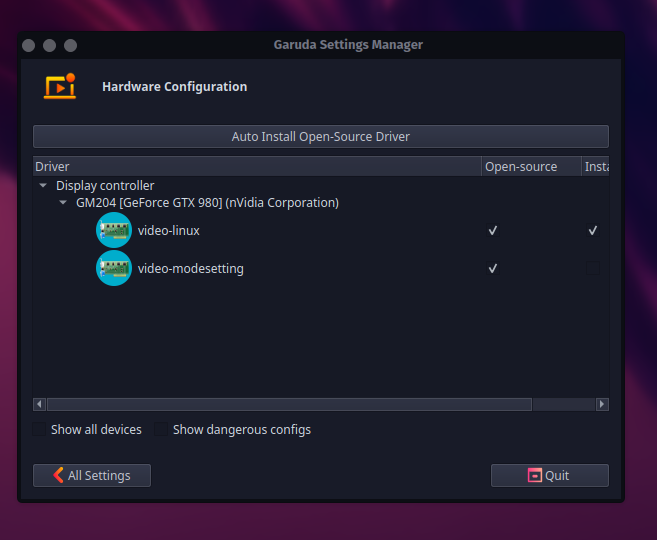
Installed & booted just fine. The only issues I see are post instillation during the first boot garuda assistant is skipping over the driver detection. it will show it for about 3 seconds then move on to the app install prompt. When going to garuda settings → hardware config. It only shows “auto install open source driver”. So would require the user to install manually.
garuda-inxi
System:
Kernel: 6.8.1-zen1-1-zen arch: x86_64 bits: 64 compiler: gcc v: 13.2.1
clocksource: tsc avail: hpet,acpi_pm
parameters: BOOT_IMAGE=/@/boot/vmlinuz-linux-zen
root=UUID=0eff8803-a8f5-4131-b025-0cebb93fb993 rw rootflags=subvol=@
quiet loglevel=3 ibt=off
Desktop: KDE Plasma v: 6.0.2 tk: Qt v: N/A info: frameworks v: 6.0.0
wm: kwin_wayland vt: 1 dm: SDDM Distro: Garuda base: Arch Linux
Machine:
Type: Desktop Mobo: ASUSTeK model: PRIME X570-PRO v: Rev X.0x
serial: <superuser required> part-nu: SKU uuid: <superuser required>
UEFI: American Megatrends v: 4802 date: 06/15/2023
CPU:
Info: model: AMD Ryzen 7 3700X bits: 64 type: MT MCP arch: Zen 2 gen: 3
level: v3 note: check built: 2020-22 process: TSMC n7 (7nm)
family: 0x17 (23) model-id: 0x71 (113) stepping: 0 microcode: 0x8701030
Topology: cpus: 1x cores: 8 tpc: 2 threads: 16 smt: enabled cache:
L1: 512 KiB desc: d-8x32 KiB; i-8x32 KiB L2: 4 MiB desc: 8x512 KiB
L3: 32 MiB desc: 2x16 MiB
Speed (MHz): avg: 2411 high: 4347 min/max: 2200/4426 boost: enabled
scaling: driver: acpi-cpufreq governor: schedutil cores: 1: 2200 2: 3600
3: 2200 4: 2057 5: 4347 6: 2200 7: 2175 8: 2200 9: 2200 10: 2200 11: 2200
12: 2200 13: 2200 14: 2200 15: 2200 16: 2200 bogomips: 115209
Flags: avx avx2 ht lm nx pae sse sse2 sse3 sse4_1 sse4_2 sse4a ssse3 svm
Vulnerabilities: <filter>
Graphics:
Device-1: NVIDIA GM204 [GeForce GTX 980] vendor: Gigabyte driver: nouveau
v: kernel non-free: 545.xx+ status: current (as of 2024-02; EOL~2026-12-xx)
arch: Maxwell code: GMxxx process: TSMC 28nm built: 2014-2019 pcie: gen: 1
speed: 2.5 GT/s lanes: 8 link-max: gen: 3 speed: 8 GT/s lanes: 16 ports:
active: DP-3 empty: DP-1, DP-2, DVI-I-1, HDMI-A-1 bus-ID: 0a:00.0
chip-ID: 10de:13c0 class-ID: 0300 temp: 32.0 C
Display: wayland server: X.org v: 1.21.1.11 with: Xwayland v: 23.2.4
compositor: kwin_wayland driver: X: loaded: nouveau unloaded: modesetting
alternate: fbdev,nv,vesa dri: nouveau gpu: nouveau display-ID: 0
Monitor-1: DP-3 res: 3440x1440 size: N/A modes: N/A
API: EGL v: 1.5 hw: drv: nvidia nouveau platforms: device: 0 drv: nouveau
device: 1 drv: swrast gbm: drv: nouveau surfaceless: drv: nouveau wayland:
drv: nouveau x11: drv: nouveau
API: OpenGL v: 4.5 compat-v: 4.3 vendor: mesa v: 24.0.3-arch1.2 glx-v: 1.4
direct-render: yes renderer: NV124 device-ID: 10de:13c0 memory: 3.87 GiB
unified: no display-ID: :1.0
API: Vulkan v: 1.3.279 layers: 3 device: 0 type: cpu name: llvmpipe (LLVM
17.0.6 256 bits) driver: mesa llvmpipe v: 24.0.3-arch1.2 (LLVM 17.0.6)
device-ID: 10005:0000 surfaces: xcb,xlib,wayland
Audio:
Device-1: NVIDIA GM204 High Definition Audio vendor: Gigabyte
driver: snd_hda_intel v: kernel pcie: gen: 1 speed: 2.5 GT/s lanes: 8
link-max: gen: 3 speed: 8 GT/s lanes: 16 bus-ID: 0a:00.1
chip-ID: 10de:0fbb class-ID: 0403
Device-2: AMD Starship/Matisse HD Audio vendor: ASUSTeK
driver: snd_hda_intel v: kernel pcie: gen: 4 speed: 16 GT/s lanes: 16
bus-ID: 0d:00.4 chip-ID: 1022:1487 class-ID: 0403
Device-3: Texas Instruments PCM2900C Audio CODEC
driver: hid-generic,snd-usb-audio,usbhid type: USB rev: 2.0 speed: 12 Mb/s
lanes: 1 mode: 1.1 bus-ID: 1-3:2 chip-ID: 08bb:29c0 class-ID: 0300
API: ALSA v: k6.8.1-zen1-1-zen status: kernel-api tools: N/A
Server-1: PipeWire v: 1.0.4 status: active with: 1: pipewire-pulse
status: active 2: wireplumber status: active 3: pipewire-alsa type: plugin
4: pw-jack type: plugin tools: pactl,pw-cat,pw-cli,wpctl
Network:
Device-1: Intel Wireless 7260 driver: iwlwifi v: kernel pcie: gen: 1
speed: 2.5 GT/s lanes: 1 bus-ID: 05:00.0 chip-ID: 8086:08b1 class-ID: 0280
IF: wlp5s0 state: down mac: <filter>
Device-2: Intel I211 Gigabit Network vendor: ASUSTeK driver: igb v: kernel
pcie: gen: 1 speed: 2.5 GT/s lanes: 1 port: f000 bus-ID: 06:00.0
chip-ID: 8086:1539 class-ID: 0200
IF: enp6s0 state: up speed: 1000 Mbps duplex: full mac: <filter>
Info: services: NetworkManager, systemd-timesyncd, wpa_supplicant
Bluetooth:
Device-1: Intel Bluetooth wireless interface driver: btusb v: 0.8 type: USB
rev: 2.0 speed: 12 Mb/s lanes: 1 mode: 1.1 bus-ID: 3-6:3 chip-ID: 8087:07dc
class-ID: e001
Report: btmgmt ID: hci0 rfk-id: 0 state: up address: <filter> bt-v: 4.0
lmp-v: 6 status: discoverable: no pairing: no class-ID: 6c0104
Drives:
Local Storage: total: 6.53 TiB used: 4.28 GiB (0.1%)
SMART Message: Unable to run smartctl. Root privileges required.
ID-1: /dev/nvme0n1 maj-min: 259:0 vendor: HP model: SSD EX920 1TB
size: 953.87 GiB block-size: physical: 512 B logical: 512 B speed: 31.6 Gb/s
lanes: 4 tech: SSD serial: <filter> fw-rev: 32A0T2IA temp: 33.9 C
scheme: GPT
ID-2: /dev/nvme1n1 maj-min: 259:7 vendor: Samsung model: SSD 980 PRO 2TB
size: 1.82 TiB block-size: physical: 512 B logical: 512 B speed: 63.2 Gb/s
lanes: 4 tech: SSD serial: <filter> fw-rev: 5B2QGXA7 temp: 36.9 C
scheme: GPT
ID-3: /dev/nvme2n1 maj-min: 259:11 vendor: Western Digital
model: WD BLACK SN770 2TB size: 1.82 TiB block-size: physical: 512 B
logical: 512 B speed: 63.2 Gb/s lanes: 4 tech: SSD serial: <filter>
fw-rev: 731100WD temp: 39.9 C scheme: GPT
ID-4: /dev/sda maj-min: 8:0 vendor: OCZ model: VERTEX3 size: 111.79 GiB
block-size: physical: 512 B logical: 512 B speed: 6.0 Gb/s tech: SSD
serial: <filter> fw-rev: 2.22 scheme: GPT
ID-5: /dev/sdb maj-min: 8:16 vendor: Western Digital
model: WD20EZAZ-00L9GB0 size: 1.82 TiB block-size: physical: 4096 B
logical: 512 B speed: 6.0 Gb/s tech: HDD rpm: 5400 serial: <filter>
fw-rev: 0A80 scheme: GPT
ID-6: /dev/sdc maj-min: 8:32 vendor: Toshiba model: TransMemory
size: 29.08 GiB block-size: physical: 512 B logical: 512 B type: USB
rev: 3.0 spd: 5 Gb/s lanes: 1 mode: 3.2 gen-1x1 tech: N/A serial: <filter>
fw-rev: PMAP scheme: MBR
SMART Message: Unknown USB bridge. Flash drive/Unsupported enclosure?
Partition:
ID-1: / raw-size: 111.49 GiB size: 111.49 GiB (100.00%)
used: 4.28 GiB (3.8%) fs: btrfs dev: /dev/sda2 maj-min: 8:2
ID-2: /boot/efi raw-size: 300 MiB size: 299.4 MiB (99.80%)
used: 584 KiB (0.2%) fs: vfat dev: /dev/sda1 maj-min: 8:1
ID-3: /home raw-size: 111.49 GiB size: 111.49 GiB (100.00%)
used: 4.28 GiB (3.8%) fs: btrfs dev: /dev/sda2 maj-min: 8:2
ID-4: /var/log raw-size: 111.49 GiB size: 111.49 GiB (100.00%)
used: 4.28 GiB (3.8%) fs: btrfs dev: /dev/sda2 maj-min: 8:2
ID-5: /var/tmp raw-size: 111.49 GiB size: 111.49 GiB (100.00%)
used: 4.28 GiB (3.8%) fs: btrfs dev: /dev/sda2 maj-min: 8:2
Swap:
Kernel: swappiness: 133 (default 60) cache-pressure: 100 (default) zswap: no
ID-1: swap-1 type: zram size: 15.52 GiB used: 0 KiB (0.0%) priority: 100
comp: zstd avail: lzo,lzo-rle,lz4,lz4hc,842 max-streams: 16 dev: /dev/zram0
Sensors:
System Temperatures: cpu: 33.0 C mobo: 35.0 C gpu: nouveau temp: 32.0 C
Fan Speeds (rpm): N/A gpu: nouveau fan: 2023
Info:
Memory: total: 16 GiB available: 15.52 GiB used: 2.29 GiB (14.7%)
Processes: 373 Power: uptime: 1m states: freeze,mem,disk suspend: deep
avail: s2idle wakeups: 0 hibernate: platform avail: shutdown, reboot,
suspend, test_resume image: 6.2 GiB services: org_kde_powerdevil,
power-profiles-daemon, upowerd Init: systemd v: 255 default: graphical
tool: systemctl
Packages: pm: pacman pkgs: 1249 libs: 372 tools: octopi,paru Compilers:
gcc: 13.2.1 Shell: garuda-inxi default: fish v: 3.7.0 running-in: konsole
inxi: 3.3.33
Garuda (2.6.23-1):
System install date:     2024-03-25
Last full system update: 2024-03-25
Is partially upgraded:   No
Relevant software:       snapper NetworkManager dracut
Windows dual boot:       Probably (Run as root to verify)
Failed units:
the other small issue i saw was in the live iso when clicking on firedragon in the dock it said it could not be found but using it in the application launcher it worked just fine.
2 Likes
Nvidia proprietary drivers are installed by the setup assistant, the choice during live boot does not actually install the driver’s in the installed system.
Thanks for the valuable feedback guys
4 Likes
This is supposed to be an extra prompt after the initial update as far as I know. I never had an NVIDIA device so no way to test that.
What does mhwd -l (not sure if it was -I or -l) tell?
The newest Dragonized ISO is working well on my system. The earlier Garuda Lite versions LTS & Zen both did not boot with AMD/APU.
You need to install the DKMS driver an rebuild the intrams if you want them “for those with older gpus you need the 340/390/470 dkms”