Bootloader doesnt recognise linux ssd after windows clean install

so i decided to make a clean install of windows on my laptop which i dualboot for uni. i heard that windows was kinda dangerous with multiple drives so i took out of my laptop the sata ssd which has garuda and let only the nvme m.2 . I did the windows install and it all went well. then i placed back the sata disk in the laptop and to my surprise the bootloader doesn’t seem to recognise the sata disk as bootable. it does find it, it appears in the “disks“ section , but even if i try to manually add a path , the bootloader doesn’t find a path towards that disk

and this is the inxi, might be a bit old though because as i said i cant really get acces to my garuda right now…

System:
Kernel: 6.15.3-zen1-1-zen arch: x86_64 bits: 64 compiler: gcc v: 15.1.1
clocksource: hpet avail: acpi_pm
parameters: BOOT_IMAGE=/@/boot/vmlinuz-linux-zen
root=UUID=38b8c0fd-ad69-49a0-886d-580605beb2ef rw rootflags=subvol=@
quiet loglevel=3 ibt=off
Desktop: KDE Plasma v: 6.4.1 tk: Qt v: N/A info: frameworks v: 6.15.0
wm: kwin_wayland vt: 1 dm: SDDM Distro: Garuda base: Arch Linux
Machine:
Type: Laptop System: ASUSTeK product: VivoBook_ASUSLaptop X512DA_X512DA
v: 1.0 serial: <superuser required>
Mobo: ASUSTeK model: X512DA v: 1.0 serial: <superuser required>
uuid: <superuser required> UEFI: American Megatrends v: X512DA.318
date: 09/28/2022
Battery:
ID-1: BAT0 charge: 23.5 Wh (98.3%) condition: 23.9/37.1 Wh (64.4%)
volts: 7.8 min: 7.8 model: ASUSTeK ASUS Battery type: Li-ion serial: N/A
status: not charging cycles: 215
CPU:
Info: model: AMD Ryzen 5 3500U with Radeon Vega Mobile Gfx bits: 64
type: MT MCP arch: Zen/Zen+ note: check gen: 1 level: v3 note: check
built: 2019 process: GF 12nm family: 0x17 (23) model-id: 0x18 (24)
stepping: 1 microcode: 0x8108109
Topology: cpus: 1x dies: 1 clusters: 1 cores: 4 threads: 8 tpc: 2
smt: enabled cache: L1: 384 KiB desc: d-4x32 KiB; i-4x64 KiB L2: 2 MiB
desc: 4x512 KiB L3: 4 MiB desc: 1x4 MiB
Speed (MHz): avg: 2769 min/max: 1400/2100 boost: enabled scaling:
driver: acpi-cpufreq governor: schedutil cores: 1: 2769 2: 2769 3: 2769
4: 2769 5: 2769 6: 2769 7: 2769 8: 2769 bogomips: 33535
Flags: avx avx2 ht lm nx pae sse sse2 sse3 sse4_1 sse4_2 sse4a ssse3 svm
Vulnerabilities: <filter>
Graphics:
Device-1: Advanced Micro Devices [AMD/ATI] Picasso/Raven 2 [Radeon Vega
Series / Radeon Mobile Series] vendor: ASUSTeK driver: amdgpu v: kernel
arch: GCN-5 code: Vega process: GF 14nm built: 2017-20 pcie: gen: 3
speed: 8 GT/s lanes: 16 ports: active: HDMI-A-1,eDP-1 empty: none
bus-ID: 03:00.0 chip-ID: 1002:15d8 class-ID: 0300 temp: 65.0 C
Device-2: IMC Networks USB2.0 HD UVC WebCam driver: uvcvideo type: USB
rev: 2.0 speed: 480 Mb/s lanes: 1 mode: 2.0 bus-ID: 3-2.2:5
chip-ID: 13d3:56dd class-ID: 0e02 serial: <filter>
Display: wayland server: X.org v: 1.21.1.18 with: Xwayland v: 24.1.8
compositor: kwin_wayland driver: X: loaded: amdgpu unloaded: modesetting
alternate: fbdev,vesa dri: radeonsi gpu: amdgpu d-rect: 3840x1080
display-ID: 0
Monitor-1: HDMI-A-1 pos: right model: Idek Iiyama PL2730H serial: <filter>
built: 2018 res: mode: 1920x1080 hz: 75 scale: 100% (1) dpi: 82 gamma: 1.2
size: 598x336mm (23.54x13.23") diag: 686mm (27") ratio: 16:9 modes:
max: 1920x1080 min: 720x400
Monitor-2: eDP-1 pos: primary,left model: BOE Display 0x07f1 built: 2018
res: mode: 1920x1080 hz: 60 scale: 100% (1) dpi: 142 gamma: 1.2
size: 344x193mm (13.54x7.6") diag: 394mm (15.5") ratio: 16:9 modes:
max: 1920x1080 min: 640x480
API: EGL v: 1.5 hw: drv: amd radeonsi platforms: device: 0 drv: radeonsi
device: 1 drv: swrast gbm: drv: kms_swrast surfaceless: drv: radeonsi
wayland: drv: radeonsi x11: drv: radeonsi
API: OpenGL v: 4.6 compat-v: 4.5 vendor: amd mesa v: 25.1.4-arch1.1
glx-v: 1.4 direct-render: yes renderer: AMD Radeon Vega 8 Graphics
(radeonsi raven ACO DRM 3.63 6.15.3-zen1-1-zen) device-ID: 1002:15d8
memory: 1.95 GiB unified: no display-ID: :1.0
API: Vulkan v: 1.4.313 layers: 9 device: 0 type: integrated-gpu name: AMD
Radeon Vega 8 Graphics (RADV RAVEN) driver: mesa radv v: 25.1.4-arch1.1
device-ID: 1002:15d8 surfaces: N/A device: 1 type: cpu name: llvmpipe
(LLVM 20.1.6 256 bits) driver: mesa llvmpipe v: 25.1.4-arch1.1 (LLVM
20.1.6) device-ID: 10005:0000 surfaces: N/A
Info: Tools: api: clinfo, eglinfo, glxinfo, vulkaninfo
de: kscreen-console,kscreen-doctor wl: wayland-info
x11: xdpyinfo, xprop, xrandr
Audio:
Device-1: Advanced Micro Devices [AMD/ATI] Raven/Raven2/Fenghuang HDMI/DP
Audio driver: snd_hda_intel v: kernel pcie: gen: 3 speed: 8 GT/s lanes: 16
bus-ID: 03:00.1 chip-ID: 1002:15de class-ID: 0403
Device-2: Advanced Micro Devices [AMD] Audio Coprocessor
driver: snd_pci_acp3x v: kernel alternate: snd_rn_pci_acp3x, snd_pci_acp5x,
snd_pci_acp6x, snd_acp_pci, snd_rpl_pci_acp6x, snd_pci_ps,
snd_sof_amd_renoir, snd_sof_amd_rembrandt, snd_sof_amd_vangogh,
snd_sof_amd_acp63, snd_sof_amd_acp70 pcie: gen: 3 speed: 8 GT/s lanes: 16
bus-ID: 03:00.5 chip-ID: 1022:15e2 class-ID: 0480
Device-3: Advanced Micro Devices [AMD] Family 17h/19h/1ah HD Audio
vendor: ASUSTeK driver: snd_hda_intel v: kernel pcie: gen: 3 speed: 8 GT/s
lanes: 16 bus-ID: 03:00.6 chip-ID: 1022:15e3 class-ID: 0403
API: ALSA v: k6.15.3-zen1-1-zen status: kernel-api tools: N/A
Server-1: PipeWire v: 1.4.5 status: active with: 1: pipewire-pulse
status: active 2: wireplumber status: active 3: pipewire-alsa type: plugin
4: pw-jack type: plugin tools: pactl,pw-cat,pw-cli,wpctl
Network:
Device-1: Qualcomm Atheros QCA9377 802.11ac Wireless Network Adapter
vendor: AzureWave driver: ath10k_pci v: kernel pcie: gen: 1 speed: 2.5 GT/s
lanes: 1 bus-ID: 01:00.0 chip-ID: 168c:0042 class-ID: 0280
IF: wlp1s0 state: up mac: <filter>
Info: services: NetworkManager, systemd-timesyncd, wpa_supplicant
Bluetooth:
Device-1: IMC Networks driver: btusb v: 0.8 type: USB rev: 1.1
speed: 12 Mb/s lanes: 1 mode: 1.1 bus-ID: 3-2.1:4 chip-ID: 13d3:3491
class-ID: e001
Report: btmgmt ID: hci0 rfk-id: 4 state: up address: N/A
Drives:
Local Storage: total: 1.14 TiB used: 325.28 GiB (27.8%)
SMART Message: Unable to run smartctl. Root privileges required.
ID-1: /dev/nvme0n1 maj-min: 259:0 vendor: Kingston
model: RBUSNS8154P3256GJ3 size: 238.47 GiB block-size: physical: 512 B
logical: 512 B speed: 15.8 Gb/s lanes: 2 tech: SSD serial: <filter>
fw-rev: E8FK1A.2 temp: 40.9 C scheme: GPT
ID-2: /dev/sda maj-min: 8:0 vendor: Western Digital model: WD Blue SA510
2.5 1000GB size: 931.51 GiB block-size: physical: 512 B logical: 512 B
speed: 6.0 Gb/s tech: SSD serial: <filter> fw-rev: 6100 scheme: GPT
Partition:
ID-1: / raw-size: 150 GiB size: 150 GiB (100.00%) used: 21.02 GiB (14.0%)
fs: btrfs dev: /dev/sda2 maj-min: 8:2
ID-2: /boot/efi raw-size: 260 MiB size: 256 MiB (98.46%)
used: 31.9 MiB (12.5%) fs: vfat dev: /dev/nvme0n1p1 maj-min: 259:1
ID-3: /home raw-size: 150 GiB size: 150 GiB (100.00%)
used: 21.02 GiB (14.0%) fs: btrfs dev: /dev/sda2 maj-min: 8:2
ID-4: /var/log raw-size: 150 GiB size: 150 GiB (100.00%)
used: 21.02 GiB (14.0%) fs: btrfs dev: /dev/sda2 maj-min: 8:2
ID-5: /var/tmp raw-size: 150 GiB size: 150 GiB (100.00%)
used: 21.02 GiB (14.0%) fs: btrfs dev: /dev/sda2 maj-min: 8:2
Swap:
Kernel: swappiness: 133 (default 60) cache-pressure: 100 (default) zswap: no
ID-1: swap-1 type: zram size: 17.5 GiB used: 0 KiB (0.0%) priority: 100
comp: zstd avail: lzo-rle,lzo,lz4,lz4hc,deflate,842 dev: /dev/zram0
Sensors:
System Temperatures: cpu: 64.5 C mobo: N/A gpu: amdgpu temp: 64.0 C
Fan Speeds (rpm): cpu: 2700
Info:
Memory: total: 20 GiB note: est. available: 17.5 GiB used: 10.08 GiB (57.6%)
Processes: 360 Power: uptime: 4h 20m states: freeze,mem,disk suspend: deep
avail: s2idle wakeups: 1 hibernate: platform avail: shutdown, reboot,
suspend, test_resume image: 6.98 GiB services: org_kde_powerdevil,
power-profiles-daemon, upowerd Init: systemd v: 257 default: graphical
tool: systemctl
Packages: 1422 pm: pacman pkgs: 1415 libs: 383 tools: octopi,paru,yay
pm: flatpak pkgs: 7 Compilers: gcc: 15.1.1 Shell: garuda-inxi default: fish
v: 4.0.2 running-in: konsole inxi: 3.3.38
Garuda (2.7.2-1):
System install date:     2025-06-25
Last full system update: 2025-06-27
Is partially upgraded:   No
Relevant software:       snapper NetworkManager dracut
Windows dual boot:       Probably (Run as root to verify)
Failed units:

Which Wndows you using? Did you installed Garuda after it and did secure boot stuff?

If you installed Garuda linux to use the nvme m2 you killed the Grub maybe.

Load the Garuda,iso from a stick and reinstall Grub with the Boot repair on the ESP or you have to chroot in it to fix it.

2 Likes

w11 and i already had garuda on the sata drive before reinstalling windows , i just disconnected the sata drive and reinstalled windows on the nvme disk. grub menu shouldnt haven been touched at all

No answer about this question.
Pls think on this. Also the other settings inside bios that you can boot the “garuda” drive.
If you have secure boot disabled, save + reboot in bios then you should see the entry for the sata drive. Select as boot drive, boot into “garuda,” open terminal and with command sudo update-grub you should have no probs to boot in both oss, after this.
If this not function follow the instuctions from the link in post 2.

How is this inxi possible if you can’t boot into garuda os ? (i ask me)

3 Likes

I dont use windows anymore at all.

You didnt explained how you installed the Systems in general. ( with secure boot and TPM on or not)

How did you installed Garuda Linux ( Did you set up Secure boot or not)

If you installed Windows first then installed Garuda Linux where did you installed Grub Bootloader? Seperated or did you let it install it on the ESP from Windows? ( sound for me like that then after a windows reinstall the configs are gone . Windows overrride it so no Boot is detected )

After a reinstall may the DISKS UUID are changed and you have to fix the /etc/fstab if your loaded a live iso and chrooted in it. ( if you did those Secure Boot installation you also have to do it again and set all correctly. I dont use those Secureboot at all but its just my choice)

How i would check such stuff.

  1. Have a USB Drive ready with any Garuda.iso ( better the Version you already had installed)
  2. Open Garuda-Rani ( if it is not self started already)
  3. Open Gparted and see how your Hard drives are partitions looking.
  4. Which one is the /boot/efi with ESP
  5. Click on this ESP and see the Properties ( Which UUID has it)
  6. Garuda-Rani->Chroot->Select Garuda is there the any error for /boot/efi
  7. if yes change the directory with cd /etc/ and type nano fstab
  8. Check there the ESP /boot/efi UUID with this from the Gparted info if it matches, if not because windows reformatted it with new UUID change it to the actually one. STRG+O>Enter>STRG+X
  9. grub-installdracut-rebuild update-grubexit and reboot see if you can now boot .
  10. Do your Secure boot stuff again if you need to boot both with it enabled i dont know it work i never did it.

So may now you get a clue how this working. Search the Forum for infos .

i bought the laptop with windows on it , added a 2nd disk on whixh i installed garuda and i didnt touch the windows disk at all with linux.

when i reinstalled the disk i made a bootable windows usb key with the installation media . after that i took out the garuda disk , did the installation and then reinstalled the disk.

secure boot is disabled in my laptop bios , i didn’t re-enable it when i reinstalled windows

when i try to chroot with an iso key , i get a return saying that there is no garuda partition detected which is strange because i can see the partition in dolphin media manager

i will try again with how you’re saying and come back although it might be in a few days

in the meantime do you maybe know why the garuda partition isn’t detected?

Install all disks. Boot the installer ISO, use garuda-chroot -a from terminal (or use garuda-rani), do

update-grub

exit chroot. Remove live ISO. Reboot.
The how too is explained often in the forum.

chroot doesnt work, i get this when i run it

grub-probe: error:cannot find a GRUB drive for /dev/sdb2. check your device.map
==>ERROR: No linux partition detected!

also my root partition is in a drive sda2

because it isnt mounted ?

Did you checked this Topic???

From the iso connect to the internet Login in the forum.
what is your output from lsblk may it helps to clarify things.

Can be a copy from another post I think :thinking: ( but not updated laptop :grimacing:

yes its that

but it is monted…

garuda@garuda-mokka in ~ as 🧙
󰛓 ❯ lsblk
NAME        MAJ:MIN RM   SIZE RO TYPE MOUNTPOINTS
loop0         7:0    0  27.8M  1 loop /run/miso/sfs/livefs
loop1         7:1    0 445.5M  1 loop /run/miso/sfs/ghtfs
loop2         7:2    0   1.7G  1 loop /run/miso/sfs/desktopfs
loop3         7:3    0 953.6M  1 loop /run/miso/sfs/rootfs
sda           8:0    0 931.5G  0 disk
├─sda1        8:1    0   781G  0 part
├─sda2        8:2    0   150G  0 part /run/media/garuda/38b8c0fd-ad69-49a0-886d-580605beb2ef
└─sda3        8:3    0   512M  0 part
sdb           8:16   1  29.8G  0 disk
├─sdb1        8:17   1  29.8G  0 part
│ ├─ventoy  253:0    0   3.2G  1 dm   /run/miso/bootmnt
│ └─sdb1    253:1    0  29.8G  0 dm
└─sdb2        8:18   1    32M  0 part
zram0       252:0    0  17.5G  0 disk [SWAP]
nvme0n1     259:0    0 238.5G  0 disk
├─nvme0n1p1 259:1    0   200M  0 part
├─nvme0n1p2 259:2    0    16M  0 part
├─nvme0n1p3 259:3    0 237.5G  0 part
└─nvme0n1p4 259:4    0   758M  0 part


garuda@garuda-mokka in ~ as 🧙
[✖] 󰛓  garuda-chroot
==> ERROR: Can't create chroot on non-directory

sda is the linux disk , the 150gb sda2 partition is the garuda root

sda2 is a partion i made in order to reinstall grib which failed

sdb is the flash usb

nvme is the windows disk

add -a

2 Likes

i dont see any flags on your created partition if its your sda3 so if will not find it.

should look like this my example.

─sda4        8:4    0   300M  0 part /boot/efi

you had grub there but with the windows reinstall you killed it like i said before.

so you have to fix your sda3 with right flag boot and mount point /boot/efi mount the sda3 manually . Create the folders with `mkdir /boot/efi/ then you can install grub again.

then you need to mount sda2 manually to and fix the fstab file like i have already written with the UUID.

4 Likes

for some reason it doesn’t work. I don’t know if i’m the one doing absolute shit but at that point i think it would probably be easier to copy my home directory on an external drive , to make a fully fresh install and to transfer back my home directory . I’ll do the same for the var etc and opt directories . i don’t think I need to copy anything else , do I?

Default you should learn how to fix this problem self, sorry.

Shutdown → disconnect the nvme. Use a live iso.
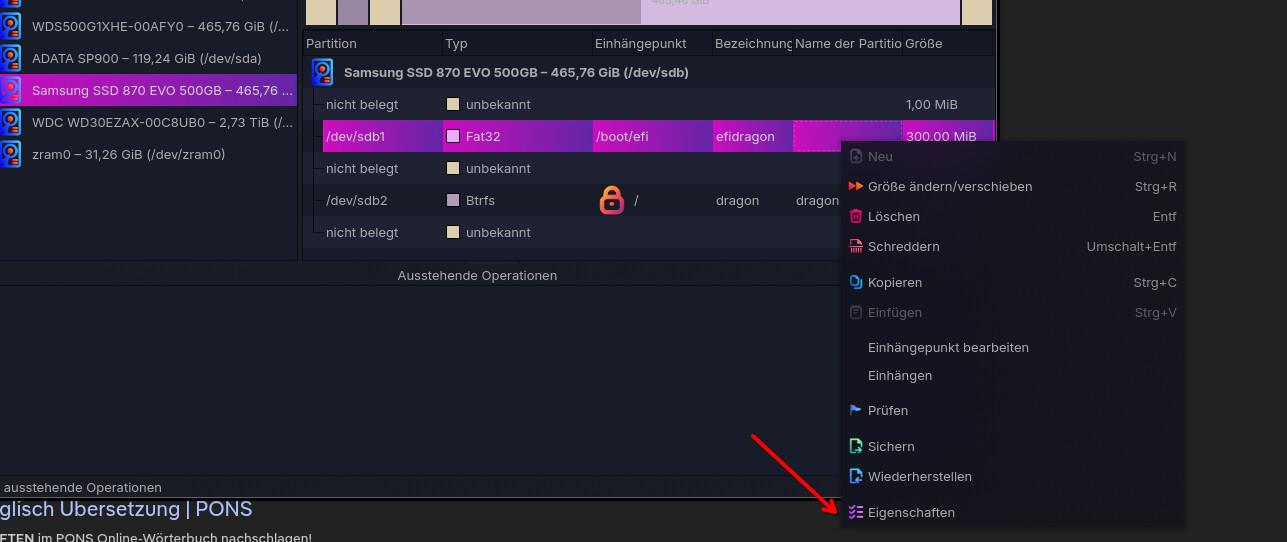
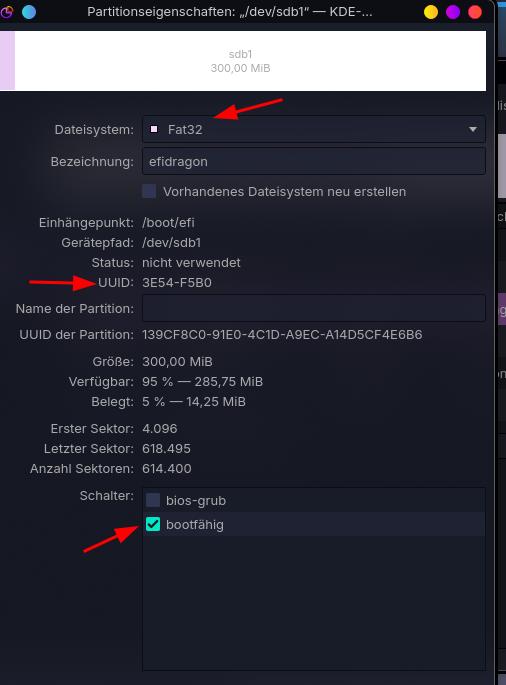
Open kde-partitionmanager, select the garuda-drive . Click on sd(x)3. If this drive is mounted. unmount first. Format as fat32 partition → right click sd(x)3 → settings (to be safe, this drive is a fat32 partition) → note the uuid → set bootflag. (see pictures)

Close the app → chroot into garuda. Now you must make the EFi folder. Command in terminal: mkdir boot/efi. Now the correct fstab entry.
micro /etc/fstab insert there the noted uuid (fat32 uuid = everytime only 9 “letters” see my example:
UUID=3E54-F5B0 /boot/efi vfat umask=0077 0 2
→ key “strg+s” then “strg+q”
Then the grub stuff: How-to over link in post 10 (from duke)
That’s all. Shutdown → insert the nvme → go into bios → select the garuda drive, save, boot garuda . Default garuda should boot “now”.
After login → open terminal → command:
sudo update-grub, done.
Reboot to see and test that you can boot now both systems.

Or your decision: Install Garuda new (but this time pls disconnect the nvme or attention inside calamares to select the right drive + the right settings)

As info for new install: /home/($user) yes; perhaps some files/folder in /etc (if you have make some manual intervention there). Var ? Why ? Opt ? Why ? For both = no (my mind)

2 Likes

as i said earlier for some reason chroot doesnt seem to be able to recognise the root drive at all. i have absolutely no idea why even when i mount the root partition with different types of settings every time i get a return in the terminal that there is no root partition detected

Did you try the manually way with the Guide how to chroot if its not working with the App?( mkdir -p /home/broken with the mount comands) wired should work .

yeah like gampel already said if your not able to fix it yourself because we dont sit in front of it. Safe youre /home folder for the rest it is not necessary if you didnt script anything or did something special. Just make a list which apps you want and reinstall it later. we dont know what you had or wanted.

i ended doing that and yeah no problem anymore. Also, I took the chance to switch from dr4gonised to mokka . Everytghing looks fine but in any case thanks for the patience time and help

This topic was automatically closed 2 days after the last reply. New replies are no longer allowed.