Hello Forum Members,
I was facing an issue after Swapping out my NVME for another one to install a pure Arch OS on it. I did put back the Garuda Dr460nized Nvme but my Bios didnt see any Boot options. If you have a similar issue too may that steps will help you to get back on.
- If you dont have any Garuda live iso as Backup Stick please download your known DE iso again and create the Boot Drive.
- Boot the Iso and open Rani Application.
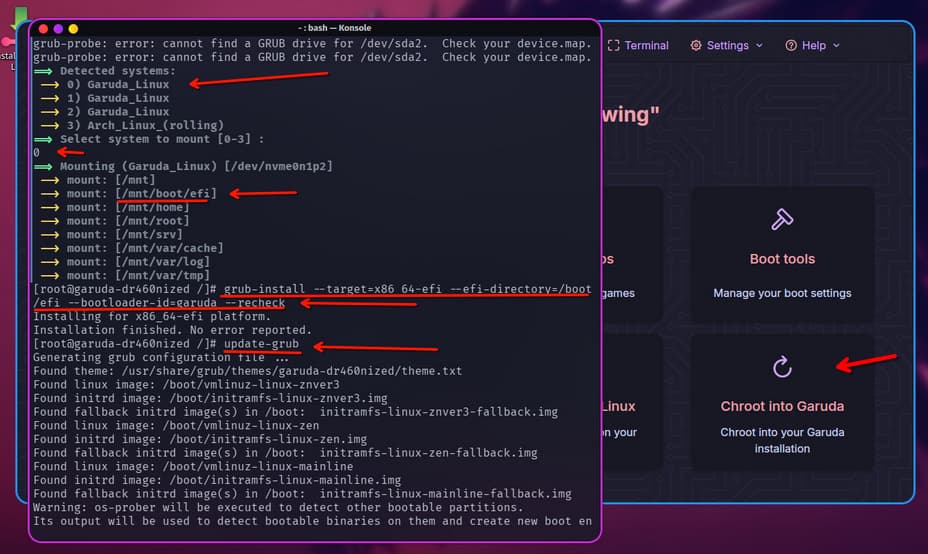
- CHROOT INTO GARUDA ( it will detect your Garuda installation)
- Choose it with the number (0 or 123 if you have more) and press ENTER BUTTON ( now it should mount all partitions)
- REINSTALL GRUB with this command
grub-install --target=x86_64-efi --efi-directory=/boot/efi --bootloader-id=garuda --recheck - UPDATE GRUB to detect all your installations and snapshots
update-grub - EXIT it and reboot type exit and enter again.
- Then you can reboot over the Graphical Interface or over the Terminal
systemctl reboot
Now you should be able to boot garuda again. ( PS. just chroot and update -grub would not work tested)