Hello,
The translation isn’t working. Even when I highlight a sentence, it doesn’t work.
Do you have any ideas?
Thank you.
Hello,
The translation isn’t working. Even when I highlight a sentence, it doesn’t work.
Do you have any ideas?
Thank you.
can you please write your issue instead of posting the template ?? 
Please make sure that you have translations enabled in the “Advanced” pane in the “FireDragon Hub”.
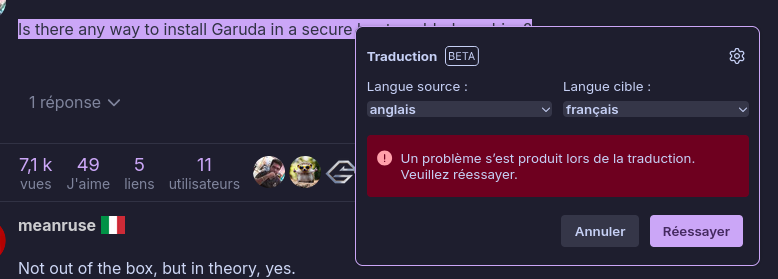
Well, it’s simple: I highlight a sentence, right-click, and click on “Translate selected text.” And I get what the screenshot shows.
And it’s the same when I want to translate a page. I click on settings, then translate the page, and I get the same result.
I’m going to try and be more helpful than all of your posts.
garuda-inxiHey amigo, where am I being aggressive?
Let me explain, I don’t speak, read, or write English. I use Deepl translation. It’s possible that the translation doesn’t reflect exactly how I express myself. I’m sorry you took it that way!
Anyway, getting back to the issue, yes, it is firedragon. In fact, I think it’s mentioned in the title.
As for beta, it’s normal that whether you’re using Firefox or Firedragon (Windows or Linux), the same window opens without me having to do anything.
As for the obscure messages, what more can I say? The copy seems clear to me! It doesn’t translate.
Best regards
garuda-inxi
System:
Kernel: 6.16.8-zen3-1-zen arch: x86_64 bits: 64 compiler: gcc v: 15.2.1
clocksource: tsc avail: hpet,acpi_pm
parameters: BOOT_IMAGE=/@/boot/vmlinuz-linux-zen
root=UUID=a4a1f970-1dea-40b8-95cc-19ba95d6dff2 rw rootflags=subvol=@
vt.default_red=30,243,166,249,137,245,148,186,88,243,166,249,137,245,148,166
vt.default_grn=30,139,227,226,180,194,226,194,91,139,227,226,180,194,226,173
vt.default_blu=46,168,161,175,250,231,213,222,112,168,161,175,250,231,213,200
quiet loglevel=3
Desktop: KDE Plasma v: 6.4.5 tk: Qt v: N/A info: frameworks v: 6.18.0
wm: kwin_wayland vt: 2 dm: SDDM Distro: Garuda base: Arch Linux
Machine:
Type: Desktop System: HP product: HP OmniDesk Desktop M02-0xxx v: N/A
serial: <superuser required> Chassis: type: 3 serial: <superuser required>
Mobo: HP model: 8D32 v: SMVB serial: <superuser required>
part-nu: BE9D5EA#ABE uuid: <superuser required> UEFI: AMI v: F.08
date: 08/12/2025
CPU:
Info: model: AMD Ryzen 7 8700G w/ Radeon 780M Graphics bits: 64 type: MT MCP
arch: Zen 4 gen: 4 level: v4 note: check built: 2022+ process: TSMC n5 (5nm)
family: 0x19 (25) model-id: 0x75 (117) stepping: 2 microcode: 0xA70520A
Topology: cpus: 1x dies: 1 clusters: 1 cores: 8 threads: 16 tpc: 2
smt: enabled cache: L1: 512 KiB desc: d-8x32 KiB; i-8x32 KiB L2: 8 MiB
desc: 8x1024 KiB L3: 16 MiB desc: 1x16 MiB
Speed (MHz): avg: 2404 min/max: 423/5177 boost: enabled scaling:
driver: amd-pstate-epp governor: powersave cores: 1: 2404 2: 2404 3: 2404
4: 2404 5: 2404 6: 2404 7: 2404 8: 2404 9: 2404 10: 2404 11: 2404 12: 2404
13: 2404 14: 2404 15: 2404 16: 2404 bogomips: 134406
Flags-basic: avx avx2 ht lm nx pae sse sse2 sse3 sse4_1 sse4_2 sse4a
ssse3 svm
Vulnerabilities: <filter>
Graphics:
Device-1: Advanced Micro Devices [AMD/ATI] Phoenix1 vendor: Hewlett-Packard
driver: amdgpu v: kernel arch: RDNA-3 code: Phoenix process: TSMC n4 (4nm)
built: 2023+ pcie: gen: 4 speed: 16 GT/s lanes: 16 ports: active: HDMI-A-1
empty: DP-1, DP-2, DP-3, DP-4, DP-5, DP-6, DP-7, Writeback-1
bus-ID: 08:00.0 chip-ID: 1002:15bf class-ID: 0300 temp: 31.0 C
Device-2: Logitech Webcam C200 driver: snd-usb-audio,uvcvideo type: USB
rev: 2.0 speed: 480 Mb/s lanes: 1 mode: 2.0 bus-ID: 1-10:3
chip-ID: 046d:0802 class-ID: 0102 serial: <filter>
Display: wayland server: X.org v: 1.21.1.18 with: Xwayland v: 24.1.8
compositor: kwin_wayland driver: gpu: amdgpu display-ID: 0
Monitor-1: HDMI-A-1 model: BenQ GW2270 serial: <filter> built: 2016 res:
mode: 1920x1080 hz: 60 scale: 100% (1) dpi: 102 gamma: 1.2
size: 476x268mm (18.74x10.55") diag: 546mm (21.5") ratio: 16:9 modes:
max: 1920x1080 min: 720x400
API: EGL v: 1.5 hw: drv: amd radeonsi platforms: device: 0 drv: radeonsi
device: 1 drv: swrast gbm: drv: kms_swrast surfaceless: drv: radeonsi
wayland: drv: radeonsi x11: drv: radeonsi
API: OpenGL v: 4.6 compat-v: 4.5 vendor: amd mesa v: 25.2.4-arch1.1
glx-v: 1.4 direct-render: yes renderer: AMD Radeon Graphics (radeonsi
phoenix LLVM 20.1.8 DRM 3.64 6.16.8-zen3-1-zen) device-ID: 1002:15bf
memory: 500 MiB unified: no display-ID: :0.0
API: Vulkan v: 1.4.321 layers: 5 device: 0 type: integrated-gpu name: AMD
Radeon Graphics (RADV PHOENIX) driver: mesa radv v: 25.2.4-arch1.1
device-ID: 1002:15bf surfaces: N/A device: 1 type: cpu name: llvmpipe
(LLVM 20.1.8 256 bits) driver: mesa llvmpipe v: 25.2.4-arch1.1 (LLVM
20.1.8) device-ID: 10005:0000 surfaces: N/A
Info: Tools: api: clinfo, eglinfo, glxinfo, vulkaninfo
de: kscreen-console,kscreen-doctor wl: wayland-info
x11: xdpyinfo, xprop, xrandr
Audio:
Device-1: Advanced Micro Devices [AMD/ATI] Radeon High Definition Audio
[Rembrandt/Strix] vendor: Hewlett-Packard driver: snd_hda_intel v: kernel
pcie: gen: 4 speed: 16 GT/s lanes: 16 bus-ID: 08:00.1 chip-ID: 1002:1640
class-ID: 0403
Device-2: Advanced Micro Devices [AMD] Family 17h/19h/1ah HD Audio
vendor: Hewlett-Packard driver: snd_hda_intel v: kernel pcie: gen: 4
speed: 16 GT/s lanes: 16 bus-ID: 08:00.6 chip-ID: 1022:15e3 class-ID: 0403
Device-3: Logitech Webcam C200 driver: snd-usb-audio,uvcvideo type: USB
rev: 2.0 speed: 480 Mb/s lanes: 1 mode: 2.0 bus-ID: 1-10:3
chip-ID: 046d:0802 class-ID: 0102 serial: <filter>
API: ALSA v: k6.16.8-zen3-1-zen status: kernel-api tools: N/A
Server-1: PipeWire v: 1.4.8 status: active with: 1: pipewire-pulse
status: active 2: wireplumber status: active 3: pipewire-alsa type: plugin
4: pw-jack type: plugin tools: pactl,pw-cat,pw-cli,wpctl
Network:
Device-1: Realtek RTL8852BE-VT PCIe 802.11ax Wireless Network
vendor: Hewlett-Packard driver: rtw89_8852bte v: kernel pcie: gen: 1
speed: 2.5 GT/s lanes: 1 port: f000 bus-ID: 04:00.0 chip-ID: 10ec:b520
class-ID: 0280
IF: wlp4s0 state: down mac: <filter>
Device-2: Realtek RTL8111/8168/8211/8411 PCI Express Gigabit Ethernet
vendor: Hewlett-Packard driver: r8169 v: kernel pcie: gen: 1 speed: 2.5 GT/s
lanes: 1 port: e000 bus-ID: 07:00.0 chip-ID: 10ec:8168 class-ID: 0200
IF: enp7s0 state: up speed: 1000 Mbps duplex: full mac: <filter>
Info: services: NetworkManager, systemd-timesyncd, wpa_supplicant
Bluetooth:
Device-1: Realtek Bluetooth Radio driver: btusb v: 0.8 type: USB rev: 1.0
speed: 12 Mb/s lanes: 1 mode: 1.1 bus-ID: 1-7:2 chip-ID: 0bda:b86a
class-ID: e001 serial: <filter>
Report: btmgmt ID: hci0 rfk-id: 2 state: up address: <filter> bt-v: 5.3
lmp-v: 12 status: discoverable: no pairing: no class-ID: 6c0104
Drives:
Local Storage: total: 953.87 GiB used: 139.39 GiB (14.6%)
SMART Message: Unable to run smartctl. Root privileges required.
ID-1: /dev/nvme0n1 maj-min: 259:0 vendor: Micron
model: MTFDKBA1T0QGN-1BN1AABHA size: 953.87 GiB block-size: physical: 512 B
logical: 512 B speed: 63.2 Gb/s lanes: 4 tech: SSD serial: <filter>
fw-rev: HPSQ050 temp: 28.9 C scheme: GPT
Partition:
ID-1: / raw-size: 166.02 GiB size: 166.02 GiB (100.00%)
used: 6.58 GiB (4.0%) fs: btrfs dev: /dev/nvme0n1p6 maj-min: 259:6
ID-2: /boot/efi raw-size: 512 MiB size: 511 MiB (99.80%)
used: 652 KiB (0.1%) fs: vfat dev: /dev/nvme0n1p5 maj-min: 259:5
ID-3: /home raw-size: 146.48 GiB size: 146.48 GiB (100.00%)
used: 561.6 MiB (0.4%) fs: btrfs dev: /dev/nvme0n1p7 maj-min: 259:7
ID-4: /var/log raw-size: 166.02 GiB size: 166.02 GiB (100.00%)
used: 6.58 GiB (4.0%) fs: btrfs dev: /dev/nvme0n1p6 maj-min: 259:6
ID-5: /var/tmp raw-size: 166.02 GiB size: 166.02 GiB (100.00%)
used: 6.58 GiB (4.0%) fs: btrfs dev: /dev/nvme0n1p6 maj-min: 259:6
Swap:
Kernel: swappiness: 133 (default 60) cache-pressure: 100 (default) zswap: no
ID-1: swap-1 type: zram size: 14.72 GiB used: 0 KiB (0.0%) priority: 100
comp: zstd avail: lzo-rle,lzo,lz4,lz4hc,deflate,842 dev: /dev/zram0
Sensors:
System Temperatures: cpu: 37.6 C mobo: N/A gpu: amdgpu temp: 31.0 C
Fan Speeds (rpm): N/A
Info:
Memory: total: 16 GiB note: est. available: 14.72 GiB used: 4.31 GiB (29.3%)
Processes: 425 Power: uptime: 2h 20m states: freeze,mem,disk
suspend: s2idle wakeups: 1 hibernate: platform avail: shutdown, reboot,
suspend, test_resume image: 5.86 GiB services: org_kde_powerdevil,
power-profiles-daemon, upowerd Init: systemd v: 258 default: graphical
tool: systemctl
Packages: pm: pacman pkgs: 1214 libs: 335 tools: octopi,paru Compilers:
gcc: 15.2.1 Shell: Bash v: 5.3.3 default: fish v: 4.1.1 running-in: konsole
inxi: 3.3.39
Garuda (2.11.1-1):
System install date:     2025-10-01
Garuda release:          250930
Last full system update: 2025-10-02
Is partially upgraded:   No
Relevant software:       snapper NetworkManager dracut garuda-hardware-profile-standard
Windows dual boot:       Probably (Run as root to verify)
Failed units:
--- System Health Check Report ---
23/24 checks run in 0.79 seconds ⌛
Powered by garuda-health 🦅

✅ System health check passed. No issues found.
Sorry, my mistake and thanks for clarifying and adding your inxi file.
see if this link helps https://forum.garudalinux.org/t/some-plugin-failures-text-to-speech-google-translate-firedragon/39438/9
Hi!
That was the solution! I changed the name from firedragon.cfg to shotragon.cfg, and that solved two problems. I also had a synchronization problem with Firefox. The settings were correct, as was the personal bar, but there were no favorites!
I could have figured it out myself, but since I don’t know the language well, I couldn’t enter the right search terms! Sorry for the duplicate post.
Thanks for your help and expertise! 
Translated with DeepL.com (free version)
We always mark here the solution and not the implementation. 
I have pointed it to @cybertheworm’s post for the information link.
Just renaming the firedragon.cfg is not a solution, since it will break FireDragon in various ways. For a proper solution please answer this question:
It’s definitely enabled, otherwise this notification wouldn’t appear.
I’ve encountered this issue as well. I accidentally disabled it and then enabled it again, and it worked. Since it’s working now, I don’t have a way to test this solution.
Hi!
I replied yesterday and attached a screenshot of the settings so you could check that everything was OK.
I should point out that my Garuda is a Mokka.
This afternoon, I tested a Live version, and the problem was the same, but it was resolved with this name change. Is it a permanent solution? Only time will tell, and if, as you say, firedragon risks breaking, then we’ll uninstall it.  In any case, Firefox doesn’t cause any problems, and I prefer it anyway.
Translated with DeepL.com (free version)
That screenshot does not match the question asked. Please answer this question:
By renaming this file you pretty much remove all the default configuration of FireDragon. Thus you won’t benefit from most of FireDragons features, including disabled Firefox telemetry, enhanced tracking protection and more.
2 posts were split to a new topic: Numlock doesn’t activate at boot
This topic was automatically closed 2 days after the last reply. New replies are no longer allowed.