Hello,
I just understood what you were asking me. Yes, I usually go directly to about:config and adjust the settings if necessary!
Sorry! I understand that this solution was a workaround, not a reliable solution!
In any case, the problem is more than solved, because yesterday I made a big mistake and grub wasn’t responding to any requests. I’ve been struggling with this PC for a week with UEFI, as it’s my first PC with this type of BIOS, activating secure boot + Garuda secure boot. Enough is enough! I reinstalled Mokka, and this time everything is OK! Well, almost… Numlock doesn’t activate at boot, despite the configuration of the /default.conf file.
Hello,
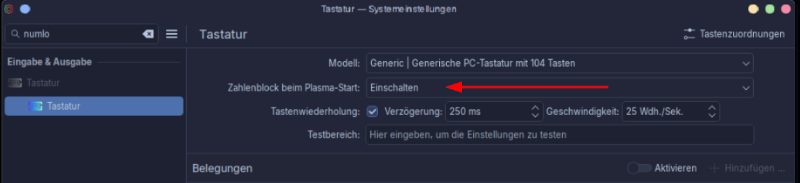
Yes, I am familiar with this setting, and I believe Garuda is configured to enable it during installation. What I want is for the numeric keypad to be enabled at login. On Mokka, at least on my PC, despite the configuration of the sddm.conf.d files (default.conf and general.conf), the numeric keypad remains disabled.
I find it a little unstable compared to Dragonized. That’s why, even though I prefer Mokka, I’ve gone back to Dragonized.
I repeat, I’m saying this is just on my PC. That doesn’t mean it can’t work just as well on other PCs.
If you want it on at the time of login, You must set it like it is above then while in Plasmas settings go to the sddm. You then want to apply the system settings to the sddm. after that numlock will be on at the longin screen.
This applies to any version of plasma tell they change out the SDDM.
Yes, that’s what I’m doing. But the problem is “solved,” since I’ve gone back to Dragonized. As I mentioned in my last post, it seems more stable on my PC!!! No translation issues or numlock activation problems when logging in.
 I’ve been struggling with this PC for a week with UEFI, as it’s my first PC with this type of BIOS, activating secure boot + Garuda secure boot. Enough is enough! I reinstalled Mokka,
  and this time everything is OK! Well, almost… Numlock doesn’t activate at boot, despite the configuration of the /default.conf file.