```nick@nick-b550iaorusproax
OS Garuda Linux x86_64
├ Kernel Linux 6.18.2-zen2-1-zen
├ Packages 1281 (pacman)[stable]
├ Shell fish 4.2.1
└ Age 119 days
DE KDE Plasma 6.5.4
├ Window Manager KWin (Wayland)
├ Login Manager sddm-autologin 0.21.0 (Wayland)
├ WM Theme plastik
├ Color Themes Breeze (Dark) [Qt]
├ System Icons breeze-dark [Qt]
├ System Fonts Inter (20pt) [Qt]
└ Terminal konsole 25.12.0
PC Desktop
├ CPU AMD Ryzen 7 5800X (16) @ 4.85 GHz
├ GPU NVIDIA GeForce RTX 3060 Ti Lite Hash Rate [Discrete]
├ Vulkan 1.4.325 - NVIDIA [590.48.01]
└ Display(s) 3840x2160 @ 2.25x in 27", 144 Hz [External]
nick@nick-b550iaorusproax in ~
❯ sudo garuda-inxi
[sudo] password for nick:
System:
Kernel: 6.18.2-zen2-1-zen arch: x86_64 bits: 64 compiler: gcc v: 15.2.1
clocksource: tsc avail: hpet,acpi_pm
parameters: BOOT_IMAGE=/@/boot/vmlinuz-linux-zen
root=UUID=9f4c5651-5ef8-4a9b-9308-eafde2769a6c rw rootflags=subvol=@
vt.default_red=30,243,166,249,137,245,148,186,88,243,166,249,137,245,148,166
vt.default_grn=30,139,227,226,180,194,226,194,91,139,227,226,180,194,226,173
vt.default_blu=46,168,161,175,250,231,213,222,112,168,161,175,250,231,213,200
loglevel=3 quiet
Desktop: KDE Plasma v: 6.5.4 tk: Qt v: N/A wm: kwin_wayland dm: SDDM
Distro: Garuda base: Arch Linux
Machine:
Type: Desktop Mobo: Gigabyte model: B550I AORUS PRO AX v: x.x serial: N/A
uuid: 03560274-043c-05cb-2a06-510700080009 Firmware: UEFI vendor: American
Megatrends LLC. v: FE date: 03/22/2024
CPU:
Info: model: AMD Ryzen 7 5800X socket: AM4 bits: 64 type: MT MCP
arch: Zen 3+ gen: 3 level: v3 note: check built: 2022 process: TSMC n6 (7nm)
family: 0x19 (25) model-id: 0x21 (33) stepping: 2 microcode: 0xA201211
Topology: cpus: 1x dies: 1 clusters: 1 cores: 8 threads: 16 tpc: 2
smt: enabled cache: L1: 512 KiB desc: d-8x32 KiB; i-8x32 KiB L2: 4 MiB
desc: 8x512 KiB L3: 32 MiB desc: 1x32 MiB
Speed (MHz): avg: 1754 min/max: 556/4854 boost: enabled
base/boost: 3800/4850 scaling: driver: amd-pstate-epp governor: powersave
volts: 1.1 V ext-clock: 100 MHz cores: 1: 1754 2: 1754 3: 1754 4: 1754
5: 1754 6: 1754 7: 1754 8: 1754 9: 1754 10: 1754 11: 1754 12: 1754
13: 1754 14: 1754 15: 1754 16: 1754 bogomips: 121370
Flags-basic: avx avx2 ht lm nx pae sse sse2 sse3 sse4_1 sse4_2 sse4a ssse3
Vulnerabilities: <filter>
Graphics:
Device-1: NVIDIA GA104 [GeForce RTX 3060 Ti Lite Hash Rate] vendor: EVGA
driver: nvidia v: 590.48.01 alternate: nouveau,nvidia_drm
non-free: 550-580.xx+ status: current (as of 2025-11; EOL~2026-12-xx)
arch: Ampere code: GAxxx process: TSMC n7 (7nm) built: 2020-2023 pcie:
gen: 4 speed: 16 GT/s lanes: 16 ports: active: DP-3
empty: DP-1,DP-2,HDMI-A-1 bus-ID: 05:00.0 chip-ID: 10de:2489
class-ID: 0300
Display: unspecified server: X.Org v: 24.1.9 with: Xwayland v: 24.1.9
compositor: kwin_wayland driver: gpu: nv_platform,nvidia,nvidia-nvswitch
display-ID: :0 screens: 1
Screen-1: 0 s-res: 1707x960 s-dpi: 96 s-size: 452x254mm (17.80x10.00")
s-diag: 518mm (20.41")
Monitor-1: DP-3 model: LG (GoldStar) ULTRAGEAR+ serial: <filter>
built: 2024 res: mode: 1707x960 hz: 144 scale: 100% (1) dpi: 73 gamma: 1.2
size: 597x336mm (23.5x13.23") diag: 801mm (31.5") ratio: 16:9 modes:
max: 3840x2160 min: 640x480
API: EGL v: 1.5 hw: drv: nvidia platforms: gbm: drv: nvidia
API: OpenGL v: 4.6.0 vendor: nvidia v: 590.48.01 glx-v: 1.4
direct-render: yes renderer: NVIDIA GeForce RTX 3060 Ti/PCIe/SSE2
memory: 7.81 GiB
API: Vulkan v: 1.4.335 layers: 8 device: 0 type: discrete-gpu name: NVIDIA
GeForce RTX 3060 Ti driver: nvidia v: 590.48.01 device-ID: 10de:2489
surfaces: N/A device: 1 type: cpu name: llvmpipe (LLVM 21.1.6 256 bits)
driver: mesa llvmpipe v: 25.3.2-arch1.1 (LLVM 21.1.6)
device-ID: 10005:0000 surfaces: N/A
Info: Tools: api: clinfo, eglinfo, glxinfo, vulkaninfo
de: kscreen-console,kscreen-doctor gpu: nvidia-settings,nvidia-smi
wl: wayland-info x11: xdpyinfo, xprop, xrandr
Audio:
Device-1: NVIDIA GA104 High Definition Audio vendor: EVGA
driver: snd_hda_intel v: kernel pcie: gen: 4 speed: 16 GT/s lanes: 16
bus-ID: 05:00.1 chip-ID: 10de:228b class-ID: 0403
Device-2: Advanced Micro Devices [AMD] Starship/Matisse HD Audio
vendor: Gigabyte driver: snd_hda_intel v: kernel pcie: gen: 4 speed: 16 GT/s
lanes: 16 bus-ID: 07:00.4 chip-ID: 1022:1487 class-ID: 0403
Device-3: Realtek LG Monitor HP MIC driver: hid-generic,usbhid type: USB
rev: 2.0 speed: 480 Mb/s lanes: 1 mode: 2.0 bus-ID: 3-2.4:6
chip-ID: 0bda:4027 class-ID: 0300 serial: <filter>
API: ALSA v: k6.18.2-zen2-1-zen status: kernel-api tools: N/A
Server-1: PipeWire v: 1.4.9 status: n/a (root, process) with:
1: pipewire-pulse status: active 2: wireplumber status: active
3: pipewire-alsa type: plugin 4: pw-jack type: plugin
tools: pactl,pw-cat,pw-cli,wpctl
Network:
Device-1: Realtek RTL8125 2.5GbE vendor: Gigabyte driver: r8169 v: kernel
pcie: gen: 2 speed: 5 GT/s lanes: 1 port: e000 bus-ID: 03:00.0
chip-ID: 10ec:8125 class-ID: 0200
IF: eno1 state: up speed: 1000 Mbps duplex: full mac: <filter>
Device-2: Realtek RTL8852CE PCIe 802.11ax Wireless Network
driver: rtw89_8852ce v: kernel pcie: gen: 2 speed: 5 GT/s lanes: 1
port: d000 bus-ID: 04:00.0 chip-ID: 10ec:c852 class-ID: 0280
IF: wlp4s0 state: down mac: <filter>
Info: services: NetworkManager, smbd, systemd-timesyncd, wpa_supplicant
Bluetooth:
Device-1: Realtek Bluetooth Radio driver: btusb v: 0.8 type: USB rev: 1.0
speed: 12 Mb/s lanes: 1 mode: 1.1 bus-ID: 1-8:3 chip-ID: 0bda:0852
class-ID: e001 serial: <filter>
Report: btmgmt ID: hci0 rfk-id: 0 state: up address: <filter> bt-v: 5.3
lmp-v: 12 status: discoverable: no pairing: no class-ID: 6c0104
Drives:
Local Storage: total: 931.51 GiB used: 34.18 GiB (3.7%)
ID-1: /dev/sda maj-min: 8:0 vendor: Crucial model: CT1000MX500SSD1
family: Micron Client SSDs size: 931.51 GiB block-size: physical: 4096 B
logical: 512 B sata: 3.3 speed: 6.0 Gb/s tech: SSD serial: <filter>
fw-rev: 045 temp: 25 C scheme: GPT
SMART: yes state: enabled health: PASSED on: 244d 8h cycles: 2767
written: 8.21 TiB
Partition:
ID-1: / raw-size: 448.41 GiB size: 448.41 GiB (100.00%)
used: 34.18 GiB (7.6%) fs: btrfs block-size: 4096 B dev: /dev/sda4
maj-min: 8:4
ID-2: /boot/efi raw-size: 300 MiB size: 299.4 MiB (99.80%)
used: 992 KiB (0.3%) fs: vfat block-size: 512 B dev: /dev/sda1 maj-min: 8:1
ID-3: /home raw-size: 448.41 GiB size: 448.41 GiB (100.00%)
used: 34.18 GiB (7.6%) fs: btrfs block-size: 4096 B dev: /dev/sda4
maj-min: 8:4
ID-4: /var/log raw-size: 448.41 GiB size: 448.41 GiB (100.00%)
used: 34.18 GiB (7.6%) fs: btrfs block-size: 4096 B dev: /dev/sda4
maj-min: 8:4
ID-5: /var/tmp raw-size: 448.41 GiB size: 448.41 GiB (100.00%)
used: 34.18 GiB (7.6%) fs: btrfs block-size: 4096 B dev: /dev/sda4
maj-min: 8:4
Swap:
Kernel: swappiness: 133 (default 60) cache-pressure: 100 (default) zswap: no
ID-1: swap-1 type: zram size: 31.26 GiB used: 0 KiB (0.0%) priority: 100
comp: zstd avail: lzo-rle,lzo,lz4,lz4hc,deflate,842 dev: /dev/zram0
ID-2: swap-2 type: partition size: 34.39 GiB used: 0 KiB (0.0%)
priority: -2 dev: /dev/sda3 maj-min: 8:3
Sensors:
System Temperatures: cpu: 38.5 C mobo: 34.0 C
Fan Speeds (rpm): N/A
Info:
Memory: total: 32 GiB available: 31.26 GiB used: 2.16 GiB (6.9%)
Processes: 381 Power: uptime: 1m states: freeze,mem,disk suspend: deep
avail: s2idle wakeups: 0 hibernate: platform avail: shutdown, reboot,
suspend, test_resume image: 12.46 GiB services: org_kde_powerdevil,
power-profiles-daemon, upowerd Init: systemd v: 259 default: graphical
tool: systemctl
Packages: pm: pacman pkgs: 1281 libs: 328 tools: octopi,paru Compilers:
gcc: 15.2.1 Shell: Bash (sudo) v: 5.3.9 running-in: konsole inxi: 3.3.40
Garuda (2.11.1-1):
System install date: 2025-08-30
Garuda release: 250826
Last full system update: 2025-12-27
Is partially upgraded: No
Relevant software: snapper NetworkManager dracut nvidia-utils nvidia-open-dkms garuda-hardware-profile-nvidia garuda-hardware-profile-standard
Windows dual boot: No/Undetected
Failed units:
--- System Health Check Report ---
26/26 checks run in 0.56 seconds ⌛
Powered by garuda-health 🦅
--- LOW ---
- "Garuda" is not the current bootloader: https://wiki.garudalinux.org/why-garuda-bootloader
```
According to your garuda-inxi, you are using Mokka, and the default bottom panel is the “Garuda Mokka Default Dock”, which is centred and does not extend across the entire screen.
However, since you are obviously using the Breeze Dark theme, it is logical that you have the default Breeze panel.
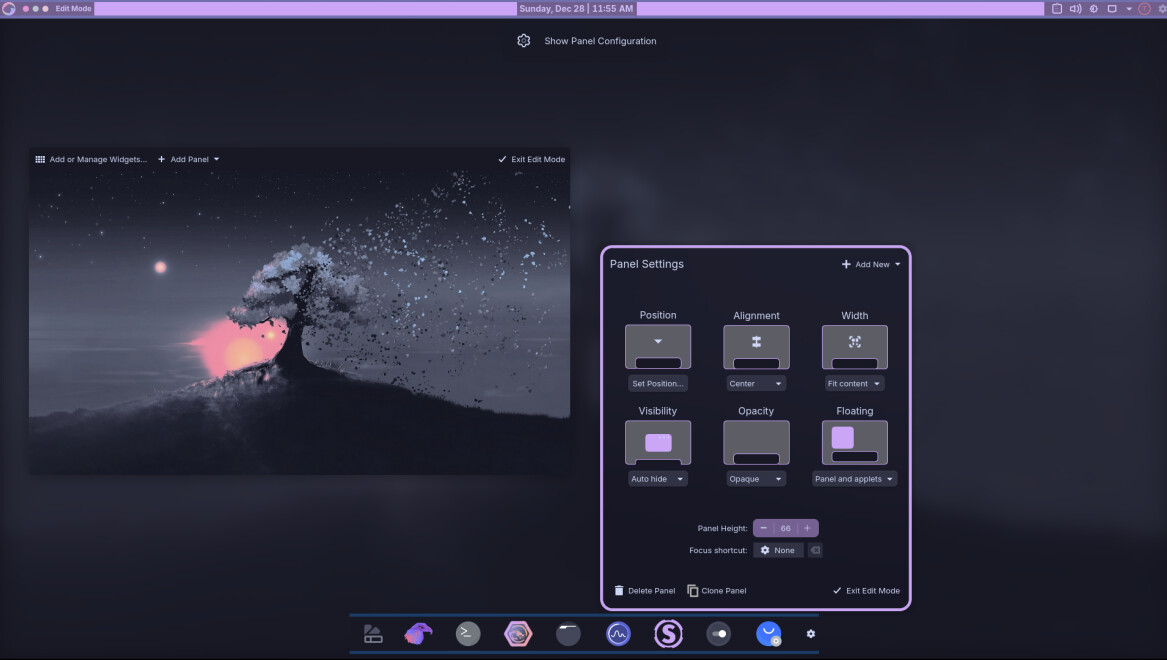
Right-click on the desktop → Enter Edit Mode and set the panel settings as follows, for example:
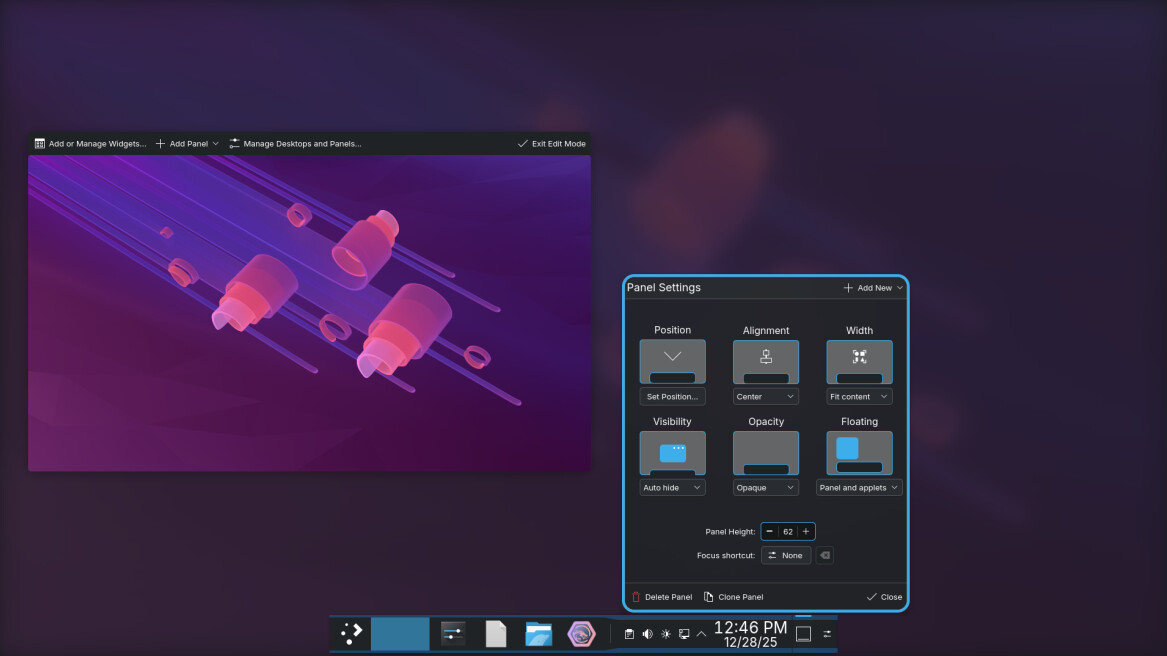
Result:
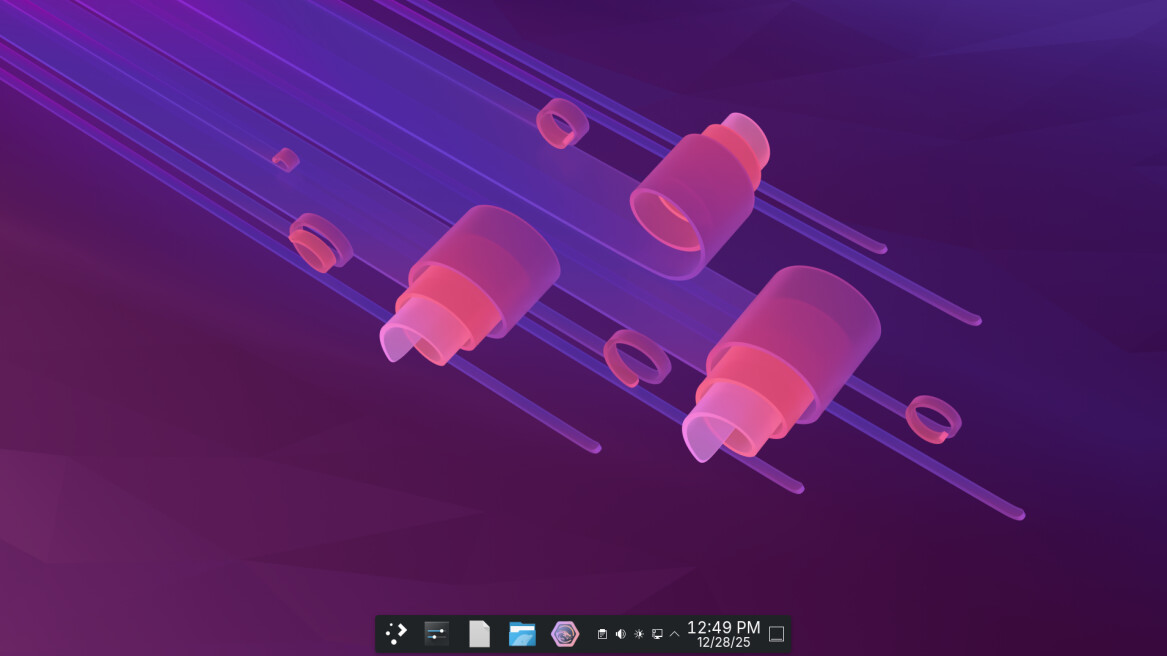
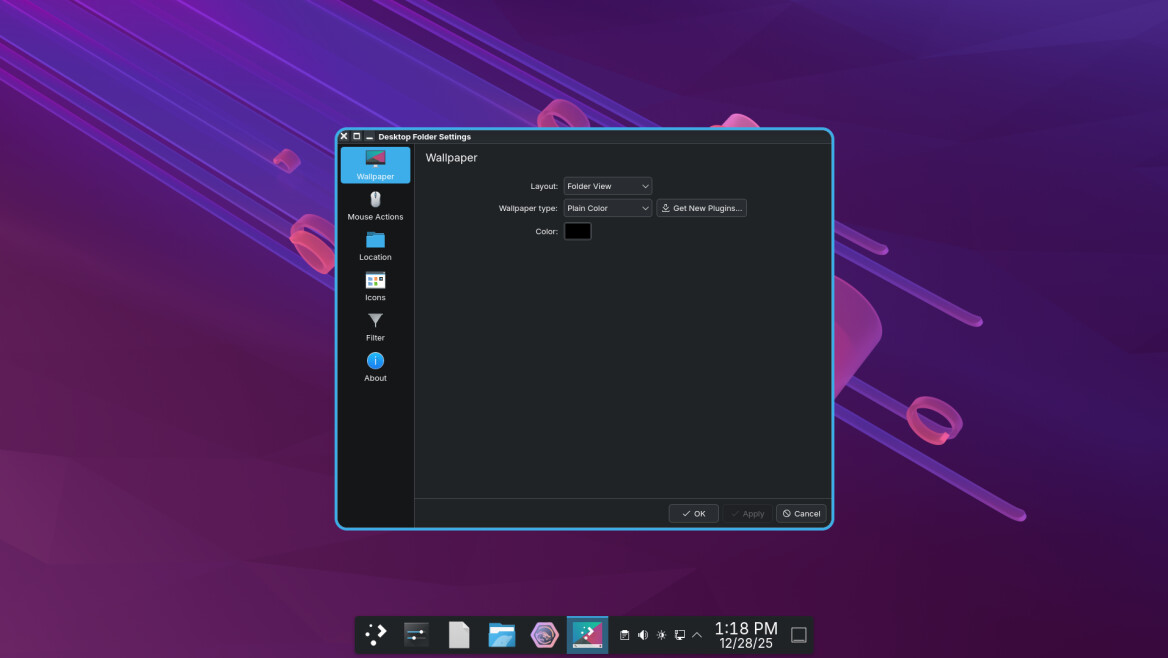
If you mean the desktop background (since the panel is already solid black), right-click on the desktop → Desktop and Wallpaper → Wallpaper type: Plain Colour. Then simply change the colour to black:
If that doesn’t help, then provide more useful information (e.g. a screenshot) and express yourself more clearly. Your description of the problem is very poor.
7 Likes
I mean when a app is open the background is not solid, like a page on Firedragon, I want a solid background on the dock. So the icons are always Flear.
May you check the Blur or Betterblur settings ? System-Settings-Window Managment-Desktop Effects or Window Settings
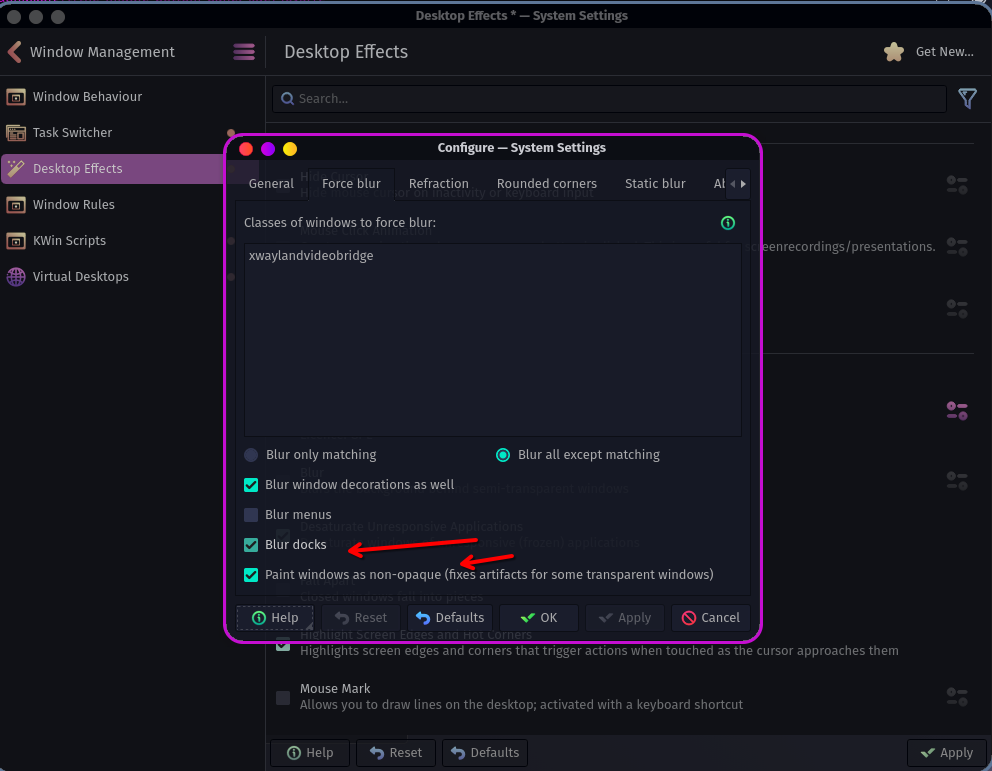
3 Likes
Hmmm, since when am I a new user? I can’t upload images. Blur is off, I mean if something not black is behind the dock (Firedragon is open & a page is open). A sshot would be so much easier. Like images/text/links all show & mess with the icons on the dock msking them hard to see.
Hm i dont know why you cant psot images or how you try to do it.
Worse Case doing remove this if you meant this behaviour . Because i did see there is a Bug too . I cant set up like Nepti showed up. But after removing this its worked. May it helpes you like you wanted.
sudo pacman -Rdd plasma6-applets-panel-colorizer

1 Like
The Garuda discourse forum software ranks users access privileges by their trustworthiness.
@Edward78 you have continually ignored forum moderators warnings to modify your posting behavior. You have been told countless times by the moderation team to always include your garuda-inxi on all help requests, which you constantly ignore. You have also been warned by multiple moderators to stop posting low quality AI slop media on the tech news thread. You were recently suspended for not following the moderation teams advice. Every warning by the moderation team goes unheeded, so it was felt more drastic measures were needed to modify your behavior.
Immediately after returning from suspension you open a new help request. Coincidently, it was on the exact topic being discussed here, and as usual no garuda-inxi was provided. Your post was immediately moved to the garbage heap, because moderators are tired of having to continually warn you, (only to be ignored)
@Edward78, you have proven time and time again that you can not be trusted to follow instructions from the Garuda moderation team. Therefore, your trust level has been reduced to 0 (zero). Users at TL0 (Trust Level 0) do not have sufficient privileges to post images on the Garuda forum. This prohibition will continue until you have demonstrated that you can be trusted to follow our forums rules and moderators instructions.
As long as you post a garuda-inxi everytime you wish to recieve help you will continue to retain the ability to recieve technical assistance on the Garuda forum. A continual refusal to comply with our forum’s posting guidelines may result in you no longer being able to ask for assistance on the Garuda forum.
You may consider this another formal warning.
6 Likes
In addition, a topic title should include a brief and meaningful description of the issue, and the initial post should include a detailed description with all the information the forum assistants need to help you. And this has also been told to you several times.
As always with you, both are missing from this topic. We are not standing behind you, looking over your shoulder to see what is happening on your system. You need to provide this information in order to get help with an issue. In this case, we still don’t know which bottom panel/dock you are using, what you have tried so far, etc. We are not clairvoyants.
@Edward78 Do not assume that this thread will be a question and answer game with 50 replies. If you do not provide useful information and meaningful feedback in your next posts, this topic will also end up in 4xx Client Error > 412 Precondition Failed.
I have already described the procedure for the default Breeze bottom panel above. If you are using the Garuda dock instead of the Breeze panel, disable the “Panel Colorizer” in the bottom dock (or remove the widget from the bottom dock, as the Panel Colorizer overwrites the KDE settings) and set “Opacity” to “Opaque” in the Panel Settings (and “Visibility” to “Auto hide” if you want the dock to only be displayed when you hover over it):
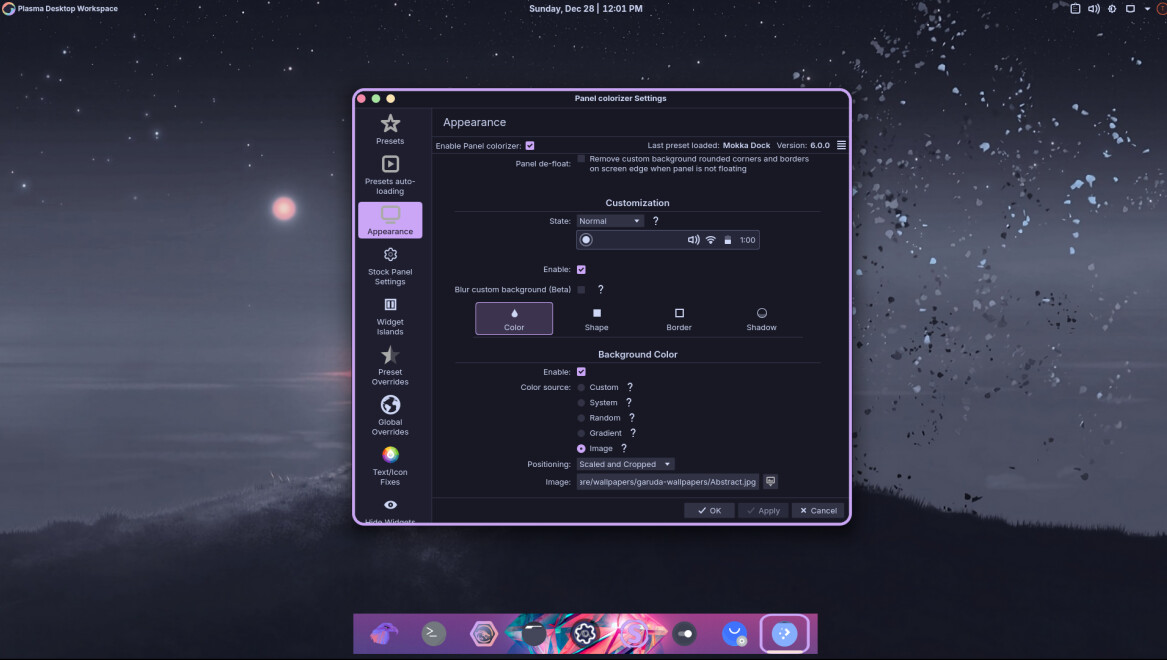
Alternatively, you can leave the “Panel Colorizer” enabled and play around with custom colours/backgrounds under ‘Appearance’:
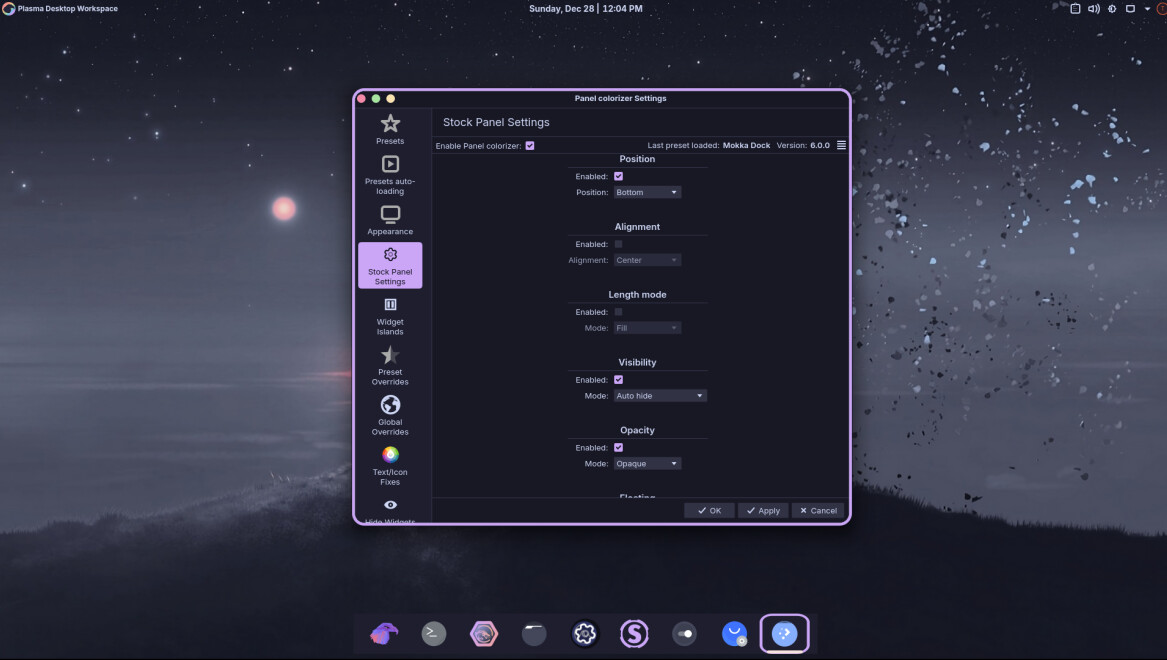
or with the “Stock Panel Settings”:
btw: we recently had a similar topic where I described exactly that. You should have just used the forum search function:
7 Likes