Hey all, new to Garuda and linux in general. I’m using the Dragonized Gaming edition of Garuda.
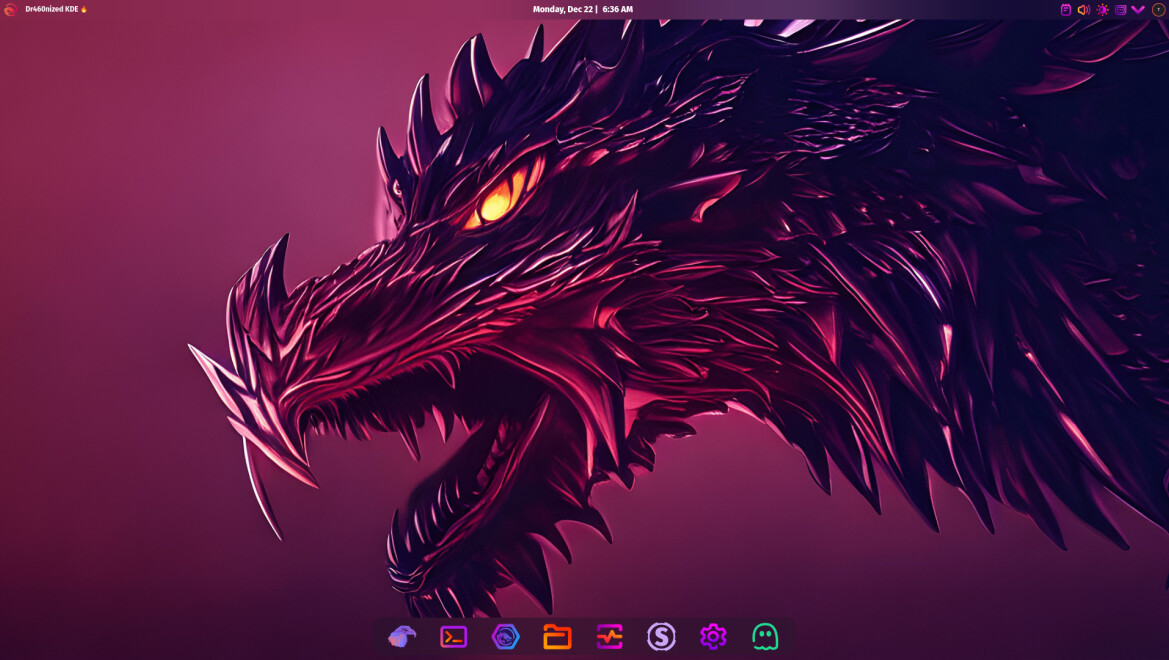
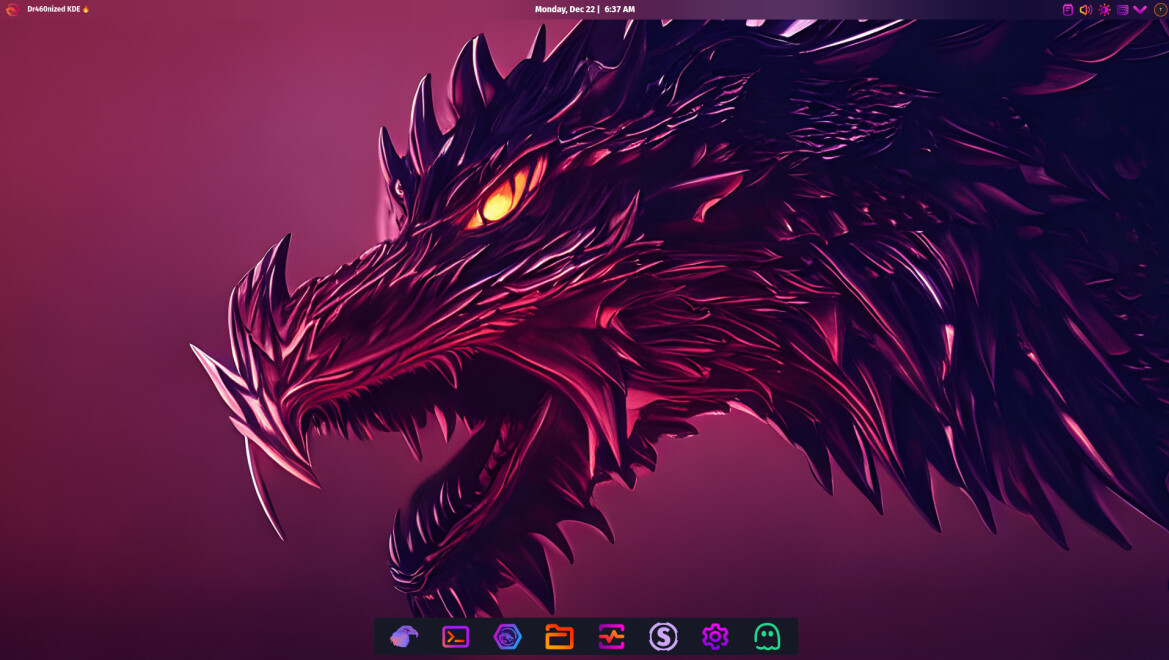
I’m trying to disable the bottom dock transparency (make it more opaque), as I find that it’s difficult for me to see without some sort of background (I’m legally blind).
What I’ve tried:
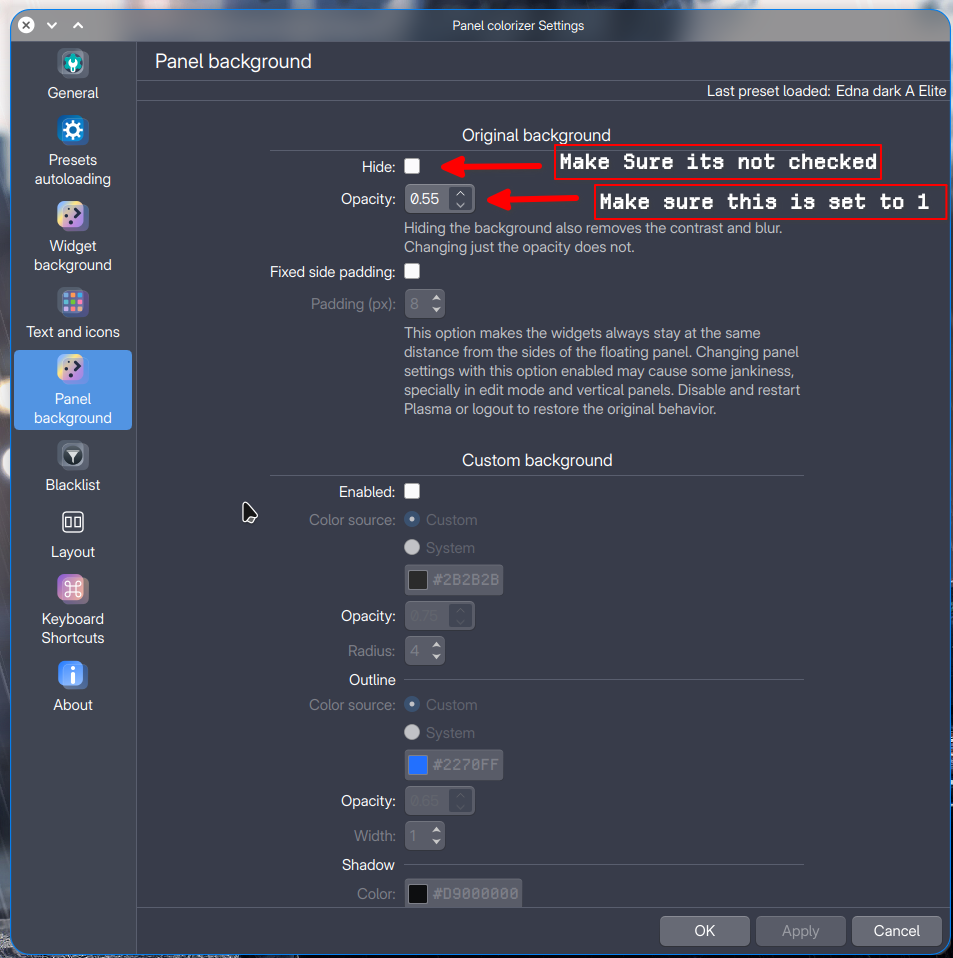
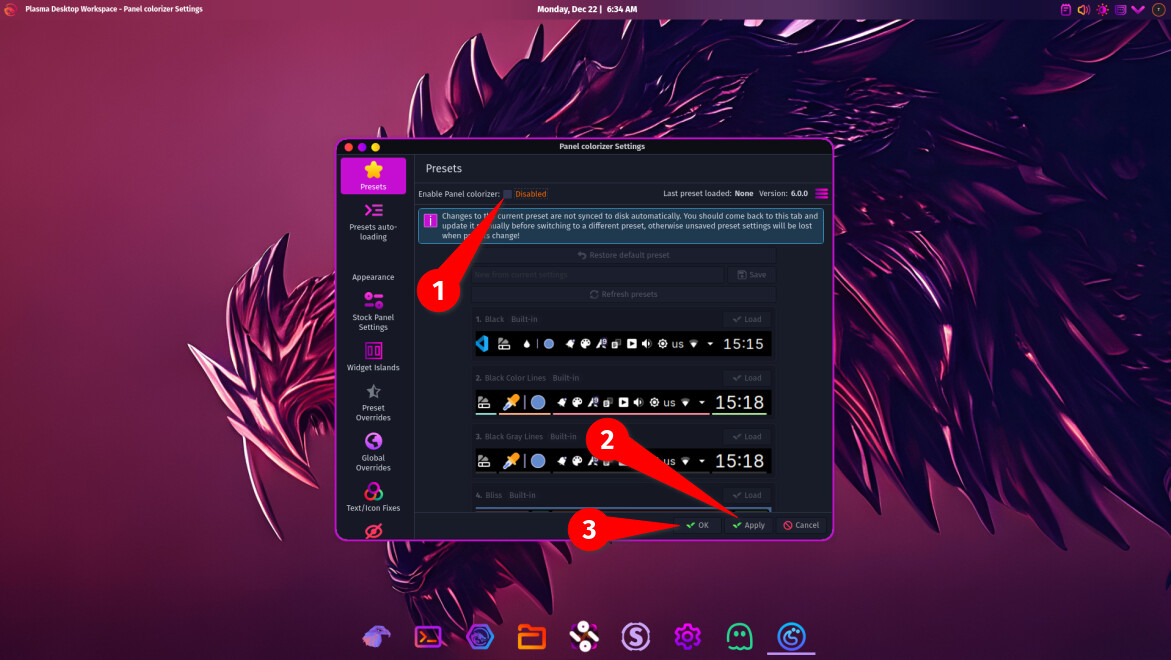
Configure Panel Colorizer. I’ve loaded the Garuda Dock preset and under Appearance I toggled both Background and towards the bottom the Enable for Background and fiddled with those settings, too.
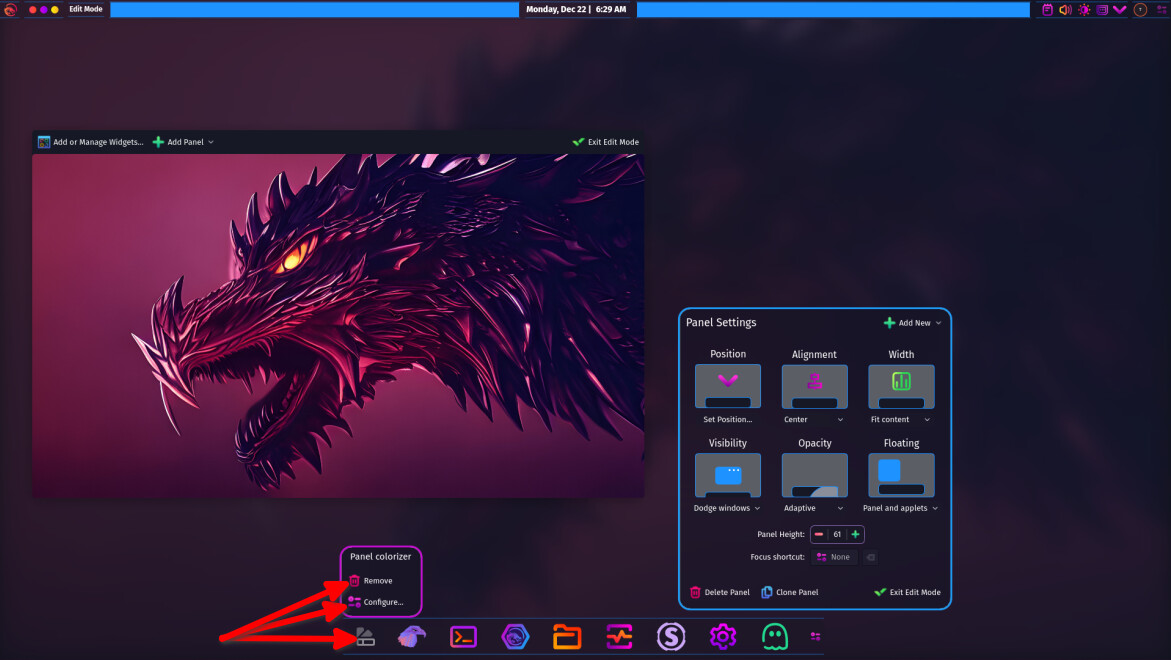
I’ve tried going into the Enter Edit Mode on the desktop and selecting the bottom dock, and toggling the Opacity feature and it doesn’t do anything.
Here is my Garuda Inxi:
System:
Kernel: 6.18.2-zen2-1-zen arch: x86_64 bits: 64 compiler: gcc v: 15.2.1
clocksource: tsc avail: hpet,acpi_pm
parameters: BOOT_IMAGE=/@/boot/vmlinuz-linux-zen
root=UUID=f64b6b79-d14b-4366-bde5-0c330e710e3e rw rootflags=subvol=@
quiet loglevel=3
Desktop: KDE Plasma v: 6.5.4 tk: Qt v: N/A info: frameworks v: 6.21.0
wm: kwin_wayland vt: 1 dm: SDDM Distro: Garuda base: Arch Linux
Machine:
Type: Desktop System: CyberPowerPC product: GamingPC v: 2.0
serial: <superuser required>
Mobo: Micro-Star model: PRO B850-VC WIFI (MS-7E56) v: 2.0
serial: <superuser required> part-nu: CPPC-SYSTEM-US
uuid: <superuser required> Firmware: UEFI vendor: American Megatrends LLC.
v: 2.A70 date: 06/18/2025
CPU:
Info: model: AMD Ryzen 7 8700F bits: 64 type: MT MCP arch: Zen 4 gen: 4
level: v4 note: check built: 2022+ process: TSMC n5 (5nm) family: 0x19 (25)
model-id: 0x75 (117) stepping: 2 microcode: 0xA70520A
Topology: cpus: 1x dies: 1 clusters: 1 cores: 8 threads: 16 tpc: 2
smt: enabled cache: L1: 512 KiB desc: d-8x32 KiB; i-8x32 KiB L2: 8 MiB
desc: 8x1024 KiB L3: 16 MiB desc: 1x16 MiB
Speed (MHz): avg: 2373 min/max: 413/5055 boost: enabled scaling:
driver: amd-pstate-epp governor: powersave cores: 1: 2373 2: 2373 3: 2373
4: 2373 5: 2373 6: 2373 7: 2373 8: 2373 9: 2373 10: 2373 11: 2373 12: 2373
13: 2373 14: 2373 15: 2373 16: 2373 bogomips: 131212
Flags-basic: avx avx2 ht lm nx pae sse sse2 sse3 sse4_1 sse4_2 sse4a
ssse3 svm
Vulnerabilities: <filter>
Graphics:
Device-1: NVIDIA GB206 [GeForce RTX 5060 Ti] vendor: PNY driver: nvidia
v: 590.48.01 alternate: nouveau,nvidia_drm non-free: 550-580.xx+
status: current (as of 2025-11) arch: Lovelace code: AD1xx
process: TSMC n4 (5nm) built: 2022+ pcie: gen: 4 speed: 16 GT/s lanes: 8
link-max: gen: 5 speed: 32 GT/s lanes: 16 ports: active: HDMI-A-1
empty: DP-1,DP-2,DP-3 bus-ID: 01:00.0 chip-ID: 10de:2d04 class-ID: 0300
Display: wayland server: X.org v: 1.21.1.21 with: Xwayland v: 24.1.9
compositor: kwin_wayland driver: X: loaded: nvidia unloaded: modesetting
alternate: fbdev,nouveau,nv,vesa gpu: nv_platform,nvidia,nvidia-nvswitch
display-ID: 0
Monitor-1: HDMI-A-1 model: Acer XV272U serial: <filter> built: 2021 res:
mode: 2560x1440 hz: 144 scale: 120% (1.2) to: 2133x1200 dpi: 109 gamma: 1.2
size: 597x336mm (23.5x13.23") diag: 685mm (27") ratio: 16:9 modes:
max: 2560x1440 min: 640x480
API: EGL v: 1.5 hw: drv: nvidia platforms: device: 0 drv: nvidia device: 2
drv: swrast gbm: drv: nvidia surfaceless: drv: nvidia wayland: drv: nvidia
x11: drv: nvidia inactive: device-1
API: OpenGL v: 4.6.0 compat-v: 4.5 vendor: nvidia mesa v: 25.3.2-arch1.1
glx-v: 1.4 direct-render: yes renderer: NVIDIA GeForce RTX 5060 Ti/PCIe/SSE2
memory: 7.77 GiB display-ID: :1.0
API: Vulkan v: 1.4.335 layers: 16 device: 0 type: discrete-gpu name: NVIDIA
GeForce RTX 5060 Ti driver: nvidia v: 590.48.01 device-ID: 10de:2d04
surfaces: N/A device: 1 type: cpu name: llvmpipe (LLVM 21.1.6 256 bits)
driver: mesa llvmpipe v: 25.3.2-arch1.1 (LLVM 21.1.6)
device-ID: 10005:0000 surfaces: N/A
Info: Tools: api: clinfo, eglinfo, glxinfo, vulkaninfo
de: kscreen-console,kscreen-doctor gpu: corectrl,nvidia-smi wl: wayland-info
x11: xdpyinfo, xprop, xrandr
Audio:
Device-1: NVIDIA GB206 High Definition Audio driver: snd_hda_intel v: kernel
pcie: gen: 4 speed: 16 GT/s lanes: 8 link-max: gen: 5 speed: 32 GT/s
lanes: 16 bus-ID: 01:00.1 chip-ID: 10de:22eb class-ID: 0403
Device-2: Advanced Micro Devices [AMD] Ryzen HD Audio
vendor: Micro-Star MSI driver: snd_hda_intel v: kernel pcie: gen: 4
speed: 16 GT/s lanes: 16 bus-ID: 0f:00.6 chip-ID: 1022:15e3 class-ID: 0403
Device-3: Razer USA Kraken Kitty Edition
driver: hid-generic,snd-usb-audio,usbhid type: USB rev: 2.0 speed: 12 Mb/s
lanes: 1 mode: 1.1 bus-ID: 1-2.3:6 chip-ID: 1532:0521 class-ID: 0300
serial: <filter>
API: ALSA v: k6.18.2-zen2-1-zen status: kernel-api with: aoss
type: oss-emulator tools: N/A
Server-1: PipeWire v: 1.4.9 status: active with: 1: pipewire-pulse
status: active 2: wireplumber status: active 3: pipewire-alsa type: plugin
4: pw-jack type: plugin tools: pactl,pw-cat,pw-cli,wpctl
Network:
Device-1: Realtek RTL8126 5GbE vendor: Micro-Star MSI driver: r8169
v: kernel pcie: gen: 3 speed: 8 GT/s lanes: 1 port: e000 bus-ID: 0b:00.0
chip-ID: 10ec:8126 class-ID: 0200
IF: enp11s0 state: down mac: <filter>
Device-2: NetGear Wireless_Device driver: mt7921u type: USB rev: 3.2
speed: 5 Gb/s lanes: 1 mode: 3.2 gen-1x1 bus-ID: 4-1:2 chip-ID: 0846:9060
class-ID: 0000 serial: <filter>
IF: wlp15s0f3u1 state: up mac: <filter>
Info: services: NetworkManager, systemd-timesyncd, wpa_supplicant
Bluetooth:
Device-1: Foxconn / Hon Hai driver: btusb v: 0.8 type: USB rev: 1.1
speed: 12 Mb/s lanes: 1 mode: 1.1 bus-ID: 1-11:3 chip-ID: 0489:e10a
class-ID: e001
Report: btmgmt ID: hci0 rfk-id: 0 state: up address: <filter> bt-v: 5.3
lmp-v: 12 status: discoverable: no pairing: no class-ID: 6c0104
Drives:
Local Storage: total: 2.79 TiB used: 158.28 GiB (5.5%)
SMART Message: Unable to run smartctl. Root privileges required.
ID-1: /dev/nvme0n1 maj-min: 259:0 vendor: Samsung
model: SSD 970 EVO Plus 2TB size: 1.82 TiB block-size: physical: 512 B
logical: 512 B speed: 31.6 Gb/s lanes: 4 tech: SSD serial: <filter>
fw-rev: 2B2QEXM7 temp: 38.9 C scheme: GPT
ID-2: /dev/nvme1n1 maj-min: 259:5 vendor: Western Digital
model: WD Green SN3000 1TB size: 931.51 GiB block-size: physical: 512 B
logical: 512 B speed: 63.2 Gb/s lanes: 4 tech: SSD serial: <filter>
fw-rev: 123000WD temp: 42.9 C scheme: GPT
ID-3: /dev/sda maj-min: 8:0 vendor: Samsung model: Type-C size: 59.75 GiB
block-size: physical: 512 B logical: 512 B type: USB rev: 3.1 spd: 5 Gb/s
lanes: 1 mode: 3.2 gen-1x1 tech: N/A serial: <filter> fw-rev: 1100
scheme: MBR
SMART Message: Unknown USB bridge. Flash drive/Unsupported enclosure?
Partition:
ID-1: / raw-size: 931.22 GiB size: 931.22 GiB (100.00%)
used: 158.28 GiB (17.0%) fs: btrfs dev: /dev/nvme1n1p2 maj-min: 259:7
ID-2: /boot/efi raw-size: 300 MiB size: 299.4 MiB (99.80%)
used: 664 KiB (0.2%) fs: vfat dev: /dev/nvme1n1p1 maj-min: 259:6
ID-3: /home raw-size: 931.22 GiB size: 931.22 GiB (100.00%)
used: 158.28 GiB (17.0%) fs: btrfs dev: /dev/nvme1n1p2 maj-min: 259:7
ID-4: /var/log raw-size: 931.22 GiB size: 931.22 GiB (100.00%)
used: 158.28 GiB (17.0%) fs: btrfs dev: /dev/nvme1n1p2 maj-min: 259:7
ID-5: /var/tmp raw-size: 931.22 GiB size: 931.22 GiB (100.00%)
used: 158.28 GiB (17.0%) fs: btrfs dev: /dev/nvme1n1p2 maj-min: 259:7
Swap:
Kernel: swappiness: 133 (default 60) cache-pressure: 100 (default) zswap: no
ID-1: swap-1 type: zram size: 15.17 GiB used: 0 KiB (0.0%) priority: 100
comp: zstd avail: lzo-rle,lzo,lz4,lz4hc,deflate,842 dev: /dev/zram0
Sensors:
System Temperatures: cpu: 46.1 C mobo: 40.5 C
Fan Speeds (rpm): N/A
Info:
Memory: total: 16 GiB note: est. available: 15.17 GiB used: 3.29 GiB (21.7%)
Processes: 424 Power: uptime: 0m states: freeze,mem,disk suspend: deep
avail: s2idle wakeups: 0 hibernate: platform avail: shutdown, reboot,
suspend, test_resume image: 6.02 GiB services: org_kde_powerdevil,
power-profiles-daemon, upowerd Init: systemd v: 259 default: graphical
tool: systemctl
Packages: pm: pacman pkgs: 1685 libs: 470 tools: octopi,paru Compilers:
gcc: 15.2.1 Shell: Bash v: 5.3.9 default: fish v: 4.2.1 running-in: konsole
inxi: 3.3.40
Garuda (2.11.1-1):
System install date:     2025-12-20
Garuda release:          251103
Last full system update: 2025-12-20
Is partially upgraded:   No
Relevant software:       snapper NetworkManager dracut nvidia-utils nvidia-open-dkms garuda-hardware-profile-nvidia garuda-hardware-profile-standard
Windows dual boot:       Probably (Run as root to verify)
Failed units:
--- System Health Check Report ---
25/26 checks run in 0.55 seconds ⌛
Powered by garuda-health 🦅

✅ System health check passed. No issues found.