'Loading initial ramdisk' is taking over a minute, normal?

I just want to check if it is normal, that loading the initial ramdisk is taking that long. After the installation of Garuda, the boot-times seemed normal, but it’s taking longer and longer.

I looked up about initrd but can’t help myself, not knowing which modules I need or not need, but taking over a minute seems slow, for my hardware.

(Also, when starting the console, I get an error that find the command is missing, which was marked orphaned after the last garuda-update, but that’s an aside.)

╭─frazzlerunning@b850msteellegendwifi in ~ took 1s
╰─λ systemd-analyze
Startup finished in 24.592s (firmware) + 6.110s (loader) + 685ms (kernel) + 1min 5.860s (initrd) + 8.761s (userspace) = 1min 46.010s
graphical.target reached after 8.761s in userspace.
╭─frazzlerunning@b850msteellegendwifi in ~ took 0s
╰─λ dracut --list-modules
dracut[I]: Executing: /usr/bin/dracut --list-modules
bash
dash
systemd
systemd-network-management
warpclock
fips
fips-crypto-policies
systemd-ac-power
systemd-ask-password
systemd-battery-check
systemd-bsod
systemd-coredump
systemd-creds
systemd-cryptsetup
systemd-hostnamed
systemd-initrd
systemd-integritysetup
systemd-journald
systemd-ldconfig
systemd-modules-load
systemd-networkd
systemd-pcrphase
systemd-portabled
systemd-pstore
systemd-repart
systemd-resolved
systemd-sysctl
systemd-sysext
systemd-timedated
systemd-timesyncd
systemd-tmpfiles
systemd-udevd
systemd-veritysetup
caps
modsign
rescue
watchdog
watchdog-modules
dbus-broker
dbus-daemon
rngd
dbus
i18n
convertfs
connman
network-legacy
network-manager
network
drm
net-lib
plymouth
simpledrm
url-lib
btrfs-snapshot-overlay
cms
lvmmerge
lvmthinpool-monitor
systemd-sysusers
cio_ignore
bluetooth
btrfs
crypt
dm
dmraid
dmsquash-live
dmsquash-live-autooverlay
dmsquash-live-ntfs
fs-lib
img-lib
kernel-modules
kernel-modules-extra
kernel-network-modules
livenet
lvm
mdraid
multipath
numlock
nvdimm
overlayfs
pcmcia
ppcmac
qemu
qemu-net
uefi-lib
crypt-gpg
crypt-loop
fido2
pcsc
pkcs11
tpm2-tss
zipl
cifs
dasd
dasd_mod
dcssblk
debug
fcoe
fcoe-uefi
fstab-sys
hwdb
iscsi
lunmask
nbd
nfs
nvmf
resume
rootfs-block
rootfs-block-fallback
squash-erofs
squash-squashfs
ssh-client
terminfo
udev-rules
virtfs
virtiofs
zfcp
znet
securityfs
biosdevname
masterkey
systemd-emergency
dracut-systemd
ecryptfs
initqueue
integrity
pollcdrom
selinux
syslog
usrmount
base
busybox
memstrack
shell-interpreter
shutdown
squash
squash-lib
╭─frazzlerunning@b850msteellegendwifi in ~
╰─λ garuda-inxi
System:
Kernel: 6.17.1-zen1-1-zen arch: x86_64 bits: 64 compiler: gcc v: 15.2.1
clocksource: tsc avail: hpet,acpi_pm
parameters: BOOT_IMAGE=/@/boot/vmlinuz-linux-zen
root=UUID=447f1f77-2189-479c-b8eb-54b999daf6e4 rw rootflags=subvol=@
quiet loglevel=3
Desktop: KDE Plasma v: 6.4.5 tk: Qt v: N/A info: frameworks v: 6.18.0
wm: kwin_wayland vt: 1 dm: SDDM Distro: Garuda base: Arch Linux
Machine:
Type: Desktop System: ASRock product: B850M Steel Legend WiFi v: N/A
serial: <superuser required>
Mobo: ASRock model: B850M Steel Legend WiFi serial: <superuser required>
uuid: <superuser required> UEFI: American Megatrends LLC. v: 3.50
date: 09/18/2025
CPU:
Info: model: AMD Ryzen 7 9800X3D bits: 64 type: MT MCP arch: Zen 5 gen: 5
level: v4 note: check built: 2024+ process: TSMC n4 (4nm) family: 0x1A (26)
model-id: 0x44 (68) stepping: 0 microcode: 0xB404032
Topology: cpus: 1x dies: 1 clusters: 1 cores: 8 threads: 16 tpc: 2
smt: enabled cache: L1: 640 KiB desc: d-8x48 KiB; i-8x32 KiB L2: 8 MiB
desc: 8x1024 KiB L3: 96 MiB desc: 1x96 MiB
Speed (MHz): avg: 603 min/max: 603/5272 boost: enabled scaling:
driver: amd-pstate-epp governor: powersave cores: 1: 603 2: 603 3: 603
4: 603 5: 603 6: 603 7: 603 8: 603 9: 603 10: 603 11: 603 12: 603 13: 603
14: 603 15: 603 16: 603 bogomips: 150108
Flags-basic: avx avx2 ht lm nx pae sse sse2 sse3 sse4_1 sse4_2 sse4a
ssse3 svm
Vulnerabilities: <filter>
Graphics:
Device-1: Advanced Micro Devices [AMD/ATI] Navi 31 [Radeon RX 7900 XT/7900
XTX/7900 GRE/7900M] driver: amdgpu v: kernel arch: RDNA-3 code: Navi-3x
process: TSMC n5 (5nm) built: 2022+ pcie: gen: 4 speed: 16 GT/s lanes: 16
ports: active: DP-3,HDMI-A-1 empty: DP-1,DP-2,Writeback-1 bus-ID: 03:00.0
chip-ID: 1002:744c class-ID: 0300
Device-2: Advanced Micro Devices [AMD/ATI] Granite Ridge [Radeon Graphics]
vendor: ASRock driver: amdgpu v: kernel arch: RDNA-2 code: Navi-2x
process: TSMC n7 (7nm) built: 2020-22 pcie: gen: 4 speed: 16 GT/s
lanes: 16 ports: active: none empty: DP-4, DP-5, DP-6, HDMI-A-2,
Writeback-2 bus-ID: 10:00.0 chip-ID: 1002:13c0 class-ID: 0300 temp: 39.0 C
Display: wayland server: X.org v: 1.21.1.18 with: Xwayland v: 24.1.8
compositor: kwin_wayland driver: X: loaded: modesetting
alternate: fbdev,vesa dri: radeonsi gpu: amdgpu d-rect: 5360x2520
display-ID: 0
Monitor-1: DP-3 pos: bottom-r model: LG (GoldStar) ULTRAGEAR
serial: <filter> built: 2021 res: mode: 3440x1440 hz: 144 scale: 100% (1)
dpi: 109 gamma: 1.2 size: 800x335mm (31.5x13.19") diag: 867mm (34.1")
modes: max: 3440x1440 min: 640x480
Monitor-2: HDMI-A-1 pos: primary,top-left model: AOC 2590G4
serial: <filter> built: 2018 res: mode: 1920x1080 hz: 60 scale: 178% (1.78)
to: 1080x1920 dpi: 90 gamma: 1.2 size: 544x303mm (21.42x11.93")
diag: 623mm (24.5") ratio: 16:9 modes: max: 1920x1080 min: 720x400
API: EGL v: 1.5 hw: drv: amd radeonsi platforms: device: 0 drv: radeonsi
device: 1 drv: radeonsi device: 2 drv: swrast gbm: drv: radeonsi
surfaceless: drv: radeonsi wayland: drv: radeonsi x11: drv: radeonsi
API: OpenGL v: 4.6 compat-v: 4.5 vendor: amd mesa v: 25.2.4-arch1.1
glx-v: 1.4 direct-render: yes renderer: AMD Radeon RX 7900 XT (radeonsi
navi31 LLVM 20.1.8 DRM 3.64 6.17.1-zen1-1-zen) device-ID: 1002:744c
memory: 19.53 GiB unified: no display-ID: :1.0
API: Vulkan v: 1.4.328 layers: 9 device: 0 type: discrete-gpu name: AMD
Radeon RX 7900 XT (RADV NAVI31) driver: mesa radv v: 25.2.4-arch1.1
device-ID: 1002:744c surfaces: N/A device: 1 type: integrated-gpu name: AMD
Radeon Graphics (RADV RAPHAEL_MENDOCINO) driver: mesa radv
v: 25.2.4-arch1.1 device-ID: 1002:13c0 surfaces: N/A device: 2 type: cpu
name: llvmpipe (LLVM 20.1.8 256 bits) driver: mesa llvmpipe
v: 25.2.4-arch1.1 (LLVM 20.1.8) device-ID: 10005:0000 surfaces: N/A
Info: Tools: api: clinfo, eglinfo, glxinfo, vulkaninfo
de: kscreen-console,kscreen-doctor wl: wayland-info
x11: xdpyinfo, xprop, xrandr
Audio:
Device-1: Advanced Micro Devices [AMD/ATI] Navi 31 HDMI/DP Audio
driver: snd_hda_intel v: kernel pcie: gen: 4 speed: 16 GT/s lanes: 16
bus-ID: 03:00.1 chip-ID: 1002:ab30 class-ID: 0403
Device-2: Advanced Micro Devices [AMD/ATI] Radeon High Definition Audio
[Rembrandt/Strix] driver: snd_hda_intel v: kernel pcie: gen: 4
speed: 16 GT/s lanes: 16 bus-ID: 10:00.1 chip-ID: 1002:1640 class-ID: 0403
Device-3: Advanced Micro Devices [AMD] Family 17h/19h/1ah HD Audio
vendor: ASRock driver: snd_hda_intel v: kernel pcie: gen: 4 speed: 16 GT/s
lanes: 16 bus-ID: 10:00.6 chip-ID: 1022:15e3 class-ID: 0403
Device-4: GN Netcom Jabra EVOLVE 20 MS driver: jabra,snd-usb-audio,usbhid
type: USB rev: 2.0 speed: 12 Mb/s lanes: 1 mode: 1.1 bus-ID: 3-11.3:10
chip-ID: 0b0e:0300 class-ID: 0300 serial: <filter>
API: ALSA v: k6.17.1-zen1-1-zen status: kernel-api tools: N/A
Server-1: PipeWire v: 1.4.9 status: active with: 1: pipewire-pulse
status: active 2: wireplumber status: active 3: pipewire-alsa type: plugin
4: pw-jack type: plugin tools: pactl,pw-cat,pw-cli,wpctl
Network:
Device-1: MEDIATEK MT7925 Wi-Fi 7 160MHz driver: mt7925e v: kernel pcie:
gen: 2 speed: 5 GT/s lanes: 1 bus-ID: 07:00.0 chip-ID: 14c3:0717
class-ID: 0280
IF: wlp7s0 state: down mac: <filter>
Device-2: Realtek RTL8125 2.5GbE vendor: ASRock driver: r8169 v: kernel
pcie: gen: 2 speed: 5 GT/s lanes: 1 port: e000 bus-ID: 08:00.0
chip-ID: 10ec:8125 class-ID: 0200
IF: enp8s0 state: up speed: 1000 Mbps duplex: full mac: <filter>
Info: services: NetworkManager, smbd, systemd-timesyncd, wpa_supplicant
Drives:
Local Storage: total: 931.51 GiB used: 57.85 GiB (6.2%)
SMART Message: Unable to run smartctl. Root privileges required.
ID-1: /dev/nvme0n1 maj-min: 259:0 vendor: Samsung model: SSD 970 EVO 1TB
size: 931.51 GiB block-size: physical: 512 B logical: 512 B speed: 31.6 Gb/s
lanes: 4 tech: SSD serial: <filter> fw-rev: 2B2QEXE7 temp: 41.9 C
scheme: GPT
Partition:
ID-1: / raw-size: 931.22 GiB size: 931.22 GiB (100.00%)
used: 57.85 GiB (6.2%) fs: btrfs dev: /dev/nvme0n1p2 maj-min: 259:2
ID-2: /boot/efi raw-size: 300 MiB size: 299.4 MiB (99.80%)
used: 632 KiB (0.2%) fs: vfat dev: /dev/nvme0n1p1 maj-min: 259:1
ID-3: /home raw-size: 931.22 GiB size: 931.22 GiB (100.00%)
used: 57.85 GiB (6.2%) fs: btrfs dev: /dev/nvme0n1p2 maj-min: 259:2
ID-4: /var/log raw-size: 931.22 GiB size: 931.22 GiB (100.00%)
used: 57.85 GiB (6.2%) fs: btrfs dev: /dev/nvme0n1p2 maj-min: 259:2
ID-5: /var/tmp raw-size: 931.22 GiB size: 931.22 GiB (100.00%)
used: 57.85 GiB (6.2%) fs: btrfs dev: /dev/nvme0n1p2 maj-min: 259:2
Swap:
Kernel: swappiness: 133 (default 60) cache-pressure: 100 (default) zswap: no
ID-1: swap-1 type: zram size: 30.43 GiB used: 0 KiB (0.0%) priority: 100
comp: zstd avail: lzo-rle,lzo,lz4,lz4hc,deflate,842 dev: /dev/zram0
Sensors:
System Temperatures: cpu: 41.6 C mobo: 40.0 C
Fan Speeds (rpm): N/A
GPU: device: amdgpu temp: 59.0 C mem: 73.0 C fan: 491 watts: 58.00
device: amdgpu temp: 39.0 C
Info:
Memory: total: 32 GiB note: est. available: 30.43 GiB used: 3.38 GiB (11.1%)
Processes: 456 Power: uptime: 4m states: freeze,mem,disk suspend: deep
avail: s2idle wakeups: 0 hibernate: platform avail: shutdown, reboot,
suspend, test_resume image: 12.14 GiB services: org_kde_powerdevil,
power-profiles-daemon, upowerd Init: systemd v: 258 default: graphical
tool: systemctl
Packages: pm: pacman pkgs: 1433 libs: 447 tools: octopi,paru Compilers:
gcc: 15.2.1 Shell: Bash v: 5.3.3 default: fish v: 4.1.2 running-in: konsole
inxi: 3.3.39
Garuda (2.11.1-1):
System install date:     2025-08-23
Garuda release:          250801
Last full system update: 2025-10-12
Is partially upgraded:   No
Relevant software:       snapper NetworkManager dracut garuda-hardware-profile-standard
Windows dual boot:       No/Undetected
Failed units:
--- System Health Check Report ---
23/24 checks run in 0.47 seconds ⌛
Powered by garuda-health 🦅

✅ System health check passed. No issues found.```

Check or post

systemd-analyze blame

Use forum search :slight_smile:

2 Likes

I posted ‘systemd-analyze’ above, but here’s the output:

╭─frazzlerunning@b850msteellegendwifi in ~
╰─λ systemd-analyze blame
1min 5.913s sys-devices-LNXSYSTM:00-LNXSYBUS:00-MSFT0101:00-tpm-tpm0.device
1min 5.913s dev-tpm0.device
1min 5.907s dev-ttyS1.device
1min 5.907s sys-devices-platform-serial8250-serial8250:0-serial8250:0.1-tty-ttyS1.device
1min 5.905s dev-ttyS3.device
1min 5.905s sys-devices-platform-serial8250-serial8250:0-serial8250:0.3-tty-ttyS3.device
1min 5.903s dev-ttyS2.device
1min 5.903s sys-devices-platform-serial8250-serial8250:0-serial8250:0.2-tty-ttyS2.device
1min 5.902s sys-devices-platform-serial8250-serial8250:0-serial8250:0.0-tty-ttyS0.device
1min 5.902s dev-ttyS0.device
1min 5.898s sys-devices-LNXSYSTM:00-LNXSYBUS:00-MSFT0101:00-tpmrm-tpmrm0.device
1min 5.898s dev-tpmrm0.device
1min 5.890s sys-module-configfs.device
1min 5.887s sys-module-fuse.device
1min 5.816s dev-disk-by\x2dpath-pci\x2d0000:0f:00.0\x2dnvme\x2d1\x2dpart-by\x2dpartuuid-1b3d1a20\x2dc2e0\x2d4927\x2db174\x2df1fb1f13eaa5.device
1min 5.816s dev-disk-by\x2duuid-447f1f77\x2d2189\x2d479c\x2db8eb\x2d54b999daf6e4.device
1min 5.816s sys-devices-pci0000:00-0000:00:02.2-0000:0f:00.0-nvme-nvme0-nvme0n1-nvme0n1p2.device
1min 5.816s dev-disk-by\x2did-nvme\x2dSamsung_SSD_970_EVO_1TB_S5H9NS0N951770Y\x2dpart2.device
1min 5.816s dev-disk-by\x2did-nvme\x2deui.002538590141a599\x2dpart2.device
1min 5.816s dev-disk-by\x2did-nvme\x2dSamsung_SSD_970_EVO_1TB_S5H9NS0N951770Y_1\x2dpart2.device
1min 5.816s dev-nvme0n1p2.device
1min 5.816s dev-disk-by\x2dpartlabel-root.device
1min 5.816s dev-disk-by\x2dpath-pci\x2d0000:0f:00.0\x2dnvme\x2d1\x2dpart-by\x2dpartnum-2.device
1min 5.816s dev-disk-by\x2dpath-pci\x2d0000:0f:00.0\x2dnvme\x2d1\x2dpart-by\x2dpartlabel-root.device
1min 5.816s dev-disk-by\x2dpath-pci\x2d0000:0f:00.0\x2dnvme\x2d1\x2dpart-by\x2duuid-447f1f77\x2d2189\x2d479c\x2db8eb\x2d54b999daf6e4.device
1min 5.816s dev-disk-by\x2dpartuuid-1b3d1a20\x2dc2e0\x2d4927\x2db174\x2df1fb1f13eaa5.device
1min 5.816s dev-disk-by\x2dpath-pci\x2d0000:0f:00.0\x2dnvme\x2d1\x2dpart2.device
1min 5.816s dev-disk-by\x2ddiskseq-1\x2dpart2.device
1min 5.816s dev-disk-by\x2dpartuuid-45100370\x2dbd27\x2d4ccd\x2d8ea2\x2da80bf1afa363.device
1min 5.816s dev-disk-by\x2did-nvme\x2dSamsung_SSD_970_EVO_1TB_S5H9NS0N951770Y\x2dpart1.device
1min 5.816s dev-nvme0n1p1.device
1min 5.816s dev-disk-by\x2did-nvme\x2deui.002538590141a599\x2dpart1.device
1min 5.816s dev-disk-by\x2dpath-pci\x2d0000:0f:00.0\x2dnvme\x2d1\x2dpart-by\x2duuid-7C47\x2d5444.device
1min 5.816s dev-disk-by\x2ddiskseq-1\x2dpart1.device
1min 5.816s dev-disk-by\x2ddesignator-esp.device
1min 5.816s dev-disk-by\x2dpath-pci\x2d0000:0f:00.0\x2dnvme\x2d1\x2dpart-by\x2dpartnum-1.device
1min 5.815s dev-disk-by\x2did-nvme\x2dSamsung_SSD_970_EVO_1TB_S5H9NS0N951770Y_1\x2dpart1.device
1min 5.815s dev-disk-by\x2duuid-7C47\x2d5444.device
1min 5.815s dev-disk-by\x2dpath-pci\x2d0000:0f:00.0\x2dnvme\x2d1\x2dpart-by\x2dpartuuid-45100370\x2dbd27\x2d4ccd\x2d8ea2\x2da80bf1afa363.device
1min 5.815s sys-devices-pci0000:00-0000:00:02.2-0000:0f:00.0-nvme-nvme0-nvme0n1-nvme0n1p1.device
1min 5.815s dev-disk-by\x2dpath-pci\x2d0000:0f:00.0\x2dnvme\x2d1\x2dpart1.device
1min 5.814s sys-subsystem-net-devices-enp8s0.device
1min 5.814s sys-devices-pci0000:00-0000:00:02.1-0000:04:00.0-0000:05:03.0-0000:08:00.0-net-enp8s0.device
1min 5.808s dev-disk-by\x2ddiskseq-1.device
1min 5.808s dev-disk-by\x2did-nvme\x2deui.002538590141a599.device
1min 5.808s dev-disk-by\x2dpath-pci\x2d0000:0f:00.0\x2dnvme\x2d1.device
1min 5.808s dev-disk-by\x2did-nvme\x2dSamsung_SSD_970_EVO_1TB_S5H9NS0N951770Y_1.device
1min 5.808s dev-disk-by\x2did-nvme\x2dSamsung_SSD_970_EVO_1TB_S5H9NS0N951770Y.device
1min 5.808s dev-nvme0n1.device
1min 5.808s sys-devices-pci0000:00-0000:00:02.2-0000:0f:00.0-nvme-nvme0-nvme0n1.device
1min 5.368s dracut-initqueue.service
6.802s NetworkManager-wait-online.service
327ms NetworkManager.service
281ms initrd-switch-root.service
206ms linux-modules-cleanup.service
205ms boot-efi.mount
200ms home.mount
200ms root.mount
199ms srv.mount
199ms var-cache.mount
184ms tmp.mount
117ms polkit.service
115ms dev-zram0.swap
99ms systemd-udev-trigger.service
82ms upower.service
77ms nmb.service
66ms user@1000.service
64ms lvm2-monitor.service
47ms dracut-pre-udev.service
45ms systemd-journald.service
45ms smb.service
40ms systemd-tmpfiles-setup-dev-early.service
39ms systemd-vconsole-setup.service
34ms systemd-tmpfiles-setup.service
30ms systemd-tmpfiles-clean.service
29ms power-profiles-daemon.service
29ms systemd-zram-setup@zram0.service
26ms systemd-udevd.service
25ms ModemManager.service
25ms systemd-remount-fs.service
23ms systemd-journal-flush.service
22ms dracut-cmdline.service
21ms systemd-fsck-root.service
20ms initrd-udevadm-cleanup-db.service
20ms dev-hugepages.mount
20ms dev-mqueue.mount
19ms sys-kernel-debug.mount
19ms udisks2.service
19ms sys-kernel-tracing.mount
19ms kmod-static-nodes.service
19ms systemd-udev-load-credentials.service
19ms user-runtime-dir@1000.service
18ms sys-fs-fuse-connections.mount
18ms wpa_supplicant.service
17ms dracut-pre-mount.service
16ms systemd-oomd.service
15ms var-log.mount
15ms systemd-hostnamed.service
15ms systemd-logind.service
15ms var-tmp.mount
14ms systemd-fsck@dev-disk-by\x2duuid-7C47\x2d5444.service
14ms dracut-pre-pivot.service
13ms dracut-pre-trigger.service
13ms systemd-timesyncd.service
12ms rtkit-daemon.service
12ms systemd-rfkill.service
11ms systemd-user-sessions.service
10ms systemd-userdbd.service
10ms dbus-broker.service
10ms systemd-update-utmp.service
10ms initrd-cleanup.service
9ms systemd-random-seed.service
7ms systemd-tmpfiles-setup-dev.service
5ms avahi-daemon.service
5ms systemd-sysctl.service
4ms systemd-modules-load.service
4ms modprobe@loop.service
3ms initrd-parse-etc.service
3ms systemd-userdb-load-credentials.service
2ms garuda-pacman-lock.service
2ms dracut-shutdown.service
570us saned.socket
521us sshd-unix-local.socket
476us systemd-coredump.socket
413us systemd-ask-password.socket
379us systemd-factory-reset.socket
268us systemd-bootctl.socket
258us systemd-creds.socket
223us systemd-sysext.socket
50us dirmngr@etc-pacman.d-gnupg.socket
30us systemd-rfkill.socket
20us avahi-daemon.socket
19us systemd-importd.socket
14us lvm2-lvmpolld.socket
14us systemd-journald-dev-log.socket
13us gpg-agent-browser@etc-pacman.d-gnupg.socket
12us dm-event.socket
12us gpg-agent-ssh@etc-pacman.d-gnupg.socket
12us gpg-agent-extra@etc-pacman.d-gnupg.socket
12us keyboxd@etc-pacman.d-gnupg.socket
11us gpg-agent@etc-pacman.d-gnupg.socket
10us systemd-machined.socket
10us cups.socket
9us systemd-udevd-varlink.socket
9us systemd-oomd.socket
8us systemd-journald.socket
8us systemd-userdbd.socket
6us systemd-logind-varlink.socket
6us dbus.socket
5us systemd-udevd-control.socket
4us systemd-hostnamed.socket
3us systemd-udevd-kernel.socket

Check this first, it’s been going on too long:

Looks like you did a BIOS update after installing Garuda:

Check your BIOS settings and/or do a BIOS reset and then set the correct settings again. This could potentially eliminate the remaining launch delays (initrd).

3 Likes

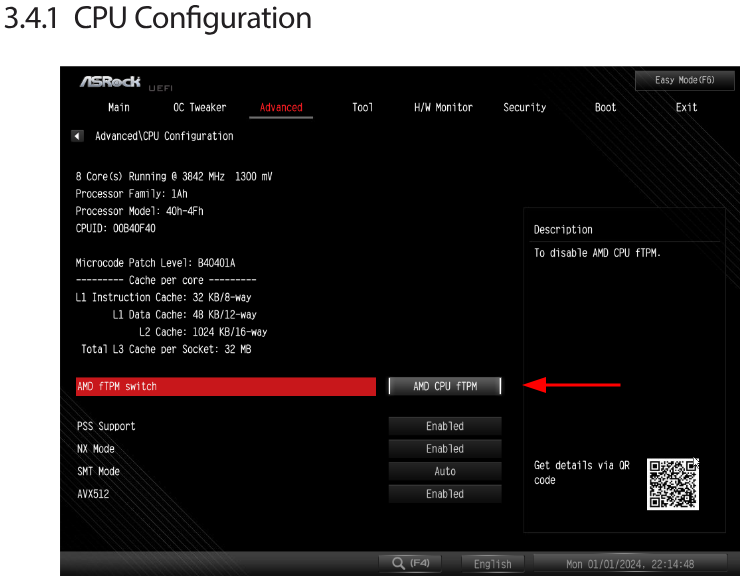
Please check that you have tpm disabled in your bios

3 Likes

You may want try:

systemctl mask dev-tpmrm0.device

Or alternately:

systemctl mask dev-tpm0.device
3 Likes

Ok, I loaded BIOS defaults, then rebooted.

Back in UEFI I re-enabled EXPO6000 settings and disabled ‘Secure Device Support’, (didn’t find anything closer to fTPM) and rebooted again. (This reboot took a bit longer to GRUB, probably memory training?)

Back on the desktop I then tried rebuilding the initrd with ‘sudo dracut --regenerate-all --force’, but:

╭─frazzlerunning@b850msteellegendwifi in ~ took 0s
[🔴] × sudo dracut --regenerate-all --force
[sudo] Passwort für frazzlerunning:
dracut[I]: Executing: /usr/bin/dracut --kver=6.12.51-1-lts --force
dracut[F]: Can't write to /boot/efi/df14ed68b2624f0fbb85eb687b607a95/6.12.51-1-lts: Directory /boot/efi/df14ed68b2624f0fbb85eb687b607a95/6.12.51-1-lts does not exist or is not accessible.
dracut[I]: Executing: /usr/bin/dracut --kver=6.17.1-zen1-1-zen --force
dracut[F]: Can't write to /boot/efi/df14ed68b2624f0fbb85eb687b607a95/6.17.1-zen1-1-zen: Directory /boot/efi/df14ed68b2624f0fbb85eb687b607a95/6.17.1-zen1-1-zen does not exist or is not accessible.

I’d guess that’s got something to do with me disabling Secure Device Support?

Edit: Startup now takes even longer?

Startup finished in 51.182s (firmware) + 5.700s (loader) + 628ms (kernel) + 1min 5.918s (initrd) + 8.771s (userspace) = 2min 12.201s
graphical.target reached after 8.771s in userspace.

Maybe I missunderstood cause of translation. You can’t find the setting for ftpm, am I right?

It’s there…

2 Likes

Oh, there it is. Ok, thats deactivated now, but again, the start is still about two minutes to login screen.

the commands from tbg created symlinks to /dev/null

new systemd-analyze:

╭─frazzlerunning@b850msteellegendwifi in ~
╰─λ systemd-analyze blame
1min 5.883s dev-ttyS3.device
1min 5.883s sys-devices-platform-serial8250-serial8250:0-serial8250:0.3-tty-ttyS3.device
1min 5.882s sys-devices-platform-serial8250-serial8250:0-serial8250:0.2-tty-ttyS2.device
1min 5.882s dev-ttyS2.device
1min 5.879s sys-devices-platform-serial8250-serial8250:0-serial8250:0.0-tty-ttyS0.device
1min 5.879s dev-ttyS0.device
1min 5.878s dev-ttyS1.device
1min 5.878s sys-devices-platform-serial8250-serial8250:0-serial8250:0.1-tty-ttyS1.device
1min 5.868s sys-module-configfs.device
1min 5.867s sys-module-fuse.device
1min 5.793s dev-disk-by\x2dpath-pci\x2d0000:0f:00.0\x2dnvme\x2d1\x2dpart-by\x2dpartnum-1.device
1min 5.793s dev-disk-by\x2dpath-pci\x2d0000:0f:00.0\x2dnvme\x2d1\x2dpart1.device
1min 5.793s dev-disk-by\x2ddiskseq-1\x2dpart1.device
1min 5.793s dev-nvme0n1p1.device
1min 5.793s dev-disk-by\x2dpartuuid-45100370\x2dbd27\x2d4ccd\x2d8ea2\x2da80bf1afa363.device
1min 5.793s sys-devices-pci0000:00-0000:00:02.2-0000:0f:00.0-nvme-nvme0-nvme0n1-nvme0n1p1.device
1min 5.793s dev-disk-by\x2ddesignator-esp.device
1min 5.793s dev-disk-by\x2did-nvme\x2deui.002538590141a599\x2dpart1.device
1min 5.793s dev-disk-by\x2did-nvme\x2dSamsung_SSD_970_EVO_1TB_S5H9NS0N951770Y\x2dpart1.device
1min 5.793s dev-disk-by\x2dpath-pci\x2d0000:0f:00.0\x2dnvme\x2d1\x2dpart-by\x2dpartuuid-45100370\x2dbd27\x2d4ccd\x2d8ea2\x2da80bf1afa363.device
1min 5.793s dev-disk-by\x2duuid-7C47\x2d5444.device
1min 5.793s dev-disk-by\x2dpath-pci\x2d0000:0f:00.0\x2dnvme\x2d1\x2dpart-by\x2duuid-7C47\x2d5444.device
1min 5.793s dev-disk-by\x2did-nvme\x2dSamsung_SSD_970_EVO_1TB_S5H9NS0N951770Y_1\x2dpart1.device
1min 5.792s sys-devices-pci0000:00-0000:00:02.2-0000:0f:00.0-nvme-nvme0-nvme0n1-nvme0n1p2.device
1min 5.792s dev-disk-by\x2ddiskseq-1\x2dpart2.device
1min 5.792s dev-disk-by\x2dpartlabel-root.device
1min 5.792s dev-disk-by\x2dpartuuid-1b3d1a20\x2dc2e0\x2d4927\x2db174\x2df1fb1f13eaa5.device
1min 5.792s dev-disk-by\x2dpath-pci\x2d0000:0f:00.0\x2dnvme\x2d1\x2dpart-by\x2dpartnum-2.device
1min 5.792s dev-disk-by\x2dpath-pci\x2d0000:0f:00.0\x2dnvme\x2d1\x2dpart-by\x2duuid-447f1f77\x2d2189\x2d479c\x2db8eb\x2d54b999daf6e4.device
1min 5.791s dev-disk-by\x2duuid-447f1f77\x2d2189\x2d479c\x2db8eb\x2d54b999daf6e4.device
1min 5.791s dev-disk-by\x2dpath-pci\x2d0000:0f:00.0\x2dnvme\x2d1\x2dpart-by\x2dpartuuid-1b3d1a20\x2dc2e0\x2d4927\x2db174\x2df1fb1f13eaa5.device
1min 5.791s dev-disk-by\x2dpath-pci\x2d0000:0f:00.0\x2dnvme\x2d1\x2dpart-by\x2dpartlabel-root.device
1min 5.791s dev-disk-by\x2did-nvme\x2dSamsung_SSD_970_EVO_1TB_S5H9NS0N951770Y_1\x2dpart2.device
1min 5.791s dev-disk-by\x2did-nvme\x2dSamsung_SSD_970_EVO_1TB_S5H9NS0N951770Y\x2dpart2.device
1min 5.791s dev-nvme0n1p2.device
1min 5.791s dev-disk-by\x2dpath-pci\x2d0000:0f:00.0\x2dnvme\x2d1\x2dpart2.device
1min 5.791s dev-disk-by\x2did-nvme\x2deui.002538590141a599\x2dpart2.device
1min 5.789s dev-disk-by\x2did-nvme\x2deui.002538590141a599.device
1min 5.789s dev-disk-by\x2did-nvme\x2dSamsung_SSD_970_EVO_1TB_S5H9NS0N951770Y.device
1min 5.789s dev-disk-by\x2ddiskseq-1.device
1min 5.789s dev-disk-by\x2dpath-pci\x2d0000:0f:00.0\x2dnvme\x2d1.device
1min 5.789s dev-disk-by\x2did-nvme\x2dSamsung_SSD_970_EVO_1TB_S5H9NS0N951770Y_1.device
1min 5.789s dev-nvme0n1.device
1min 5.789s sys-devices-pci0000:00-0000:00:02.2-0000:0f:00.0-nvme-nvme0-nvme0n1.device
1min 5.778s sys-devices-pci0000:00-0000:00:02.1-0000:04:00.0-0000:05:03.0-0000:08:00.0-net-enp8s0.device
1min 5.778s sys-subsystem-net-devices-enp8s0.device
1min 5.318s dracut-initqueue.service
6.774s NetworkManager-wait-online.service
788ms plocate-updatedb.service
274ms initrd-switch-root.service
253ms NetworkManager.service
228ms boot-efi.mount
203ms grub-btrfs-snapper.service
197ms linux-modules-cleanup.service
128ms ldconfig.service
113ms dev-zram0.swap
99ms systemd-udev-trigger.service
94ms home.mount
94ms root.mount
94ms srv.mount
79ms tmp.mount
77ms nmb.service
68ms upower.service
55ms lvm2-monitor.service
55ms user@1000.service
50ms systemd-tmpfiles-setup-dev-early.service
48ms systemd-journald.service
47ms smb.service
47ms dracut-pre-udev.service
47ms systemd-tmpfiles-clean.service
44ms polkit.service
40ms systemd-remount-fs.service
28ms systemd-vconsole-setup.service
27ms power-profiles-daemon.service
27ms systemd-timesyncd.service
27ms systemd-udevd.service
24ms systemd-oomd.service
24ms ModemManager.service
23ms dev-hugepages.mount
23ms dev-mqueue.mount
23ms dracut-cmdline.service
22ms sys-kernel-debug.mount
22ms sys-kernel-tracing.mount
21ms kmod-static-nodes.service
21ms systemd-journal-flush.service
21ms systemd-tmpfiles-setup-dev.service
21ms systemd-userdbd.service
21ms systemd-fsck-root.service
20ms udisks2.service
20ms systemd-udev-load-credentials.service
19ms systemd-zram-setup@zram0.service
19ms initrd-udevadm-cleanup-db.service
19ms systemd-tmpfiles-setup.service
19ms systemd-modules-load.service
18ms dracut-pre-mount.service
18ms systemd-journal-catalog-update.service
16ms wpa_supplicant.service
15ms systemd-logind.service
15ms user-runtime-dir@1000.service
15ms systemd-hostnamed.service
15ms var-cache.mount
15ms systemd-sysusers.service
14ms var-log.mount
14ms avahi-daemon.service
14ms var-tmp.mount
14ms dracut-pre-pivot.service
14ms proc-sys-fs-binfmt_misc.mount
13ms dracut-pre-trigger.service
12ms rtkit-daemon.service
12ms systemd-update-utmp.service
11ms dracut-shutdown.service
11ms garuda-pacman-lock.service
10ms systemd-fsck@dev-disk-by\x2duuid-7C47\x2d5444.service
9ms dbus-broker.service
9ms initrd-cleanup.service
8ms systemd-random-seed.service
8ms systemd-user-sessions.service
7ms systemd-update-done.service
7ms systemd-userdb-load-credentials.service
4ms modprobe@loop.service
4ms systemd-sysctl.service
4ms sys-fs-fuse-connections.mount
3ms initrd-parse-etc.service
2ms systemd-rfkill.service
605us saned.socket
545us sshd-unix-local.socket
475us systemd-coredump.socket
422us systemd-ask-password.socket
377us systemd-factory-reset.socket
274us systemd-bootctl.socket
262us systemd-creds.socket
231us systemd-sysext.socket
51us dirmngr@etc-pacman.d-gnupg.socket
31us systemd-rfkill.socket
22us avahi-daemon.socket
18us systemd-importd.socket
16us gpg-agent-browser@etc-pacman.d-gnupg.socket
15us lvm2-lvmpolld.socket
13us keyboxd@etc-pacman.d-gnupg.socket
13us gpg-agent-ssh@etc-pacman.d-gnupg.socket
13us systemd-journald-dev-log.socket
13us gpg-agent-extra@etc-pacman.d-gnupg.socket
12us dm-event.socket
12us gpg-agent@etc-pacman.d-gnupg.socket
11us cups.socket
10us systemd-machined.socket
9us systemd-userdbd.socket
9us systemd-oomd.socket
8us systemd-udevd-varlink.socket
8us systemd-journald.socket
7us systemd-logind-varlink.socket
6us dbus.socket
5us systemd-udevd-control.socket
5us systemd-hostnamed.socket
4us systemd-udevd-kernel.socket

Heya, could you please try unplugging every device other than your mouse and keyboard? Also remove any CDs if you have any. Afterwards, try to reboot and see if anything has changed.

Most of the boot log output is being suppressed. You only see the “loading initial ram disk” text because all other text is suppressed. Remove quiet and the loglevel from the kernel parameters and then we should be closer to an answer.

3 Likes

I am also running into this except now it won’t even boot. Going to try recovery and see what I can find. Attempted both zen and lts kernels. Even unplugging everything except Ethernet and power cord it gets stuck at loading initial ramdisk. Fresh install of Mokka today. Will get an inxi when I’m able to get in next

Finally got past the initializing ramdisk but now it’s just a black screen with my mouse cursor in the middle and mouse does not work. Stuck on that. Tty does not work either. I was able to send an inxi, journalctl, or anything to garuda-privatebin due to being in rescue mode. I’ll troubleshoot more tomorrow to try and get more info for you.

Can’t you just load a working snapshot?

Also, use garuda-diag to send your garuda-inxi. You can use it in rescue mode.

2 Likes

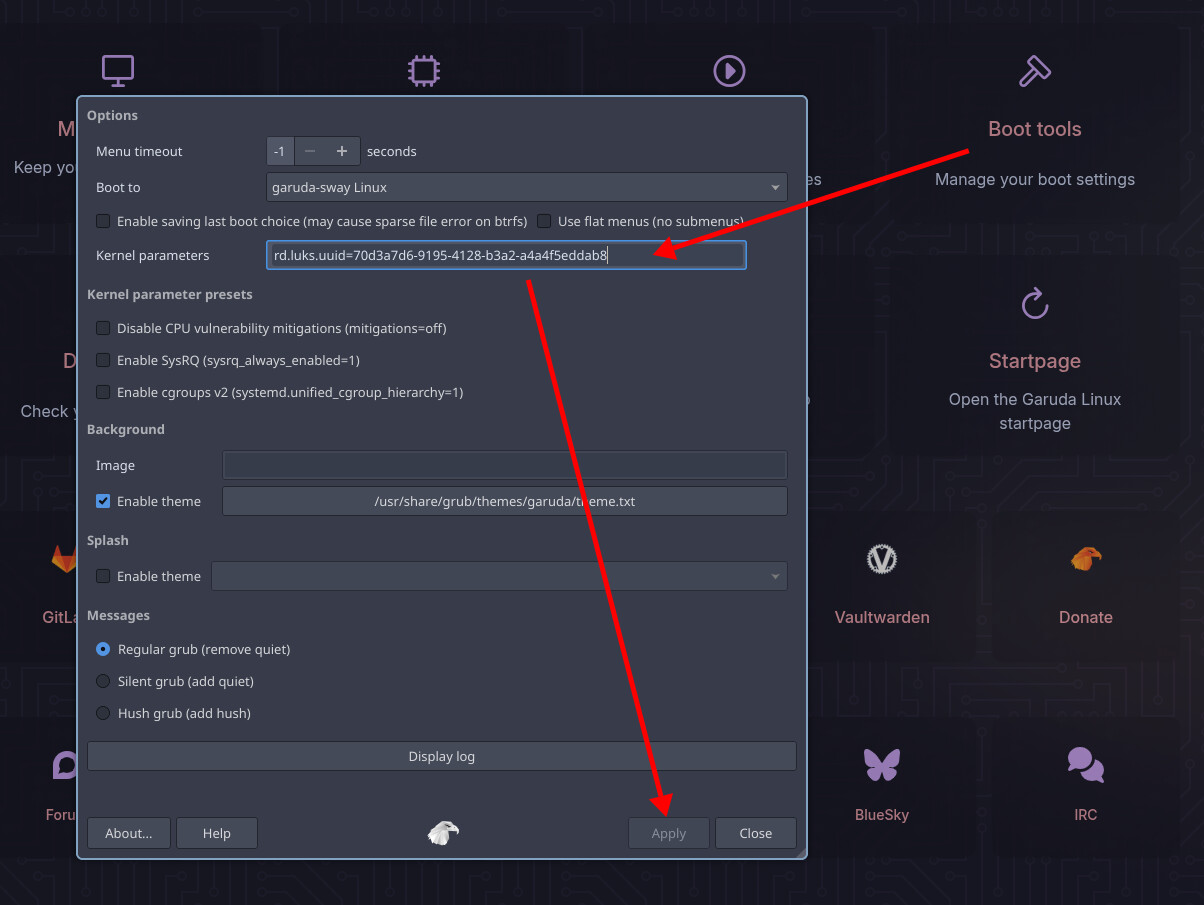
Ok, I found the kernel parameters in the rani Boot tools menu.

I also removed unneccessary devices, which was just one USB-Hub in the second monitor. I only have mouse, keyboard, ethernet and the DisplayPort for primary and HDMI for secondary monitor connected.

The bootup took about as long as before, but now showed more than just “loading initial ramdisk”, this time it showed:
“A start job is running for dracut initqueue hook (1min 5s / no limit)”.
I recorded the boot on my phone so I could see when it was done.

Do you need a new systemd-analyze? a new inxi?

Edit: did a garuda-diag now, after an update and restart

Try like this:

sudo dracut-rebuild
3 Likes
╭─frazzlerunning@b850msteellegendwifi in ~ as 🧙 took 47s
╰─λ sudo dracut-rebuild
:: Rebuilding all initramfs due to changes in dracut files.
:: Building initramfs for linux-lts (6.12.52-1-lts)
:: Building fallback initramfs for linux-lts (6.12.52-1-lts)
:: Building initramfs for linux-zen (6.17.2-zen1-1-zen)
:: Building fallback initramfs for linux-zen (6.17.2-zen1-1-zen)

Done. I’ll go for a reboot, see if that helped.

Edit: I’d say it didn’t make it worse.

Out of curiosity: how long should loading the initrd take? 10s? 30?

Only a few seconds. But you are not actually showing the journal after it is loaded because you are using the quiet kernel parameter:

Which is to say, it looks like you are waiting for the initramfs to load because that is the last message printed on the console, but actually it has probably already finished that part and is waiting on something else instead.

Try removing those two parameters (quiet loglevel=3) for now so you can see the journal while you are booting. You can remove them with “boot tools” in the Rani application.

Then reboot, and see if it is more obvious what is holding up the boot process.

2 Likes

I did take out those parameters and posted a Garuda-diag (after reboot) above.

Edit: here’s the quote:

I had the same issue. It keeps coming back after issues with either ckb-next and/or openrgb. The fix each time has been to power down the computer and turn off the power supply for a few seconds. Then turn it back on

That sounds less like a fix, and more like a patch.

But if nobody knows what the issue is, I will consider switching to bazzite and seeing if that happens there.