Without further troubleshooting/dignostics on your part how can we possibly know what your issue is?
3 Likes
What troubleshooting/diagnostics haven’t I provided? I don’t know what you need, I think I provided what you asked for.
Ah yes, I missed that somehow. Does for the dracut initqueue still take over one minute after rebuilding the initrds?
Please post the contents of /etc/fstab, and also the output of lsblk -f.
1 Like
Yes, the initqueue is still taking 1min and 4 or 5 seconds.
lsblk -f
╭─frazzlerunning@b850msteellegendwifi in ~ as 🧙 took 33s
╰─λ lsblk -f
NAME        FSTYPE FSVER LABEL UUID                                 FSAVAIL FSUSE% MOUNTPOINTS
zram0       swap   1     zram0 803c9008-959f-4270-8431-f6a3c20b4e6d                [SWAP]
nvme0n1
├─nvme0n1p1 vfat   FAT32       7C47-5444                             298,8M     0% /boot/efi
└─nvme0n1p2 btrfs              447f1f77-2189-479c-b8eb-54b999daf6e4  865,7G     7% /var/cache
/home
/var/log
/root
/srv
/var/tmp
/
/etc/fstab
# /etc/fstab: static file system information.
#
# Use 'blkid' to print the universally unique identifier for a device; this may
# be used with UUID= as a more robust way to name devices that works even if
# disks are added and removed. See fstab(5).
#
# <file system>             <mount point>  <type>  <options>  <dump>  <pass>
UUID=7C47-5444                            /boot/efi      vfat    defaults,umask=0077 0 2
UUID=447f1f77-2189-479c-b8eb-54b999daf6e4 /              btrfs   subvol=/@,defaults,noatime,compress=zstd 0 0
UUID=447f1f77-2189-479c-b8eb-54b999daf6e4 /home          btrfs   subvol=/@home,defaults,noatime,compress=zstd 0 0
UUID=447f1f77-2189-479c-b8eb-54b999daf6e4 /root          btrfs   subvol=/@root,defaults,noatime,compress=zstd 0 0
UUID=447f1f77-2189-479c-b8eb-54b999daf6e4 /srv           btrfs   subvol=/@srv,defaults,noatime,compress=zstd 0 0
UUID=447f1f77-2189-479c-b8eb-54b999daf6e4 /var/cache     btrfs   subvol=/@cache,defaults,noatime,compress=zstd 0 0
UUID=447f1f77-2189-479c-b8eb-54b999daf6e4 /var/log       btrfs   subvol=/@log,defaults,noatime,compress=zstd 0 0
UUID=447f1f77-2189-479c-b8eb-54b999daf6e4 /var/tmp       btrfs   subvol=/@tmp,defaults,noatime,compress=zstd 0 0
tmpfs                                     /tmp           tmpfs   defaults,noatime,mode=1777 0 0
╭─frazzlerunning@b850msteellegendwifi in ~
╰─λ systemd-analyze
Startup finished in 22.278s (firmware) + 1.952s (loader) + 652ms (kernel) + 1min 5.484s (initrd) + 8.182s (userspace) = 1min 38.550s
graphical.target reached after 8.182s in userspace.
Can you please remove the quiet and loglevel=3 parameters from the kernel cmdline and add rd.debug to it instead?
Afterward, sudo update-grub and then reboot. Then show us where it gets stuck, a picture would work.
They have already been removed. I’ll add rd.debug.
╭─frazzlerunning@b850msteellegendwifi in ~
╰─λ sudo update-grub
[sudo] Passwort für frazzlerunning:
GRUB-Konfigurationsdatei wird erstellt …
Thema gefunden: /usr/share/grub/themes/garuda-dr460nized/theme.txt
Linux-Abbild gefunden: /boot/vmlinuz-linux-zen
Initrd-Abbild gefunden: /boot/initramfs-linux-zen.img
Found fallback initrd image(s) in /boot:  initramfs-linux-zen-fallback.img
Linux-Abbild gefunden: /boot/vmlinuz-linux-lts
Initrd-Abbild gefunden: /boot/initramfs-linux-lts.img
Found fallback initrd image(s) in /boot:  initramfs-linux-lts-fallback.img
Warnung: Zur Erkennung anderer bootfähiger Partitionen wird os-prober ausgeführt.
Dessen Ausgabe wird zur Erkennung bootfähiger Programmdateien und Erzeugen neuer Boot-Einträge verwendet.
Bootmenü-Eintrag für UEFI-Firmware-Einstellungen wird hinzugefügt …
Detecting snapshots ...
Found snapshot: 2025-10-18 13:16:20 | @/.snapshots/109/snapshot | post   | ldb lib32-libxml2 libarchive libavif libblockdev libblockdev-crypto libb |
Found snapshot: 2025-10-18 13:15:37 | @/.snapshots/108/snapshot | pre    | pacman -Su                                                               |
Found snapshot: 2025-10-16 18:33:38 | @/.snapshots/107/snapshot | post   | brave-bin fwupd git kio libreoffice-still plasma6-applets-panel-colorize |
Found snapshot: 2025-10-16 18:33:35 | @/.snapshots/106/snapshot | pre    | pacman -Su                                                               |
Found snapshot: 2025-10-15 20:38:42 | @/.snapshots/105/snapshot | post   | candy-icons-git exfatprogs gsettings-desktop-schemas gsettings-system-sc |
Found snapshot: 2025-10-15 20:37:58 | @/.snapshots/104/snapshot | pre    | pacman -Su                                                               |
Found snapshot: 2025-10-13 17:53:35 | @/.snapshots/103/snapshot | post   | attica baloo bluez-qt breeze-icons ffmpeg4.4 firedragon frameworkintegra |
Found snapshot: 2025-10-13 17:53:29 | @/.snapshots/102/snapshot | pre    | pacman -Su --noprogressbar                                               |
Found snapshot: 2025-10-12 09:30:51 | @/.snapshots/101/snapshot | post   | alsa-card-profiles amd-ucode gst-plugin-pipewire lib32-libpipewire lib32 |
Found snapshot: 2025-10-12 09:30:16 | @/.snapshots/100/snapshot | pre    | pacman -Su                                                               |
Found snapshot: 2025-10-08 21:40:07 | @/.snapshots/91/snapshot  | single | Before PacDiff merge                                                     |
Found 11 snapshot(s)
Unmount /tmp/grub-btrfs.kg3DBvv2Bs .. Success
Found memtest86+ image: /boot/memtest86+/memtest.bin
/usr/bin/grub-probe: Warnung: Unbekannter Gerätetyp nvme0n1.
abgeschlossen
I’ll reboot now.
Edit: bootup pictures:
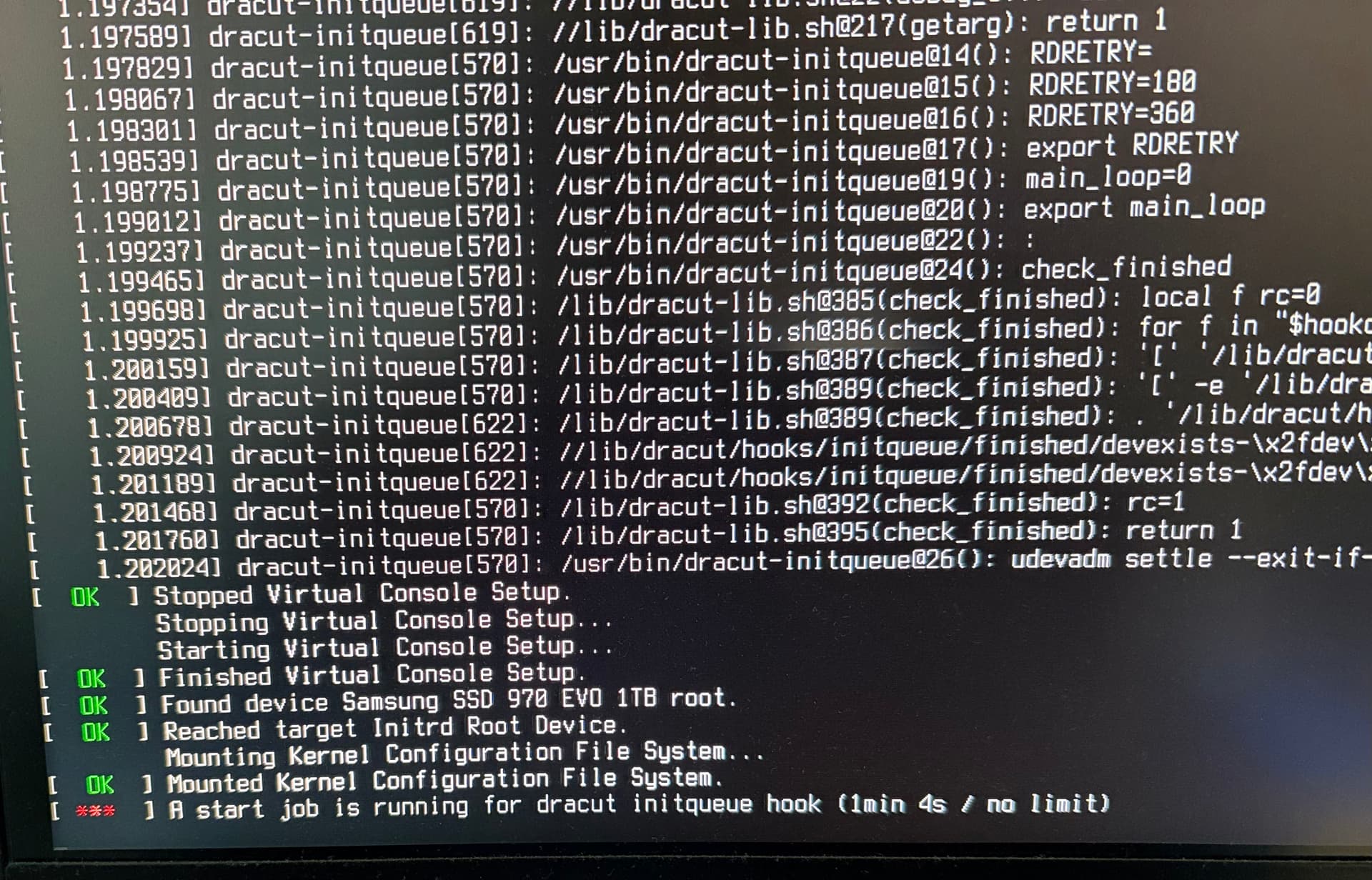
Heya. We need to be able to see the whole text, please. Cut off parts of the logs are not useful for diagnosis.
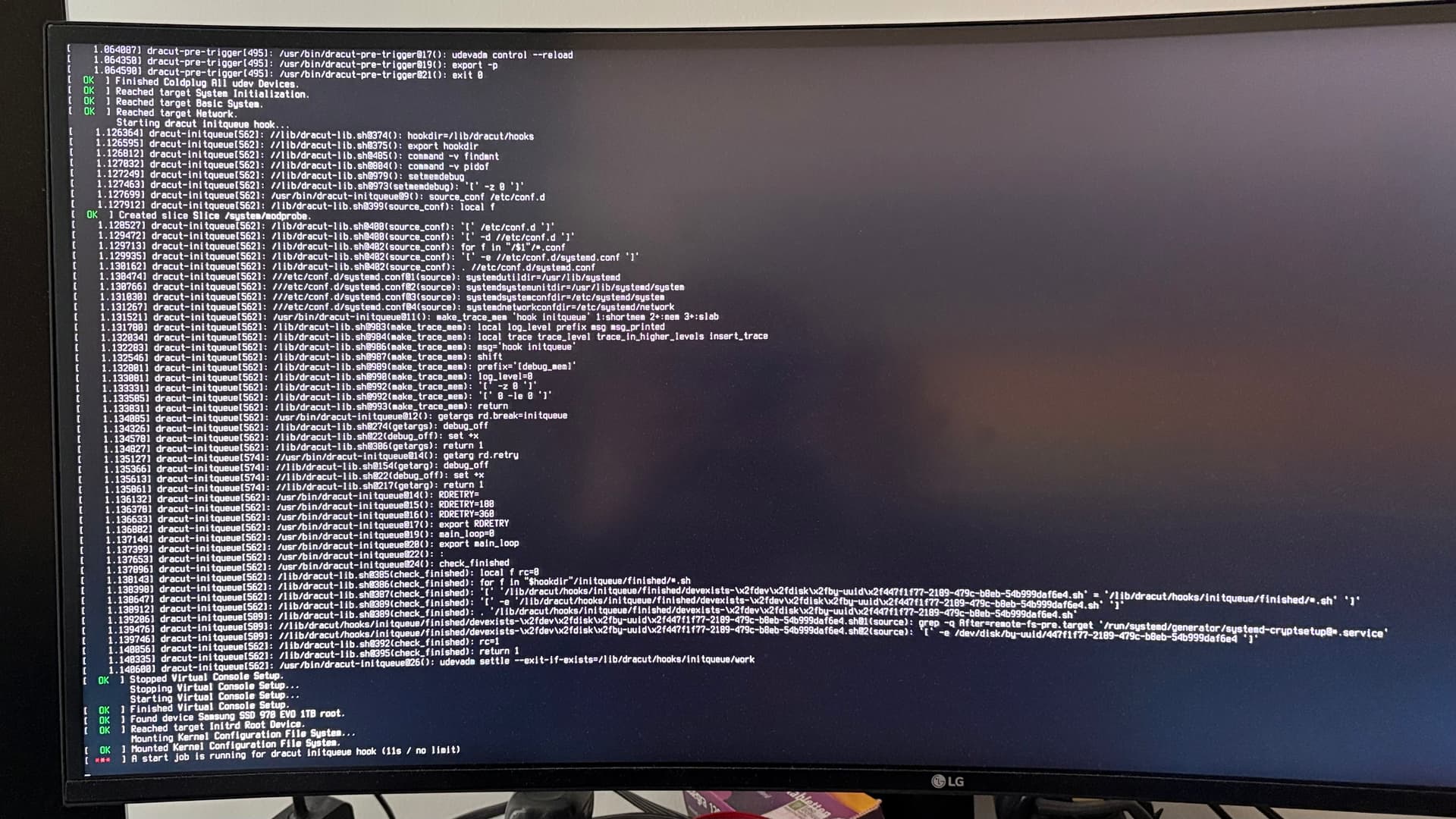
Udevadm usually only takes that long when there is hardware plugged in that is glitchy. Are you 100% sure you have unplugged everything? Unplug ethernet cables, unplug EVERYTHING except the screen and try to boot again.
2 Likes
I unplugged even keyboard and mouse and ethernet. Same issue.
Then I unplugged even the internal USB-headers for the front-IO, still hangs over a minute.
So I looked through the journalctl:
Okt 19 13:42:47 b850msteellegendwifi kernel: usb 3-8: device descriptor read/64, error -110
Okt 19 13:43:03 b850msteellegendwifi kernel: usb 3-8: device descriptor read/64, error -110
Okt 19 13:43:03 b850msteellegendwifi kernel: usb 3-8: new high-speed USB device number 5 using xhci_hcd
Okt 19 13:43:09 b850msteellegendwifi kernel: usb 3-8: device descriptor read/64, error -110
Okt 19 13:43:25 b850msteellegendwifi kernel: usb 3-8: device descriptor read/64, error -110
Okt 19 13:43:25 b850msteellegendwifi kernel: usb usb3-port8: attempt power cycle
Okt 19 13:43:25 b850msteellegendwifi kernel: usb 3-8: new high-speed USB device number 6 using xhci_hcd
Okt 19 13:43:30 b850msteellegendwifi kernel: usb 3-8: Device not responding to setup address.
Okt 19 13:43:35 b850msteellegendwifi kernel: usb 3-8: Device not responding to setup address.
Okt 19 13:43:35 b850msteellegendwifi kernel: usb 3-8: device not accepting address 6, error -71
Okt 19 13:43:36 b850msteellegendwifi kernel: usb 3-8: new high-speed USB device number 7 using xhci_hcd
Okt 19 13:43:41 b850msteellegendwifi kernel: usb 3-8: Device not responding to setup address.
Okt 19 13:43:41 b850msteellegendwifi systemd-udevd[492]: usb3: Worker [583] processing SEQNUM=2203 is taking a long time.
Okt 19 13:43:41 b850msteellegendwifi systemd[1]: systemd-udevd.service: Got notification message from PID 492: WATCHDOG=1
Okt 19 13:43:46 b850msteellegendwifi kernel: usb 3-8: Device not responding to setup address.
Okt 19 13:43:46 b850msteellegendwifi kernel: usb 3-8: device not accepting address 7, error -71
Okt 19 13:43:46 b850msteellegendwifi kernel: usb usb3-port8: unable to enumerate USB device
Can I somehow disable that single USB port?
How can I find out, which port that is on my mainboard? I looked through the manual (https://download.asrock.com/Manual/B850M%20Steel%20Legend%20WiFi.pdf), but I can’t tell which port or header that would be, I find no reference to a USB 3 port 8, on the USB 2 header 7_8 nothing is connected.
From the beginning until now, everything indicates that you have a BIOS or hardware problem:
You haven’t responded to my post yet. Is there a temporal connection between the BIOS update and the boot delay? Did you check whether the settings were still correct after the BIOS update? Did you perform a CMOS reset after the BIOS update and then set the BIOS correctly? And sorry for putting this somewhat bluntly, but loading the BIOS defaults and then changing two settings is nonsense. Furthermore, it is not helpful to use garuda-diag, as this log only contains the last entries of the journal and nothing from the actual boot.
It makes sense to first fix the exorbitant firmware boot time to rule out faulty hardware or incorrect BIOS settings as the actual cause.
Or in short, and in exactly this order:
- Perform a CMOS reset and then set your BIOS correctly.
- Then post the current output of
systemd-analyzeandsystemd-analyze blame. - Post a complete journal of the boot in question.
Edit: I didn’t see that you posted while I was replying:
THIS is the first real clue as to what is delaying the boot.
I’m not sure, but I seem to remember that when I looked at the BIOS manual for your motherboard, I saw that RAM tuning etc. is enabled in the default settings. Perhaps that’s a clue too. If that’s the case, I would disable all tuning settings.
3 is the bus and 8 is the device, post the output of
lsusb
Sorry to jump in here again.
I don’t have time to debug this more thoroughly right now but I can tell you all this has nothing at all to do with TPM or anything like that.
You are reading the blame wrong.
dracut-initqueue.service is the problem.
More specifically, this has nothing to do with dracut, but one of the udevadm hooks.
One of the hooks is taking too long and timing out. This is commonly a hardware thing.
The true answer to finding out what the real problem is, is identifying which udevadm hook takes over a minute. Trying random things isn’t going to do it, or rather is going to take forever.
Once it has been identified, it can be rectified.
1 Like
╭─frazzlerunning@b850msteellegendwifi in ~ took 0s
[🔍] × lsusb
Bus 001 Device 001: ID 1d6b:0002 Linux Foundation 2.0 root hub
Bus 002 Device 001: ID 1d6b:0003 Linux Foundation 3.0 root hub
Bus 003 Device 001: ID 1d6b:0002 Linux Foundation 2.0 root hub
Bus 003 Device 002: ID 05ac:0250 Apple, Inc. Aluminium Keyboard (ISO)
Bus 003 Device 003: ID 05e3:0610 Genesys Logic, Inc. Hub
Bus 004 Device 001: ID 1d6b:0003 Linux Foundation 3.0 root hub
Bus 005 Device 001: ID 1d6b:0002 Linux Foundation 2.0 root hub
Bus 005 Device 002: ID 3434:d030 Keychron  Keychron Link
Bus 006 Device 001: ID 1d6b:0003 Linux Foundation 3.0 root hub
Bus 007 Device 001: ID 1d6b:0002 Linux Foundation 2.0 root hub
Bus 007 Device 002: ID 0451:8142 Texas Instruments, Inc. TUSB8041 4-Port Hub
Bus 007 Device 003: ID 2109:2811 VIA Labs, Inc. Hub
Bus 007 Device 004: ID 0b0e:0300 GN Netcom Jabra EVOLVE 20 MS
Bus 008 Device 001: ID 1d6b:0003 Linux Foundation 3.0 root hub
Bus 008 Device 002: ID 0451:8140 Texas Instruments, Inc. TUSB8041 4-Port Hub
Bus 008 Device 003: ID 2109:8110 VIA Labs, Inc. Hub
Bus 009 Device 001: ID 1d6b:0002 Linux Foundation 2.0 root hub
Bus 009 Device 002: ID 26ce:01a2 ASRock LED Controller
Bus 010 Device 001: ID 1d6b:0003 Linux Foundation 3.0 root hub```No one claimed that, and I only summarized roughly (without quoting everything) that it points to hardware issue or incorrect BIOS settings.
I agree.
These look like the same errors that I was seeing after having failures on resuming from sleep and the pc freezing up. After that it would take a long time to reboot. Not until I did as I suggested earlier did the problem go away. It only came back when the PC froze again while resuming from sleep. That would occur to something not working right with ckb-next and/or openrgb. I still haven’t found a fix from my pc taking 3 attempts to wake from suspend until it successfully completes the task. So did your PC freeze up before this started? Have you tried to power down the system?
Sorry to interject, but your USB errors look similar to what I used to receive on a MOBO with a faulty bios that did not function correctly with linux. The manufacturer (Gigabyte) never released a bios update to correct the USB problems affecting Linux, (as Linux was obviously not a priority for them). The only way I could resolve the USB problems using Linux was to use special boot parameters that disabled iommu.
There are several variations of the required parameter that worked to correct this issue, such as:
amd_iommu=off
Or
iommu=off
Or
iommu=soft
Just throwing it out there for you on the off chance that something similar is occurring with your mobo.
Edited to add further info:
You can try the amd_iommu=on iommu=pt boot parameters together if you want to retain the option to use virtualization technologies.
You will need to use this method if you want to run a Virtual Machine.
When using the amd_iommu=on iommu=pt boot parameters together it is best to leave iommu enabled in the bios.
Alternately, you can use the iommu=soft boot parameter if you have no need for virtualization technologies.
When using the iommu=soft boot parameter it is best to leave the iommu option disabled in the bios.
4 Likes
Looks like a virtual device.
If only we knew whether @frazzlerunning has IOMMU enabled or disabled in his BIOS under AMD CBS…
But hey, as long as the OP isn’t even remotely capable of taking care of his BIOS to rule this out as a potential cause, I’m out of here. 
So i briefly looked through the thread and i had a similar issue with “Loading initial ramdisk” taking for a while on my one PC and it turns out it was my official wireless xbox dongle that was causing the hangup. As soon as i unplugged it the issue went away at boot. So now i just plug it in when i need it and it works just fine.
Not sure if this is helpful or not.