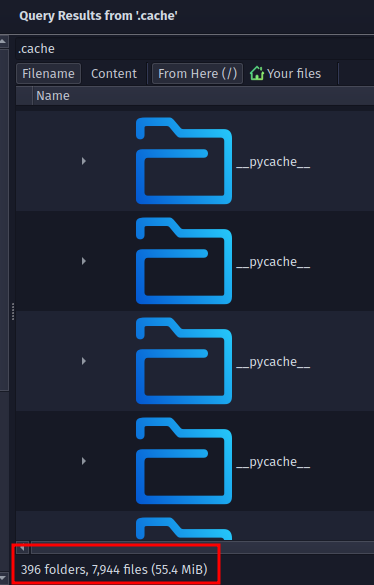
Nearly 8000 python cache files!
I would like a cli client too considering IMO the new GUI app sucks. It’s way too barebones and I wish they’d have programmed it in Qt6 instead of GTK3 but I can live with the latter.
You are right, considering they don’t officially support Arch or Arch based distros. 
I installed it via AUR & Octopi before I switched to using paru.
The only folders I was referring to in ~/.cache & ~/.config are literally titled ‘Proton’. I never deleted any python folders. Maybe that’s my problem, haha.
Yes, that’s what I figured but your comment got me wondering exactly how many cache files were on my computer! I know pvpn uses lots of python code. But i was not expecting to find ~8000 cache files even regardless of pvpn lol! Maybe Garuda uses it them for the btrfs???
Wait, those 8000 are only from PVPN? Holy cow.
No not only from PVPN! I did’t scroll through even all the folders but they are just general python cache folders used by anything.
But I know they use a lot and that trying to update my python for pvpn a few years ago basically rewrote my garuda os which promptly caused a catastrophic system fail after reboot. It wiped the hdd and i had to reinstall the os from scratch! (that told me a lot but that is left to imagination creativity lol)
My global menu didn’t work at ALL. Even apps like Dolphin and Konsole.
All I had to do was run the lookandfeeltool --resetLayout --apply Dr460nized manually and now it works!
Sadly some of the apps don’t work (yet), skimming the web:
Something… Qt5/Qt6… Something… qt.qpa.wayland: Wayland does not support QWindow::requestActivate()… Something… export QT_QPA_PLATFORM=xcb
I am assuming they will be along eventually as Qt5 apps start upgrading to Qt6.

I decided to update my system. Seems ok so far except the space between the icons in my panel is insane and I can’t figure out how to reduce it. Anyone know a way to fix this?

Edit:
I figured out a way. It seems dumb but I had to add two spacers at the top and two at the bottom. I’d still like to know a way to actually just set the spacing per icon so it isn’t bonkers. It seems to only be so crazy when it’s vertically positioned, because it seemed more reasonable after the theme was first applied by the migration thing and it was at the bottom of the screen.
You have to adjust hint-margin in the tasks.svgz located in the widgets folder of the theme.
I am currently working on adjusting those margins, which are not the same depending on the dock Position (sides vs top/bottom). It takes a lot of testing time to find the right margins. I noticed they also seem somewhat dependent on screen resolution and definitely on Panel size, which is a huge shame.
At the moment, hint-margin element does not even exist in the tasks.svgz of Dr460nized theme, if you want to change them now, you need to create them (or copy them from say Breeze theme’s svgz).
As this isn’t enough, the ones in Breeze are for bottom dock. You need to understand the elements’ naming convention so you can use them in one of the other 3 positions.
Good luck.
I think it is the kwin_wayland that is messing with the vpn connection. Someone on KDE gist.github.com mentioned that wayland can prevent gui apps from running as root, although this has strikethroughs on it on the github as if the text details have been retracted.
If i run pvpn from cli then it works - i can use the pvpn gui to change the exit country but cannot do initial connection from power off. It looks like pvpn is running but no net connection (port ?) is fully opened.
This is actually a major security issue and if we imagine that KDE will partner with a laptop chop shop to someday build a KDE linux hard-wired computer (with garuda & plasma burned into the roms lol), then our usual antiFOSS friends will be butthurt if they cannot bribe everyone to build in m-i-m backdoors everywhere!
That is strange. I learned another place PVPN places files is in ~./cert/nm-openvpn
So maybe try deleting files from there too if you decide to try a clean install.
I managed to fix my PVPN issue with the new version. I stupidly forgot to update its dependencies, which fixed the issue once I updated them.
1 Like
Are you running Dr460nized Garuda or another ?
Dr460nized Gaming specifically.
1 Like
"kdialog
The Window Switcher installation is broken, resources are missing.
Contact your distribution about this. "
Does this happen to everyone on Dr460nized right now when you use alt-tab?
It seems to be caused by this:
Mar 22 13:55:19 nova kwin_wayland[11072]: kwin_tabbox: Component failed to load: QList(file:///home/serqetry/
.local/share/kwin/tabbox/thumbnail_switcher/contents/ui/main.qml:26:1: module “org.kde.kwin” version 2.0 is no
t installed
Edit:
I figured out the solution. It must have been settings left behind by Plasma 5 causing this, because I went to Task Switcher in System Settings and clicked the button to reset to defaults… and now it has the thumbnail grid again during alt-tab and no more error.
2 Likes
ALT-TAB works fine on mine.
Yes i too had the same error, same error popped up every time… finally i changed the visualisation to ‘cover switch’ and that error message no longer is prompted.
4 Likes
Well this is very disappointing but you still can’t arrange icons in the dock if you use Activities with apps set to appear only on certain Activities.
If you try, it will scramble all your arrangement on all Activities. You can’t arrange them unless you set them all to appear on all Activities before you move them around, then you can remove them from specific activities. If you ever want to add something new to an Activity, it destroys all your work again and you have to start over.
I thought this must be a bug in KDE, but now they haven’t even touched it going to a new major version. I should probably ask since our dock panel is unique to Garuda… is this confirmed to be a KDE bug? And if it isn’t… or even if it is… can it be fixed for Garuda?
This could be fixed if there could be a different dock for each activity, but I haven’t figured out a way to do that without making scripts that swap config files around upon entering an Activity and doing that causes annoying side effects so I would rather not set that up again in Plasma 6.
Activities were heavily debated to be removed in Plasma 6 for more than one reason (Nate Graham wrote about this in his numerous blogs about Plasma 6). If I remember correctly (I wasn’t paying attention to activities because I’ve never used them so my memory might not be perfect), it was decided not to remove activities but they were essentially made to work with Plasma 6 in basic form, but I think he said or implied that they weren’t touched otherwise. So I’m not surprised to hear of bugs with activities.
And a clarification about the “dock”. It isn’t unique to Garuda. It’s literally the plasma panel just configured in a way different than default / normal.
That’s just crazy. Activities are awesome, and so much more useful than regular virtual desktops. I don’t understand why anyone would want them removed. They just need to be improved and bugs fixed. It makes no sense that it doesn’t allow different panel configurations for each Activity, especially with that glaring bug.
I made a perl script that reads a sorted list of my apps and modifies the Plasma config file where the arrangement is stored. So now if I want to rearrange things I can just edit the text file and run the script. Really stupid that this is necessary… but it works. Maybe I will try learning how to turn it into a Plasmoid widget.
1 Like