I want to install garuda on my new laptop but my keyboard doesn't work properly on this system.
After selecting language and location, the keyboard is a big problem. I tried all the keyboard modes Calamares provided, and none of them worked. Of course, I could use a USB external keyboard, but I'd like a laptop keyboard to work.
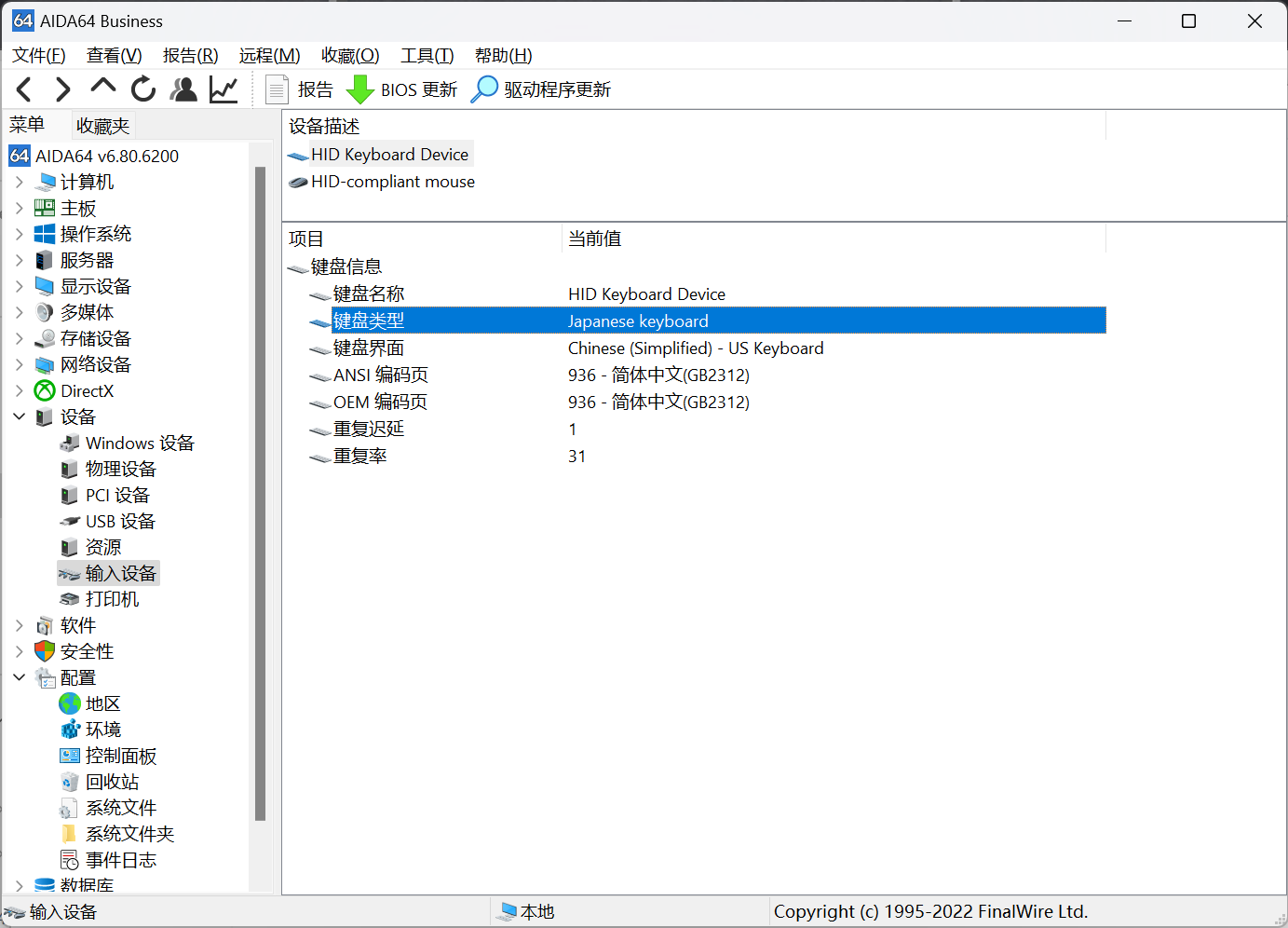
I'm not sure if there is such a thing as a keyboard driver, or how I can add my keyboard mode.With AIDA64,I got my laptop keyboard mode:Japanese Keyboard.How to add it?
Please follow the template and post the
garuda-inxi
as text. Try copy and paste if keyboard failed.
Maybe you must use for install English layout and try later to change the language?
3 Likes
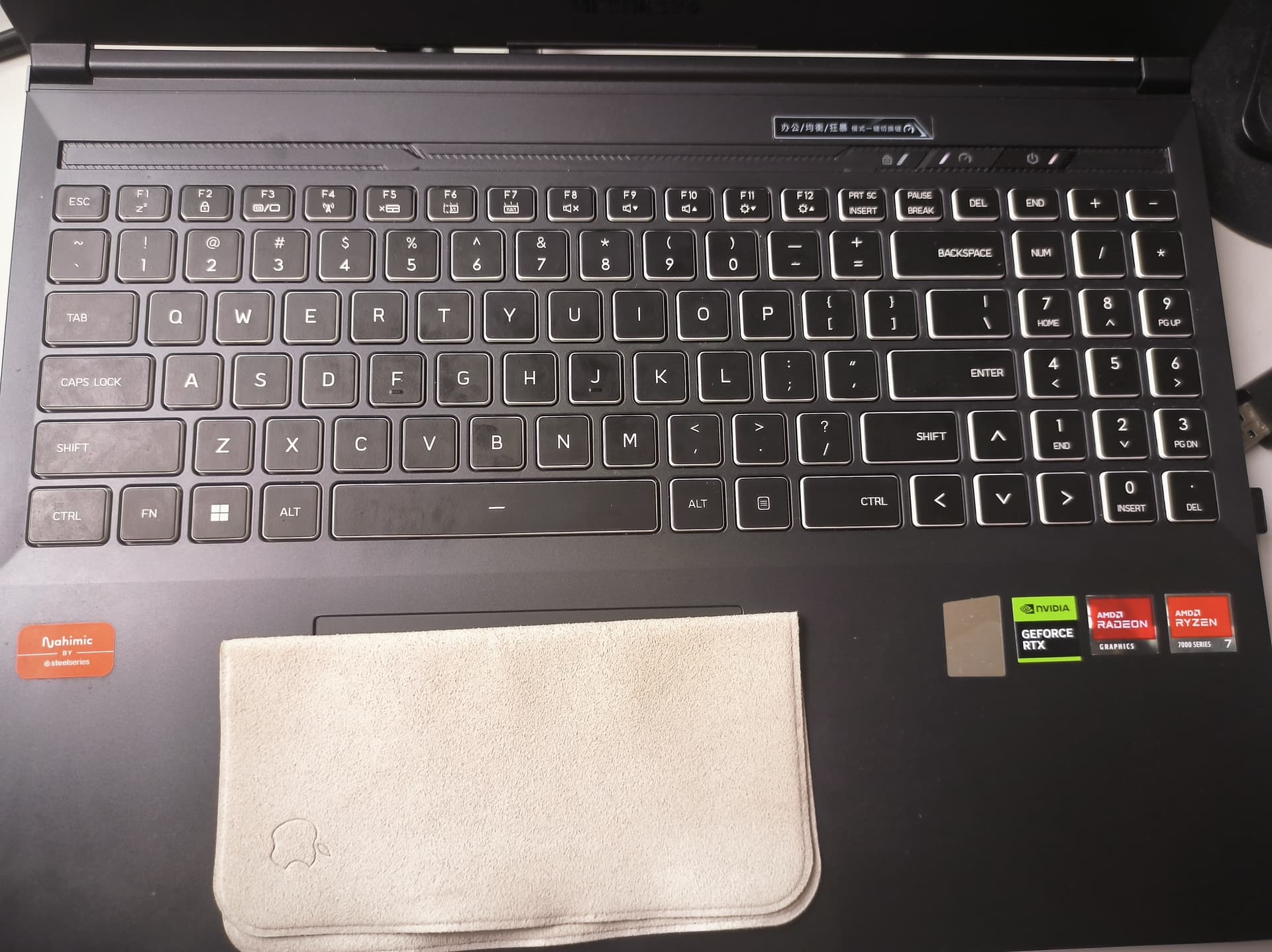
I'm not sure I understand the problem, that looks like an English keyboard to me.
Are you looking for an input method to type Japanese on that keyboard?
4 Likes
This is not a keyboard layout problem, but a lower level. If there is no gui installed, I can't even do anything. I press any key, and the computer does not respond.With the help of the mouse, I can operate in the live.
1 Like
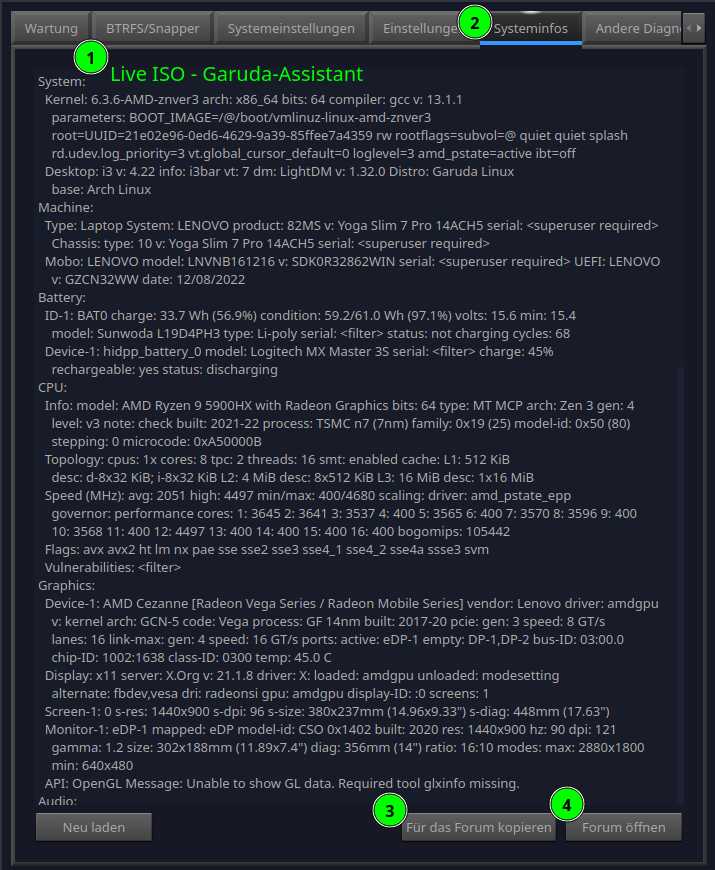
garuda-inxi
System:
Kernel: 6.2.13-zen-1-zen arch: x86_64 bits: 64 compiler: gcc v: 12.2.1
parameters: BOOT_IMAGE=/boot/vmlinuz-x86_64 lang=en_US keytable=us tz=UTC
misobasedir=garuda root=miso:LABEL=GARUDA_DR460NIZED_RAPTOR quiet
systemd.show_status=1 ibt=off driver=nonfree nouveau.modeset=0
i915.modeset=1 radeon.modeset=1
Desktop: KDE Plasma v: 5.27.4 tk: Qt v: 5.15.9 wm: kwin_x11 vt: 1 dm: SDDM
Distro: Garuda Linux base: Arch Linux
Machine:
Type: Laptop System: MECHREVO product: Jiaolong16S Series GM6XG0X
v: Standard serial: <superuser required>
Mobo: MECHREVO model: GM6XG0X v: Standard serial: <superuser required>
UEFI: American Megatrends LLC. v: N.1.20MRO04 date: 05/12/2023
Battery:
ID-1: BAT0 charge: 62.3 Wh (100.0%) condition: 62.3/62.3 Wh (100.0%)
volts: 17.1 min: 15.2 model: standard type: Li-ion serial: <filter>
status: full
Device-1: hidpp_battery_0 model: Logitech G304 Lightspeed Wireless Gaming
Mouse serial: <filter> charge: 100% (should be ignored) rechargeable: yes
status: discharging
CPU:
Info: model: AMD Ryzen 7 7840H w/Radeon 780M Graphics bits: 64 type: MT MCP
arch: Zen 4 gen: 5 level: v4 note: check built: 2022+ process: TSMC n5 (5nm)
family: 0x19 (25) model-id: 0x74 (116) stepping: 1 microcode: 0xA704101
Topology: cpus: 1x cores: 8 tpc: 2 threads: 16 smt: enabled cache:
L1: 512 KiB desc: d-8x32 KiB; i-8x32 KiB L2: 8 MiB desc: 8x1024 KiB
L3: 16 MiB desc: 1x16 MiB
Speed (MHz): avg: 2116 high: 3800 min/max: 1600/6680 boost: enabled
scaling: driver: acpi-cpufreq governor: schedutil cores: 1: 3800 2: 1600
3: 1600 4: 1600 5: 1385 6: 3800 7: 3800 8: 3800 9: 1600 10: 1600 11: 1600
12: 1600 13: 1600 14: 1600 15: 1283 16: 1600 bogomips: 121375
Flags: avx avx2 ht lm nx pae sse sse2 sse3 sse4_1 sse4_2 sse4a ssse3 svm
Vulnerabilities: <filter>
Graphics:
Device-1: NVIDIA AD107M [GeForce RTX 4060 Max-Q / Mobile]
vendor: Tongfang Hongkong driver: N/A alternate: nouveau non-free: 530.xx+
status: current (as of 2023-03) arch: Lovelace code: AD1xx
process: TSMC n4 (5nm) built: 2022-23+ pcie: gen: 4 speed: 16 GT/s
lanes: 8 bus-ID: 01:00.0 chip-ID: 10de:28a0 class-ID: 0300
Device-2: AMD Phoenix1 vendor: Tongfang Hongkong driver: amdgpu v: kernel
arch: RDNA-3 code: Phoenix process: TSMC n4 (4nm) built: 2022+ pcie: gen: 4
speed: 16 GT/s lanes: 16 ports: active: eDP-1
empty: DP-1, DP-2, DP-3, DP-4 bus-ID: 07:00.0 chip-ID: 1002:15bf
class-ID: 0300 temp: 52.0 C
Device-3: Chicony HD Webcam type: USB driver: uvcvideo bus-ID: 1-3:3
chip-ID: 04f2:b78a class-ID: fe01 serial: <filter>
Display: x11 server: X.Org v: 21.1.8 with: Xwayland v: 23.1.1
compositor: kwin_x11 driver: X: loaded: amdgpu unloaded: modesetting
alternate: fbdev,vesa dri: radeonsi gpu: amdgpu display-ID: :0 screens: 1
Screen-1: 0 s-res: 2560x1600 s-dpi: 96 s-size: 677x423mm (26.65x16.65")
s-diag: 798mm (31.43")
Monitor-1: eDP-1 mapped: eDP model: TL160ADMP11-0 built: 2021
res: 2560x1600 hz: 240 dpi: 188 gamma: 1.2 size: 345x215mm (13.58x8.46")
diag: 407mm (16") ratio: 16:10 modes: max: 2560x1600 min: 640x480
API: OpenGL v: 4.6 Mesa 23.0.3 renderer: AMD Radeon Graphics (gfx1103_r1
LLVM 15.0.7 DRM 3.49 6.2.13-zen-1-zen) direct-render: Yes
Audio:
Device-1: NVIDIA vendor: Tongfang Hongkong driver: snd_hda_intel v: kernel
pcie: gen: 4 speed: 16 GT/s lanes: 8 bus-ID: 01:00.1 chip-ID: 10de:22be
class-ID: 0403
Device-2: AMD ACP/ACP3X/ACP6x Audio Coprocessor vendor: Tongfang Hongkong
driver: snd_pci_ps v: kernel alternate: snd_pci_acp3x, snd_rn_pci_acp3x,
snd_pci_acp5x, snd_pci_acp6x, snd_acp_pci, snd_rpl_pci_acp6x,
snd_sof_amd_renoir, snd_sof_amd_rembrandt pcie: gen: 4 speed: 16 GT/s
lanes: 16 bus-ID: 07:00.5 chip-ID: 1022:15e2 class-ID: 0480
Device-3: AMD Family 17h/19h HD Audio vendor: Tongfang Hongkong
driver: snd_hda_intel v: kernel pcie: gen: 4 speed: 16 GT/s lanes: 16
bus-ID: 07:00.6 chip-ID: 1022:15e3 class-ID: 0403
API: ALSA v: k6.2.13-zen-1-zen status: kernel-api tools: N/A
Server-1: PipeWire v: 0.3.70 status: active with: 1: pipewire-pulse
status: active 2: wireplumber status: active 3: pipewire-alsa type: plugin
4: pw-jack type: plugin tools: pactl,pw-cat,pw-cli,wpctl
Network:
Device-1: Realtek RTL8111/8168/8411 PCI Express Gigabit Ethernet
vendor: Tongfang Hongkong driver: r8169 v: kernel pcie: gen: 1
speed: 2.5 GT/s lanes: 1 port: e000 bus-ID: 03:00.0 chip-ID: 10ec:8168
class-ID: 0200
IF: enp3s0 state: up speed: 100 Mbps duplex: full mac: <filter>
Device-2: MEDIATEK MT7921K Wi-Fi 6E 80MHz driver: mt7921e v: kernel pcie:
gen: 2 speed: 5 GT/s lanes: 1 bus-ID: 04:00.0 chip-ID: 14c3:0608
class-ID: 0280
IF: wlp4s0 state: down mac: <filter>
Bluetooth:
Device-1: MediaTek Wireless_Device type: USB driver: btusb v: 0.8
bus-ID: 1-5:4 chip-ID: 0e8d:0608 class-ID: e001 serial: <filter>
Report: bt-adapter ID: hci0 rfk-id: 0 state: up address: <filter>
Drives:
Local Storage: total: 1.89 TiB used: 0 KiB (0.0%)
SMART Message: Unable to run smartctl. Root privileges required.
ID-1: /dev/nvme0n1 maj-min: 259:1 vendor: Kingston model: OM8SEP41024Q-A0
size: 953.87 GiB block-size: physical: 512 B logical: 512 B speed: 63.2 Gb/s
lanes: 4 type: SSD serial: <filter> rev: SBI00111 temp: 55.9 C scheme: GPT
ID-2: /dev/nvme1n1 maj-min: 259:0 vendor: Yangtze Memory
model: ZHITAI TiPlus5000 1TB size: 953.87 GiB block-size: physical: 512 B
logical: 512 B speed: 31.6 Gb/s lanes: 4 type: SSD serial: <filter>
rev: ZTA10613 temp: 47.9 C scheme: GPT
ID-3: /dev/sda maj-min: 8:0 type: USB vendor: Kingston
model: DataTraveler 3.0 size: 28.82 GiB block-size: physical: 512 B
logical: 512 B type: N/A serial: <filter> scheme: MBR
SMART Message: Unknown USB bridge. Flash drive/Unsupported enclosure?
Partition:
Message: No partition data found.
Swap:
Kernel: swappiness: 133 (default 60) cache-pressure: 100 (default)
ID-1: swap-1 type: zram size: 14.84 GiB used: 0 KiB (0.0%) priority: 100
dev: /dev/zram0
Sensors:
System Temperatures: cpu: 59.8 C mobo: N/A gpu: amdgpu temp: 52.0 C
Fan Speeds (RPM): N/A
Info:
Processes: 322 Uptime: 1m wakeups: 6 Memory: 14.84 GiB
used: 1.96 GiB (13.2%) Init: systemd v: 253 default: graphical
tool: systemctl Compilers: gcc: 12.2.1 Packages: pm: pacman pkgs: 1200
libs: 327 tools: octopi,paru Shell: fish v: 3.6.1 default: Bash v: 5.1.16
running-in: konsole inxi: 3.3.26
warning: database file for 'garuda' does not exist (use '-Sy' to download)
warning: database file for 'core' does not exist (use '-Sy' to download)
warning: database file for 'extra' does not exist (use '-Sy' to download)
warning: database file for 'community' does not exist (use '-Sy' to download)
warning: database file for 'multilib' does not exist (use '-Sy' to download)
warning: database file for 'chaotic-aur' does not exist (use '-Sy' to download)
Garuda (2.6.16-1):
System install date:     2023-06-09
Last full system update: 2023-06-09 ↻
Is partially upgraded:   No
Relevant software:       snapper NetworkManager dracut
Windows dual boot:       <superuser required>
Failed units:
2 Likes
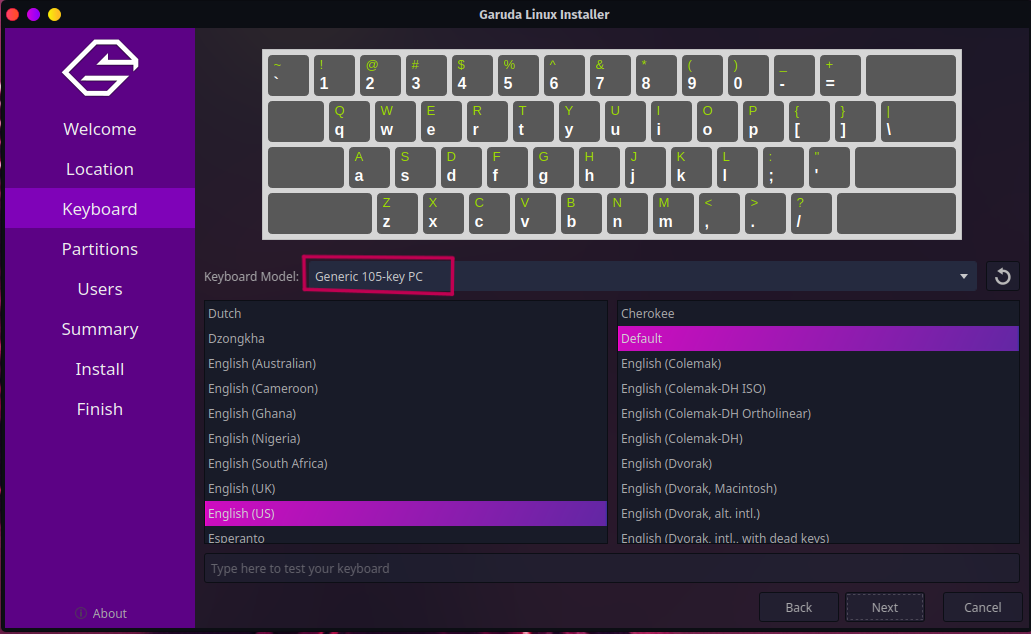
This is the keyboard model,and I tried everyone of them,my laptop keyboard didnt work.(it works fine on win11).AIDA64 show the Keyboard Model is Japanese keyboard,as much as I'm confused, is there any way to add it.I type garuda-inxi with USB keyboard
A quick search online suggests that this model has a good amount of compatibility problems, I hope to find a solution somewhere.
@sgs is xinput in the KDE live?
I think xinput -list would be helpful here... if there's a way to even type that.
3 Likes
1 Like
xinput should be available
3 Likes
There is not the laptop keyboard.
╭─garuda@garuda in ~ as 🧙
╰─λ xinput --list
⎡ Virtual core pointer                          id=2    [master pointer  (3)]
⎜   ↳ Virtual core XTEST pointer                id=4    [slave  pointer  (2)]
⎜   ↳ Logitech G304                             id=10   [slave  pointer  (2)]
⎜   ↳ UNIW0001:00 093A:0255 Mouse               id=13   [slave  pointer  (2)]
⎜   ↳ UNIW0001:00 093A:0255 Touchpad            id=14   [slave  pointer  (2)]
⎜   ↳ USB Keyboard USB Keyboard                 id=16   [slave  pointer  (2)]
⎣ Virtual core keyboard                         id=3    [master keyboard (2)]
↳ Virtual core XTEST keyboard               id=5    [slave  keyboard (3)]
↳ Video Bus                                 id=6    [slave  keyboard (3)]
↳ Video Bus                                 id=7    [slave  keyboard (3)]
↳ Power Button                              id=8    [slave  keyboard (3)]
↳ Sleep Button                              id=9    [slave  keyboard (3)]
↳ HD Webcam: HD Webcam                      id=11   [slave  keyboard (3)]
↳ Logitech G304                             id=15   [slave  keyboard (3)]
↳ USB Keyboard USB Keyboard                 id=17   [slave  keyboard (3)]
↳ USB Keyboard USB Keyboard                 id=12   [slave  keyboard (3)]
Well there's three USB Keyboard, to be honest I don't know what that means.
I'd guess one is the virtual keybaord, one the external, and perhaps one is the laptop one.
Try also sudo lshw -businfo -sanitize and lsusb -tvv -- again, I don't know if those commands are available in the live, someone please suggest what to do if not.
lshw dont in the Kde live, wait some minutes,Find the solution after I install the system.
pacman -Ss lshw
extra/lshw B.02.19.2-5
    A small tool to provide detailed information on the hardware
    configuration of the machine.
╭─lee@long16s in ~ as 🧙 took 9ms
[🔴] × sudo lshw -businfo -sanitize
Bus info          Device          Class          Description
============================================================
system         Jiaolong16S Series GM6XG0X (0001)
bus            GM6XG0X
memory         64KiB BIOS
memory         512KiB L1 cache
memory         8MiB L2 cache
memory         16MiB L3 cache
cpu@0                             processor      AMD Ryzen 7 7840H w/Radeon 780M Graphics
memory         16GiB System Memory
memory         8GiB SODIMM Synchronous Unbuffered (Unregistered) 4800 MHz (0
memory         8GiB SODIMM Synchronous Unbuffered (Unregistered) 4800 MHz (0
pci@0000:00:00.0                  bridge         Advanced Micro Devices, Inc. [AMD]
pci@0000:00:00.2                  generic        Advanced Micro Devices, Inc. [AMD]
pci@0000:00:01.1                  bridge         Advanced Micro Devices, Inc. [AMD]
pci@0000:01:00.0  /dev/fb0        display        AD107M [GeForce RTX 4060 Max-Q / Mobile]
pci@0000:01:00.1                  multimedia     NVIDIA Corporation
pci@0000:00:01.2                  bridge         Advanced Micro Devices, Inc. [AMD]
pci@0000:02:00.0  /dev/nvme0      storage        ZHITAI TiPlus5000 1TB
hwmon3          disk           NVMe disk
/dev/ng0n1      disk           NVMe disk
nvme@0:1          /dev/nvme0n1    disk           1024GB NVMe disk
nvme@0:1,1        /dev/nvme0n1p1  volume         299MiB Windows FAT volume
nvme@0:1,2        /dev/nvme0n1p2  volume         953GiB EFI partition
pci@0000:00:02.1                  bridge         Advanced Micro Devices, Inc. [AMD]
pci@0000:03:00.0  enp3s0          network        RTL8111/8168/8411 PCI Express Gigabit Ethernet Controller
pci@0000:00:02.2                  bridge         Advanced Micro Devices, Inc. [AMD]
pci@0000:04:00.0  wlp4s0          network        MT7921K (RZ608) Wi-Fi 6E 80MHz
pci@0000:00:02.3                  bridge         Advanced Micro Devices, Inc. [AMD]
pci@0000:00:02.4                  bridge         Advanced Micro Devices, Inc. [AMD]
pci@0000:06:00.0  /dev/nvme1      storage        KINGSTON OM8SEP41024Q-A0
hwmon4          disk           NVMe disk
/dev/ng1n1      disk           NVMe disk
nvme@1:1          /dev/nvme1n1    disk           1024GB NVMe disk
nvme@1:1,1        /dev/nvme1n1p1  volume         99MiB Windows FAT volume
nvme@1:1,2        /dev/nvme1n1p2  volume         15MiB reserved partition
nvme@1:1,3        /dev/nvme1n1p3  volume         953GiB Windows NTFS volume
nvme@1:1,4        /dev/nvme1n1p4  volume         735MiB Windows NTFS volume
pci@0000:00:08.1                  bridge         Advanced Micro Devices, Inc. [AMD]
pci@0000:07:00.0                  display        Phoenix1
pci@0000:07:00.2                  generic        Advanced Micro Devices, Inc. [AMD]
pci@0000:07:00.3                  bus            Advanced Micro Devices, Inc. [AMD]
usb@1             usb1            bus            xHCI Host Controller
usb@1:1                           input          USB Receiver
usb@1:3                           multimedia     HD Webcam
usb@1:4                           input          USB Keyboard
usb@1:5                           communication  Wireless_Device
usb@2             usb2            bus            xHCI Host Controller
pci@0000:07:00.4                  bus            Advanced Micro Devices, Inc. [AMD]
usb@3             usb3            bus            xHCI Host Controller
usb@3:1                           bus            Hub
usb@4             usb4            bus            xHCI Host Controller
pci@0000:07:00.5                  multimedia     ACP/ACP3X/ACP6x Audio Coprocessor
pci@0000:07:00.6                  multimedia     Family 17h/19h HD Audio Controller
pci@0000:00:08.2                  bridge         Advanced Micro Devices, Inc. [AMD]
pci@0000:08:00.0                  generic        Advanced Micro Devices, Inc. [AMD]
pci@0000:00:08.3                  bridge         Advanced Micro Devices, Inc. [AMD]
pci@0000:09:00.0                  generic        Advanced Micro Devices, Inc. [AMD]
pci@0000:09:00.3                  bus            Advanced Micro Devices, Inc. [AMD]
usb@5             usb5            bus            xHCI Host Controller
usb@6             usb6            bus            xHCI Host Controller
pci@0000:09:00.4                  bus            Advanced Micro Devices, Inc. [AMD]
usb@7             usb7            bus            xHCI Host Controller
usb@8             usb8            bus            xHCI Host Controller
pci@0000:00:14.0                  bus            FCH SMBus Controller
pci@0000:00:14.3                  bridge         FCH LPC Bridge
pci@0000:00:01.0                  bridge         Advanced Micro Devices, Inc. [AMD]
pci@0000:00:02.0                  bridge         Advanced Micro Devices, Inc. [AMD]
pci@0000:00:03.0                  bridge         Advanced Micro Devices, Inc. [AMD]
pci@0000:00:04.0                  bridge         Advanced Micro Devices, Inc. [AMD]
pci@0000:00:08.0                  bridge         Advanced Micro Devices, Inc. [AMD]
pci@0000:00:18.0                  bridge         Advanced Micro Devices, Inc. [AMD]
pci@0000:00:18.1                  bridge         Advanced Micro Devices, Inc. [AMD]
pci@0000:00:18.2                  bridge         Advanced Micro Devices, Inc. [AMD]
pci@0000:00:18.3                  bridge         Advanced Micro Devices, Inc. [AMD]
pci@0000:00:18.4                  bridge         Advanced Micro Devices, Inc. [AMD]
pci@0000:00:18.5                  bridge         Advanced Micro Devices, Inc. [AMD]
pci@0000:00:18.6                  bridge         Advanced Micro Devices, Inc. [AMD]
pci@0000:00:18.7                  bridge         Advanced Micro Devices, Inc. [AMD]
system         System Board
system         AT Real-Time Clock
input          IBM Enhanced keyboard controller (101/2-key)
system         Motherboard registers
╭─lee@long16s in ~ as 🧙 took 1s
╰─λ sudo lsusb -tvv
/:  Bus 08.Port 1: Dev 1, Class=root_hub, Driver=xhci_hcd/1p, 10000M
ID 1d6b:0003 Linux Foundation 3.0 root hub
/sys/bus/usb/devices/usb8  /dev/bus/usb/008/001
/:  Bus 07.Port 1: Dev 1, Class=root_hub, Driver=xhci_hcd/1p, 480M
ID 1d6b:0002 Linux Foundation 2.0 root hub
/sys/bus/usb/devices/usb7  /dev/bus/usb/007/001
/:  Bus 06.Port 1: Dev 1, Class=root_hub, Driver=xhci_hcd/1p, 10000M
ID 1d6b:0003 Linux Foundation 3.0 root hub
/sys/bus/usb/devices/usb6  /dev/bus/usb/006/001
/:  Bus 05.Port 1: Dev 1, Class=root_hub, Driver=xhci_hcd/1p, 480M
ID 1d6b:0002 Linux Foundation 2.0 root hub
/sys/bus/usb/devices/usb5  /dev/bus/usb/005/001
/:  Bus 04.Port 1: Dev 1, Class=root_hub, Driver=xhci_hcd/1p, 10000M
ID 1d6b:0003 Linux Foundation 3.0 root hub
/sys/bus/usb/devices/usb4  /dev/bus/usb/004/001
/:  Bus 03.Port 1: Dev 1, Class=root_hub, Driver=xhci_hcd/1p, 480M
ID 1d6b:0002 Linux Foundation 2.0 root hub
/sys/bus/usb/devices/usb3  /dev/bus/usb/003/001
|__ Port 1: Dev 2, If 0, Class=Hub, Driver=hub/4p, 480M
ID 05e3:0608 Genesys Logic, Inc. Hub
/sys/bus/usb/devices/3-1  /dev/bus/usb/003/002
/:  Bus 02.Port 1: Dev 1, Class=root_hub, Driver=xhci_hcd/2p, 10000M
ID 1d6b:0003 Linux Foundation 3.0 root hub
/sys/bus/usb/devices/usb2  /dev/bus/usb/002/001
/:  Bus 01.Port 1: Dev 1, Class=root_hub, Driver=xhci_hcd/5p, 480M
ID 1d6b:0002 Linux Foundation 2.0 root hub
/sys/bus/usb/devices/usb1  /dev/bus/usb/001/001
|__ Port 1: Dev 2, If 0, Class=Human Interface Device, Driver=usbhid, 12M
ID 046d:c53f Logitech, Inc.
/sys/bus/usb/devices/1-1  /dev/bus/usb/001/002
|__ Port 1: Dev 2, If 1, Class=Human Interface Device, Driver=usbhid, 12M
ID 046d:c53f Logitech, Inc.
/sys/bus/usb/devices/1-1  /dev/bus/usb/001/002
|__ Port 1: Dev 2, If 2, Class=Human Interface Device, Driver=usbhid, 12M
ID 046d:c53f Logitech, Inc.
/sys/bus/usb/devices/1-1  /dev/bus/usb/001/002
|__ Port 3: Dev 3, If 0, Class=Video, Driver=uvcvideo, 480M
ID 04f2:b78a Chicony Electronics Co., Ltd
/sys/bus/usb/devices/1-3  /dev/bus/usb/001/003
|__ Port 3: Dev 3, If 1, Class=Video, Driver=uvcvideo, 480M
ID 04f2:b78a Chicony Electronics Co., Ltd
/sys/bus/usb/devices/1-3  /dev/bus/usb/001/003
|__ Port 3: Dev 3, If 2, Class=Application Specific Interface, Driver=, 480M
ID 04f2:b78a Chicony Electronics Co., Ltd
/sys/bus/usb/devices/1-3  /dev/bus/usb/001/003
|__ Port 4: Dev 4, If 0, Class=Human Interface Device, Driver=usbhid, 12M
ID 1a81:2039 Holtek Semiconductor, Inc.
/sys/bus/usb/devices/1-4  /dev/bus/usb/001/004
|__ Port 4: Dev 4, If 1, Class=Human Interface Device, Driver=usbhid, 12M
ID 1a81:2039 Holtek Semiconductor, Inc.
/sys/bus/usb/devices/1-4  /dev/bus/usb/001/004
|__ Port 4: Dev 4, If 2, Class=Human Interface Device, Driver=usbhid, 12M
ID 1a81:2039 Holtek Semiconductor, Inc.
/sys/bus/usb/devices/1-4  /dev/bus/usb/001/004
|__ Port 5: Dev 5, If 0, Class=Wireless, Driver=btusb, 480M
ID 0e8d:0608 MediaTek Inc.
/sys/bus/usb/devices/1-5  /dev/bus/usb/001/005
|__ Port 5: Dev 5, If 1, Class=Wireless, Driver=btusb, 480M
ID 0e8d:0608 MediaTek Inc.
/sys/bus/usb/devices/1-5  /dev/bus/usb/001/005
|__ Port 5: Dev 5, If 2, Class=Wireless, Driver=, 480M
ID 0e8d:0608 MediaTek Inc.
/sys/bus/usb/devices/1-5  /dev/bus/usb/001/005
╭─lee@long16s in ~ as 🧙 took 16ms
╰─λ sudo lshw -businfo -sanitize | grep input
usb@1:1                           input          USB Receiver
usb@1:4                           input          USB Keyboard
input          IBM Enhanced keyboard controller (101/2-key)
Is this with the external keyboard connected?
yeah,a USB 87 keyboard.