joyal0
12 February 2026 06:18
1
So this is the problem I want to install garuda XFCE and Garuda sway in parallel for a triple boot
sudo cp -r /boot/efi/EFI ~/EFI-backup
sudo mv /boot/efi/EFI/Garuda /boot/efi/EFI/Garuda-XFCE
sudo nano /etc/default/grub
 and then changed the GRUB_DISTRIBUTOR="Garuda-XFCE"
then
sudo grub-install --target=x86_64-efi --efi-directory=/boot/efi --bootloader-id=Garuda-XFCE
sudo grub-mkconfig -o /boot/grub/grub.cfg
Now after rebooting and garuda update i have this shown on health.Will it cause problems in the future.
type or paste code here
--- System Health Check Report ---
25/26 checks run in 1.84 seconds ⌛
Powered by garuda-health 🦅

--- LOW ---
 - Failed systemd services found: proton.VPN.service
 - "Garuda" is not the current bootloader: https://wiki.garudalinux.org/why-garuda-bootloader
Will it cause any problems in the future?
TNE
12 February 2026 08:00
2
Heya. This will be fine, just be aware that:
The “Garuda” bootloader will be overwritten by every Garuda Version you have installed. So you will probably want two separate grubs for each Garuda Installation that are not named “Garuda”, not just for XFCE
It is now your responsibility to update the grub bootloader (via grub-install, not update-grub) when it becomes necessary. It won’t be done automatically for you anymore.
3 Likes
joyal0
13 February 2026 05:33
4
just when is it necessary? should it be done after every update or what
TNE
13 February 2026 05:35
5
See the red disclaimer:
Rule of thumb: Whenever the grub package updates.
1 Like
joyal0
13 February 2026 06:05
6
Thanks a lot.
and would running
sudo grub-install --target=x86_64-efi --efi-directory=/boot/efi --bootloader-id=Garuda-XFCE
sudo grub-mkconfig -o /boot/grub/grub.cfg
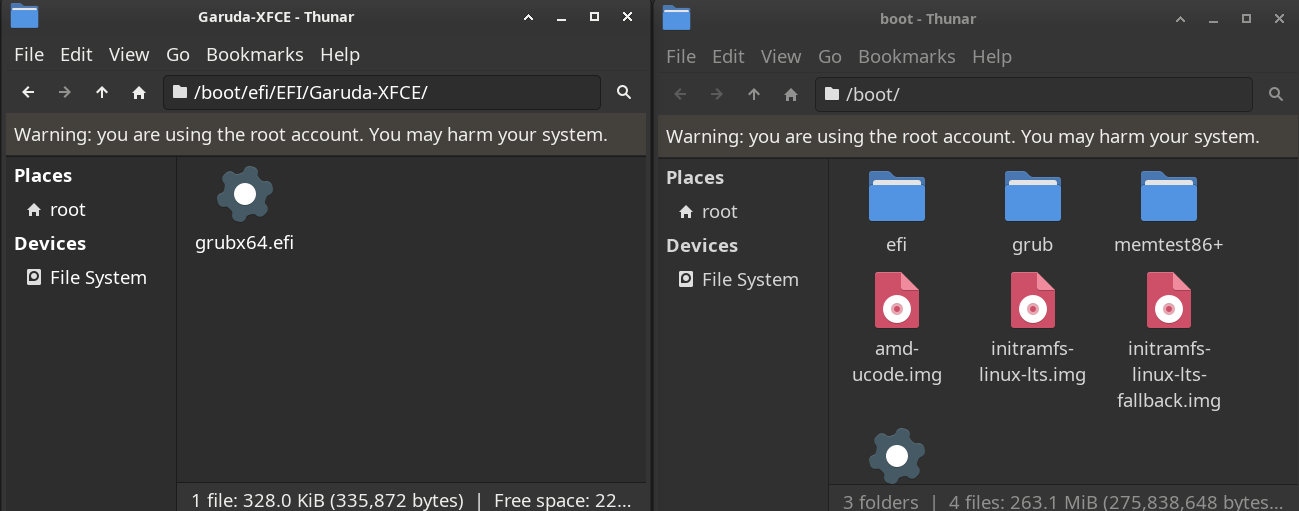
overwrite the generated grubx64.efi and grub folder or would it create a new one and keep on generating new ones until it fully occupy the space of EFI drive and then i have do delete them manually again.
Edit: i saw the frustration of posting without inxi hence here is the required
System:
  Kernel: 6.12.69-1-lts arch: x86_64 bits: 64 compiler: gcc v: 15.2.1 clocksource: tsc
    avail: hpet,acpi_pm parameters: BOOT_IMAGE=/@/boot/vmlinuz-linux-lts
    root=UUID=XXXX                                                                                      rw rootflags=subvol=@ quiet loglevel=3
  Desktop: Xfce v: 4.20.1 tk: Gtk v: 3.24.51 wm: xfwm4 v: 4.20.0 with: xfce4-panel
    tools: xfce4-screensaver vt: 7 dm: LightDM v: 1.32.0 Distro: Garuda base: Arch Linux
Machine:
  Type: Laptop System: ASUSTeK product: TUF Gaming FX505DT_FX505DT v: 1.0
    serial: <superuser required>
  Mobo: ASUSTeK model: FX505DT v: 1.0 serial: <superuser required> uuid: <superuser required>
    Firmware: UEFI vendor: American Megatrends v: FX505DT.316 date: 01/28/2021
Battery:
  ID-1: BAT0 charge: 34.1 Wh (100%) condition: 34.1/48 Wh (70.9%) volts: 12.09 min: 11.68
    model: FX50442 type: Li-ion serial: N/A charging: status: full control: start: N/A end: 100%
    cycles: N/A
CPU:
  Info: model: AMD Ryzen 7 3750H with Radeon Vega Mobile Gfx bits: 64 type: MT MCP arch: Zen/Zen+
    note: check gen: 1 level: v3 note: check built: 2019 process: GF 12nm family: 0x17 (23)
    model-id: 0x18 (24) stepping: 1 microcode: 0x8108102
  Topology: cpus: 1x dies: 1 clusters: 1 cores: 4 threads: 8 tpc: 2 smt: enabled cache:
    L1: 384 KiB desc: d-4x32 KiB; i-4x64 KiB L2: 2 MiB desc: 4x512 KiB L3: 4 MiB desc: 1x4 MiB
  Speed (MHz): avg: 1397 min/max: 1400/2300 boost: enabled scaling: driver: acpi-cpufreq
    governor: powersave cores: 1: 1397 2: 1397 3: 1397 4: 1397 5: 1397 6: 1397 7: 1397 8: 1397
    bogomips: 36749
  Flags-basic: avx avx2 ht lm nx pae sse sse2 sse3 sse4_1 sse4_2 sse4a ssse3
  Vulnerabilities: <filter>
Graphics:
  Device-1: NVIDIA TU117M [GeForce GTX 1650 Mobile / Max-Q] vendor: ASUSTeK driver: nvidia
    v: 590.48.01 alternate: nouveau,nvidia_drm non-free: 550-580.xx+ status: current (as of 2025-11;
    EOL~2026-12-xx) arch: Turing code: TUxxx process: TSMC 12nm FF built: 2018-2022 pcie: gen: 1
    speed: 2.5 GT/s lanes: 8 link-max: gen: 3 speed: 8 GT/s lanes: 16 ports: active: none
    empty: HDMI-A-1 bus-ID: 01:00.0 chip-ID: 10de:1f91 class-ID: 0300
  Device-2: Advanced Micro Devices [AMD/ATI] Picasso/Raven 2 [Radeon Vega Series / Radeon Mobile
    Series] vendor: ASUSTeK driver: amdgpu v: kernel arch: GCN-5 code: Vega process: GF 14nm
    built: 2017-20 pcie: gen: 3 speed: 8 GT/s lanes: 16 ports: active: eDP-1 empty: none
    bus-ID: 05:00.0 chip-ID: 1002:15d8 class-ID: 0300 temp: 54.0 C
  Device-3: IMC Networks USB2.0 HD UVC WebCam driver: uvcvideo type: USB rev: 2.0 speed: 480 Mb/s
    lanes: 1 mode: 2.0 bus-ID: 3-1:2 chip-ID: 13d3:56a2 class-ID: 0e02 serial: <filter>
  Display: x11 server: X.Org v: 21.1.21 compositor: xfwm4 v: 4.20.0 driver: X:
    loaded: amdgpu,nvidia unloaded: modesetting,nouveau alternate: fbdev,nv,vesa dri: radeonsi
    gpu: amdgpu display-ID: :0.0 screens: 1
  Screen-1: 0 s-res: 1536x864 s-dpi: 96 s-size: 407x229mm (16.02x9.02") s-diag: 467mm (18.39")
  Monitor-1: eDP-1 mapped: eDP model: Najing CEC Panda 0x002d built: 2018 res: mode: 1920x1080
    hz: 60 scale: 125% (0.8) to: 1536x864 dpi: 142 gamma: 1.2 size: 344x194mm (13.54x7.64")
    diag: 395mm (15.5") ratio: 16:9 modes: max: 1920x1080 min: 640x480
  API: OpenGL Message: Unable to show GL data. glxinfo is missing.
  Info: Tools: de: xfce4-display-settings gpu: nvidia-smi x11: xdpyinfo, xprop, xrandr
Audio:
  Device-1: NVIDIA vendor: ASUSTeK driver: snd_hda_intel v: kernel pcie: gen: 1 speed: 2.5 GT/s
    lanes: 8 link-max: gen: 3 speed: 8 GT/s lanes: 16 bus-ID: 01:00.1 chip-ID: 10de:10fa
    class-ID: 0403
  Device-2: Advanced Micro Devices [AMD] Ryzen HD Audio vendor: ASUSTeK driver: snd_hda_intel
    v: kernel pcie: gen: 3 speed: 8 GT/s lanes: 16 bus-ID: 05:00.6 chip-ID: 1022:15e3 class-ID: 0403
  API: ALSA v: k6.12.69-1-lts status: kernel-api tools: N/A
  Server-1: sndiod v: N/A status: off tools: aucat,midicat,sndioctl
  Server-2: PipeWire v: 1.4.10 status: active with: 1: pipewire-pulse status: active
    2: wireplumber status: active 3: pipewire-alsa type: plugin 4: pw-jack type: plugin
    tools: pactl,pw-cat,pw-cli,wpctl
Network:
  Device-1: Realtek RTL8111/8168/8211/8411 PCI Express Gigabit Ethernet vendor: ASUSTeK
    driver: r8169 v: kernel pcie: gen: 1 speed: 2.5 GT/s lanes: 1 port: e000 bus-ID: 02:00.0
    chip-ID: 10ec:8168 class-ID: 0200
  IF: enp2s0 state: up speed: 100 Mbps duplex: full mac: <filter>
  Device-2: Realtek RTL8822CE 802.11ac PCIe Wireless Network Adapter vendor: AzureWave
    driver: rtw_8822ce v: N/A modules: rtw88_8822ce pcie: gen: 1 speed: 2.5 GT/s lanes: 1 port: d000
    bus-ID: 04:00.0 chip-ID: 10ec:c822 class-ID: 0280
  IF: wlp4s0 state: down mac: <filter>
  Info: services: NetworkManager, systemd-timesyncd, wpa_supplicant
Bluetooth:
  Device-1: IMC Networks Bluetooth Radio driver: btusb v: 0.8 type: USB rev: 1.0 speed: 12 Mb/s
    lanes: 1 mode: 1.1 bus-ID: 1-4:4 chip-ID: 13d3:3548 class-ID: e001 serial: <filter>
  Report: btmgmt ID: hci0 rfk-id: 3 state: down bt-service: enabled,running rfk-block:
    hardware: no software: yes address: <filter> bt-v: 5.1 lmp-v: 10 status: discoverable: no
    pairing: no
Drives:
  Local Storage: total: 1011.5 GiB used: 25.14 GiB (2.5%)
  SMART Message: Required tool smartctl not installed. Check --recommends
  ID-1: /dev/nvme0n1 maj-min: 259:0 vendor: Micron model: 2200V MTFDHBA512TCK size: 476.94 GiB
    block-size: physical: 512 B logical: 512 B speed: 31.6 Gb/s lanes: 4 tech: SSD serial: <filter>
    fw-rev: P1MA0V4 temp: 45.9 C scheme: GPT
  ID-2: /dev/sda maj-min: 8:0 vendor: EVM model: 512GB SSD size: 476.94 GiB block-size:
    physical: 512 B logical: 512 B speed: 6.0 Gb/s tech: SSD serial: <filter> fw-rev: 521a
    scheme: MBR
  ID-3: /dev/sdb maj-min: 8:16 model: General USB Disk size: 57.62 GiB block-size:
    physical: 512 B logical: 512 B type: USB rev: 2.0 spd: 480 Mb/s lanes: 1 mode: 2.0 tech: N/A
    serial: <filter> fw-rev: 2.00 scheme: MBR
Partition:
  ID-1: / raw-size: 216.37 GiB size: 216.37 GiB (100.00%) used: 25.11 GiB (11.6%) fs: btrfs
    dev: /dev/sda2 maj-min: 8:2
  ID-2: /boot/efi raw-size: 260 MiB size: 256 MiB (98.46%) used: 33.8 MiB (13.2%) fs: vfat
    dev: /dev/nvme0n1p1 maj-min: 259:1
  ID-3: /home raw-size: 216.37 GiB size: 216.37 GiB (100.00%) used: 25.11 GiB (11.6%) fs: btrfs
    dev: /dev/sda2 maj-min: 8:2
  ID-4: /var/log raw-size: 216.37 GiB size: 216.37 GiB (100.00%) used: 25.11 GiB (11.6%)
    fs: btrfs dev: /dev/sda2 maj-min: 8:2
  ID-5: /var/tmp raw-size: 216.37 GiB size: 216.37 GiB (100.00%) used: 25.11 GiB (11.6%)
    fs: btrfs dev: /dev/sda2 maj-min: 8:2
Swap:
  Kernel: swappiness: 133 (default 60) cache-pressure: 100 (default) zswap: no
  ID-1: swap-1 type: zram size: 15.06 GiB used: 0 KiB (0.0%) priority: 100 comp: zstd
    avail: lzo-rle,lzo,lz4,lz4hc,deflate,842 max-streams: 8 dev: /dev/zram0
Sensors:
  System Temperatures: cpu: 54.1 C mobo: N/A gpu: amdgpu temp: 54.0 C
  Fan Speeds (rpm): cpu: 2400
Info:
  Memory: total: 16 GiB note: est. available: 15.06 GiB used: 4.24 GiB (28.1%)
  Processes: 366 Power: uptime: 1d 5h 2m states: freeze,mem,disk suspend: deep avail: s2idle
    wakeups: 2 hibernate: platform avail: shutdown, reboot, suspend, test_resume image: 5.98 GiB
    services: power-profiles-daemon, upowerd, xfce4-power-manager Init: systemd v: 259
    default: graphical tool: systemctl
  Packages: pm: pacman pkgs: 1270 libs: 364 tools: paru Compilers: clang: 21.1.6 gcc: 15.2.1
    Client: Unknown Client: electron inxi: 3.3.40
Garuda (2.12.3-2):
  System install date:     2026-01-29
  Garuda release:          260115
  Last full system update: 2026-02-13 ↻
  Is partially upgraded:   No
  Relevant software:       snapper NetworkManager dracut nvidia-utils nvidia-open-dkms garuda-hardware-profile-nvidia garuda-hardware-profile-standard garuda-hardware-profile-standard-x11
  Windows dual boot:       Probably (Run as root to verify)
  Failed units:            proton.VPN.service
--- System Health Check Report ---
25/26 checks run in 2.02 seconds ⌛
Powered by garuda-health 🦅

--- LOW ---
 - Failed systemd services found: proton.VPN.service
 - Old Btrfs snapshots found that can be deleted (fix available)
 - "Garuda" is not the current bootloader: https://wiki.garudalinux.org/why-garuda-bootloader

--- INFO ---
 - A reboot is pending (update applied since last reboot)

Run garuda-health --fix to apply fixes.
system
27 February 2026 06:05
7
This topic was automatically closed 14 days after the last reply. New replies are no longer allowed.