I have a ooooold Laptop but quite Nice and working. Since there is no Games working well with the never isos and mesa. So i did install Linux Mint 20 debian for testing but their even Steam didnt want Launch and hang in a Loop with the orginal Nvidia 340.108 Driver.
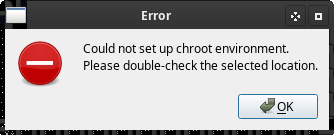
So i plugged in the USB with Ventoy and garuda-xfce-linux-lts-251103.iso. Started the Garuda-Repair-Tool but nothing worked dosnt matter if i choose MBR,EFI or Local. Also a error comes up can not set chroot Enviroment.
The only way was to chroot in it and installed Grub completely new. Update-Grub didnt work either showed a message couldnt lock something and lookup yourself . ( Could not remember all yet but wired)
Im compiling a Kernel now for testings if im done i can take a look again and may sen some screenshots.
my garuda-inxi
garuda-inxi
System:
  Kernel: 6.12.61-1-lts arch: x86_64 bits: 64 compiler: gcc v: 15.2.1
    clocksource: tsc avail: hpet,acpi_pm
    parameters: BOOT_IMAGE=/@/boot/vmlinuz-linux-lts
    root=UUID=2eb7e28d-bde1-4e86-8854-ccb93db680a6 rw rootflags=subvol=@
    quiet loglevel=3
  Desktop: Xfce v: 4.20.1 tk: Gtk v: 3.24.51 wm: xfwm4 v: 4.20.0
    with: xfce4-panel tools: xfce4-screensaver vt: 7 dm: LightDM v: 1.32.0
    Distro: Garuda base: Arch Linux
Machine:
  Type: Laptop System: ASUSTeK product: G71GX v: 1.0
    serial: <superuser required> Chassis: ASUSTek Computer INC. type: 10 v: 1.0
    serial: <superuser required>
  Mobo: ASUSTeK model: G71GX v: 1.00 serial: <superuser required>
    uuid: <superuser required> Firmware: BIOS vendor: American Megatrends
    v: 0904 date: 04/27/2009
Battery:
  ID-1: BAT0 charge: 21.9 Wh (100%) condition: 21.9/74 Wh (29.6%) volts: 16.43
    min: 14.8 model: ASUS G71GX type: Li-ion serial: N/A charging: status: full
    cycles: N/A
CPU:
  Info: model: Intel Core2 Duo T9600 bits: 64 type: MCP arch: Penryn level: v1
    built: 2008 process: Intel 45nm family: 6 model-id: 0x17 (23) stepping: 6
    microcode: 0x60F
  Topology: cpus: 1x dies: 1 clusters: 1 cores: 2 smt: <unsupported> cache:
    L1: 128 KiB desc: d-2x32 KiB; i-2x32 KiB L2: 6 MiB desc: 1x6 MiB
  Speed (MHz): avg: 1597 min/max: 1600/2800 scaling: driver: acpi-cpufreq
    governor: schedutil cores: 1: 1597 2: 1597 bogomips: 11177
  Flags-basic: ht lm nx pae sse sse2 sse3 sse4_1 ssse3 vmx
  Vulnerabilities: <filter>
Graphics:
  Device-1: NVIDIA G92M [GeForce GTX 260M] vendor: ASUSTeK driver: nouveau
    v: kernel non-free: series: 340.xx status: legacy (EOL~2019-12-xx) last:
    release: 340.108 kernel: 5.4 xorg: 1.20 arch: Tesla process: 40-80nm
    built: 2006-2013 pcie: gen: 1 speed: 2.5 GT/s lanes: 16 link-max: gen: 2
    speed: 5 GT/s ports: active: LVDS-1 empty: HDMI-A-1,VGA-1 bus-ID: 01:00.0
    chip-ID: 10de:0618 class-ID: 0300 temp: 62.0 C
  Device-2: Suyin USB 2.0 UVC 2.0M WebCam driver: uvcvideo type: USB
    rev: 2.0 speed: 480 Mb/s lanes: 1 mode: 2.0 bus-ID: 8-5:4 chip-ID: 064e:a115
    class-ID: 0e02 serial: <filter>
  Display: x11 server: X.Org v: 21.1.21 with: Xwayland v: 24.1.9
    compositor: xfwm4 v: 4.20.0 driver: X: loaded: nouveau unloaded: modesetting
    alternate: fbdev,nv,vesa dri: nouveau gpu: nouveau display-ID: :0.0
    screens: 1
  Screen-1: 0 s-res: 1440x900 s-dpi: 96 s-size: 382x239mm (15.04x9.41")
    s-diag: 451mm (17.74")
  Monitor-1: LVDS-1 model: LG Philips 0xa101 built: 2007 res: mode: 1440x900
    hz: 60 scale: 100% (1) dpi: 100 gamma: 1.2 size: 367x230mm (14.45x9.06")
    diag: 433mm (17.1") ratio: 16:10 modes: max: 1440x900 min: 640x350
  API: EGL v: 1.5 hw: drv: nvidia nouveau platforms: device: 0 drv: nouveau
    device: 1 drv: swrast gbm: drv: nouveau surfaceless: drv: nouveau x11:
    drv: swrast inactive: wayland
  API: OpenGL v: 4.5 compat-v: 3.3 vendor: mesa v: 25.3.1-arch1.2 glx-v: 1.4
    direct-render: yes renderer: llvmpipe (LLVM 21.1.6 128 bits)
    device-ID: ffffffff:ffffffff memory: 5.65 GiB unified: yes
  API: Vulkan v: 1.4.328 layers: 11 device: 0 type: cpu name: llvmpipe
    (LLVM 21.1.6 128 bits) driver: mesa llvmpipe v: 25.3.1-arch1.2 (LLVM
    21.1.6) device-ID: 10005:0000 surfaces: N/A
  Info: Tools: api: eglinfo, glxinfo, vulkaninfo de: xfce4-display-settings
    x11: xdpyinfo, xprop, xrandr
Audio:
  Device-1: Intel 82801JI HD Audio vendor: ASUSTeK driver: snd_hda_intel
    v: kernel bus-ID: 00:1b.0 chip-ID: 8086:3a3e class-ID: 0403
  API: ALSA v: k6.12.61-1-lts status: kernel-api with: aoss
    type: oss-emulator tools: N/A
  Server-1: PipeWire v: 1.4.9 status: active with: 1: pipewire-pulse
    status: active 2: wireplumber status: active 3: pipewire-alsa type: plugin
    4: pw-jack type: plugin tools: pactl,pw-cat,pw-cli,wpctl
Network:
  Device-1: Realtek RTL8111/8168/8211/8411 PCI Express Gigabit Ethernet
    vendor: ASUSTeK driver: r8169 v: kernel pcie: gen: 1 speed: 2.5 GT/s
    lanes: 1 port: b800 bus-ID: 03:00.0 chip-ID: 10ec:8168 class-ID: 0200
  IF: enp3s0 state: down mac: <filter>
  Device-2: Qualcomm Atheros AR928X Wireless Network Adapter
    vendor: AzureWave AW-NE771 802.11bgn driver: ath9k v: kernel pcie: gen: 1
    speed: 2.5 GT/s lanes: 1 bus-ID: 07:00.0 chip-ID: 168c:002a class-ID: 0280
  IF: wlp7s0 state: up mac: <filter>
  Info: services: NetworkManager, systemd-timesyncd, wpa_supplicant
Bluetooth:
  Device-1: ASUSTek BT-253 Bluetooth Adapter driver: btusb v: 0.8 type: USB
    rev: 2.0 speed: 12 Mb/s lanes: 1 mode: 1.1 bus-ID: 3-1:2 chip-ID: 0b05:1751
    class-ID: fe01 serial: <filter>
  Report: btmgmt ID: hci0 rfk-id: 0 state: down bt-service: enabled,running
    rfk-block: hardware: no software: yes address: <filter> bt-v: 2.1 lmp-v: 4
    status: discoverable: no pairing: no
Drives:
  Local Storage: total: 960.43 GiB used: 150.09 GiB (15.6%)
  SMART Message: Required tool smartctl not installed. Check --recommends
  ID-1: /dev/sda maj-min: 8:0 vendor: Toshiba model: MQ01ABF050
    size: 465.76 GiB block-size: physical: 512 B logical: 512 B speed: 3.0 Gb/s
    tech: HDD rpm: 5400 serial: <filter> fw-rev: 3M scheme: MBR
  ID-2: /dev/sdb maj-min: 8:16 vendor: Crucial model: CT500MX500SSD1
    size: 465.76 GiB block-size: physical: 512 B logical: 512 B speed: 3.0 Gb/s
    tech: SSD serial: <filter> fw-rev: 043 scheme: GPT
  ID-3: /dev/sdc maj-min: 8:32 vendor: Generic model: Flash Disk
    size: 28.91 GiB block-size: physical: 512 B logical: 512 B type: USB
    rev: 2.1 spd: 480 Mb/s lanes: 1 mode: 2.0 tech: SSD serial: <filter>
    fw-rev: 8.01 scheme: MBR
Partition:
  ID-1: / raw-size: 139.7 GiB size: 139.7 GiB (100.00%)
    used: 126.64 GiB (90.7%) fs: btrfs dev: /dev/sda6 maj-min: 8:6
  ID-2: /home raw-size: 139.7 GiB size: 139.7 GiB (100.00%)
    used: 126.64 GiB (90.7%) fs: btrfs dev: /dev/sda6 maj-min: 8:6
  ID-3: /var/log raw-size: 139.7 GiB size: 139.7 GiB (100.00%)
    used: 126.64 GiB (90.7%) fs: btrfs dev: /dev/sda6 maj-min: 8:6
  ID-4: /var/tmp raw-size: 139.7 GiB size: 139.7 GiB (100.00%)
    used: 126.64 GiB (90.7%) fs: btrfs dev: /dev/sda6 maj-min: 8:6
Swap:
  Kernel: swappiness: 133 (default 60) cache-pressure: 100 (default) zswap: no
  ID-1: swap-1 type: zram size: 5.79 GiB used: 1.17 GiB (20.2%)
    priority: 100 comp: zstd avail: lzo-rle,lzo,lz4,lz4hc,deflate,842
    max-streams: 2 dev: /dev/zram0
Sensors:
  System Temperatures: cpu: 59.0 C mobo: N/A gpu: nouveau temp: 62.0 C
  Fan Speeds (rpm): N/A
Info:
  Memory: total: 6 GiB available: 5.79 GiB used: 2.16 GiB (37.3%)
  Processes: 271 Power: uptime: 21h 11m states: freeze,mem,disk
    suspend: deep avail: s2idle wakeups: 0 hibernate: platform avail: shutdown,
    reboot, suspend, test_resume image: 2.3 GiB
    services: upowerd,xfce4-power-manager Init: systemd v: 258
    default: graphical tool: systemctl
  Packages: pm: pacman pkgs: 1350 libs: 417 tools: pacseek,paru Compilers:
    clang: 21.1.6 gcc: 15.2.1 Shell: Bash v: 5.3.8 running-in: xfce4-terminal
    inxi: 3.3.40
Garuda (2.11.1-1):
  System install date:     2025-12-09
  Garuda release:          251103
  Last full system update: 2025-12-10
  Is partially upgraded:   No
  Relevant software:       snapper NetworkManager dracut garuda-hardware-profile-standard garuda-hardware-profile-standard-x11
  Windows dual boot:       <superuser required>      nooo Winblows
  Failed units:
--- System Health Check Report ---
24/26 checks run in 3.99 seconds ⌛
Powered by garuda-health 🦅

--- INFO ---
 - A reboot is pending (update applied since last reboot)

✅ System health check passed. No issues found.
 just thought there is something wrong with it and want point it because of dbus error “disabled at compile time”