After decrypting the drive and selecting my amd kernel through the bootloader screen, I get this error message:

Is there any way to recover from this?
After decrypting the drive and selecting my amd kernel through the bootloader screen, I get this error message:
Is there any way to recover from this?
Try last working snapshot or use other kernel from grub.
I tried booting from an old kernel, and I did get something different:
I'm new to btrfs, how can I switch to an old snapshot?
Also, once I'm in, how do I repair my system?
Please
Use the forum search function:
black screen
chroot
wiki:
Restore snapshot
Personelly I cant help with encrypting or
Did you make any changes to the disk before this? For example, shrinking or expanding a partition, adding an installation to the disk, etc.
Boot to the live ISO, mount the disk, decrypt it, chroot to the root partition, and check /etc/fstab against lsblk -f.
To chroot, you can probably just use the chroot tool from the welcome menu in the live environment, or: How to chroot Garuda Linux
What do you mean by “an old kernel”? What kernel is it? What options do you have for your kernels?
No changes, but I think there might've been a problem with hibernation.
One concern I have is the bad superblock message... I'm wondering if there's something wrong wuth btrfs integrity and maybe there's something I can to to fix it.
I have the default Zen kernel, plus the AMD-optimized one. At first I was trying the optimized one, but I went to the fallback Zen kernel and that got me to that different error message. I haven't made any changes to kernel config, everything's just kinda worked so far.
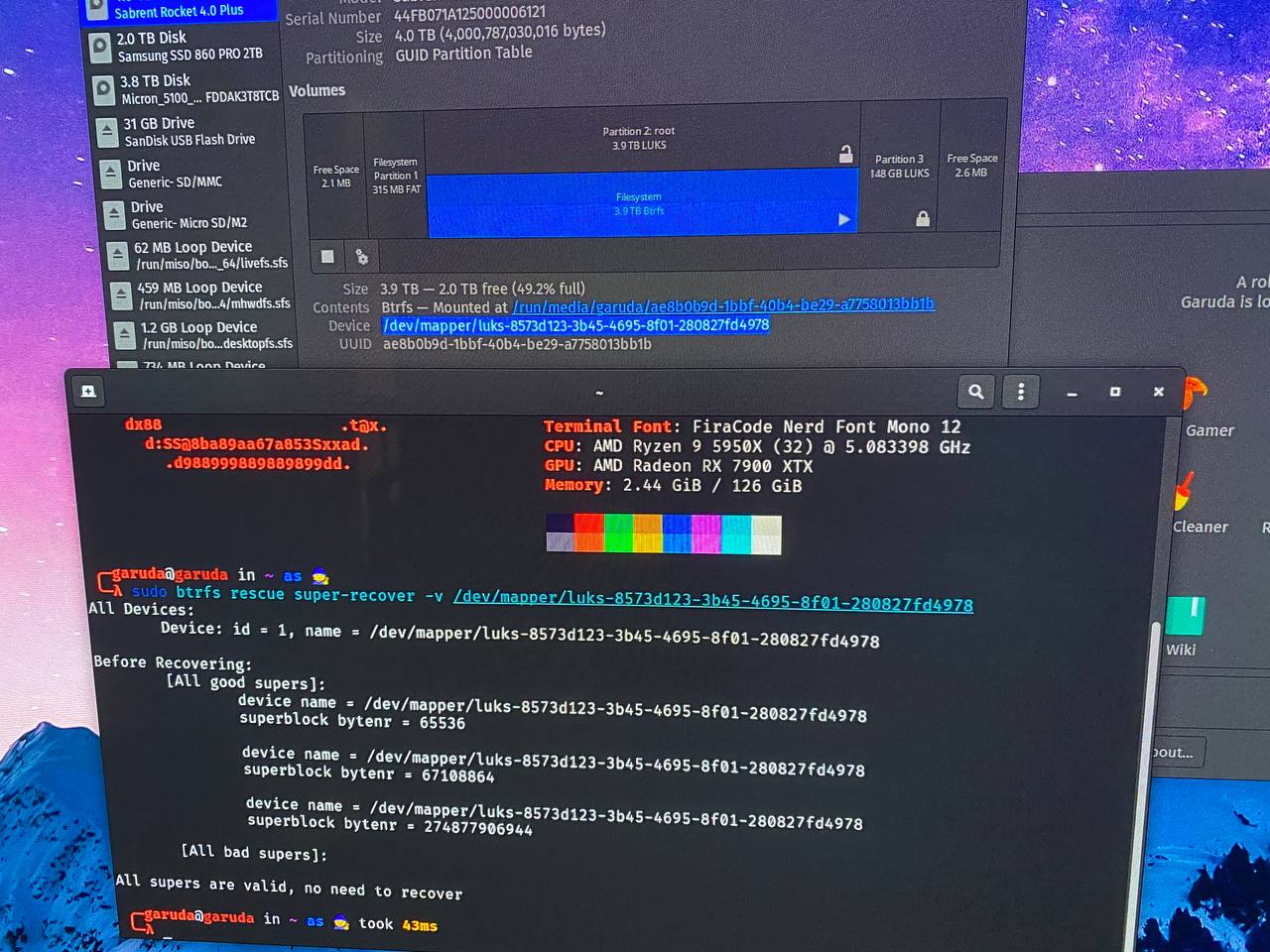
Okay, so I tried the commands this person used:
https://bbs.archlinux.org/viewtopic.php?id=248361
And these were the results:
So, after booting from USB, and mounting the volume, btrfs kinda automagically recovered itself, just like it did for them.
Thanks for helping me think about this problem!
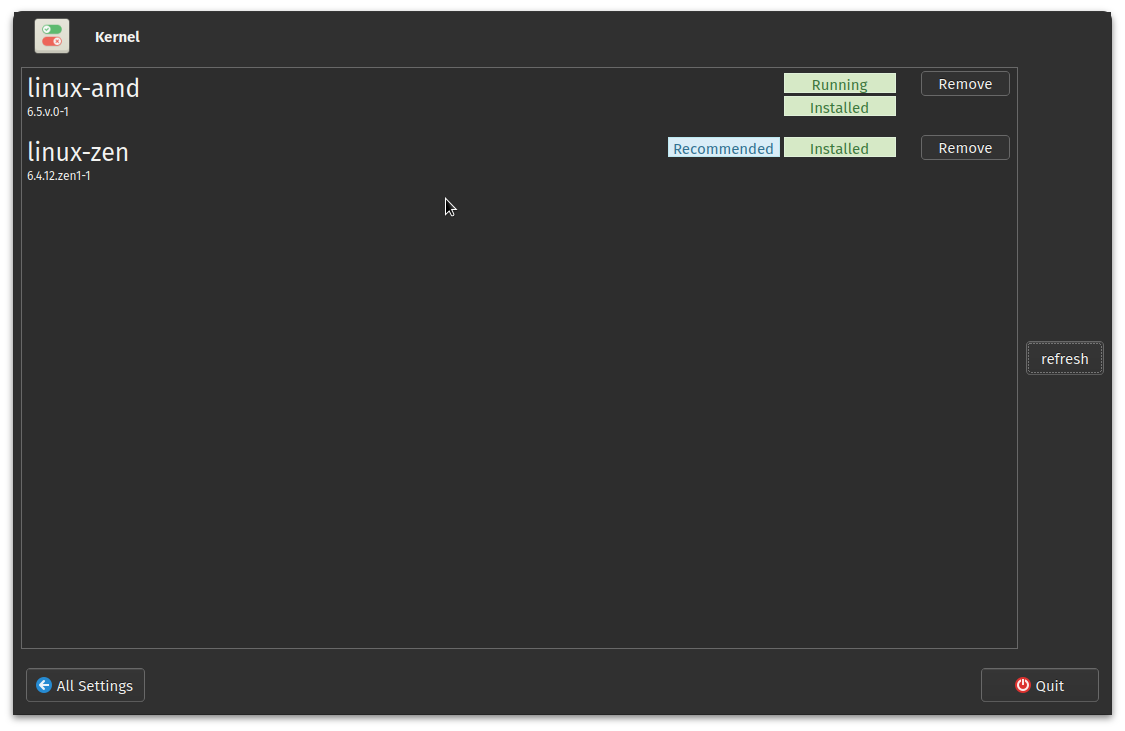
Just a follow-up, this is interesting... When I booted back into linux-amd, I ran into the same error, or maybe it was similar, I didn't scrutinize it, but it looked similar, with the black screen dropping me into root fs. So, I booted into linux-zen, which worked, used the very helpful Garuda Settings app to remove the bad kernel, and then I used paru to install a fresh copy of linux-amd. After rebooting, all works fine on linux-amd. Here's my kernel versions:
What pops out to me is that linux-amd is 6.5, whereas linux-zen is 6.4... This might be helpful information for the devs, but I'm not sure who I would contact.
In case this is helpful to anyone, I've included my garuda-inxi:
System:
  Kernel: 6.5.0-AMD arch: x86_64 bits: 64 compiler: gcc v: 13.2.1
    clocksource: tsc available: hpet,acpi_pm
    parameters: BOOT_IMAGE=/@/boot/vmlinuz-linux-amd
    root=UUID=ae8b0b9d-1bbf-40b4-be29-a7758013bb1b rw rootflags=subvol=@
    quiet
    cryptdevice=UUID=8573d123-3b45-4695-8f01-280827fd4978:luks-8573d123-3b45-4695-8f01-280827fd4978
    root=/dev/mapper/luks-8573d123-3b45-4695-8f01-280827fd4978 quiet
    rd.udev.log_priority=3 vt.global_cursor_default=0
    resume=/dev/mapper/luks-dc3ce9e4-f899-4fbc-94b3-bd8b8716eef4 loglevel=3
    ibt=off
  Desktop: GNOME v: 44.4 tk: GTK v: 3.24.38 wm: gnome-shell dm: GDM v: 44.1
    Distro: Garuda Linux base: Arch Linux
Machine:
  Type: Desktop Mobo: Micro-Star model: MEG X570 GODLIKE (MS-7C34) v: 1.0
    serial: <superuser required> UEFI: American Megatrends LLC. v: 1.C0
    date: 02/02/2021
CPU:
  Info: model: AMD Ryzen 9 5950X bits: 64 type: MT MCP arch: Zen 3+ gen: 4
    level: v3 note: check built: 2022 process: TSMC n6 (7nm) family: 0x19 (25)
    model-id: 0x21 (33) stepping: 0 microcode: 0xA201009
  Topology: cpus: 1x cores: 16 tpc: 2 threads: 32 smt: enabled cache:
    L1: 1024 KiB desc: d-16x32 KiB; i-16x32 KiB L2: 8 MiB desc: 16x512 KiB
    L3: 64 MiB desc: 2x32 MiB
  Speed (MHz): avg: 3513 high: 3966 min/max: 2200/5083 boost: enabled
    scaling: driver: acpi-cpufreq governor: performance cores: 1: 3400 2: 3400
    3: 3656 4: 3400 5: 3400 6: 3400 7: 3400 8: 3400 9: 3624 10: 3598 11: 3400
    12: 3400 13: 3597 14: 3400 15: 3400 16: 3400 17: 3400 18: 3756 19: 3880
    20: 3966 21: 3771 22: 3400 23: 3714 24: 3400 25: 3400 26: 3678 27: 3600
    28: 3400 29: 3595 30: 3400 31: 3400 32: 3400 bogomips: 217679
  Flags: avx avx2 ht lm nx pae sse sse2 sse3 sse4_1 sse4_2 sse4a ssse3 svm
  Vulnerabilities: <filter>
Graphics:
  Device-1: AMD Navi 31 [Radeon RX 7900 XT/7900 XTX] vendor: XFX RX-79XMERCB9
    driver: amdgpu v: kernel arch: RDNA-3 code: Navi-3x process: TSMC n5 (5nm)
    built: 2022+ pcie: gen: 4 speed: 16 GT/s lanes: 16 ports: active: HDMI-A-1
    empty: DP-1,DP-2,DP-3 bus-ID: 2f:00.0 chip-ID: 1002:744c class-ID: 0300
  Device-2: Logitech C922 Pro Stream Webcam driver: snd-usb-audio,uvcvideo
    type: USB rev: 2.0 speed: 480 Mb/s lanes: 1 mode: 2.0 bus-ID: 5-1.4.3:6
    chip-ID: 046d:085c class-ID: 0102 serial: <filter>
  Display: x11 server: X.Org v: 21.1.8 with: Xwayland v: 23.2.0
    compositor: gnome-shell driver: X: loaded: amdgpu
    unloaded: modesetting,radeon alternate: fbdev,vesa dri: radeonsi
    gpu: amdgpu display-ID: :1 screens: 1
  Screen-1: 0 s-res: 3840x2160 s-dpi: 96 s-size: 1016x571mm (40.00x22.48")
    s-diag: 1165mm (45.88")
  Monitor-1: HDMI-A-1 mapped: HDMI-A-0 model: LG (GoldStar) TV SSCR
    serial: <filter> built: 2021 res: 3840x2160 dpi: 61 gamma: 1.2
    size: 1600x900mm (62.99x35.43") diag: 1836mm (72.3") ratio: 16:9 modes:
    max: 3840x2160 min: 720x400
  API: OpenGL v: 4.6 Mesa 23.1.6-arch1.4 renderer: AMD Radeon RX 7900 XTX
    (gfx1100 LLVM 16.0.6 DRM 3.54 6.5.0-AMD) direct-render: Yes
Audio:
  Device-1: AMD Navi 31 HDMI/DP Audio driver: snd_hda_intel v: kernel pcie:
    gen: 4 speed: 16 GT/s lanes: 16 bus-ID: 2f:00.1 chip-ID: 1002:ab30
    class-ID: 0403
  Device-2: AMD Starship/Matisse HD Audio vendor: Micro-Star MSI
    driver: snd_hda_intel v: kernel pcie: gen: 4 speed: 16 GT/s lanes: 16
    bus-ID: 31:00.4 chip-ID: 1022:1487 class-ID: 0403
  Device-3: Logitech C922 Pro Stream Webcam driver: snd-usb-audio,uvcvideo
    type: USB rev: 2.0 speed: 480 Mb/s lanes: 1 mode: 2.0 bus-ID: 5-1.4.3:6
    chip-ID: 046d:085c class-ID: 0102 serial: <filter>
  Device-4: Audient EVO4 driver: snd-usb-audio type: USB rev: 2.0
    speed: 480 Mb/s lanes: 1 mode: 2.0 bus-ID: 5-2:3 chip-ID: 2708:0006
    class-ID: fe01
  API: ALSA v: k6.5.0-AMD status: kernel-api with: aoss type: oss-emulator
    tools: N/A
  Server-1: PipeWire v: 0.3.79 status: active with: 1: pipewire-pulse
    status: active 2: wireplumber status: active 3: pipewire-alsa type: plugin
    4: pw-jack type: plugin tools: pactl,pw-cat,pw-cli,wpctl
Network:
  Device-1: Aquantia AQC107 NBase-T/IEEE 802.3bz Ethernet [AQtion]
    vendor: Micro-Star MSI driver: atlantic v: kernel pcie: gen: 3 speed: 8 GT/s
    lanes: 4 port: N/A bus-ID: 24:00.0 chip-ID: 1d6a:07b1 class-ID: 0200
  IF: enp36s0 state: down mac: <filter>
  Device-2: Realtek vendor: Micro-Star MSI driver: N/A modules: r8169 pcie:
    speed: Unknown lanes: 63 link-max: gen: 6 speed: 64 GT/s port: 1000
    bus-ID: 26:00.0 chip-ID: 10ec:2600 class-ID: 0200
  Device-3: Realtek Killer E3000 2.5GbE vendor: Micro-Star MSI driver: r8169
    v: kernel pcie: gen: 2 speed: 5 GT/s lanes: 1 port: 2000 bus-ID: 27:00.0
    chip-ID: 10ec:3000 class-ID: 0200
  IF: enp39s0 state: down mac: <filter>
  Device-4: Intel Wi-Fi 6 AX200 vendor: Rivet Networks Killer
    driver: iwlwifi v: kernel pcie: gen: 2 speed: 5 GT/s lanes: 1
    bus-ID: 28:00.0 chip-ID: 8086:2723 class-ID: 0280
  IF: wlp40s0 state: down mac: <filter>
  Device-5: Realtek RTL8153 Gigabit Ethernet Adapter driver: r8152 type: USB
    rev: 3.0 speed: 5 Gb/s lanes: 1 mode: 3.2 gen-1x1 bus-ID: 6-3.2:6
    chip-ID: 0bda:8153 class-ID: 0000 serial: <filter>
  IF: enp49s0f3u3u2 state: up speed: 1000 Mbps duplex: full mac: <filter>
Bluetooth:
  Device-1: Intel AX200 Bluetooth driver: btusb v: 0.8 type: USB rev: 2.0
    speed: 12 Mb/s lanes: 1 mode: 1.1 bus-ID: 1-4:3 chip-ID: 8087:0029
    class-ID: e001
  Report: btmgmt ID: hci0 rfk-id: 0 state: up address: <filter> bt-v: 5.2
    lmp-v: 11 status: discoverable: no pairing: no class-ID: 6c0104
Drives:
  Local Storage: total: 8.99 TiB used: 4.72 TiB (52.5%)
  SMART Message: Required tool smartctl not installed. Check --recommends
  ID-1: /dev/nvme0n1 maj-min: 259:0 vendor: Sabrent model: Rocket 4.0 Plus
    size: 3.64 TiB block-size: physical: 512 B logical: 512 B speed: 63.2 Gb/s
    lanes: 4 tech: SSD serial: <filter> fw-rev: R4PB47.2 temp: 43.9 C
    scheme: GPT
  ID-2: /dev/sda maj-min: 8:0 vendor: Samsung model: SSD 860 PRO 2TB
    size: 1.86 TiB block-size: physical: 512 B logical: 512 B speed: 6.0 Gb/s
    tech: SSD serial: <filter> fw-rev: 1B6Q scheme: GPT
  ID-3: /dev/sdb maj-min: 8:16 vendor: Micron model: 5100 EEFDDAK3T8TCB
    size: 3.49 TiB block-size: physical: 8192 B logical: 512 B speed: 6.0 Gb/s
    tech: SSD serial: <filter> fw-rev: 0369 scheme: GPT
Partition:
  ID-1: / raw-size: 3.5 TiB size: 3.5 TiB (100.00%) used: 1.74 TiB (49.6%)
    fs: btrfs dev: /dev/dm-0 maj-min: 254:0
    mapped: luks-8573d123-3b45-4695-8f01-280827fd4978
  ID-2: /boot/efi raw-size: 300 MiB size: 299.4 MiB (99.80%)
    used: 720 KiB (0.2%) fs: vfat dev: /dev/nvme0n1p1 maj-min: 259:1
  ID-3: /home raw-size: 3.5 TiB size: 3.5 TiB (100.00%)
    used: 1.74 TiB (49.6%) fs: btrfs dev: /dev/dm-0 maj-min: 254:0
    mapped: luks-8573d123-3b45-4695-8f01-280827fd4978
  ID-4: /var/log raw-size: 3.5 TiB size: 3.5 TiB (100.00%)
    used: 1.74 TiB (49.6%) fs: btrfs dev: /dev/dm-0 maj-min: 254:0
    mapped: luks-8573d123-3b45-4695-8f01-280827fd4978
  ID-5: /var/tmp raw-size: 3.5 TiB size: 3.5 TiB (100.00%)
    used: 1.74 TiB (49.6%) fs: btrfs dev: /dev/dm-0 maj-min: 254:0
    mapped: luks-8573d123-3b45-4695-8f01-280827fd4978
Swap:
  Kernel: swappiness: 133 (default 60) cache-pressure: 100 (default) zswap: no
  ID-1: swap-1 type: partition size: 138.28 GiB used: 0 KiB (0.0%)
    priority: -2 dev: /dev/dm-1 maj-min: 254:1
    mapped: luks-dc3ce9e4-f899-4fbc-94b3-bd8b8716eef4
  ID-2: swap-2 type: zram size: 125.73 GiB used: 0 KiB (0.0%) priority: 100
    comp: zstd avail: lzo,lzo-rle,lz4,lz4hc,842 max-streams: 32 dev: /dev/zram0
Sensors:
  System Temperatures: cpu: 58.0 C mobo: N/A gpu: amdgpu temp: 56.0 C
    mem: 68.0 C
  Fan Speeds (rpm): N/A gpu: amdgpu fan: 0
Info:
  Processes: 614 Uptime: 6m wakeups: 0 Memory: total: 128 GiB note: est.
  available: 125.73 GiB used: 9.15 GiB (7.3%) Init: systemd v: 254
  default: graphical tool: systemctl Compilers: gcc: 13.2.1 clang: 16.0.6
  Packages: pm: pacman pkgs: 1842 libs: 534
  tools: gnome-software,pamac,paru,yay pm: flatpak pkgs: 0 Shell: fish
  v: 3.6.1 default: Bash v: 5.1.16 running-in: alacritty inxi: 3.3.29
Garuda (2.6.16-1):
  System install date:     2023-02-01
  Last full system update: 2023-09-02
  Is partially upgraded:   No
  Relevant software:       snapper NetworkManager mkinitcpio
  Windows dual boot:       No/Undetected
  Failed units:
In your case, this command didn’t actually do anything. Did you run any other commands while you were in there?
You may have some filesystem corruption. Try running a Btrfs scrub, and when it completed do a full btrfs check run.
This topic was automatically closed 2 days after the last reply. New replies are no longer allowed.