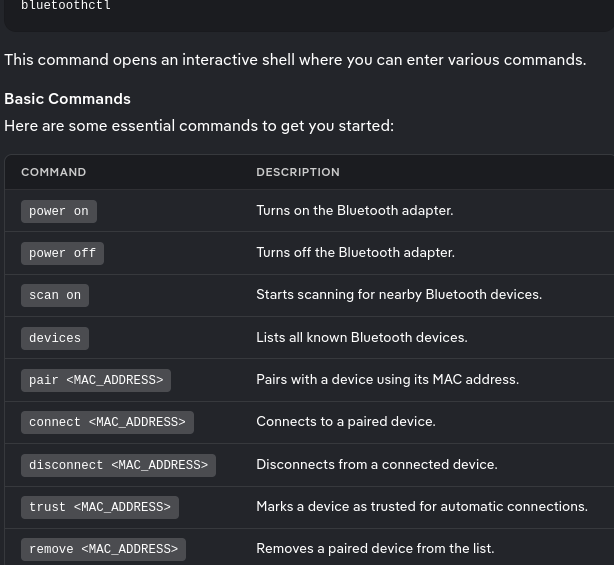
Bluetooth module needs restart everytime i restart or open my screen

so as the title says it , every time i open my pc i need to restart the module in the terminal with this function:

sudo systemctl restart bluetooth

and its extremely bothersome. ach time i try to connect something like my headphones for example, they connect and disconnect like 5sec later. if i try to connect them again i get a notification in the lines of “connection to X failed“.

when i type the command i have 1/3 chances for it to work immediately and i can connect my headphones or i have to type the command again 2 or 3 times because the bluetooth has frozen and doesn’t re-enable itself again.

also this is a new install on a new machine but even on my previous one i have the same problem, although it happens more rarely (the old machine is a laptop, maybe this is the reason , idk)

this is my new system:

System:
Kernel: 6.17.8-zen1-1-zen arch: x86_64 bits: 64 compiler: gcc v: 15.2.1
clocksource: tsc avail: hpet,acpi_pm
parameters: BOOT_IMAGE=/@/boot/vmlinuz-linux-zen
root=UUID=0ec1c558-c030-4fad-b3df-803bed771170 rw rootflags=subvol=@
vt.default_red=30,243,166,249,137,245,148,186,88,243,166,249,137,245,148,166
vt.default_grn=30,139,227,226,180,194,226,194,91,139,227,226,180,194,226,173
vt.default_blu=46,168,161,175,250,231,213,222,112,168,161,175,250,231,213,200
quiet loglevel=3
Desktop: KDE Plasma v: 6.5.3 tk: Qt v: N/A info: frameworks v: 6.20.0
wm: kwin_wayland vt: 1 dm: SDDM Distro: Garuda base: Arch Linux
Machine:
Type: Desktop Mobo: GMKtec model: NucBox K8 Plus
serial: <superuser required> part-nu: K8 Plus-001 uuid: <superuser required>
UEFI: American Megatrends LLC. v: NucBox K8 Plus 1.01 date: 02/19/2025
CPU:
Info: model: AMD Ryzen 7 8845HS w/ Radeon 780M Graphics bits: 64
type: MT MCP arch: Zen 4 gen: 4 level: v4 note: check built: 2022+
process: TSMC n5 (5nm) family: 0x19 (25) model-id: 0x75 (117) stepping: 2
microcode: 0xA705208
Topology: cpus: 1x dies: 1 clusters: 1 cores: 8 threads: 16 tpc: 2
smt: enabled cache: L1: 512 KiB desc: d-8x32 KiB; i-8x32 KiB L2: 8 MiB
desc: 8x1024 KiB L3: 16 MiB desc: 1x16 MiB
Speed (MHz): avg: 1093 min/max: 417/5103 boost: enabled scaling:
driver: amd-pstate-epp governor: powersave cores: 1: 1093 2: 1093 3: 1093
4: 1093 5: 1093 6: 1093 7: 1093 8: 1093 9: 1093 10: 1093 11: 1093 12: 1093
13: 1093 14: 1093 15: 1093 16: 1093 bogomips: 121369
Flags-basic: avx avx2 ht lm nx pae sse sse2 sse3 sse4_1 sse4_2 sse4a
ssse3 svm
Vulnerabilities: <filter>
Graphics:
Device-1: Advanced Micro Devices [AMD/ATI] HawkPoint1 driver: amdgpu
v: kernel arch: RDNA-3 code: Phoenix process: TSMC n4 (4nm) built: 2023+
pcie: gen: 4 speed: 16 GT/s lanes: 16 ports: active: HDMI-A-1 empty: DP-1,
DP-2, DP-3, DP-4, DP-5, DP-6, DP-7, Writeback-1 bus-ID: c6:00.0
chip-ID: 1002:1900 class-ID: 0300 temp: 39.0 C
Display: wayland server: X.org v: 1.21.1.20 with: Xwayland v: 24.1.9
compositor: kwin_wayland driver: X: loaded: amdgpu unloaded: modesetting
alternate: fbdev,vesa dri: radeonsi gpu: amdgpu display-ID: 0
Monitor-1: HDMI-A-1 model: AOC 24G2W1G4 serial: <filter> built: 2019 res:
mode: 1920x1080 hz: 144 scale: 100% (1) dpi: 93 gamma: 1.2
size: 527x296mm (20.75x11.65") diag: 604mm (23.8") ratio: 16:9 modes:
max: 1920x1080 min: 720x400
API: EGL v: 1.5 hw: drv: amd radeonsi platforms: device: 0 drv: radeonsi
device: 1 drv: swrast gbm: drv: kms_swrast surfaceless: drv: radeonsi
wayland: drv: radeonsi x11: drv: radeonsi
API: OpenGL v: 4.6 compat-v: 4.5 vendor: amd mesa v: 25.2.7-arch1.1
glx-v: 1.4 direct-render: yes renderer: AMD Radeon 780M Graphics (radeonsi
phoenix LLVM 21.1.5 DRM 3.64 6.17.8-zen1-1-zen) device-ID: 1002:1900
memory: 15.62 GiB unified: no display-ID: :1.0
API: Vulkan v: 1.4.328 layers: 9 device: 0 type: integrated-gpu name: AMD
Radeon 780M Graphics (RADV PHOENIX) driver: mesa radv v: 25.2.7-arch1.1
device-ID: 1002:1900 surfaces: N/A device: 1 type: cpu name: llvmpipe
(LLVM 21.1.5 256 bits) driver: mesa llvmpipe v: 25.2.7-arch1.1 (LLVM
21.1.5) device-ID: 10005:0000 surfaces: N/A
Info: Tools: api: clinfo, eglinfo, glxinfo, vulkaninfo
de: kscreen-console,kscreen-doctor wl: wayland-info
x11: xdpyinfo, xprop, xrandr
Audio:
Device-1: Advanced Micro Devices [AMD/ATI] Radeon High Definition Audio
[Rembrandt/Strix] driver: snd_hda_intel v: kernel pcie: gen: 4
speed: 16 GT/s lanes: 16 bus-ID: c6:00.1 chip-ID: 1002:1640 class-ID: 0403
Device-2: Advanced Micro Devices [AMD] Audio Coprocessor vendor: Realtek
driver: snd_pci_ps v: kernel alternate: snd_pci_acp3x, snd_rn_pci_acp3x,
snd_pci_acp5x, snd_pci_acp6x, snd_acp_pci, snd_rpl_pci_acp6x,
snd_sof_amd_renoir, snd_sof_amd_rembrandt, snd_sof_amd_vangogh,
snd_sof_amd_acp63, snd_sof_amd_acp70 pcie: gen: 4 speed: 16 GT/s lanes: 16
bus-ID: c6:00.5 chip-ID: 1022:15e2 class-ID: 0480
Device-3: Advanced Micro Devices [AMD] Family 17h/19h/1ah HD Audio
vendor: Realtek driver: snd_hda_intel v: kernel pcie: gen: 4 speed: 16 GT/s
lanes: 16 bus-ID: c6:00.6 chip-ID: 1022:15e3 class-ID: 0403
API: ALSA v: k6.17.8-zen1-1-zen status: kernel-api tools: N/A
Server-1: PipeWire v: 1.4.9 status: active with: 1: pipewire-pulse
status: active 2: wireplumber status: active 3: pipewire-alsa type: plugin
4: pw-jack type: plugin tools: pactl,pw-cat,pw-cli,wpctl
Network:
Device-1: Intel Ethernet I226-V driver: igc v: kernel pcie: gen: 2
speed: 5 GT/s lanes: 1 port: N/A bus-ID: 02:00.0 chip-ID: 8086:125c
class-ID: 0200
IF: eno1 state: up speed: 1000 Mbps duplex: full mac: <filter>
Device-2: Intel Ethernet I226-V driver: igc v: kernel pcie: gen: 2
speed: 5 GT/s lanes: 1 port: N/A bus-ID: 03:00.0 chip-ID: 8086:125c
class-ID: 0200
IF: enp3s0 state: down mac: <filter>
Device-3: Intel Wi-Fi 6 AX200 driver: iwlwifi v: kernel pcie: gen: 2
speed: 5 GT/s lanes: 1 bus-ID: 04:00.0 chip-ID: 8086:2723 class-ID: 0280
IF: wlp4s0 state: down mac: <filter>
Info: services: NetworkManager,systemd-timesyncd
Bluetooth:
Device-1: Intel AX200 Bluetooth driver: btusb v: 0.8 type: USB rev: 2.0
speed: 12 Mb/s lanes: 1 mode: 1.1 bus-ID: 1-5:6 chip-ID: 8087:0029
class-ID: e001
Report: btmgmt ID: hci0 rfk-id: 2 state: up address: <filter> bt-v: 5.2
lmp-v: 11 status: discoverable: no pairing: no class-ID: 6c0104
Drives:
Local Storage: total: 931.51 GiB used: 265.3 GiB (28.5%)
SMART Message: Unable to run smartctl. Root privileges required.
ID-1: /dev/nvme0n1 maj-min: 259:0 vendor: Crucial model: CT1000P3PSSD8
size: 931.51 GiB block-size: physical: 512 B logical: 512 B speed: 63.2 Gb/s
lanes: 4 tech: SSD serial: <filter> fw-rev: P9CR420 temp: 33.9 C
scheme: GPT
Partition:
ID-1: / raw-size: 150.3 GiB size: 150.3 GiB (100.00%)
used: 17.09 GiB (11.4%) fs: btrfs dev: /dev/nvme0n1p4 maj-min: 259:4
ID-2: /boot/efi raw-size: 100 MiB size: 96 MiB (96.00%)
used: 49.9 MiB (52.0%) fs: vfat dev: /dev/nvme0n1p1 maj-min: 259:1
ID-3: /home raw-size: 150.3 GiB size: 150.3 GiB (100.00%)
used: 17.09 GiB (11.4%) fs: btrfs dev: /dev/nvme0n1p4 maj-min: 259:4
ID-4: /var/log raw-size: 150.3 GiB size: 150.3 GiB (100.00%)
used: 17.09 GiB (11.4%) fs: btrfs dev: /dev/nvme0n1p4 maj-min: 259:4
ID-5: /var/tmp raw-size: 150.3 GiB size: 150.3 GiB (100.00%)
used: 17.09 GiB (11.4%) fs: btrfs dev: /dev/nvme0n1p4 maj-min: 259:4
Swap:
Kernel: swappiness: 133 (default 60) cache-pressure: 100 (default) zswap: no
ID-1: swap-1 type: zram size: 15.44 GiB used: 560 MiB (3.5%) priority: 100
comp: zstd avail: lzo-rle,lzo,lz4,lz4hc,deflate,842 dev: /dev/zram0
Sensors:
System Temperatures: cpu: 44.9 C mobo: 37.8 C gpu: amdgpu temp: 39.0 C
Fan Speeds (rpm): N/A
Info:
Memory: total: 16 GiB available: 15.44 GiB used: 5.77 GiB (37.4%)
Processes: 424 Power: uptime: 47m states: freeze,mem,disk suspend: s2idle
wakeups: 0 hibernate: platform avail: shutdown, reboot, suspend, test_resume
image: 6.16 GiB services: org_kde_powerdevil, power-profiles-daemon,
upowerd Init: systemd v: 258 default: graphical tool: systemctl
Packages: pm: pacman pkgs: 1326 libs: 335 tools: octopi,paru,yay
Compilers: gcc: 15.2.1 Shell: Bash v: 5.3.3 default: fish v: 4.2.1
running-in: konsole inxi: 3.3.39
Garuda (2.11.1-1):
System install date:     2025-11-24
Garuda release:          251103
Last full system update: 2025-11-25
Is partially upgraded:   No
Relevant software:       snapper NetworkManager dracut garuda-hardware-profile-standard
Windows dual boot:       Probably (Run as root to verify)
Failed units:
--- System Health Check Report ---
25/26 checks run in 0.85 seconds ⌛
Powered by garuda-health 🦅

✅ System health check passed. No issues found.

When you restart your pc, run: sudo systemctl status bluetooth
If it’s not Active or Status: “Running”, run: sudo systemctl enable bluetooth
This should set systemctl to automatically run bluetooth (test with a reboot)

From Info systemctl the restart of systemctl may not be doing what you expect.

restart PATTERN…
Stop and then start one or more units specified on the command line. If the units are not running yet, they will be started.

Note that restarting a unit with this command does not necessarily flush out all of the unit’s resources before it is started again.
For example, the per-service file descriptor storage facility (see FileDescriptorStoreMax= in systemd.service(5)) will remain intact
as long as the unit has a job pending, and is only cleared when the unit is fully stopped and no jobs are pending anymore. If it is
intended that the file descriptor store is flushed out, too, during a restart operation an explicit systemctl stop command followed
by systemctl start should be issued.
2 Likes

Hi ,

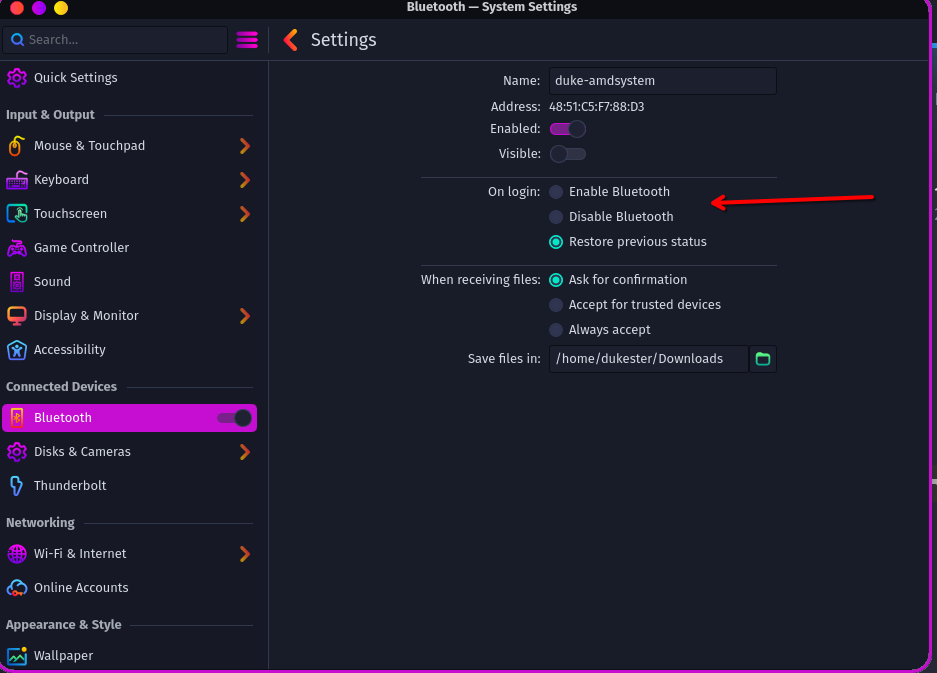
Can you check here the Settings please :wink:

did you do a right Windows shutdown ( with SHIFT Button?) windows hijacks Hardware

Windows dual boot:       Probably (Run as root to verify)
2 Likes

i have it on the same setting as on the image you show .

and what do you mean about shutting windows down?

Since you obviously have Windows dual boot, you should check whether Fastboot is disabled in the BIOS and Fast Startup and Hibernation are disabled in Windows. You should also shut down Windows correctly (press the Shift key while clicking ‘Shut down’ in the Start menu) to prevent Windows from hijacking the hardware.

4 Likes

so i don”t have fastboot in my bios (also i don’t have a uefi but legacy mode only)and if checked the windows settings and had already disables fast startup and hibernation.

i did shut down with shift key and i had the same problem: connected and disconnected 5 sec later

update: changed the setting in the system settings>bluetooth and changed to something else then put it back to “restore previous status” and it worked. thanks a lot!!

update 2 :

it actually didn’t work it seems…when i did i reboot yesterday it worked and when i was finished from my pc i put it to sleep and now that I’ve reopened it i have the same problem. note that from yesterday i have been o the windows partition at all, i just woke up the pc from sleep mod, bluetooth connected , then disconnected again

1 Like

It does sound like Windows got you. While it should not happen with power options correctly set, the forced rebooting for Windows Updates is sometimes not clean, especially if upgrading firmware/drivers. Ideally you will not hit this in the future since you have disabled fast startup. Please test further to make sure, and select a solution if it’s all good.

3 Likes

i updated the previous reply , it didn’t work…when i did i reboot yesterday it worked and when i was finished from my pc i put it to sleep and now that I’ve reopened it i have the same problem. note that from yesterday i have been o the windows partition at all, i just woke up the pc from sleep mod, bluetooth connected , then disconnected again

1 Like

I’m seeing your Bluetooth device is indicated as a USB 2.0 device. Is it external & plugged into your NucBox?

no. i haven’t added a bluetooth module. And as i said i have the same problem on my laptop as well which this is is inxi if you are interested:

System:
Kernel: 6.15.3-zen1-1-zen arch: x86_64 bits: 64 compiler: gcc v: 15.1.1
clocksource: hpet avail: acpi_pm
parameters: BOOT_IMAGE=/@/boot/vmlinuz-linux-zen
root=UUID=38b8c0fd-ad69-49a0-886d-580605beb2ef rw rootflags=subvol=@
quiet loglevel=3 ibt=off
Desktop: KDE Plasma v: 6.4.1 tk: Qt v: N/A info: frameworks v: 6.15.0
wm: kwin_wayland vt: 1 dm: SDDM Distro: Garuda base: Arch Linux
Machine:
Type: Laptop System: ASUSTeK product: VivoBook_ASUSLaptop X512DA_X512DA
v: 1.0 serial: <superuser required>
Mobo: ASUSTeK model: X512DA v: 1.0 serial: <superuser required>
uuid: <superuser required> UEFI: American Megatrends v: X512DA.318
date: 09/28/2022
Battery:
ID-1: BAT0 charge: 23.5 Wh (98.3%) condition: 23.9/37.1 Wh (64.4%)
volts: 7.8 min: 7.8 model: ASUSTeK ASUS Battery type: Li-ion serial: N/A
status: not charging cycles: 215
CPU:
Info: model: AMD Ryzen 5 3500U with Radeon Vega Mobile Gfx bits: 64
type: MT MCP arch: Zen/Zen+ note: check gen: 1 level: v3 note: check
built: 2019 process: GF 12nm family: 0x17 (23) model-id: 0x18 (24)
stepping: 1 microcode: 0x8108109
Topology: cpus: 1x dies: 1 clusters: 1 cores: 4 threads: 8 tpc: 2
smt: enabled cache: L1: 384 KiB desc: d-4x32 KiB; i-4x64 KiB L2: 2 MiB
desc: 4x512 KiB L3: 4 MiB desc: 1x4 MiB
Speed (MHz): avg: 2769 min/max: 1400/2100 boost: enabled scaling:
driver: acpi-cpufreq governor: schedutil cores: 1: 2769 2: 2769 3: 2769
4: 2769 5: 2769 6: 2769 7: 2769 8: 2769 bogomips: 33535
Flags: avx avx2 ht lm nx pae sse sse2 sse3 sse4_1 sse4_2 sse4a ssse3 svm
Vulnerabilities: <filter>
Graphics:
Device-1: Advanced Micro Devices [AMD/ATI] Picasso/Raven 2 [Radeon Vega
Series / Radeon Mobile Series] vendor: ASUSTeK driver: amdgpu v: kernel
arch: GCN-5 code: Vega process: GF 14nm built: 2017-20 pcie: gen: 3
speed: 8 GT/s lanes: 16 ports: active: HDMI-A-1,eDP-1 empty: none
bus-ID: 03:00.0 chip-ID: 1002:15d8 class-ID: 0300 temp: 65.0 C
Device-2: IMC Networks USB2.0 HD UVC WebCam driver: uvcvideo type: USB
rev: 2.0 speed: 480 Mb/s lanes: 1 mode: 2.0 bus-ID: 3-2.2:5
chip-ID: 13d3:56dd class-ID: 0e02 serial: <filter>
Display: wayland server: X.org v: 1.21.1.18 with: Xwayland v: 24.1.8
compositor: kwin_wayland driver: X: loaded: amdgpu unloaded: modesetting
alternate: fbdev,vesa dri: radeonsi gpu: amdgpu d-rect: 3840x1080
display-ID: 0
Monitor-1: HDMI-A-1 pos: right model: Idek Iiyama PL2730H serial: <filter>
built: 2018 res: mode: 1920x1080 hz: 75 scale: 100% (1) dpi: 82 gamma: 1.2
size: 598x336mm (23.54x13.23") diag: 686mm (27") ratio: 16:9 modes:
max: 1920x1080 min: 720x400
Monitor-2: eDP-1 pos: primary,left model: BOE Display 0x07f1 built: 2018
res: mode: 1920x1080 hz: 60 scale: 100% (1) dpi: 142 gamma: 1.2
size: 344x193mm (13.54x7.6") diag: 394mm (15.5") ratio: 16:9 modes:
max: 1920x1080 min: 640x480
API: EGL v: 1.5 hw: drv: amd radeonsi platforms: device: 0 drv: radeonsi
device: 1 drv: swrast gbm: drv: kms_swrast surfaceless: drv: radeonsi
wayland: drv: radeonsi x11: drv: radeonsi
API: OpenGL v: 4.6 compat-v: 4.5 vendor: amd mesa v: 25.1.4-arch1.1
glx-v: 1.4 direct-render: yes renderer: AMD Radeon Vega 8 Graphics
(radeonsi raven ACO DRM 3.63 6.15.3-zen1-1-zen) device-ID: 1002:15d8
memory: 1.95 GiB unified: no display-ID: :1.0
API: Vulkan v: 1.4.313 layers: 9 device: 0 type: integrated-gpu name: AMD
Radeon Vega 8 Graphics (RADV RAVEN) driver: mesa radv v: 25.1.4-arch1.1
device-ID: 1002:15d8 surfaces: N/A device: 1 type: cpu name: llvmpipe
(LLVM 20.1.6 256 bits) driver: mesa llvmpipe v: 25.1.4-arch1.1 (LLVM
20.1.6) device-ID: 10005:0000 surfaces: N/A
Info: Tools: api: clinfo, eglinfo, glxinfo, vulkaninfo
de: kscreen-console,kscreen-doctor wl: wayland-info
x11: xdpyinfo, xprop, xrandr
Audio:
Device-1: Advanced Micro Devices [AMD/ATI] Raven/Raven2/Fenghuang HDMI/DP
Audio driver: snd_hda_intel v: kernel pcie: gen: 3 speed: 8 GT/s lanes: 16
bus-ID: 03:00.1 chip-ID: 1002:15de class-ID: 0403
Device-2: Advanced Micro Devices [AMD] Audio Coprocessor
driver: snd_pci_acp3x v: kernel alternate: snd_rn_pci_acp3x, snd_pci_acp5x,
snd_pci_acp6x, snd_acp_pci, snd_rpl_pci_acp6x, snd_pci_ps,
snd_sof_amd_renoir, snd_sof_amd_rembrandt, snd_sof_amd_vangogh,
snd_sof_amd_acp63, snd_sof_amd_acp70 pcie: gen: 3 speed: 8 GT/s lanes: 16
bus-ID: 03:00.5 chip-ID: 1022:15e2 class-ID: 0480
Device-3: Advanced Micro Devices [AMD] Family 17h/19h/1ah HD Audio
vendor: ASUSTeK driver: snd_hda_intel v: kernel pcie: gen: 3 speed: 8 GT/s
lanes: 16 bus-ID: 03:00.6 chip-ID: 1022:15e3 class-ID: 0403
API: ALSA v: k6.15.3-zen1-1-zen status: kernel-api tools: N/A
Server-1: PipeWire v: 1.4.5 status: active with: 1: pipewire-pulse
status: active 2: wireplumber status: active 3: pipewire-alsa type: plugin
4: pw-jack type: plugin tools: pactl,pw-cat,pw-cli,wpctl
Network:
Device-1: Qualcomm Atheros QCA9377 802.11ac Wireless Network Adapter
vendor: AzureWave driver: ath10k_pci v: kernel pcie: gen: 1 speed: 2.5 GT/s
lanes: 1 bus-ID: 01:00.0 chip-ID: 168c:0042 class-ID: 0280
IF: wlp1s0 state: up mac: <filter>
Info: services: NetworkManager, systemd-timesyncd, wpa_supplicant
Bluetooth:
Device-1: IMC Networks driver: btusb v: 0.8 type: USB rev: 1.1
speed: 12 Mb/s lanes: 1 mode: 1.1 bus-ID: 3-2.1:4 chip-ID: 13d3:3491
class-ID: e001
Report: btmgmt ID: hci0 rfk-id: 4 state: up address: N/A
Drives:
Local Storage: total: 1.14 TiB used: 325.28 GiB (27.8%)
SMART Message: Unable to run smartctl. Root privileges required.
ID-1: /dev/nvme0n1 maj-min: 259:0 vendor: Kingston
model: RBUSNS8154P3256GJ3 size: 238.47 GiB block-size: physical: 512 B
logical: 512 B speed: 15.8 Gb/s lanes: 2 tech: SSD serial: <filter>
fw-rev: E8FK1A.2 temp: 40.9 C scheme: GPT
ID-2: /dev/sda maj-min: 8:0 vendor: Western Digital model: WD Blue SA510
2.5 1000GB size: 931.51 GiB block-size: physical: 512 B logical: 512 B
speed: 6.0 Gb/s tech: SSD serial: <filter> fw-rev: 6100 scheme: GPT
Partition:
ID-1: / raw-size: 150 GiB size: 150 GiB (100.00%) used: 21.02 GiB (14.0%)
fs: btrfs dev: /dev/sda2 maj-min: 8:2
ID-2: /boot/efi raw-size: 260 MiB size: 256 MiB (98.46%)
used: 31.9 MiB (12.5%) fs: vfat dev: /dev/nvme0n1p1 maj-min: 259:1
ID-3: /home raw-size: 150 GiB size: 150 GiB (100.00%)
used: 21.02 GiB (14.0%) fs: btrfs dev: /dev/sda2 maj-min: 8:2
ID-4: /var/log raw-size: 150 GiB size: 150 GiB (100.00%)
used: 21.02 GiB (14.0%) fs: btrfs dev: /dev/sda2 maj-min: 8:2
ID-5: /var/tmp raw-size: 150 GiB size: 150 GiB (100.00%)
used: 21.02 GiB (14.0%) fs: btrfs dev: /dev/sda2 maj-min: 8:2
Swap:
Kernel: swappiness: 133 (default 60) cache-pressure: 100 (default) zswap: no
ID-1: swap-1 type: zram size: 17.5 GiB used: 0 KiB (0.0%) priority: 100
comp: zstd avail: lzo-rle,lzo,lz4,lz4hc,deflate,842 dev: /dev/zram0
Sensors:
System Temperatures: cpu: 64.5 C mobo: N/A gpu: amdgpu temp: 64.0 C
Fan Speeds (rpm): cpu: 2700
Info:
Memory: total: 20 GiB note: est. available: 17.5 GiB used: 10.08 GiB (57.6%)
Processes: 360 Power: uptime: 4h 20m states: freeze,mem,disk suspend: deep
avail: s2idle wakeups: 1 hibernate: platform avail: shutdown, reboot,
suspend, test_resume image: 6.98 GiB services: org_kde_powerdevil,
power-profiles-daemon, upowerd Init: systemd v: 257 default: graphical
tool: systemctl
Packages: 1422 pm: pacman pkgs: 1415 libs: 383 tools: octopi,paru,yay
pm: flatpak pkgs: 7 Compilers: gcc: 15.1.1 Shell: garuda-inxi default: fish
v: 4.0.2 running-in: konsole inxi: 3.3.38
Garuda (2.7.2-1):
System install date:     2025-06-25
Last full system update: 2025-06-27
Is partially upgraded:   No
Relevant software:       snapper NetworkManager dracut
Windows dual boot:       Probably (Run as root to verify)
Failed units:

Can you try it just with Enable Bluetooth and Visible and Accept for Trusted devices(just in case) on please.

i have the same AX200 module but rarely use BT headphones.

This sounds like a bluez +/or pipewire bug i had it too with my xbox controller a while ago.

see here:

i tried with the settings you gave me and same problem :face_with_spiral_eyes:

wired i have to test it with my sony or bt speaker but not today if i get anyy trouble. Your rfkill list is fine ? Did you checked this if it works without KDE GUI? ( im not on the KDE actually) ive posted here many times to Topics with BT issues even on Gnome . Power on-> helped mostly even with pairing without KDE issue :wink:

i’m sorry ,i didn’t understand anything you just said :sob:

No Problem ,

can you check the Terminal output after a reboot:

rfkill list 

this in the Terminal :(and enter)

bluetoothctl 
power on

is there a comming error like Failed to set power on: org.bluez.Error.Failed ?

so after doing

rfkill list 

like you said i get this output :

0: hci0: Bluetooth
Soft blocked: no
Hard blocked: no
1: phy0: Wireless LAN
Soft blocked: yes
Hard blocked: no

and after i do

bluetoothctl 
power on 

i get

Changing power on succeeded

oh and headphones still connect and disconnect just after

Thanks so the dbus should be not a issue good to know.

Which Headphones you are using ? May there is a known issue already .

So if i unterstand it correctly its not a Bluetooth issue startup anymore just the rconnecting issue with your Headset right?

I would try to remove the Bluetooth from the KDE Gui or in Settings first and then reboot.
After the reboot open the Terminal and type in this bluetoothctl again or in the Terminal you can use the arrow up button to find it and enter :wink:

type and enter :slight_smile:

scan on

now it should scan and shows your headphone ( hope you just have this one not other bluetooth devices nearby)

Mark the given MAC address with the mouse and then (CTRL+C) type pair and press (CTRL+V) if not working try (SHIFT+CTRL+C/V)

pair 

then same with

trust

now see if this works or which error comes up and if this diconnecting happens here too.

my Example is working :slight_smile:

pair 8F:16:00:85:A9:30
Attempting to pair with 8F:16:00:85:A9:30
Failed to pair: org.bluez.Error.AlreadyExists
[CHG] Device 8F:16:00:85:A9:30 RSSI: 0xffffffcd (-51)
[bluetoothctl]> trust 8F:16:00:85:A9:30
[CHG] Device 8F:16:00:85:A9:30 Trusted: yes
Changing 8F:16:00:85:A9:30 trust succeeded
[CHG] Device 8F:16:00:85:A9:30 Connected: yes
[CHG] Device 8F:16:00:85:A9:30 UUIDs: 0000110b-0000-1000-8000-00805f9b34fb
[CHG] Device 8F:16:00:85:A9:30 UUIDs: 0000110c-0000-1000-8000-00805f9b34fb
[CHG] Device 8F:16:00:85:A9:30 UUIDs: 0000110d-0000-1000-8000-00805f9b34fb
[CHG] Device 8F:16:00:85:A9:30 UUIDs: 0000110e-0000-1000-8000-00805f9b34fb
[CHG] Device 8F:16:00:85:A9:30 UUIDs: 0000111e-0000-1000-8000-00805f9b34fb
[CHG] Device 8F:16:00:85:A9:30 UUIDs: 00001124-0000-1000-8000-00805f9b34fb
[CHG] Device 8F:16:00:85:A9:30 UUIDs: 00001200-0000-1000-8000-00805f9b34fb
[NEW] Endpoint /org/bluez/hci0/dev_8F_16_00_85_A9_30/sep1 
[NEW] Endpoint /org/bluez/hci0/dev_8F_16_00_85_A9_30/sep2 
[NEW] Transport /org/bluez/hci0/dev_8F_16_00_85_A9_30/sep1/fd0 
[CHG] Transport /org/bluez/hci0/dev_8F_16_00_85_A9_30/sep1/fd0 State: active
[CHG] Transport /org/bluez/hci0/dev_8F_16_00_85_A9_30/sep1/fd0 State: idle
[CHG] Transport /org/bluez/hci0/dev_8F_16_00_85_A9_30/sep1/fd0 State: active
[CHG] Transport /org/bluez/hci0/dev_8F_16_00_85_A9_30/sep1/fd0 Volume: 0x0054 (84)
[CHG] Transport /org/bluez/hci0/dev_8F_16_00_85_A9_30/sep1/fd0 Volume: 0x004d (77)
[CHG] Transport /org/bluez/hci0/dev_8F_16_00_85_A9_30/sep1/fd0 Volume: 0x0047 (71)
[CHG] Transport /org/bluez/hci0/dev_8F_16_00_85_A9_30/sep1/fd0 Volume: 0x0041 (65)
[CHG] Transport /org/bluez/hci0/dev_8F_16_00_85_A9_30/sep1/fd0 Volume: 0x003a (58)
[CHG] Transport /org/bluez/hci0/dev_8F_16_00_85_A9_30/sep1/fd0 Volume: 0x0034 (52)
[CHG] Transport /org/bluez/hci0/dev_8F_16_00_85_A9_30/sep1/fd0 Volume: 0x002e (46)
[CHG] Transport /org/bluez/hci0/dev_8F_16_00_85_A9_30/sep1/fd0 Volume: 0x0027 (39)
[SBL TW6 B2]> 

i have the soundcore q30 headphones. ill try what you just old me and update on the result

update:

scan on detects device

pair and trust seem to have been successful as well, this is what the terminal returned to me

bluetoothctl
[NEW] Media /org/bluez/hci0
SupportedUUIDs: 0000110a-0000-1000-8000-00805f9b34fb
SupportedUUIDs: 0000110b-0000-1000-8000-00805f9b34fb
Agent registered
[bluetoothctl]> scan on
SetDiscoveryFilter success
Discovery started
[CHG] Controller 88:F4:DA:9E:02:F4 Discovering: yes
[NEW] Device 98:47:44:FB:CF:35 soundcore Q30
[NEW] Device 38:CA:84:87:EF:E0 38-CA-84-87-EF-E0
[bluetoothctl]> pair 98:47:44:FB:CF:35
Attempting to pair with 98:47:44:FB:CF:35
[CHG] Device 98:47:44:FB:CF:35 Connected: yes
[CHG] Device 98:47:44:FB:CF:35 Bonded: yes
[CHG] Device 98:47:44:FB:CF:35 UUIDs: 00001101-0000-1000-8000-00805f9b34fb
[CHG] Device 98:47:44:FB:CF:35 UUIDs: 0000110b-0000-1000-8000-00805f9b34fb
[CHG] Device 98:47:44:FB:CF:35 UUIDs: 0000110c-0000-1000-8000-00805f9b34fb
[CHG] Device 98:47:44:FB:CF:35 UUIDs: 0000110e-0000-1000-8000-00805f9b34fb
[CHG] Device 98:47:44:FB:CF:35 UUIDs: 0000111e-0000-1000-8000-00805f9b34fb
[CHG] Device 98:47:44:FB:CF:35 UUIDs: 66666666-6666-6666-6666-666666666666
[CHG] Device 98:47:44:FB:CF:35 UUIDs: df21fe2c-2515-4fdb-8886-f12c4d67927c
[CHG] Device 98:47:44:FB:CF:35 ServicesResolved: yes
[CHG] Device 98:47:44:FB:CF:35 Paired: yes
Pairing successful
[CHG] Device 98:47:44:FB:CF:35 ServicesResolved: no
[SIGNAL] BREDR.Disconnected - org.bluez.Reason.Local, Connection terminated by local host
[SIGNAL] Disconnected - org.bluez.Reason.Local, Connection terminated by local host
[CHG] Device 98:47:44:FB:CF:35 Connected: no
[CHG] Device 98:47:44:FB:CF:35 RSSI: 0xffffffd5 (-43)
[NEW] Device 7A:0F:7C:37:CC:3D 7A-0F-7C-37-CC-3D
[bluetoothctl]> trust 98:47:44:FB:CF:35
[CHG] Device 98:47:44:FB:CF:35 Trusted: yes
Changing 98:47:44:FB:CF:35 trust succeeded
[DEL] Device 7A:0F:7C:37:CC:3D 7A-0F-7C-37-CC-3D
[DEL] Device 38:CA:84:87:EF:E0 38-CA-84-87-EF-E0

but when i go in the bluetooth device manager in settings and connect to the headphones it connects and disconnects again

when i try to connect through terminal i get the same result, connects for a moment then disconects and this is what the terminal returns

connect 98:47:44:FB:CF:35
Attempting to connect to 98:47:44:FB:CF:35
[CHG] Device 98:47:44:FB:CF:35 Connected: yes
[NEW] Endpoint /org/bluez/hci0/dev_98_47_44_FB_CF_35/sep1
[NEW] Endpoint /org/bluez/hci0/dev_98_47_44_FB_CF_35/sep2
[NEW] Transport /org/bluez/hci0/dev_98_47_44_FB_CF_35/sep2/fd0
[CHG] Transport /org/bluez/hci0/dev_98_47_44_FB_CF_35/sep2/fd0 Delay: 0x0708 (1800)
Connection successful
[CHG] Device 98:47:44:FB:CF:35 ServicesResolved: yes
[DEL] Transport /org/bluez/hci0/dev_98_47_44_FB_CF_35/sep2/fd0
[DEL] Endpoint /org/bluez/hci0/dev_98_47_44_FB_CF_35/sep1
[DEL] Endpoint /org/bluez/hci0/dev_98_47_44_FB_CF_35/sep2
[CHG] Device 98:47:44:FB:CF:35 ServicesResolved: no
[SIGNAL] BREDR.Disconnected - org.bluez.Reason.Remote, Connection terminated by remote user
[SIGNAL] Disconnected - org.bluez.Reason.Remote, Connection terminated by remote user
[CHG] Device 98:47:44:FB:CF:35 Connected: no

okay that seems like a plasma bug with your headphones. I found on the Web many reports for it. Can you post the output from this:

pacman -Qi bluez

yep this is the output:

Name            : bluez
Version         : 5.85-1
Description     : Daemons for the bluetooth protocol stack
Architecture    : x86_64
URL             : http://www.bluez.org/
Licenses        : GPL-2.0-only
Groups          : None
Provides        : None
Depends On      : systemd-libs  dbus  glib2  alsa-lib  glibc
Optional Deps   : None
Required By     : bluetooth-support  bluez-qt  bluez-tools  fwupd
Optional For    : dracut  networkmanager
Conflicts With  : None
Replaces        : None
Installed Size  : 1495,97 KiB
Packager        : Robin Candau <antiz@archlinux.org>
Build Date      : Παρ 21 Νοε 2025 19:46:50 EET
Install Date    : Δευ 24 Νοε 2025 23:12:47 EET
Install Reason  : Installed as a dependency for another package
Install Script  : No
Validated By    : Signature