Well hello guys, it’s my first time here and I’ve used garuda mokka only in the last 5ish months, so sorry for still being pretty newbie in all of this.
I moved into mokka and was great, all the interfaces were helpful and fully customizable to use and I’m glad for it. I was in the finals period of my collage last year and then the holidays and vacations so I didn’t updated in a while… So 2 days ago, I noticed the “need to update” notification and gave it a go, just a “garuda-update” and didn’t think much of it.
Here my problem starts, as it seems, the drivers and kernels have updated and since the reboot after that my wifi connection disconnects and reconnects every 2/3 minutes in loop. Notice, not only my wifi but the neighbors wifi also disappear - as if I was disabling it. I’ve tried updating again to see if maybe something was in conflict and correct this problem, but nothing worked out. I’ve tried to search for common problems with the same kernel (ath9k) here and also nothing seems to work.
As I am not worried about starting over again, I’ve put my college stuff into an usb and thought that maybe a fresh start would be best, so with factory reset I went. It’s the 6th time now and I went experimenting with different options. I tried with the lts kernel options but didn’t make any difference, so I am out of creativity to think of anything else to try to solve this problem.
Important things about my setup, looks like my laptop is only able to connect with the 2.4g frequency, my cellphone and the other pc in my house uses the 5g but even when I connect them to the 2.4g it looks normal in them and also I don’t use vpn, my laptop is in another room away from the router but the other pc is even further and still uses it normally (my house is under renovation, hopefully until next month I will be able to be in the same room as my router). Also I tried to estimate how many times the disconnections occurs but it is randomly. I tried to plug power out of both my laptop and the router for a few minutes to see if it could make a difference but also nothing.
Image of how it appears when the connection is on:
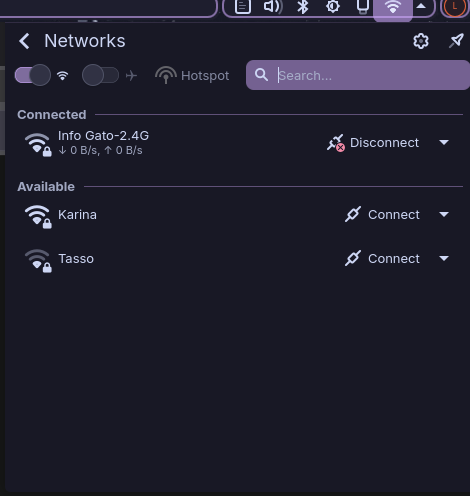
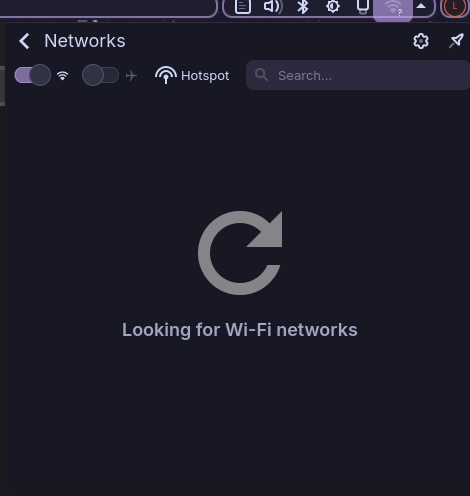
Image of how it appears when it is disconnecting:
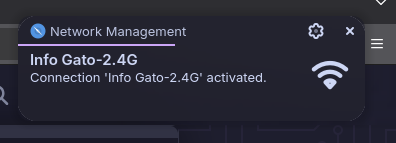
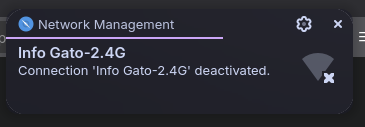
Notification that appears in loop:
(garuda-inxi)
System:
  Kernel: 6.18.5-zen1-1-zen arch: x86_64 bits: 64 compiler: gcc v: 15.2.1 clocksource: tsc
    avail: hpet,acpi_pm parameters: BOOT_IMAGE=/@/boot/vmlinuz-linux-zen
    root=UUID=ea7da237-c487-4264-a909-70cf166e789b rw rootflags=subvol=@
    vt.default_red=30,243,166,249,137,245,148,186,88,243,166,249,137,245,148,166
    vt.default_grn=30,139,227,226,180,194,226,194,91,139,227,226,180,194,226,173
    vt.default_blu=46,168,161,175,250,231,213,222,112,168,161,175,250,231,213,200 quiet loglevel=3
  Desktop: KDE Plasma v: 6.5.5 tk: Qt v: N/A info: frameworks v: 6.22.0 wm: kwin_wayland vt: 2
    dm: SDDM Distro: Garuda base: Arch Linux
Machine:
  Type: Laptop System: Dell product: Inspiron 15-3567 v: N/A serial: <superuser required> Chassis:
    type: 9 serial: <superuser required>
  Mobo: Dell model: 0MM5K1 v: A00 serial: <superuser required> part-nu: 078B
    uuid: <superuser required> Firmware: UEFI vendor: Dell v: 2.9.0 date: 01/17/2019
Battery:
  ID-1: BAT0 charge: 11 Wh (100%) condition: 11/41.4 Wh (26.6%) volts: 16.48 min: 14.8
    model: Panasonic DELL 7GNNN97 type: Li-ion serial: <filter> charging: status: full control:
    start: 50% end: 90% type: adaptive avail: adaptive,custom,fast,standard,trickle cycles: N/A
CPU:
  Info: model: Intel Core i7-7500U bits: 64 type: MT MCP arch: Amber/Kaby Lake note: check
    gen: core 7 level: v3 note: check built: 2017 process: Intel 14nm family: 6 model-id: 0x8E (142)
    stepping: 9 microcode: 0xF6
  Topology: cpus: 1x dies: 1 clusters: 2 cores: 2 threads: 4 tpc: 2 smt: enabled cache:
    L1: 128 KiB desc: d-2x32 KiB; i-2x32 KiB L2: 512 KiB desc: 2x256 KiB L3: 4 MiB desc: 1x4 MiB
  Speed (MHz): avg: 800 min/max: 400/3500 scaling: driver: intel_pstate governor: powersave
    cores: 1: 800 2: 800 3: 800 4: 800 bogomips: 23199
  Flags-basic: avx avx2 ht lm nx pae sse sse2 sse3 sse4_1 sse4_2 ssse3 vmx
  Vulnerabilities: <filter>
Graphics:
  Device-1: Intel Kaby Lake-U GT2 [HD Graphics 620] vendor: Dell driver: i915 v: kernel
    arch: Gen-9.5 process: Intel 14nm built: 2016-20 ports: active: HDMI-A-1,eDP-1 empty: none
    bus-ID: 00:02.0 chip-ID: 8086:5916 class-ID: 0300
  Device-2: Realtek Integrated Webcam driver: uvcvideo type: USB rev: 2.0 speed: 480 Mb/s
    lanes: 1 mode: 2.0 bus-ID: 1-5:5 chip-ID: 0bda:5689 class-ID: 0e02 serial: <filter>
  Display: wayland server: X.org v: 1.21.1.21 with: Xwayland v: 24.1.9 compositor: kwin_wayland
    driver: gpu: i915 d-rect: 3286x1848 display-ID: 0
  Monitor-1: HDMI-A-1 pos: top-right model: AOC 24G2W1G5 serial: <filter> built: 2021 res:
    mode: 1920x1080 hz: 75 scale: 100% (1) dpi: 93 gamma: 1.2 size: 527x296mm (20.75x11.65")
    diag: 604mm (23.8") ratio: 16:9 modes: max: 1920x1080 min: 720x400
  Monitor-2: eDP-1 pos: bottom-l model: BOE Display 0x0808 built: 2018 res: mode: 1366x768 hz: 60
    scale: 100% (1) dpi: 101 gamma: 1.2 size: 344x194mm (13.54x7.64") diag: 395mm (15.5") ratio: 16:9
    modes: 1366x768
  API: EGL v: 1.5 hw: drv: intel iris platforms: device: 0 drv: iris device: 1 drv: swrast gbm:
    drv: iris surfaceless: drv: iris wayland: drv: iris x11: drv: iris
  API: OpenGL v: 4.6 compat-v: 4.5 vendor: intel mesa v: 25.3.3-arch1.2 glx-v: 1.4
    direct-render: yes renderer: Mesa Intel HD Graphics 620 (KBL GT2) device-ID: 8086:5916
    memory: 7.44 GiB unified: yes display-ID: :0.0
  API: Vulkan v: 1.4.335 layers: 6 device: 0 type: integrated-gpu name: Intel HD Graphics 620
    (KBL GT2) driver: mesa intel v: 25.3.3-arch1.2 device-ID: 8086:5916 surfaces: N/A device: 1
    type: cpu name: llvmpipe (LLVM 21.1.6 256 bits) driver: mesa llvmpipe v: 25.3.3-arch1.2 (LLVM
    21.1.6) device-ID: 10005:0000 surfaces: N/A
  Info: Tools: api: clinfo, eglinfo, glxinfo, vulkaninfo de: kscreen-console,kscreen-doctor
    wl: wayland-info x11: xdpyinfo, xprop, xrandr
Audio:
  Device-1: Intel Sunrise Point-LP HD Audio vendor: Dell driver: snd_hda_intel v: kernel
    alternate: snd_soc_avs bus-ID: 00:1f.3 chip-ID: 8086:9d71 class-ID: 0403
  API: ALSA v: k6.18.5-zen1-1-zen status: kernel-api tools: N/A
  Server-1: PipeWire v: 1.4.9 status: active with: 1: pipewire-pulse status: active
    2: wireplumber status: active 3: pipewire-alsa type: plugin 4: pw-jack type: plugin
    tools: pactl,pw-cat,pw-cli,wpctl
Network:
  Device-1: Qualcomm Atheros QCA9565 / AR9565 Wireless Network Adapter vendor: Dell Vostro 3470
    driver: ath9k v: kernel pcie: gen: 1 speed: 2.5 GT/s lanes: 1 bus-ID: 01:00.0 chip-ID: 168c:0036
    class-ID: 0280
  IF: wlp1s0 state: down mac: <filter>
  Device-2: Realtek RTL810xE PCI Express Fast Ethernet vendor: Dell driver: r8169 v: kernel pcie:
    gen: 1 speed: 2.5 GT/s lanes: 1 port: e000 bus-ID: 02:00.0 chip-ID: 10ec:8136 class-ID: 0200
  IF: enp2s0 state: down mac: <filter>
  Info: services: NetworkManager, systemd-timesyncd, wpa_supplicant
Bluetooth:
  Device-1: Qualcomm Atheros driver: btusb v: 0.8 type: USB rev: 1.1 speed: 12 Mb/s lanes: 1
    mode: 1.1 bus-ID: 1-8:8 chip-ID: 0cf3:e005 class-ID: e001
  Report: btmgmt ID: hci0 rfk-id: 1 state: up address: <filter> bt-v: 4.0 lmp-v: 6 status:
    discoverable: no pairing: no class-ID: 6c010c
Drives:
  Local Storage: total: 1.88 TiB used: 18.15 GiB (0.9%)
  SMART Message: Unable to run smartctl. Root privileges required.
  ID-1: /dev/sda maj-min: 8:0 vendor: Seagate model: ST2000LM007-1R8174 size: 1.82 TiB
    block-size: physical: 4096 B logical: 512 B speed: 6.0 Gb/s tech: HDD rpm: 5400 serial: <filter>
    fw-rev: SDM2 scheme: GPT
  ID-2: /dev/sdb maj-min: 8:16 model: USB Flash Disk size: 59.52 GiB block-size: physical: 512 B
    logical: 512 B type: USB rev: 2.0 spd: 480 Mb/s lanes: 1 mode: 2.0 tech: SSD serial: <filter>
    fw-rev: 1100 scheme: MBR
  SMART Message: Unknown USB bridge. Flash drive/Unsupported enclosure?
Partition:
  ID-1: / raw-size: 1.82 TiB size: 1.82 TiB (100.00%) used: 18.15 GiB (1.0%) fs: btrfs
    dev: /dev/sda2 maj-min: 8:2
  ID-2: /boot/efi raw-size: 300 MiB size: 299.4 MiB (99.80%) used: 664 KiB (0.2%) fs: vfat
    dev: /dev/sda1 maj-min: 8:1
  ID-3: /home raw-size: 1.82 TiB size: 1.82 TiB (100.00%) used: 18.15 GiB (1.0%) fs: btrfs
    dev: /dev/sda2 maj-min: 8:2
  ID-4: /var/log raw-size: 1.82 TiB size: 1.82 TiB (100.00%) used: 18.15 GiB (1.0%) fs: btrfs
    dev: /dev/sda2 maj-min: 8:2
  ID-5: /var/tmp raw-size: 1.82 TiB size: 1.82 TiB (100.00%) used: 18.15 GiB (1.0%) fs: btrfs
    dev: /dev/sda2 maj-min: 8:2
Swap:
  Kernel: swappiness: 133 (default 60) cache-pressure: 100 (default) zswap: no
  ID-1: swap-1 type: zram size: 7.62 GiB used: 0 KiB (0.0%) priority: 100 comp: zstd
    avail: lzo-rle,lzo,lz4,lz4hc,deflate,842 dev: /dev/zram0
Sensors:
  System Temperatures: cpu: 60.0 C pch: 55.0 C mobo: 54.0 C
  Fan Speeds (rpm): cpu: 2585
Info:
  Memory: total: 8 GiB available: 7.62 GiB used: 3.84 GiB (50.4%)
  Processes: 243 Power: uptime: 12m states: freeze,mem,disk suspend: deep avail: s2idle
    wakeups: 0 hibernate: platform avail: shutdown, reboot, suspend, test_resume image: 3.03 GiB
    services: org_kde_powerdevil, power-profiles-daemon, upowerd Init: systemd v: 259
    default: graphical tool: systemctl
  Packages: pm: pacman pkgs: 1248 libs: 351 tools: octopi,paru Compilers: gcc: 15.2.1
    Client: Unknown Client: electron inxi: 3.3.40
Garuda (2.12.3-2):
  System install date:     2026-01-16
  Garuda release:          251103
  Last full system update: 2026-01-16
  Is partially upgraded:   No
  Relevant software:       snapper NetworkManager dracut garuda-hardware-profile-standard
  Windows dual boot:       Probably (Run as root to verify)
  Failed units:
--- System Health Check Report ---
25/26 checks run in 4.08 seconds ⌛
Powered by garuda-health 🦅

✅ System health check passed. No issues found.

