Hello everyone…I have been trying to experiment with the TPM 2.0 modules in my computers to see if I can make Garuda run with them. I have had little success, and I know I have asked this question before (found here). However, I keep trying to fight with it and have no success.
So, to prevent me from blowing everything up, I have built a virtual machine to try and perfect the process and add it to my Joplin notes before I make things so much more worse for myself. And, if somehow it doesn’t work out well for me after following instructions, then I have made an image where I can just simply reset the process again and again and so fourth as you can see here…
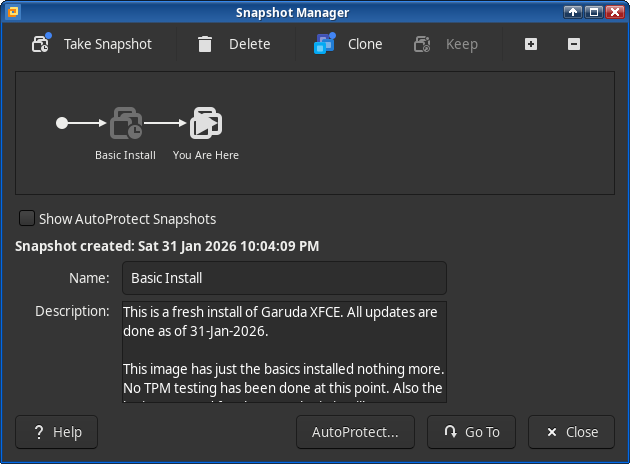
Now, lets get the information that is expected of me out there first:
 ╭─fenris@tpm in ~ as 🧙 took 0s
 ╰─λ sudo garuda-inxi
System:
  Kernel: 6.18.7-zen1-1-zen arch: x86_64 bits: 64 compiler: gcc v: 15.2.1
    clocksource: tsc avail: hpet,acpi_pm
    parameters: BOOT_IMAGE=/@/boot/vmlinuz-linux-zen
    root=UUID=877b7c0d-e9fb-425a-b9d7-216cbda173df rw rootflags=subvol=@
    quiet rd.luks.uuid=0f6e405e-edf6-4b98-bc2d-9f8230d0795a loglevel=3
  Desktop: Xfce v: 4.20.1 tk: Gtk v: 3.24.51 wm: xfwm4 v: 4.20.0
    with: xfce4-panel tools: xfce4-screensaver dm: LightDM v: 1.32.0
    Distro: Garuda base: Arch Linux
Machine:
  Type: Vmware System: VMware product: VMware20,1 v: N/A serial: <filter>
    Chassis: No Enclosure type: 1 serial: N/A
  Mobo: Intel model: 440BX Desktop Reference Platform serial: N/A
    uuid: cf154d56-6383-30ad-3479-ea6a36b5e79a Firmware: UEFI vendor: VMware
    v: VMW201.00V.24866131.B64.2507211911 date: 07/21/2025
CPU:
  Info: model: AMD Ryzen 9 6900HX with Radeon Graphics bits: 64 type: MCP SMP
    arch: Zen 3+ gen: 3 level: v3 note: check built: 2022 process: TSMC n6 (7nm)
    family: 0x19 (25) model-id: 0x44 (68) stepping: 1 microcode: 0xA404108
  Topology: cpus: 2x dies: 1 clusters: 1 cores: 4 smt: <unsupported> cache:
    L1: 2x 256 KiB (512 KiB) desc: d-4x32 KiB; i-4x32 KiB L2: 2x 2 MiB (4 MiB)
    desc: 4x512 KiB L3: 2x 16 MiB (32 MiB) desc: 1x16 MiB
  Speed (MHz): avg: 3294 min/max: N/A base/boost: 3141/3141 volts: 3.3 V
    cores: 1: 3294 2: 3294 3: 3294 4: 3294 5: 3294 6: 3294 7: 3294 8: 3294
    bogomips: 52700
  Flags-basic: avx avx2 ht lm nx pae sse sse2 sse3 sse4_1 sse4_2 sse4a ssse3
  Vulnerabilities: <filter>
Graphics:
  Device-1: VMware SVGA II Adapter driver: vmwgfx v: 2.21.0.0 ports:
    active: Virtual-1 empty: Virtual-2, Virtual-3, Virtual-4, Virtual-5,
    Virtual-6, Virtual-7, Virtual-8 bus-ID: 00:0f.0 chip-ID: 15ad:0405
    class-ID: 0300
  Display: x11 server: X.Org v: 21.1.21 compositor: xfwm4 v: 4.20.0 driver:
    X: loaded: modesetting unloaded: fbdev alternate: vesa,vmware gpu: vmwgfx
    display-ID: :0.0 screens: 1
  Screen-1: 0 s-res: 1904x887 s-dpi: 96 s-size: 503x234mm (19.80x9.21")
    s-diag: 555mm (21.84")
  Monitor-1: Virtual-1 res: mode: 1904x887 hz: 60 scale: 100% (1) size: N/A
    modes: max: 1904x887 min: 640x480
  API: OpenGL Message: Unable to show GL data. glxinfo is missing.
  Info: Tools: de: xfce4-display-settings x11: xdpyinfo, xprop, xrandr
Audio:
  Device-1: Ensoniq ES1371/ES1373 / Creative Labs CT2518 driver: snd_ens1371
    v: kernel bus-ID: 02:02.0 chip-ID: 1274:1371 class-ID: 0401
  API: ALSA v: k6.18.7-zen1-1-zen status: kernel-api tools: N/A
  Server-1: PipeWire v: 1.4.10 status: n/a (root, process) with:
    1: pipewire-pulse status: active 2: wireplumber status: active
    3: pipewire-alsa type: plugin 4: pw-jack type: plugin
    tools: pactl,pw-cat,pw-cli,wpctl
Network:
  Device-1: Intel 82371AB/EB/MB PIIX4 ACPI vendor: VMware Virtual Machine
    type: network bridge driver: N/A modules: i2c_piix4 port: N/A
    bus-ID: 00:07.3 chip-ID: 8086:7113 class-ID: 0680
  Device-2: Intel 82545EM Gigabit Ethernet vendor: VMware PRO/1000 MT
    Single Port driver: e1000 v: kernel port: 1040 bus-ID: 02:01.0
    chip-ID: 8086:100f class-ID: 0200
  IF: ens33 state: up speed: 1000 Mbps duplex: full mac: <filter>
  Info: services: NetworkManager, smbd, systemd-timesyncd
Drives:
  Local Storage: total: 36 GiB used: 8.92 GiB (24.8%)
  SMART Message: Required tool smartctl not installed. Check --recommends
  ID-1: /dev/nvme0n1 maj-min: 259:0 vendor: VMware model: Virtual NVMe Disk
    VMware NVME size: 36 GiB block-size: physical: 512 B logical: 512 B
    speed: 128 Gb/s lanes: 32 tech: SSD serial: <filter> fw-rev: 1.4
    temp: 29.9 C scheme: GPT
Partition:
  ID-1: / raw-size: 35.7 GiB size: 35.7 GiB (100.00%) used: 8.92 GiB (25.0%)
    fs: btrfs block-size: 4096 B dev: /dev/dm-0 maj-min: 253:0
    mapped: luks-0f6e405e-edf6-4b98-bc2d-9f8230d0795a
  ID-2: /boot/efi raw-size: 300 MiB size: 299.4 MiB (99.80%)
    used: 984 KiB (0.3%) fs: vfat block-size: 512 B dev: /dev/nvme0n1p1
    maj-min: 259:1
  ID-3: /home raw-size: 35.7 GiB size: 35.7 GiB (100.00%)
    used: 8.92 GiB (25.0%) fs: btrfs block-size: 4096 B dev: /dev/dm-0
    maj-min: 253:0 mapped: luks-0f6e405e-edf6-4b98-bc2d-9f8230d0795a
  ID-4: /var/log raw-size: 35.7 GiB size: 35.7 GiB (100.00%)
    used: 8.92 GiB (25.0%) fs: btrfs block-size: 4096 B dev: /dev/dm-0
    maj-min: 253:0 mapped: luks-0f6e405e-edf6-4b98-bc2d-9f8230d0795a
  ID-5: /var/tmp raw-size: 35.7 GiB size: 35.7 GiB (100.00%)
    used: 8.92 GiB (25.0%) fs: btrfs block-size: 4096 B dev: /dev/dm-0
    maj-min: 253:0 mapped: luks-0f6e405e-edf6-4b98-bc2d-9f8230d0795a
Swap:
  Kernel: swappiness: 133 (default 60) cache-pressure: 100 (default) zswap: no
  ID-1: swap-1 type: zram size: 7.71 GiB used: 0 KiB (0.0%) priority: 100
    comp: zstd avail: lzo-rle,lzo,lz4,lz4hc,deflate,842 dev: /dev/zram0
Sensors:
  Src: lm-sensors+/sys Message: No sensor data found using /sys/class/hwmon
    or lm-sensors.
Info:
  Memory: total: 8 GiB available: 7.71 GiB used: 1.52 GiB (19.7%)
  Processes: 378 Power: uptime: 11m states: freeze,standby,mem,disk
    suspend: s2idle avail: shallow wakeups: 0 hibernate: platform
    avail: shutdown, reboot, suspend, test_resume image: 3.07 GiB
    services: upowerd,xfce4-power-manager Init: systemd v: 259
    default: graphical tool: systemctl
  Packages: pm: pacman pkgs: 1238 libs: 355 tools: paru Compilers:
    gcc: 15.2.1 Shell: Bash (sudo) v: 5.3.9 running-in: xfce4-terminal
    inxi: 3.3.40
Garuda (2.12.3-2):
  System install date:     2026-01-31
  Garuda release:          250801
  Last full system update: 2026-01-31
  Is partially upgraded:   No
  Relevant software:       snapper NetworkManager dracut garuda-hardware-profile-standard garuda-hardware-profile-standard-x11 garuda-hardware-profile-vm
  Windows dual boot:       No/Undetected
  Failed units:
--- System Health Check Report ---
25/26 checks run in 2.64 seconds ⌛
Powered by garuda-health 🦅

✅ System health check passed. No issues found.

 ╭─fenris@tpm in ~ as 🧙 took 7s
 ╰─λ
What I have been trying to follow: systemd-cryptenroll
I have also been trying to follow this video here: https://www.youtube.com/watch?v=rcXV3MNwaao
So far, I was able to get to this stage here:
 ╭─fenris@tpm in ~ as 🧙 took 1m28s
 ╰─λ systemd-cryptenroll --tpm2-device=list
PATH        DEVICE     DRIVER
/dev/tpmrm0 VMW0004:00 tpm_tis

 ╭─fenris@tpm in ~ as 🧙 took 0s
 ╰─λ systemd-cryptenroll --tpm2-device=/dev/tpmrm0
Block device backing /var/ is not a LUKS2 device.

 ╭─fenris@tpm in ~ as 🧙 took 0s
[🔴] ×
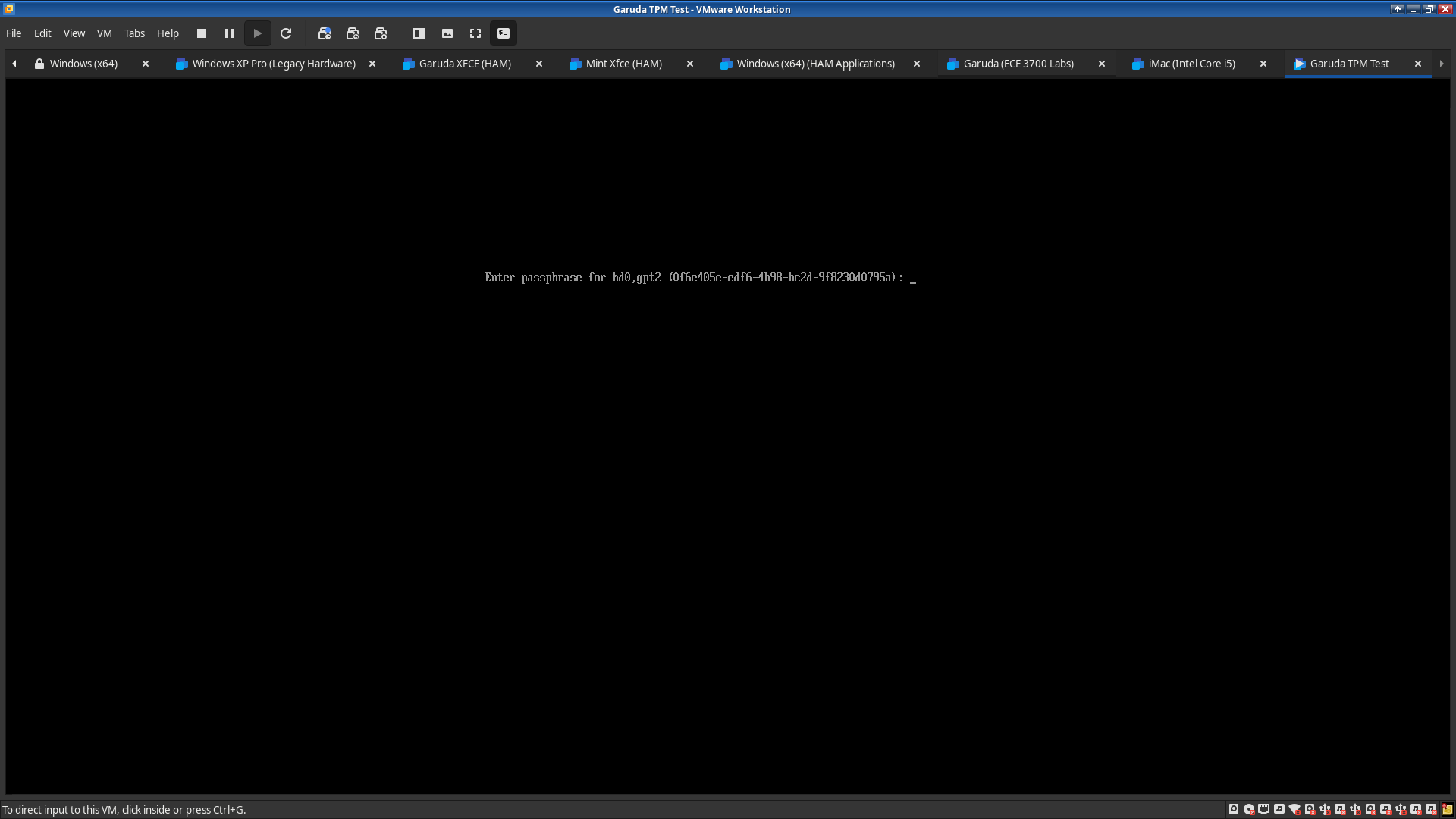
So what I am trying to do is, unlock the system with a password like you normally do when you encrypt Linux. However, I would like it to also use what ever is coming off that TPM to add to the unlocking process.
To make it clear, I’m looking to use --tpm2-with-pin=BOOL so TPM 2.0 keys + a password is used to unlock the drive and continue to load Garuda. What I’m expecting to see is the following in the image below, but also uses TPM 2.0 keys…
Does anyone know how to properly do this in Garuda or could please guide me through the process?
Thank you