Hello!
It’s my first time installing and using a Linux distro, however I’m not a complete tech noob.
I am dual booting Garuda and Win10 on a laptop. I was trying to download Minecraft, but the launcher kept opening an empty grey window, which didn’t even have a “Minecraft Launcher” text, wether in the taskbar or in the window’s top bar.
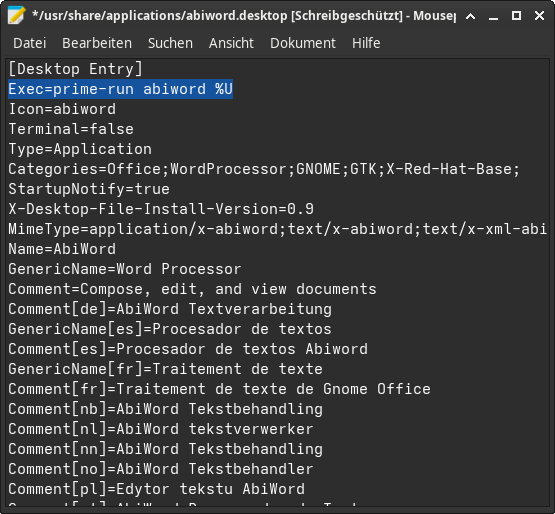
I messed around and toggled the “Run using dedicated GPU” in MClauncher’s advanced tab from the KDE menu editor, and now it works completely fine.
I am assuming this is linked to the fact my laptop has 2 GPUs, and that it defaults to the worst one?
Would that mean that I need to toggle “Run using dedicated GPU” for all apps that need to run on the better GPU? I can’t find a way to do it on appimages, so it may not be a reliable “system-wide” fix. Perhaps there is a way to select the default GPU for every app?
It’s not giving me any explicit problems as of right now but I’m guessing it’ll affect performance and maybe even other apps if ignored. Here’s my inxi:
System:
Kernel: 6.17.9-zen1-1-zen arch: x86_64 bits: 64 compiler: gcc v: 15.2.1
clocksource: tsc avail: acpi_pm
parameters: BOOT_IMAGE=/@/boot/vmlinuz-linux-zen
root=UUID=850dffb0-e2dc-4963-978f-0b0527fc9d5d rw rootflags=subvol=@
vt.default_red=30,243,166,249,137,245,148,186,88,243,166,249,137,245,148,166
vt.default_grn=30,139,227,226,180,194,226,194,91,139,227,226,180,194,226,173
vt.default_blu=46,168,161,175,250,231,213,222,112,168,161,175,250,231,213,200
quiet loglevel=3
Desktop: KDE Plasma v: 6.5.4 tk: Qt v: N/A info: frameworks v: 6.20.0
wm: kwin_wayland with: krunner vt: 2 dm: SDDM Distro: Garuda
base: Arch Linux
Machine:
Type: Laptop System: HP product: OMEN by HP Laptop 15-ce0xx v: N/A
serial: <superuser required> Chassis: type: 10 serial: <superuser required>
Mobo: HP model: 838F v: 40.28 serial: <superuser required>
part-nu: 1RH51EA#ABF uuid: <superuser required> Firmware: UEFI
vendor: American Megatrends v: F.24 date: 07/05/2021
CPU:
Info: model: Intel Core i5-7300HQ bits: 64 type: MCP arch: Kaby Lake
gen: core 7 level: v3 note: check built: 2018 process: Intel 14nm family: 6
model-id: 0x9E (158) stepping: 9 microcode: 0xF8
Topology: cpus: 1x dies: 1 clusters: 4 cores: 4 smt: <unsupported> cache:
L1: 256 KiB desc: d-4x32 KiB; i-4x32 KiB L2: 1024 KiB desc: 4x256 KiB
L3: 6 MiB desc: 1x6 MiB
Speed (MHz): avg: 900 min/max: 800/3500 scaling: driver: intel_pstate
governor: powersave cores: 1: 900 2: 900 3: 900 4: 900 bogomips: 19999
Flags-basic: avx avx2 ht lm nx pae sse sse2 sse3 sse4_1 sse4_2 ssse3
Vulnerabilities: <filter>
Graphics:
Device-1: Intel HD Graphics 630 vendor: Hewlett-Packard driver: i915
v: kernel arch: Gen-9.5 process: Intel 14nm built: 2016-20 ports:
active: eDP-1 empty: DP-1,HDMI-A-1 bus-ID: 00:02.0 chip-ID: 8086:591b
class-ID: 0300
Device-2: NVIDIA GP107M [GeForce GTX 1050 Mobile] vendor: Hewlett-Packard
driver: nvidia v: 580.105.08 alternate: nouveau,nvidia_drm
non-free: 550-580.xx+ status: current (as of 2025-11; EOL~2026-12-xx)
arch: Pascal code: GP10x process: TSMC 16nm built: 2016-2021 pcie: gen: 1
speed: 2.5 GT/s lanes: 8 link-max: gen: 3 speed: 8 GT/s lanes: 16 ports:
active: none empty: DP-2,HDMI-A-2 bus-ID: 01:00.0 chip-ID: 10de:1c8d
class-ID: 0300
Device-3: Cheng Uei Precision Industry (Foxlink) HP Wide Vision HD Camera
driver: uvcvideo type: USB rev: 2.0 speed: 480 Mb/s lanes: 1 mode: 2.0
bus-ID: 1-6:3 chip-ID: 05c8:03ab class-ID: 0e02
Display: wayland server: X.org v: 1.21.1.21 with: Xwayland v: 24.1.9
compositor: kwin_wayland driver: gpu: i915 display-ID: 0
Monitor-1: eDP-1 model: ChiMei InnoLux 0x15d3 built: 2015 res:
mode: 1920x1080 hz: 60 scale: 125% (1.25) to: 1536x864 dpi: 142 gamma: 1.2
size: 344x193mm (13.54x7.6") diag: 394mm (15.5") ratio: 16:9
modes: 1920x1080
API: EGL v: 1.5 hw: drv: intel iris drv: nvidia platforms: device: 0
drv: nvidia device: 2 drv: iris device: 3 drv: swrast gbm: drv: nvidia
surfaceless: drv: nvidia wayland: drv: iris x11: drv: iris
inactive: device-1
API: OpenGL v: 4.6.0 compat-v: 4.5 vendor: intel mesa v: 25.3.1-arch1.2
glx-v: 1.4 direct-render: yes renderer: Mesa Intel HD Graphics 630 (KBL GT2)
device-ID: 8086:591b memory: 7.33 GiB unified: yes display-ID: :0.0
API: Vulkan v: 1.4.328 layers: 12 device: 0 type: integrated-gpu
name: Intel HD Graphics 630 (KBL GT2) driver: mesa intel v: 25.3.1-arch1.2
device-ID: 8086:591b surfaces: N/A device: 1 type: discrete-gpu
name: NVIDIA GeForce GTX 1050 driver: nvidia v: 580.105.08
device-ID: 10de:1c8d surfaces: N/A device: 2 type: cpu name: llvmpipe
(LLVM 21.1.6 256 bits) driver: mesa llvmpipe v: 25.3.1-arch1.2 (LLVM
21.1.6) device-ID: 10005:0000 surfaces: N/A
Info: Tools: api: clinfo, eglinfo, glxinfo, vulkaninfo
de: kscreen-console,kscreen-doctor gpu: corectrl,nvidia-smi wl: wayland-info
x11: xdpyinfo, xprop, xrandr
Audio:
Device-1: Intel CM238 HD Audio vendor: Hewlett-Packard driver: snd_hda_intel
v: kernel alternate: snd_soc_avs bus-ID: 00:1f.3 chip-ID: 8086:a171
class-ID: 0403
Device-2: NVIDIA GP107GL High Definition Audio driver: snd_hda_intel
v: kernel pcie: gen: 3 speed: 8 GT/s lanes: 8 link-max: lanes: 16
bus-ID: 01:00.1 chip-ID: 10de:0fb9 class-ID: 0403
API: ALSA v: k6.17.9-zen1-1-zen status: kernel-api with: aoss
type: oss-emulator tools: N/A
Server-1: PipeWire v: 1.4.9 status: active with: 1: pipewire-pulse
status: active 2: wireplumber status: active 3: pipewire-alsa type: plugin
4: pw-jack type: plugin tools: pactl,pw-cat,pw-cli,wpctl
Network:
Device-1: Realtek RTL8111/8168/8211/8411 PCI Express Gigabit Ethernet
vendor: Hewlett-Packard driver: r8169 v: kernel pcie: gen: 1 speed: 2.5 GT/s
lanes: 1 port: c000 bus-ID: 03:00.0 chip-ID: 10ec:8168 class-ID: 0200
IF: eno1 state: down mac: <filter>
Device-2: Intel Wireless 7265 driver: iwlwifi v: kernel pcie: gen: 1
speed: 2.5 GT/s lanes: 1 bus-ID: 04:00.0 chip-ID: 8086:095a class-ID: 0280
IF: wlo1 state: up mac: <filter>
Info: services: NetworkManager, systemd-timesyncd, wpa_supplicant
Bluetooth:
Device-1: Intel Bluetooth wireless interface driver: btusb v: 0.8 type: USB
rev: 2.0 speed: 12 Mb/s lanes: 1 mode: 1.1 bus-ID: 1-7:4 chip-ID: 8087:0a2a
class-ID: e001
Report: btmgmt ID: hci0 rfk-id: 2 state: down bt-service: enabled,running
rfk-block: hardware: no software: yes address: <filter> bt-v: 4.2 lmp-v: 8
status: discoverable: no pairing: no
Drives:
Local Storage: total: 931.51 GiB used: 262.63 GiB (28.2%)
SMART Message: Unable to run smartctl. Root privileges required.
ID-1: /dev/sda maj-min: 8:0 vendor: Seagate model: ST1000LM048-2E7172
size: 931.51 GiB block-size: physical: 4096 B logical: 512 B speed: 6.0 Gb/s
tech: HDD rpm: 5400 serial: <filter> fw-rev: 0001 scheme: GPT
Partition:
ID-1: / raw-size: 690.07 GiB size: 690.07 GiB (100.00%)
used: 262.58 GiB (38.1%) fs: btrfs dev: /dev/sda5 maj-min: 8:5
ID-2: /boot/efi raw-size: 100 MiB size: 96 MiB (96.00%)
used: 49.8 MiB (51.9%) fs: vfat dev: /dev/sda2 maj-min: 8:2
ID-3: /home raw-size: 690.07 GiB size: 690.07 GiB (100.00%)
used: 262.58 GiB (38.1%) fs: btrfs dev: /dev/sda5 maj-min: 8:5
ID-4: /var/log raw-size: 690.07 GiB size: 690.07 GiB (100.00%)
used: 262.58 GiB (38.1%) fs: btrfs dev: /dev/sda5 maj-min: 8:5
ID-5: /var/tmp raw-size: 690.07 GiB size: 690.07 GiB (100.00%)
used: 262.58 GiB (38.1%) fs: btrfs dev: /dev/sda5 maj-min: 8:5
Swap:
Kernel: swappiness: 133 (default 60) cache-pressure: 100 (default) zswap: no
ID-1: swap-1 type: zram size: 7.51 GiB used: 1.8 GiB (24.0%) priority: 100
comp: zstd avail: lzo-rle,lzo,lz4,lz4hc,deflate,842 dev: /dev/zram0
Sensors:
System Temperatures: cpu: 53.0 C pch: 52.0 C mobo: N/A
Fan Speeds (rpm): cpu: 6656 fan-2: 0
Info:
Memory: total: 8 GiB note: est. available: 7.51 GiB used: 4.34 GiB (57.8%)
Processes: 254 Power: uptime: 3h 34m states: freeze,mem,disk suspend: deep
avail: s2idle wakeups: 1 hibernate: platform avail: shutdown, reboot,
suspend, test_resume image: 2.88 GiB services: org_kde_powerdevil,
power-profiles-daemon, upowerd Init: systemd v: 258 default: graphical
tool: systemctl
Packages: 1581 pm: pacman pkgs: 1565 libs: 455 tools: octopi,paru
pm: flatpak pkgs: 16 Compilers: gcc: 15.2.1 Shell: Bash v: 5.3.8
default: fish v: 4.2.1 running-in: konsole inxi: 3.3.40
Garuda (2.11.1-1):
System install date:     2025-11-09
Garuda release:          251103
Last full system update: 2025-12-09
Is partially upgraded:   No
Relevant software:       snapper NetworkManager dracut nvidia-utils nvidia-dkms garuda-hardware-profile-nvidia-closed garuda-hardware-profile-standard
Windows dual boot:       Probably (Run as root to verify)
Failed units: