Second data partition is not a separate device and I can't write anything to it

Hello. I’m a new Garuda Linux user. I recently cleared my drives and switched their formats to the btrfs format. However, I have had multiple issues regarding the data partitioning on my non root drive.

Instead of the device being its own separate disk, I click on it and it’s in the media/chahnkeh/fd1165d9-912d-4a14-bb74-bb7f-b2aa605f6d7f folder. When I try to use applications such as Steam to create a dedicated folder (In Steams case SteamLibrary) it will say that the folder is not writable on that drive.

I also tried downloading a few files to the folder with a similar issue.

How would I be able to properly format in btrfs while also having it as a separate drive instead of a folder?

garuda-ixni:

System:
Kernel: 6.18.7-zen1-1-zen arch: x86_64 bits: 64 compiler: gcc v: 15.2.1
clocksource: tsc avail: hpet,acpi_pm
parameters: BOOT_IMAGE=/@/boot/vmlinuz-linux-zen
root=UUID=5f002f56-d3d6-484a-9798-3be427303f8c rw rootflags=subvol=@
quiet loglevel=3
Desktop: KDE Plasma v: 6.5.5 tk: Qt v: N/A wm: kwin_wayland dm: SDDM
Distro: Garuda base: Arch Linux
Machine:
Type: Desktop Mobo: ASRock model: X470 Master SLI/ac serial: <filter>
uuid: 2e4f2079-2e45-0000-0000-000000000000 Firmware: UEFI
vendor: American Megatrends v: P4.40 date: 03/29/2021
CPU:
Info: model: AMD Ryzen 9 5950X socket: AM4 bits: 64 type: MT MCP
arch: Zen 3+ gen: 3 level: v3 note: check built: 2022 process: TSMC n6 (7nm)
family: 0x19 (25) model-id: 0x21 (33) stepping: 2 microcode: 0xA201211
Topology: cpus: 1x dies: 1 clusters: 1 cores: 16 threads: 32 tpc: 2
smt: enabled cache: L1: 1024 KiB desc: d-16x32 KiB; i-16x32 KiB L2: 8 MiB
desc: 16x512 KiB L3: 64 MiB desc: 2x32 MiB
Speed (MHz): avg: 3805 min/max: 582/5086 boost: enabled
base/boost: 3400/5050 scaling: driver: amd-pstate-epp governor: powersave
volts: 1.1 V ext-clock: 100 MHz cores: 1: 3805 2: 3805 3: 3805 4: 3805
5: 3805 6: 3805 7: 3805 8: 3805 9: 3805 10: 3805 11: 3805 12: 3805
13: 3805 14: 3805 15: 3805 16: 3805 17: 3805 18: 3805 19: 3805 20: 3805
21: 3805 22: 3805 23: 3805 24: 3805 25: 3805 26: 3805 27: 3805 28: 3805
29: 3805 30: 3805 31: 3805 32: 3805 bogomips: 217204
Flags-basic: avx avx2 ht lm nx pae sse sse2 sse3 sse4_1 sse4_2 sse4a
ssse3 svm
Vulnerabilities: <filter>
Graphics:
Device-1: NVIDIA GA104 [GeForce RTX 3070 Ti] vendor: EVGA driver: nvidia
v: 590.48.01 alternate: nouveau,nvidia_drm non-free: 550-580.xx+
status: current (as of 2025-11; EOL~2026-12-xx) arch: Ampere code: GAxxx
process: TSMC n7 (7nm) built: 2020-2023 pcie: gen: 2 speed: 5 GT/s
lanes: 16 link-max: gen: 4 speed: 16 GT/s ports: active: DP-1,HDMI-A-1
empty: DP-2,DP-3 bus-ID: 0a:00.0 chip-ID: 10de:2482 class-ID: 0300
Display: unspecified server: X.Org v: 24.1.9 with: Xwayland v: 24.1.9
compositor: kwin_wayland driver: X: loaded: nvidia unloaded: modesetting
alternate: fbdev,nouveau,nv,vesa gpu: nv_platform,nvidia,nvidia-nvswitch
display-ID: :1 screens: 1
Screen-1: 0 s-res: 3840x1080 s-dpi: 96 s-size: 1016x286mm (40.00x11.26")
s-diag: 1055mm (41.55")
Monitor-1: DP-1 pos: primary,left model: VG248 serial: <filter>
built: 2018 res: mode: 1920x1080 hz: 144 scale: 100% (1) dpi: 92 gamma: 1.2
size: 531x299mm (20.91x11.77") diag: 609mm (24") ratio: 16:9 modes:
max: 1920x1080 min: 640x480
Monitor-2: HDMI-A-1 pos: right model: VG245 serial: <filter> built: 2020
res: mode: 1920x1080 hz: 60 scale: 100% (1) dpi: 92 gamma: 1.2
size: 531x299mm (20.91x11.77") diag: 609mm (24") ratio: 16:9 modes:
max: 1920x1080 min: 640x480
API: EGL v: 1.5 hw: drv: nvidia platforms: device: 0 drv: nvidia device: 2
drv: swrast gbm: drv: nvidia surfaceless: drv: nvidia x11: drv: nvidia
inactive: wayland,device-1
API: OpenGL v: 4.6.0 compat-v: 4.5 vendor: nvidia mesa v: 25.3.4-arch1.1
glx-v: 1.4 direct-render: yes renderer: NVIDIA GeForce RTX 3070 Ti/PCIe/SSE2
memory: 7.81 GiB
API: Vulkan v: 1.4.335 layers: 10 device: 0 type: discrete-gpu name: NVIDIA
GeForce RTX 3070 Ti driver: nvidia v: 590.48.01 device-ID: 10de:2482
surfaces: N/A device: 1 type: cpu name: llvmpipe (LLVM 21.1.6 256 bits)
driver: mesa llvmpipe v: 25.3.4-arch1.1 (LLVM 21.1.6)
device-ID: 10005:0000 surfaces: N/A
Info: Tools: api: clinfo, eglinfo, glxinfo, vulkaninfo
de: kscreen-console,kscreen-doctor gpu: nvidia-smi wl: wayland-info
x11: xdpyinfo, xprop, xrandr
Audio:
Device-1: NVIDIA GA104 High Definition Audio vendor: EVGA
driver: snd_hda_intel v: kernel pcie: gen: 3 speed: 8 GT/s lanes: 16
link-max: gen: 4 speed: 16 GT/s bus-ID: 0a:00.1 chip-ID: 10de:228b
class-ID: 0403
Device-2: Advanced Micro Devices [AMD] Starship/Matisse HD Audio
vendor: ASRock driver: snd_hda_intel v: kernel pcie: gen: 4 speed: 16 GT/s
lanes: 16 bus-ID: 0c:00.4 chip-ID: 1022:1487 class-ID: 0403
Device-3: RODE Microphones Deity VO-7U driver: snd-usb-audio type: USB
rev: 2.0 speed: 12 Mb/s lanes: 1 mode: 1.1 bus-ID: 1-7:3 chip-ID: 19f7:003c
class-ID: 0102 serial: <filter>
API: ALSA v: k6.18.7-zen1-1-zen status: kernel-api tools: N/A
Server-1: PipeWire v: 1.4.10 status: n/a (root, process) with:
1: pipewire-pulse status: active 2: wireplumber status: active
3: pipewire-alsa type: plugin 4: pw-jack type: plugin
tools: pactl,pw-cat,pw-cli,wpctl
Network:
Device-1: Intel Dual Band Wireless-AC 3168NGW [Stone Peak] driver: iwlwifi
v: kernel pcie: gen: 1 speed: 2.5 GT/s lanes: 1 bus-ID: 03:00.0
chip-ID: 8086:24fb class-ID: 0280
IF: wlp3s0 state: down mac: <filter>
Device-2: Intel I211 Gigabit Network vendor: ASRock driver: igb v: kernel
pcie: gen: 1 speed: 2.5 GT/s lanes: 1 port: f000 bus-ID: 04:00.0
chip-ID: 8086:1539 class-ID: 0200
IF: enp4s0 state: up speed: 1000 Mbps duplex: full mac: <filter>
Info: services: NetworkManager, systemd-timesyncd, wpa_supplicant
Bluetooth:
Device-1: Intel Wireless-AC 3168 Bluetooth driver: btusb v: 0.8 type: USB
rev: 2.0 speed: 12 Mb/s lanes: 1 mode: 1.1 bus-ID: 1-9:4 chip-ID: 8087:0aa7
class-ID: e001
Report: btmgmt ID: hci0 rfk-id: 2 state: up address: <filter> bt-v: 4.2
lmp-v: 8 status: discoverable: no pairing: no class-ID: 6c0104
Drives:
Local Storage: total: 1.36 TiB used: 19.52 GiB (1.4%)
ID-1: /dev/nvme0n1 maj-min: 259:0 vendor: Western Digital
model: WDS500G2X0C-00L350 size: 465.76 GiB block-size: physical: 512 B
logical: 512 B speed: 31.6 Gb/s lanes: 4 tech: SSD serial: <filter>
fw-rev: 101140WD temp: 35.9 C scheme: GPT
SMART: yes health: PASSED on: 3y 160d 4h cycles: 2,412
read-units: 115,232,592 [58.9 TB] written-units: 362,874,850 [185 TB]
ID-2: /dev/sda maj-min: 8:0 vendor: Samsung model: SSD 860 QVO 1TB
family: based SSDs size: 931.51 GiB block-size: physical: 512 B
logical: 512 B sata: 3.2 speed: 6.0 Gb/s tech: SSD serial: <filter>
fw-rev: 1B6Q temp: 16 C scheme: GPT
SMART: yes state: enabled health: PASSED on: 3y 29d 5h cycles: 1684
written: 10.03 TiB
Partition:
ID-1: / raw-size: 465.47 GiB size: 465.47 GiB (100.00%)
used: 19.51 GiB (4.2%) fs: btrfs block-size: 4096 B dev: /dev/nvme0n1p2
maj-min: 259:2
ID-2: /boot/efi raw-size: 300 MiB size: 299.4 MiB (99.80%)
used: 664 KiB (0.2%) fs: vfat block-size: 512 B dev: /dev/nvme0n1p1
maj-min: 259:1
ID-3: /home raw-size: 465.47 GiB size: 465.47 GiB (100.00%)
used: 19.51 GiB (4.2%) fs: btrfs block-size: 4096 B dev: /dev/nvme0n1p2
maj-min: 259:2
ID-4: /var/log raw-size: 465.47 GiB size: 465.47 GiB (100.00%)
used: 19.51 GiB (4.2%) fs: btrfs block-size: 4096 B dev: /dev/nvme0n1p2
maj-min: 259:2
ID-5: /var/tmp raw-size: 465.47 GiB size: 465.47 GiB (100.00%)
used: 19.51 GiB (4.2%) fs: btrfs block-size: 4096 B dev: /dev/nvme0n1p2
maj-min: 259:2
Swap:
Kernel: swappiness: 133 (default 60) cache-pressure: 100 (default) zswap: no
ID-1: swap-1 type: zram size: 31.26 GiB used: 0 KiB (0.0%) priority: 100
comp: zstd avail: lzo-rle,lzo,lz4,lz4hc,deflate,842 dev: /dev/zram0
Sensors:
System Temperatures: cpu: 43.6 C mobo: N/A
Fan Speeds (rpm): N/A
Info:
Memory: total: 32 GiB available: 31.26 GiB used: 7.51 GiB (24.0%)
Processes: 595 Power: uptime: 2h 21m states: freeze,mem,disk suspend: deep
avail: s2idle wakeups: 1 hibernate: platform avail: shutdown, reboot,
suspend, test_resume image: 12.46 GiB services: org_kde_powerdevil,
power-profiles-daemon, upowerd Init: systemd v: 259 default: graphical
tool: systemctl
Packages: pm: pacman pkgs: 1355 libs: 384 tools: octopi,paru Compilers:
gcc: 15.2.1 Shell: Bash (sudo) v: 5.3.9 running-in: konsole inxi: 3.3.40
Garuda (2.12.3-2):
System install date:     2026-02-01
Garuda release:          260115
Last full system update: 2026-02-06 ↻
Is partially upgraded:   No
Relevant software:       snapper NetworkManager dracut nvidia-utils nvidia-open-dkms garuda-hardware-profile-nvidia garuda-hardware-profile-standard
Windows dual boot:       No/Undetected
Failed units:
--- System Health Check Report ---
26/26 checks run in 0.66 seconds ⌛
Powered by garuda-health 🦅
```
Hello, I would suggest you add your garuda-inxi here quick before the moderators catch you and castigate you for not following the forum rules LOL

Cheekiness aside, without it, we really cannot help you. The full output of the garuda-inxi provides us with foundational details about the topography of your system, including hardware profiles, and generally how your system is configured. Please edit your original post to include the output we need, and then we can offer some targeted advice.

3 Likes

Sorry I must of have missed that. Should have everything you would need.

1 Like

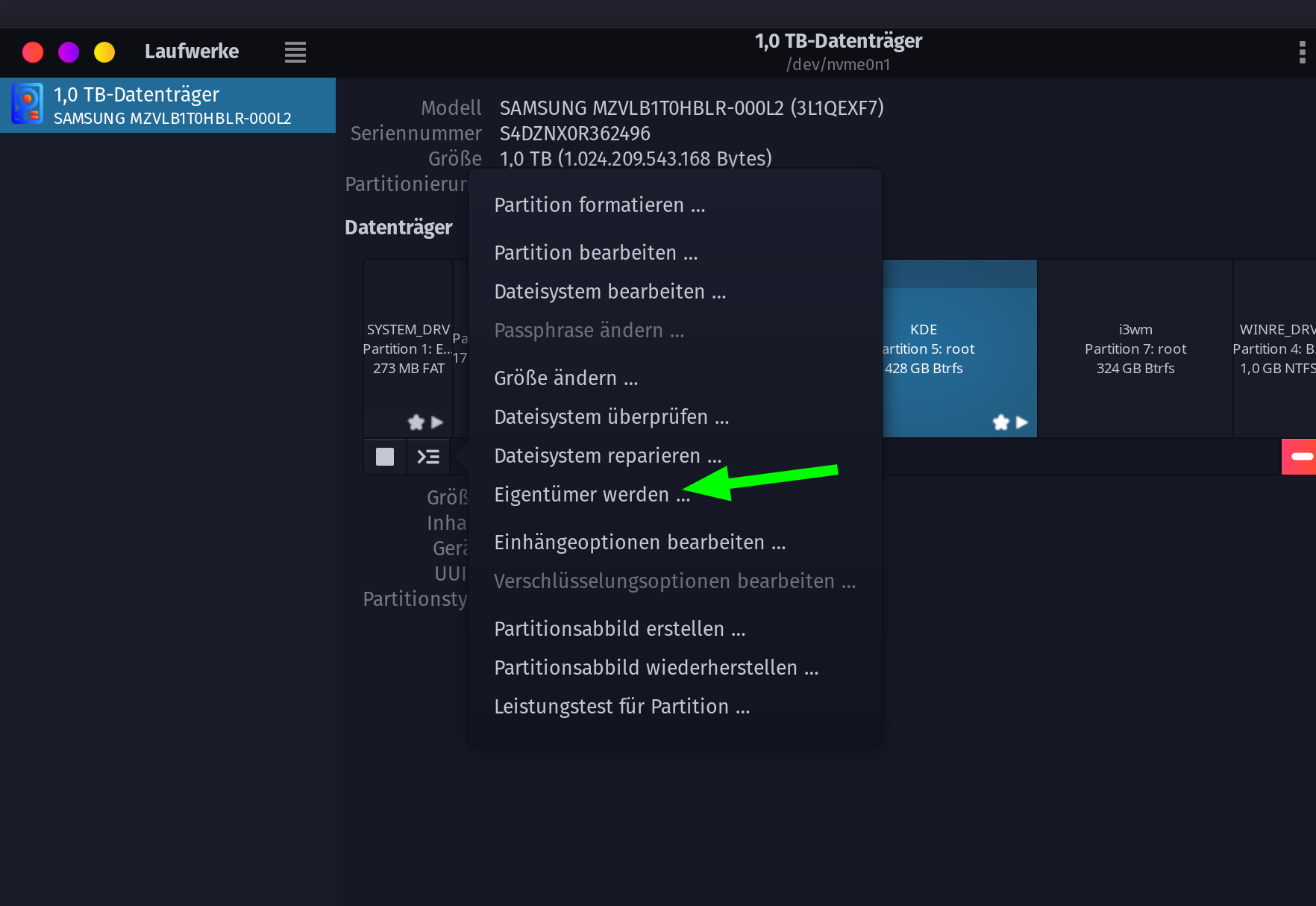
Seems you must change the owner on this device.
use disks

2 Likes

Firstly, though likely unrelated, it seems your BIOS could be updated, so you may wish to look into that:

https://www.asrock.com/mb/AMD/X470%20Master%20SLI/index.us.asp#BIOS

I see that you have 2 storage devices: /dev/nvme0n1 - which appears to be the root device, and /dev/sda which I’m assuming is the one you’re having problems with?

How do you mount this storage device? Do you just click on its entry in Dolphin and it automounts to /media/chahnkeh/fd1165d9-912d-4a14-bb74-bb7f-b2aa605f6d7f?

After you mount this storage device, can you post the output of findmnt --list ?

What’s the filesystem on this storage device?

2 Likes
TARGET            SOURCE       FSTYPE   OPTIONS
/                 /dev/nvme0n1p2[/@]
btrfs    rw,noatime,compress=zstd:3,ssd,discard=async,space_cache=v2,subvolid=2
/dev              devtmpfs     devtmpfs rw,nosuid,size=16326048k,nr_inodes=4081512,mode=755,inode64
/dev/shm          tmpfs        tmpfs    rw,nosuid,nodev,inode64,usrquota
/dev/pts          devpts       devpts   rw,nosuid,noexec,relatime,gid=5,mode=600,ptmxmode=000
/sys              sysfs        sysfs    rw,nosuid,nodev,noexec,relatime
/sys/kernel/security
securityfs   security rw,nosuid,nodev,noexec,relatime
/sys/fs/cgroup    cgroup2      cgroup2  rw,nosuid,nodev,noexec,relatime,nsdelegate,memory_recursiveprot,memory
/sys/fs/pstore    none         pstore   rw,nosuid,nodev,noexec,relatime
/sys/firmware/efi/efivars
efivarfs     efivarfs rw,nosuid,nodev,noexec,relatime
/sys/fs/bpf       bpf          bpf      rw,nosuid,nodev,noexec,relatime,mode=700
/sys/kernel/config
configfs     configfs rw,nosuid,nodev,noexec,relatime
/proc             proc         proc     rw,nosuid,nodev,noexec,relatime
/run              tmpfs        tmpfs    rw,nosuid,nodev,size=6554944k,nr_inodes=819200,mode=755,inode64
/proc/sys/fs/binfmt_misc
systemd-1    autofs   rw,relatime,fd=41,pgrp=1,timeout=0,minproto=5,maxproto=5,direct,pipe_i
/run/credentials/systemd-journald.service
none         tmpfs    ro,nosuid,nodev,noexec,relatime,nosymfollow,size=1024k,nr_inodes=1024,
/sys/kernel/tracing
tracefs      tracefs  rw,nosuid,nodev,noexec,relatime
/sys/fs/fuse/connections
fusectl      fusectl  rw,nosuid,nodev,noexec,relatime
/dev/mqueue       mqueue       mqueue   rw,nosuid,nodev,noexec,relatime
/sys/kernel/debug debugfs      debugfs  rw,nosuid,nodev,noexec,relatime
/dev/hugepages    hugetlbfs    hugetlbf rw,nosuid,nodev,relatime,pagesize=2M
/srv              /dev/nvme0n1p2[/@srv]
btrfs    rw,noatime,compress=zstd:3,ssd,discard=async,space_cache=v2,subvolid=2
/root             /dev/nvme0n1p2[/@root]
btrfs    rw,noatime,compress=zstd:3,ssd,discard=async,space_cache=v2,subvolid=2
/home             /dev/nvme0n1p2[/@home]
btrfs    rw,noatime,compress=zstd:3,ssd,discard=async,space_cache=v2,subvolid=2
/tmp              tmpfs        tmpfs    rw,noatime,inode64
/var/cache        /dev/nvme0n1p2[/@cache]
btrfs    rw,noatime,compress=zstd:3,ssd,discard=async,space_cache=v2,subvolid=2
/var/log          /dev/nvme0n1p2[/@log]
btrfs    rw,noatime,compress=zstd:3,ssd,discard=async,space_cache=v2,subvolid=2
/var/tmp          /dev/nvme0n1p2[/@tmp]
btrfs    rw,noatime,compress=zstd:3,ssd,discard=async,space_cache=v2,subvolid=2
/boot/efi         /dev/nvme0n1p1
vfat     rw,relatime,fmask=0077,dmask=0077,codepage=437,iocharset=ascii,shortna
/proc/sys/fs/binfmt_misc
binfmt_misc  binfmt_m rw,nosuid,nodev,noexec,relatime
/run/user/1000    tmpfs        tmpfs    rw,nosuid,nodev,relatime,size=3277468k,nr_inodes=819367,mode=700,uid=1
/run/user/1000/doc
portal       fuse.por rw,nosuid,nodev,relatime,user_id=1000,group_id=1000

I’m not seeing anything mounted in /media/chahnkeh/fd1165d9-912d-4a14-bb74-bb7f-b2aa605f6d7f

What about the answers to my other questions?

2 Likes

Sorry. /dev/sda is the problem device. I would just mount it and it automatically mounts to that folder.

Can you please mount it, then send me the output of findmnt --list so I can see more details about the storage device and what FS there is and how it’s being mounted?

2 Likes

I managed to change the folder.

TARGET               SOURCE      FSTYPE   OPTIONS
/                    /dev/nvme0n1p2[/@]
btrfs    rw,noatime,compress=zstd:3,ssd,discard=async,space_cache=v2,subvolid
/dev                 devtmpfs    devtmpfs rw,nosuid,size=16326048k,nr_inodes=4081512,mode=755,inode64
/dev/shm             tmpfs       tmpfs    rw,nosuid,nodev,inode64,usrquota
/dev/pts             devpts      devpts   rw,nosuid,noexec,relatime,gid=5,mode=600,ptmxmode=000
/sys                 sysfs       sysfs    rw,nosuid,nodev,noexec,relatime
/sys/kernel/security securityfs  security rw,nosuid,nodev,noexec,relatime
/sys/fs/cgroup       cgroup2     cgroup2  rw,nosuid,nodev,noexec,relatime,nsdelegate,memory_recursiveprot,memo
/sys/fs/pstore       none        pstore   rw,nosuid,nodev,noexec,relatime
/sys/firmware/efi/efivars
efivarfs    efivarfs rw,nosuid,nodev,noexec,relatime
/sys/fs/bpf          bpf         bpf      rw,nosuid,nodev,noexec,relatime,mode=700
/sys/kernel/config   configfs    configfs rw,nosuid,nodev,noexec,relatime
/proc                proc        proc     rw,nosuid,nodev,noexec,relatime
/run                 tmpfs       tmpfs    rw,nosuid,nodev,size=6554944k,nr_inodes=819200,mode=755,inode64
/proc/sys/fs/binfmt_misc
systemd-1   autofs   rw,relatime,fd=41,pgrp=1,timeout=0,minproto=5,maxproto=5,direct,pipe
/run/credentials/systemd-journald.service
none        tmpfs    ro,nosuid,nodev,noexec,relatime,nosymfollow,size=1024k,nr_inodes=102
/sys/kernel/tracing  tracefs     tracefs  rw,nosuid,nodev,noexec,relatime
/sys/fs/fuse/connections
fusectl     fusectl  rw,nosuid,nodev,noexec,relatime
/dev/mqueue          mqueue      mqueue   rw,nosuid,nodev,noexec,relatime
/sys/kernel/debug    debugfs     debugfs  rw,nosuid,nodev,noexec,relatime
/dev/hugepages       hugetlbfs   hugetlbf rw,nosuid,nodev,relatime,pagesize=2M
/srv                 /dev/nvme0n1p2[/@srv]
btrfs    rw,noatime,compress=zstd:3,ssd,discard=async,space_cache=v2,subvolid
/root                /dev/nvme0n1p2[/@root]
btrfs    rw,noatime,compress=zstd:3,ssd,discard=async,space_cache=v2,subvolid
/home                /dev/nvme0n1p2[/@home]
btrfs    rw,noatime,compress=zstd:3,ssd,discard=async,space_cache=v2,subvolid
/tmp                 tmpfs       tmpfs    rw,noatime,inode64
/var/cache           /dev/nvme0n1p2[/@cache]
btrfs    rw,noatime,compress=zstd:3,ssd,discard=async,space_cache=v2,subvolid
/var/log             /dev/nvme0n1p2[/@log]
btrfs    rw,noatime,compress=zstd:3,ssd,discard=async,space_cache=v2,subvolid
/var/tmp             /dev/nvme0n1p2[/@tmp]
btrfs    rw,noatime,compress=zstd:3,ssd,discard=async,space_cache=v2,subvolid
/boot/efi            /dev/nvme0n1p1
vfat     rw,relatime,fmask=0077,dmask=0077,codepage=437,iocharset=ascii,short
/proc/sys/fs/binfmt_misc
binfmt_misc binfmt_m rw,nosuid,nodev,noexec,relatime
/run/user/1000       tmpfs       tmpfs    rw,nosuid,nodev,relatime,size=3277468k,nr_inodes=819367,mode=700,uid
/run/user/1000/doc   portal      fuse.por rw,nosuid,nodev,relatime,user_id=1000,group_id=1000
/run/media/chahnkeh/fd1165d9-912d-4a14-bb7f-b2aa605f6d7f
/dev/sda2   btrfs    rw,nosuid,nodev,relatime,ssd,discard=async,space_cache=v2,subvolid=5
/run/media/chahnkeh  /dev/sda2   btrfs    rw,relatime,ssd,discard=async,space_cache=v2,subvolid=5,subvol=/

Well, it seems like your /dev/sda2 is being correctly mounted as a read-write btrfs volume on /run/media/chahnkeh. In a terminal window, can you change into the directory where it’s mounted and issue touch test to have it create a file called test and see if it gives you any write-permission errors?

2 Likes

Managed to fix it, @SGS’s solution worked. I went to the Dolphin file manager, right-clicked on empty space, selected “Root Actions”, and then selected “Ownership to Active User”. I then went to properties and changed all permission groups to “Can View & Modify Content”.

As for you @shayaknyc, I edited the mount point and created a new folder which seems to be working for me. I’ll mark this as resolved since this was the main issue that was preventing me from fixing the other issues.

Thanks to both of you guys!

2 Likes

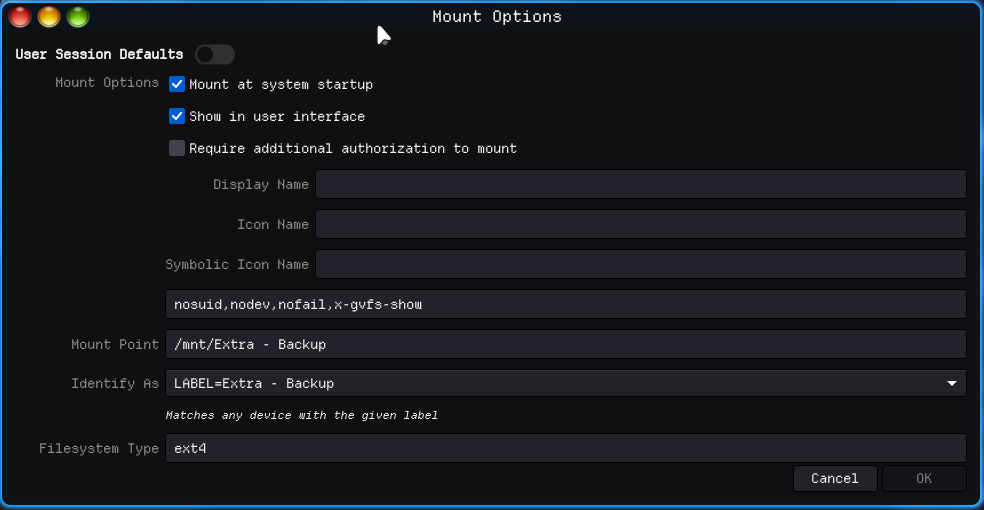
If you want it mounted to /mount do SGS’s way after you have to reboot so it automounts with the kernel and it will act like a normal drive steam can work with

just make sure you set the top two options like this

*if its in run steam will have issues most of the time or you can format it as ext4 do as sgs showed and it will work fine when making the parition in kde partition tool make sure its set to all users not just root

5 Likes

This topic was automatically closed 2 days after the last reply. New replies are no longer allowed.