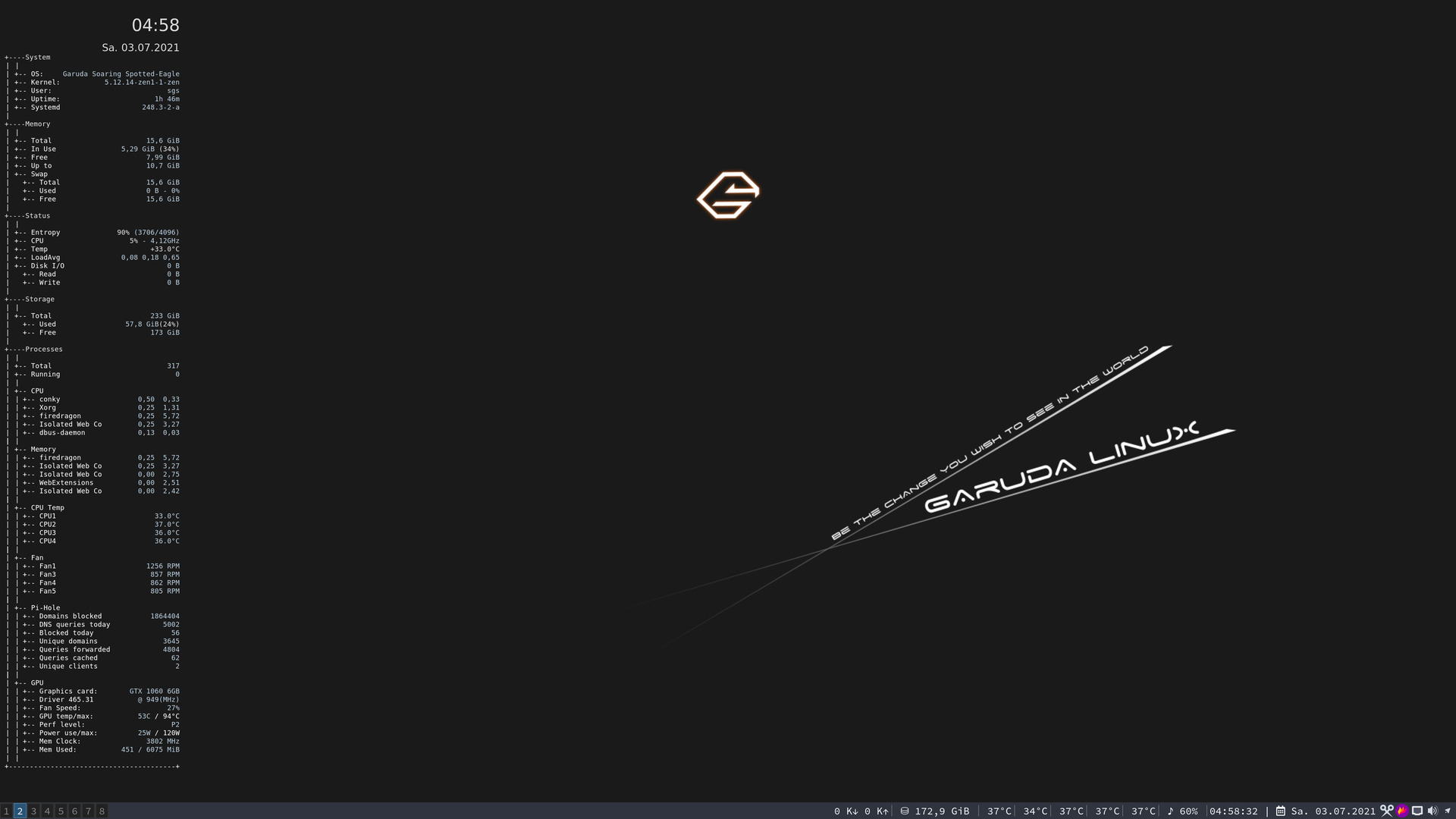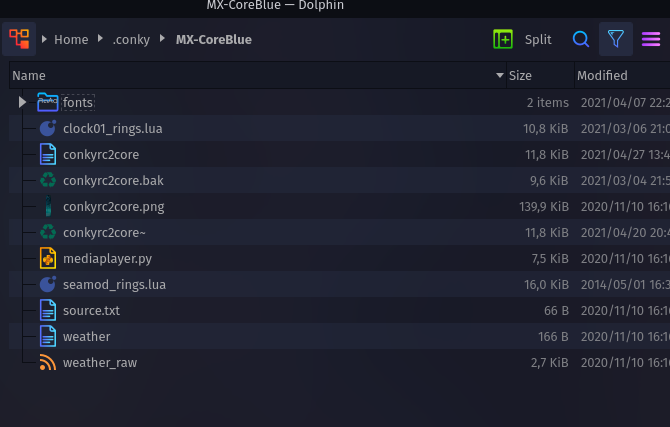
There are multiple scripts in the sub-folder.
There are multiple scripts in the sub-folder.
Normal place are
~/.config/conky/
you don't need to post fonts, .bak, rest are txt files. Post in PM to be topic here.
conky.config = {
-- Conky settings #
    background = false,
    update_interval = 1,

    cpu_avg_samples = 2,
    net_avg_samples = 2,

    override_utf8_locale = true,

    double_buffer = true,
    no_buffers = true,

    text_buffer_size = 2048,
--imlib_cache_size 0


-- Window specifications #
    own_window = true,
    own_window_type = 'normal',
    own_window_transparent = true,
    own_window_transparent = true,
    own_window_hints = 'undecorated,skip_taskbar,skip_pager,below,sticky',

    border_inner_margin = 0,
    border_outer_margin = 5,

    minimum_width = 500, minimum_height = 500,
    maximum_width = 500,

    alignment = 'middle_right',
    gap_x = 30,
    gap_y = -70,

-- Graphics settings #
    draw_shades = false,
    draw_outline = false,
    draw_borders = false,
    draw_graph_borders = true,

-- Text settings #
    use_xft = true,
    font = 'caviar dreams:size=8',
    xftalpha = 0.5,

    uppercase = false,

--  temperature_unit = 'fahrenheit',
    temperature_unit = 'celsius',

    -- default_color = 'FFFFFF',
    -- color0 = 'FFFFFF',
    -- color1 = '0ABFFF',
    default_color = 'ffffff',
    color0 = 'ffffff',
    color1 = '0abfff',


-- Lua Load  #
    lua_load = './clock01_rings.lua',
    lua_draw_hook_pre = 'clock_rings',


-- Loading lua script for drawning rings
    --lua_load ./seamod_rings.lua
    --lua_load ~/musictools/conky/conky-music/player.lua
    --lua_draw_hook_pre = 'main',


    own_window_argb_value = 0,
    own_window_argb_visual = true,
    own_window_colour = '000000',

-- network templates
    if_up_strictness = 'address',

    template0 = [[${color1}\1: $color$alignr${addr \1}
${color1}Current: $color${alignr}${execi 10 test -e /sys/class/net/\1 && /sbin/iwconfig \1 | awk '/Bit Rate=/ { sub(/Rate=/,"", $2); print $2 }'} Mbits/sec]],

    template1 = [[
${color1}\1: $color$alignr${addr \1}\n]],

    template2 = [[${color1}Down: $color${downspeed \1} k/s ${alignr}${color1}Up:$color ${upspeed \1} k/s
${downspeedgraph \1 30,240 000000 0ABFFF} ${alignr}${upspeedgraph \1 30,240 000000 0ABFFF}$color
${color1}Total:$color ${totaldown \1} ${alignr}${color1}\1          ${alignr}${color1}Total:$color ${totalup \1}]],

   template4 = 'eno1',
   template5 = 'eth1',
   template6 = 'wlan0',
   template7 = 'wlan1',


-- wheather templates

   template8 = '~/.conky/accu_weather/rss/weather',
   template9 = '~/.conky/accu_weather/rss/acc_rss',


};


-- fluxbox adjustment
-- if math.floor(os.execute("pgrep -x fluxbox>/dev/null")/256) == 0 then
--   conky.config.own_window_transparent = true
--   conky.config.own_window_argb_visual = false
-- end

conky.text = [[
#----------------------------------------------------------------------------------------------------------------------------------------
#                        Computer info
#----------------------------------------------------------------------------------------------------------------------------------------
${color1}${voffset 2}${hr 1}${voffset 5}
${color1}Hostname:$color${alignr}${nodename}
${color1}OS:$color${alignr}${head /etc/arch-release 1 3600}\
${color1}Kernel:$color${alignr}${kernel}$color
${color1}${voffset 2}${hr 1}${voffset 5}
#----------------------------------------------------------------------------------------------------------------------------------------
#----------------------------------------------------------------------------------------------------------------------------------------
#                            Time and date
#----------------------------------------------------------------------------------------------------------------------------------------
${voffset 7}${font Radio Space:size=16}${color1}${time %A}${font}$color${font Radio Space:size=38}${goto 167}${voffset -8} ${time %e}${font}
${font Radio Space:size=18}${voffset -30}${time %B}${font}${voffset -2} ${font Radio Space:size=20}${time %Y}${font}${color1} ${hr 1}
#----------------------------------------------------------------------------------------------------------------------------------------
#                            Battery Circle
#----------------------------------------------------------------------------------------------------------------------------------------
${color FFFFFF}${goto 209}${voffset 34}\
${if_existing /sys/class/power_supply/BAT0}${battery_percent BAT0}%\
${else}${if_existing /sys/class/power_supply/BAT1}${battery_percent BAT1}%${endif}${endif}
${color1}${goto 202}${voffset 25}Battery
#----------------------------------------------------------------------------------------------------------------------------------------
#                       Weather
#----------------------------------------------------------------------------------------------------------------------------------------
${font conkyweather:size=35}${color FFFFFF}${goto 200}${voffset 20}${execpi 6000  test -f ${template8} && sed -n '2p' ${template8}}$color${font}${font Radio Space:size=11}${color1}${goto 202}${voffset 12}${if_existing ${template8}}HOME${endif}
${execi 600 test -f ${template9} && bash ${template9}}${font Radio Space:size=15}${goto 201}${voffset -4}${execpi 600 test -f ${template8} && ( sed -n '1p' ${template8}|awk '{print $NF}') }${font}$color
${font caviar dreams:size=8}${goto 47}${voffset 5}Uptime: ${uptime_short}
#----------------------------------------------------------------------------------------------------------------------------------------
#                              CPU usage
#----------------------------------------------------------------------------------------------------------------------------------------
${color1}${hr 1}$color
${color1}${voffset 6}Temp: $color ${if_existing /sys/class/thermal/thermal_zone0/temp}${eval ${acpitemp}}${else} ${endif}°C
${color1}${voffset 6}Processes:$color $processes
${color1}${voffset 6}Running: $color  $running_processes${goto 116}${voffset 8}${cpu cpu0}% ${color1}${goto 116}${voffset 13}CPU1$color${goto 191}${voffset -12}${cpu cpu1}% ${color1}${goto 191}${voffset 12}CPU2$color     $color${goto 266}${voffset -12}${cpu cpu2}% ${color1}${goto 266}${voffset 12}CPU3$color   $color${goto 341}${voffset -12}${cpu cpu3}% ${color1}${goto 341}${voffset 12}CPU4$color   $color${goto 415}${voffset -12}${cpu cpu4}% ${color1}${goto 415}${voffset 12}CPUA$color
${color1}${voffset -12}FREQ:$color ${freq}MHz
${color1}${voffset 6}Load:$color ${loadavg} ${user_times}

${color1}${hr 1}$color
${color1}${goto 10}Core 1 : ${color}${freq_g 1}GHz ${goto 110}${color3}${execi 4 sensors 2>/dev/null | grep 'Core 0' | cut -c18-24} ${alignr}${cpu cpu0}% $color1 ${cpubar cpu0 4,330}
${color1}${goto 10}Core 2 : ${color}${freq_g 2}GHz ${goto 110}${color3}${execi 4 sensors 2>/dev/null | grep 'Core 1' | cut -c18-24} ${alignr}${cpu cpu1}% $color1 ${cpubar cpu1 4,330}
${color1}${goto 10}Core 3 : ${color}${freq_g 3}GHz ${goto 110}${color3}${execi 4 sensors 2>/dev/null | grep 'Core 2' | cut -c18-24} ${alignr}${cpu cpu2}% $color1 ${cpubar cpu2 4,330}
${color1}${goto 10}Core 4 : ${color}${freq_g 4}GHz ${goto 110}${color3}${execi 4 sensors 2>/dev/null | grep 'Core 3' | cut -c18-24} ${alignr}${cpu cpu3}% $color1 ${cpubar cpu3 4,330}
${color1}${goto 10}Core A : ${color}${freq_g 5}GHz ${goto 110}${color3}${execi 4 sensors 2>/dev/null | grep 'Core 4' | cut -c18-24} ${alignr}${cpu cpu4}% $color1 ${cpubar cpu4 4,330}

#----------------------------------------------------------------------------------------------------------------------------------------
#                       Network
#----------------------------------------------------------------------------------------------------------------------------------------
${color1}${voffset 2}${hr 1}
${color1}${voffset 5}Hostname: $color$alignr$nodename
${if_up ${template7}}${template0 ${template7}}${else}${template0 ${template6}}${endif}
${if_up ${template5} }${template1 ${template5} }${else}${template1 ${template4} }${endif}
${if_up ${template7}}${template2 ${template7}}${else}${if_up ${template6}}${template2 ${template6}}${else}${if_up ${template5}}${template2 ${template5}}${else}${if_up ${template4}}${template2 ${template4}}${else}${template2 no-link}      ${endif}${endif}${endif}${endif}
#----------------------------------------------------------------------------------------------------------------------------------------
#                   DISK/RAM/SWAP usage
#----------------------------------------------------------------------------------------------------------------------------------------
${color1}${voffset 2}${hr 1}
${color FFFFFF}${goto 7}${voffset 39}${fs_used_perc /}%
${color1}${goto 7}DISK
${color FFFFFF}${goto 102}${voffset -27}${memperc}%
${color1}${goto 102}RAM
${color FFFFFF}${goto 192}${voffset -26}${swapperc}%
${color1}${goto 191}SWAP
#----------------------------------------------------------------------------------------------------------------------------------------
#                      Running processes
#----------------------------------------------------------------------------------------------------------------------------------------
${color1}${voffset 2} ${hr 1}
${color1}${voffset 5}NAME${goto 122}PID${goto 163}CPU%${goto 210}MEM%${goto 260}MEM${goto 315}User${goto 360}TIME$color${voffset 5}
${top name 1}${goto 115}${top pid 1}${goto 160}${top cpu 1}${goto 205}${top mem 1}${goto 255}${top mem_res 1}${goto 315}${top user 1}${goto 350}${top time 1}
${top name 2}${goto 115}${top pid 2}${goto 160}${top cpu 2}${goto 205}${top mem 2}${goto 255}${top mem_res 2}${goto 315}${top user 2}${goto 350}${top time 2}
${top name 3}${goto 115}${top pid 3}${goto 160}${top cpu 3}${goto 205}${top mem 3}${goto 255}${top mem_res 3}${goto 315}${top user 3}${goto 350}${top time 3}
${top name 4}${goto 115}${top pid 4}${goto 160}${top cpu 4}${goto 205}${top mem 4}${goto 255}${top mem_res 4}${goto 315}${top user 4}${goto 350}${top time 4}
${top name 5}${goto 115}${top pid 5}${goto 160}${top cpu 5}${goto 205}${top mem 5}${goto 255}${top mem_res 5}${goto 315}${top user 5}${goto 350}${top time 5}
${top name 6}${goto 115}${top pid 6}${goto 160}${top cpu 6}${goto 205}${top mem 6}${goto 255}${top mem_res 6}${goto 315}${top user 6}${goto 350}${top time 6}
${top name 7}${goto 115}${top pid 7}${goto 160}${top cpu 7}${goto 205}${top mem 7}${goto 255}${top mem_res 7}${goto 315}${top user 7}${goto 350}${top time 7}
${top name 8}${goto 115}${top pid 8}${goto 160}${top cpu 8}${goto 205}${top mem 8}${goto 255}${top mem_res 8}${goto 315}${top user 8}${goto 350}${top time 8}

#----------------------------------------------------------------------------------------------------------------------------------------
#                        Computer info
#----------------------------------------------------------------------------------------------------------------------------------------
${color1}${voffset 2}${hr 1}${voffset 5}
${color1}Hostname:$color${alignr}${nodename}
#${color1}OS:$color${alignr}${execi 3600 awk 'NF{NF-=3}1' /etc/arch_release}
${color1}OS:$color${alignr}${head /etc/arch-release 1 3600}\
${color1}Kernel:$color${alignr}${kernel}$color
${color1}${voffset 2}${hr 1}${voffset 5}
${color1}${voffset 6}User Login time:$color ${user_times}  ${conky_build_date}

#----------------------------------------------------------------------------------------------------------------------------------------

##Clementine using mediaplayer.py script; orig ${font Open Sans:size=9}
${if_existing ./mediaplayer.py}${if_match "${execi 10 python3 ./mediaplayer.py clementine -i}"=="yes"}
${color3}${font Open Sans:size=9}${execpi 4 python3 ./mediaplayer.py clementine -tamlr -w 45}
${if_match "${execi 4 python3 ./mediaplayer.py clementine -p}"=="Unknown"}\
Progress: ${alignr}Unknown
${else}\
Progress:
${color1}${execibar 4 python3 ./mediaplayer.py clementine -p}
#${execi 20 python ./mediaplayer.py clementine -c /tmp/cover.jpg}${if_existing /tmp/cover.jpg}${image /tmp/cover.jpg -p 114,633 -s 75x75 -n}${endif}

${endif}\
${else}
${color3}${font Open Sans:size=9}Clementine Not Running\
${endif}${endif}

]];
--[[
# Clock Rings by Linux Mint (2012) reEdited by Altin.
#
# This script draws percentage meters as rings, and also draws clock hands if you want! It is fully customisable; all options are described in the script.
# This script is based off a combination of my clock.lua script and my rings.lua script.
#
# IMPORTANT: If you are using the 'cpu' function, it will cause a segmentation fault if it tries to draw a ring straight away.
#                     The if statement on line 324 uses a delay to make sure that this doesn't happen.
#                     It calculates the length of the delay by the number of updates since Conky started.
#                     Generally, a value of 5s is long enough, so if you update Conky every 1s,
#                     use update_num>5 in that if statement (the default).
#                     If you only update Conky every 2s, you should change it to update_num>3;
#                     conversely if you update Conky every 0.5s, you should use update_num>10.
#                     ALSO, if you change your Conky, is it best to use "killall conky; conky" to update it,
#                     otherwise the update_num will not be reset and you will get an error.
#
# To call this script in Conky, use the following in your conkyrc:
#
#   lua_load ~/.conky/clock01_rings.lua
#   lua_draw_hook_pre clock_rings
#
# Changelog:
#   * v1.0 -->  Original release (30.09.2009)
#   * v1.1p -->   Jpope edit londonali1010 (05.10.2009)
#   * vX 2011mint --> reEdit despot77 (18.02.2011)
#   * vX 2012 --> Altin reEdit (22.07.2012)
#   * Added weather function (Accu Weather)
#   * Added battery monitoring
#   * Syslog monitoring
#   * Running processes monitoring
#   * Rearanged rings
#   * Exctra network functions/monitoring
#   * Changed Fonts
]]

settings_table = {
    {
        -- Edit this table to customise your rings.
        -- You can create more rings simply by adding more elements to settings_table.
        -- "name" is the type of stat to display; you can choose from 'cpu', 'memperc', 'fs_used_perc', 'battery_used_perc'.
        name='time',
        -- "arg" is the argument to the stat type, e.g. if in Conky you would write ${cpu cpu0}, 'cpu0' would be the argument. If you would not use an argument in the Conky variable, use ''.
        arg='%I.%M',
        -- "max" is the maximum value of the ring. If the Conky variable outputs a percentage, use 100.
        max=12,
        -- "bg_colour" is the colour of the base ring.
        bg_colour=0xffffff,
        -- "bg_alpha" is the alpha value of the base ring.
        bg_alpha=0.15,
        -- "fg_colour" is the colour of the indicator part of the ring.
        fg_colour=0x0ABFFF,
        -- "fg_alpha" is the alpha value of the indicator part of the ring.
        fg_alpha=0.3,
        -- "x" and "y" are the x and y coordinates of the centre of the ring, relative to the top left corner of the Conky window.
        x=100, y=250,
        -- "radius" is the radius of the ring.
        radius=60,
        -- "thickness" is the thickness of the ring, centred around the radius.
        thickness=5,
        -- "start_angle" is the starting angle of the ring, in degrees, clockwise from top. Value can be either positive or negative.
        start_angle=0,
        -- "end_angle" is the ending angle of the ring, in degrees, clockwise from top. Value can be either positive or negative, but must be larger than start_angle.
        end_angle=360
    },

    {
        name='battery_percent',
        arg='',
        max=100,
        bg_colour=0xffffff,
        bg_alpha=0.2,
        fg_colour=0x0ABFFF,
        fg_alpha=0.8,
        x=222, y=185,
        radius=27,
        thickness=5,
        start_angle=-90,
        end_angle=270
    },

    {
        name='time',
        arg='%M.%S',
        max=60,
        bg_colour=0xffffff,
        bg_alpha=0.1,
        fg_colour=0x0ABFFF,
        fg_alpha=0.4,
        x=100, y=250,
        radius=66,
        thickness=5,
        start_angle=0,
        end_angle=360
    },
    {
        name='time',
        arg='%S',
        max=60,
        bg_colour=0xffffff,
        bg_alpha=0.1,
        fg_colour=0x0ABFFF,
        fg_alpha=0.6,
        x=100, y=250,
        radius=72,
        thickness=5,
        start_angle=0,
        end_angle=360
    },
    {
        name='time',
        arg='%d',
        max=31,
        bg_colour=0xffffff,
        bg_alpha=0.1,
        fg_colour=0x0ABFFF,
        fg_alpha=0.8,
        x=100, y=250,
        radius=80,
        thickness=5,
        start_angle=-90,
        end_angle=90
    },
    {
        name='time',
        arg='%m',
        max=12,
        bg_colour=0xffffff,
        bg_alpha=0.1,
        fg_colour=0x0ABFFF,
        fg_alpha=1,
        x=100, y=250,
        radius=86,
        thickness=5,
        start_angle=-90,
        end_angle=90
    },
    {
        name='cpu',
        arg='cpu0',
        max=100,
        bg_colour=0xffffff,
        bg_alpha=0.3,
        fg_colour=0x0ABFFF,
        fg_alpha=0.8,
        x=145, y=415,
        radius=25,
        thickness=5,
        start_angle=-90,
        end_angle=180
    },
    {
        name='cpu',
        arg='cpu1',
        max=100,
        bg_colour=0xffffff,
        bg_alpha=0.3,
        fg_colour=0x0ABFFF,
        fg_alpha=0.8,
        x=220, y=415,
        radius=25,
        thickness=5,
        start_angle=-90,
        end_angle=180
    },
    {
        name='cpu',
        arg='cpu2',
        max=100,
        bg_colour=0xffffff,
        bg_alpha=0.3,
        fg_colour=0x0ABFFF,
        fg_alpha=0.8,
        x=295, y=415,
        radius=25,
        thickness=5,
        start_angle=-90,
        end_angle=180
    },
    {
        name='cpu',
        arg='cpu3',
        max=100,
        bg_colour=0xffffff,
        bg_alpha=0.3,
        fg_colour=0x0ABFFF,
        fg_alpha=0.8,
        x=370, y=415,
        radius=25,
        thickness=5,
        start_angle=-90,
        end_angle=180
    },
    {
        name='cpu',
        arg='cpu4',
        max=100,
        bg_colour=0xffffff,
        bg_alpha=0.3,
        fg_colour=0x0ABFFF,
        fg_alpha=0.8,
        x=445, y=415,
        radius=25,
        thickness=5,
        start_angle=-90,
        end_angle=180
    },
    {
        name='fs_used_perc',
        arg='/',
        max=100,
        bg_colour=0xffffff,
        bg_alpha=0.2,
        fg_colour=0x0ABFFF,
        fg_alpha=0.8,
        x=35, y=775,
        radius=25,
        thickness=5,
        start_angle=-90,
        end_angle=180
    },
    {
        name='memperc',
        arg='',
        max=100,
        bg_colour=0xffffff,
        bg_alpha=0.2,
        fg_colour=0x0ABFFF,
        fg_alpha=0.8,
        x=130, y=775,
        radius=25,
        thickness=5,
        start_angle=-90,
        end_angle=180
    },
    {
        name='swapperc',
        arg='',
        max=100,
        bg_colour=0xffffff,
        bg_alpha=0.2,
        fg_colour=0x0ABFFF,
        fg_alpha=0.8,
        x=220, y=775,
        radius=25,
        thickness=5,
        start_angle=-90,
        end_angle=172
    },
}

-- Use these settings to define the origin and extent of your clock.

clock_r=65

-- "clock_x" and "clock_y" are the coordinates of the centre of the clock, in pixels, from the top left of the Conky window.

clock_x=100
clock_y=250

show_seconds=true -- Change to true if you want the seconds hand

require 'cairo'

function rgb_to_r_g_b(colour,alpha)
    return ((colour / 0x10000) % 0x100) / 255., ((colour / 0x100) % 0x100) / 255., (colour % 0x100) / 255., alpha
end

function window_background(colour,alpha)
    return ((colour / 0x10000) % 0x100) / 255., ((colour / 0x100) % 0x100) / 255., (colour % 0x100) / 255., alpha
end

function draw_ring(cr,t,pt)
    local w,h=conky_window.width,conky_window.height

    local xc,yc,ring_r,ring_w,sa,ea=pt['x'],pt['y'],pt['radius'],pt['thickness'],pt['start_angle'],pt['end_angle']
    local bgc, bga, fgc, fga=pt['bg_colour'], pt['bg_alpha'], pt['fg_colour'], pt['fg_alpha']

    local angle_0=sa*(2*math.pi/360)-math.pi/2
    local angle_f=ea*(2*math.pi/360)-math.pi/2
    local t_arc=t*(angle_f-angle_0)

    -- Draw background ring

    cairo_arc(cr,xc,yc,ring_r,angle_0,angle_f)
    cairo_set_source_rgba(cr,rgb_to_r_g_b(bgc,bga))
    cairo_set_line_width(cr,ring_w)
    cairo_stroke(cr)

    -- Draw indicator ring

    cairo_arc(cr,xc,yc,ring_r,angle_0,angle_0+t_arc)
    cairo_set_source_rgba(cr,rgb_to_r_g_b(fgc,fga))
    cairo_stroke(cr)
end

function draw_clock_hands(cr,xc,yc)
    local secs,mins,hours,secs_arc,mins_arc,hours_arc
    local xh,yh,xm,ym,xs,ys

    secs=os.date("%S")
    mins=os.date("%M")
    hours=os.date("%I")

    secs_arc=(2*math.pi/60)*secs
    mins_arc=(2*math.pi/60)*mins+secs_arc/60
    hours_arc=(2*math.pi/12)*hours+mins_arc/12

    -- Draw hour hand

    xh=xc+0.90*clock_r*math.sin(hours_arc)
    yh=yc-0.86*clock_r*math.cos(hours_arc)
    cairo_move_to(cr,xc,yc)
    cairo_line_to(cr,xh,yh)

    cairo_set_line_cap(cr,CAIRO_LINE_CAP_ROUND)
    cairo_set_line_width(cr,5)
    cairo_set_source_rgba(cr,1.0,1.0,1.0,1.0)
    cairo_stroke(cr)

    -- Draw minute hand

    xm=xc+0.98*clock_r*math.sin(mins_arc)
    ym=yc-1.02*clock_r*math.cos(mins_arc)
    cairo_move_to(cr,xc,yc)
    cairo_line_to(cr,xm,ym)

    cairo_set_line_width(cr,3)
    cairo_stroke(cr)

    -- Draw seconds hand

    if show_seconds then
        xs=xc+1.1*clock_r*math.sin(secs_arc)
        ys=yc-clock_r*math.cos(secs_arc)
        cairo_move_to(cr,xc,yc)
        cairo_line_to(cr,xs,ys)

        cairo_set_line_width(cr,1)
        cairo_stroke(cr)
    end
end

function conky_clock_rings()
    local function setup_rings(cr,pt)
        local str=''
        local value=0

        if pt['name'] == 'time' then
            if  pt['arg'] == '%I.%M' then
                value = math.fmod(os.date("%I"),12) + os.date("%M")/60
            elseif pt['arg'] == '%M.%S' then
                value = os.date("%M") + os.date("%S")/60
            else
                value = os.date(pt['arg'])
            end
       elseif pt['name'] == 'battery_percent' then

         str='${if_existing /sys/class/power_supply/BAT0}${battery_percent BAT0}${else}${if_existing /sys/class/power_supply/BAT1}${battery_percent BAT1}${else}0${endif}${endif}'
          str=conky_parse(str)
          value=tonumber(str)

        else
            str=string.format('${%s %s}',pt['name'],pt['arg'])
            str=conky_parse(str)
            value=tonumber(str)
        end

        pct=value/pt['max']

        draw_ring(cr,pct,pt)
    end

    -- Check that Conky has been running for at least 5s

    if conky_window==nil then return end
    local cs=cairo_xlib_surface_create(conky_window.display,conky_window.drawable,conky_window.visual, conky_window.width,conky_window.height)

    local cr=cairo_create(cs)

    local updates=conky_parse('${updates}')
    update_num=tonumber(updates)

    if update_num>5 then
        for i in pairs(settings_table) do
            setup_rings(cr,settings_table[i])
        end
    end

    draw_clock_hands(cr,clock_x,clock_y)
end
#!/usr/bin/env python3
#
#  mediaplayer.py
#
#  Print the metadata of a mediaplayer on conky and control it
#  This can also be used as a stand-alone command line application
#
#  Author : Amish Naidu
#  I release this in the public domain, do with it what you want.

import dbus, argparse, subprocess

#Concat left and right, add alignr if conky_alignr is true and trunc
def fmt_field(left, right, conky_alignr, width):
    res = str(left)
    res += ':${alignr}' if conky_alignr else ': '
    res += str(right)
    if width > 0:
        return res[:width]
    else:
        return res

#Return a string containing time in HH:MM:SS format from microseconds
def fmt_time(microseconds):
    seconds = microseconds/1000000
    return '{:02}:{:02}:{:02}'.format(int(seconds//360), int((seconds%360)//60), int(seconds%60))

if __name__ == '__main__':

    parser = argparse.ArgumentParser(formatter_class=argparse.RawDescriptionHelpFormatter, description='''\
Connect to a media player through dbus to get the metadata or control it.
This can be used to output the current track playing (and it's attributes) on *conky*
%(prog)s can print the metadata of the track currently playing and
make the player perform an action
If the bus was not found, 'Not found' will be printed.
If any property is not found, 'Unknown' will be used/printed.
The 'player' must support MPRIS 2.0''',
epilog='''\
Examples of usage:

To display the Artist, Title and Album with Clementine
  $ python3 %(prog)s clementine -atm
To display the Artist, Title, Album and Genre but this time with ${alignr} between the field and it's value
  $ python3 %(prog)s vlc -atmg -r
Using the long form arguments with Audacious
  $ python3 %(prog)s audacious --album --artist --length
To switch track
  $ python3 %(prog)s amarok --action=next
  $ python3 %(prog)s clementine --action=play

Author: Amish Naidu (amhndu --at-- gmail)
Please report any bugs.
''')


    parser.add_argument('-i', '--running', action='store_true', help="print 'yes' if the 'player' is running, 'no' otherwise")
    parser.add_argument('player', action='store',
        help="name of the player e.g. 'clementine', or 'vlc' or 'audacious' or 'xmms2'")
    parser.add_argument('-r', '--conkyalignr', action='store_true', help='Add ${alignr} before values')
    parser.add_argument('-w', '--width', type=int,
            help="Truncate lines upto 'width' characters. No limit if less than zero (default)", default=-1)
    parser.add_argument('-t', '--title', action='store_true', help='title of the track')
    parser.add_argument('-a', '--artist', action='store_true', help='artist name')
    parser.add_argument('-m', '--album', action='store_true', help='album name')
    parser.add_argument('-g', '--genre', action='store_true', help='genre of the current track')
    parser.add_argument('-y', '--year', action='store_true', help='year of the track')
    parser.add_argument('-l', '--length', action='store_true', help='lenght of the track')
    parser.add_argument('-e', '--elapsed', action='store_true', help='elapsed time for the track')
    parser.add_argument('-p', '--progress', action='store_true',
        help='progress of the track as a percent (not formatted)')
    parser.add_argument('-n', '--track', action='store_true', help='track number')
    parser.add_argument('-c', '--cover',  help='Make a (soft) symlink at the specified location to the album art')
    parser.add_argument('--cover_default', help='If the the album art could not be found from the player, make a link to this')
    parser.add_argument('--action', action='store', help='make the player perform an action : next, prev, play, pause, volume up/down by 0.1',
            choices=['next', 'prev', 'pause', 'play', 'playpause', 'volup', 'voldown'])
    args = parser.parse_args()

    try:
        #MPRIS 2.0 Spec http://specifications.freedesktop.org/mpris-spec/latest/index.html
        player = dbus.SessionBus().get_object('org.mpris.MediaPlayer2.' + args.player, '/org/mpris/MediaPlayer2')
        metadata = player.Get('org.mpris.MediaPlayer2.Player', 'Metadata',
                dbus_interface='org.freedesktop.DBus.Properties')
        running = True
    except dbus.exceptions.DBusException:
        running = False

    if args.running:
        print("yes" if running else "no")
    if not running:
        print("Not found")
    else:
        if args.artist:
            print(fmt_field('Artist',
                metadata['xesam:artist'][0] if 'xesam:artist' in metadata else 'Unknown',
                args.conkyalignr, args.width))
        if args.title:
            print(fmt_field('Title',
                metadata['xesam:title'] if 'xesam:title' in metadata else 'Unknown', args.conkyalignr, args.width))
        if args.album:
            print(fmt_field('Album',
                metadata['xesam:album'] if 'xesam:album' in metadata else 'Unknown', args.conkyalignr, args.width))
        if args.genre:
            print(fmt_field('Genre',
                metadata['xesam:genre'][0] if 'xesam:genre' in metadata else 'Unknown', args.conkyalignr, args.width))
        if args.year:
            print(fmt_field('Year',
                metadata['xesam:contentCreated'][:3] if 'xesam:contentCreated' in metadata else 'Unknown',
                args.conkyalignr, args.width))
        if args.track:
            print(fmt_field('Track',
                metadata['xesam:trackNumber'] if 'xesam:trackNumber' in metadata else 'Unknown',
                args.conkyalignr, args.width))
        if args.elapsed:
            print(fmt_field('Elapsed', fmt_time(player.Get('org.mpris.MediaPlayer2.Player', 'Position',
                dbus_interface='org.freedesktop.DBus.Properties')), args.conkyalignr, args.width))
        if args.length:
            print(fmt_field('Length',
                fmt_time(metadata['mpris:length']) if 'mpris:length' in metadata else 'Unknown',
                args.conkyalignr, args.width))
        if args.progress:
            if 'mpris:length' in metadata and metadata['mpris:length'] != 0:
                print(int(player.Get('org.mpris.MediaPlayer2.Player', 'Position',
                    dbus_interface='org.freedesktop.DBus.Properties')*100/metadata['mpris:length']))
            else:
                print('Unknown')
        if args.cover is not None:
            if 'mpris:artUrl' in metadata:
                location = metadata['mpris:artUrl'][7:]
                subprocess.call(['ln', '-sf', location, args.cover])
            elif args.cover_default is not None:
                subprocess.call(['ln', '-sf', args.cover_default, args.cover])
        if args.action is not None:
            try:
                interface = dbus.Interface(player, dbus_interface='org.mpris.MediaPlayer2.Player')
                if args.action == 'next':
                    interface.Next()
                elif args.action == 'prev':
                    interface.Previous()
                elif args.action == 'pause':
                    interface.Pause()
                elif args.action == 'play':
                    interface.Play()
                elif args.action == 'playpause':
                    interface.PlayPause()
                elif args.action == 'volup' or args.action == 'voldown':
                    volume = player.Get('org.mpris.MediaPlayer2.Player', 'Volume',
                        dbus_interface='org.freedesktop.DBus.Properties')
                    volume += 0.1 if args.action == 'volup' else -0.1
                    player.Set('org.mpris.MediaPlayer2.Player', 'Volume', volume,
                            dbus_interface='org.freedesktop.DBus.Properties')
            except:
passGaruda sway.
After yesterday's complaints about nwg-drawer not working on M***, I tested it there, and on Garuda. Seems to work well on both systems.


You mean the sad attempt at a copy of our dr460nized? 
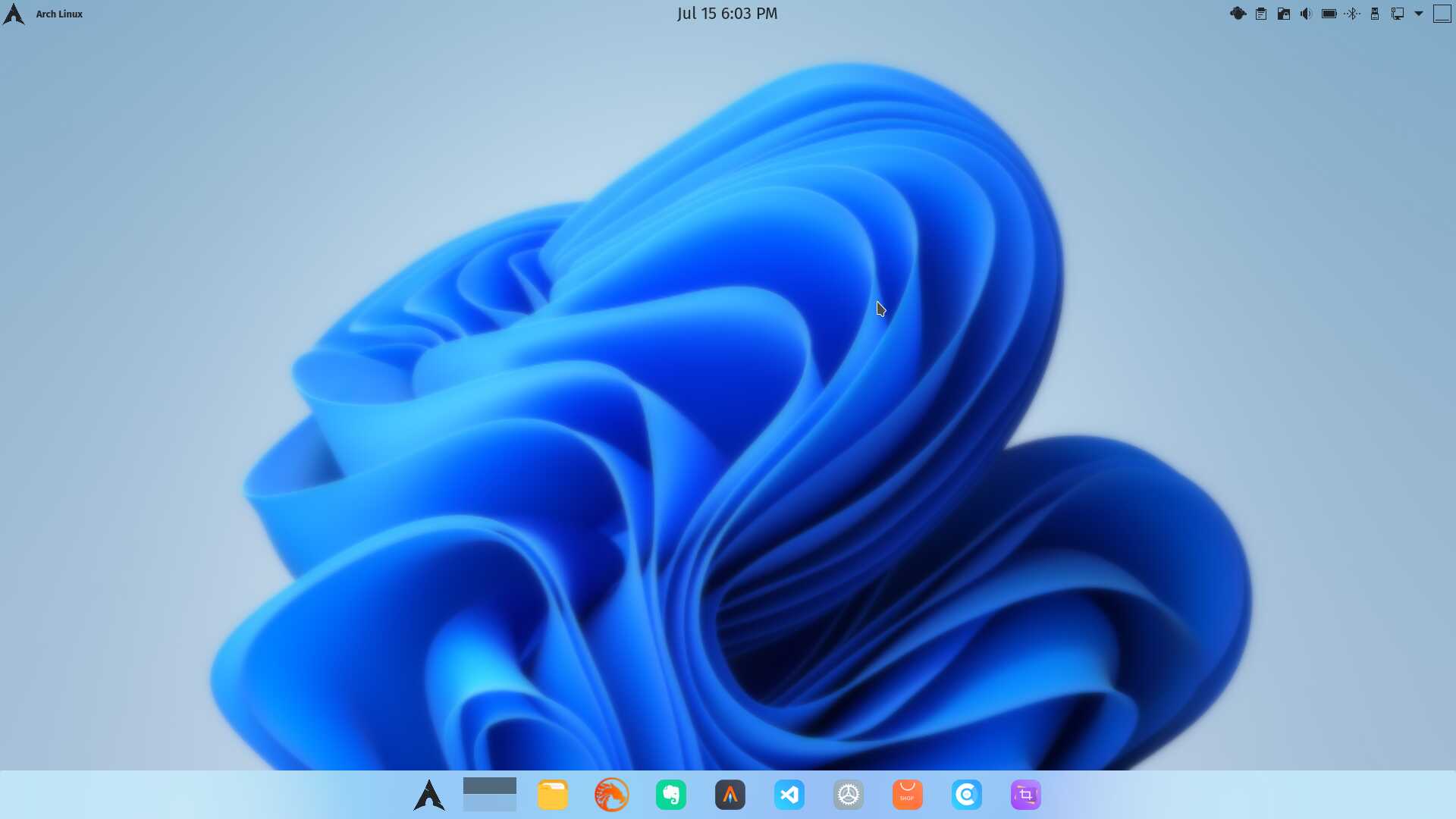
It's only a development build, but they've done a horrible job of imitating KDE Plasma. The taskbar can be set to 'Left' instead of 'Center' and it regains most of the Win 10 menu & taskbar look. It's not really a dock, just a centered taskbar shortened to fit the rather awkward menu. It keeps popping-up arbitrarily even in full-screen mode--but, again, it's only a development build.
Even though my machine meets all their TPM 2.0 requirements, which may be described by different terms in any individual BIOS, I don't envision myself running it and I imagine a great number of Win 10 users will remain with that until they're forced to use it.
Personally, if I were in charge of their development team, I'd fire the UI designer.
And, LOLOLOL, the Control Panel is still there to be found.
I was a little surprised that Dell updates were the same as with Win 10, until I realized it is listed by MS as a Win 10 dev build, which it still is at this point.
Anyway, not to take this off-topic further. 
I wish krohnkite, dim inactive and no plank was default also chaotic-aur/webapp-manager and kde are great =)
Oh it appears to me you want to get me and few other's PCs get yeeted out of their rooms.
Mods get the screenshot lol
Though I love dark theme I do love light themes like this too!
Someone even forked the menu lol:
those who want to try Win 11 need not install it then