Prompted to Relogin after 1 minute and 32 seconds, black screen post login

Hey All!~

Back again with a weird issue.
I turned off my PC this morning, and it was working great.
I turned on just now after work, weird behavior!

I boot from GRUB like normal.
I boot into the lock screen, where it prompts me for my password (this is normal).

From hitting enter, it takes 34 (+/- 2) seconds to reach the desktop environment.

I then have desktop access until the timer reaches 1:32.
After which point, the screen relocks. Entering the password to re-enter the desktop works, except it doesn’t send me to desktop. Instead, the system just black screens. :pensive_face:

Last restore point was at 2pm today, and doesn’t work (an issue for a different post and more investigation).

Googling the issue didn’t turn up many results, similar to searching both these and the KDE forums directly (although if you can prove me wrong with an easy fix cause I didn’t look hard enough, you can win 5 imaginary internet bonus points! You win an additional 5 if it solves the issue lol)

garuda-inxi

haezel@soverign in ~
󰛓 ❯ garuda-inxi
System:
Kernel: 6.15.8-zen1-1-zen arch: x86_64 bits: 64 compiler: gcc v: 15.1.1
clocksource: tsc avail: hpet,acpi_pm
parameters: BOOT_IMAGE=/@/boot/vmlinuz-linux-zen
root=UUID=56e860a8-7ca9-4ddf-956b-495ba0def4bd rw rootflags=subvol=@
vt.default_red=30,243,166,249,137,245,148,186,88,243,166,249,137,245,148,166
vt.default_grn=30,139,227,226,180,194,226,194,91,139,227,226,180,194,226,173
vt.default_blu=46,168,161,175,250,231,213,222,112,168,161,175,250,231,213,200
quiet loglevel=3 ibt=off
Desktop: KDE Plasma v: 6.4.3 tk: Qt v: N/A info: frameworks v: 6.16.0
wm: kwin_wayland vt: 2 dm: SDDM Distro: Garuda base: Arch Linux
Machine:
Type: Desktop System: Micro-Star product: MS-7B86 v: 5.0
serial: <superuser required>
Mobo: Micro-Star model: B550 GAMING GEN3 (MS-7B86) v: 5.0
serial: <superuser required> uuid: <superuser required> UEFI: American
Megatrends LLC. v: P.90 date: 03/26/2025
CPU:
Info: model: AMD Ryzen 7 5700X3D bits: 64 type: MT MCP arch: Zen 3+ gen: 3
level: v3 note: check built: 2022 process: TSMC n6 (7nm) family: 0x19 (25)
model-id: 0x21 (33) stepping: 2 microcode: 0xA201213
Topology: cpus: 1x dies: 1 clusters: 1 cores: 8 threads: 16 tpc: 2
smt: enabled cache: L1: 512 KiB desc: d-8x32 KiB; i-8x32 KiB L2: 4 MiB
desc: 8x512 KiB L3: 96 MiB desc: 1x96 MiB
Speed (MHz): avg: 3715 min/max: 575/4151 boost: enabled scaling:
driver: amd-pstate-epp governor: powersave cores: 1: 3715 2: 3715 3: 3715
4: 3715 5: 3715 6: 3715 7: 3715 8: 3715 9: 3715 10: 3715 11: 3715 12: 3715
13: 3715 14: 3715 15: 3715 16: 3715 bogomips: 96006
Flags: avx avx2 ht lm nx pae sse sse2 sse3 sse4_1 sse4_2 sse4a ssse3 svm
Vulnerabilities: <filter>
Graphics:
Device-1: NVIDIA TU102 [GeForce RTX 2080 Ti Rev. A] vendor: Micro-Star MSI
driver: nvidia v: 575.64.05 alternate: nouveau,nvidia_drm
non-free: 550-570.xx+ status: current (as of 2025-04; EOL~2026-12-xx)
arch: Turing code: TUxxx process: TSMC 12nm FF built: 2018-2022 pcie:
gen: 3 speed: 8 GT/s lanes: 8 link-max: lanes: 16 ports: active: none
off: DP-2,DP-3,HDMI-A-1 empty: DP-1,Unknown-2 bus-ID: 2b:00.0
chip-ID: 10de:1e07 class-ID: 0300
Device-2: webcamvendor NexiGo N60 FHD Webcam Audio
driver: snd-usb-audio,uvcvideo type: USB rev: 2.0 speed: 480 Mb/s lanes: 1
mode: 2.0 bus-ID: 1-1:2 chip-ID: 3443:60bb class-ID: 0102 serial: <filter>
Display: wayland server: X.org v: 1.21.1.18 with: Xwayland v: 24.1.8
compositor: kwin_wayland driver: X: loaded: nvidia
unloaded: modesetting,nouveau alternate: fbdev,nv,vesa
gpu: nvidia,nvidia-nvswitch d-rect: 7680x4320 display-ID: 0
Monitor-1: DP-2 pos: top-right model: Dell P2414H serial: <filter>
built: 2014 res: mode: 1920x1080 hz: 60 scale: 178% (1.78) to: 1080x1920
dpi: 93 gamma: 1.2 size: 527x297mm (20.75x11.69") diag: 605mm (23.8")
ratio: 16:9 modes: max: 1920x1080 min: 640x480
Monitor-2: DP-3 pos: middle-c model: YMG-4K32-01 serial: <filter>
built: 2021 res: mode: 3840x2160 hz: 60 scale: 145% (1.45) to: 2648x1490
dpi: 139 gamma: 1.2 size: 700x390mm (27.56x15.35") diag: 801mm (31.5")
ratio: 16:9 modes: max: 3840x2160 min: 640x480
Monitor-3: HDMI-A-1 pos: bottom-l model: Dell U2713HM serial: <filter>
built: 2014 res: mode: 1920x1080 hz: 60 scale: 100% (1) dpi: 82 gamma: 1.2
size: 597x336mm (23.5x13.23") diag: 685mm (27") ratio: 16:9 modes:
max: 1920x1080 min: 640x480
API: EGL v: 1.5 hw: drv: nvidia platforms: device: 0 drv: nvidia device: 2
drv: swrast gbm: drv: nvidia surfaceless: drv: nvidia wayland: drv: nvidia
x11: drv: nvidia inactive: device-1
API: OpenGL v: 4.6.0 compat-v: 4.5 vendor: nvidia mesa v: 575.64.05
glx-v: 1.4 direct-render: yes renderer: NVIDIA GeForce RTX 2080 Ti/PCIe/SSE2
memory: 10.74 GiB display-ID: :0.0
API: Vulkan v: 1.4.321 layers: 11 device: 0 type: discrete-gpu name: NVIDIA
GeForce RTX 2080 Ti driver: nvidia v: 575.64.05 device-ID: 10de:1e07
surfaces: N/A device: 1 type: cpu name: llvmpipe (LLVM 20.1.8 256 bits)
driver: mesa llvmpipe v: 25.1.6-arch1.1 (LLVM 20.1.8)
device-ID: 10005:0000 surfaces: N/A
Info: Tools: api: clinfo, eglinfo, glxinfo, vulkaninfo
de: kscreen-console,kscreen-doctor gpu: corectrl, nvidia-settings,
nvidia-smi wl: wayland-info x11: xdpyinfo, xprop, xrandr
Audio:
Device-1: NVIDIA TU102 High Definition Audio vendor: Micro-Star MSI
driver: snd_hda_intel v: kernel pcie: gen: 3 speed: 8 GT/s lanes: 8
link-max: lanes: 16 bus-ID: 2b:00.1 chip-ID: 10de:10f7 class-ID: 0403
Device-2: Advanced Micro Devices [AMD] Starship/Matisse HD Audio
vendor: Micro-Star MSI driver: snd_hda_intel v: kernel pcie: gen: 4
speed: 16 GT/s lanes: 16 bus-ID: 2d:00.4 chip-ID: 1022:1487 class-ID: 0403
Device-3: webcamvendor NexiGo N60 FHD Webcam Audio
driver: snd-usb-audio,uvcvideo type: USB rev: 2.0 speed: 480 Mb/s lanes: 1
mode: 2.0 bus-ID: 1-1:2 chip-ID: 3443:60bb class-ID: 0102 serial: <filter>
Device-4: Medeli WMT800 Microphone
driver: hid-generic,snd-usb-audio,usbhid type: USB rev: 1.1 speed: 12 Mb/s
lanes: 1 mode: 1.1 bus-ID: 5-2:3 chip-ID: 0a67:d061 class-ID: 0300
serial: <filter>
API: ALSA v: k6.15.8-zen1-1-zen status: kernel-api with: aoss
type: oss-emulator tools: N/A
Server-1: PipeWire v: 1.4.7 status: active with: 1: pipewire-pulse
status: active 2: wireplumber status: active 3: pipewire-alsa type: plugin
4: pw-jack type: plugin tools: pactl,pw-cat,pw-cli,wpctl
Network:
Device-1: Realtek RTL8111/8168/8211/8411 PCI Express Gigabit Ethernet
vendor: Micro-Star MSI driver: r8169 v: kernel pcie: gen: 1 speed: 2.5 GT/s
lanes: 1 port: f000 bus-ID: 2a:00.0 chip-ID: 10ec:8168 class-ID: 0200
IF: enp42s0 state: up speed: 1000 Mbps duplex: full mac: <filter>
Info: services: NetworkManager, smbd, systemd-timesyncd
Drives:
Local Storage: total: 5.62 TiB used: 242.61 GiB (4.2%)
SMART Message: Unable to run smartctl. Root privileges required.
ID-1: /dev/nvme0n1 maj-min: 259:0 vendor: Silicon Power
model: SPCC M.2 PCIe SSD size: 1.86 TiB block-size: physical: 512 B
logical: 512 B speed: 31.6 Gb/s lanes: 4 tech: SSD serial: <filter>
fw-rev: SN26904 temp: 37.9 C scheme: GPT
ID-2: /dev/sda maj-min: 8:0 vendor: Samsung model: SSD 850 EVO 1TB
size: 931.51 GiB block-size: physical: 512 B logical: 512 B speed: 6.0 Gb/s
tech: SSD serial: <filter> fw-rev: 1B6Q scheme: MBR
ID-3: /dev/sdb maj-min: 8:16 vendor: Samsung model: SSD 870 EVO 2TB
size: 1.82 TiB block-size: physical: 512 B logical: 512 B speed: 6.0 Gb/s
tech: SSD serial: <filter> fw-rev: 2B6Q scheme: GPT
ID-4: /dev/sdc maj-min: 8:32 vendor: Western Digital
model: WD10EACS-00ZJB0 size: 931.51 GiB block-size: physical: 512 B
logical: 512 B speed: 3.0 Gb/s tech: N/A serial: <filter> fw-rev: 1B01
scheme: MBR
ID-5: /dev/sdd maj-min: 8:48 vendor: Samsung model: Flash Drive FIT
size: 119.51 GiB block-size: physical: 512 B logical: 512 B type: USB
rev: 3.1 spd: 5 Gb/s lanes: 1 mode: 3.2 gen-1x1 tech: SSD serial: <filter>
fw-rev: 1100 scheme: MBR
SMART Message: Unknown USB bridge. Flash drive/Unsupported enclosure?
Partition:
ID-1: / raw-size: 635.81 GiB size: 635.81 GiB (100.00%)
used: 242.61 GiB (38.2%) fs: btrfs dev: /dev/nvme0n1p2 maj-min: 259:2
ID-2: /boot/efi raw-size: 300 MiB size: 299.4 MiB (99.80%)
used: 616 KiB (0.2%) fs: vfat dev: /dev/nvme0n1p1 maj-min: 259:1
ID-3: /home raw-size: 635.81 GiB size: 635.81 GiB (100.00%)
used: 242.61 GiB (38.2%) fs: btrfs dev: /dev/nvme0n1p2 maj-min: 259:2
ID-4: /var/log raw-size: 635.81 GiB size: 635.81 GiB (100.00%)
used: 242.61 GiB (38.2%) fs: btrfs dev: /dev/nvme0n1p2 maj-min: 259:2
ID-5: /var/tmp raw-size: 635.81 GiB size: 635.81 GiB (100.00%)
used: 242.61 GiB (38.2%) fs: btrfs dev: /dev/nvme0n1p2 maj-min: 259:2
Swap:
Alert: No swap data was found.
Sensors:
System Temperatures: cpu: 48.4 C mobo: N/A
Fan Speeds (rpm): N/A
Info:
Memory: total: 32 GiB available: 31.26 GiB used: 5.09 GiB (16.3%)
Processes: 430 Power: uptime: 1m states: freeze,mem,disk suspend: deep
avail: s2idle wakeups: 0 hibernate: platform avail: shutdown, reboot,
suspend, test_resume image: 12.45 GiB services: org_kde_powerdevil,
power-profiles-daemon, upowerd Init: systemd v: 257 default: graphical
tool: systemctl
Packages: pm: pacman pkgs: 2167 libs: 529 tools: octopi,paru pm: flatpak
pkgs: 0 Compilers: clang: 20.1.8 gcc: 15.1.1 Shell: garuda-inxi
default: fish v: 4.0.2 running-in: konsole inxi: 3.3.38
Garuda (2.7.3-2):
System install date:     2025-07-02
Last full system update: 2025-07-29
Is partially upgraded:   No
Relevant software:       snapper NetworkManager dracut
Windows dual boot:       No/Undetected
Failed units:

haezel@soverign in ~ took 2s661ms

Please help me wizards! You’re my only hope!
(Outside of… reinstalling)

1 Like

Your zram is “faulty”
Pls disconnect all usb stuff.
Konsole: lsblk -fs or zramctl
default for zram line should be this:
zram0 swap 1 zram0 a53d5839-46ac-4225-b03a-16daddea5c5a [SWAP]

or

╰─λ zramctl
NAME       ALGORITHM DISKSIZE DATA COMPR TOTAL STREAMS MOUNTPOINT
/dev/zram0 zstd         31,3G   4K   64B   20K         [SWAP]

use command : journalctl -b | grep swap to “see” the error and pls post the output.
As test also possible: swapon --show and swapon -S → result = ?

3 Likes

Hey!! Thanks for responding.


haezel@soverign in ~
󰛓 ❯ zramctl
NAME       ALGORITHM DISKSIZE DATA COMPR TOTAL STREAMS MOUNTPOINT
/dev/zram0 zstd         31.3G   4K   64B   20K         [SWAP]

haezel@soverign in ~
󰛓 ❯ lsblk -fs
NAME      FSTYPE FSVER LABEL   UUID                                 FSAVAIL FSUSE% MOUNTPOINTS
sda2      ntfs                 F224E75D24E722F9
└─sda
sdb2      btrfs                bd08a06f-ec73-45e5-82d9-09344bfdd6f6
└─sdb
sdc1      ntfs                 02880FCA880FBB65
└─sdc
sdd1      exfat  1.0   Ventoy  4E21-0000
└─sdd
sdd2      vfat   FAT16 VTOYEFI 626B-4255
└─sdd
sr0
zram0     swap   1     zram0   e334957a-bffa-4071-ba58-11857d056d13                [SWAP]
nvme0n1p1 vfat   FAT32         904A-4ED9                             298.8M     0% /boot/efi
└─nvme0n1
nvme0n1p2 btrfs                56e860a8-7ca9-4ddf-956b-495ba0def4bd  393.1G    38% /var/tmp
│                                                                                  /var/log
│                                                                                  /var/cache
│                                                                                  /home
│                                                                                  /root
│                                                                                  /srv
│                                                                                  /
└─nvme0n1
nvme0n1p3 btrfs                484943c4-d279-4b26-b51b-20d5b85b4c3a
└─nvme0n1
nvme0n1p4 btrfs                348e6e8a-5890-4ddb-9df2-a7f5fb1f6300
└─nvme0n1

As well as the journal:

haezel@soverign in ~
󰛓 ❯ journalctl -b | grep swap
Jul 29 02:51:23 soverign kernel: Spectre V1 : Mitigation: usercopy/swapgs barriers and __user pointer sanitization
Jul 29 02:51:23 soverign kernel: zswap: loaded using pool zstd/zsmalloc
Jul 29 02:51:26 soverign systemd-oomd[746]: No swap; memory pressure usage will be degraded
Jul 29 02:51:26 soverign systemd[1]: Starting Create swap on /dev/zram0...
Jul 29 02:51:26 soverign systemd-makefs[868]: /dev/zram0 successfully formatted as swap (label "zram0", uuid b7301676-2227-4c94-ba72-ddf8da443dc3)
Jul 29 02:51:26 soverign systemd[1]: Finished Create swap on /dev/zram0.
Jul 29 02:51:26 soverign systemd[1]: Activating swap Compressed Swap on /dev/zram0...
Jul 29 02:51:26 soverign kernel: Adding 32780284k swap on /dev/zram0.  Priority:100 extents:1 across:32780284k SSDsc
Jul 29 02:51:26 soverign systemd[1]: Activated swap Compressed Swap on /dev/zram0.
Jul 29 02:51:29 soverign sddm-helper-start-x11user[3110]: "(--) Log file renamed from \"/var/lib/sddm/.local/share/xorg/Xorg.pid-3144.log\" to \"/var/lib/sddm/.local/share/xorg/Xorg.0.log\"\n\nX.Org X Server 1.21.1.18\nX Protocol Version 11, Revision 0\nCurrent Operating System: Linux soverign 6.15.8-zen1-1-zen #1 ZEN SMP PREEMPT_DYNAMIC Thu, 24 Jul 2025 18:17:55 +0000 x86_64\nKernel command line: BOOT_IMAGE=/@/boot/vmlinuz-linux-zen root=UUID=56e860a8-7ca9-4ddf-956b-495ba0def4bd rw rootflags=subvol=@ vt.default_red=30,243,166,249,137,245,148,186,88,243,166,249,137,245,148,166 vt.default_grn=30,139,227,226,180,194,226,194,91,139,227,226,180,194,226,173 vt.default_blu=46,168,161,175,250,231,213,222,112,168,161,175,250,231,213,200 quiet loglevel=3 ibt=off\n \nCurrent version of pixman: 0.46.4\n\tBefore reporting problems, check http://wiki.x.org\n\tto make sure that you have the latest version.\nMarkers: (--) probed, (**) from config file, (==) default setting,\n\t(++)from command line, (!!) notice, (II) informational,\n\t(WW) warning, (EE) error, (NI) not implemented, (??) unknown.\n(==) Log file: \"/var/lib/sddm/.local/share/xorg/Xorg.0.log\", Time: Tue Jul 29 02:51:29 2025\n(==)Using config directory: \"/etc/X11/xorg.conf.d\"\n(==) Using system config directory \"/usr/share/X11/xorg.conf.d\"\n(==) No Layout section.  Using the first Screen section.\n(==) No screen section available. Using defaults.\n(**) |-->Screen \"Default Screen Section\" (0)\n(**) |   |-->Monitor \"<default monitor>\"\n(==) No monitor specified for screen \"Default Screen Section\".\n\tUsing a default monitor configuration.\n(**) Allowing byte-swapped clients\n(==) Automatically adding devices\n(==) Automatically enabling devices\n(==) Automatically adding GPU devices\n(==) Automatically binding GPU devices\n(==) Max clients allowed: 256, resource mask: 0x1fffff\n(WW) `fonts.dir' not found (or not valid) in \"/usr/share/fonts/misc\".\n\tEntry deleted fromfont path.\n\t(Run 'mkfontdir' on \"/usr/share/fonts/misc\").\n(WW) `fonts.dir' not found (or not valid) in \"/usr/share/fonts/TTF\".\n\tEntry deleted from font path.\n\t(Run 'mkfontdir' on \"/usr/share/fonts/TTF\").\n(WW) The directory \"/usr/share/fonts/OTF\" does not exist.\n\tEntry deleted from font path.\n(WW) The directory \"/usr/share/fonts/Type1\" does not exist.\n\tEntry deleted from font path.\n(WW) The directory \"/usr/share/fonts/100dpi\" does not exist.\n\tEntry deleted from font path.\n(WW) The directory \"/usr/share/fonts/75dpi\" does not exist.\n\tEntry deleted from font path.\n(==) FontPath set to:\n\t\n(==) ModulePath set to \"/usr/lib/xorg/modules\"\n(II) The server relies on udev to provide the list of input devices.\n\tIf no devices become available, reconfigure udev or disable AutoAddDevices.\n(II) Module ABI versions:\n\tX.Org ANSI C Emulation: 0.4\n\tX.Org Video Driver: 25.2\n\tX.Org XInput driver : 24.4\n\tX.Org Server Extension : 10.0\n(++)using VT number 1\n\n(II) systemd-logind: took control of session /org/freedesktop/login1/session/c2\n(II) xfree86: Adding drm device (/dev/dri/card1)\n(II) Platform probe for /sys/devices/pci0000:00/0000:00:03.2/0000:2b:00.0/drm/card1\n(II) systemd-logind: got fd for /dev/dri/card1 226:1 fd 14 paused 0\n(**) OutputClass \"nvidia\" ModulePath extended to \"/usr/lib/nvidia/xorg,/usr/lib/xorg/modules,/usr/lib/xorg/modules\"\n(--) PCI:*(43@0:0:0) 10de:1e07:1462:3715 rev 161, Mem @ 0xfb000000/16777216, 0x7fe0000000/268435456, 0x7ff0000000/33554432, I/O @ 0x0000e000/128, BIOS @ 0x????????/524288\n(II) LoadModule: \"glx\"\n(II) Loading /usr/lib/xorg/modules/extensions/libglx.so\n(II) Module glx: vendor=\"X.Org Foundation\"\n\tcompiled for 1.21.1.18, module version = 1.0.0\n\tABI class: X.Org Server Extension, version 10.0\n(II) Applying OutputClass \"nvidia\" to /dev/dri/card1\n\tloading driver: nvidia\n(==) Matched nvidia as autoconfigured driver 0\n(==) Matched nouveau as autoconfigured driver 1\n(==) Matched nv as autoconfigured driver 2\n(==) Matched modesetting as autoconfigured driver 3\n(==) Matched fbdev as autoconfigured driver 4\n(==) Matched vesa as autoconfigured driver 5\n(==) Assigned the driver to the xf86ConfigLayout\n(II) LoadModule: \"nvidia\"\n(II) Loading /usr/lib/xorg/modules/drivers/nvidia_drv.so\n(II) Module nvidia: vendor=\"NVIDIA Corporation\"\n\tcompiled for 1.6.99.901, module version = 1.0.0\n\tModule class: X.Org Video Driver\n(II) LoadModule: \"nouveau\"\n(II) Loading /usr/lib/xorg/modules/drivers/nouveau_drv.so\n(II) Module nouveau: vendor=\"X.Org Foundation\"\n\tcompiled for 1.21.1.14, module version = 1.0.18\n\tModule class: X.Org Video Driver\n\tABI class: X.Org Video Driver, version 25.2\n(II) LoadModule: \"nv\"\n(WW) Warning, couldn't open module nv\n(EE) Failed to load module \"nv\" (module does not exist, 0)\n(II) LoadModule: \"modesetting\"\n(II) Loading /usr/lib/xorg/modules/drivers/modesetting_drv.so\n(II) Module modesetting: vendor=\"X.Org Foundation\"\n\tcompiled for 1.21.1.18, module version = 1.21.1\n\tModule class: X.Org Video Driver\n\tABI class: X.Org Video Driver, version 25.2\n(II) LoadModule: \"fbdev\"\n(WW) Warning, couldn't open module fbdev\n(EE) Failed to load module \"fbdev\" (module does not exist, 0)\n(II) LoadModule: \"vesa\"\n(WW) Warning, couldn't open module vesa\n(EE) Failed to load module \"vesa\" (module does not exist, 0)\n(II) NVIDIA dlloader X Driver  575.64.05  Fri Jul 18 15:48:33 UTC 2025\n(II) NVIDIA Unified Driver for all Supported NVIDIA GPUs\n(II) NOUVEAU driver \n(II) NOUVEAU driver for NVIDIA chipset families :\n\tRIVA TNT            (NV04)\n\tRIVA TNT2           (NV05)\n\tGeForce 256         (NV10)\n\tGeForce 2           (NV11, NV15)\n\tGeForce 4MX         (NV17, NV18)\n\tGeForce 3           (NV20)\n\tGeForce 4Ti (NV25, NV28)\n\tGeForce FX          (NV3x)\n\tGeForce 6           (NV4x)\n\tGeForce 7           (G7x)\n\tGeForce 8           (G8x)\n\tGeForce 9           (G9x)\n\tGeForce GTX 2xx/3xx (GT2xx)\n\tGeForce GTX 4xx/5xx (GFxxx)\n\tGeForce GTX 6xx/7xx (GKxxx)\n\tGeForce GTX 9xx     (GMxxx)\n\tGeForce GTX 10xx    (GPxxx)\n(II) modesetting: Driver for Modesetting Kernel Drivers: kms\n(II) systemd-logind: releasing fd for 226:1\n(II) Loading sub module \"fb\"\n(II) LoadModule: \"fb\"\n(II) Module \"fb\" already built-in\n(II) Loading sub module \"wfb\"\n(II) LoadModule: \"wfb\"\n(II) Loading /usr/lib/xorg/modules/libwfb.so\n(II) Module wfb: vendor=\"X.Org Foundation\"\n\tcompiled for 1.21.1.18, module version = 1.0.0\n\tABI class: X.Org ANSI C Emulation, version 0.4\n(WW) Falling back to old probe method for modesetting\n(EE) open /dev/dri/card0: No such file ordirectory\n(WW) VGA arbiter: cannot open kernel arbiter, no multi-card support\n(II) NVIDIA(0): Creating default Display subsection in Screen section\n\t\"Default Screen Section\" for depth/fbbpp 24/32\n(==) NVIDIA(0): Depth 24, (==) framebuffer bpp 32\n(==) NVIDIA(0): RGB weight 888\n(==) NVIDIA(0): Default visual is TrueColor\n(==) NVIDIA(0): Using gamma correction (1.0, 1.0, 1.0)\n(II) Applying OutputClass \"nvidia\" options to /dev/dri/card1\n(**) NVIDIA(0): Option \"AllowEmptyInitialConfiguration\"\n(**) NVIDIA(0): Enabling 2D acceleration\n(II) Loading sub module \"glxserver_nvidia\"\n(II) LoadModule: \"glxserver_nvidia\"\n(II) Loading /usr/lib/nvidia/xorg/libglxserver_nvidia.so\n(II) Module glxserver_nvidia: vendor=\"NVIDIA Corporation\"\n\tcompiled for 1.6.99.901, module version = 1.0.0\n\tModule class: X.Org Server Extension\n(II) NVIDIA GLX Module  575.64.05  Fri Jul 18 15:54:06 UTC 2025\n(II) NVIDIA: The X server supports PRIME Render Offload.\n(--) NVIDIA(0): Valid display device(s) on GPU-0 at PCI:43:0:0\n(--) NVIDIA(0):     DFP-0\n(--) NVIDIA(0):     DFP-1\n(--) NVIDIA(0):     DFP-2\n(--) NVIDIA(0):     DFP-3 (boot)\n(--) NVIDIA(0):     DFP-4\n(--) NVIDIA(0):     DFP-5\n(--) NVIDIA(0):     DFP-6\n(--) NVIDIA(0):     DFP-7\n(II) NVIDIA(0): NVIDIA GPU NVIDIA GeForce RTX 2080Ti (TU102-A) at PCI:43:0:0\n(II) NVIDIA(0):     (GPU-0)\n(--) NVIDIA(0): Memory: 11534336 kBytes\n(--) NVIDIA(0): VideoBIOS: 90.02.42.00.14\n(II) NVIDIA(0): Detected PCI Express Link width: 16X\n(--) NVIDIA(GPU-0): DFP-0: disconnected\n(--) NVIDIA(GPU-0): DFP-0: Internal DisplayPort\n(--) NVIDIA(GPU-0): DFP-0: 2660.0 MHz maximum pixel clock\n(--) NVIDIA(GPU-0): \n(--) NVIDIA(GPU-0): DFP-1: disconnected\n(--) NVIDIA(GPU-0): DFP-1: Internal TMDS\n(--) NVIDIA(GPU-0): DFP-1: 165.0 MHz maximum pixel clock\n(--) NVIDIA(GPU-0): \n(--) NVIDIA(GPU-0): DELL U2713HM (DFP-2): connected\n(--) NVIDIA(GPU-0): DELL U2713HM (DFP-2): Internal TMDS\n(--) NVIDIA(GPU-0): DELL U2713HM (DFP-2): 600.0 MHz maximum pixel clock\n(--) NVIDIA(GPU-0): \n(--) NVIDIA(GPU-0): DELL P2414H (DFP-3): connected\n(--) NVIDIA(GPU-0): DELL P2414H (DFP-3): Internal DisplayPort\n(--) NVIDIA(GPU-0): DELL P2414H (DFP-3): 2660.0 MHz maximum pixel clock\n(--) NVIDIA(GPU-0): \n(--) NVIDIA(GPU-0): DFP-4: disconnected\n(--) NVIDIA(GPU-0): DFP-4: Internal TMDS\n(--) NVIDIA(GPU-0): DFP-4: 165.0 MHz maximum pixel clock\n(--)NVIDIA(GPU-0): \n(--) NVIDIA(GPU-0): YEY YMG-4K32-01 (DFP-5): connected\n(--) NVIDIA(GPU-0): YEY YMG-4K32-01(DFP-5): Internal DisplayPort\n(--) NVIDIA(GPU-0): YEY YMG-4K32-01 (DFP-5): 2660.0 MHz maximum pixel clock\n(--) NVIDIA(GPU-0): \n(--) NVIDIA(GPU-0): DFP-6: disconnected\n(--) NVIDIA(GPU-0): DFP-6: Internal TMDS\n(--)NVIDIA(GPU-0): DFP-6: 165.0 MHz maximum pixel clock\n(--) NVIDIA(GPU-0): \n(--) NVIDIA(GPU-0): DFP-7: disconnected\n(--) NVIDIA(GPU-0): DFP-7: Internal DisplayPort\n(--) NVIDIA(GPU-0): DFP-7: 2660.0 MHz maximum pixel clock\n(--) NVIDIA(GPU-0): \n(==) NVIDIA(0): \n(==) NVIDIA(0): No modes were requested; the default mode \"nvidia-auto-select\"\n(==) NVIDIA(0):     will be used as the requested mode.\n(==) NVIDIA(0): \n(II) NVIDIA(0): Validated MetaModes:\n(II) NVIDIA(0):    \n(II) NVIDIA(0):     \"DFP-3:nvidia-auto-select,DFP-2:nvidia-auto-select,DFP-5:nvidia-auto-select\"\n(II) NVIDIA(0): Virtual screen size determined to be 7680 x 2160\n(--) NVIDIA(0): DPI set to (92, 91); computed from \"UseEdidDpi\" X config\n(--) NVIDIA(0):     option\n(II) UnloadModule: \"nouveau\"\n(II) Unloading nouveau\n(II) UnloadModule: \"modesetting\"\n(II) Unloading modesetting\n(WW) NVIDIA: Failed to bind sideband socket to\n(WW) NVIDIA:     '/var/run/nvidia-xdriver-1fd4dfa6' Permissiondenied\n(II) NVIDIA: Reserving 24576.00 MB of virtual memory for indirect memory\n(II) NVIDIA:     access.\n(II) NVIDIA(0): ACPI: failed to connect to the ACPI event daemon; the daemon\n(II) NVIDIA(0):     may not be running or the \"AcpidSocketPath\" X\n(II) NVIDIA(0):     configuration option may not be set correctly.  When the\n(II) NVIDIA(0):     ACPI event daemon is available, the NVIDIA X driver will\n(II) NVIDIA(0):     try to use it to receive ACPI event notifications.  For\n(II) NVIDIA(0):     details, please see the \"ConnectToAcpid\" and\n(II) NVIDIA(0):     \"AcpidSocketPath\" X configuration options in Appendix B: X\n(II) NVIDIA(0):Config Options in the README.\n(II) NVIDIA(0): Setting mode \"DFP-3:nvidia-auto-select,DFP-2:nvidia-auto-select,DFP-5:nvidia-auto-select\"\n(==) NVIDIA(0): Disabling shared memory pixmaps\n(==) NVIDIA(0): Backing store enabled\n(==) NVIDIA(0): Silken mouse enabled\n(==) NVIDIA(0): DPMS enabled\n(II) Loading sub module \"dri2\"\n(II) LoadModule: \"dri2\"\n(II) Module \"dri2\" already built-in\n(II) NVIDIA(0): [DRI2] Setup complete\n(II) NVIDIA(0): [DRI2]   VDPAU driver: nvidia\n(II) Initializing extension Generic Event Extension\n(II) Initializing extension SHAPE\n(II) Initializing extension MIT-SHM\n(II) Initializing extension XInputExtension\n(II) Initializing extension XTEST\n(II) Initializing extension BIG-REQUESTS\n(II) Initializing extension SYNC\n(II) Initializing extension XKEYBOARD\n(II) Initializing extension XC-MISC\n(II) Initializing extension SECURITY\n(II) Initializing extension XFIXES\n(II) Initializing extension RENDER\n(II) Initializing extensionRANDR\n(II) Initializing extension COMPOSITE\n(II) Initializing extension DAMAGE\n(II) Initializing extension MIT-SCREEN-SAVER\n(II) Initializing extension DOUBLE-BUFFER\n(II) Initializing extension RECORD\n(II) Initializing extension DPMS\n(II) Initializing extension Present\n(II) Initializing extension DRI3\n(II) Initializing extension X-Resource\n(II) Initializing extension XVideo\n(II) Initializing extension XVideo-MotionCompensation\n(II) Initializing extension GLX\n(II) Initializing extension GLX\n(II) Indirect GLX disabled.\n(II) GLX: Another vendor is already registered for screen 0\n(II) Initializing extension XFree86-VidModeExtension\n(II) Initializing extension XFree86-DGA\n(II) Initializing extension XFree86-DRI\n(II) Initializing extensionDRI2\n(II) Initializing extension NV-GLX\n(II) Initializing extension NV-CONTROL\n(II) Initializing extension XINERAMA\nThe XKEYBOARD keymap compiler (xkbcomp) reports:\n> Warning:          Could not resolve keysym XF86RefreshRateToggle\n> Warning:          Could not resolve keysym XF86Accessibility\n> Warning:          Could not resolve keysym XF86DoNotDisturb\nErrors from xkbcomp are not fatal to the X server\n(II) config/udev: Adding input device Power Button (/dev/input/event1)\n(**) Power Button: Applying InputClass \"evdev keyboard catchall\"\n(**) Power Button: Applying InputClass \"libinput keyboard catchall\"\n(**) Power Button: Applying InputClass \"system-keyboard\"\n(II) LoadModule: \"libinput\"\n(II) Loading /usr/lib/xorg/modules/input/libinput_drv.so\n(II) Module libinput: vendor=\"X.Org Foundation\"\n\tcompiled for 1.21.1.13, module version = 1.5.0\n\tModule class: X.Org XInput Driver\n\tABI class: X.Org XInput driver, version 24.4\n(II) Using input driver 'libinput' for 'Power Button'\n(II) systemd-logind: got fd for /dev/input/event1 13:65 fd 40 paused 0\n(**) Power Button: always reports core events\n(**) Option \"Device\" \"/dev/input/event1\"\n(II) event1  - Power Button: is tagged by udev as: Keyboard\n(II) event1  - Power Button: device is a keyboard\n(II) event1  - Power Button: device removed\n(**) Option \"config_info\" \"udev:/sys/devices/LNXSYSTM:00/LNXPWRBN:00/input/input1/event1\"\n(II) XINPUT: Adding extended input device \"Power Button\" (type: KEYBOARD, id 6)\n(**) Option \"xkb_layout\" \"us\"\n(WW) Option \"xkb_variant\" requires a string value\n(II) event1  - Power Button: is tagged by udev as: Keyboard\n(II) event1  - Power Button: device is a keyboard\n(II) config/udev: Adding input device Power Button (/dev/input/event0)\n(**) Power Button: Applying InputClass \"evdev keyboard catchall\"\n(**) Power Button: Applying InputClass \"libinput keyboard catchall\"\n(**) Power Button: Applying InputClass \"system-keyboard\"\n(II) Using input driver 'libinput' for 'Power Button'\n(II) systemd-logind: got fdfor /dev/input/event0 13:64 fd 43 paused 0\n(**) Power Button: always reports core events\n(**) Option \"Device\" \"/dev/input/event0\"\n(II) event0  - Power Button: is tagged by udev as: Keyboard\n(II) event0  - Power Button: device is a keyboard\n(II) event0  - Power Button: device removed\n(**) Option \"config_info\" \"udev:/sys/devices/LNXSYSTM:00/LNXSYBUS:00/PNP0C0C:00/input/input0/event0\"\n(II) XINPUT: Adding extended input device \"Power Button\" (type: KEYBOARD, id 7)\n(**) Option \"xkb_layout\" \"us\"\n(WW) Option \"xkb_variant\" requires a string value\n(II) event0  - Power Button: is tagged by udev as: Keyboard\n(II) event0  - Power Button: device is a keyboard\n(II) config/udev: Adding input device SINO WEALTH Gaming KB  (/dev/input/event7)\n(**) SINO WEALTH Gaming KB : Applying InputClass \"evdev keyboard catchall\"\n(**) SINO WEALTH Gaming KB :Applying InputClass \"libinput keyboard catchall\"\n(**) SINO WEALTH Gaming KB : Applying InputClass \"system-keyboard\"\n(II) Using input driver 'libinput' for 'SINO WEALTH Gaming KB '\n(II) systemd-logind: got fd for /dev/input/event7 13:71 fd 44 paused 0\n(**) SINO WEALTH Gaming KB : always reports core events\n(**) Option \"Device\" \"/dev/input/event7\"\n(II) event7  - SINO WEALTH Gaming KB : is tagged by udev as: Keyboard\n(II) event7  - SINO WEALTH Gaming KB : device is a keyboard\n(II) event7  - SINO WEALTH Gaming KB : device removed\n(**) Option \"config_info\" \"udev:/sys/devices/pci0000:00/0000:00:01.2/0000:02:00.0/usb1/1-2/1-2:1.0/0003:258A:003A.0003/input/input7/event7\"\n(II) XINPUT: Adding extended input device \"SINO WEALTH Gaming KB \"(type: KEYBOARD, id 8)\n(**) Option \"xkb_layout\" \"us\"\n(WW) Option \"xkb_variant\" requires a string value\n(II) event7  - SINO WEALTH Gaming KB : is tagged by udev as: Keyboard\n(II) event7  - SINO WEALTH Gaming KB : device is a keyboard\n(II) config/udev: Adding input device SINO WEALTH Gaming KB  Keyboard (/dev/input/event10)\n(**) SINO WEALTH Gaming KB  Keyboard: Applying InputClass \"evdev keyboard catchall\"\n(**) SINO WEALTH Gaming KB  Keyboard: Applying InputClass \"libinput keyboard catchall\"\n(**) SINO WEALTH Gaming KB  Keyboard: Applying InputClass \"system-keyboard\"\n(II) Using input driver 'libinput' for 'SINO WEALTH Gaming KBKeyboard'\n(II) systemd-logind: got fd for /dev/input/event10 13:74 fd 45 paused 0\n(**) SINO WEALTH GamingKB  Keyboard: always reports core events\n(**) Option \"Device\" \"/dev/input/event10\"\n(II) event10 - SINOWEALTH Gaming KB  Keyboard: is tagged by udev as: Keyboard\n(II) event10 - SINO WEALTH Gaming KB  Keyboard: device is a keyboard\n(II) event10 - SINO WEALTH Gaming KB  Keyboard: device removed\n(**) Option \"config_info\" \"udev:/sys/devices/pci0000:00/0000:00:01.2/0000:02:00.0/usb1/1-2/1-2:1.1/0003:258A:003A.0004/input/input10/event10\"\n(II) XINPUT: Adding extended input device \"SINO WEALTH Gaming KB  Keyboard\" (type: KEYBOARD,id 9)\n(**) Option \"xkb_layout\" \"us\"\n(WW) Option \"xkb_variant\" requires a string value\n(II) event10 - SINO WEALTH Gaming KB  Keyboard: is tagged by udev as: Keyboard\n(II) event10 - SINO WEALTH Gaming KB  Keyboard: device is a keyboard\n(II) config/udev: Adding input device SINO WEALTH Gaming KB  System Control (/dev/input/event8)\n(**) SINO WEALTH Gaming KB  System Control: Applying InputClass \"evdev keyboard catchall\"\n(**) SINO WEALTH Gaming KB  System Control: Applying InputClass \"libinput keyboard catchall\"\n(**) SINO WEALTH Gaming KB  System Control: Applying InputClass \"system-keyboard\"\n(II) Using input driver 'libinput' for 'SINO WEALTH Gaming KB  System Control'\n(II) systemd-logind: got fd for /dev/input/event8 13:72 fd 46 paused 0\n(**) SINO WEALTH Gaming KB  System Control: always reports core events\n(**) Option \"Device\" \"/dev/input/event8\"\n(II) event8  - SINO WEALTH Gaming KB  System Control: is tagged by udev as: Keyboard\n(II) event8  - SINO WEALTH Gaming KB  System Control: device is a keyboard\n(II) event8  - SINO WEALTH Gaming KB  System Control: device removed\n(**) Option \"config_info\" \"udev:/sys/devices/pci0000:00/0000:00:01.2/0000:02:00.0/usb1/1-2/1-2:1.1/0003:258A:003A.0004/input/input8/event8\"\n(II) XINPUT: Adding extended input device \"SINO WEALTH Gaming KB  System Control\" (type:

swapon -S → result = ?

swapon -s
?

2 Likes

Here you are!


haezel@soverign in ~
󰛓 ❯ swapon --show
NAME       TYPE       SIZE USED PRIO
/dev/zram0 partition 31.3G   0B  100

haezel@soverign in ~
󰛓 ❯ swapon -S
swapon: invalid option -- 'S'
Try 'swapon --help' for more information.

Edit: I’m dumb.

haezel@soverign in ~
󰛓 ❯ swapon -s
Filename                                Type            Size            Used            Priority
/dev/zram0                              partition       32780284        0               100

Read the help or use s not S.

2 Likes

yes…lol..sorry..
I was working on another problem at the same time.
swapon ..of course

2 Likes

Yes, thanks! Goofy mistake, sleepy rn…

swapon -s
Dateiname				Typ		Größe		Benutzt		Priorität
/dev/zram0            partition	14141436	1752100		100
1 Like

Re-Add in case the edit doesn’t appear for some reason

haezel@soverign in ~
󰛓 ❯ swapon -s
Filename                                Type            Size            Used            Priority
/dev/zram0                              partition       32780284        0               100
1 Like

Sorry, for wrong info.
i must open a new topic.. i work now more then 2 weeks on a problem and find self no solution and i ask me why. Men and 2 things at the same time not a good “mix”. :innocent:

2 Likes

Seems @gampel post is correct, your zram did not work, so check

2 Likes

Interesting, more reading to do.

So in the article, it listsa couple methods for more permanent methods of setting up ZRAM. Which one (or if there is a different one) does Garuda use? Or I guess is it supposed to be using bc it’s not working rn…

No idea if this is helpful at all, but if you have a black screen, but can see your mouse, it may be a compositor issue - make sure the renderer is not set for software. You can open ~/.config/kdeglobals with an editor (for example kate) and see if you have this entry:

[QtQuickRendererSettings]
SceneGraphBackend=software

If yes, then simply delete these two lines, save and exit. If you’re able to pull up the “run” dialog (Alt+F2) you can type:
kquitapp5 plasmashell to force close the DE, then load up the run dialog again and type kstart5 plasmashell which should render your DE. If these don’t work, after saving and closing the file, reboot.

Hope this helps!

EDIT: Just realized, that it’s possible that your kdeglobals file may not have that setting, in which case, in the run dialog (Alt+F2) search for Plasma Renderer and see if that window loads, it may display “Software” in one or both of the drop-downs - make sure you select “Automatic” for both, save, and either run the commands I provided, or reboot.

I can’t see the mouse, sadly.

I appreciate the response and will look into that.

1 Like

Update from the future!

It’s still not fixed :sob:.

But I am closer I think…

(What follows is an account of what I’ve done this far for anyone who comes across this thread in need. I hope for both our sakes there is a solution when you read it lol).

I started following along the ZRAM Arch Wiki page like I was doing first time setup (figuring I’d encounter the problem sooner or later).

Checked to see what’s installed.
pacman -Qs zram → zram-generator
Okay, good. Let’s check to see if the service is running…how do I do that? More reading
Seems to be this:
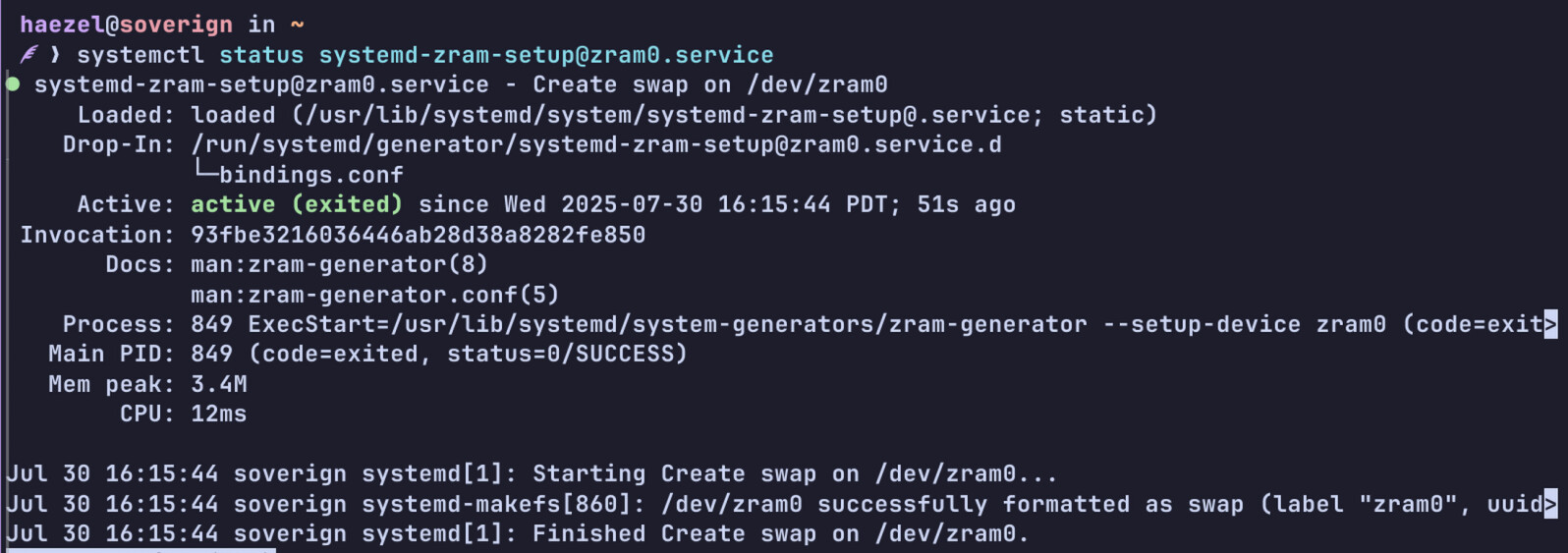
systemctl status systemd-zram-setup@zram0.service

Loaded: loaded
Active: inactive (dead)

Welp… that’s no good. Why is it dead?
More searching → “You’re an idiot, read the wiki.”
Fantastic. Great. Helpful even lol.

Well, onto the next point, check the config file. Maybe it’s got a weird setting I can search…
cat /etc/systems/zram-generator.conf
Result? error: File not found

Okay…why? Guess we’re gonna replace that!

Okay.

So, I repaired the zram-generator.conf file, and it starts normally.

Yay :blush:.

But that hasn’t fixed the problem.
Further more, swapon -s still reports

Filename          Type         Size       Used      Priority 
/dev/zram0        partition    32780284   0         100

Which is weird.

Okay, update.

It looks like the swap partition for ZRAM isn’t in /etc/fstab
At least… that’s what I think grep swap /etc/fstab is telling me when it returns empty.

So… fixing that next I guess.

Alrighty!!! :smile: It’s (probably) working again.

TL;DR: ZRAM Broke (somehow), needed fixing.
Garuda appears to use zram-generator to set up it’s ZRAM.

For those who might be following along in the future:::
So, going by the Arch Wiki I needed to check a few things:

  1. That the package zram-generator was installed and up to date.
  2. That the service for zram setup was running by checking systemctl status systemd-zram-setup@zram0.service
  3. That the file /etc/systems/zram-generator.conf exists at all, and that’s contents (per the Arch Wiki) were at least:
[zram0]
zram-size = min(ram / 2, 4096)
compression-algorithm = zstd
  1. That the partition created by zram-generator exists (in this case @ /dev/zram0)
  2. And that an entry for the partition (/dev/zram0 in this case) exists within the file
    /etc/fstab. That entry was formatted as
    UUID={{UUID for /dev/zram0}} none swap sw 0 0 where
    {{UUID for /dev/zram0}} was obtained from the information provided by
    sudo blkid /dev/zram0 (YMMV for the name of your swap partition).

Since then, I have not yet been kicked back out to SDDM or had any other side effects.

So I’ll make this the solution for the TL;DR with the info above, BUT CREDIT does go to @gampel for spotting it the issue as being with ZRAM, so a :purple_heart: to you, thank you so much!

I still don’t know why my ZRAM just…died. I don’t exactly go screwing around with much of that stuff when I can avoid it. I largely trust Garuda to just manage itself, with occasional intervention on my part to instruct it to update or change the wallpaper. Maybe install a package that’s a dependency to playing minecraft or smth. My daily used apps largely consist of Obsidian, Godot, Discord, Firefox, and Steam. Otherwise I try to not touch anything outside of the daily garuda-update. If anyone has ideas why this happened, or suggestions how I could track it down, I’d love to hear them.

Otherwise, with everything working that should just be the end of the thread! Thanks all!!!~~

2 Likes