Okay i will try, oh how do i activate sane and what app do i have to use to get the scanning function working restarting my PC
i think gutenber may not work correctly i found this driver instead
paru -S cnijfilter-mx470series
Sorry Chris83, a little bit you must read self.
How-to from “systemctl.” What is systemd. In your case the status from the sane daemon
(if active or not) Also which app or gui i must use/install that i can scan in linux.
Over Archwiki homepage, over the great www, of course forums and also over the terminal with “man”. open terminal :man systemctl or man sane etc
3 Likes
True after the restart there is still no reaction, i will try to change the printers driver to the one you suggested.
I did change the Driver to the one you suggested, sadly still no reaction.
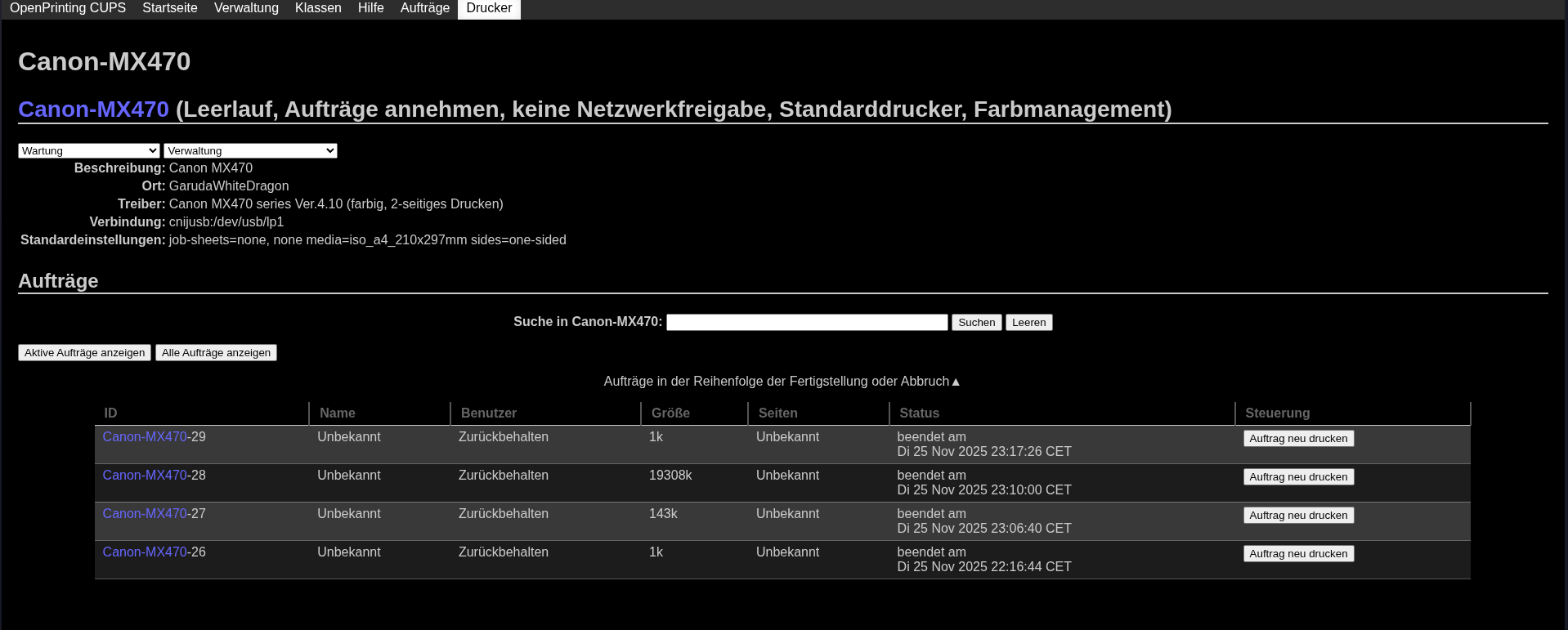
Strangely in the printer task CUPS window the Printing tasks show as finished :

My suggestion at this point would be to make sure you have your snapshot retention set high enough to rollback your system to a snapshot before you made all these changes.
Sometimes, whether you have your printer physically attached (or not) at the time you install a driver makes a difference. Are you attempting a USB, or network printer connection? I feel it is always best to use a physical USB printer connection at setup time rather than trying to install the printer via a network.
You might want to roll back your system to time before you made all these printer changes just to make a clean start. Have you searched online for your exact printer model number and if others found a working driver? If so what driver have others found successful?
2 Likes
As @tbg mentioned do this first i ussually do it too. If you have installed the new driver i would suggest to remove/delete the Printer in both settings and in the CUPs interface because it has the gutenberg added and not the new driver. As secure do a reboot after it and add the printer again .
1 Like
I try to get my printer to work over usb connection. Yes i agree , i am all for physical connections by USB too. I have researched what drivers other people have used sadly it seems noone with my specific Canon Pixma MX 475 seems to have written something about what driver they use.
As Info: Do you test the printer inside cups ? (Print test page / Testseite drucken)
yes i did a while ago 
1 Like
cup of coffee… ok..sorry
2 Likes
send it per Airline Ryanair please .  no its fine he should read it .
you should see this if you install the printer again 
Canon PIXMA MX470 - CUPS + cnijfilter (color)
The usb cable can also be the problem + check another usb port.
3 Likes
please also check the output of groups in the Terminal and post the output here 
groups
Yes i did try to print out a test page several times but as well with no reaction form my printer but with the printing task showing as finished in the printing task list
okay here the results of the groups command :
groups
chris sys games scanner vboxusers cups sambashare realtime libvirt video lp kvm input audio wheel
Oh perhaps here is the problem, these missing dependency :
yay -S cnijfilter-mx470series
:: Löse Abhängigkeiten auf…
:: Konflikte berechnen…
:: Interne Konflikte berechnen…

Aur (1)                     Alte Version  Neue Version   Nur Make
aur/cnijfilter-mx470series  4.10-1        4.10-1         Nein

:: Mit Überprüfung fortfahren? [J/n]: J

:: Lade PKGBUILDs herunter…
PKGBUILDs sind aktuell
nichts Neues zu überprüfen
devel Informationen werden empfangen...
==> Erstelle Paket: cnijfilter-mx470series 4.10-1 (Mi 26 Nov 2025 00:01:23 CET)
==> Empfange Quellen...
-> cnijfilter-mx470series-4.10-1-deb.tar.gz gefunden
==> Überprüfe source Dateien mit sha256sums...
cnijfilter-mx470series-4.10-1-deb.tar.gz ... Erfolg
==> Erstelle Paket: cnijfilter-mx470series 4.10-1 (Mi 26 Nov 2025 00:01:24 CET)
==> Prüfe Laufzeit-Abhängigkeiten...
==> Prüfe Buildtime-Abhängigkeiten...
==> Empfange Quellen...
-> cnijfilter-mx470series-4.10-1-deb.tar.gz gefunden
==> Überprüfe source Dateien mit sha256sums...
cnijfilter-mx470series-4.10-1-deb.tar.gz ... Erfolg
==> Entferne existierendes $srcdir/ Verzeichnis...
==> Entpacke Quellen...
-> Entpacke cnijfilter-mx470series-4.10-1-deb.tar.gz mit bsdtar
==> Quellen sind fertig.
cnijfilter-mx470series-4.10-1: Lese pkg Liste…
:: cnijfilter-mx470series-4.10-1 ist aktuell -- überspringe Erstellen
[sudo] Passwort für shiny:
Pakete werden geladen …
Warnung: cnijfilter-mx470series-4.10-1 ist aktuell -- Reinstalliere
Abhängigkeiten werden aufgelöst …
Nach in Konflikt stehenden Paketen wird gesucht …

Paket (1)               Alte Version  Neue Version  Netto-Veränderung

cnijfilter-mx470series  4.10-1        4.10-1                 0,00 MiB

Gesamtgröße der installierten Pakete:  1,81 MiB
Größendifferenz der Aktualisierung:    0,00 MiB

:: Installation fortsetzen? [J/n]
(1/1) Schlüssel im Schlüsselbund werden geprüft                          [----------------------------------------] 100%
(1/1) Paket-Integrität wird überprüft                                    [----------------------------------------] 100%
(1/1) Paket-Dateien werden geladen                                       [----------------------------------------] 100%
(1/1) Auf Dateikonflikte wird geprüft                                    [----------------------------------------] 100%
(1/1) Verfügbarer Festplattenspeicher wird ermittelt                     [----------------------------------------] 100%
:: Pre-transaction-Hooks werden gestartet …
(1/2) Rejecting pacman transaction if running in snapshot...
(2/2) Performing snapper pre snapshots for the following configurations...
==> root: 137
:: Paketänderungen werden verarbeitet …
(1/1) Reinstalliert wird cnijfilter-mx470series                          [----------------------------------------] 100%
:: Post-transaction-Hooks werden gestartet …
(1/8) Reloading device manager configuration...
(2/8) Arming ConditionNeedsUpdate...
(3/8) Checking for package with missing dependencies...
File "/usr/bin/cnijlgmon2" from package "cnijfilter-mx470series" is missing dependency "libxml2.so.2"
File "/usr/bin/qwebengine_convert_dict" from package "qt5-webengine" is missing dependency "libicui18n.so.76"
File "/usr/bin/qwebengine_convert_dict" from package "qt5-webengine" is missing dependency "libicuuc.so.76"
File "/usr/lib/libQt5WebEngine.so.5.15.19" from package "qt5-webengine" is missing dependency "libicui18n.so.76"
File "/usr/lib/libQt5WebEngine.so.5.15.19" from package "qt5-webengine" is missing dependency "libicuuc.so.76"
File "/usr/lib/libQt5WebEngineCore.so.5.15.19" from package "qt5-webengine" is missing dependency "libicui18n.so.76"
File "/usr/lib/libQt5WebEngineCore.so.5.15.19" from package "qt5-webengine" is missing dependency "libicuuc.so.76"
File "/usr/lib/libQt5WebEngineWidgets.so.5.15.19" from package "qt5-webengine" is missing dependency "libicui18n.so.76"
File "/usr/lib/libQt5WebEngineWidgets.so.5.15.19" from package "qt5-webengine" is missing dependency "libicuuc.so.76"
File "/usr/lib/qt/libexec/QtWebEngineProcess" from package "qt5-webengine" is missing dependency "libicui18n.so.76"
File "/usr/lib/qt/libexec/QtWebEngineProcess" from package "qt5-webengine" is missing dependency "libicuuc.so.76"
File "/usr/lib/qt/plugins/designer/libqwebengineview.so" from package "qt5-webengine" is missing dependency "libicui18n.so.76"
File "/usr/lib/qt/plugins/designer/libqwebengineview.so" from package "qt5-webengine" is missing dependency "libicuuc.so.76"
File "/usr/lib/qt/qml/QtWebEngine/libqtwebengineplugin.so" from package "qt5-webengine" is missing dependency "libicui18n.so.76"
File "/usr/lib/qt/qml/QtWebEngine/libqtwebengineplugin.so" from package "qt5-webengine" is missing dependency "libicuuc.so.76"
(4/8) Foreign/AUR package notification
botan2 2.19.5-2
cnijfilter-mx470series 4.10-1
cnijfilter2 6.81-1
gtk2 2.24.33-5
proton-ge-custom-rtsp-bin GE_Proton10_20_rtsp19-2
qt5-remoteobjects 5.15.18-1
qt5-webchannel 5.15.18+kde+r3-1
qt5-webengine 5.15.19-4
scangearmp2 4.80-1
snapd 2.72-1
whatsdesk-bin 0.3.9-2
(5/8) Orphaned package notification...
autoconf-archive 1:2024.10.16-3
botan2 2.19.5-2
find-the-command-git 2.0.1.r0.gfecba1a-1.1
go 2:1.25.4-1
go-tools 4:0.39.0-1
gobject-introspection 1.86.0-1
gtk-doc 1.35.1-1
lib32-libinstpatch 1.1.7-1
mbedtls2 2.28.10-1
python-docutils 1:0.22.3-1
python-toml 0.10.2-12
(6/8) Checking for .pacnew and .pacsave files...
(7/8) Performing snapper post snapshots for the following configurations...
==> root: 138
(8/8) Syncing all file systems...
I dont have this Printer anymore because i use a HP now. This missing dependencies are mostly to ignore just the important one i found after research ( should be installed but check it again)
paru -S libxml2
The groups looking good Garuda-Rani did a good job
As Info: For the missing library file libxml2.so.2 requires the libxml2-legacy package.
sudo pacman -S libxml2-legacy
4 Likes