Nvidia Randomly Disconnects My Monitors

Hello! I am a first-time Linux user (as in, I installed Garuda yesterday) and have overall been quite pleased with it! I spent some time fixing all of the major issues I had, but there’s just one esoteric thing remaining I’d appreciate help with.

Every so often, both of my monitors will go black and seemingly nothing will fix them. Well, one time turning my monitors off and back on fixed it, but that hasn’t worked since. Due to the random nature of it, I’m afraid I don’t have much concrete information to give you. I think it triggers when the OS goes to sleep (Easy fix; I don’t want it to sleep anyway), but mainly it happens right as I open an application.

Usually I can hit Ctrl+Alt+F4 to bring up the terminal, but sometimes this didn’t work. Again, not sure the rhyme or reason. Running startx at this time tells me (EE) no screens found (EE) and to check xorg.2.log. The photo of the startx error (sorry couldn’t copy-paste) is not attached because I’m a new user, but I’ll put the contents of xorg.2.log below.

I should probably note that, since getting this log, I ran garuda-health --fix to remove packagekit, but I don’t think that would be very related. Again, can’t really force it to check (yes I could turn sleep back on, but the one time it was definitely due to sleep was the one time that resetting the monitors worked, so I think they may be different?)

When searching, much of what I came across was things not booting or frequently blacking out, like, every 3 seconds. This post looks like the problem I’m having, but it immediately went dead. This post could be the sleep problem, but there’s not much in the way of proposed solutions there either. I’ve noticed that most of the posts I found (including these 2) specify that they’re using DisplayPort, so let me clarify that one of my monitors (Dell) is using DisplayPort and the other (Sceptre) is using a DL-DVI-D to HDMI cable. Don’t ask; I don’t recall.

garuda-inxi

System:
Kernel: 6.18.2-zen2-1-zen arch: x86_64 bits: 64 compiler: gcc v: 15.2.1
clocksource: tsc avail: hpet,acpi_pm
parameters: BOOT_IMAGE=/@/boot/vmlinuz-linux-zen
root=UUID=8f815160-a7f5-47d1-bad6-db5fd8360cc0 rw rootflags=subvol=@
quiet loglevel=3
Desktop: KDE Plasma v: 6.5.4 tk: Qt v: N/A info: frameworks v: 6.21.0
wm: kwin_wayland vt: 1 dm: SDDM Distro: Garuda base: Arch Linux
Machine:
Type: Desktop Mobo: ASUSTeK model: PRIME X570-PRO v: Rev X.0x
serial: <superuser required> part-nu: SKU uuid: <superuser required>
Firmware: UEFI vendor: American Megatrends v: 4021 date: 08/09/2021
Battery:
Device-1: hidpp_battery_0 model: Logitech ERGO M575 Trackball
serial: <filter> charge: 60% rechargeable: yes status: discharging
CPU:
Info: model: AMD Ryzen 5 5600X bits: 64 type: MT MCP arch: Zen 3+ gen: 3
level: v3 note: check built: 2022 process: TSMC n6 (7nm) family: 0x19 (25)
model-id: 0x21 (33) stepping: 0 microcode: 0xA20102E
Topology: cpus: 1x dies: 1 clusters: 1 cores: 6 threads: 12 tpc: 2
smt: enabled cache: L1: 384 KiB desc: d-6x32 KiB; i-6x32 KiB L2: 3 MiB
desc: 6x512 KiB L3: 32 MiB desc: 1x32 MiB
Speed (MHz): avg: 1973 min/max: 636/5282 boost: disabled scaling:
driver: amd-pstate-epp governor: performance,powersave cores: 1: 1973
2: 1973 3: 1973 4: 1973 5: 1973 6: 1973 7: 1973 8: 1973 9: 1973 10: 1973
11: 1973 12: 1973 bogomips: 100800
Flags-basic: avx avx2 ht lm nx pae sse sse2 sse3 sse4_1 sse4_2 sse4a
ssse3 svm
Vulnerabilities: <filter>
Graphics:
Device-1: NVIDIA GP104 [GeForce GTX 1070 Ti] vendor: EVGA driver: nvidia
v: 580.119.02 alternate: nouveau,nvidia_drm non-free: 550-580.xx+
status: current (as of 2025-11; EOL~2026-12-xx) arch: Pascal code: GP10x
process: TSMC 16nm built: 2016-2021 pcie: gen: 3 speed: 8 GT/s lanes: 16
ports: active: DP-1,DVI-D-1 empty: DP-2,DP-3,HDMI-A-1 bus-ID: 08:00.0
chip-ID: 10de:1b82 class-ID: 0300
Device-2: Logitech CrystalCam driver: snd-usb-audio,uvcvideo type: USB
rev: 2.0 speed: 480 Mb/s lanes: 1 mode: 2.0 bus-ID: 1-2:3 chip-ID: 046d:0894
class-ID: 0102 serial: <filter>
Display: wayland server: X.org v: 1.21.1.21 with: Xwayland v: 24.1.9
compositor: kwin_wayland driver: X: loaded: nvidia unloaded: modesetting
alternate: fbdev,nouveau,nv,vesa gpu: nvidia,nvidia-nvswitch
d-rect: 7680x2160 display-ID: 0
Monitor-1: DP-1 pos: primary,left model: Dell S2725QS serial: <filter>
built: 2025 res: mode: 3840x2160 hz: 120 scale: 170% (1.7) to: 2259x1271
dpi: 163 gamma: 1.2 size: 597x336mm (23.5x13.23") diag: 685mm (27")
ratio: 16:9 modes: max: 3840x2160 min: 640x480
Monitor-2: DVI-D-1 pos: right model: Sceptre Z27 built: 2023 res:
mode: 3840x2160 hz: 60 scale: 170% (1.7) to: 2259x1271 dpi: 163 gamma: 1.2
size: 597x336mm (23.5x13.23") diag: 685mm (27") ratio: 16:9 modes:
max: 3840x2160 min: 640x480
API: EGL v: 1.5 hw: drv: nvidia platforms: device: 0 drv: nvidia device: 2
drv: swrast gbm: drv: nvidia surfaceless: drv: nvidia wayland: drv: nvidia
x11: drv: nvidia inactive: device-1
API: OpenGL v: 4.6.0 compat-v: 4.5 vendor: nvidia mesa v: 580.119.02
glx-v: 1.4 direct-render: yes renderer: NVIDIA GeForce GTX 1070 Ti/PCIe/SSE2
memory: 7.81 GiB display-ID: :1.0
API: Vulkan v: 1.4.335 layers: 17 device: 0 type: discrete-gpu name: NVIDIA
GeForce GTX 1070 Ti driver: nvidia v: 580.119.02 device-ID: 10de:1b82
surfaces: N/A device: 1 type: cpu name: llvmpipe (LLVM 21.1.6 256 bits)
driver: mesa llvmpipe v: 25.3.2-arch1.1 (LLVM 21.1.6)
device-ID: 10005:0000 surfaces: N/A
Info: Tools: api: clinfo, eglinfo, glxinfo, vulkaninfo
de: kscreen-console,kscreen-doctor gpu: corectrl, lact, nvidia-smi
wl: wayland-info x11: xdpyinfo, xprop, xrandr
Audio:
Device-1: NVIDIA GP104 High Definition Audio vendor: EVGA
driver: snd_hda_intel v: kernel pcie: gen: 3 speed: 8 GT/s lanes: 16
bus-ID: 08:00.1 chip-ID: 10de:10f0 class-ID: 0403
Device-2: Advanced Micro Devices [AMD] Starship/Matisse HD Audio
vendor: ASUSTeK driver: snd_hda_intel v: kernel pcie: gen: 4 speed: 16 GT/s
lanes: 16 bus-ID: 0a:00.4 chip-ID: 1022:1487 class-ID: 0403
Device-3: Logitech CrystalCam driver: snd-usb-audio,uvcvideo type: USB
rev: 2.0 speed: 480 Mb/s lanes: 1 mode: 2.0 bus-ID: 1-2:3 chip-ID: 046d:0894
class-ID: 0102 serial: <filter>
Device-4: Logitech Blue Snowball iCE
driver: hid-generic,snd-usb-audio,usbhid type: USB rev: 2.0 speed: 12 Mb/s
lanes: 1 mode: 1.1 bus-ID: 5-1:2 chip-ID: 046d:0aca class-ID: 0300
serial: <filter>
API: ALSA v: k6.18.2-zen2-1-zen status: kernel-api with: aoss
type: oss-emulator tools: N/A
Server-1: PipeWire v: 1.4.9 status: active with: 1: pipewire-pulse
status: active 2: wireplumber status: active 3: pipewire-alsa type: plugin
4: pw-jack type: plugin tools: pactl,pw-cat,pw-cli,wpctl
Network:
Device-1: Intel I211 Gigabit Network vendor: ASUSTeK driver: igb v: kernel
pcie: gen: 1 speed: 2.5 GT/s lanes: 1 port: f000 bus-ID: 04:00.0
chip-ID: 8086:1539 class-ID: 0200
IF: enp4s0 state: up speed: 1000 Mbps duplex: full mac: <filter>
Info: services: NetworkManager,systemd-timesyncd
Drives:
Local Storage: total: 6.37 TiB used: 3.44 TiB (54.0%)
SMART Message: Unable to run smartctl. Root privileges required.
ID-1: /dev/nvme0n1 maj-min: 259:0 vendor: Crucial model: CT1000P510SSD8
size: 931.51 GiB block-size: physical: 512 B logical: 512 B speed: 126 Gb/s
lanes: 4 tech: SSD serial: <filter> fw-rev: K1CR5102 temp: 49.9 C
scheme: GPT
ID-2: /dev/sda maj-min: 8:0 vendor: Seagate model: ST2000NM0011
size: 1.82 TiB block-size: physical: 512 B logical: 512 B speed: 3.0 Gb/s
tech: HDD rpm: 7202 serial: <filter> fw-rev: SN03 scheme: GPT
ID-3: /dev/sdb maj-min: 8:16 vendor: Crucial model: CT2000BX500SSD1
size: 1.82 TiB block-size: physical: 512 B logical: 512 B speed: 6.0 Gb/s
tech: SSD serial: <filter> fw-rev: 030 scheme: GPT
ID-4: /dev/sdc maj-min: 8:32 vendor: Seagate model: ST2000NM0011
size: 1.82 TiB block-size: physical: 512 B logical: 512 B speed: 3.0 Gb/s
tech: HDD rpm: 7202 serial: <filter> fw-rev: SN03 scheme: GPT
Partition:
ID-1: / raw-size: 931.22 GiB size: 931.22 GiB (100.00%)
used: 225.24 GiB (24.2%) fs: btrfs dev: /dev/nvme0n1p2 maj-min: 259:2
ID-2: /boot/efi raw-size: 300 MiB size: 299.4 MiB (99.80%)
used: 664 KiB (0.2%) fs: vfat dev: /dev/nvme0n1p1 maj-min: 259:1
ID-3: /home raw-size: 931.22 GiB size: 931.22 GiB (100.00%)
used: 225.24 GiB (24.2%) fs: btrfs dev: /dev/nvme0n1p2 maj-min: 259:2
ID-4: /var/log raw-size: 931.22 GiB size: 931.22 GiB (100.00%)
used: 225.24 GiB (24.2%) fs: btrfs dev: /dev/nvme0n1p2 maj-min: 259:2
ID-5: /var/tmp raw-size: 931.22 GiB size: 931.22 GiB (100.00%)
used: 225.24 GiB (24.2%) fs: btrfs dev: /dev/nvme0n1p2 maj-min: 259:2
Swap:
Kernel: swappiness: 133 (default 60) cache-pressure: 100 (default) zswap: no
ID-1: swap-1 type: zram size: 46.94 GiB used: 0 KiB (0.0%) priority: 100
comp: zstd avail: lzo-rle,lzo,lz4,lz4hc,deflate,842 dev: /dev/zram0
Sensors:
System Temperatures: cpu: 40.0 C mobo: 48.0 C
Fan Speeds (rpm): N/A
Info:
Memory: total: 48 GiB available: 46.94 GiB used: 5.28 GiB (11.2%)
Processes: 364 Power: uptime: 32m states: freeze,mem,disk suspend: deep
avail: s2idle wakeups: 0 hibernate: platform avail: shutdown, reboot,
suspend, test_resume image: 18.7 GiB services: org_kde_powerdevil,
power-profiles-daemon, upowerd Init: systemd v: 259 default: graphical
tool: systemctl
Packages: 2073 pm: pacman pkgs: 2060 libs: 543
tools: gnome-software,octopi,paru pm: flatpak pkgs: 13 Compilers:
clang: 21.1.6 gcc: 15.2.1 Shell: Bash v: 5.3.9 default: fish v: 4.2.1
running-in: konsole inxi: 3.3.40
Garuda (2.11.1-1):
System install date:     2025-12-23
Garuda release:          251103
Last full system update: 2025-12-24
Is partially upgraded:   No
Relevant software:       snapper NetworkManager dracut nvidia-580xx-dkms garuda-hardware-profile-nvidia-580xx garuda-hardware-profile-standard
Windows dual boot:       Probably (Run as root to verify)
Failed units:
--- System Health Check Report ---
25/26 checks run in 0.71 seconds ⌛
Powered by garuda-health 🦅

✅ System health check passed. No issues found.

xorg.2.log

[  3019.501] 
X.Org X Server 1.21.1.21
X Protocol Version 11, Revision 0
[  3019.502] Current Operating System: Linux garudacomputer 6.18.2-zen2-1-zen #1 ZEN SMP PREEMPT_DYNAMIC Thu, 18 Dec 2025 18:00:58 +0000 x86_64
[  3019.502] Kernel command line: BOOT_IMAGE=/@/boot/vmlinuz-linux-zen root=UUID=8f815160-a7f5-47d1-bad6-db5fd8360cc0 rw rootflags=subvol=@ quiet loglevel=3
[  3019.502]  
[  3019.502] Current version of pixman: 0.46.4
[  3019.502] 	Before reporting problems, check http://wiki.x.org
	to make sure that you have the latest version.
[  3019.502] Markers: (--) probed, (**) from config file, (==) default setting,
	(++) from command line, (!!) notice, (II) informational,
	(WW) warning, (EE) error, (NI) not implemented, (??) unknown.
[  3019.503] (==) Log file: "/home/gabe/.local/share/xorg/Xorg.2.log", Time: Wed Dec 24 12:42:32 2025
[  3019.503] (==) Using config directory: "/etc/X11/xorg.conf.d"
[  3019.503] (==) Using system config directory "/usr/share/X11/xorg.conf.d"
[  3019.503] (==) No Layout section.  Using the first Screen section.
[  3019.503] (==) No screen section available. Using defaults.
[  3019.503] (**) |-->Screen "Default Screen Section" (0)
[  3019.503] (**) |   |-->Monitor "<default monitor>"
[  3019.503] (==) No monitor specified for screen "Default Screen Section".
	Using a default monitor configuration.
[  3019.503] (**) Allowing byte-swapped clients
[  3019.503] (==) Automatically adding devices
[  3019.503] (==) Automatically enabling devices
[  3019.503] (==) Automatically adding GPU devices
[  3019.503] (==) Automatically binding GPU devices
[  3019.503] (==) Max clients allowed: 256, resource mask: 0x1fffff
[  3019.503] (WW) `fonts.dir' not found (or not valid) in "/usr/share/fonts/misc".
[  3019.503] 	Entry deleted from font path.
[  3019.503] 	(Run 'mkfontdir' on "/usr/share/fonts/misc").
[  3019.503] (WW) `fonts.dir' not found (or not valid) in "/usr/share/fonts/TTF".
[  3019.503] 	Entry deleted from font path.
[  3019.503] 	(Run 'mkfontdir' on "/usr/share/fonts/TTF").
[  3019.503] (WW) `fonts.dir' not found (or not valid) in "/usr/share/fonts/OTF".
[  3019.503] 	Entry deleted from font path.
[  3019.503] 	(Run 'mkfontdir' on "/usr/share/fonts/OTF").
[  3019.503] (WW) The directory "/usr/share/fonts/Type1" does not exist.
[  3019.503] 	Entry deleted from font path.
[  3019.503] (WW) The directory "/usr/share/fonts/100dpi" does not exist.
[  3019.503] 	Entry deleted from font path.
[  3019.503] (WW) The directory "/usr/share/fonts/75dpi" does not exist.
[  3019.503] 	Entry deleted from font path.
[  3019.503] (==) FontPath set to:
	
[  3019.503] (==) ModulePath set to "/usr/lib/xorg/modules"
[  3019.503] (II) The server relies on udev to provide the list of input devices.
	If no devices become available, reconfigure udev or disable AutoAddDevices.
[  3019.503] (II) Module ABI versions:
[  3019.503] 	X.Org ANSI C Emulation: 0.4
[  3019.503] 	X.Org Video Driver: 25.2
[  3019.503] 	X.Org XInput driver : 24.4
[  3019.503] 	X.Org Server Extension : 10.0
[  3019.503] (++) using VT number 4

[  3019.504] (II) systemd-logind: took control of session /org/freedesktop/login1/session/_34
[  3019.505] (II) xfree86: Adding drm device (/dev/dri/card1)
[  3019.505] (II) Platform probe for /sys/devices/pci0000:00/0000:00:03.1/0000:08:00.0/drm/card1
[  3019.506] (II) systemd-logind: got fd for /dev/dri/card1 226:1 fd 13 paused 0
[  3019.508] (**) OutputClass "nvidia" ModulePath extended to "/usr/lib/nvidia/xorg,/usr/lib/xorg/modules,/usr/lib/xorg/modules"
[  3019.510] (--) PCI:*(8@0:0:0) 10de:1b82:3842:5671 rev 161, Mem @ 0xfb000000/16777216, 0xd0000000/268435456, 0xe0000000/33554432, I/O @ 0x0000e000/128, BIOS @ 0x????????/524288
[  3019.510] (II) LoadModule: "glx"
[  3019.510] (II) Loading /usr/lib/xorg/modules/extensions/libglx.so
[  3019.511] (II) Module glx: vendor="X.Org Foundation"
[  3019.511] 	compiled for 1.21.1.21, module version = 1.0.0
[  3019.511] 	ABI class: X.Org Server Extension, version 10.0
[  3019.511] (II) Applying OutputClass "nvidia" to /dev/dri/card1
[  3019.511] 	loading driver: nvidia
[  3019.511] (==) Matched nvidia as autoconfigured driver 0
[  3019.511] (==) Matched nouveau as autoconfigured driver 1
[  3019.511] (==) Matched nv as autoconfigured driver 2
[  3019.511] (==) Matched modesetting as autoconfigured driver 3
[  3019.511] (==) Matched fbdev as autoconfigured driver 4
[  3019.511] (==) Matched vesa as autoconfigured driver 5
[  3019.511] (==) Assigned the driver to the xf86ConfigLayout
[  3019.511] (II) LoadModule: "nvidia"
[  3019.511] (II) Loading /usr/lib/xorg/modules/drivers/nvidia_drv.so
[  3019.511] (II) Module nvidia: vendor="NVIDIA Corporation"
[  3019.511] 	compiled for 1.6.99.901, module version = 1.0.0
[  3019.511] 	Module class: X.Org Video Driver
[  3019.511] (II) LoadModule: "nouveau"
[  3019.512] (WW) Warning, couldn't open module nouveau
[  3019.512] (EE) Failed to load module "nouveau" (module does not exist, 0)
[  3019.512] (II) LoadModule: "nv"
[  3019.512] (WW) Warning, couldn't open module nv
[  3019.512] (EE) Failed to load module "nv" (module does not exist, 0)
[  3019.512] (II) LoadModule: "modesetting"
[  3019.512] (II) Loading /usr/lib/xorg/modules/drivers/modesetting_drv.so
[  3019.512] (II) Module modesetting: vendor="X.Org Foundation"
[  3019.512] 	compiled for 1.21.1.21, module version = 1.21.1
[  3019.512] 	Module class: X.Org Video Driver
[  3019.512] 	ABI class: X.Org Video Driver, version 25.2
[  3019.512] (II) LoadModule: "fbdev"
[  3019.512] (WW) Warning, couldn't open module fbdev
[  3019.512] (EE) Failed to load module "fbdev" (module does not exist, 0)
[  3019.512] (II) LoadModule: "vesa"
[  3019.513] (WW) Warning, couldn't open module vesa
[  3019.513] (EE) Failed to load module "vesa" (module does not exist, 0)
[  3019.513] (II) NVIDIA dlloader X Driver  580.119.02  Mon Dec  8 07:39:13 UTC 2025
[  3019.513] (II) NVIDIA Unified Driver for all Supported NVIDIA GPUs
[  3019.513] (II) modesetting: Driver for Modesetting Kernel Drivers: kms
[  3019.513] (II) systemd-logind: releasing fd for 226:1
[  3019.513] (II) Loading sub module "fb"
[  3019.513] (II) LoadModule: "fb"
[  3019.513] (II) Module "fb" already built-in
[  3019.513] (II) Loading sub module "wfb"
[  3019.513] (II) LoadModule: "wfb"
[  3019.513] (II) Loading /usr/lib/xorg/modules/libwfb.so
[  3019.513] (II) Module wfb: vendor="X.Org Foundation"
[  3019.513] 	compiled for 1.21.1.21, module version = 1.0.0
[  3019.513] 	ABI class: X.Org ANSI C Emulation, version 0.4
[  3019.532] (WW) Falling back to old probe method for modesetting
[  3019.532] (EE) open /dev/dri/card0: No such file or directory
[  3019.532] (WW) VGA arbiter: cannot open kernel arbiter, no multi-card support
[  3019.533] (II) NVIDIA(0): Creating default Display subsection in Screen section
	"Default Screen Section" for depth/fbbpp 24/32
[  3019.533] (==) NVIDIA(0): Depth 24, (==) framebuffer bpp 32
[  3019.533] (==) NVIDIA(0): RGB weight 888
[  3019.533] (==) NVIDIA(0): Default visual is TrueColor
[  3019.533] (==) NVIDIA(0): Using gamma correction (1.0, 1.0, 1.0)
[  3019.533] (II) Applying OutputClass "nvidia" options to /dev/dri/card1
[  3019.533] (**) NVIDIA(0): Option "AllowEmptyInitialConfiguration"
[  3019.533] (**) NVIDIA(0): Enabling 2D acceleration
[  3019.533] (II) Loading sub module "glxserver_nvidia"
[  3019.533] (II) LoadModule: "glxserver_nvidia"
[  3019.533] (II) Loading /usr/lib/nvidia/xorg/libglxserver_nvidia.so
[  3019.544] (II) Module glxserver_nvidia: vendor="NVIDIA Corporation"
[  3019.544] 	compiled for 1.6.99.901, module version = 1.0.0
[  3019.544] 	Module class: X.Org Server Extension
[  3019.544] (II) NVIDIA GLX Module  580.119.02  Mon Dec  8 07:41:51 UTC 2025
[  3019.544] (II) NVIDIA: The X server supports PRIME Render Offload.
[  3019.594] (--) NVIDIA(0): Valid display device(s) on GPU-0 at PCI:8:0:0
[  3019.594] (--) NVIDIA(0):     DFP-0
[  3019.594] (--) NVIDIA(0):     DFP-1
[  3019.594] (--) NVIDIA(0):     DFP-2 (boot)
[  3019.594] (--) NVIDIA(0):     DFP-3
[  3019.594] (--) NVIDIA(0):     DFP-4
[  3019.594] (--) NVIDIA(0):     DFP-5
[  3019.594] (--) NVIDIA(0):     DFP-6
[  3019.594] (--) NVIDIA(0):     DFP-7
[  3019.721] (II) NVIDIA(0): NVIDIA GPU NVIDIA GeForce GTX 1070 Ti (GP104-A) at PCI:8:0:0
[  3019.721] (II) NVIDIA(0):     (GPU-0)
[  3019.721] (--) NVIDIA(0): Memory: 8388608 kBytes
[  3019.721] (--) NVIDIA(0): VideoBIOS: 86.04.8d.00.70
[  3019.721] (II) NVIDIA(0): Detected PCI Express Link width: 16X
[  3020.037] (--) NVIDIA(GPU-0): Sceptre Z27 (DFP-0): connected
[  3020.037] (--) NVIDIA(GPU-0): Sceptre Z27 (DFP-0): Internal TMDS
[  3020.037] (--) NVIDIA(GPU-0): Sceptre Z27 (DFP-0): 600.0 MHz maximum pixel clock
[  3020.037] (--) NVIDIA(GPU-0): 
[  3020.058] (--) NVIDIA(GPU-0): DFP-1: disconnected
[  3020.058] (--) NVIDIA(GPU-0): DFP-1: Internal TMDS
[  3020.058] (--) NVIDIA(GPU-0): DFP-1: 165.0 MHz maximum pixel clock
[  3020.058] (--) NVIDIA(GPU-0): 
[  3020.059] (--) NVIDIA(GPU-0): DELL S2725QS (DFP-2): connected
[  3020.059] (--) NVIDIA(GPU-0): DELL S2725QS (DFP-2): Internal DisplayPort
[  3020.059] (--) NVIDIA(GPU-0): DELL S2725QS (DFP-2): 1440.0 MHz maximum pixel clock
[  3020.059] (--) NVIDIA(GPU-0): 
[  3020.064] (--) NVIDIA(GPU-0): DFP-3: disconnected
[  3020.064] (--) NVIDIA(GPU-0): DFP-3: Internal TMDS
[  3020.064] (--) NVIDIA(GPU-0): DFP-3: 165.0 MHz maximum pixel clock
[  3020.064] (--) NVIDIA(GPU-0): 
[  3020.064] (--) NVIDIA(GPU-0): DFP-4: disconnected
[  3020.064] (--) NVIDIA(GPU-0): DFP-4: Internal DisplayPort
[  3020.064] (--) NVIDIA(GPU-0): DFP-4: 1440.0 MHz maximum pixel clock
[  3020.064] (--) NVIDIA(GPU-0): 
[  3020.085] (--) NVIDIA(GPU-0): DFP-5: disconnected
[  3020.085] (--) NVIDIA(GPU-0): DFP-5: Internal TMDS
[  3020.085] (--) NVIDIA(GPU-0): DFP-5: 165.0 MHz maximum pixel clock
[  3020.085] (--) NVIDIA(GPU-0): 
[  3020.085] (--) NVIDIA(GPU-0): DFP-6: disconnected
[  3020.085] (--) NVIDIA(GPU-0): DFP-6: Internal DisplayPort
[  3020.085] (--) NVIDIA(GPU-0): DFP-6: 1440.0 MHz maximum pixel clock
[  3020.085] (--) NVIDIA(GPU-0): 
[  3020.085] (--) NVIDIA(GPU-0): DFP-7: disconnected
[  3020.085] (--) NVIDIA(GPU-0): DFP-7: Internal TMDS
[  3020.085] (--) NVIDIA(GPU-0): DFP-7: 165.0 MHz maximum pixel clock
[  3020.085] (--) NVIDIA(GPU-0): 
[  3020.093] (==) NVIDIA(0): 
[  3020.093] (==) NVIDIA(0): No modes were requested; the default mode "nvidia-auto-select"
[  3020.093] (==) NVIDIA(0):     will be used as the requested mode.
[  3020.093] (==) NVIDIA(0): 
[  3020.093] (WW) NVIDIA(0): No valid modes for
[  3020.093] (WW) NVIDIA(0):     "DFP-2:nvidia-auto-select,DFP-0:nvidia-auto-select";
[  3020.093] (WW) NVIDIA(0):     removing.
[  3020.093] (WW) NVIDIA(0): 
[  3020.093] (WW) NVIDIA(0): Unable to validate any modes; falling back to the default mode
[  3020.093] (WW) NVIDIA(0):     "nvidia-auto-select".
[  3020.093] (WW) NVIDIA(0): 
[  3020.093] (WW) NVIDIA(0): No valid modes for
[  3020.093] (WW) NVIDIA(0):     "DFP-2:nvidia-auto-select,DFP-0:nvidia-auto-select";
[  3020.093] (WW) NVIDIA(0):     removing.
[  3020.093] (EE) NVIDIA(0): Unable to use default mode "nvidia-auto-select".
[  3020.093] (EE) NVIDIA(0): Failing initialization of X screen
[  3020.094] (II) UnloadModule: "nvidia"
[  3020.094] (II) UnloadSubModule: "glxserver_nvidia"
[  3020.094] (II) Unloading glxserver_nvidia
[  3020.094] (II) UnloadSubModule: "wfb"
[  3020.094] (EE) Screen(s) found, but none have a usable configuration.
[  3020.095] (EE) 
Fatal server error:
[  3020.095] (EE) no screens found(EE) 
[  3020.095] (EE) 
Please consult the The X.Org Foundation support 
	 at http://wiki.x.org
 for help. 
[  3020.095] (EE) Please also check the log file at "/home/gabe/.local/share/xorg/Xorg.2.log" for additional information.
[  3020.095] (EE) 
[  3020.287] (EE) Server terminated with error (1). Closing log file.
Hey this got marked as “Unsupported hardware.” I fully believe I’d have unsupported hardware, but what specifically is that for? Um dual boot is correct, but Windows is completely sequestered to a separate drive - Garuda was cleanly installed on an empty SSD.

That’s “normal.” Reason:

You stay on wayland and not on x11 and the packages to start a x11 session are not installed.
To start a wayland session over terminal:
Exec=/usr/lib/plasma-dbus-run-session-if-needed /usr/bin/startplasma-wayland
or “only”
/usr/bin/startplasma-wayland
Think on this: if you use crtl+alt+F4 and you mean you can start a new wayland or even a new x11 session, this can’t function. Reason: One wayland session is running.
Systemd deliberately doesn’t support more than one graphical session per user.
If, direct boot in terminal and then over command startx or startplasma-wayland.
Pls read for this the how-to in the arch wiki / here in forum or the great www. (if important)
If you use ctrl+alt+F4 → command reboot or shutdown -h now. (if you have this issue)

Pls make a bios update. !!Your bios is out of date!! Vers. 5043Beta or at least Version 5031.
After bios update think on the right settings. UEFI not CSM, Fast + secure boot off, Ahci not Raid, Resizebar enabled and fastboot off inside M$ Windows. Never warmboot from windows to linux, reverse yes.

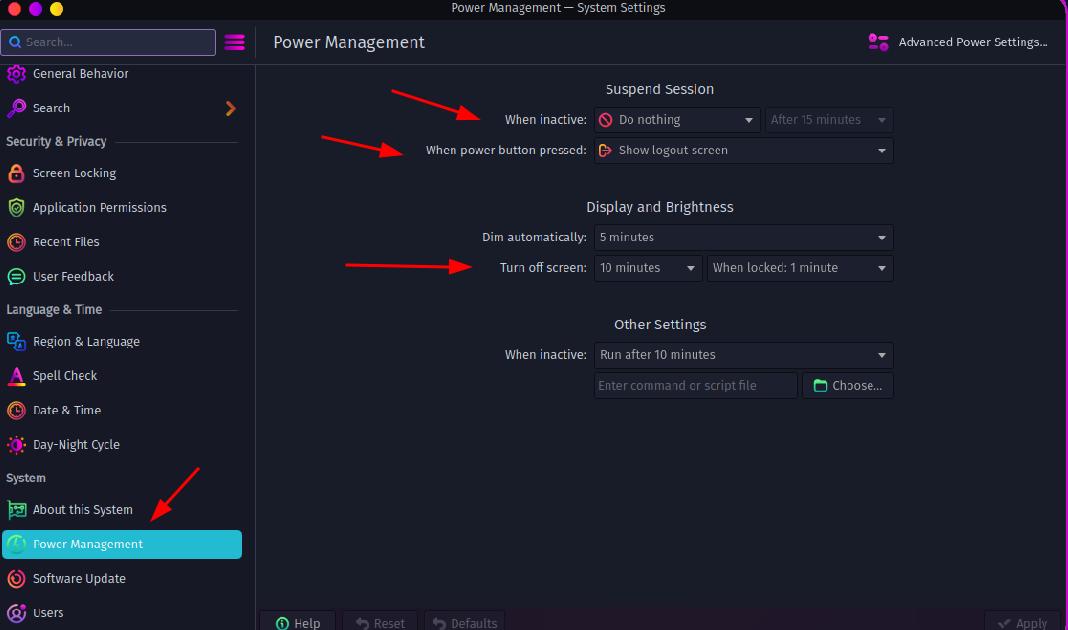
The settings for “energy” inside plasma you find if you open “Systemsettings”
Tab “Power Management”

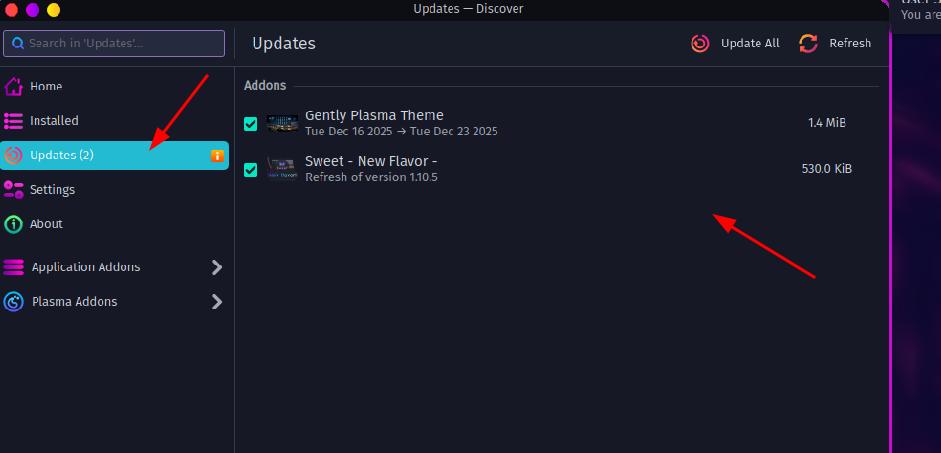
Packagekit it’s for using Plasma “discover”. First: Never do a update over this app.
For plasma theming, (look and feel updates), yes.
This have nothing to do with your “issue.”

Pls use always over the terminal:
garuda-update, garuda-update -a or upd, upd -a (option -a is to update the chaotic/ aureal source packages.
as info to read:

Since I’m no longer an nvidia card owner, I can’t help real with that.
You have the right driver installed (my knowledge)
If open terminal, command:
systemctl list-unit-files | grep -i nvidia
There you see the settings for the card. (if the powermanagement services for the gpu are “active” or not)

4 Likes

Thank you very much for the detailed reply! Forgive me as I ask clarifying questions.

Okay, so… startx was the wrong command to use; I should be using startplasma-wayland (or /usr/bin/startplasma-wayland?) instead. As in, if this happens again should I ctrl+alt+F4 to go to terminal and use the startplasma-wayland command to get my desktop back? Or might there still be a wayland session running (even if I don’t see anything) and I need to somehow terminate that before I can start a new one? I’m aware that I can reboot or shutdown -h now in the terminal (and have been), but I’d like to get back to what I was doing in case I had unsaved work.

Bios update makes sense. Does this thread still hold up as a good way to do so or is there some garuda command I should run to do so?

I’m pretty sure I currently have UEFI, Ahci, and Fast+Secure boot off, but I will certainly double check and look at the others though. Is there some way I can check in garuda?

I already turned off sleep, and I’ve never used plasma update to my knowledge. That was included just to be clear that I had done some things after the last time I had the issue. I have not actually encountered this issue since, though again the random nature makes it difficult to determine if it has actually stopped.

Running systemctl list-unit-files | grep -i nvidia gets me

garuda-nvidia-live.service                   static          -
nvidia-hibernate.service                     enabled         disabled
nvidia-persistenced.service                  disabled        disabled
nvidia-powerd.service                        disabled        disabled
nvidia-resume.service                        enabled         disabled
nvidia-suspend-then-hibernate.service        disabled        disabled
nvidia-suspend.service                       enabled         disabled

I have since been independently advised to get an amd gpu because the drivers work better with linux in general. I’ve already ordered one and it’s on its way. At the risk of adding another topic to the thread, am I correct that after installing it I should run garuda-update from terminal to get rid of the nvidia drivers and install the amd drivers?

Once again, thank you for the great response!

plasma start from terminal
Default it should run if you boot in terminal and run :
startplasma-wayland

For bios update it exist no apps for this. Download the file, decompress and copy to a usb stick. Go inside bios → open advanced page → use ez flash utility (key “tab” to open the “folder” → navigate to usb → bios file then press “enter”
After this → make the right settings, without garuda can’t boot (special the stupid microsoft secure boot.

The services have the right settings (my knowledge)
I know only the powersettings for nvidia was / are often a problem, special for laptops.
Perhaps as test you can install an additional kernel (for your cpu znver3 or lts kernel or both)
But i mean that not solved the issue.
sudo pacman -S linux-znver3 linux-znver3-headers
sudo pacman -S linux-lts linux-lts-headers
sudo pacman -S linux-lts linux-lts-headers linux-znver3 linux-znver3-headers

My mind, disable the powersettings and with the new gpu it will resolve itself your problem.

If you change the gpu:
Deinstall before “garuda-hardware-profile-nvidia-580xx”.
sudo pacman -R garuda-hardware-profile-nvidia-580xx (say yes to all if asked)
Then shutdown. Change the gpu.
Boot into garuda → open terminal and install then the right stuff for the amd gpu with command:
garuda-hardware-tool --free
This “tool” install the right stuff for the gpu.
(perhaps you must manual installing the 32bit stuff if needed)

as info:

also a info: you should / must learn a little bit over the “handling” the os linux. You stay on a arch based distro and garuda is not “really” a arch os. It’s a little bit more. It’s easier to handle with tools from the garuda-team. Example the app rani or garuda-update or in your case the garuda-hardware-tool. The snapshot function and how it is to handle if you need this to go back to a running state without problems. (example after a update and your system is then “faulty”)
You need knowledge about the terminal and some important commands special install commands (example pacman and paru/yay) and of course some more. Use the forum search here to find solutions or for how-to, the arch wiki and the “great” www. AI stuff can help but not real on arch based systems. (special garuda)

3 Likes

Thank you again!

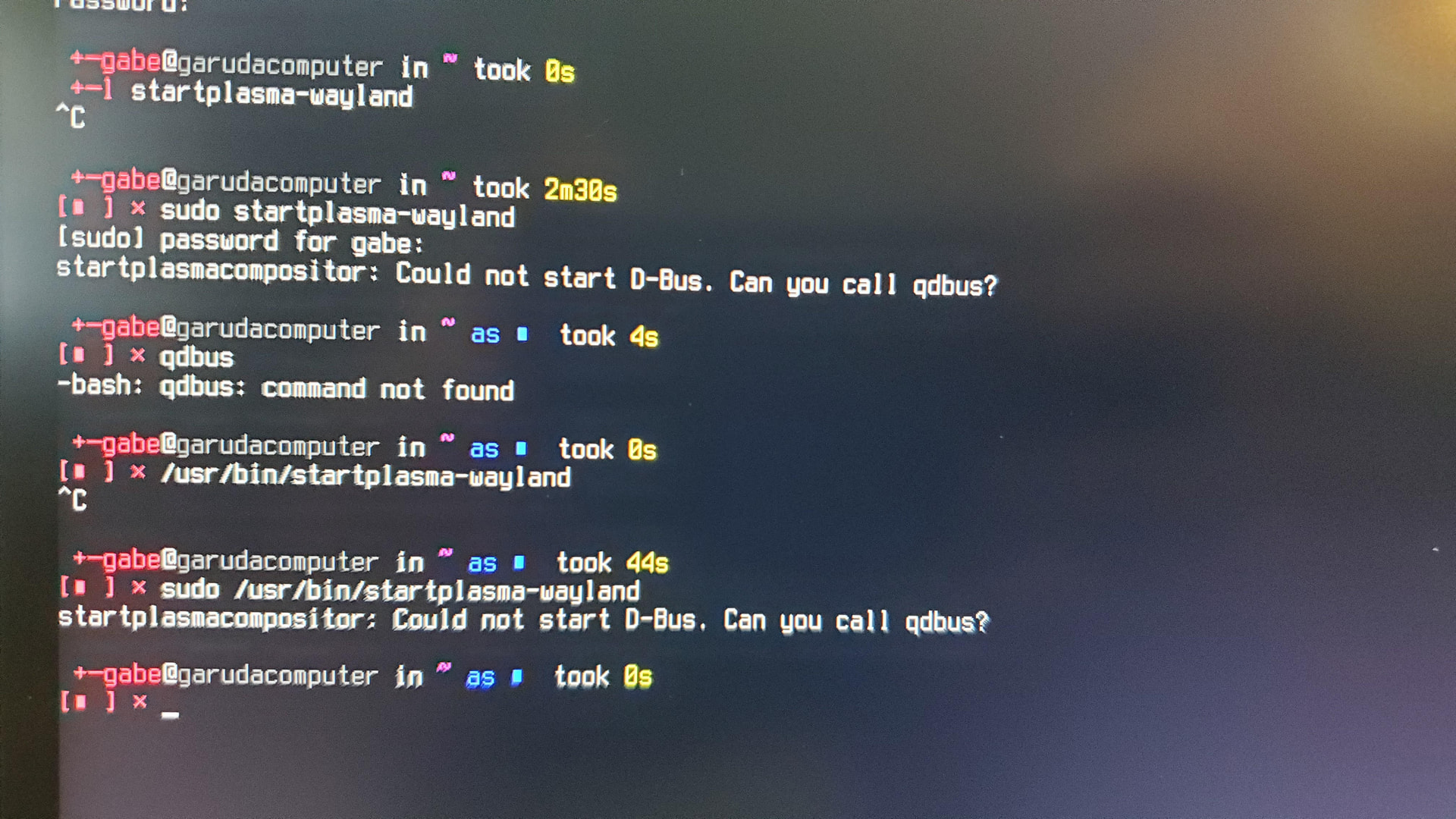
Uh… Before I was able to do any of that, it actually happened again and I was able to try startplasma-wayland. It just sort of… didn’t do anything and I Ctrl+C’d out of it after 2.5 mins. Running it with sudo gave me startplasmacompositor: Could not start D-Bus. Can you call qdbus? I tried calling qdbus but the command was not found. After rebooting I discovered that qdbus6 works, but I once again can’t force the issue to try that in the proper context.

I’ll definitely go do all of the things you recommended, though I do want to ask if you just mean that I should install those mentioned kernels or if I should switch to one of them.

And like, all due respect, I have been using the garuda tools, searching problems, and reading up on commands. As I said, I solved every other major issue I had. That often required digging into threads I didn’t understand, getting a better understanding of them, and trying many things. I asked about this specific problem because I couldn’t find any thread that seemed to be my issue (and had any proposed fixes/relevant information). Perhaps the issue was just that I didn’t have an error message that was definitely it. I have later in this thread asked things that I could/did search, but that was “while I have the ear of someone who definitely knows, let’s verify that I’ve got the right thing.” I did with the bios update, and I didn’t with the gpu installation. If this has been annoying, I apologize and will refrain for the remainder of this thread. Again, I genuinely appreciate all of the assistance.

1 Like

I have updated the bios, installed the kernels, and set the settings.

Current garuda-inxi (ran as root)

System:
Kernel: 6.18.2-arch2-1-znver3 arch: x86_64 bits: 64 compiler: gcc v: 15.2.1
clocksource: tsc avail: hpet,acpi_pm
parameters: BOOT_IMAGE=/@/boot/vmlinuz-linux-znver3
root=UUID=8f815160-a7f5-47d1-bad6-db5fd8360cc0 rw rootflags=subvol=@
quiet loglevel=3
Desktop: KDE Plasma v: 6.5.4 tk: Qt v: N/A wm: kwin_wayland dm: SDDM
Distro: Garuda base: Arch Linux
Machine:
Type: Desktop Mobo: ASUSTeK model: PRIME X570-PRO v: Rev X.0x
serial: <filter> part-nu: SKU uuid: cac20cbd-96ee-2001-5374-04421ae763fb
Firmware: UEFI vendor: American Megatrends v: 5043 date: 09/10/2025
Battery:
Device-1: hidpp_battery_0 model: Logitech ERGO M575 Trackball
serial: <filter> charge: 55% rechargeable: yes status: discharging
CPU:
Info: model: AMD Ryzen 5 5600X socket: AM4 bits: 64 type: MT MCP
arch: Zen 3+ gen: 3 level: v3 note: check built: 2022 process: TSMC n6 (7nm)
family: 0x19 (25) model-id: 0x21 (33) stepping: 0 microcode: 0xA201030
Topology: cpus: 1x dies: 1 clusters: 1 cores: 6 threads: 12 tpc: 2
smt: enabled cache: L1: 384 KiB desc: d-6x32 KiB; i-6x32 KiB L2: 3 MiB
desc: 6x512 KiB L3: 32 MiB desc: 1x32 MiB
Speed (MHz): avg: 1738 min/max: 561/4654 boost: enabled
base/boost: 3700/4650 scaling: driver: amd-pstate-epp governor: powersave
volts: 1.1 V ext-clock: 100 MHz cores: 1: 1738 2: 1738 3: 1738 4: 1738
5: 1738 6: 1738 7: 1738 8: 1738 9: 1738 10: 1738 11: 1738 12: 1738
bogomips: 88639
Flags-basic: avx avx2 ht lm nx pae sse sse2 sse3 sse4_1 sse4_2 sse4a ssse3
Vulnerabilities: <filter>
Graphics:
Device-1: NVIDIA GP104 [GeForce GTX 1070 Ti] vendor: EVGA driver: nvidia
v: 580.119.02 alternate: nouveau,nvidia_drm non-free: 550-580.xx+
status: current (as of 2025-11; EOL~2026-12-xx) arch: Pascal code: GP10x
process: TSMC 16nm built: 2016-2021 pcie: gen: 3 speed: 8 GT/s lanes: 16
ports: active: DP-1,DVI-D-1 empty: DP-2,DP-3,HDMI-A-1 bus-ID: 08:00.0
chip-ID: 10de:1b82 class-ID: 0300
Device-2: Logitech CrystalCam driver: snd-usb-audio,uvcvideo type: USB
rev: 2.0 speed: 480 Mb/s lanes: 1 mode: 2.0 bus-ID: 1-2:3 chip-ID: 046d:0894
class-ID: 0102 serial: <filter>
Display: unspecified server: X.Org v: 24.1.9 with: Xwayland v: 24.1.9
compositor: kwin_wayland driver: X: loaded: nvidia unloaded: modesetting
alternate: fbdev,nouveau,nv,vesa gpu: nvidia,nvidia-nvswitch
display-ID: :1 screens: 1
Screen-1: 0 s-res: 7680x2160 s-dpi: 96 s-size: 2032x572mm (80.00x22.52")
s-diag: 2111mm (83.11")
Monitor-1: DP-1 pos: primary,left model: Dell S2725QS serial: <filter>
built: 2025 res: mode: 3840x2160 hz: 120 scale: 100% (1) dpi: 163 gamma: 1.2
size: 597x336mm (23.5x13.23") diag: 685mm (27") ratio: 16:9 modes:
max: 3840x2160 min: 640x480
Monitor-2: DVI-D-1 pos: right model: Sceptre Z27 built: 2023 res:
mode: 3840x2160 hz: 60 scale: 100% (1) dpi: 163 gamma: 1.2
size: 597x336mm (23.5x13.23") diag: 685mm (27") ratio: 16:9 modes:
max: 3840x2160 min: 640x480
API: EGL v: 1.5 hw: drv: nvidia platforms: device: 0 drv: nvidia device: 2
drv: swrast gbm: drv: nvidia surfaceless: drv: nvidia x11: drv: nvidia
inactive: wayland,device-1
API: OpenGL v: 4.6.0 compat-v: 4.5 vendor: nvidia mesa v: 580.119.02
glx-v: 1.4 direct-render: yes renderer: NVIDIA GeForce GTX 1070 Ti/PCIe/SSE2
memory: 7.81 GiB
API: Vulkan v: 1.4.335 layers: 13 device: 0 type: discrete-gpu name: NVIDIA
GeForce GTX 1070 Ti driver: nvidia v: 580.119.02 device-ID: 10de:1b82
surfaces: N/A device: 1 type: cpu name: llvmpipe (LLVM 21.1.6 256 bits)
driver: mesa llvmpipe v: 25.3.2-arch1.1 (LLVM 21.1.6)
device-ID: 10005:0000 surfaces: N/A
Info: Tools: api: clinfo, eglinfo, glxinfo, vulkaninfo
de: kscreen-console,kscreen-doctor gpu: corectrl, lact, nvidia-smi
wl: wayland-info x11: xdpyinfo, xprop, xrandr
Audio:
Device-1: NVIDIA GP104 High Definition Audio vendor: EVGA
driver: snd_hda_intel v: kernel pcie: gen: 3 speed: 8 GT/s lanes: 16
bus-ID: 08:00.1 chip-ID: 10de:10f0 class-ID: 0403
Device-2: Advanced Micro Devices [AMD] Starship/Matisse HD Audio
vendor: ASUSTeK driver: snd_hda_intel v: kernel pcie: gen: 4 speed: 16 GT/s
lanes: 16 bus-ID: 0a:00.4 chip-ID: 1022:1487 class-ID: 0403
Device-3: Logitech CrystalCam driver: snd-usb-audio,uvcvideo type: USB
rev: 2.0 speed: 480 Mb/s lanes: 1 mode: 2.0 bus-ID: 1-2:3 chip-ID: 046d:0894
class-ID: 0102 serial: <filter>
Device-4: Logitech Blue Snowball iCE
driver: hid-generic,snd-usb-audio,usbhid type: USB rev: 2.0 speed: 12 Mb/s
lanes: 1 mode: 1.1 bus-ID: 5-1:2 chip-ID: 046d:0aca class-ID: 0300
serial: <filter>
API: ALSA v: k6.18.2-arch2-1-znver3 status: kernel-api with: aoss
type: oss-emulator tools: N/A
Server-1: PipeWire v: 1.4.9 status: n/a (root, process) with:
1: pipewire-pulse status: active 2: wireplumber status: active
3: pipewire-alsa type: plugin 4: pw-jack type: plugin
tools: pactl,pw-cat,pw-cli,wpctl
Network:
Device-1: Intel I211 Gigabit Network vendor: ASUSTeK driver: igb v: kernel
pcie: gen: 1 speed: 2.5 GT/s lanes: 1 port: f000 bus-ID: 04:00.0
chip-ID: 8086:1539 class-ID: 0200
IF: enp4s0 state: up speed: 1000 Mbps duplex: full mac: <filter>
Info: services: NetworkManager,systemd-timesyncd
Drives:
Local Storage: total: 6.48 TiB used: 3.47 TiB (53.5%)
ID-1: /dev/nvme0n1 maj-min: 259:0 vendor: Crucial model: CT1000P510SSD8
size: 931.51 GiB block-size: physical: 512 B logical: 512 B speed: 126 Gb/s
lanes: 4 tech: SSD serial: <filter> fw-rev: K1CR5102 temp: 47.9 C
scheme: GPT
SMART: yes health: PASSED on: 62 hrs cycles: 28
read-units: 425,199 [217 GB] written-units: 1,376,979 [705 GB]
ID-2: /dev/sda maj-min: 8:0 vendor: Seagate model: ST2000NM0011
family: Constellation ES (SATA 6Gb/s) size: 1.82 TiB block-size:
physical: 512 B logical: 512 B sata: 3.0 speed: 3.0 Gb/s tech: HDD
rpm: 7202 serial: <filter> fw-rev: SN03 temp: 49 C scheme: GPT
SMART: yes state: enabled health: PASSED on: 3y 244d 11h cycles: 3371
Old-Age: g-sense error rate: 2571 Pre-Fail: attribute: Spin_Retry_Count
value: 100 worst: 100 threshold: 97
ID-3: /dev/sdb maj-min: 8:16 vendor: Crucial model: CT2000BX500SSD1
family: Micron Client SSDs size: 1.82 TiB block-size: physical: 512 B
logical: 512 B sata: 3.3 speed: 6.0 Gb/s tech: SSD serial: <filter>
fw-rev: 030 temp: 40 C scheme: GPT
SMART: yes state: enabled health: PASSED on: 2y 127d 23h cycles: 1426
written: 52.26 TiB
ID-4: /dev/sdc maj-min: 8:32 vendor: Seagate model: ST2000NM0011
family: Constellation ES (SATA 6Gb/s) size: 1.82 TiB block-size:
physical: 512 B logical: 512 B sata: 3.0 speed: 3.0 Gb/s tech: HDD
rpm: 7202 serial: <filter> fw-rev: SN03 temp: 46 C scheme: GPT
SMART: yes state: enabled health: PASSED on: 3y 225d 5h cycles: 3364
Old-Age: g-sense error rate: 1709 Pre-Fail: reallocated sector: 100
threshold: 36 attribute: Spin_Retry_Count value: 100 worst: 100
threshold: 97
ID-5: /dev/sdd maj-min: 8:48 model: General USB Flash Disk
size: 116.06 GiB block-size: physical: 512 B logical: 512 B type: USB
rev: 3.2 spd: 5 Gb/s lanes: 1 mode: 3.2 gen-1x1 tech: SSD serial: <filter>
fw-rev: 2.00 scheme: GPT
SMART Message: Unknown USB bridge. Flash drive/Unsupported enclosure?
Partition:
ID-1: / raw-size: 931.22 GiB size: 931.22 GiB (100.00%)
used: 255.42 GiB (27.4%) fs: btrfs block-size: 4096 B dev: /dev/nvme0n1p2
maj-min: 259:2
ID-2: /boot/efi raw-size: 300 MiB size: 299.4 MiB (99.80%)
used: 664 KiB (0.2%) fs: vfat block-size: 512 B dev: /dev/nvme0n1p1
maj-min: 259:1
ID-3: /home raw-size: 931.22 GiB size: 931.22 GiB (100.00%)
used: 255.42 GiB (27.4%) fs: btrfs block-size: 4096 B dev: /dev/nvme0n1p2
maj-min: 259:2
ID-4: /var/log raw-size: 931.22 GiB size: 931.22 GiB (100.00%)
used: 255.42 GiB (27.4%) fs: btrfs block-size: 4096 B dev: /dev/nvme0n1p2
maj-min: 259:2
ID-5: /var/tmp raw-size: 931.22 GiB size: 931.22 GiB (100.00%)
used: 255.42 GiB (27.4%) fs: btrfs block-size: 4096 B dev: /dev/nvme0n1p2
maj-min: 259:2
Swap:
Kernel: swappiness: 133 (default 60) cache-pressure: 100 (default) zswap: no
ID-1: swap-1 type: zram size: 46.95 GiB used: 0 KiB (0.0%) priority: 100
comp: zstd avail: lzo-rle,lzo,lz4,lz4hc,deflate,842 dev: /dev/zram0
Sensors:
System Temperatures: cpu: 51.0 C mobo: 46.0 C
Fan Speeds (rpm): N/A
Info:
Memory: total: 48 GiB available: 46.95 GiB used: 4.44 GiB (9.5%)
Processes: 378 Power: uptime: 11m states: freeze,mem,disk suspend: deep
avail: s2idle wakeups: 0 hibernate: platform avail: shutdown, reboot,
suspend, test_resume image: 18.7 GiB services: org_kde_powerdevil,
power-profiles-daemon, upowerd Init: systemd v: 259 default: graphical
tool: systemctl
Packages: 2047 pm: pacman pkgs: 2034 libs: 547
tools: gnome-software,octopi,paru pm: flatpak pkgs: 13 Compilers:
clang: 21.1.6 gcc: 15.2.1 Shell: Bash (sudo) v: 5.3.9 running-in: konsole
inxi: 3.3.40
Garuda (2.11.1-1):
System install date:     2025-12-23
Garuda release:          251103
Last full system update: 2025-12-27
Is partially upgraded:   No
Relevant software:       snapper NetworkManager dracut nvidia-580xx-dkms garuda-hardware-profile-nvidia-580xx garuda-hardware-profile-standard
Windows dual boot:       Yes
Failed units:
--- System Health Check Report ---
26/26 checks run in 0.75 seconds ⌛
Powered by garuda-health 🦅

✅ System health check passed. No issues found.

Hi ,

ive seen you running 2 4k Monitors. Actually there a few problems with the new 580-dkms driver if i see it even on the Nvidia Forum. I dont use Nvidia too . Did you try to set the resolution on different settings ?

but mainly it happens right as I open an application.

Are this specific applications?

2 Likes

Do you also have this issue when you disconnect the Sceptre Z27?

If this happens again, open the terminal, enter the following:

garuda-diag

and post the generated link here.

3 Likes

As a reply to both of you, my monitors are both set to the same resolution, though they are set to different refresh rates. I have not tried this with the sceptre disconnected - I suppose I could try for a day but again this happens randomly and I have gone full days without it.

I haven’t kept track of what applications have done it. I know applications (bauh) and Rani both did it at least once, and I think some random games or Godot have done it.

I will certainly keep garuda-diag in mind. Thank you for the tip.

Also I suppose it’s important to note that this has happened again since doing the bios update and kernel thing, but I tried to check again if turning the monitors off/on would fix it and that made it unable to open the terminal.

Yes we see it on your garuda -inxi one 120hz and another 60hz :wink: But i can just tell i had issues with 4k Resolution too because the older GPU isnt made for it even i had crashes on Windows too until i did V-sync off details to middle and lower resolution in Games anyway.
I dont use bauh and less Rani because of Electron. Its not Ranis fault . Also if you use Discord as example please disable in their Settings Hardware Acceleration it crashes the Plasma too. On the Diag we could see more informations. If you use also like journalctl --since "2 minute ago" after a crash and reboot their will be logged errors.

2 Likes

Hey it happened again. I have not tried having the second monitor disconnected yet.

I ran garuda-diag and got too much to fit in a reply. The link is here, but here’s some portions that looked relevant.

=== Journal Logs (last 512 lines) ===
Jan 01 12:27:01 garudacomputer org_kde_powerdevil[6347]: [ 10668] Device /dev/i2c-1 lacks R/W permissions
Jan 01 12:27:01 garudacomputer org_kde_powerdevil[6347]: [ 10668] Device /dev/i2c-2 lacks R/W permissions
Jan 01 12:27:01 garudacomputer org_kde_powerdevil[6347]: [ 10668] Device /dev/i2c-3 lacks R/W permissions
Jan 01 12:27:01 garudacomputer systemd[1]: Starting Virtual Console Setup...
Jan 01 12:27:01 garudacomputer org_kde_powerdevil[6347]: [ 10668] Device /dev/i2c-4 lacks R/W permissions
Jan 01 12:27:01 garudacomputer org_kde_powerdevil[6347]: [ 10668] Device /dev/i2c-5 lacks R/W permissions
Jan 01 12:27:01 garudacomputer org_kde_powerdevil[6347]: [ 10668] Device /dev/i2c-6 lacks R/W permissions
Jan 01 12:27:01 garudacomputer kded6[6302]: No object for name "auto_null.monitor"
Jan 01 12:27:01 garudacomputer plasmashell[6321]: No object for name "auto_null.monitor"
Jan 01 12:27:02 garudacomputer plasmashell[6321]: QWaylandGLContext: Failed to create the decorations EGLContext. Decorations will not be drawn.
Jan 01 12:27:02 garudacomputer org_kde_powerdevil[6347]: [ 10668] Device /dev/i2c-0 lacks R/W permissions
Jan 01 12:27:02 garudacomputer org_kde_powerdevil[6347]: [ 10668] Device /dev/i2c-1 lacks R/W permissions
Jan 01 12:27:02 garudacomputer org_kde_powerdevil[6347]: [ 10668] Device /dev/i2c-2 lacks R/W permissions
Jan 01 12:27:02 garudacomputer org_kde_powerdevil[6347]: [ 10668] Device /dev/i2c-3 lacks R/W permissions
Jan 01 12:27:02 garudacomputer org_kde_powerdevil[6347]: [ 10668] Device /dev/i2c-4 lacks R/W permissions
Jan 01 12:27:02 garudacomputer org_kde_powerdevil[6347]: [ 10668] Device /dev/i2c-5 lacks R/W permissions
Jan 01 12:27:02 garudacomputer org_kde_powerdevil[6347]: [ 10668] Device /dev/i2c-6 lacks R/W permissions
Jan 01 12:27:02 garudacomputer org_kde_powerdevil[6347]: [ 10668] Removing connected display on bus 2
Jan 01 12:27:02 garudacomputer org_kde_powerdevil[6347]: [ 10668] Emitting DDCA_Display_Status_Event[805.712:  DDCA_EVENT_DISPLAY_DISCONNECTED, card1-DVI-D-1, dref: DDCA_Display_Ref[1], io_path:/dev/i2c-2, ddc working: false]
Jan 01 12:27:02 garudacomputer org_kde_powerdevil[6347]: [ 10668] Starting 1 callback threads
Jan 01 12:27:02 garudacomputer org_kde_powerdevil[6347]: [ 10668] libddcutil callback thread 0x7f3c84001460 started
Jan 01 12:27:02 garudacomputer org_kde_powerdevil[6347]: [ 10668] Started 1 event callback thread(s)
Jan 01 12:27:02 garudacomputer org_kde_powerdevil[6347]: [ 10668] Removing connected display on bus 4
Jan 01 12:27:02 garudacomputer org_kde_powerdevil[6347]: [ 10668] Emitting DDCA_Display_Status_Event[805.712:  DDCA_EVENT_DISPLAY_DISCONNECTED, card1-DP-1, dref: DDCA_Display_Ref[2], io_path:/dev/i2c-4, ddc working: false]
Jan 01 12:27:02 garudacomputer org_kde_powerdevil[6347]: [ 10668] Starting 1 callback threads
Jan 01 12:27:02 garudacomputer org_kde_powerdevil[6347]: [164227] Invoking callback function 0x7f3cb5ace7f0 for event DDCA_Display_Status_Event[805.712:  DDCA_EVENT_DISPLAY_DISCONNECTED, card1-DVI-D-1, dref: DDCA_Display_Ref[1], io_path:/dev/i2c-2, ddc working: false] in this thread [164227]
Jan 01 12:27:02 garudacomputer org_kde_powerdevil[6347]: [ 10668] libddcutil callback thread 0x7f3c84003250 started
Jan 01 12:27:02 garudacomputer org_kde_powerdevil[6347]: [ 10668] Started 1 event callback thread(s)
Jan 01 12:27:02 garudacomputer org_kde_powerdevil[6347]: [164227] Callback function 0x7f3cb5ace7f0 for event DDCA_Display_Status_Event[805.712:  DDCA_EVENT_DISPLAY_DISCONNECTED, card1-DVI-D-1, dref: DDCA_Display_Ref[1], io_path:/dev/i2c-2, ddc working: false] complete
Jan 01 12:27:02 garudacomputer org_kde_powerdevil[6347]: [164228] Invoking callback function 0x7f3cb5ace7f0 for event DDCA_Display_Status_Event[805.712:  DDCA_EVENT_DISPLAY_DISCONNECTED, card1-DP-1, dref: DDCA_Display_Ref[2], io_path:/dev/i2c-4, ddc working: false] in this thread [164228]
Jan 01 12:27:02 garudacomputer org_kde_powerdevil[6347]: [164228] Callback function 0x7f3cb5ace7f0 for event DDCA_Display_Status_Event[805.712:  DDCA_EVENT_DISPLAY_DISCONNECTED, card1-DP-1, dref: DDCA_Display_Ref[2], io_path:/dev/i2c-4, ddc working: false] complete

[LATER]

Jan 01 12:27:02 garudacomputer kwin_wayland[6185]: EglGbmLayerSurface::renderTestBuffer: failed to make opengl context current
Jan 01 12:27:02 garudacomputer kwin_wayland[6185]: Could not make egl context current! EGL_BAD_CONTEXT
Jan 01 12:27:02 garudacomputer kwin_wayland[6185]: EglGbmLayerSurface::renderTestBuffer: failed to make opengl context current
Jan 01 12:27:02 garudacomputer kwin_wayland[6185]: Could not make egl context current! EGL_BAD_CONTEXT
Jan 01 12:27:02 garudacomputer kwin_wayland[6185]: EglGbmLayerSurface::renderTestBuffer: failed to make opengl context current
Jan 01 12:27:02 garudacomputer kwin_wayland[6185]: Could not make egl context current! EGL_BAD_CONTEXT
Jan 01 12:27:02 garudacomputer kwin_wayland[6185]: EglGbmLayerSurface::renderTestBuffer: failed to make opengl context current
Jan 01 12:27:02 garudacomputer kwin_wayland[6185]: Applying output configuration failed!

[LATER]

Jan 01 12:27:17 garudacomputer org_kde_powerdevil[6347]: [164464] Invoking callback function 0x7f3cb5ace7f0 for event DDCA_Display_Status_Event[820.817:  DDCA_EVENT_DISPLAY_CONNECTED, card1-DVI-D-1, dref: DDCA_Display_Ref[3], io_path:/dev/i2c-2, ddc working: true] in this thread [164464]
Jan 01 12:27:17 garudacomputer org_kde_powerdevil[6347]: [164464] Callback function 0x7f3cb5ace7f0 for event DDCA_Display_Status_Event[820.817:  DDCA_EVENT_DISPLAY_CONNECTED, card1-DVI-D-1, dref: DDCA_Display_Ref[3], io_path:/dev/i2c-2, ddc working: true] complete
Jan 01 12:27:17 garudacomputer org_kde_powerdevil[6347]: [ 10668] Adding connected display with bus 4
Jan 01 12:27:17 garudacomputer org_kde_powerdevil[6347]: [  6347] Quiescing libddcutil API...
Jan 01 12:27:17 garudacomputer org_kde_powerdevil[6347]: [  6347] Quiesce libddcutil API complete
Jan 01 12:27:17 garudacomputer org_kde_powerdevil[6347]: [  6347] Display redetection starting.
Jan 01 12:27:17 garudacomputer org_kde_powerdevil[6347]: [ 10667] recheck thread terminating because watch thread terminated
Jan 01 12:27:17 garudacomputer kded6[6302]: No object for name "auto_null.monitor"
Jan 01 12:27:17 garudacomputer plasmashell[6321]: No object for name "auto_null.monitor"
Jan 01 12:27:17 garudacomputer kded6[6302]: No object for name "auto_null"
Jan 01 12:27:17 garudacomputer plasmashell[6321]: No object for name "auto_null"
Jan 01 12:27:17 garudacomputer plasmashell[6321]: No object for name "auto_null.monitor"
Jan 01 12:27:17 garudacomputer kded6[6302]: No object for name "auto_null.monitor"
Jan 01 12:27:17 garudacomputer kded6[6302]: No object for name "@DEFAULT_SINK@"
Jan 01 12:27:17 garudacomputer plasmashell[6321]: No object for name "@DEFAULT_SINK@"
Jan 01 12:27:17 garudacomputer kded6[6302]: No object for name "@DEFAULT_SINK@"
Jan 01 12:27:17 garudacomputer plasmashell[6321]: No object for name "@DEFAULT_SINK@"
Jan 01 12:27:17 garudacomputer org_kde_powerdevil[6347]: [ 10668] busno=4, Feature 0xdd should not exist but ddc_get_nontable_vcp_value() succeeds, returning mh=0xff ml=0xff sh=0x00 sl=0xff
Jan 01 12:27:17 garudacomputer org_kde_powerdevil[6347]: [ 10668] busno=4, Feature 0x41 should not exist but ddc_get_nontable_vcp_value() succeeds, returning mh=0xff ml=0xff sh=0x00 sl=0xff
Jan 01 12:27:17 garudacomputer org_kde_powerdevil[6347]: [ 10668] busno=4, Feature 0x00 should not exist but ddc_get_nontable_vcp_value() succeeds, returning mh=0xff ml=0xff sh=0x00 sl=0xff
Jan 01 12:27:17 garudacomputer org_kde_powerdevil[6347]: [ 10668] busno=4, All features that should not exist detected. Monitor does not indicate unsupported
Jan 01 12:27:18 garudacomputer org_kde_powerdevil[6347]: [ 10668] Emitting DDCA_Display_Status_Event[821.686:  DDCA_EVENT_DISPLAY_CONNECTED, card1-DP-1, dref: DDCA_Display_Ref[4], io_path:/dev/i2c-4, ddc working: true]
Jan 01 12:27:18 garudacomputer org_kde_powerdevil[6347]: [ 10668] Starting 1 callback threads
Jan 01 12:27:18 garudacomputer org_kde_powerdevil[6347]: [ 10668] libddcutil callback thread 0x7f3c8400f780 started
Jan 01 12:27:18 garudacomputer org_kde_powerdevil[6347]: [ 10668] Started 1 event callback thread(s)
Jan 01 12:27:18 garudacomputer org_kde_powerdevil[6347]: [164466] Invoking callback function 0x7f3cb5ace7f0 for event DDCA_Display_Status_Event[821.686:  DDCA_EVENT_DISPLAY_CONNECTED, card1-DP-1, dref: DDCA_Display_Ref[4], io_path:/dev/i2c-4, ddc working: true] in this thread [164466]
Jan 01 12:27:18 garudacomputer org_kde_powerdevil[6347]: [164466] Callback function 0x7f3cb5ace7f0 for event DDCA_Display_Status_Event[821.686:  DDCA_EVENT_DISPLAY_CONNECTED, card1-DP-1, dref: DDCA_Display_Ref[4], io_path:/dev/i2c-4, ddc working: true] complete

[LATER]

Jan 01 12:27:19 garudacomputer kwin_wayland[6185]: EglGbmLayerSurface::renderTestBuffer: failed to make opengl context current
Jan 01 12:27:19 garudacomputer kwin_wayland[6185]: Could not make egl context current! EGL_BAD_CONTEXT
Jan 01 12:27:19 garudacomputer kwin_wayland[6185]: EglGbmLayerSurface::renderTestBuffer: failed to make opengl context current
Jan 01 12:27:19 garudacomputer kwin_wayland[6185]: Could not make egl context current! EGL_BAD_CONTEXT
Jan 01 12:27:19 garudacomputer kwin_wayland[6185]: EglGbmLayerSurface::renderTestBuffer: failed to make opengl context current
Jan 01 12:27:19 garudacomputer kwin_wayland[6185]: Applying output configuration failed!
Jan 01 12:27:37 garudacomputer systemd[1]: Bluetooth service was skipped because of an unmet condition check (ConditionPathIsDirectory=/sys/class/bluetooth).
Jan 01 12:27:37 garudacomputer kdeconnectd[6430]: Cannot find Bluez 5 adapter for device search false

[LATER]

Jan 01 12:12:02 garudacomputer org_kde_powerdevil[8884]: [ 13381] Device /dev/i2c-6 lacks R/W permissions
Jan 01 12:12:02 garudacomputer org_kde_powerdevil[8884]: [ 13381] Removing connected display on bus 2
Jan 01 12:12:02 garudacomputer org_kde_powerdevil[8884]: [ 13381] Emitting DDCA_Display_Status_Event[4965.762:  DDCA_EVENT_DISPLAY_DISCONNECTED, card1-DVI-D-1, dref: DDCA_Display_Ref[1], io_path:/dev/i2c-2, ddc working: false]
Jan 01 12:12:02 garudacomputer org_kde_powerdevil[8884]: [ 13381] Starting 1 callback threads
Jan 01 12:12:02 garudacomputer org_kde_powerdevil[8884]: [ 13381] libddcutil callback thread 0x7f9700002cc0 started
Jan 01 12:12:02 garudacomputer org_kde_powerdevil[8884]: [ 13381] Started 1 event callback thread(s)
Jan 01 12:12:02 garudacomputer org_kde_powerdevil[8884]: [ 13381] Removing connected display on bus 4
Jan 01 12:12:02 garudacomputer org_kde_powerdevil[8884]: [ 13381] Emitting DDCA_Display_Status_Event[4965.762:  DDCA_EVENT_DISPLAY_DISCONNECTED, card1-DP-1, dref: DDCA_Display_Ref[2], io_path:/dev/i2c-4, ddc working: false]
Jan 01 12:12:02 garudacomputer org_kde_powerdevil[8884]: [ 13381] Starting 1 callback threads
Jan 01 12:12:02 garudacomputer org_kde_powerdevil[8884]: [ 13381] libddcutil callback thread 0x7f97000014c0 started
Jan 01 12:12:02 garudacomputer org_kde_powerdevil[8884]: [251751] Invoking callback function 0x7f972f3a67f0 for event DDCA_Display_Status_Event[4965.762:  DDCA_EVENT_DISPLAY_DISCONNECTED, card1-DVI-D-1, dref: DDCA_Display_Ref[1], io_path:/dev/i2c-2, ddc working: false] in this thread [251751]
Jan 01 12:12:02 garudacomputer org_kde_powerdevil[8884]: [ 13381] Started 1 event callback thread(s)
Jan 01 12:12:02 garudacomputer org_kde_powerdevil[8884]: [251751] Callback function 0x7f972f3a67f0 for event DDCA_Display_Status_Event[4965.762:  DDCA_EVENT_DISPLAY_DISCONNECTED, card1-DVI-D-1, dref: DDCA_Display_Ref[1], io_path:/dev/i2c-2, ddc working: false] complete
Jan 01 12:12:02 garudacomputer org_kde_powerdevil[8884]: [251752] Invoking callback function 0x7f972f3a67f0 for event DDCA_Display_Status_Event[4965.762:  DDCA_EVENT_DISPLAY_DISCONNECTED, card1-DP-1, dref: DDCA_Display_Ref[2], io_path:/dev/i2c-4, ddc working: false] in this thread [251752]
Jan 01 12:12:02 garudacomputer org_kde_powerdevil[8884]: [251752] Callback function 0x7f972f3a67f0 for event DDCA_Display_Status_Event[4965.762:  DDCA_EVENT_DISPLAY_DISCONNECTED, card1-DP-1, dref: DDCA_Display_Ref[2], io_path:/dev/i2c-4, ddc working: false] complete
Jan 01 12:12:02 garudacomputer kwin_wayland[8726]: Atomic modeset test failed! Permission denied
Jan 01 12:12:02 garudacomputer kwin_wayland[8726]: Applying output configuration failed!
Jan 01 12:12:02 garudacomputer kwin_wayland[8726]: Atomic modeset test failed! Permission denied
Jan 01 12:12:02 garudacomputer kwin_wayland[8726]: Applying output configuration failed!
Jan 01 12:12:02 garudacomputer kwin_wayland[8726]: PipeWire remote error:  connection error
Jan 01 12:12:02 garudacomputer systemd[8621]: Stopped Garuda System Maintenance.
Jan 01 12:12:02 garudacomputer dbus-broker-launch[1029]: Activation request for 'org.freedesktop.UPower' failed.
Jan 01 12:12:02 garudacomputer systemd[8621]: Stopped dbus-:1.2-org.kde.kdeconnect@0.service.
Jan 01 12:12:02 garudacomputer systemd[8621]: dbus-:1.2-org.kde.kdeconnect@0.service: Consumed 3.819s CPU time over 1h 22min 44.707s wall clock time, 30.7M memory peak.
Jan 01 12:12:02 garudacomputer systemd[8621]: Removed slice Slice /app/dbus-:1.2-org.kde.kdeconnect.
Jan 01 12:12:02 garudacomputer systemd[8621]: app-dbus\x2d:1.2\x2dorg.kde.kdeconnect.slice: Consumed 3.819s CPU time over 1h 22min 44.709s wall clock time, 30.8M memory peak.
Jan 01 12:12:02 garudacomputer systemd[8621]: Stopped Discover.
Jan 01 12:12:02 garudacomputer dbus-broker-launch[1029]: Activation request for 'org.freedesktop.UPower' failed.
Jan 01 12:12:02 garudacomputer systemd[8621]: Stopped KRunner provider for baloo file indexer.
Jan 01 12:12:02 garudacomputer dbus-broker-launch[1029]: Activation request for 'org.freedesktop.UPower' failed.
Jan 01 12:12:02 garudacomputer systemd[8621]: Stopped dbus-:1.2-org.kde.kmtpd5@0.service.
Jan 01 12:12:02 garudacomputer systemd[8621]: dbus-:1.2-org.kde.kmtpd5@0.service: Consumed 1.159s CPU time over 4min 11.940s wall clock time, 22.6M memory peak.
Jan 01 12:12:02 garudacomputer dbus-broker-launch[1029]: Activation request for 'org.freedesktop.UPower' failed.
Jan 01 12:12:02 garudacomputer systemd[8621]: Removed slice Slice /app/dbus-:1.2-org.kde.kmtpd5.
Jan 01 12:12:02 garudacomputer systemd[8621]: app-dbus\x2d:1.2\x2dorg.kde.kmtpd5.slice: Consumed 1.159s CPU time over 4min 11.942s wall clock time, 22.6M memory peak.
Jan 01 12:12:02 garudacomputer dbus-broker-launch[1029]: Activation request for 'org.freedesktop.UPower' failed.
Jan 01 12:12:02 garudacomputer systemd[8621]: Stopped Applications (bauh).
Jan 01 12:12:02 garudacomputer systemd[8621]: app-bauh@8b43d595103043ba9730dece29da6215.service: Consumed 15.568s CPU time over 12min 20.658s wall clock time, 575M memory peak.
Jan 01 12:12:02 garudacomputer dbus-broker-launch[1029]: Activation request for 'org.freedesktop.UPower' failed.
Jan 01 12:12:02 garudacomputer systemd[8621]: Stopped Firewall Applet.
Jan 01 12:12:02 garudacomputer systemd[8621]: app-firewall\x2dapplet@autostart.service: Consumed 582ms CPU time over 1h 22min 34.828s wall clock time, 78.7M memory peak.
Jan 01 12:12:02 garudacomputer systemd[8621]: Stopped target Current graphical user session.
Jan 01 12:12:02 garudacomputer systemd[8621]: Stopped target KDE Plasma Workspace.

[LATER]

Jan 01 12:12:03 garudacomputer plasmashell[8863]: file:///usr/share/plasma/plasmoids/luisbocanegra.panel.colorizer/contents/ui/main.qml:407: TypeError: Cannot read property 'cfgEnabled' of null
Jan 01 12:12:03 garudacomputer ananicy-cpp[1031]: [2026-01-01 12:12:03.143] [info] Summary:
Jan 01 12:12:03 garudacomputer ananicy-cpp[1031]: 74356 processes processed, ran for 01:23:29.750309 seconds
Jan 01 12:12:03 garudacomputer plasmashell[8863]: qrc:/qt/qml/plasma/applet/org/kde/plasma/notifications/global/Globals.qml:132: TypeError: Cannot read property 'screenGeometry' of null
Jan 01 12:12:03 garudacomputer plasmashell[8863]: Connection::send() called with connection not inited
Jan 01 12:12:03 garudacomputer plasmashell[8863]: qrc:/qt/qml/plasma/applet/org/kde/plasma/notifications/global/Globals.qml:262: TypeError: Cannot read property 'plasmoid' of undefined
Jan 01 12:12:03 garudacomputer systemd[8621]: Stopped KDE Plasma Workspace.
Jan 01 12:12:03 garudacomputer systemd[8621]: plasma-plasmashell.service: Consumed 48.972s CPU time over 1h 22min 46.473s wall clock time, 1G memory peak.
Jan 01 12:12:03 garudacomputer systemd[8621]: Stopping KDE Session Management Server...

[LATER]

=== Display Manager: sddm.service ===
● sddm.service - Simple Desktop Display Manager
     Loaded: loaded (/usr/lib/systemd/system/sddm.service; enabled; preset: disabled)
     Active: active (running) since Thu 2026-01-01 12:13:22 EST; 14min ago
 Invocation: dab2d8053c364ce89cd2368965808199
       Docs: man:sddm(1)
             man:sddm.conf(5)
   Main PID: 2828 (sddm)
      Tasks: 4 (limit: 57459)
     Memory: 160.9M (peak: 182.9M)
        CPU: 694ms
     CGroup: /system.slice/sddm.service
             ├─2828 /usr/bin/sddm
             └─2988 /usr/lib/Xorg -nolisten tcp -background none -seat seat0 vt2 -auth /run/sddm/xauth_nIsbtN -noreset -displayfd 16

Jan 01 12:13:34 garudacomputer sddm-helper[6077]: pam_kwallet5(sddm:auth): pam_kwallet5: pam_sm_authenticate
Jan 01 12:13:34 garudacomputer sddm-helper[6077]: [PAM] returning.
Jan 01 12:13:34 garudacomputer sddm[2828]: Authentication for user  "gabe"  successful
Jan 01 12:13:34 garudacomputer sddm-helper[6077]: pam_kwallet5(sddm:setcred): pam_kwallet5: pam_sm_setcred
Jan 01 12:13:34 garudacomputer sddm-helper[6077]: pam_unix(sddm:session): session opened for user gabe(uid=1000) by gabe(uid=0)
Jan 01 12:13:34 garudacomputer sddm[2828]: Auth: sddm-helper exited successfully
Jan 01 12:13:34 garudacomputer sddm[2828]: Greeter stopped. SDDM::Auth::HELPER_SUCCESS
Jan 01 12:13:34 garudacomputer sddm-helper[6077]: pam_kwallet5(sddm:session): pam_kwallet5: pam_sm_open_session
Jan 01 12:13:34 garudacomputer sddm-helper[6077]: Starting Wayland user session: "/usr/share/sddm/scripts/wayland-session" "/usr/lib/plasma-dbus-run-session-if-needed /usr/bin/startplasma-wayland"
Jan 01 12:13:34 garudacomputer sddm[2828]: Session started true

=== Display Manager Journal Logs (last 100 lines) ===
Jan 01 10:48:35 garudacomputer sddm[1252]: Starting...
Jan 01 10:48:35 garudacomputer sddm[1252]: Logind interface found
Jan 01 10:48:35 garudacomputer sddm[1252]: Adding new display...
Jan 01 10:48:35 garudacomputer sddm[1252]: Loaded empty theme configuration
Jan 01 10:48:35 garudacomputer sddm[1252]: Xauthority path: "/run/sddm/xauth_snRWeR"
Jan 01 10:48:35 garudacomputer sddm[1252]: Using VT 2
Jan 01 10:48:35 garudacomputer sddm[1252]: Display server starting...
Jan 01 10:48:35 garudacomputer sddm[1252]: Writing cookie to "/run/sddm/xauth_snRWeR"
Jan 01 10:48:35 garudacomputer sddm[1252]: Running: /usr/bin/X -nolisten tcp -background none -seat seat0 vt2 -auth /run/sddm/xauth_snRWeR -noreset -displayfd 16
Jan 01 10:48:36 garudacomputer sddm[1252]: Setting default cursor
Jan 01 10:48:36 garudacomputer sddm[1252]: Could not setup default cursor
Jan 01 10:48:36 garudacomputer sddm[1252]: Running display setup script  "/usr/share/sddm/scripts/Xsetup"
Jan 01 10:48:36 garudacomputer sddm[1252]: Display server started.
Jan 01 10:48:36 garudacomputer sddm[1252]: Socket server starting...
Jan 01 10:48:36 garudacomputer sddm[1252]: Socket server started.
Jan 01 10:48:36 garudacomputer sddm[1252]: Loading theme configuration from "/usr/share/sddm/themes/Dr460nized/theme.conf"
Jan 01 10:48:36 garudacomputer sddm[1252]: Greeter starting...
Jan 01 10:48:36 garudacomputer sddm-helper[4666]: [PAM] Starting...
Jan 01 10:48:36 garudacomputer sddm-helper[4666]: [PAM] Authenticating...
Jan 01 10:48:36 garudacomputer sddm-helper[4666]: [PAM] returning.
Jan 01 10:48:36 garudacomputer sddm-helper[4666]: pam_unix(sddm-greeter:session): session opened for user sddm(uid=951) by (uid=0)
Jan 01 10:48:36 garudacomputer sddm-helper[4666]: Writing cookie to "/tmp/xauth_kunvad"
Jan 01 10:48:36 garudacomputer sddm-helper[4666]: Starting X11 session: "" "/usr/bin/sddm-greeter-qt6 --socket /tmp/sddm-:0-airYoh --theme /usr/share/sddm/themes/Dr460nized"
Jan 01 10:48:36 garudacomputer sddm[1252]: Greeter session started successfully
Jan 01 10:48:36 garudacomputer sddm[1252]: Message received from greeter: Connect
Jan 01 10:49:14 garudacomputer sddm[1252]: Message received from greeter: Login
Jan 01 10:49:14 garudacomputer sddm[1252]: Reading from "/usr/share/wayland-sessions/plasma.desktop"
Jan 01 10:49:14 garudacomputer sddm[1252]: Session "/usr/share/wayland-sessions/plasma.desktop" selected, command: "/usr/lib/plasma-dbus-run-session-if-needed /usr/bin/startplasma-wayland" for VT 1
Jan 01 10:49:14 garudacomputer sddm-helper[8615]: [PAM] Starting...
Jan 01 10:49:14 garudacomputer sddm-helper[8615]: [PAM] Authenticating...
Jan 01 10:49:14 garudacomputer sddm-helper[8615]: [PAM] Preparing to converse...
Jan 01 10:49:14 garudacomputer sddm-helper[8615]: [PAM] Conversation with 1 messages
Jan 01 10:49:14 garudacomputer sddm-helper[8615]: pam_kwallet5(sddm:auth): pam_kwallet5: pam_sm_authenticate
Jan 01 10:49:14 garudacomputer sddm-helper[8615]: [PAM] returning.
Jan 01 10:49:14 garudacomputer sddm[1252]: Authentication for user  "gabe"  successful
Jan 01 10:49:14 garudacomputer sddm-helper[8615]: pam_kwallet5(sddm:setcred): pam_kwallet5: pam_sm_setcred
Jan 01 10:49:14 garudacomputer sddm-helper[8615]: pam_unix(sddm:session): session opened for user gabe(uid=1000) by gabe(uid=0)
Jan 01 10:49:14 garudacomputer sddm[1252]: Auth: sddm-helper exited successfully
Jan 01 10:49:14 garudacomputer sddm[1252]: Greeter stopped. SDDM::Auth::HELPER_SUCCESS
Jan 01 10:49:14 garudacomputer sddm-helper[8615]: pam_kwallet5(sddm:session): pam_kwallet5: pam_sm_open_session
Jan 01 10:49:14 garudacomputer sddm-helper[8615]: Starting Wayland user session: "/usr/share/sddm/scripts/wayland-session" "/usr/lib/plasma-dbus-run-session-if-needed /usr/bin/startplasma-wayland"
Jan 01 10:49:14 garudacomputer sddm[1252]: Session started true
Jan 01 12:12:02 garudacomputer sddm[1252]: Authentication error: SDDM::Auth::ERROR_INTERNAL "Process crashed"
Jan 01 12:12:02 garudacomputer sddm[1252]: Auth: sddm-helper (--socket /tmp/sddm-auth-9ed29167-358a-4850-a7c4-95a865b004fd --id 1 --start /usr/lib/plasma-dbus-run-session-if-needed /usr/bin/startplasma-wayland --user gabe) crashed (exit code 1)
Jan 01 12:12:02 garudacomputer sddm[1252]: Authentication error: SDDM::Auth::ERROR_INTERNAL "Process crashed"
Jan 01 12:12:02 garudacomputer sddm[1252]: Auth: sddm-helper exited with 1
Jan 01 12:12:02 garudacomputer sddm[1252]: Signal received: SIGTERM
Jan 01 12:12:02 garudacomputer systemd[1]: Stopping Simple Desktop Display Manager...
Jan 01 12:12:02 garudacomputer sddm[1252]: Socket server stopping...
Jan 01 12:12:02 garudacomputer sddm[1252]: Socket server stopped.
Jan 01 12:12:02 garudacomputer sddm[1252]: Display server stopping...
Jan 01 12:12:02 garudacomputer sddm[1252]: Display server stopped.
Jan 01 12:12:02 garudacomputer sddm[1252]: Running display stop script  QList("/usr/share/sddm/scripts/Xstop")
Jan 01 12:12:02 garudacomputer systemd[1]: sddm.service: Deactivated successfully.
Jan 01 12:12:02 garudacomputer systemd[1]: Stopped Simple Desktop Display Manager.
Jan 01 12:12:02 garudacomputer systemd[1]: sddm.service: Consumed 689ms CPU time over 1h 23min 28.209s wall clock time, 180.7M memory peak.
-- Boot e0d38d63bdca49c5958744c977f62e8a --
Jan 01 12:13:22 garudacomputer systemd[1]: Started Simple Desktop Display Manager.
Jan 01 12:13:22 garudacomputer sddm[2828]: Initializing...
Jan 01 12:13:22 garudacomputer sddm[2828]: Starting...
Jan 01 12:13:22 garudacomputer sddm[2828]: Logind interface found
Jan 01 12:13:22 garudacomputer sddm[2828]: Adding new display...
Jan 01 12:13:22 garudacomputer sddm[2828]: Loaded empty theme configuration
Jan 01 12:13:22 garudacomputer sddm[2828]: Xauthority path: "/run/sddm/xauth_nIsbtN"
Jan 01 12:13:22 garudacomputer sddm[2828]: Using VT 2
Jan 01 12:13:22 garudacomputer sddm[2828]: Display server starting...
Jan 01 12:13:22 garudacomputer sddm[2828]: Writing cookie to "/run/sddm/xauth_nIsbtN"
Jan 01 12:13:22 garudacomputer sddm[2828]: Running: /usr/bin/X -nolisten tcp -background none -seat seat0 vt2 -auth /run/sddm/xauth_nIsbtN -noreset -displayfd 16
Jan 01 12:13:23 garudacomputer sddm[2828]: Setting default cursor
Jan 01 12:13:23 garudacomputer sddm[2828]: Could not setup default cursor
Jan 01 12:13:23 garudacomputer sddm[2828]: Running display setup script  "/usr/share/sddm/scripts/Xsetup"
Jan 01 12:13:23 garudacomputer sddm[2828]: Display server started.
Jan 01 12:13:23 garudacomputer sddm[2828]: Socket server starting...
Jan 01 12:13:23 garudacomputer sddm[2828]: Socket server started.
Jan 01 12:13:23 garudacomputer sddm[2828]: Loading theme configuration from "/usr/share/sddm/themes/Dr460nized/theme.conf"
Jan 01 12:13:23 garudacomputer sddm[2828]: Greeter starting...
Jan 01 12:13:23 garudacomputer sddm-helper[5732]: [PAM] Starting...
Jan 01 12:13:23 garudacomputer sddm-helper[5732]: [PAM] Authenticating...
Jan 01 12:13:23 garudacomputer sddm-helper[5732]: [PAM] returning.
Jan 01 12:13:23 garudacomputer sddm-helper[5732]: pam_unix(sddm-greeter:session): session opened for user sddm(uid=951) by (uid=0)
Jan 01 12:13:23 garudacomputer sddm-helper[5732]: Writing cookie to "/tmp/xauth_hOKzZs"
Jan 01 12:13:23 garudacomputer sddm-helper[5732]: Starting X11 session: "" "/usr/bin/sddm-greeter-qt6 --socket /tmp/sddm-:0-kihnBu --theme /usr/share/sddm/themes/Dr460nized"
Jan 01 12:13:23 garudacomputer sddm[2828]: Greeter session started successfully
Jan 01 12:13:23 garudacomputer sddm[2828]: Message received from greeter: Connect
Jan 01 12:13:34 garudacomputer sddm[2828]: Message received from greeter: Login
Jan 01 12:13:34 garudacomputer sddm[2828]: Reading from "/usr/share/wayland-sessions/plasma.desktop"
Jan 01 12:13:34 garudacomputer sddm[2828]: Session "/usr/share/wayland-sessions/plasma.desktop" selected, command: "/usr/lib/plasma-dbus-run-session-if-needed /usr/bin/startplasma-wayland" for VT 1
Jan 01 12:13:34 garudacomputer sddm-helper[6077]: [PAM] Starting...
Jan 01 12:13:34 garudacomputer sddm-helper[6077]: [PAM] Authenticating...
Jan 01 12:13:34 garudacomputer sddm-helper[6077]: [PAM] Preparing to converse...
Jan 01 12:13:34 garudacomputer sddm-helper[6077]: [PAM] Conversation with 1 messages
Jan 01 12:13:34 garudacomputer sddm-helper[6077]: pam_kwallet5(sddm:auth): pam_kwallet5: pam_sm_authenticate
Jan 01 12:13:34 garudacomputer sddm-helper[6077]: [PAM] returning.
Jan 01 12:13:34 garudacomputer sddm[2828]: Authentication for user  "gabe"  successful
Jan 01 12:13:34 garudacomputer sddm-helper[6077]: pam_kwallet5(sddm:setcred): pam_kwallet5: pam_sm_setcred
Jan 01 12:13:34 garudacomputer sddm-helper[6077]: pam_unix(sddm:session): session opened for user gabe(uid=1000) by gabe(uid=0)
Jan 01 12:13:34 garudacomputer sddm[2828]: Auth: sddm-helper exited successfully
Jan 01 12:13:34 garudacomputer sddm[2828]: Greeter stopped. SDDM::Auth::HELPER_SUCCESS
Jan 01 12:13:34 garudacomputer sddm-helper[6077]: pam_kwallet5(sddm:session): pam_kwallet5: pam_sm_open_session
Jan 01 12:13:34 garudacomputer sddm-helper[6077]: Starting Wayland user session: "/usr/share/sddm/scripts/wayland-session" "/usr/lib/plasma-dbus-run-session-if-needed /usr/bin/startplasma-wayland"
Jan 01 12:13:34 garudacomputer sddm[2828]: Session started true

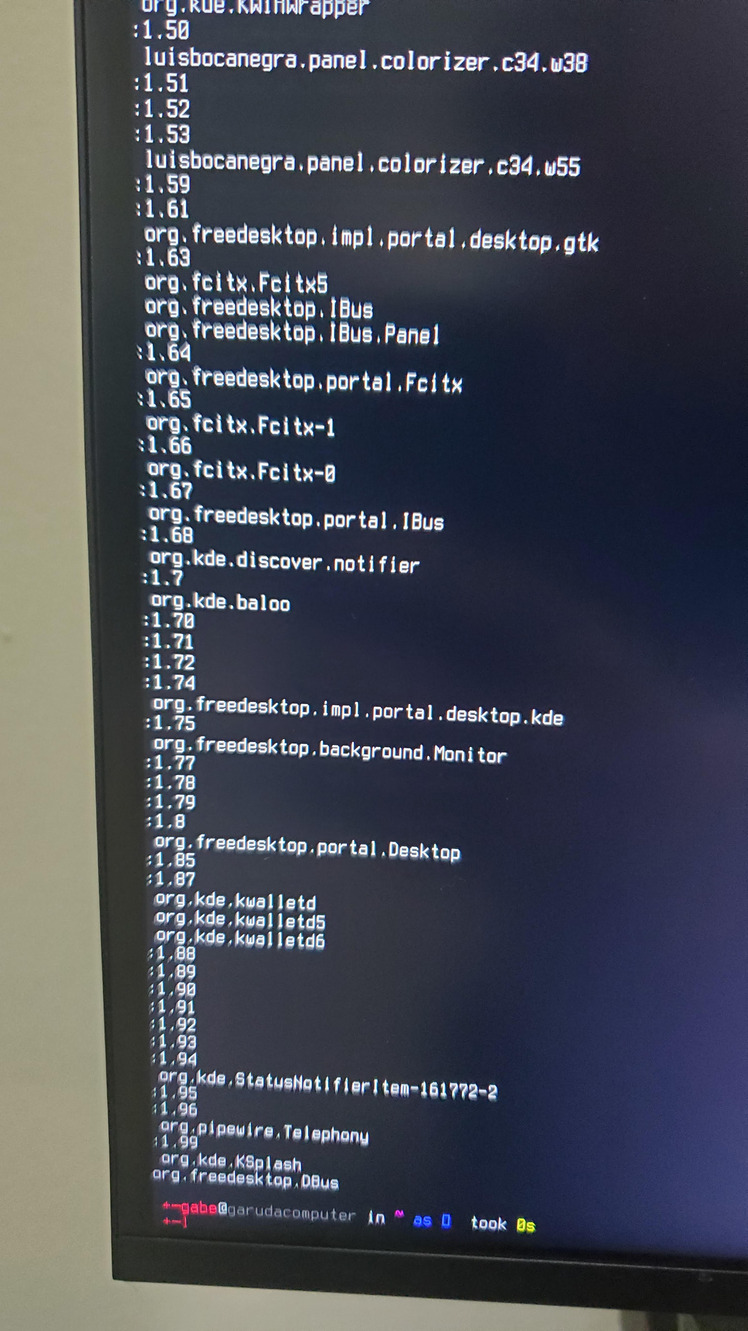
I also tried running qdbus6 at the terminal this time and got the following (not the full output - couldn’t scroll up)

hmm Powerdevil … Did you have any screensaver activated? Is the monitor in any ECO Power saving mode? Would check the Display settings too.

Please also fix your system

garuda-health --fix in the Terminal.

I’m going to bed for tonight, so I’ll look at the display settings tomorrow. This was when opening an app (and actually it happened twice after when opening apps - I think I can force it to happen will investigate) so I don’t think Screensavers have anything to do with it.

Oh yeah I thought I mentioned that I noticed the needed fixes and already dealt with it. Seemingly not.

Disconnect the Sceptre Z27 monitor (or use an HDMI or DP cable, not the DL-DVI-D to HDMI cable). If the issue occurs again, please post a complete journal, as the journal excerpt from garuda-diag only contains the last 512 lines of the journal and it is not clear what happened before that.

3 Likes

Turns out I don’t actually have a way to force it. It happened twice in quick succession when I opened a bunch of intensive applications all at once immediately after boot, but I’ve been doing that for a few hours and haven’t had it happen once.

After that, I did the following things.

My monitors do not appear to be on any power-saving modes.

When I looked through power settings, I noticed there was one more sleep command in the advanced power settings that I missed. Turned that off.

I switched my Sceptre monitor to a normal HDMI cable. I thought I had a reason for using that weird cable, but the HDMI works just fine. So who knows.

If it happens again, I will attempt to grab the full journal. Thank you all for your patience and guidance.