it just wont appear
edit: I accidentally deleted on edit mode and now restored, thank you all for the help
I could only see the miniatures from the videoplayer, but maybe it has the “hide automatically” feature on? I saw that when you mouse over the top edge of the screen, the menu did appear.
If you’re talking about the bottom part of the UI, you can always pick the dragonized theme as follows:
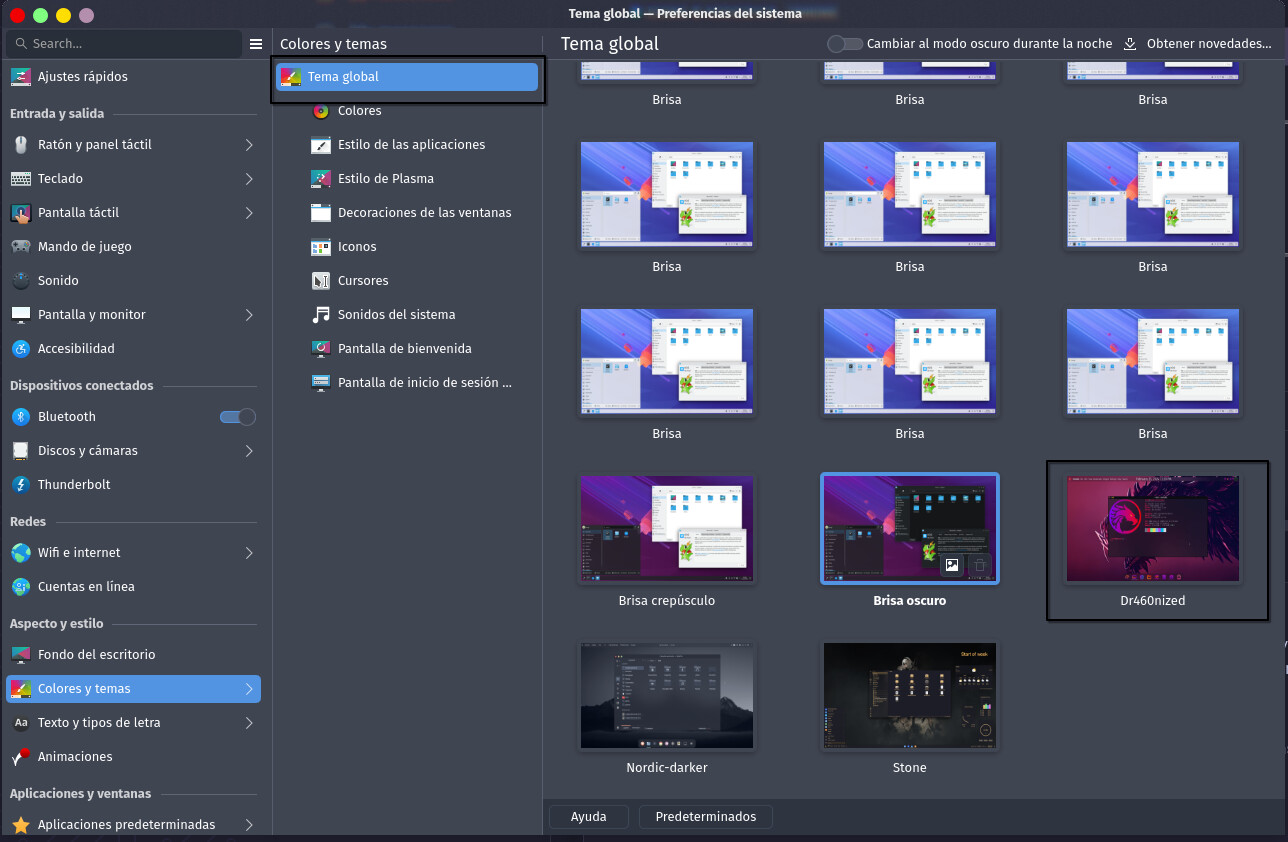
that will reset more than the desktop layout though, so if you have customized colors or something you may loose it and have to re configure it.
Hope this helps!
2 Likes
Please post the terminal output from garuda-inxi, as requested in the template for your post. This output is essential for receiving assistance on this forum. Otherwise, your post will be moved to
Format it as a code block by clicking the preformatted text button (</>), or put three tildes (~) above and below the output text.
2 Likes
You can actually reconfigure this in KDE, and potentially delete your taskbar.
Right-click the desktop and choose “Enter Edit Mode” to do exactly that, then choose “Add panel” on the top to add a new one. If you still have one but it’s invisible for some reason it should also show up in edit mode and fix it.
1 Like
it was it!!! thank you!!!
This topic was automatically closed 2 days after the last reply. New replies are no longer allowed.