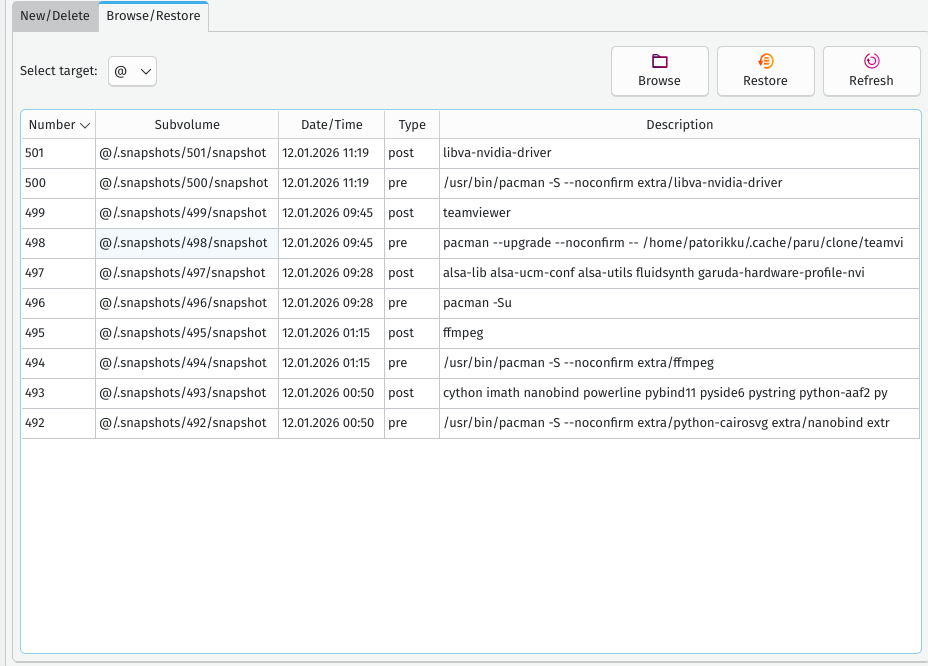
Yesterday I got the following error when trying to use mpv:
mpv: error while loading shared libraries: libpython3.13.so.1.0: cannot open shared object file: No such file or directory
The day before that mpv worked fine, so most likely some update had to broke it, but I have no clue where to look to locate the root of the issue. Does anyone have any idea what might be the root cause of this?
System:
  Kernel: 6.18.4-zen1-1-zen arch: x86_64 bits: 64 compiler: gcc v: 15.2.1
    clocksource: tsc avail: hpet,acpi_pm
    parameters: BOOT_IMAGE=/@/boot/vmlinuz-linux-zen
    root=UUID=4de138a4-b46f-4c97-b1e6-f20e3baa20da rw rootflags=subvol=@
    quiet quiet rd.udev.log_priority=3 vt.global_cursor_default=0
    resume=UUID=7d1ff86f-8e16-4212-b931-39bebd0dd592 loglevel=3
  Desktop: KDE Plasma v: 6.5.4 tk: Qt v: N/A info: frameworks v: 6.22.0
    wm: kwin_wayland vt: 1 dm: SDDM Distro: Garuda base: Arch Linux
Machine:
  Type: Desktop System: Micro-Star product: MS-7B17 v: 2.0
    serial: <superuser required>
  Mobo: Micro-Star model: MPG Z390 GAMING EDGE AC (MS-7B17) v: 2.0
    serial: <superuser required> uuid: <superuser required> Firmware: UEFI
    vendor: American Megatrends v: A.B0 date: 10/12/2020
CPU:
  Info: model: Intel Core i7-9700KF bits: 64 type: MCP arch: Coffee Lake
    gen: core 9 level: v3 note: check built: 2018 process: Intel 14nm family: 6
    model-id: 0x9E (158) stepping: 0xC (12) microcode: 0xF8
  Topology: cpus: 1x dies: 1 clusters: 8 cores: 8 smt: <unsupported> cache:
    L1: 512 KiB desc: d-8x32 KiB; i-8x32 KiB L2: 2 MiB desc: 8x256 KiB
    L3: 12 MiB desc: 1x12 MiB
  Speed (MHz): avg: 4701 min/max: 800/4900 scaling: driver: intel_pstate
    governor: powersave cores: 1: 4701 2: 4701 3: 4701 4: 4701 5: 4701 6: 4701
    7: 4701 8: 4701 bogomips: 57600
  Flags-basic: avx avx2 ht lm nx pae sse sse2 sse3 sse4_1 sse4_2 ssse3 vmx
  Vulnerabilities: <filter>
Graphics:
  Device-1: NVIDIA TU104 [GeForce RTX 2070 SUPER] vendor: ASUSTeK
    driver: nvidia v: 590.48.01 alternate: nouveau,nvidia_drm
    non-free: 550-580.xx+ status: current (as of 2025-11; EOL~2026-12-xx)
    arch: Turing code: TUxxx process: TSMC 12nm FF built: 2018-2022 pcie:
    gen: 3 speed: 8 GT/s lanes: 16 ports: active: DP-2,HDMI-A-2
    empty: DP-1,HDMI-A-1,Unknown-2 bus-ID: 01:00.0 chip-ID: 10de:1e84
    class-ID: 0300
  Display: wayland server: X.org v: 1.21.1.21 with: Xwayland v: 24.1.9
    compositor: kwin_wayland driver: X: loaded: nvidia
    unloaded: modesetting,nouveau alternate: fbdev,nv,vesa
    gpu: nv_platform,nvidia,nvidia-nvswitch d-rect: 4480x2520 display-ID: 0
  Monitor-1: DP-2 pos: primary,top-left model: BenQ LCD serial: <filter>
    built: 2019 res: mode: 2560x1440 hz: 60 scale: 100% (1) dpi: 123 gamma: 1.2
    size: 527x296mm (20.75x11.65") diag: 604mm (23.8") ratio: 16:9 modes:
    max: 2560x1440 min: 640x480
  Monitor-2: HDMI-A-2 pos: bottom-r model: eM713A built: 2023 res:
    mode: 1920x1080 hz: 60 scale: 150% (1.5) to: 1280x720 dpi: 55 gamma: 1.2
    size: 476x268mm (18.74x10.55") diag: 537mm (21.1") ratio: 16:9 modes:
    max: 1024x600 min: 640x480
  API: EGL v: 1.5 hw: drv: nvidia platforms: device: 0 drv: nvidia device: 2
    drv: swrast gbm: drv: nvidia surfaceless: drv: nvidia wayland: drv: nvidia
    x11: drv: nvidia inactive: device-1
  API: OpenGL v: 4.6.0 compat-v: 4.5 vendor: nvidia mesa v: 25.3.3-arch1.2
    glx-v: 1.4 direct-render: yes renderer: NVIDIA GeForce RTX 2070
    SUPER/PCIe/SSE2 memory: 7.81 GiB display-ID: :1.0
  API: Vulkan v: 1.4.335 layers: 17 device: 0 type: discrete-gpu name: NVIDIA
    GeForce RTX 2070 SUPER driver: nvidia v: 590.48.01 device-ID: 10de:1e84
    surfaces: N/A device: 1 type: cpu name: llvmpipe (LLVM 21.1.6 256 bits)
    driver: mesa llvmpipe v: 25.3.3-arch1.2 (LLVM 21.1.6)
    device-ID: 10005:0000 surfaces: N/A
  Info: Tools: api: clinfo, eglinfo, glxinfo, vulkaninfo
    de: kscreen-console,kscreen-doctor gpu: corectrl, nvidia-settings,
    nvidia-smi wl: wayland-info x11: xdpyinfo, xprop, xrandr
Audio:
  Device-1: Intel Cannon Lake PCH cAVS vendor: Micro-Star MSI
    driver: snd_hda_intel v: kernel alternate: snd_soc_avs,snd_sof_pci_intel_cnl
    bus-ID: 00:1f.3 chip-ID: 8086:a348 class-ID: 0403
  Device-2: NVIDIA TU104 HD Audio vendor: ASUSTeK driver: snd_hda_intel
    v: kernel pcie: gen: 3 speed: 8 GT/s lanes: 16 bus-ID: 01:00.1
    chip-ID: 10de:10f8 class-ID: 0403
  Device-3: Creative Sound Blaster GC7
    driver: cdc_acm,hid-generic,snd-usb-audio,usbhid type: USB rev: 2.0
    speed: 480 Mb/s lanes: 1 mode: 2.0 bus-ID: 1-4.2:4 chip-ID: 041e:3271
    class-ID: 0102 serial: <filter>
  API: ALSA v: k6.18.4-zen1-1-zen status: kernel-api with: aoss
    type: oss-emulator tools: alsactl,alsamixer,amixer
  Server-1: sndiod v: N/A status: off tools: aucat,midicat,sndioctl
  Server-2: PipeWire v: 1.4.9 status: active with: 1: pipewire-pulse
    status: active 2: wireplumber status: active 3: pipewire-alsa type: plugin
    4: pw-jack type: plugin tools: pactl,pw-cat,pw-cli,wpctl
Network:
  Device-1: Intel Cannon Lake PCH CNVi WiFi driver: iwlwifi v: kernel
    bus-ID: 00:14.3 chip-ID: 8086:a370 class-ID: 0280
  IF: wlo1 state: up mac: <filter>
  Device-2: Intel Ethernet I219-V vendor: Micro-Star MSI driver: e1000e
    v: kernel port: N/A bus-ID: 00:1f.6 chip-ID: 8086:15bc class-ID: 0200
  IF: eno2 state: down mac: <filter>
  Info: services: NetworkManager, smbd, systemd-timesyncd, wpa_supplicant
Bluetooth:
  Device-1: Intel Bluetooth 9460/9560 Jefferson Peak (JfP) driver: btusb
    v: 0.8 type: USB rev: 2.0 speed: 12 Mb/s lanes: 1 mode: 1.1 bus-ID: 1-14:9
    chip-ID: 8087:0aaa class-ID: e001
  Report: btmgmt ID: hci1 rfk-id: 1 state: up address: <filter> bt-v: 5.1
    lmp-v: 10 status: discoverable: no pairing: no class-ID: 6c0104
  Device-2: TP-Link Bluetooth USB Adapter driver: btusb v: 0.8 type: USB
    rev: 1.1 speed: 12 Mb/s lanes: 1 mode: 1.1 bus-ID: 1-9:5 chip-ID: 2357:0604
    class-ID: e001 serial: <filter>
  Report: ID: hci0 rfk-id: 0 state: up address: <filter> bt-v: 5.1 lmp-v: 10
    status: discoverable: no pairing: no class-ID: 6c0104
Drives:
  Local Storage: total: 7.55 TiB used: 5.45 TiB (72.1%)
  SMART Message: Unable to run smartctl. Root privileges required.
  ID-1: /dev/nvme0n1 maj-min: 259:0 vendor: Samsung
    model: MZVLB1T0HBLR-00000 size: 953.87 GiB block-size: physical: 512 B
    logical: 512 B speed: 31.6 Gb/s lanes: 4 tech: SSD serial: <filter>
    fw-rev: EXF7201Q temp: 35.9 C scheme: GPT
  ID-2: /dev/nvme1n1 maj-min: 259:4 vendor: A-Data model: SX6000PNP
    size: 953.87 GiB block-size: physical: 512 B logical: 512 B speed: 31.6 Gb/s
    lanes: 4 tech: SSD serial: <filter> fw-rev: V9002s09 temp: 34.9 C
    scheme: GPT
  ID-3: /dev/sda maj-min: 8:0 vendor: Samsung model: SSD 870 QVO 2TB
    size: 1.82 TiB block-size: physical: 512 B logical: 512 B speed: 6.0 Gb/s
    tech: SSD serial: <filter> fw-rev: 2B6Q scheme: GPT
  ID-4: /dev/sdb maj-min: 8:16 vendor: Samsung model: SSD 850 PRO 256GB
    size: 238.47 GiB block-size: physical: 512 B logical: 512 B speed: 6.0 Gb/s
    tech: SSD serial: <filter> fw-rev: 1B6Q scheme: MBR
  ID-5: /dev/sdc maj-min: 8:32 vendor: Samsung model: SSD 870 QVO 4TB
    size: 3.64 TiB block-size: physical: 512 B logical: 512 B speed: 6.0 Gb/s
    tech: SSD serial: <filter> fw-rev: 2B6Q scheme: GPT
Partition:
  ID-1: / raw-size: 936.46 GiB size: 936.46 GiB (100.00%)
    used: 675.2 GiB (72.1%) fs: btrfs dev: /dev/nvme0n1p2 maj-min: 259:2
  ID-2: /boot/efi raw-size: 300 MiB size: 299.4 MiB (99.80%)
    used: 668 KiB (0.2%) fs: vfat dev: /dev/nvme0n1p1 maj-min: 259:1
  ID-3: /home raw-size: 936.46 GiB size: 936.46 GiB (100.00%)
    used: 675.2 GiB (72.1%) fs: btrfs dev: /dev/nvme0n1p2 maj-min: 259:2
  ID-4: /var/log raw-size: 936.46 GiB size: 936.46 GiB (100.00%)
    used: 675.2 GiB (72.1%) fs: btrfs dev: /dev/nvme0n1p2 maj-min: 259:2
  ID-5: /var/tmp raw-size: 936.46 GiB size: 936.46 GiB (100.00%)
    used: 675.2 GiB (72.1%) fs: btrfs dev: /dev/nvme0n1p2 maj-min: 259:2
Swap:
  Kernel: swappiness: 133 (default 60) cache-pressure: 100 (default) zswap: no
  ID-1: swap-1 type: zram size: 62.72 GiB used: 9 MiB (0.0%) priority: 100
    comp: zstd avail: lzo-rle,lzo,lz4,lz4hc,deflate,842 dev: /dev/zram0
  ID-2: swap-2 type: partition size: 17.11 GiB used: 0 KiB (0.0%)
    priority: -2 dev: /dev/nvme0n1p3 maj-min: 259:3
Sensors:
  System Temperatures: cpu: 33.0 C pch: 53.0 C mobo: N/A
  Fan Speeds (rpm): N/A
Info:
  Memory: total: 64 GiB note: est. available: 62.72 GiB used: 8.75 GiB (14.0%)
  Processes: 395 Power: uptime: 1h 36m states: freeze,mem,disk suspend: deep
    avail: s2idle wakeups: 0 hibernate: platform avail: shutdown, reboot,
    suspend, test_resume image: 25 GiB services: org_kde_powerdevil,
    power-profiles-daemon, upowerd Init: systemd v: 259 default: graphical
    tool: systemctl
  Packages: 2903 pm: pacman pkgs: 2896 libs: 680 tools: octopi,paru
    pm: flatpak pkgs: 7 Compilers: clang: 21.1.6 gcc: 15.2.1 alt: 13/14
    Shell: Bash v: 5.3.9 default: Zsh v: 5.9 running-in: konsole inxi: 3.3.40
Garuda (2.11.1-1):
  System install date:     2023-05-09
  Garuda release:          230501
  Last full system update: 2026-01-12 ↻
  Is partially upgraded:   No
  Relevant software:       snapper NetworkManager dracut nvidia-utils nvidia-open-dkms garuda-hardware-profile-nvidia garuda-hardware-profile-standard garuda-hardware-profile-standard-x11
  Windows dual boot:       Probably (Run as root to verify)
  Failed units:            nmb.service
--- System Health Check Report ---
25/26 checks run in 0.71 seconds ⌛
Powered by garuda-health 🦅

--- LOW ---
 - Failed systemd services found: nmb.service
 - PackageKit is currently installed. PackageKit (Discover, GNOME Software) is not a supported method to manage packages on Garuda Linux. https://wiki.garudalinux.org/avoid-packagekit (fix available)

--- INFO ---
 - A reboot is pending (update applied since last reboot)

Run garuda-health --fix to apply fixes.