$ garuda-inxi
System:
  Kernel: 6.12.65-1-lts arch: x86_64 bits: 64 compiler: gcc v: 15.2.1
    clocksource: tsc avail: hpet,acpi_pm
    parameters: BOOT_IMAGE=/@/boot/vmlinuz-linux-lts
    root=UUID=3caa4a96-5787-457b-817a-8117f05250c4 rw rootflags=subvol=@
    cryptdevice=UUID=ec3ee267-8732-4cc4-8960-c39fbbf5c306:luks-ec3ee267-8732-4cc4-8960-c39fbbf5c306
    root=/dev/mapper/luks-ec3ee267-8732-4cc4-8960-c39fbbf5c306
    rd.udev.log_priority=3 vt.global_cursor_default=0
    resume=/dev/mapper/luks-22d6ffdc-91a9-4c97-ac75-1f30bca3e10c loglevel=1
    quiet
  Desktop: Xfce v: 4.20.1 tk: Gtk v: 3.24.51 wm: xfwm4 v: 4.20.0
    with: xfce4-panel tools: xfce4-screensaver avail: xautolock vt: 7
    dm: LightDM v: 1.32.0 Distro: Garuda base: Arch Linux
Machine:
  Type: Desktop System: MSI product: MS-7917 v: 1.0
    serial: <superuser required>
  Mobo: MSI model: Z97 GAMING 5 (MS-7917) v: 1.0
    serial: <superuser required> uuid: <superuser required> Firmware: UEFI
    vendor: American Megatrends v: 1.13 date: 02/16/2016
Battery:
  Device-1: hidpp_battery_0 model: Logitech K350 serial: <filter>
    charge: 70% (should be ignored) rechargeable: yes status: discharging
CPU:
  Info: model: Intel Core i7-4790K bits: 64 type: MT MCP arch: Haswell
    gen: core 4 level: v3 note: check built: 2013-15 process: Intel 22nm
    family: 6 model-id: 0x3C (60) stepping: 3 microcode: 0x28
  Topology: cpus: 1x dies: 1 clusters: 4 cores: 4 threads: 8 tpc: 2
    smt: enabled cache: L1: 256 KiB desc: d-4x32 KiB; i-4x32 KiB L2: 1024 KiB
    desc: 4x256 KiB L3: 8 MiB desc: 1x8 MiB
  Speed (MHz): avg: 4000 min/max: 800/4000 scaling: driver: intel_cpufreq
    governor: schedutil cores: 1: 4000 2: 4000 3: 4000 4: 4000 5: 4000 6: 4000
    7: 4000 8: 4000 bogomips: 64022
  Flags-basic: avx avx2 ht lm nx pae sse sse2 sse3 sse4_1 sse4_2 ssse3 vmx
  Vulnerabilities: <filter>
Graphics:
  Device-1: Intel Xeon E3-1200 v3/4th Gen Core Processor Integrated Graphics
    vendor: Micro-Star MSI driver: i915 v: kernel arch: Gen-7.5
    process: Intel 22nm built: 2013 ports: active: none
    empty: HDMI-A-1,HDMI-A-2,VGA-1 bus-ID: 00:02.0 chip-ID: 8086:0412
    class-ID: 0380
  Device-2: Advanced Micro Devices [AMD/ATI] RV790 [Radeon HD 4890]
    vendor: ASUSTeK driver: radeon v: kernel alternate: amdgpu arch: TeraScale
    code: R6xx/RV6xx/RV7xx process: TSMC 55-65nm built: 2005-13 pcie: gen: 2
    speed: 5 GT/s lanes: 16 link-max: gen: 1 speed: 2.5 GT/s ports:
    active: HDMI-A-3 off: DVI-I-1 empty: DIN-1,VGA-2 bus-ID: 01:00.0
    chip-ID: 1002:9460 class-ID: 0300 temp: 62.5 C
  Display: x11 server: X.Org v: 21.1.21 compositor: xfwm4 v: 4.20.0 driver:
    X: loaded: modesetting,radeon alternate: fbdev,intel,vesa dri: r600,crocus
    gpu: radeon display-ID: :0.0 screens: 1
  Screen-1: 0 s-res: 1920x1080 s-dpi: 96 s-size: 509x286mm (20.04x11.26")
    s-diag: 584mm (22.99")
  Monitor-1: DVI-I-1 mapped: DVI-0 note: disabled model: HP E243i
    serial: <filter> built: 2019 res: N/A dpi: 94 gamma: 1.2
    size: 518x324mm (20.39x12.76") diag: 611mm (24.1") ratio: 16:10 modes:
    max: 1920x1200 min: 720x400
  Monitor-2: HDMI-A-3 mapped: HDMI-2 pos: primary model: ViewSonic VX2858Sml
    serial: <filter> built: 2014 res: mode: 1920x1080 hz: 60 scale: 100% (1)
    dpi: 79 gamma: 1.2 size: 621x341mm (24.45x13.43") diag: 708mm (27.9")
    ratio: 16:9 modes: max: 1920x1080 min: 720x400
  API: Vulkan v: 1.4.335 layers: 10 device: 0 type: integrated-gpu
    name: Intel HD Graphics 4600 (HSW GT2) driver: mesa intel v: 25.3.3-arch1.2
    device-ID: 8086:0412 surfaces: N/A device: 1 type: cpu name: llvmpipe
    (LLVM 21.1.6 256 bits) driver: mesa llvmpipe v: 25.3.3-arch1.2 (LLVM
    21.1.6) device-ID: 10005:0000 surfaces: N/A
  API: OpenGL Message: Unable to show GL data. glxinfo is missing.
  Info: Tools: api: vulkaninfo de: xfce4-display-settings
    x11: xdpyinfo, xprop, xrandr
Audio:
  Device-1: Intel Xeon E3-1200 v3/4th Gen Core Processor HD Audio
    vendor: Micro-Star MSI driver: snd_hda_intel v: kernel bus-ID: 00:03.0
    chip-ID: 8086:0c0c class-ID: 0403
  Device-2: Intel 9 Series Family HD Audio vendor: Micro-Star MSI
    driver: snd_hda_intel v: kernel bus-ID: 00:1b.0 chip-ID: 8086:8ca0
    class-ID: 0403
  Device-3: Advanced Micro Devices [AMD/ATI] RV770 HDMI Audio [Radeon HD
    4850/4870] vendor: ASUSTeK driver: snd_hda_intel v: kernel pcie: gen: 2
    speed: 5 GT/s lanes: 16 link-max: gen: 1 speed: 2.5 GT/s bus-ID: 01:00.1
    chip-ID: 1002:aa30 class-ID: 0403
  API: ALSA v: k6.12.65-1-lts status: kernel-api tools: N/A
  Server-1: PipeWire v: 1.4.9 status: active with: 1: pipewire-pulse
    status: active 2: wireplumber status: active 3: pipewire-alsa type: plugin
    4: pw-jack type: plugin tools: pactl,pw-cat,pw-cli,wpctl
Network:
  Device-1: Qualcomm Atheros Killer E220x Gigabit Ethernet
    vendor: Micro-Star MSI driver: alx v: kernel pcie: gen: 1 speed: 2.5 GT/s
    lanes: 1 port: d000 bus-ID: 02:00.0 chip-ID: 1969:e091 class-ID: 0200
  IF: enp2s0 state: up speed: 1000 Mbps duplex: full mac: <filter>
  Info: services: NetworkManager,systemd-timesyncd
Bluetooth:
  Device-1: Realtek Bluetooth Radio driver: btusb v: 0.8 type: USB rev: 1.1
    speed: 12 Mb/s lanes: 1 mode: 1.1 bus-ID: 1-10:8 chip-ID: 2550:8761
    class-ID: e001 serial: <filter>
  Report: rfkill ID: hci0 rfk-id: 0 state: up address: see --recommends
RAID:
  Hardware-1: Intel SATA Controller [RAID mode] driver: ahci v: 3.0 port: f060
    bus-ID: 00:1f.2 chip-ID: 8086:2822 rev: class-ID: 0104
  Supported mdraid levels: raid1
  Device-1: md124 maj-min: 9:124 type: mdraid level: mirror status: active
    size: 931.51 GiB
  Info: report: 2/2 UU blocks: 976759808 chunk-size: N/A
  Components: Online:
  0: sdb maj-min: 8:16 size: 931.51 GiB
  1: sda maj-min: 8:0 size: 931.51 GiB
  Device-2: md125 maj-min: 9:125 type: mdraid level: mirror status: active
    size: 931.51 GiB
  Info: report: 2/2 UU blocks: 976759808 chunk-size: N/A
  Components: Online:
  0: sdd maj-min: 8:48 size: 931.51 GiB
  1: sdc maj-min: 8:32 size: 931.51 GiB
  Device-3: md126 maj-min: 9:126 type: mdraid level: N/A status: inactive
    size: N/A
  Info: report: N/A blocks: 5552 chunk-size: N/A
  Components: Online: N/A Spare:
  0: sdc maj-min: 8:32 size: 931.51 GiB state: S
  1: sdd maj-min: 8:48 size: 931.51 GiB state: S
  Device-4: md127 maj-min: 9:127 type: mdraid level: N/A status: inactive
    size: N/A
  Info: report: N/A blocks: 5552 chunk-size: N/A
  Components: Online: N/A Spare:
  0: sda maj-min: 8:0 size: 931.51 GiB state: S
  1: sdb maj-min: 8:16 size: 931.51 GiB state: S
Drives:
  Local Storage: total: raw: 3.86 TiB usable: -1717154056 used: 114.59 GiB
  SMART Message: Required tool smartctl not installed. Check --recommends
  ID-1: /dev/sda maj-min: 8:0 vendor: Western Digital
    model: WD10EZEX-75ZF5A0 size: 931.51 GiB block-size: physical: 4096 B
    logical: 512 B speed: 6.0 Gb/s tech: N/A serial: <filter> fw-rev: 0A80
  ID-2: /dev/sdb maj-min: 8:16 vendor: Western Digital
    model: WD10EZEX-00WN4A0 size: 931.51 GiB block-size: physical: 4096 B
    logical: 512 B speed: 6.0 Gb/s tech: HDD rpm: 7200 serial: <filter>
    fw-rev: 1A01
  ID-3: /dev/sdc maj-min: 8:32 vendor: Western Digital
    model: WD10EZEX-75ZF5A0 size: 931.51 GiB block-size: physical: 4096 B
    logical: 512 B speed: 6.0 Gb/s tech: N/A serial: <filter> fw-rev: 0A80
  ID-4: /dev/sdd maj-min: 8:48 vendor: Western Digital
    model: WD1002FAEX-00Z3A0 size: 931.51 GiB block-size: physical: 512 B
    logical: 512 B speed: 6.0 Gb/s tech: N/A serial: <filter> fw-rev: 1D05
  ID-5: /dev/sde maj-min: 8:64 vendor: Seagate model: ST240HM000-1G5152
    size: 223.57 GiB block-size: physical: 4096 B logical: 512 B speed: 6.0 Gb/s
    tech: SSD serial: <filter> fw-rev: C675 scheme: GPT
  ID-6: /dev/sdf maj-min: 8:80 model: General size: 1.86 GiB block-size:
    physical: 512 B logical: 512 B type: USB rev: 2.0 spd: 480 Mb/s lanes: 1
    mode: 2.0 tech: N/A serial: <filter> fw-rev: 5.00
Partition:
  ID-1: / raw-size: 206.14 GiB size: 206.14 GiB (100.00%)
    used: 114.59 GiB (55.6%) fs: btrfs dev: /dev/dm-0 maj-min: 254:0
    mapped: luks-ec3ee267-8732-4cc4-8960-c39fbbf5c306
  ID-2: /boot/efi raw-size: 300 MiB size: 299.4 MiB (99.80%)
    used: 984 KiB (0.3%) fs: vfat dev: /dev/sde1 maj-min: 8:65
  ID-3: /home raw-size: 206.14 GiB size: 206.14 GiB (100.00%)
    used: 114.59 GiB (55.6%) fs: btrfs dev: /dev/dm-0 maj-min: 254:0
    mapped: luks-ec3ee267-8732-4cc4-8960-c39fbbf5c306
  ID-4: /var/log raw-size: 206.14 GiB size: 206.14 GiB (100.00%)
    used: 114.59 GiB (55.6%) fs: btrfs dev: /dev/dm-0 maj-min: 254:0
    mapped: luks-ec3ee267-8732-4cc4-8960-c39fbbf5c306
  ID-5: /var/tmp raw-size: 206.14 GiB size: 206.14 GiB (100.00%)
    used: 114.59 GiB (55.6%) fs: btrfs dev: /dev/dm-0 maj-min: 254:0
    mapped: luks-ec3ee267-8732-4cc4-8960-c39fbbf5c306
Swap:
  Kernel: swappiness: 133 (default 60) cache-pressure: 100 (default) zswap: no
  ID-1: swap-1 type: zram size: 15.07 GiB used: 0 KiB (0.0%) priority: 100
    comp: zstd avail: lzo-rle,lzo,lz4,lz4hc,deflate,842 max-streams: 8
    dev: /dev/zram0
  ID-2: swap-2 type: partition size: 17.13 GiB used: 0 KiB (0.0%)
    priority: -2 dev: /dev/dm-1 maj-min: 254:1
    mapped: luks-22d6ffdc-91a9-4c97-ac75-1f30bca3e10c
Sensors:
  System Temperatures: cpu: 39.0 C mobo: N/A gpu: radeon temp: 62.5 C
  Fan Speeds (rpm): N/A
Info:
  Memory: total: 16 GiB note: est. available: 15.07 GiB used: 1.66 GiB (11.0%)
  Processes: 318 Power: uptime: 2m states: freeze,mem,disk suspend: deep
    avail: s2idle wakeups: 0 hibernate: platform avail: shutdown, reboot,
    suspend, test_resume image: 5.98 GiB services: upowerd,xfce4-power-manager
    Init: systemd v: 259 default: graphical tool: systemctl
  Packages: pm: pacman pkgs: 1783 libs: 450 tools: octopi,paru,yay
    Compilers: clang: 21.1.6 gcc: 15.2.1 Shell: Bash v: 5.3.9
    running-in: xfce4-terminal inxi: 3.3.40
Garuda (2.11.1-1):
  System install date:     2023-02-21
  Last full system update: 2026-01-13 ↻
  Is partially upgraded:   No
  Relevant software:       snapper NetworkManager dracut(custom) mkinitcpio garuda-hardware-profile-standard garuda-hardware-profile-standard-x11
  Windows dual boot:       No/Undetected
  Failed units:
--- System Health Check Report ---
25/26 checks run in 1.01 seconds ⌛
Powered by garuda-health 🦅

--- HIGH ---
 - System is using dracut, but garuda-dracut-support is not installed (fix available)

--- LOW ---
 - Old Btrfs snapshots found that can be deleted (fix available)

--- INFO ---
 - A reboot is pending (update applied since last reboot)

Run garuda-health --fix to apply fixes.
Having an issue after I install garuda-dracut-support
It seems to timeout when trying to decrypt on startup leaving me unable to access my system.
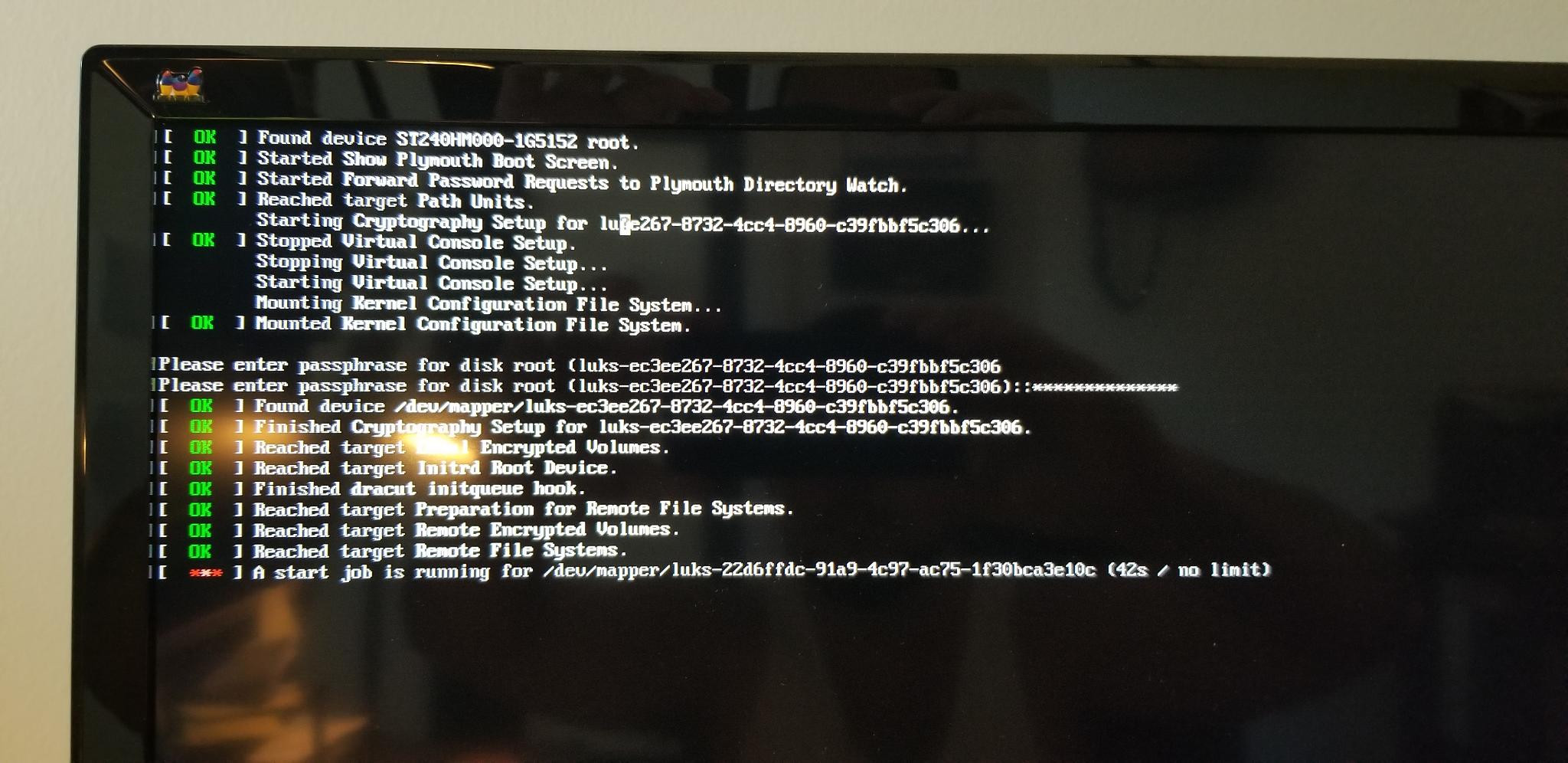
This is what I get after entering my decrypt key 3 times. One time before grub, and twice during the prompt you see above. Not sure why it needs it 3 times.
I am a bit of a noob with this and I know just enough to do some damage which is bad 
I have already attempted a couple things and have had to boot off snapshots which is how I am posting this now.
I don’t want to keep messing around without getting some solid advice that I hope you experienced guys can give. Thanks!!

