
I want to know how to hide this bottom task bar icons automatically. They are capturing spaces in lots of apps.
I want to know how to hide this bottom task bar icons automatically. They are capturing spaces in lots of apps.
I'm not on my machine in this moment, but I think if you right click on the KDE bottom panel (the dock), close to e.g. the right border, select Enter Edit mode there should be an option for auto-hiding.
Edit: now that I think about it, I remember this feature could still be buggy in the latest KDE release.
There should be topics about it in the forum and on the internet. E.g.
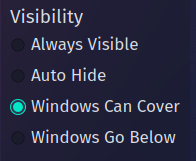
right click on your desktop and choose enter edit mode on the bottom task bar you will see this small icon at the right side of the task bar.

click it. then click on more options and choose the visibility you desire
Thank you so much
This topic was automatically closed 2 days after the last reply. New replies are no longer allowed.