I was playing Metro Exodus Enhanced through Steam last night just fine for a few hours. I got as far as the desert level when I quit and went to bed. After work today, I loaded steam up and pressed play on the game. It started loading, but then suddenly stopped, and I never saw a window open. I tried verifying and reinstalling the game with no luck. My last ditch effort to fix the issue is currently blocked by the fact that I can’t find the config files for the game. I scoured duckduckgo and google to find answers, but when I THOROUGHLY looked through my .local and .config folders I couldn’t find metro. IDK what to do at this point. Any help would be MUCH appreciated.
If you search through the forums, there’s an active thread discussing the location of Steam games.
1 Like
According to the following article the files should be in Documents\Saved Games\Metro Exodus\Saves(on Windows). I don’t have the game myself to check, but lets work with this.
Next is to find the emulation folder for this game. Open the game properties in Steam and go to the updates tab. It will show the App ID at the bottom.
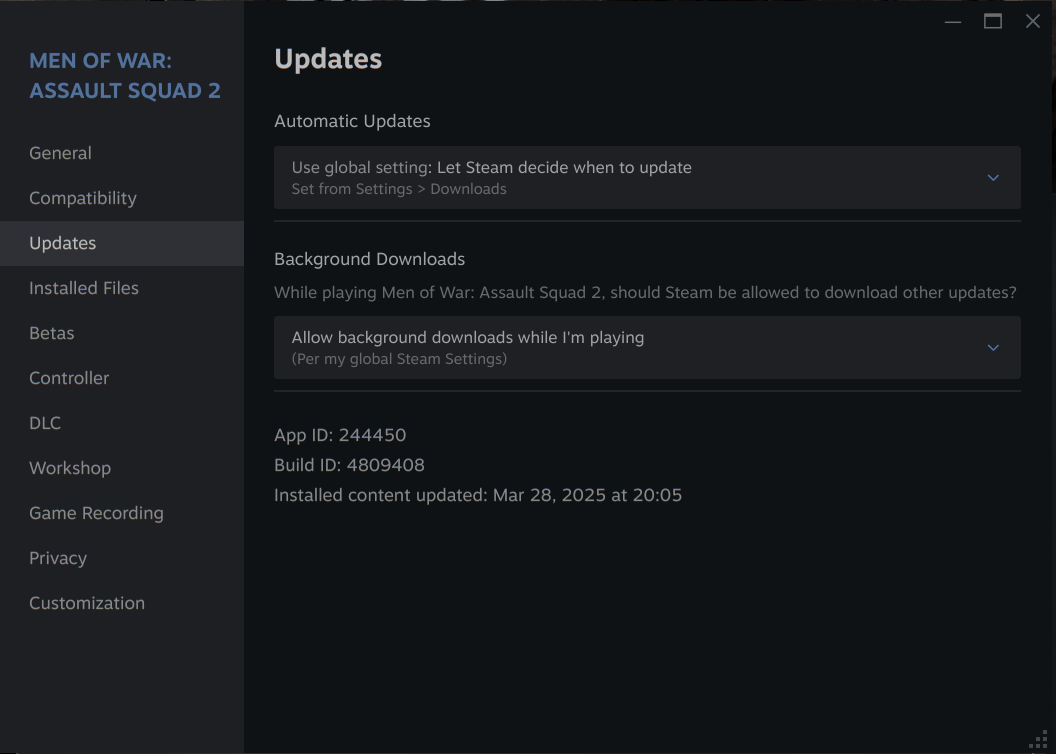
(Attention: Screenshot is from a different game, you need to check yours.)
Now open Dolphin and go to the following path, replace [APPID] with the actual ID.
~/.local/share/Steam/steamapps/compatdata/[APPID]/pfx/drive_c
This will show a pseudo filesystem for Windows that you can navigate through to find whatever location this game stores it’s files in.
TLDR: The saves and game config should be here:
~/.local/share/Steam/steamapps/compatdata/APPIDOFMETROEXODUS/pfx/drive_c/users/steamuser/Saved Games/Metro Exodus/Saves
Hey, thanks for the help. Unfortunately there’s nothing there but a single folder named “0”, and when I follow the path down to where a supposed save game would be it ends in the Saved Games folder. “new users cannot upload images” so unfortunately I can’t show you the issue.
I just realized helldivers used to work too but now it’s doing the same thing and stopping without opening anything. I tried uninstalling both games, then uninstalling steam and removing all related files. It didn’t help. The only change to my system I can remember before this happened was using the disks tool to auto mount my games drive so I don’t have to add the drive to steam every time I reboot. Reverting and reinstalling didn’t work.
I can’t help you any further on Metro because I don’t have it.
I do have Helldivers 2 though and can confirm it runs just fine on Garuda. Make sure you have Proton Experimentalset as default in Steam as it usually works without much tinkering.
If games fail to start the most common issue I see is that they try to use “true” fullscreen (i.e. taking control of the monitor) which does not exist in Linux. If you cannot even start it, you may have to modify the settings file to make the game use borderless mode.
Check out this website to see which games run on Linux and what kind of adjustments may be necessary: https://www.protondb.com/app/553850
1 Like
Can always find that info for virtually any game here:
Heyo, I actually found the issue. For some reason, proton experimental was actually the issue. I set steam to run proton-GE instead for metro and it fixed the issue. Thanks!
1 Like
This topic was automatically closed 2 days after the last reply. New replies are no longer allowed.