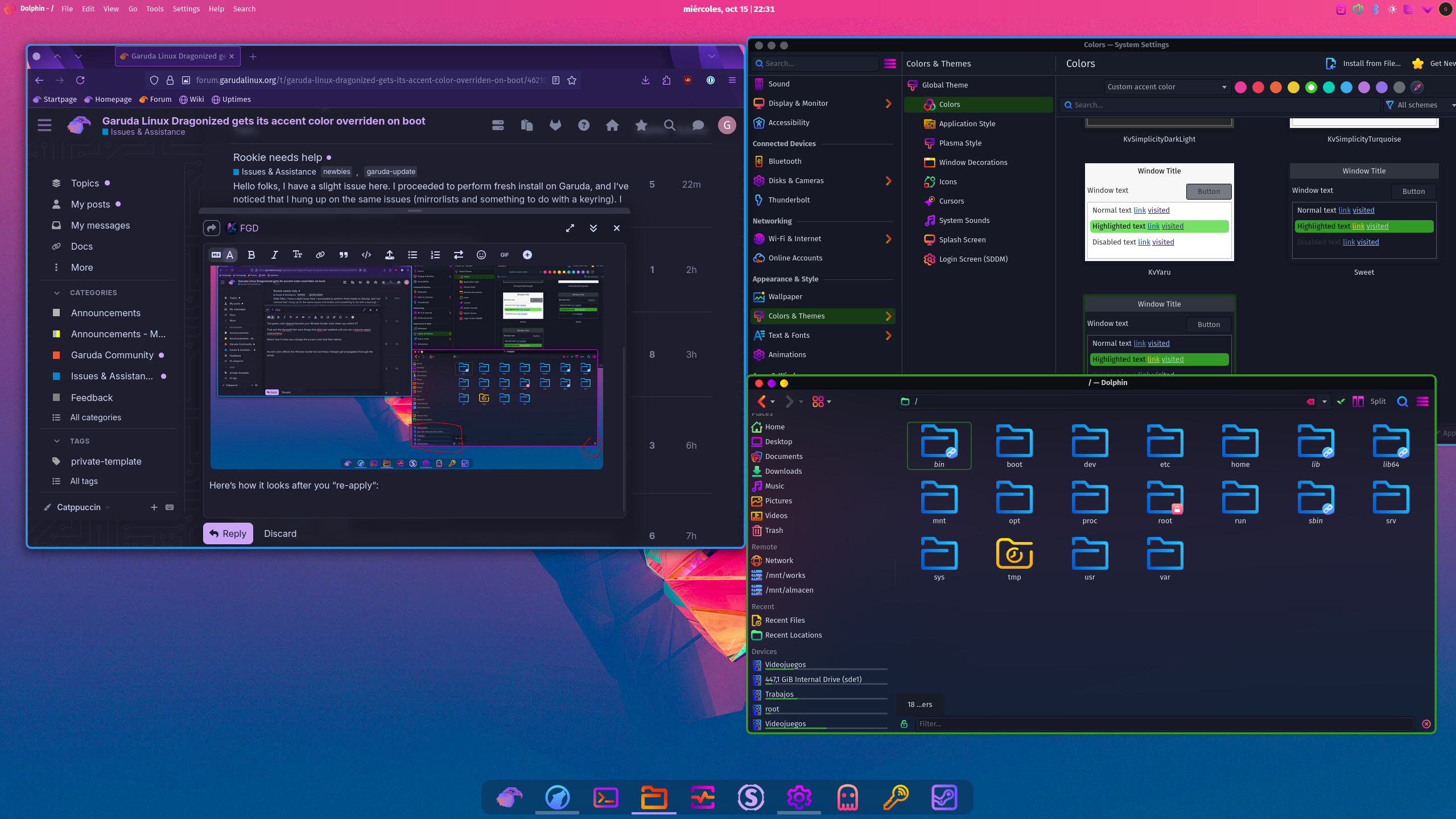
Garuda Linux Dragonized gets its accent color overriden on boot

Hi!

I’ve an issue where the system accent color of a the plasma KDE installation of “Garuda Dragonized Gaming“ gets overridden by the default “Sweet“. Even though I manually set it to use a custom accent color.

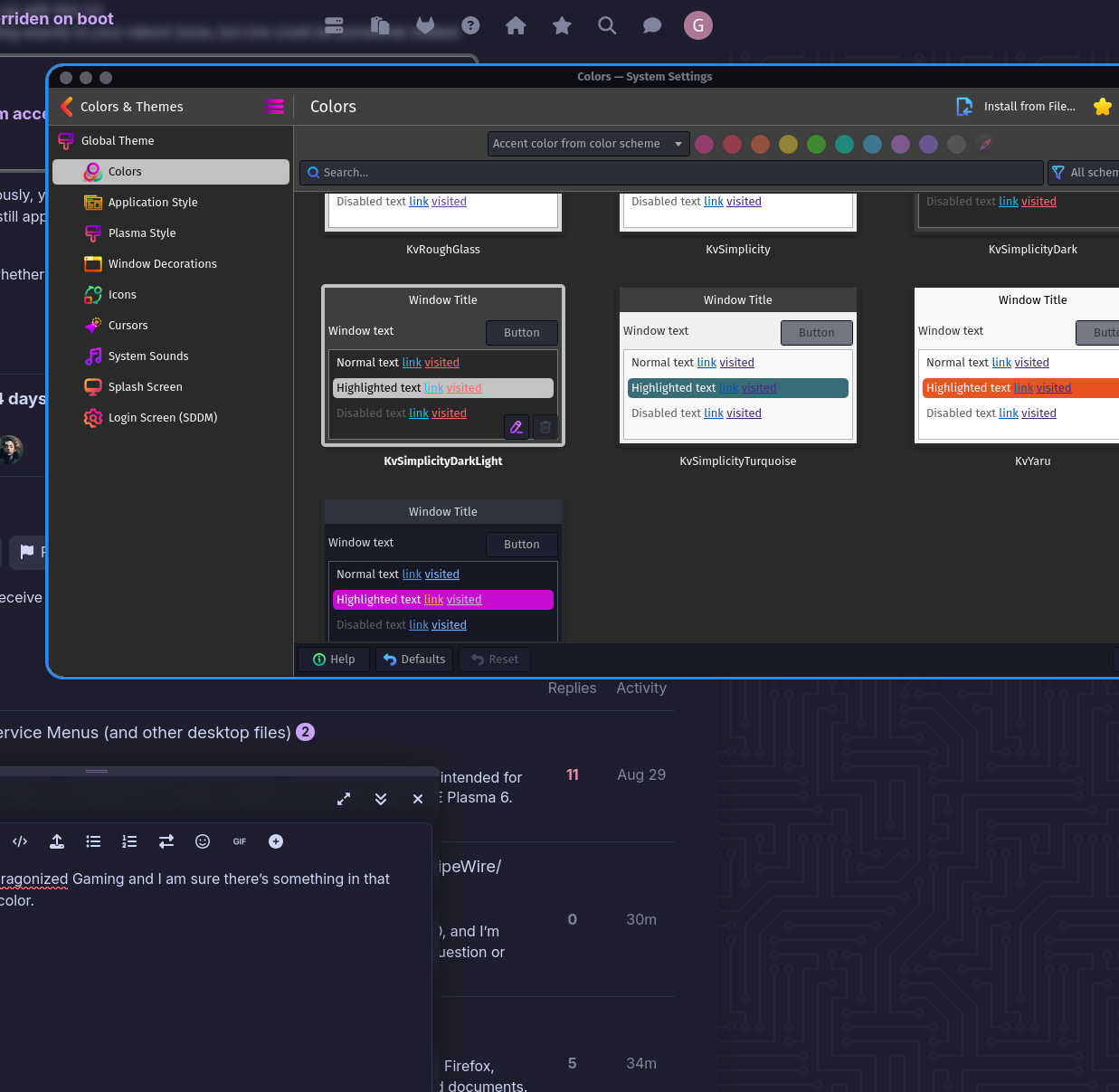
Case in point this screenshot:
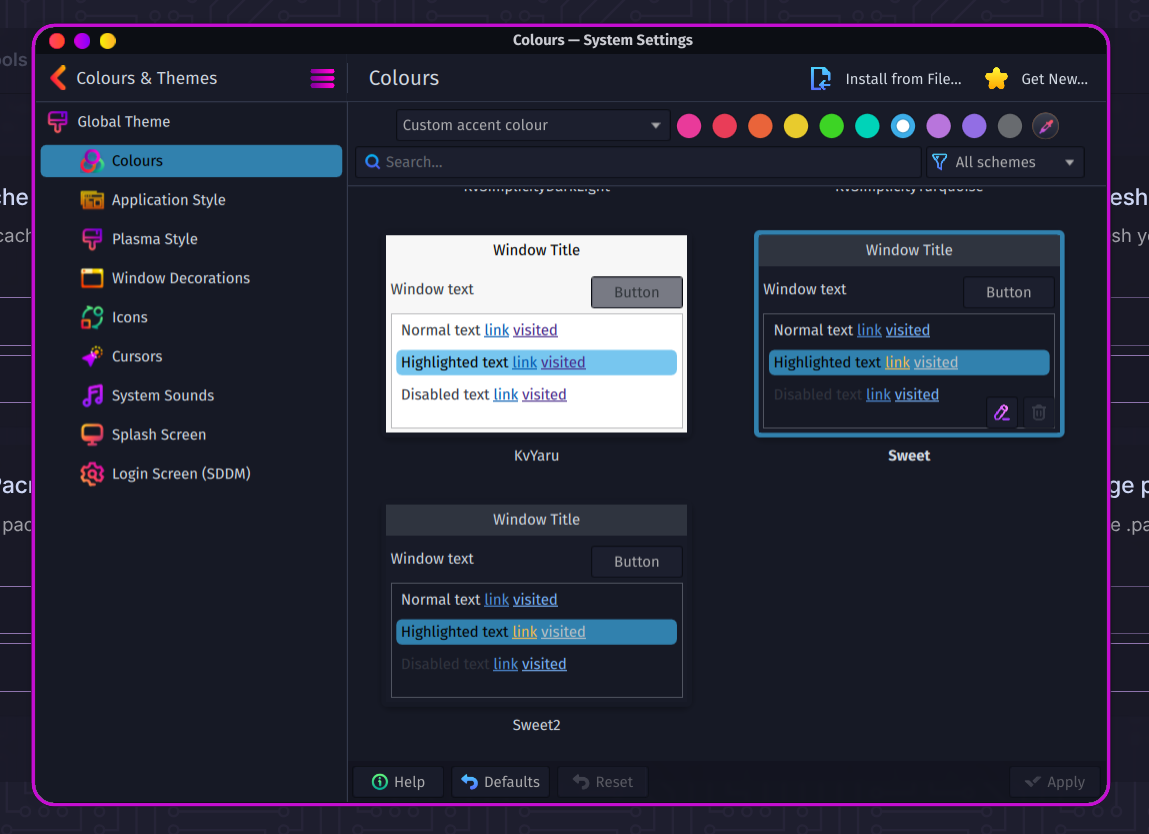
The window border shows the overridden color even though the custom accent color option was chosen (as seen inside said window).

I’ve tried changing the contents of usr/share/plasma/look-and-feel/Dr460nized/contents/defaults to use my custom Sweet2 theme to no avail.

I’ve also tried setting up a systemd launch script that called “plasma-apply-colorscheme“ which seemed to get me the closest to what I needed but apparently I set it up wrong and it wouldn’t let other services start up correctly.

Garuda-inxi down bellow:

System:
  Kernel: 6.16.10-zen1-1-zen arch: x86_64 bits: 64 compiler: gcc v: 15.2.1
    clocksource: tsc avail: hpet,acpi_pm
    parameters: BOOT_IMAGE=/@/boot/vmlinuz-linux-zen
    root=UUID=271e08a0-f9a0-4ddc-9f9e-304c2ae62f2f rw rootflags=subvol=@
    quiet loglevel=3
  Desktop: KDE Plasma v: 6.4.5 tk: Qt v: N/A info: frameworks v: 6.18.0
    wm: kwin_wayland vt: 1 dm: SDDM Distro: Garuda base: Arch Linux
Machine:
  Type: Desktop Mobo: Micro-Star model: PRO B650-S WIFI (MS-7E26) v: 1.0
    serial: <superuser required> uuid: <superuser required> UEFI: American
    Megatrends LLC. v: 1.I0 date: 12/27/2024
CPU:
  Info: model: AMD Ryzen 7 9800X3D bits: 64 type: MT MCP arch: Zen 5 gen: 5
    level: v4 note: check built: 2024+ process: TSMC n4 (4nm) family: 0x1A (26)
    model-id: 0x44 (68) stepping: 0 microcode: 0xB404023
  Topology: cpus: 1x dies: 1 clusters: 1 cores: 8 threads: 16 tpc: 2
    smt: enabled cache: L1: 640 KiB desc: d-8x48 KiB; i-8x32 KiB L2: 8 MiB
    desc: 8x1024 KiB L3: 96 MiB desc: 1x96 MiB
  Speed (MHz): avg: 5229 min/max: 603/5272 boost: enabled scaling:
    driver: amd-pstate-epp governor: performance cores: 1: 5229 2: 5229 3: 5229
    4: 5229 5: 5229 6: 5229 7: 5229 8: 5229 9: 5229 10: 5229 11: 5229 12: 5229
    13: 5229 14: 5229 15: 5229 16: 5229 bogomips: 150399
  Flags-basic: avx avx2 ht lm nx pae sse sse2 sse3 sse4_1 sse4_2 sse4a
    ssse3 svm
  Vulnerabilities: <filter>
Graphics:
  Device-1: Advanced Micro Devices [AMD/ATI] Navi 48 [Radeon RX 9070/9070
    XT/9070 GRE] vendor: ASUSTeK driver: amdgpu v: kernel arch: RDNA-4
    code: Navi-4x process: TSMC n4 (4nm) built: 2025+ pcie: gen: 5
    speed: 32 GT/s lanes: 16 ports: active: DP-2,DP-3
    empty: DP-1,HDMI-A-1,Writeback-1 bus-ID: 03:00.0 chip-ID: 1002:7550
    class-ID: 0300
  Device-2: Advanced Micro Devices [AMD/ATI] Granite Ridge [Radeon Graphics]
    vendor: Micro-Star MSI driver: amdgpu v: kernel arch: RDNA-2 code: Navi-2x
    process: TSMC n7 (7nm) built: 2020-22 pcie: gen: 4 speed: 16 GT/s
    lanes: 16 ports: active: none empty: DP-4, DP-5, DP-6, HDMI-A-2,
    Writeback-2 bus-ID: 11:00.0 chip-ID: 1002:13c0 class-ID: 0300 temp: 40.0 C
  Display: wayland server: X.org v: 1.21.1.18 with: Xwayland v: 24.1.8
    compositor: kwin_wayland driver: X: loaded: amdgpu
    unloaded: modesetting,radeon alternate: fbdev,vesa dri: radeonsi
    gpu: amdgpu d-rect: 5120x1440 display-ID: 0
  Monitor-1: DP-2 pos: primary,left model: DP serial: <filter> built: 2023
    res: mode: 2560x1440 hz: 165 scale: 114% (1.15) to: 2226x1252 dpi: 108
    gamma: 1.2 size: 597x336mm (23.5x13.23") diag: 685mm (27") ratio: 16:9
    modes: max: 2560x1440 min: 640x480
  Monitor-2: DP-3 pos: right model: DP serial: <filter> built: 2023 res:
    mode: 2560x1440 hz: 165 scale: 114% (1.15) to: 2226x1252 dpi: 108 gamma: 1.2
    size: 597x336mm (23.5x13.23") diag: 685mm (27") ratio: 16:9 modes:
    max: 2560x1440 min: 640x480
  API: EGL v: 1.5 hw: drv: amd radeonsi platforms: device: 0 drv: radeonsi
    device: 1 drv: radeonsi device: 2 drv: swrast gbm: drv: radeonsi
    surfaceless: drv: radeonsi wayland: drv: radeonsi x11: drv: radeonsi
  API: OpenGL v: 4.6 compat-v: 4.5 vendor: amd mesa v: 25.2.4-arch1.1
    glx-v: 1.4 direct-render: yes renderer: AMD Radeon RX 9070 XT (radeonsi
    gfx1201 LLVM 20.1.8 DRM 3.64 6.16.10-zen1-1-zen) device-ID: 1002:7550
    memory: 15.62 GiB unified: no display-ID: :1.0
  API: Vulkan v: 1.4.328 layers: 13 device: 0 type: discrete-gpu name: AMD
    Radeon RX 9070 XT (RADV GFX1201) driver: mesa radv v: 25.2.4-arch1.1
    device-ID: 1002:7550 surfaces: N/A device: 1 type: integrated-gpu name: AMD
    Radeon Graphics (RADV RAPHAEL_MENDOCINO) driver: mesa radv
    v: 25.2.4-arch1.1 device-ID: 1002:13c0 surfaces: N/A device: 2 type: cpu
    name: llvmpipe (LLVM 20.1.8 256 bits) driver: mesa llvmpipe
    v: 25.2.4-arch1.1 (LLVM 20.1.8) device-ID: 10005:0000 surfaces: N/A
  Info: Tools: api: clinfo, eglinfo, glxinfo, vulkaninfo
    de: kscreen-console,kscreen-doctor gpu: amd-smi,corectrl wl: wayland-info
    x11: xdpyinfo, xprop, xrandr
Audio:
  Device-1: Advanced Micro Devices [AMD/ATI] Navi 48 HDMI/DP Audio
    driver: snd_hda_intel v: kernel pcie: gen: 5 speed: 32 GT/s lanes: 16
    bus-ID: 03:00.1 chip-ID: 1002:ab40 class-ID: 0403
  Device-2: Advanced Micro Devices [AMD/ATI] Radeon High Definition Audio
    [Rembrandt/Strix] vendor: Micro-Star MSI driver: snd_hda_intel v: kernel
    pcie: gen: 4 speed: 16 GT/s lanes: 16 bus-ID: 11:00.1 chip-ID: 1002:1640
    class-ID: 0403
  Device-3: Advanced Micro Devices [AMD] Family 17h/19h/1ah HD Audio
    vendor: Micro-Star MSI driver: snd_hda_intel v: kernel pcie: gen: 4
    speed: 16 GT/s lanes: 16 bus-ID: 11:00.6 chip-ID: 1022:15e3 class-ID: 0403
  Device-4: Logitech H390 headset with microphone
    driver: hid-generic,snd-usb-audio,usbhid type: USB rev: 1.1 speed: 12 Mb/s
    lanes: 1 mode: 1.1 bus-ID: 1-3:3 chip-ID: 046d:0a8f class-ID: 0300
  API: ALSA v: k6.16.10-zen1-1-zen status: kernel-api with: aoss
    type: oss-emulator tools: alsactl,alsamixer,amixer
  Server-1: PipeWire v: 1.4.8 status: active with: 1: pipewire-pulse
    status: active 2: wireplumber status: active 3: pipewire-alsa type: plugin
    4: pw-jack type: plugin tools: pactl,pw-cat,pw-cli,wpctl
Network:
  Device-1: Realtek RTL8125 2.5GbE vendor: Micro-Star MSI driver: r8169
    v: kernel pcie: gen: 2 speed: 5 GT/s lanes: 1 port: c000 bus-ID: 0d:00.0
    chip-ID: 10ec:8125 class-ID: 0200
  IF: enp13s0 state: up speed: 1000 Mbps duplex: full mac: <filter>
  Device-2: MEDIATEK MT7922 802.11ax PCI Express Wireless Network Adapter
    driver: mt7921e v: kernel pcie: gen: 2 speed: 5 GT/s lanes: 1
    bus-ID: 0e:00.0 chip-ID: 14c3:0616 class-ID: 0280
  IF: wlp14s0 state: down mac: <filter>
  Info: services: NetworkManager, smbd, systemd-timesyncd, wpa_supplicant
Bluetooth:
  Device-1: MediaTek Wireless_Device driver: btusb v: 0.8 type: USB rev: 2.1
    speed: 480 Mb/s lanes: 1 mode: 2.0 bus-ID: 1-7:7 chip-ID: 0e8d:0616
    class-ID: e001 serial: <filter>
  Report: btmgmt ID: hci0 rfk-id: 0 state: up address: <filter> bt-v: 5.3
    lmp-v: 12 status: discoverable: no pairing: no class-ID: 6c0104
Drives:
  Local Storage: total: 1.99 TiB used: 549.34 GiB (26.9%)
  SMART Message: Unable to run smartctl. Root privileges required.
  ID-1: /dev/sda maj-min: 8:0 vendor: KIOXIA model: EXCERIA SATA SSD
    size: 447.13 GiB block-size: physical: 512 B logical: 512 B speed: 6.0 Gb/s
    tech: SSD serial: <filter> fw-rev: 18.1 scheme: GPT
  ID-2: /dev/sdb maj-min: 8:16 vendor: KIOXIA model: EXCERIA SATA SSD
    size: 447.13 GiB block-size: physical: 512 B logical: 512 B speed: 6.0 Gb/s
    tech: SSD serial: <filter> fw-rev: 18.1 scheme: GPT
  ID-3: /dev/sdc maj-min: 8:32 vendor: Samsung model: SSD 870 EVO 500GB
    size: 465.76 GiB block-size: physical: 512 B logical: 512 B speed: 6.0 Gb/s
    tech: SSD serial: <filter> fw-rev: 2B6Q scheme: GPT
  ID-4: /dev/sdd maj-min: 8:48 vendor: Samsung model: SSD 850 EVO 250GB
    size: 232.89 GiB block-size: physical: 512 B logical: 512 B speed: 6.0 Gb/s
    tech: SSD serial: <filter> fw-rev: 1B6Q scheme: GPT
  ID-5: /dev/sde maj-min: 8:64 vendor: KIOXIA model: EXCERIA SATA SSD
    size: 447.13 GiB block-size: physical: 512 B logical: 512 B speed: 6.0 Gb/s
    tech: SSD serial: <filter> fw-rev: 18.1 scheme: MBR
Partition:
  ID-1: / raw-size: 446.84 GiB size: 446.84 GiB (100.00%)
    used: 193.19 GiB (43.2%) fs: btrfs dev: /dev/sda2 maj-min: 8:2
  ID-2: /boot/efi raw-size: 300 MiB size: 299.4 MiB (99.80%)
    used: 632 KiB (0.2%) fs: vfat dev: /dev/sda1 maj-min: 8:1
  ID-3: /home raw-size: 446.84 GiB size: 446.84 GiB (100.00%)
    used: 193.19 GiB (43.2%) fs: btrfs dev: /dev/sda2 maj-min: 8:2
  ID-4: /var/log raw-size: 446.84 GiB size: 446.84 GiB (100.00%)
    used: 193.19 GiB (43.2%) fs: btrfs dev: /dev/sda2 maj-min: 8:2
  ID-5: /var/tmp raw-size: 446.84 GiB size: 446.84 GiB (100.00%)
    used: 193.19 GiB (43.2%) fs: btrfs dev: /dev/sda2 maj-min: 8:2
Swap:
  Kernel: swappiness: 133 (default 60) cache-pressure: 100 (default) zswap: no
  ID-1: swap-1 type: zram size: 30.45 GiB used: 0 KiB (0.0%) priority: 100
    comp: zstd avail: lzo-rle,lzo,lz4,lz4hc,deflate,842 dev: /dev/zram0
Sensors:
  System Temperatures: cpu: 44.2 C mobo: 36.0 C
  Fan Speeds (rpm): N/A
  GPU: device: amdgpu temp: 40.0 C device: amdgpu temp: 49.0 C mem: 68.0 C
    fan: 215 watts: 85.00
Info:
  Memory: total: 32 GiB note: est. available: 30.45 GiB used: 6.14 GiB (20.2%)
  Processes: 576 Power: uptime: 34m states: freeze,mem,disk suspend: deep
    avail: s2idle wakeups: 0 hibernate: platform avail: shutdown, reboot,
    suspend, test_resume image: 12.15 GiB services: org_kde_powerdevil,
    power-profiles-daemon, upowerd Init: systemd v: 258 default: graphical
    tool: systemctl
  Packages: pm: pacman pkgs: 2019 libs: 581 tools: octopi,paru Compilers:
    clang: 20.1.8 gcc: 15.2.1 Shell: Bash v: 5.3.3 default: fish v: 4.1.2
    running-in: konsole inxi: 3.3.39
Garuda (2.11.1-1):
  System install date:     2025-07-19
  Garuda release:          250308
  Last full system update: 2025-10-11 ↻
  Is partially upgraded:   No
  Relevant software:       snapper NetworkManager dracut garuda-hardware-profile-standard garuda-hardware-profile-standard-x11
  Windows dual boot:       No/Undetected
  Failed units:            
--- System Health Check Report ---
23/24 checks run in 0.48 seconds ⌛
Powered by garuda-health 🦅

--- INFO ---
 - A reboot is pending (update applied since last reboot)

✅ System health check passed. No issues found.
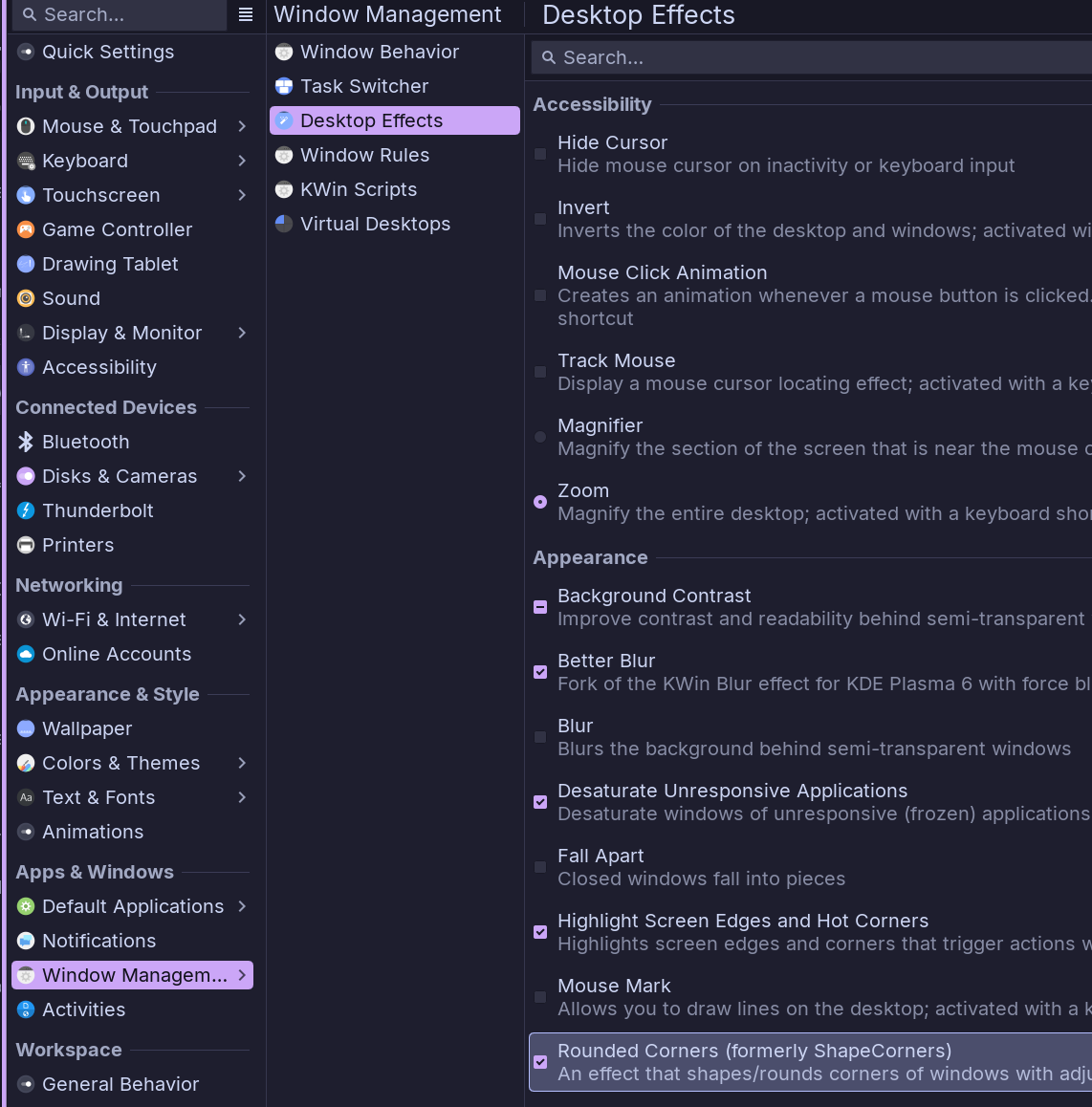
Disable Rounded-Corners.

2 Likes

If only the border color is the issue, yes that is controlled by the Rounded Corners plugin. You can adjust it to match your theme.

1 Like

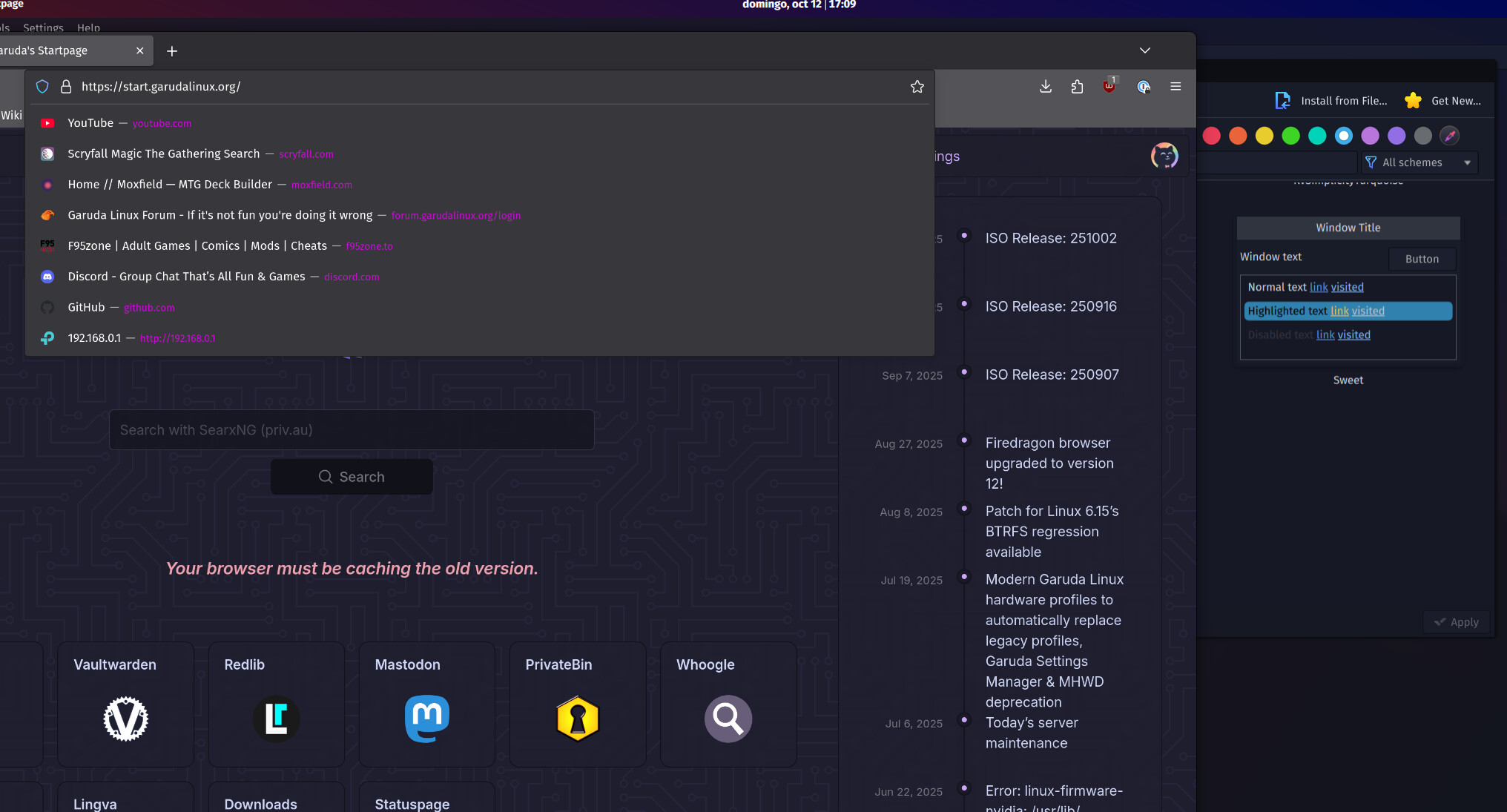
Sadly it’s not the actual solution, it was just the easiest way to showcase the accent color being changed. As you can see in this screenshot. The text ought to be blue, not the Sweet purple.

Suggested text color in Firefox is way different than Window Borders.

So your issue is that the suggested text color in Firefox is not blue but it was blue up to recently until you performed a system update and then the color changed to purple?

As far as I am aware, Accent Colors does not affect text color. Unless Plasma added that feature recently, but I can’t find anywhere that it does that.
I think this purple text color is driven by the Firefox theme you have, or a userChrome.css, or directly the Sweet theme (which we did not modify, we use the one from Sweet, so Dr460nized color scheme is not overwritten by Sweet, as you may think, since there is no Dr460nized color scheme).

On the other end, your Firefox window seems to be non-customized, as plain Firefox.

You can try changing Color Scheme in System Settings and see if the text changes. If it does then it is controlled by the Color Scheme as text color, not Highlighted Text color, as we see on the right hand side of your screenshot.

Going back to your original screenshot with blue borders in the Colors section, that is not how Dr460nized comes.
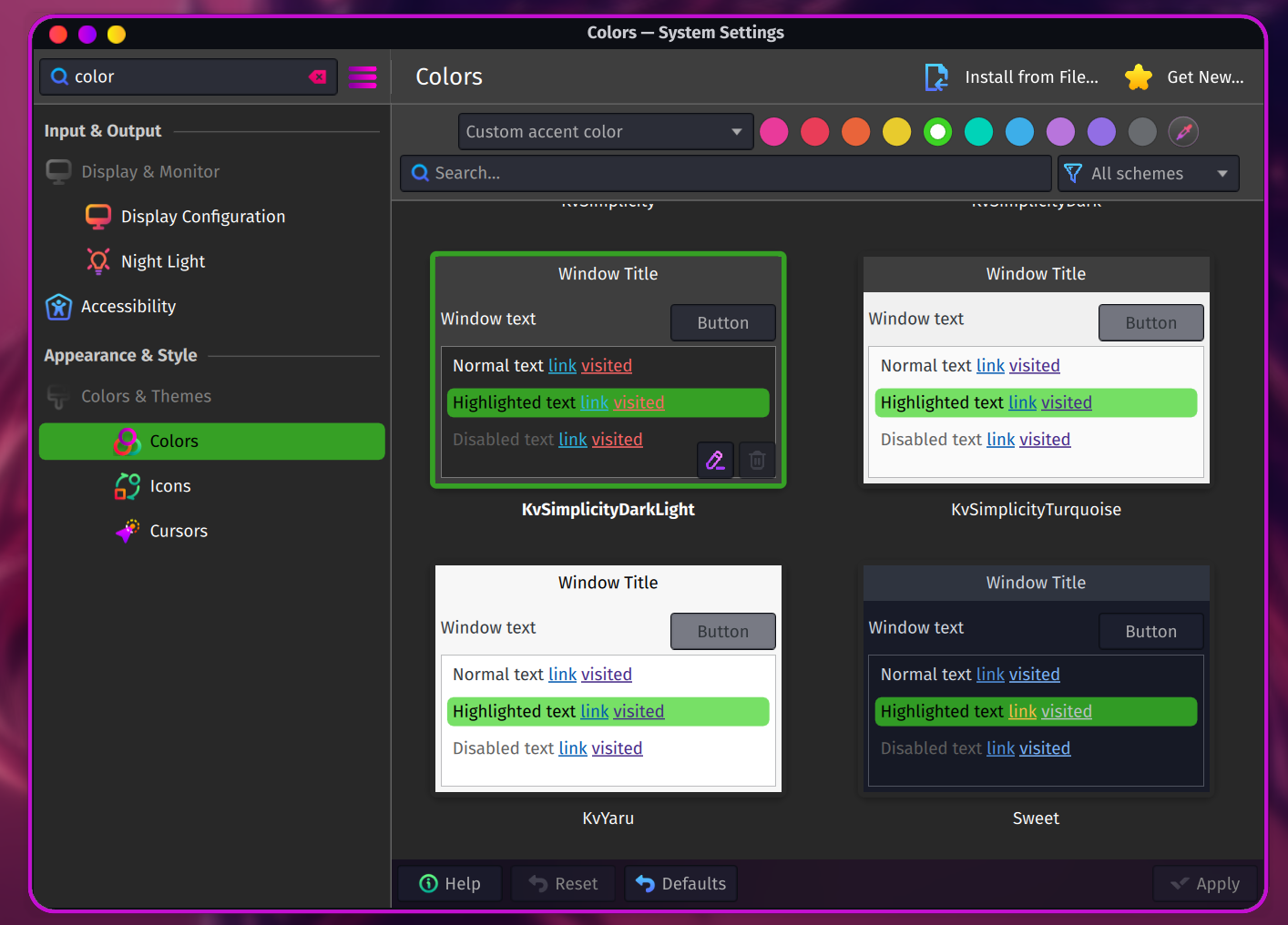
It should look like this when non-modified:

So I suspect something is off in your Color Scheme.
Instead of using Custom accent color, try to go back to Accent color from color scheme and see what that does.

Also plz post the output of

pacman -Qi plasma5-themes-sweet-full-git | grep Version
4 Likes

Here’s a video of me using the pc right after boot to showcase the accent color problem:

https://imgur.com/a/h7jsmEs

The command you asked me to run provides this:

Version : r431.07b6dc5-1

I’m using “Librewolf“ a privacy-focused fork of firefox and I really havent done much editing of it here. The other program showcased are “Thunderbird“ and Dolphin

Your video looks fine to me.

You start with purple accent color, we see purple in the search bar as well as highlight color in various apps.
Then you change for blue accent and we see blue in apps, including the text in the search bar of Librewolf.

Then what is the issue?

This is the correct version.
Keep in mind Sweet theme is NOT ported yet to Plasma 6. We did not see any obvious issues running the Sweet-Plasms5 version but it is not impossible some edge cases or precise details might not work properly.

3 Likes

It you look at the “Custom Accent colour” bar it was set to blue I have to re-set it for it to work.

Like, mind trying to reproduce it? Change the accent color to another one using either the custom option or make your own colorscheme set it and then reboot.

Ok now I get it.

I tested this and I cannot reproduce. I set it to Blue, rebooted and the blue accent is still on.

I am not surprised, as Dr460nized theme does not override your custom theme. It is applied once, during installation from ISO or when you install the package garuda-dr460nized and apply the Global Theme.

Overwriting your custom theme would not be respectful to our thinking, at Garuda we encourage people in customizing their own theme, as showcased here, for example.

There is probably something going on on your installation that resets the accent colors on reboot OR you hit a Plasma bug.
I searched and came up with this list.
I could not find anything exactly to your reboot issue, but one could be somewhat related:

As I mentioned previously, you should try to apply a different Color Scheme, reboot, see if the Color Scheme is still applied and then change the Accent Color, reboot and see if it’s still applied.

This would confirm whether it happens across all Color Schemes and not just Sweet.

3 Likes

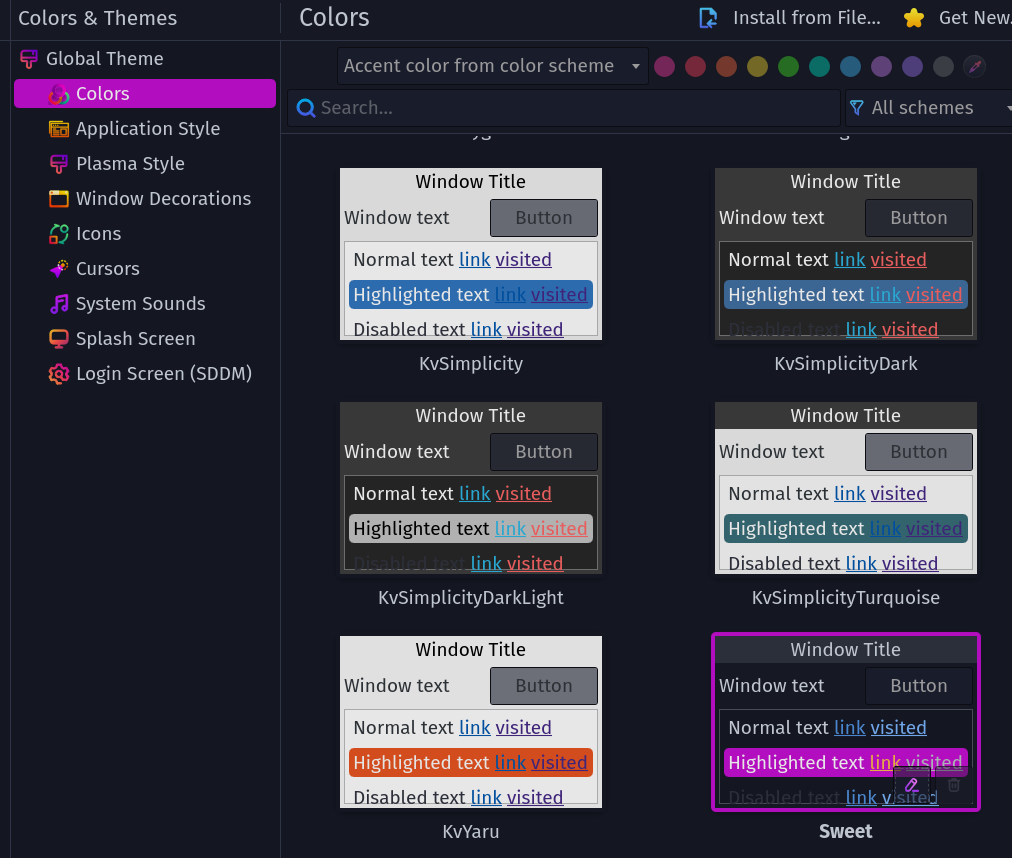
Hi! I did a full reinstall of Garuda Dragonized Gaming and I am sure there’s something in that release that overrides the accent color.

In here the accent color should be white when the border showcases it being the sweet one.

new garuda-inxi:

System:
Kernel: 6.17.2-zen1-1-zen arch: x86_64 bits: 64 compiler: gcc v: 15.2.1
clocksource: tsc avail: hpet,acpi_pm
parameters: BOOT_IMAGE=/@/boot/vmlinuz-linux-zen
root=UUID=7d6c320e-2fcb-4048-9111-b0b57a68d8fb rw rootflags=subvol=@
quiet loglevel=3
Desktop: KDE Plasma v: 6.4.5 tk: Qt v: N/A info: frameworks v: 6.19.0
wm: kwin_wayland vt: 1 dm: SDDM Distro: Garuda base: Arch Linux
Machine:
Type: Desktop Mobo: Micro-Star model: PRO B650-S WIFI (MS-7E26) v: 1.0
serial: <superuser required> uuid: <superuser required> UEFI: American
Megatrends LLC. v: 1.I0 date: 12/27/2024
CPU:
Info: model: AMD Ryzen 7 9800X3D bits: 64 type: MT MCP arch: Zen 5 gen: 5
level: v4 note: check built: 2024+ process: TSMC n4 (4nm) family: 0x1A (26)
model-id: 0x44 (68) stepping: 0 microcode: 0xB404023
Topology: cpus: 1x dies: 1 clusters: 1 cores: 8 threads: 16 tpc: 2
smt: enabled cache: L1: 640 KiB desc: d-8x48 KiB; i-8x32 KiB L2: 8 MiB
desc: 8x1024 KiB L3: 96 MiB desc: 1x96 MiB
Speed (MHz): avg: 2985 min/max: 603/5272 boost: enabled scaling:
driver: amd-pstate-epp governor: powersave cores: 1: 2985 2: 2985 3: 2985
4: 2985 5: 2985 6: 2985 7: 2985 8: 2985 9: 2985 10: 2985 11: 2985 12: 2985
13: 2985 14: 2985 15: 2985 16: 2985 bogomips: 150399
Flags-basic: avx avx2 ht lm nx pae sse sse2 sse3 sse4_1 sse4_2 sse4a
ssse3 svm
Vulnerabilities: <filter>
Graphics:
Device-1: Advanced Micro Devices [AMD/ATI] Navi 48 [Radeon RX 9070/9070
XT/9070 GRE] vendor: ASUSTeK driver: amdgpu v: kernel arch: RDNA-4
code: Navi-4x process: TSMC n4 (4nm) built: 2025+ pcie: gen: 5
speed: 32 GT/s lanes: 16 ports: active: DP-2,DP-3 off: HDMI-A-1
empty: DP-1,Writeback-1 bus-ID: 03:00.0 chip-ID: 1002:7550 class-ID: 0300
Device-2: Advanced Micro Devices [AMD/ATI] Granite Ridge [Radeon Graphics]
vendor: Micro-Star MSI driver: amdgpu v: kernel arch: RDNA-2 code: Navi-2x
process: TSMC n7 (7nm) built: 2020-22 pcie: gen: 4 speed: 16 GT/s
lanes: 16 ports: active: none empty: DP-4, DP-5, DP-6, HDMI-A-2,
Writeback-2 bus-ID: 11:00.0 chip-ID: 1002:13c0 class-ID: 0300 temp: 39.0 C
Display: wayland server: X.org v: 1.21.1.18 with: Xwayland v: 24.1.8
compositor: kwin_wayland driver: X: loaded: modesetting
alternate: fbdev,vesa dri: radeonsi gpu: amdgpu display-ID: 0
Monitor-1: DP-2 model: DP serial: <filter> built: 2023 res:
mode: 2560x1440 hz: 165 scale: 100% (1) dpi: 108 gamma: 1.2
size: 597x336mm (23.5x13.23") diag: 685mm (27") ratio: 16:9 modes:
max: 2560x1440 min: 640x480
Monitor-2: DP-3 model: DP serial: <filter> built: 2023 res:
mode: 2560x1440 hz: 165 scale: 100% (1) dpi: 108 gamma: 1.2
size: 597x336mm (23.5x13.23") diag: 685mm (27") ratio: 16:9 modes:
max: 2560x1440 min: 640x480
Monitor-3: HDMI-A-1 model: UHD TV serial: <filter> built: 2018
res: 3840x2160 dpi: 81 gamma: 1.2 size: 160x90mm (6.3x3.54")
diag: 1388mm (54.6") ratio: 16:9 modes: max: 3840x2160 min: 640x480
API: EGL v: 1.5 hw: drv: amd radeonsi platforms: device: 0 drv: radeonsi
device: 1 drv: radeonsi device: 2 drv: swrast gbm: drv: radeonsi
surfaceless: drv: radeonsi wayland: drv: radeonsi x11: drv: radeonsi
API: OpenGL v: 4.6 compat-v: 4.5 vendor: amd mesa v: 25.2.4-arch1.2
glx-v: 1.4 direct-render: yes renderer: AMD Radeon RX 9070 XT (radeonsi
gfx1201 LLVM 20.1.8 DRM 3.64 6.17.2-zen1-1-zen) device-ID: 1002:7550
memory: 15.62 GiB unified: no display-ID: :1.0
API: Vulkan v: 1.4.328 layers: 9 device: 0 type: discrete-gpu name: AMD
Radeon RX 9070 XT (RADV GFX1201) driver: mesa radv v: 25.2.4-arch1.2
device-ID: 1002:7550 surfaces: N/A device: 1 type: integrated-gpu name: AMD
Radeon Graphics (RADV RAPHAEL_MENDOCINO) driver: mesa radv
v: 25.2.4-arch1.2 device-ID: 1002:13c0 surfaces: N/A device: 2 type: cpu
name: llvmpipe (LLVM 20.1.8 256 bits) driver: mesa llvmpipe
v: 25.2.4-arch1.2 (LLVM 20.1.8) device-ID: 10005:0000 surfaces: N/A
Info: Tools: api: clinfo, eglinfo, glxinfo, vulkaninfo
de: kscreen-console,kscreen-doctor gpu: corectrl wl: wayland-info
x11: xdpyinfo, xprop, xrandr
Audio:
Device-1: Advanced Micro Devices [AMD/ATI] Navi 48 HDMI/DP Audio
driver: snd_hda_intel v: kernel pcie: gen: 5 speed: 32 GT/s lanes: 16
bus-ID: 03:00.1 chip-ID: 1002:ab40 class-ID: 0403
Device-2: Advanced Micro Devices [AMD/ATI] Radeon High Definition Audio
[Rembrandt/Strix] vendor: Micro-Star MSI driver: snd_hda_intel v: kernel
pcie: gen: 4 speed: 16 GT/s lanes: 16 bus-ID: 11:00.1 chip-ID: 1002:1640
class-ID: 0403
Device-3: Advanced Micro Devices [AMD] Family 17h/19h/1ah HD Audio
vendor: Micro-Star MSI driver: snd_hda_intel v: kernel pcie: gen: 4
speed: 16 GT/s lanes: 16 bus-ID: 11:00.6 chip-ID: 1022:15e3 class-ID: 0403
API: ALSA v: k6.17.2-zen1-1-zen status: kernel-api with: aoss
type: oss-emulator tools: N/A
Server-1: PipeWire v: 1.4.9 status: active with: 1: pipewire-pulse
status: active 2: wireplumber status: active 3: pipewire-alsa type: plugin
4: pw-jack type: plugin tools: pactl,pw-cat,pw-cli,wpctl
Network:
Device-1: Realtek RTL8125 2.5GbE vendor: Micro-Star MSI driver: r8169
v: kernel pcie: gen: 2 speed: 5 GT/s lanes: 1 port: c000 bus-ID: 0d:00.0
chip-ID: 10ec:8125 class-ID: 0200
IF: enp13s0 state: up speed: 1000 Mbps duplex: full mac: <filter>
Device-2: MEDIATEK MT7922 802.11ax PCI Express Wireless Network Adapter
driver: mt7921e v: kernel pcie: gen: 2 speed: 5 GT/s lanes: 1
bus-ID: 0e:00.0 chip-ID: 14c3:0616 class-ID: 0280
IF: wlp14s0 state: down mac: <filter>
Info: services: NetworkManager, smbd, systemd-timesyncd, wpa_supplicant
Bluetooth:
Device-1: MediaTek Wireless_Device driver: btusb v: 0.8 type: USB rev: 2.1
speed: 480 Mb/s lanes: 1 mode: 2.0 bus-ID: 1-7:6 chip-ID: 0e8d:0616
class-ID: e001 serial: <filter>
Report: btmgmt ID: hci0 rfk-id: 0 state: up address: <filter> bt-v: 5.3
lmp-v: 12 status: discoverable: no pairing: no class-ID: 6c0104
Drives:
Local Storage: total: 1.99 TiB used: 18.88 GiB (0.9%)
SMART Message: Unable to run smartctl. Root privileges required.
ID-1: /dev/sda maj-min: 8:0 vendor: KIOXIA model: EXCERIA SATA SSD
size: 447.13 GiB block-size: physical: 512 B logical: 512 B speed: 6.0 Gb/s
tech: SSD serial: <filter> fw-rev: 18.1 scheme: GPT
ID-2: /dev/sdb maj-min: 8:16 vendor: KIOXIA model: EXCERIA SATA SSD
size: 447.13 GiB block-size: physical: 512 B logical: 512 B speed: 6.0 Gb/s
tech: SSD serial: <filter> fw-rev: 18.1 scheme: GPT
ID-3: /dev/sdc maj-min: 8:32 vendor: Samsung model: SSD 870 EVO 500GB
size: 465.76 GiB block-size: physical: 512 B logical: 512 B speed: 6.0 Gb/s
tech: SSD serial: <filter> fw-rev: 2B6Q scheme: GPT
ID-4: /dev/sdd maj-min: 8:48 vendor: Samsung model: SSD 850 EVO 250GB
size: 232.89 GiB block-size: physical: 512 B logical: 512 B speed: 6.0 Gb/s
tech: SSD serial: <filter> fw-rev: 1B6Q scheme: GPT
ID-5: /dev/sde maj-min: 8:64 vendor: KIOXIA model: EXCERIA SATA SSD
size: 447.13 GiB block-size: physical: 512 B logical: 512 B speed: 6.0 Gb/s
tech: SSD serial: <filter> fw-rev: 18.1 scheme: MBR
Partition:
ID-1: / raw-size: 446.84 GiB size: 446.84 GiB (100.00%)
used: 18.88 GiB (4.2%) fs: btrfs dev: /dev/sda2 maj-min: 8:2
ID-2: /boot/efi raw-size: 300 MiB size: 299.4 MiB (99.80%)
used: 632 KiB (0.2%) fs: vfat dev: /dev/sda1 maj-min: 8:1
ID-3: /home raw-size: 446.84 GiB size: 446.84 GiB (100.00%)
used: 18.88 GiB (4.2%) fs: btrfs dev: /dev/sda2 maj-min: 8:2
ID-4: /var/log raw-size: 446.84 GiB size: 446.84 GiB (100.00%)
used: 18.88 GiB (4.2%) fs: btrfs dev: /dev/sda2 maj-min: 8:2
ID-5: /var/tmp raw-size: 446.84 GiB size: 446.84 GiB (100.00%)
used: 18.88 GiB (4.2%) fs: btrfs dev: /dev/sda2 maj-min: 8:2
Swap:
Kernel: swappiness: 133 (default 60) cache-pressure: 100 (default) zswap: no
ID-1: swap-1 type: zram size: 30.45 GiB used: 0 KiB (0.0%) priority: 100
comp: zstd avail: lzo-rle,lzo,lz4,lz4hc,deflate,842 dev: /dev/zram0
Sensors:
System Temperatures: cpu: 43.0 C mobo: 33.0 C
Fan Speeds (rpm): N/A
GPU: device: amdgpu temp: 39.0 C device: amdgpu temp: 34.0 C mem: 55.0 C
fan: 0 watts: 26.00
Info:
Memory: total: 32 GiB note: est. available: 30.45 GiB used: 4.15 GiB (13.6%)
Processes: 429 Power: uptime: 8m states: freeze,mem,disk suspend: deep
avail: s2idle wakeups: 0 hibernate: platform avail: shutdown, reboot,
suspend, test_resume image: 12.15 GiB services: org_kde_powerdevil,
power-profiles-daemon, upowerd Init: systemd v: 258 default: graphical
tool: systemctl
Packages: pm: pacman pkgs: 1909 libs: 558 tools: octopi,paru Compilers:
clang: 20.1.8 gcc: 15.2.1 Shell: Bash v: 5.3.3 default: fish v: 4.1.2
running-in: konsole inxi: 3.3.39
Garuda (2.11.1-1):
System install date:     2025-10-14
Garuda release:          251002
Last full system update: 2025-10-14 ↻
Is partially upgraded:   No
Relevant software:       snapper NetworkManager dracut garuda-hardware-profile-standard
Windows dual boot:       No/Undetected
Failed units:
--- System Health Check Report ---
23/24 checks run in 0.63 seconds ⌛
Powered by garuda-health 🦅

--- INFO ---
- A reboot is pending (update applied since last reboot)

✅ System health check passed. No issues found.
I’ll give the non-gaming distro a whirl

Which ISO (exact date from the filename) did you use to reinstall?

1 Like

This is looking as expected to me. Again, the border color is not controlled by the theme. The accent color is white and the icons are still set to Beautyline.

1 Like

@zoeruda is correct. The behavior of the Window Borders has been explained, there is no issue there.

Are you still having the accent colors (the highlighted menu colors in Plasma and text in Librewolf search bar) reset upon reboot?

1 Like

Which ISO (exact date from the filename) did you use to reinstall?

Direct download from Garuda Linux yesterday garuda-dr460nized-linux-zen-251002

Issue stays after a full reinstall on both garuda-dr460nized.

Tho, I have found a workaround. Running the following script right after launch on the autorun settings sets the colorscheme and syncs both the border colors and librewolfs text.

#! /bin/bash

plasma-apply-colorscheme Sweet
plasma-apply-colorscheme SweetCustom

What issue exactly?

  • I downloaded same ISO
  • Installed it
  • Did a full upgrade
  • Rebooted
  • Changed the Color Scheme to something else than Sweet (which is what you seem to be doing with plasma-apply-colorscheme SweetCustom)
  • Changed the Accent Color to GREEN
  • Rebooted

No issue at all.
Green Accent Color and KvSimplicityDarkLight Color Scheme are still applied.

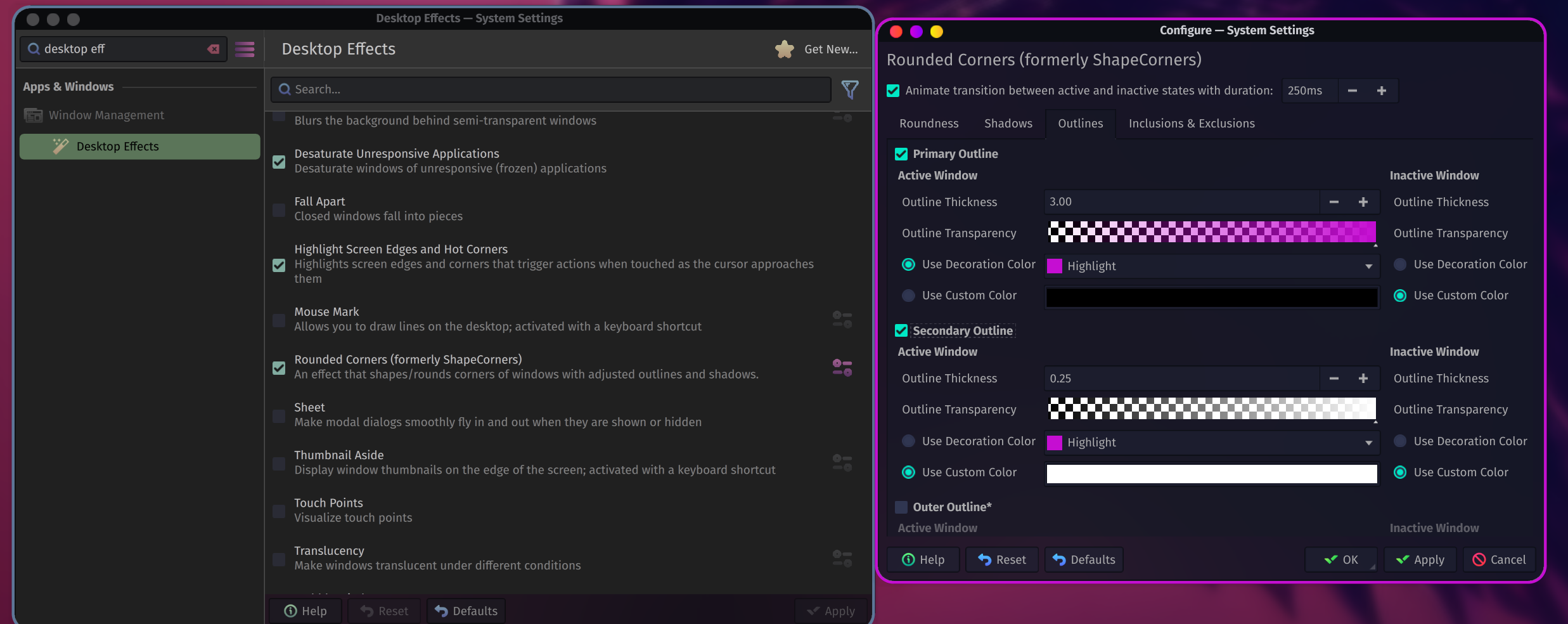
If you want to change the WINDOW BORDER colors, then go here:

3 Likes

The green color doesnt become your Window border color when you switch it?

That and the librewolf text were things that didnt get updated until you ran a plasma-apply-colorscheme.

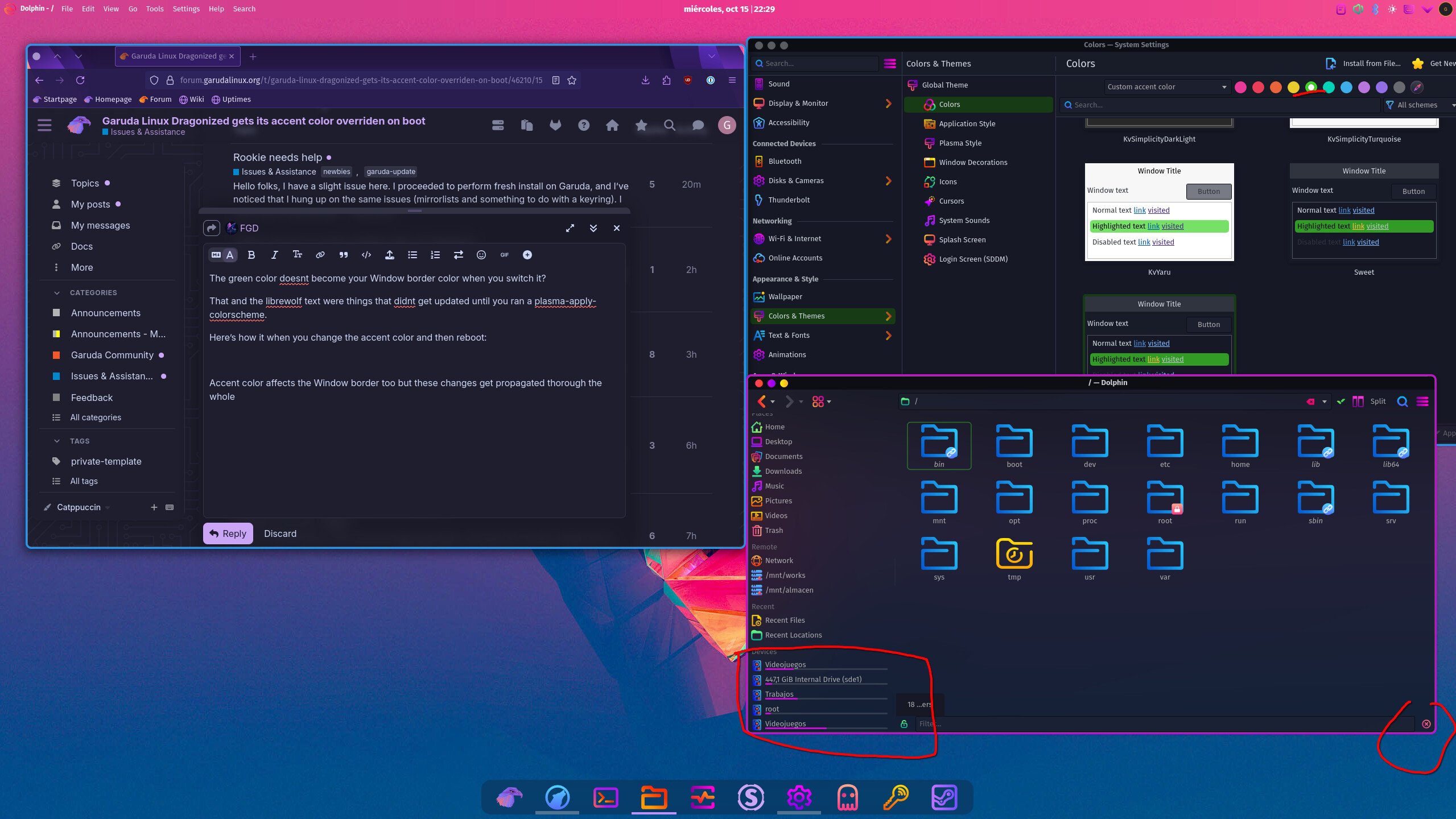
Here’s how it displays when you have a changed accent color and then reboot:

Here’s how it looks after you “re-apply“:

Something is not feeding the changed accent color on boot correctly, wether it’s the border color, the disk drive fill indicators, librewolf text, etc. There’s a discrepancy between re-applied custom accent color and custom accent color on reboot.

No, because the Window Borders are not controlled by the Color Scheme but by a Desktop Effect.

However I did a 2nd reboot just now and I see some bad interaction between Color Scheme/Accent Colors and Dolphin and Window Borders. The borders were changing color to match the Accent Color (OMG!!), just like you mentioned.

It’s interesting I had to reboot TWICE and force a Color Scheme a couple times with an Accent Color. It’s erratic.

Now I can anwser one of your question: If the borders do change color to match your Accent Color, that color is NOT applied in the Rounded-Corners desktop effect (you can look at it yourself before you reboot), therefore when you reboot it reverts to whatever color is in Rounded-Corners.

So that’s one explanation.

Now my Dolphin is just not changing color at all so I can’t test that one. Oh it just did now after forcing a few times, but only for the filesystem disks bar, not the Places icons on the left. See how erratic…

What’s at play here are 4 things:
1- Kvantum Manager
2- Plasma Accent Color feature
3- Rounded-Corners desktop effect for Window Borders
4- Sweet Plasma 5 theme (not Plasma 6 version).

Some are probably fighting with each other.

I will see if the same problem happens in Mokka ISO, which does not use Sweet at all.
After that it’s a matter of uninstalling those 1 by 1, of course #2 cannot be uninstalled.

4 Likes

I think if the border color is set to “highlight”, rather than a custom color, then it does change with the Plasma theme’s accent color.

The Dolphin thing is due to Kvantum engine as @FGD mentioned. You might try changing the “Application Style” to Breeze and see if that suits you better. I pretty much always do that when I steer away from the Sweet color scheme.

Of course, apps designed in Kvantum will still inherit the Dr460nized theme by default, so there’s another decision to be made there. Oh and there’s also the GTK theme, which GTK apps may or may not adhere to…

Theming ain’t easy on Linux :sweat_smile:

4 Likes

Based on my tests, that’s the way to go for something reliable.

If you change to Breeze, it will also keep the Window Border color to the Accent Color you select, due to the fact Rounded-Corners uses “highlight” color of the theme and not a custom color, true. I’m impressed. So with Application Style = Breeze, you can control the border color 2 ways: with the Accent Color of the Color Scheme, or with the Rounded-Corners desktop effect.

That being said, the package causing the interactions here is Kvantum. Simply getting out of it will fix all accent colors issues.
Kvantum is quite powerful and goes deep in the application style, I haven’t checked their github yet but they would have to better integrate the package, if that is possible.

You forgot Plasma Styles. :smiley: Cuz even by changing the Application Style to Breeze, you still get this on the Plasma Style:
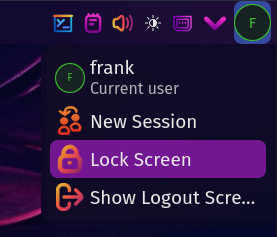
The purple color did not change to green, my test accent color.
You have to change the Plasma Style as well or edit it and play with the elements.

To summarize, yes our themes have weird interactions specifically with Plasma Accent Color feature. The behavior varies a bit from one person to another but the overall theme does not follow the Accent Color everywhere.
This is due to the use of Kvantum.
Since other Kvantum themes react the same as Dr460nized, I believe the people at Kvantum should improve this, without even knowing how feasible it is.

As for Dr460nized and Mokka, they are provided and featured as heavily customized themes. It is normal to be more complex and to have more actions to perform when someone wants to change something, depending on what it is.

Plasma is probably the hardest and most complex DE to theme.
I will probably document this finding of yours, @Gonzako , on the wiki, so it will be explained somewhere.

7 Likes

This topic was automatically closed 2 days after the last reply. New replies are no longer allowed.