Drives/partition connecting/loading slowly with adapter on laptop

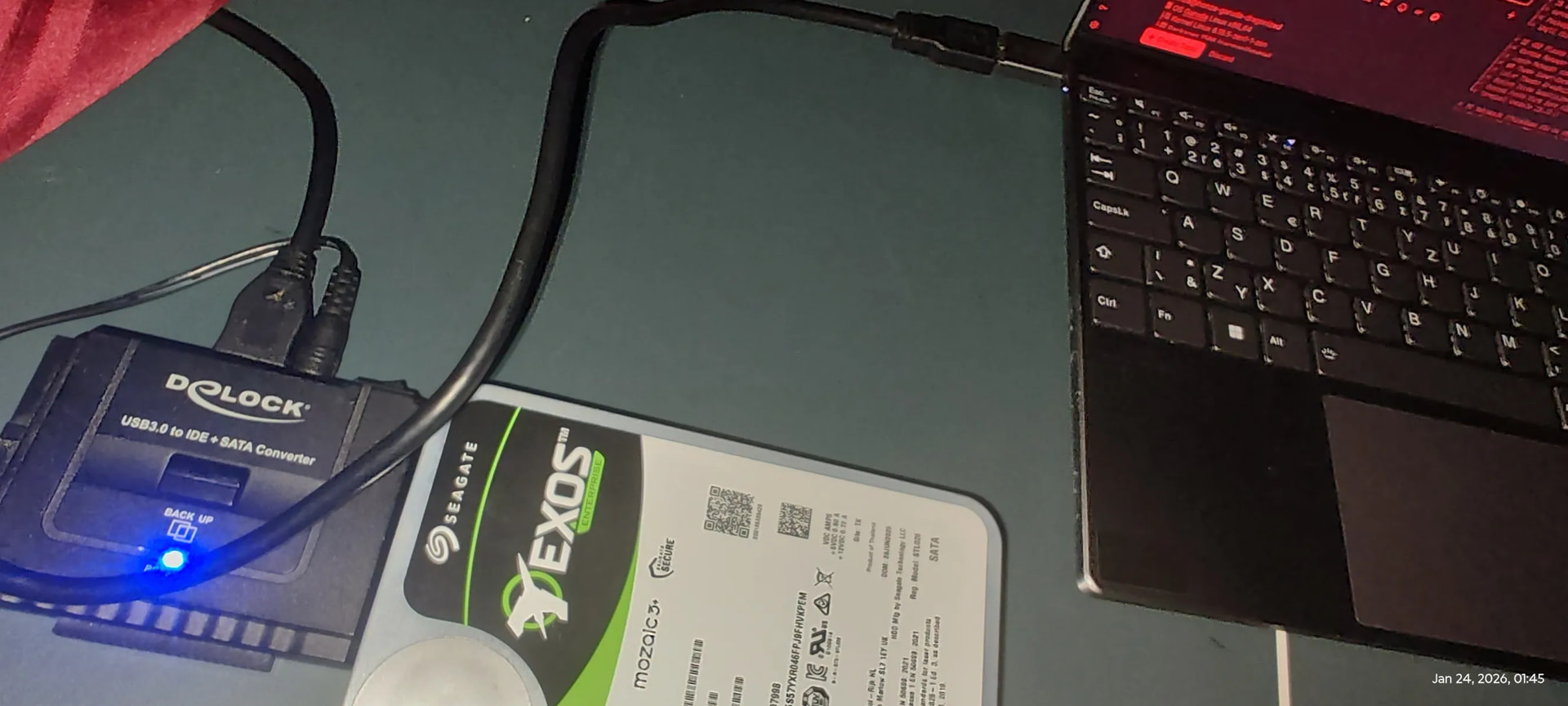
For some reason when I connect a HDD to my laptop, it takes a while to connect, it’s the same thing when creating a new volume/deleting one, KDE Partition Manager is scanning for like a minute after every reload/refresh even with no changes. Size of the drive doesn’t seem to matter, I tried 2 older 3TB drives and one of them actually took longer I think? When my dad tried it on windows pc it was only few seconds.

It’s not really an issue for me I just thought that my adapter doesn’t work for large drives, if I remember correctly 2 years ago it worked flawlessly in Garuda for drives up to 8TB, which loaded very quickly, and my 18TB Toshiba didn’t, but now I think I just didn’t wait long enough.

Any ideas on why this happens?
garuda-inxi:

honza@honza-garuda-dragonized
 OS Garuda Linux x86_64
├ Kernel Linux 6.18.5-zen1-1-zen
├󰏖 Packages 1566 (pacman)[stable]
└ Shell fish 4.3.3

 DE KDE Plasma 6.5.5
├󰧨 Window Manager KWin (Wayland)
├󰧨 Login Manager sddm 0.21.0 (Wayland)
├󰉼 WM Theme Sweet-Dark
├󰉼 Color Themes Dr460nized (Sweet) [Qt], Sweet-Dark [GTK2/3/4]
├󰀻 System Icons BeautyLine [Qt], BeautyLine [GTK2/3/4]
├ System Fonts Fira Sans (10pt) [Qt], Fira Sans (10pt) [GTK2/3/4]
└ Terminal konsole 25.12.1

󰌢 PC Notebook (ThinkBook 13x G4 IMH)
├󰻠 CPU Intel(R) Core(TM) Ultra 9 185H (22) @ 5.10 GHz
├󰍛 GPU Intel Arc Graphics @ 2.35 GHz [Integrated]
├󰍛 OpenGL 4.6 (Compatibility Profile) Mesa 25.3.3-arch1.3
├󰍛 Vulkan 1.4.328 - Intel open-source Mesa driver [Mesa 25.3.3-arch1.3]
└󰍹 Display(s) 2880x1920 @ 1.7x in 13", 120 Hz [Built-in]

╭─honza@honza in ~
╰─λ garuda-inxi
System:
Kernel: 6.18.5-zen1-1-zen arch: x86_64 bits: 64 compiler: gcc v: 15.2.1
clocksource: tsc avail: acpi_pm
parameters: BOOT_IMAGE=/@/boot/vmlinuz-linux-zen
root=UUID=1aeafeea-7f63-4d26-a722-5d3a5eb1bb5e rw rootflags=subvol=@
quiet loglevel=3
Desktop: KDE Plasma v: 6.5.5 tk: Qt v: N/A info: frameworks v: 6.22.0
wm: kwin_wayland vt: 1 dm: SDDM Distro: Garuda base: Arch Linux
Machine:
Type: Laptop System: LENOVO product: 21KR v: ThinkBook 13x G4 IMH
serial: <superuser required> Chassis: type: 10 v: ThinkBook 13x G4 IMH
serial: <superuser required>
Mobo: LENOVO model: LNVNB161216 v: SDK0T76528 WIN
serial: <superuser required> part-nu: LENOVO_MT_21KR_BU_idea_FM_ThinkBook
13x G4 IMH uuid: <superuser required> Firmware: UEFI vendor: LENOVO
v: MTCN51WW date: 04/07/2025
Battery:
ID-1: BAT1 charge: 71.4 Wh (99.9%) condition: 71.5/74 Wh (96.6%) volts: 17.7
min: 15.6 model: Simplo BASE-BAT type: Li-poly serial: <filter> charging:
status: not charging type: standard avail: long_life,standard cycles: 81
CPU:
Info: model: Intel Core Ultra 9 185H bits: 64 type: MST AMCP
arch: Meteor Lake level: v3 note: check built: 2023+ process: Intel 4 (7nm)
family: 6 model-id: 0xAA (170) stepping: 4 microcode: 0x25
Topology: cpus: 1x dies: 1 clusters: 9 cores: 16 threads: 22 mt: 6 tpc: 2
st: 10 smt: enabled cache: L1: 1.6 MiB desc: d-10x32 KiB, 6x48 KiB; i-16x64
KiB L2: 18 MiB desc: 9x2 MiB L3: 24 MiB desc: 1x24 MiB
Speed (MHz): avg: 400 min/max: 400/4800:5100:3800:2500 scaling:
driver: intel_pstate governor: powersave cores: 1: 400 2: 400 3: 400 4: 400
5: 400 6: 400 7: 400 8: 400 9: 400 10: 400 11: 400 12: 400 13: 400 14: 400
15: 400 16: 400 17: 400 18: 400 19: 400 20: 400 21: 400 22: 400
bogomips: 135168
Flags-basic: avx avx2 ht lm nx pae sse sse2 sse3 sse4_1 sse4_2 ssse3 vmx
Vulnerabilities: <filter>
Graphics:
Device-1: Intel Meteor Lake-P [Intel Arc Graphics] vendor: Lenovo
driver: i915 v: kernel alternate: xe arch: Xe-LPG process: Intel 4 (7nm+)
built: 2023+ ports: active: eDP-1 empty: DP-1, DP-2, DP-3, DP-4
bus-ID: 00:02.0 chip-ID: 8086:7d55 class-ID: 0300
Display: wayland server: X.org v: 1.21.1.21 with: Xwayland v: 24.1.9
compositor: kwin_wayland driver: X: loaded: modesetting
alternate: fbdev,intel,vesa dri: iris gpu: i915 display-ID: 0
Monitor-1: eDP-1 model: California Institute of eDP-1-0x1319 built: 2023
res: mode: 2880x1920 hz: 120 scale: 170% (1.7) to: 1694x1129 dpi: 257
gamma: 1.2 size: 285x190mm (11.22x7.48") diag: 343mm (13.5") ratio: 3:2
modes: 2880x1920
API: EGL v: 1.5 hw: drv: intel iris platforms: device: 0 drv: iris
device: 1 drv: swrast gbm: drv: iris surfaceless: drv: iris wayland:
drv: iris x11: drv: iris
API: OpenGL v: 4.6 compat-v: 4.5 vendor: intel mesa v: 25.3.3-arch1.3
glx-v: 1.4 direct-render: yes renderer: Mesa Intel Arc Graphics (MTL)
device-ID: 8086:7d55 memory: 30.22 GiB unified: yes display-ID: :1.0
API: Vulkan v: 1.4.335 layers: 6 device: 0 type: integrated-gpu name: Intel
Arc Graphics (MTL) driver: mesa intel v: 25.3.3-arch1.3
device-ID: 8086:7d55 surfaces: N/A device: 1 type: cpu name: llvmpipe
(LLVM 21.1.6 256 bits) driver: mesa llvmpipe v: 25.3.3-arch1.3 (LLVM
21.1.6) device-ID: 10005:0000 surfaces: N/A
Info: Tools: api: clinfo, eglinfo, glxinfo, vulkaninfo
de: kscreen-console,kscreen-doctor wl: wayland-info
x11: xdpyinfo, xprop, xrandr
Audio:
Device-1: Intel Meteor Lake IPU vendor: Lenovo driver: intel-ipu6
alternate: intel_ipu6 bus-ID: 00:05.0 chip-ID: 8086:7d19 class-ID: 0480
Device-2: Intel Meteor Lake-P HD Audio vendor: Lenovo
driver: sof-audio-pci-intel-mtl
alternate: snd_sof_pci_intel_mtl,snd_hda_intel bus-ID: 00:1f.3
chip-ID: 8086:7e28 class-ID: 0401
API: ALSA v: k6.18.5-zen1-1-zen status: kernel-api tools: N/A
Server-1: PipeWire v: 1.4.10 status: active with: 1: pipewire-pulse
status: active 2: wireplumber status: active 3: pipewire-alsa type: plugin
4: pw-jack type: plugin tools: pactl,pw-cat,pw-cli,wpctl
Network:
Device-1: Intel Meteor Lake PCH CNVi WiFi driver: iwlwifi v: kernel
bus-ID: 00:14.3 chip-ID: 8086:7e40 class-ID: 0280
IF: wlp0s20f3 state: up mac: <filter>
Info: services: NetworkManager, systemd-timesyncd, wpa_supplicant
Bluetooth:
Device-1: Intel AX211 Bluetooth driver: btusb v: 0.8 type: USB rev: 2.0
speed: 12 Mb/s lanes: 1 mode: 1.1 bus-ID: 3-10:4 chip-ID: 8087:0033
class-ID: e001
Report: btmgmt ID: hci0 rfk-id: 2 state: down bt-service: enabled,running
rfk-block: hardware: no software: yes address: <filter> bt-v: 5.4 lmp-v: 13
status: discoverable: no pairing: no
Drives:
Local Storage: total: 27.33 TiB used: 1.22 TiB (4.5%)
SMART Message: Unable to run smartctl. Root privileges required.
ID-1: /dev/nvme0n1 maj-min: 259:0 vendor: Samsung
model: MZAL81T0HDLB-00BL2 size: 953.87 GiB block-size: physical: 512 B
logical: 512 B speed: 63.2 Gb/s lanes: 4 tech: SSD serial: <filter>
fw-rev: 6L1QKXD7 temp: 42.9 C scheme: GPT
ID-2: /dev/sda maj-min: 8:0 vendor: Kingston model: DataTraveler Max
size: 953.87 GiB block-size: physical: 512 B logical: 512 B type: USB
rev: 3.2 spd: 10 Gb/s lanes: 1 mode: 3.2 gen-2x1 tech: SSD
serial: <filter> fw-rev: 1000 scheme: MBR
ID-3: /dev/sdb maj-min: 8:16 vendor: Seagate model: ST28000NM003K-3TE133
size: 25.47 TiB block-size: physical: 512 B logical: 512 B type: USB
rev: 3.0 spd: 5 Gb/s lanes: 1 mode: 3.2 gen-1x1 tech: HDD rpm: 7200
serial: <filter> scheme: GPT
Partition:
ID-1: / raw-size: 47.64 GiB size: 47.64 GiB (100.00%)
used: 26.76 GiB (56.2%) fs: btrfs dev: /dev/nvme0n1p4 maj-min: 259:4
ID-2: /boot/efi raw-size: 600 MiB size: 598.8 MiB (99.80%)
used: 45.1 MiB (7.5%) fs: vfat dev: /dev/nvme0n1p1 maj-min: 259:1
ID-3: /home raw-size: 47.64 GiB size: 47.64 GiB (100.00%)
used: 26.76 GiB (56.2%) fs: btrfs dev: /dev/nvme0n1p4 maj-min: 259:4
ID-4: /var/log raw-size: 47.64 GiB size: 47.64 GiB (100.00%)
used: 26.76 GiB (56.2%) fs: btrfs dev: /dev/nvme0n1p4 maj-min: 259:4
ID-5: /var/tmp raw-size: 47.64 GiB size: 47.64 GiB (100.00%)
used: 26.76 GiB (56.2%) fs: btrfs dev: /dev/nvme0n1p4 maj-min: 259:4
Swap:
Kernel: swappiness: 133 (default 60) cache-pressure: 100 (default) zswap: no
ID-1: swap-1 type: zram size: 30.95 GiB used: 20 KiB (0.0%) priority: 100
comp: zstd avail: lzo-rle,lzo,lz4,lz4hc,deflate,842 dev: /dev/zram0
Sensors:
Src: /sys System Temperatures: cpu: 64.0 C mobo: N/A
Fan Speeds (rpm): N/A
Info:
Memory: total: 32 GiB note: est. available: 30.95 GiB used: 6.32 GiB (20.4%)
Processes: 488 Power: uptime: 3h 5m states: freeze,mem,disk
suspend: s2idle wakeups: 0 hibernate: platform avail: shutdown, reboot,
suspend, test_resume image: 12.37 GiB services: org_kde_powerdevil,
power-profiles-daemon, upowerd Init: systemd v: 259 default: graphical
tool: systemctl
Packages: pm: pacman pkgs: 1566 libs: 405 tools: octopi,paru Compilers:
gcc: 15.2.1 Shell: Bash v: 5.3.9 default: fish v: 4.3.3 running-in: konsole
inxi: 3.3.40
Garuda (2.12.3-2):
System install date:     2026-01-09
Garuda release:          251103
Last full system update: 2026-01-24 ↻
Is partially upgraded:   No
Relevant software:       snapper NetworkManager dracut garuda-hardware-profile-standard
Windows dual boot:       No/Undetected
Failed units:
--- System Health Check Report ---
25/26 checks run in 0.74 seconds ⌛
Powered by garuda-health 🦅

--- INFO ---
- A reboot is pending (update applied since last reboot)

✅ System health check passed. No issues found.

╭─honza@honza in ~ took 2s
╰─λ

Please post

lsblk -f
lsusb
3 Likes

I would highly suggest you test older kernels such as the LTS.

I had to use the LTS because of USB issues with one of my drives six or so years ago.

I’d also suggest you thoroughly check your drives wear statistics with smartmon. Even if the drive does not register as failing, this could still be the reason for this behavior. The drive I was referring to passed all tests, but I eventually realized it was the problem, and I retired it.

Linux is not Windows, Linux is sometimes far more sensitive to hardware that is no longer up to spec.

3 Likes
╭─honza@honza in ~
╰─λ lsblk -f
NAME        FSTYPE FSVER LABEL  UUID                                 FSAVAIL FSUSE% MOUNTPOINTS
sdb
└─sdb1      ext4   1.0   třídím ca54472a-357b-4265-8466-e0cc7cdeb370   22,3T     7% /run/media/honza/třídím
zram0       swap   1     zram0  1307cf62-a824-4739-ad06-de47f7417f68                [SWAP]
nvme0n1
├─nvme0n1p1 vfat   FAT32        3ECE-6AA6                             553,8M     8% /boot/efi
├─nvme0n1p2 ext4   1.0          a52fb9d0-1f22-4dc9-be74-610ae15ab159
├─nvme0n1p3 crypto 2            965c4a46-e37d-4bf8-97a3-dc519baee4d6
├─nvme0n1p4 btrfs               1aeafeea-7f63-4d26-a722-5d3a5eb1bb5e   19,2G    57% /run/BtrfsAssistant/1aeafeea-7f63-4d26-a722-5d3a5eb1bb5e
│                                                                                   /var/tmp
│                                                                                   /home
│                                                                                   /root
│                                                                                   /var/cache
│                                                                                   /var/log
│                                                                                   /srv
│                                                                                   /
└─nvme0n1p5 ext4   1.0   media  15c5f073-c4b6-487e-a688-cdde4377f8c7  701,2G     0% /run/media/honza/media
nvme1n1
└─nvme1n1p2 btrfs               ec83daa8-2011-4daf-8a28-e6bbc626bb1f  487,2G    84% /run/media/honza/ec83daa8-2011-4daf-8a28-e6bbc626bb1f

My last drive nvme1n1p2 wasn’t there before, you can ignore that. Also it doesn’t seem to show the full capacity, only free space, interesting and třídím means (I am) sorting, cause there will be many TB of semi-sorted files. I have stable 140MiB/s copying from one external drive to another, so that works just fine.

aaaaand after consulting man lsblk:

╰─λ lsblk -a
NAME        MAJ:MIN RM   SIZE RO TYPE MOUNTPOINTS
sdb           8:16   0  25,5T  0 disk
└─sdb1        8:17   0  25,5T  0 part /run/media/honza/třídím
zram0       253:0    0  30,9G  0 disk [SWAP]
nvme0n1     259:0    0 953,9G  0 disk
├─nvme0n1p1 259:1    0   600M  0 part /boot/efi
├─nvme0n1p2 259:2    0     1G  0 part
├─nvme0n1p3 259:3    0 103,9G  0 part
├─nvme0n1p4 259:4    0  47,6G  0 part /run/BtrfsAssistant/1aeafeea-7f63-4d26-a722-5d3a5eb1bb5e
│                                     /var/tmp
│                                     /home
│                                     /root
│                                     /var/cache
│                                     /var/log
│                                     /srv
│                                     /
└─nvme0n1p5 259:5    0   752G  0 part /run/media/honza/media
nvme1n1     259:6    0   3,7T  0 disk
└─nvme1n1p2 259:7    0   3,1T  0 part /run/media/honza/ec83daa8-2011-4daf-8a28-e6bbc626bb1f

╭─honza@honza in ~ took 0s
[🔴] × lsblk -O
ALIGNMENT ID-LINK ID DISC-ALN DAX DISC-GRAN DISK-SEQ DISC-MAX DISC-ZERO FSAVAIL FSROOTS FSSIZE FSTYPE FSUSED FSUSE% FSVER GROUP HCTL       HOTPLUG KNAME     LABEL  LOG-SEC MAJ:MIN MAJ MIN MIN-IO MODE       MODEL  MQ NAME OPT-IO OWNER PARTFLAGS PARTLABEL            PARTN PARTTYPE                             PARTTYPENAME        PARTUUID                             PATH           PHY-SEC PKNAME  PTTYPE PTUUID                                 RA RAND      REV RM RO ROTA RQ-SIZE SCHED SERIAL   SIZE    START STATE SUBSYSTEMS MOUNTPOINT MOUNTPOINTS TRAN   TYPE UUID                                 VENDOR WSAME WWN                                  ZONED ZONE-SZ ZONE-WGRAN ZONE-APP ZONE-NR ZONE-OMAX ZONE-AMAX
0 wwn-0x5000c500ea707998
0x5000c500ea707998
0   0        0B        6       0B         0                                                   disk  1:0:0:0          1 sdb                 512   8:16  8   16     512 brw-rw---- ST280   1 sdb       0 root                                                                                                      /dev/sdb           512         gpt    e5fcd98d-9c9d-475f-8376-5c2feefe778a 2048    1     SE02  0  0    1       2 bfq   K1S0BX  25,5T    runni block:scsi:usb:pci
│                                                                                                                     usb    disk                                      ST2800    0B 0x5000c500ea707998                   none       0B       0B       0B       0         0         0
0 wwn-0x5000c500ea707998-part1
0x5000c500ea707998-part1
0   0        0B        6       0B         0   22,1T /        25,4T ext4       2T     8% 1.0   disk                   1 sdb1      třídím    512   8:17  8   17     512 brw-rw----         1 └─sdb1
0 root                                     1 0fc63daf-8483-4772-8e79-3d69d8477de4 Linux filesystem    f4cad470-5216-4f78-a41c-8773c2daed0f /dev/sdb1          512 sdb     gpt    e5fcd98d-9c9d-475f-8376-5c2feefe778a 2048    1           0  0    1       2 bfq           25,5T    2048       block:scsi:usb:pci
/run/media /run/media/honza/třídím
part ca54472a-357b-4265-8466-e0cc7cdeb370           0B 0x5000c500ea707998                   none       0B       0B       0B       0         0         0
0                   0   0        4K        2       2T         0                        swap                 1     disk                   0 zram0     zram0     4096 253:0   253 0     4096 brw-rw----         1 zram0
4096 root                                                                                                      /dev/zram0        4096                                                      128    0           0  0    0                       30,9G    block      [SWAP]     [SWAP]             disk 1307cf62-a824-4739-ad06-de47f7417f68           0B                                      none       0B       0B       0B       0         0         0
0 nvme-eui.002538a441cd7fc2
eui.002538a441cd7fc2
0   0      512B        1       2T         0                                                   disk                   0 nvme0n1             512 259:0   259 0      512 brw-rw---- SAMSU  16 nvme0n1
│         0 root                                                                                                      /dev/nvme0n1       512         gpt    695f13e8-d30f-41ed-aa0a-fbec2eab5848  128    0 6L1QKXD7  0  0    0     256 kyber S77LNF 953,9G    live  block:nvme:pci
│                                                                                                                     nvme   disk                                                0B eui.002538a441cd7fc2                 none       0B       0B       0B       0         0         0
0 nvme-eui.002538a441cd7fc2-part1
eui.002538a441cd7fc2-part1
0   0      512B        1       2T         0  553,8M /       598,8M vfat    45,1M     8% FAT32 disk                   0 nvme0n1p1           512 259:1   259 1      512 brw-rw----        16 ├─nvme0n1p1
│         0 root            EFI System Partition     1 c12a7328-f81f-11d2-ba4b-00a0c93ec93b EFI System          fa8242dd-4173-4755-a2b1-fbc14c870e21 /dev/nvme0n1p1     512 nvme0n1 gpt    695f13e8-d30f-41ed-aa0a-fbec2eab5848  128    0           0  0    0     256 kyber          600M    2048       block:nvme:pci
│                                                                                                                     /boot/efi  /boot/efi   nvme   part 3ECE-6AA6                                      0B eui.002538a441cd7fc2                 none       0B       0B       0B       0         0         0
0 nvme-eui.002538a441cd7fc2-part2
eui.002538a441cd7fc2-part2
0   0      512B        1       2T         0                        ext4                 1.0   disk                   0 nvme0n1p2           512 259:2   259 2      512 brw-rw----        16 ├─nvme0n1p2
│         0 root                                     2 bc13c2ff-59e6-4262-a352-b275fd6f7172 Linux extended boot 6ec7dc8a-8f3d-4b30-ae13-3a9a468f888b /dev/nvme0n1p2     512 nvme0n1 gpt    695f13e8-d30f-41ed-aa0a-fbec2eab5848  128    0           0  0    0     256 kyber            1G    1230848       block:nvme:pci
│                                                                                                                     nvme   part a52fb9d0-1f22-4dc9-be74-610ae15ab159           0B eui.002538a441cd7fc2                 none       0B       0B       0B       0         0         0
0 nvme-eui.002538a441cd7fc2-part3
eui.002538a441cd7fc2-part3
0   0      512B        1       2T         0                        crypto               2     disk                   0 nvme0n1p3           512 259:3   259 3      512 brw-rw----        16 ├─nvme0n1p3
│         0 root                                     3 0fc63daf-8483-4772-8e79-3d69d8477de4 Linux filesystem    fc787bef-5d1d-471e-9307-9a67371998be /dev/nvme0n1p3     512 nvme0n1 gpt    695f13e8-d30f-41ed-aa0a-fbec2eab5848  128    0           0  0    0     256 kyber        103,9G    3328000       block:nvme:pci
│                                                                                                                     nvme   part 965c4a46-e37d-4bf8-97a3-dc519baee4d6           0B eui.002538a441cd7fc2                 none       0B       0B       0B       0         0         0
0 nvme-eui.002538a441cd7fc2-part4
eui.002538a441cd7fc2-part4
0   0      512B        1       2T         0   19,2G /        47,6G btrfs     27G    57%       disk                   0 nvme0n1p4           512 259:4   259 4      512 brw-rw----        16 ├─nvme0n1p4
│         0 root            root                     4 0fc63daf-8483-4772-8e79-3d69d8477de4 Linux filesystem    fe635958-b991-44ae-ae4b-ddf73eb523a8 /dev/nvme0n1p4     512 nvme0n1 gpt    695f13e8-d30f-41ed-aa0a-fbec2eab5848  128    0           0  0    0     256 kyber         47,6G 1900496896       block:nvme:pci
│                                                                                                                     /run/Btrfs /run/BtrfsAssistant/1aeafeea-7f63-4d26-a722-5d3a5eb1bb5e
│                                                                                                                     nvme   part 1aeafeea-7f63-4d26-a722-5d3a5eb1bb5e           0B eui.002538a441cd7fc2                 none       0B       0B       0B       0         0         0
/@tmp                                                                                  │                                                                                                                     /var/tmp                                                                                                                           
/@home                                                                                 │                                                                                                                     /home                                                                                                                              
/@root                                                                                 │                                                                                                                     /root                                                                                                                              
/@cache                                                                                │                                                                                                                     /var/cache                                                                                                                         
/@log                                                                                  │                                                                                                                     /var/log
/@srv                                                                                  │                                                                                                                     /srv
/@                                                                                     │                                                                                                                     /
0 nvme-eui.002538a441cd7fc2-part5
eui.002538a441cd7fc2-part5
0   0      512B        1       2T         0  701,2G /       739,1G ext4   284,3M     0% 1.0   disk                   0 nvme0n1p5 media     512 259:5   259 5      512 brw-rw----        16 └─nvme0n1p5
0 root                                     5 0fc63daf-8483-4772-8e79-3d69d8477de4 Linux filesystem    518e1556-5681-41b9-ae90-07acac012bac /dev/nvme0n1p5     512 nvme0n1 gpt    695f13e8-d30f-41ed-aa0a-fbec2eab5848  128    0           0  0    0     256 kyber          752G  323536896       block:nvme:pci
/run/media /run/media/honza/media
nvme   part 15c5f073-c4b6-487e-a688-cdde4377f8c7           0B eui.002538a441cd7fc2                 none       0B       0B       0B       0         0         0
0 nvme-eui.0000000623083381caf25b0320001089
eui.0000000623083381caf25b0320001089
0   0      512B        8       2T         0                                                   disk                   1 nvme1n1             512 259:6   259 6      512 brw-rw---- Lexar  16 nvme1n1
│         0 root                                                                                                      /dev/nvme1n1       512         gpt    4bcf12fe-410a-4007-9535-0017da745001  128    0    12237  0  0    0     256 kyber NJF381   3,7T    live  block:nvme:pci
│                                                                                                                     nvme   disk                                                0B eui.0000000623083381caf25b0320001089 none       0B       0B       0B       0         0         0
0 nvme-eui.0000000623083381caf25b0320001089-part2
eui.0000000623083381caf25b0320001089-part2
0   0      512B        8       2T         0  487,2G /         3,1T btrfs    2,6T    84%       disk                   1 nvme1n1p2           512 259:7   259 7      512 brw-rw----        16 └─nvme1n1p2
0 root            root                     2 0fc63daf-8483-4772-8e79-3d69d8477de4 Linux filesystem    50d05db5-0e21-4ba7-ad3c-5767b605a6b8 /dev/nvme1n1p2     512 nvme1n1 gpt    4bcf12fe-410a-4007-9535-0017da745001  128    0           0  0    0     256 kyber          3,1T    618496       block:nvme:pci
/run/media /run/media/honza/ec83daa8-2011-4daf-8a28-e6bbc626bb1f
nvme   part ec83daa8-2011-4daf-8a28-e6bbc626bb1f           0B eui.0000000623083381caf25b0320001089 none       0B       0B       0B       0         0         0
╭─honza@honza in ~ took 0s
╰─λ lsusb
Bus 001 Device 001: ID 1d6b:0002 Linux Foundation 2.0 root hub
Bus 002 Device 001: ID 1d6b:0003 Linux Foundation 3.0 root hub
Bus 002 Device 005: ID 1f75:0611 Innostor Technology Corporation IS611 SATA/PATA Bridge Controller
Bus 003 Device 001: ID 1d6b:0002 Linux Foundation 2.0 root hub
Bus 003 Device 002: ID 04f3:0c8d Elan Microelectronics Corp. ELAN:ARM-M4
Bus 003 Device 003: ID 17ef:f006 Lenovo Idea5003
Bus 003 Device 004: ID 8087:0033 Intel Corp. AX211 Bluetooth
Bus 004 Device 001: ID 1d6b:0003 Linux Foundation 3.0 root hub

Thanks for the tips! I’m actually about to learn how to use smartctl today, what is the difference between that and smartmon?

Also the drive is new, and it happened on 3 different ones, so I doubt it is because of the drives.

Wait is there any risk of data loss?

I mean, well that’s a risk at any time. It shouldn’t be a big risk if the drive is new, but even new drives suffer failures.

Check for USB errors in your logs:

journalctl | grep usb
sudo dmsg | grep usb

Please post the input and outputs of those commands.

1 Like

Soo new adapter fixed it, nice.

it was too long for body character limit, so I’m attaching both as files.
I can’t attach .txt

If the situation is resolved now, I guess the logs aren’t required.

Glad to hear you resolved your issue. :+1:

1 Like

This topic was automatically closed 2 days after the last reply. New replies are no longer allowed.