Hey folks,
After a recent reboot, somehow, my primary monitor (dual monitor setup) which has the default Garuda Dr460nized top bar and latte dock (as does the secondary extended monitor), no longer seems to respect it’s settings and the desktop icons appear underneath/behind the top bar. I’ve compared the settings in both the “Show panel configuration” and in the “Panel colorizer” - and they’re identical. However, the icons on the primary monitor are able to “snap” underneath the bar, and the icons on the secondary monitor snap to just below the bar, like it used to. I don’t know how to fix this. Here are some screenshots:
Primary monitor:
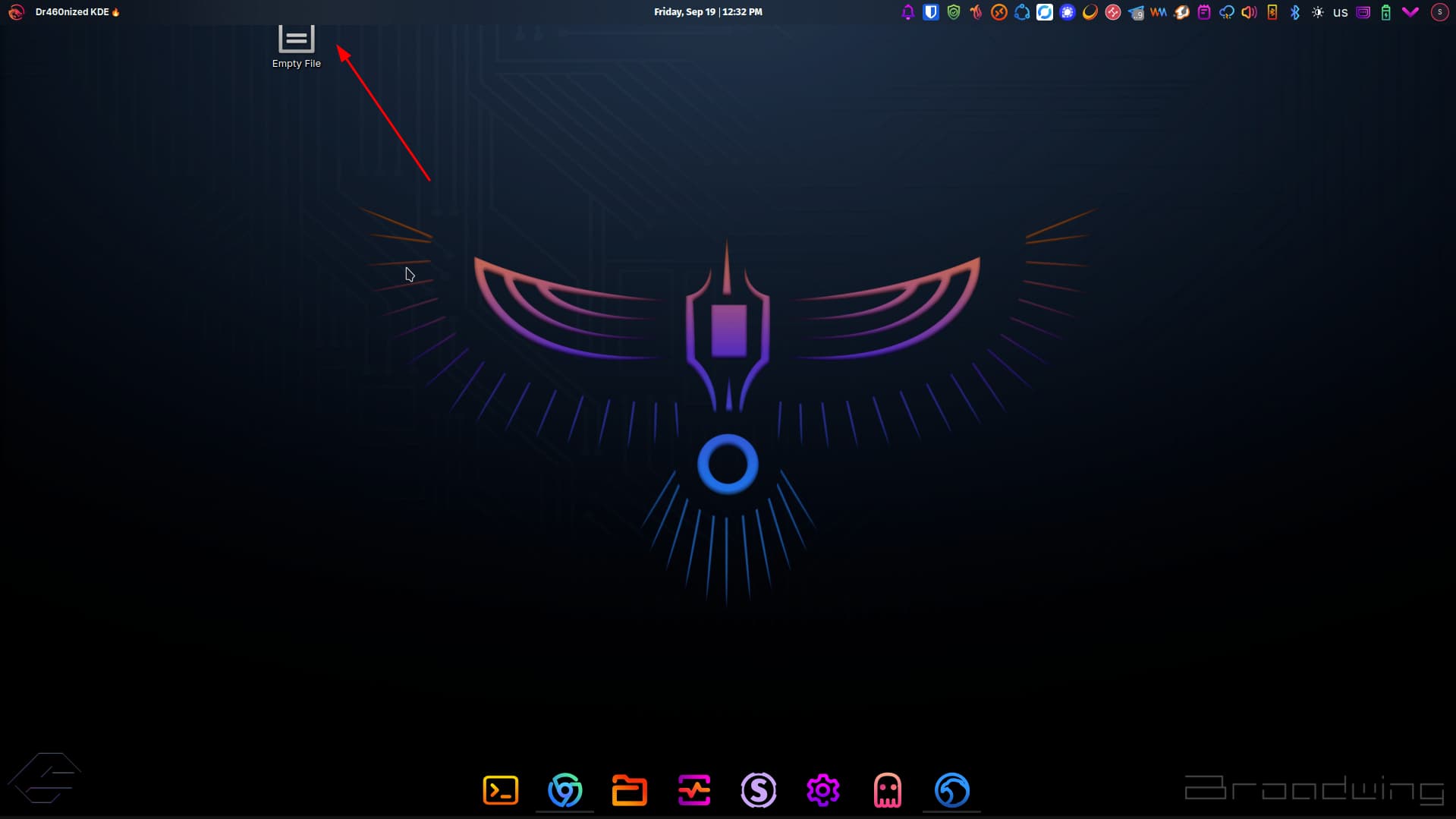
Secondary Monitor:

Primary Monitor panel configuration:
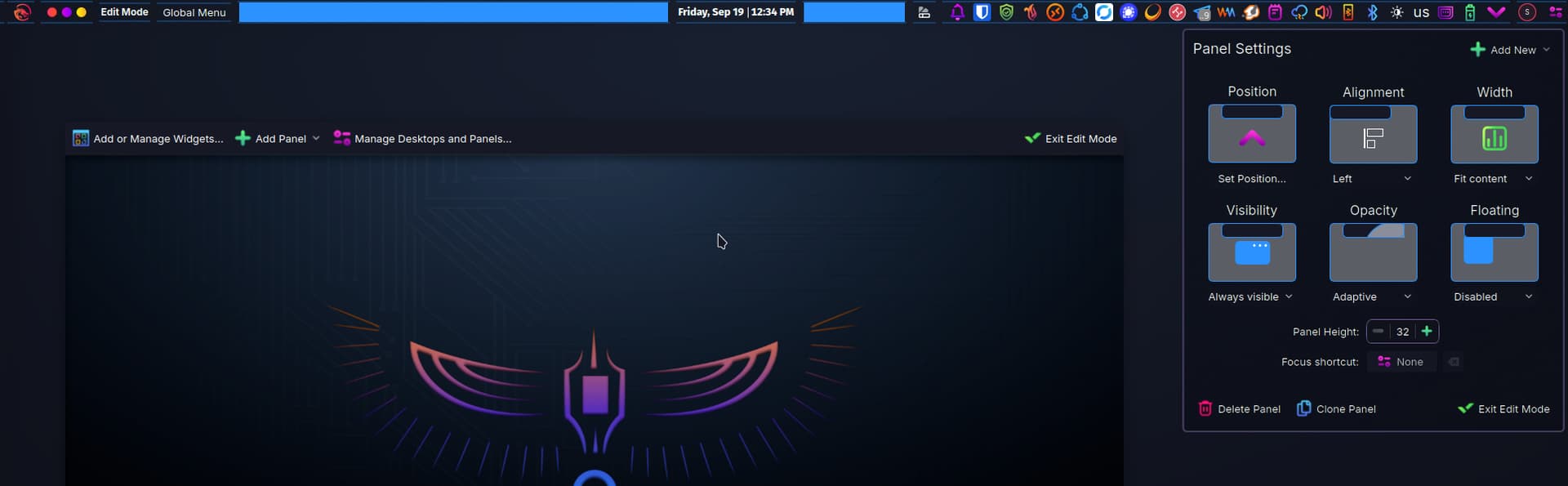
Secondary Monitor panel configuration:

In the Panel colorizer settings, I’ve re-loaded the “Dr460nized Top Panel” and confirmed that the “Presets auto-loading” options are identical between both Primary and Secondary monitor.
Here’s my garuda-inxi:
> garuda-inxi
System:
  Kernel: 6.16.7-zen1-1-zen arch: x86_64 bits: 64 compiler: gcc v: 15.2.1
    clocksource: tsc avail: acpi_pm
    parameters: BOOT_IMAGE=/@/boot/vmlinuz-linux-zen
    root=UUID=8dcc0c9c-8fe9-4fc6-b189-a8db2cfa3823 rw rootflags=subvol=@
    rd.driver.pre=vfio-pci intel_iommu=on i915.enable_guc=3 i915.max_vfs=7
    i915.force_probe=!4680 xe.force_probe=4680 quiet
    resume=UUID=a14a443b-9c6b-47d0-b49a-d9686d767b7c loglevel=3
    sysrq_always_enabled=1 split_lock_detect=off nvidia-drm.modeset=1
    pci=disable_acs_redir=pci:12D8:2308
    vt.default_red=30,243,166,249,137,245,148,186,88,243,166,249,137,245,148,166
    vt.default_grn=30,139,227,226,180,194,226,194,91,139,227,226,180,194,226,173
    vt.default_blu=46,168,161,175,250,231,213,222,112,168,161,175,250,231,213,200
  Desktop: KDE Plasma v: 6.4.5 tk: Qt v: N/A info: frameworks v: 6.18.0
    wm: kwin_wayland with: krunner vt: 1 dm: SDDM Distro: Garuda
    base: Arch Linux
Machine:
  Type: Desktop System: ASUS product: N/A v: N/A serial: <superuser required>
  Mobo: ASUSTeK model: PRIME Z690-P WIFI v: Rev 1.xx
    serial: <superuser required> part-nu: SKU uuid: <superuser required>
    UEFI: American Megatrends v: 3801 date: 05/14/2025
Battery:
  Device-1: hidpp_battery_0 model: Logitech Wireless Keyboard serial: <filter>
    charge: 55% (should be ignored) rechargeable: yes status: discharging
CPU:
  Info: model: 12th Gen Intel Core i9-12900K bits: 64 type: MST AMCP
    arch: Alder Lake gen: core 12 level: v3 note: check built: 2021+
    process: Intel 7 (10nm ESF) family: 6 model-id: 0x97 (151) stepping: 2
    microcode: 0x3A
  Topology: cpus: 1x dies: 1 clusters: 10 cores: 16 threads: 24 mt: 8 tpc: 2
    st: 8 smt: enabled cache: L1: 1.4 MiB desc: d-8x32 KiB, 8x48 KiB; i-8x32
    KiB, 8x64 KiB L2: 14 MiB desc: 8x1.2 MiB, 2x2 MiB L3: 30 MiB
    desc: 1x30 MiB
  Speed (MHz): avg: 4238 min/max: 800/5100:5200:3900 scaling:
    driver: intel_pstate governor: powersave cores: 1: 4238 2: 4238 3: 4238
    4: 4238 5: 4238 6: 4238 7: 4238 8: 4238 9: 4238 10: 4238 11: 4238 12: 4238
    13: 4238 14: 4238 15: 4238 16: 4238 17: 4238 18: 4238 19: 4238 20: 4238
    21: 4238 22: 4238 23: 4238 24: 4238 bogomips: 152985
  Flags-basic: avx avx2 ht lm nx pae sse sse2 sse3 sse4_1 sse4_2 ssse3 vmx
  Vulnerabilities: <filter>
Graphics:
  Device-1: Intel AlderLake-S GT1 vendor: ASUSTeK driver: xe v: kernel
    alternate: i915 arch: Xe process: Intel 10nm built: 2020-21 ports:
    active: none empty: DP-4,HDMI-A-3,HDMI-A-4 bus-ID: 00:02.0
    chip-ID: 8086:4680 class-ID: 0300
  Device-2: NVIDIA GA104 [GeForce RTX 3060 Ti Lite Hash Rate]
    vendor: ASUSTeK driver: nvidia v: 580.82.09 alternate: nouveau,nvidia_drm
    non-free: 550-580.xx+ status: current (as of 2025-08; EOL~2026-12-xx)
    arch: Ampere code: GAxxx process: TSMC n7 (7nm) built: 2020-2023 pcie:
    gen: 4 speed: 16 GT/s lanes: 16 ports: active: DP-1,DP-3,HDMI-A-2
    empty: DP-2,HDMI-A-1 bus-ID: 01:00.0 chip-ID: 10de:2489 class-ID: 0300
  Device-3: Microsoft LifeCam Studio
    driver: hid-generic,snd-usb-audio,usbhid,uvcvideo type: USB rev: 2.0
    speed: 480 Mb/s lanes: 1 mode: 2.0 bus-ID: 1-3:3 chip-ID: 045e:0772
    class-ID: 0300
  Display: wayland server: X.org v: 1.21.1.18 with: Xwayland v: 24.1.8
    compositor: kwin_wayland driver: X: loaded: modesetting,nvidia
    unloaded: nouveau alternate: fbdev,intel,nv,vesa dri: iris
    gpu: nv_platform,nvidia,nvidia-nvswitch d-rect: 3840x1080 display-ID: 0
  Monitor-1: DP-1 pos: primary,left model: Samsung SyncMaster
    serial: <filter> built: 2009 res: mode: 1920x1080 hz: 60 scale: 100% (1)
    dpi: 92 gamma: 1.2 size: 531x298mm (20.91x11.73") diag: 609mm (24")
    ratio: 16:9 modes: max: 1920x1080 min: 640x480
  Monitor-2: DP-3 pos: right model: Dell UZ2715H serial: <filter>
    built: 2014 res: mode: 1920x1080 hz: 60 scale: 100% (1) dpi: 83 gamma: 1.2
    size: 597x336mm (23.5x13.23") diag: 676mm (26.6") ratio: 16:9 modes:
    max: 1920x1080 min: 640x480
  Monitor-3: HDMI-A-2 pos: right model: ROG PG248Q serial: <filter>
    built: 2020 res: mode: 1920x1080 hz: 60 scale: 100% (1) dpi: 92 gamma: 1.2
    size: 531x299mm (20.91x11.77") diag: 609mm (24") ratio: 16:9 modes:
    max: 1920x1080 min: 640x480
  API: EGL v: 1.5 hw: drv: intel iris drv: nvidia platforms: device: 0
    drv: nvidia device: 1 drv: iris device: 3 drv: swrast gbm: drv: iris
    surfaceless: drv: nvidia wayland: drv: nvidia x11: drv: nvidia
    inactive: device-2
  API: OpenGL v: 4.6.0 compat-v: 4.5 vendor: nvidia mesa v: 580.82.09
    glx-v: 1.4 direct-render: yes renderer: NVIDIA GeForce RTX 3060 Ti/PCIe/SSE2
    memory: 7.81 GiB display-ID: :1.0
  API: Vulkan v: 1.4.321 layers: 17 device: 0 type: discrete-gpu name: NVIDIA
    GeForce RTX 3060 Ti driver: nvidia v: 580.82.09 device-ID: 10de:2489
    surfaces: N/A device: 1 type: integrated-gpu name: Intel UHD Graphics 770
    (ADL-S GT1) driver: mesa intel v: 25.2.3-arch1.1 device-ID: 8086:4680
    surfaces: N/A device: 2 type: cpu name: llvmpipe (LLVM 20.1.8 256 bits)
    driver: mesa llvmpipe v: 25.2.3-arch1.1 (LLVM 20.1.8)
    device-ID: 10005:0000 surfaces: N/A
  Info: Tools: api: clinfo, eglinfo, glxinfo, vulkaninfo
    de: kscreen-console,kscreen-doctor gpu: corectrl, gputop, intel_gpu_top,
    lsgpu, nvidia-settings, nvidia-smi wl: wayland-info,wlr-randr
    x11: xdpyinfo, xprop, xrandr
Audio:
  Device-1: Intel Alder Lake-S HD Audio vendor: ASUSTeK driver: vfio-pci
    alternate: snd_hda_intel, snd_soc_avs, snd_sof_pci_intel_tgl bus-ID: 00:1f.3
    chip-ID: 8086:7ad0 class-ID: 0403
  Device-2: NVIDIA GA104 High Definition Audio vendor: ASUSTeK
    driver: snd_hda_intel v: kernel pcie: gen: 4 speed: 16 GT/s lanes: 16
    bus-ID: 01:00.1 chip-ID: 10de:228b class-ID: 0403
  Device-3: Microsoft LifeCam Studio
    driver: hid-generic,snd-usb-audio,usbhid,uvcvideo type: USB rev: 2.0
    speed: 480 Mb/s lanes: 1 mode: 2.0 bus-ID: 1-3:3 chip-ID: 045e:0772
    class-ID: 0300
  API: ALSA v: k6.16.7-zen1-1-zen status: kernel-api with: aoss
    type: oss-emulator tools: alsactl,alsamixer,amixer
  Server-1: PipeWire v: 1.4.8 status: active with: 1: pipewire-pulse
    status: active 2: wireplumber status: active 3: pipewire-alsa type: plugin
    4: pw-jack type: plugin tools: pactl,pw-cat,pw-cli,wpctl
Network:
  Device-1: Intel Alder Lake-S PCH CNVi WiFi driver: iwlwifi v: kernel
    bus-ID: 00:14.3 chip-ID: 8086:7af0 class-ID: 0280
  IF: wlo1 state: down mac: <filter>
  Device-2: Realtek RTL8125 2.5GbE vendor: ASUSTeK driver: r8169 v: kernel
    pcie: gen: 2 speed: 5 GT/s lanes: 1 port: 3000 bus-ID: 06:00.0
    chip-ID: 10ec:8125 class-ID: 0200
  IF: enp6s0 state: up speed: 1000 Mbps duplex: full mac: <filter>
  IF-ID-1: br-1f7862558da6 state: down mac: <filter>
  IF-ID-2: br-6e396916a229 state: down mac: <filter>
  IF-ID-3: br-7bfc84ea431e state: down mac: <filter>
  IF-ID-4: br-82d31aa0b51e state: up speed: 10000 Mbps duplex: unknown
    mac: <filter>
  IF-ID-5: br-8cfdb6073e28 state: down mac: <filter>
  IF-ID-6: br-960c3623af4c state: down mac: <filter>
  IF-ID-7: br-b787944b7593 state: up speed: 10000 Mbps duplex: unknown
    mac: <filter>
  IF-ID-8: br-b90412b2529c state: down mac: <filter>
  IF-ID-9: br-c3a5729d4cf6 state: down mac: <filter>
  IF-ID-10: br-e0cf0c4bc03a state: down mac: <filter>
  IF-ID-11: br-e9c38ec2b98c state: up speed: 10000 Mbps duplex: unknown
    mac: <filter>
  IF-ID-12: docker0 state: down mac: <filter>
  IF-ID-13: veth30b607f state: up speed: 10000 Mbps duplex: full
    mac: <filter>
  IF-ID-14: vethe9e20a2 state: up speed: 10000 Mbps duplex: full
    mac: <filter>
  IF-ID-15: vethee83951 state: up speed: 10000 Mbps duplex: full
    mac: <filter>
  Info: services: NetworkManager, smbd, sshd, systemd-timesyncd
Bluetooth:
  Device-1: Intel AX201 Bluetooth driver: btusb v: 0.8 type: USB rev: 2.0
    speed: 12 Mb/s lanes: 1 mode: 1.1 bus-ID: 1-14:7 chip-ID: 8087:0026
    class-ID: e001
  Report: btmgmt ID: hci0 rfk-id: 0 state: up address: N/A
RAID:
  Hardware-1: Intel Volume Management Device NVMe RAID Controller driver: vmd
    v: 0.6 port: N/A bus-ID: 00:0e.0 chip-ID: 8086:467f rev: class-ID: 0104
Drives:
  Local Storage: total: 6.37 TiB used: 2.92 TiB (45.9%)
  SMART Message: Unable to run smartctl. Root privileges required.
  ID-1: /dev/nvme0n1 maj-min: 259:1 vendor: Samsung model: SSD 980 PRO 1TB
    size: 931.51 GiB block-size: physical: 512 B logical: 512 B speed: 63.2 Gb/s
    lanes: 4 tech: SSD serial: <filter> fw-rev: 5B2QGXA7 temp: 45.9 C
    scheme: GPT
  ID-2: /dev/nvme1n1 maj-min: 259:0 vendor: Samsung model: SSD 990 PRO with
    Heatsink 2TB size: 1.82 TiB block-size: physical: 512 B logical: 512 B
    speed: 63.2 Gb/s lanes: 4 tech: SSD serial: <filter> fw-rev: 4B2QJXD7
    temp: 54.9 C scheme: GPT
  ID-3: /dev/sda maj-min: 8:0 vendor: Seagate model: ST4000NE001-2MA101
    size: 3.64 TiB block-size: physical: 4096 B logical: 512 B speed: 6.0 Gb/s
    tech: HDD rpm: 7200 serial: <filter> fw-rev: EN01 scheme: GPT
  SMART Message: Unknown smartctl error. Unable to generate data.
Partition:
  ID-1: / raw-size: 1.79 TiB size: 1.79 TiB (100.00%) used: 661.66 GiB (36.2%)
    fs: btrfs block-size: 4096 B dev: /dev/nvme1n1p2 maj-min: 259:3
  ID-2: /boot/efi raw-size: 300 MiB size: 299.4 MiB (99.80%)
    used: 636 KiB (0.2%) fs: vfat block-size: 512 B dev: /dev/nvme1n1p1
    maj-min: 259:2
  ID-3: /home raw-size: 1.79 TiB size: 1.79 TiB (100.00%)
    used: 661.66 GiB (36.2%) fs: btrfs block-size: 4096 B dev: /dev/nvme1n1p2
    maj-min: 259:3
  ID-4: /var/log raw-size: 1.79 TiB size: 1.79 TiB (100.00%)
    used: 661.66 GiB (36.2%) fs: btrfs block-size: 4096 B dev: /dev/nvme1n1p2
    maj-min: 259:3
  ID-5: /var/tmp raw-size: 1.79 TiB size: 1.79 TiB (100.00%)
    used: 661.66 GiB (36.2%) fs: btrfs block-size: 4096 B dev: /dev/nvme1n1p2
    maj-min: 259:3
Swap:
  Kernel: swappiness: 133 (default 60) cache-pressure: 100 (default) zswap: no
  ID-1: swap-1 type: zram size: 31.08 GiB used: 5.48 GiB (17.6%)
    priority: 100 comp: zstd avail: lzo-rle,lzo,lz4,lz4hc,deflate,842
    dev: /dev/zram0
  ID-2: swap-2 type: partition size: 34.2 GiB used: 0 KiB (0.0%)
    priority: -2 dev: /dev/nvme1n1p3 maj-min: 259:4
Sensors:
  System Temperatures: cpu: 47.5 C mobo: N/A
  Fan Speeds (rpm): N/A
Info:
  Memory: total: 32 GiB note: est. available: 31.08 GiB
    used: 11.37 GiB (36.6%)
  Processes: 738 Power: uptime: 22h 51m states: freeze,mem,disk
    suspend: deep avail: s2idle wakeups: 0 hibernate: platform avail: shutdown,
    reboot, suspend, test_resume image: 12.37 GiB services: org_kde_powerdevil,
    power-profiles-daemon, upowerd Init: systemd v: 258 default: graphical
    tool: systemctl
  Packages: 2697 pm: pacman pkgs: 2686 libs: 616 tools: octopi,pacseek,paru
    pm: flatpak pkgs: 11 Compilers: clang: 20.1.8 gcc: 15.2.1 alt: 13/14
    Shell: Bash v: 5.3.3 default: fish v: 4.0.6 running-in: kitty inxi: 3.3.39
Garuda (2.8.3-2):
  System install date:     2024-10-16
  Garuda release:          240428
  Last full system update: 2025-09-19
  Is partially upgraded:   No
  Relevant software:       snapper NetworkManager dracut
  Windows dual boot:       Probably (Run as root to verify)
  Failed units:
--- System Health Check Report ---
23/24 checks run in 0.70 seconds ⌛
Powered by garuda-health 🦅
Short of entering “Edit mode”, removing the top panel, then re-adding the default garuda top panel, is there any way to troubleshoot this? I haven’t done this yet because I want to understand how this happens and how to fix it without going semi-nuclear on the fix.
Thanks in advance to any insights and guidance!