System updated! 🐧

--- System Health Check Report ---
26/26 checks run in 1.13 seconds ⌛
Powered by garuda-health 🦅

--- LOW ---
- PackageKit is currently installed. PackageKit (Discover, Gnome Software) is not a supported method to manage packages on Garuda Linux. https://wiki.garudalinux.org/avoid-packagekit (fix available)

--- INFO ---
- A reboot is pending (update applied since last reboot)

Run garuda-health --fix to apply fixes.

╭─honza@honza in ~ as 🧙 took 4m7s
╰─λ yay -Rns packagekit
checking dependencies...
error: failed to prepare transaction (could not satisfy dependencies)
:: removing packagekit breaks dependency 'packagekit' required by packagekit-qt5

╭─honza@honza in ~ as 🧙 took 0s
[🔴] × yay -Rns packagekit-qt5
checking dependencies...

Package (3)         Old Version  Net Change

libpackagekit-glib  1.3.2-2       -1.89 MiB
packagekit          1.3.2-2       -2.67 MiB
packagekit-qt5      1.1.3-1       -0.35 MiB

Total Removed Size:  4.91 MiB

:: Do you want to remove these packages? [Y/n]
First missing garuda-inxi → without → how is help possible. Pls post yours.
As info, default are these packages not installed → reason the garuda-update “script” handle this and system updates over these apps are not possible. (except some theming stuff) You have explicitly installed these packages. (my mind)
6 Likes
Heya, I pushed an update to garuda-health that should make the removal more reliable.
6 Likes
Sorry I thought it’s not needed for this. I don’t remember installing qt5 and all this, garuda-inxi below:
╭─honza@honza in ~
╰─λ garuda-inxi
System:
Kernel: 6.17.7-zen1-1-zen arch: x86_64 bits: 64 compiler: gcc v: 15.2.1
clocksource: tsc avail: acpi_pm
parameters: BOOT_IMAGE=/@/boot/vmlinuz-linux-zen
root=UUID=e110a10c-a5b1-4454-9546-52f0a764cedf rw rootflags=subvol=@
quiet loglevel=3
Desktop: KDE Plasma v: 6.5.2 tk: Qt v: N/A info: frameworks v: 6.19.0
wm: kwin_wayland vt: 1 dm: SDDM Distro: Garuda base: Arch Linux
Machine:
Type: Laptop System: LENOVO product: 21KR v: ThinkBook 13x G4 IMH
serial: <superuser required> Chassis: type: 10 v: ThinkBook 13x G4 IMH
serial: <superuser required>
Mobo: LENOVO model: LNVNB161216 v: SDK0T76528 WIN
serial: <superuser required> part-nu: LENOVO_MT_21KR_BU_idea_FM_ThinkBook
13x G4 IMH uuid: <superuser required> UEFI: LENOVO v: MTCN51WW
date: 04/07/2025
Battery:
ID-1: BAT1 charge: 47.7 Wh (65.9%) condition: 72.4/74 Wh (97.9%)
power: 5.3 W volts: 16.26 min: 15.6 model: Simplo BASE-BAT type: Li-poly
serial: <filter> charging: status: discharging type: standard
avail: long_life,standard cycles: 48
CPU:
Info: model: Intel Core Ultra 9 185H bits: 64 type: MST AMCP
arch: Meteor Lake level: v3 note: check built: 2023+ process: Intel 4 (7nm)
family: 6 model-id: 0xAA (170) stepping: 4 microcode: 0x25
Topology: cpus: 1x dies: 1 clusters: 9 cores: 16 threads: 22 mt: 6 tpc: 2
st: 10 smt: enabled cache: L1: 1.6 MiB desc: d-10x32 KiB, 6x48 KiB; i-16x64
KiB L2: 18 MiB desc: 9x2 MiB L3: 24 MiB desc: 1x24 MiB
Speed (MHz): avg: 400 min/max: 400/4800:5100:3800:2500 scaling:
driver: intel_pstate governor: powersave cores: 1: 400 2: 400 3: 400 4: 400
5: 400 6: 400 7: 400 8: 400 9: 400 10: 400 11: 400 12: 400 13: 400 14: 400
15: 400 16: 400 17: 400 18: 400 19: 400 20: 400 21: 400 22: 400
bogomips: 135168
Flags-basic: avx avx2 ht lm nx pae sse sse2 sse3 sse4_1 sse4_2 ssse3 vmx
Vulnerabilities: <filter>
Graphics:
Device-1: Intel Meteor Lake-P [Intel Arc Graphics] vendor: Lenovo
driver: i915 v: kernel alternate: xe arch: Xe-LPG process: Intel 4 (7nm+)
built: 2023+ ports: active: eDP-1 empty: DP-1, DP-2, DP-3, DP-4
bus-ID: 00:02.0 chip-ID: 8086:7d55 class-ID: 0300
Display: wayland server: X.org v: 1.21.1.20 with: Xwayland v: 24.1.9
compositor: kwin_wayland driver: X: loaded: modesetting
alternate: fbdev,intel,vesa dri: iris gpu: i915 display-ID: 0
Monitor-1: eDP-1 model: California Institute of eDP-1-0x1319 built: 2023
res: mode: 2880x1920 hz: 120 scale: 170% (1.7) to: 1694x1129 dpi: 257
gamma: 1.2 size: 285x190mm (11.22x7.48") diag: 343mm (13.5") ratio: 3:2
modes: 2880x1920
API: EGL v: 1.5 hw: drv: intel iris platforms: device: 0 drv: iris
device: 1 drv: swrast gbm: drv: iris surfaceless: drv: iris wayland:
drv: iris x11: drv: iris
API: OpenGL v: 4.6 compat-v: 4.5 vendor: intel mesa v: 25.2.7-arch1.1
glx-v: 1.4 direct-render: yes renderer: Mesa Intel Arc Graphics (MTL)
device-ID: 8086:7d55 memory: 30.22 GiB unified: yes display-ID: :1.0
API: Vulkan v: 1.4.328 layers: 5 device: 0 type: integrated-gpu name: Intel
Arc Graphics (MTL) driver: mesa intel v: 25.2.7-arch1.1
device-ID: 8086:7d55 surfaces: N/A device: 1 type: cpu name: llvmpipe
(LLVM 21.1.5 256 bits) driver: mesa llvmpipe v: 25.2.7-arch1.1 (LLVM
21.1.5) device-ID: 10005:0000 surfaces: N/A
Info: Tools: api: clinfo, eglinfo, glxinfo, vulkaninfo
de: kscreen-console,kscreen-doctor wl: wayland-info
x11: xdpyinfo, xprop, xrandr
Audio:
Device-1: Intel Meteor Lake IPU vendor: Lenovo driver: intel-ipu6
alternate: intel_ipu6 bus-ID: 00:05.0 chip-ID: 8086:7d19 class-ID: 0480
Device-2: Intel Meteor Lake-P HD Audio vendor: Lenovo
driver: sof-audio-pci-intel-mtl
alternate: snd_sof_pci_intel_mtl,snd_hda_intel bus-ID: 00:1f.3
chip-ID: 8086:7e28 class-ID: 0401
API: ALSA v: k6.17.7-zen1-1-zen status: kernel-api tools: N/A
Server-1: PipeWire v: 1.4.9 status: active with: 1: pipewire-pulse
status: active 2: wireplumber status: active 3: pipewire-alsa type: plugin
4: pw-jack type: plugin tools: pactl,pw-cat,pw-cli,wpctl
Network:
Device-1: Intel Meteor Lake PCH CNVi WiFi driver: iwlwifi v: kernel
bus-ID: 00:14.3 chip-ID: 8086:7e40 class-ID: 0280
IF: wlp0s20f3 state: up mac: <filter>
Info: services: NetworkManager, smbd, systemd-timesyncd, wpa_supplicant
Bluetooth:
Device-1: Intel AX211 Bluetooth driver: btusb v: 0.8 type: USB rev: 2.0
speed: 12 Mb/s lanes: 1 mode: 1.1 bus-ID: 3-10:4 chip-ID: 8087:0033
class-ID: e001
Report: btmgmt ID: hci0 rfk-id: 2 state: down bt-service: disabled
rfk-block: hardware: no software: yes address: N/A
Drives:
Local Storage: total: 953.87 GiB used: 817.41 GiB (85.7%)
SMART Message: Unable to run smartctl. Root privileges required.
ID-1: /dev/nvme0n1 maj-min: 259:0 vendor: Samsung
model: MZAL81T0HDLB-00BL2 size: 953.87 GiB block-size: physical: 512 B
logical: 512 B speed: 63.2 Gb/s lanes: 4 tech: SSD serial: <filter>
fw-rev: 6L1QKXD7 temp: 33.9 C scheme: GPT
Partition:
ID-1: / raw-size: 826.8 GiB size: 826.8 GiB (100.00%)
used: 817.38 GiB (98.9%) fs: btrfs dev: /dev/nvme0n1p5 maj-min: 259:5
ID-2: /boot/efi raw-size: 100 MiB size: 96 MiB (96.00%)
used: 39 MiB (40.7%) fs: vfat dev: /dev/nvme0n1p1 maj-min: 259:1
ID-3: /home raw-size: 826.8 GiB size: 826.8 GiB (100.00%)
used: 817.38 GiB (98.9%) fs: btrfs dev: /dev/nvme0n1p5 maj-min: 259:5
ID-4: /var/log raw-size: 826.8 GiB size: 826.8 GiB (100.00%)
used: 817.38 GiB (98.9%) fs: btrfs dev: /dev/nvme0n1p5 maj-min: 259:5
ID-5: /var/tmp raw-size: 826.8 GiB size: 826.8 GiB (100.00%)
used: 817.38 GiB (98.9%) fs: btrfs dev: /dev/nvme0n1p5 maj-min: 259:5
Swap:
Kernel: swappiness: 133 (default 60) cache-pressure: 100 (default) zswap: no
ID-1: swap-1 type: zram size: 30.95 GiB used: 0 KiB (0.0%) priority: 100
comp: zstd avail: lzo-rle,lzo,lz4,lz4hc,deflate,842 dev: /dev/zram0
Sensors:
Src: /sys System Temperatures: cpu: 38.0 C mobo: N/A
Fan Speeds (rpm): N/A
Info:
Memory: total: 32 GiB note: est. available: 30.95 GiB used: 8.82 GiB (28.5%)
Processes: 498 Power: uptime: 3h 7m states: freeze,mem,disk
suspend: s2idle wakeups: 1 hibernate: platform avail: shutdown, reboot,
suspend, test_resume image: 12.37 GiB services: org_kde_powerdevil,
power-profiles-daemon, upowerd Init: systemd v: 258 default: graphical
tool: systemctl
Packages: pm: pacman pkgs: 1779 libs: 459
tools: gnome-software,octopi,paru Compilers: clang: 21.1.5 gcc: 15.2.1
Shell: Bash v: 5.3.3 default: fish v: 4.2.0 running-in: konsole
inxi: 3.3.39
Garuda (2.11.1-1):
System install date:     2025-07-07
Garuda release:          240428
Last full system update: 2025-11-13 ↻
Is partially upgraded:   No
Relevant software:       snapper NetworkManager dracut garuda-hardware-profile-standard garuda-hardware-profile-standard-x11
Windows dual boot:       Probably (Run as root to verify)
Failed units:
--- System Health Check Report ---
25/26 checks run in 1.18 seconds ⌛
Powered by garuda-health 🦅

--- LOW ---
- Root Btrfs filesystem has less than 10GB free space
- PackageKit is currently installed. PackageKit (Discover, GNOME Software) is not a supported method to manage packages on Garuda Linux. https://wiki.garudalinux.org/avoid-packagekit (fix available)

--- INFO ---
- A reboot is pending (update applied since last reboot)

Run garuda-health --fix to apply fixes.

╭─honza@honza in ~ took 4s
╰─λ
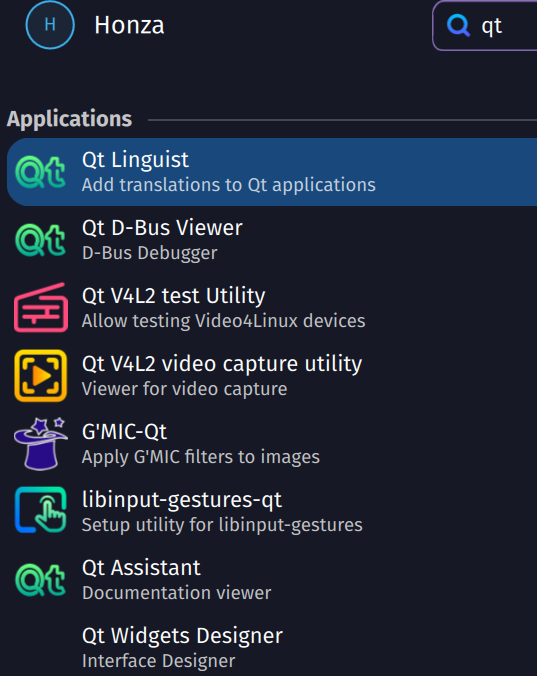
Nice  I just wanna know what is all the qt stuff for before just deleting it. Also it all looks really useful but I don’t have the ttime now to learn with it
AAAAaaAa why tf is 5 Megapixels the upload limit, I compresed it to 266.94KB and it still won’t let me
https://imgur.com/a/V4zKDgB
Tbh the qt apps look like they might have been pulled as a dep of another qt application. But this of course will be obvious when you try to remove it.
1 Like
libinput-gestures-qt (Qt-based GUI for libinput-gestures) is preinstalled. This was already the case in the
release and is still the case today.
The same applies to Qt Assistant, Qt D-Bus Viewer, Qt Linguist, and Qt Widgets Designer. These are part of the qt6-tools package, which is also preinstalled and required by KDE Plasma - do not remove this package.
The Qt V4L2 test utility and Qt V4L2 video capture utility are part of the v4l-utils package, which is also preinstalled and required by ffmpeg, for example.
4 Likes
Thank you! I hope I get the time to learn with it before graduation, but I doubt it
soo y/N?
PS: help I can’t format code like code now idk why
╭─honza@honza in ~
╰─λ garuda-health --fix
— System Health Check Report —
25/26 checks run in 1.13 seconds 
Powered by garuda-health  e
e
— LOW —
- Root Btrfs filesystem has less than 10GB free space
- PackageKit is currently installed. PackageKit (Discover, GNOME Software) is not a supported method to manage packages on Garuda Linux. https://wiki.garudalinux.org/
avoid-packagekit (fix available)
— INFO —
- A reboot is pending (update applied since last reboot)
Run garuda-health --fix to apply fixes.
— Applying Fixes —
Fixing “PackageKit is currently installed. PackageKit (Discover, GNOME Software) is not a supported method to manage packages on Garuda Linux. https://wiki.garudalinux
.org/avoid-packagekit”:
The following command will be executed:
sudo pacman -Rs packagekit packagekit-qt5
Continue? [y/N]:
Yes (y).
2 Likes
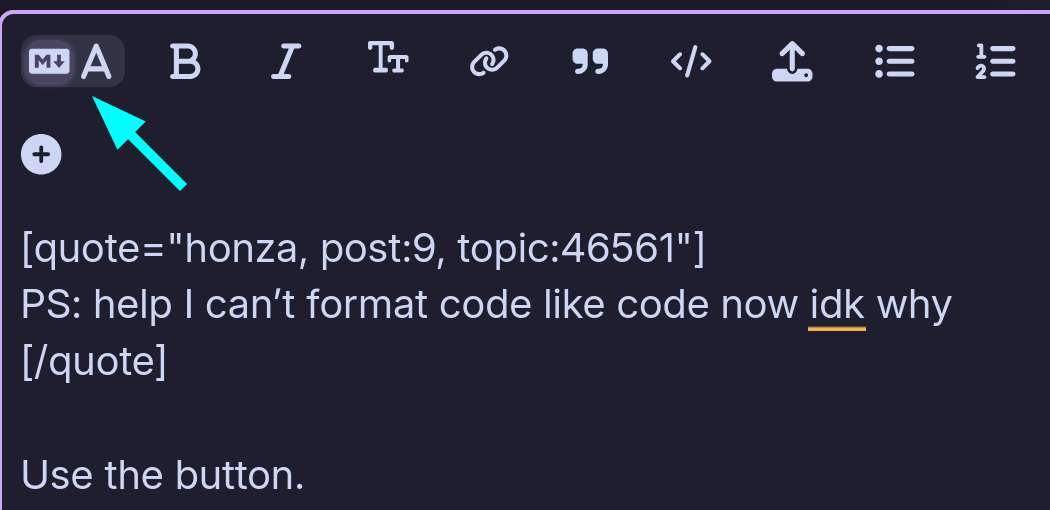
nonono I mean like this, with programming ůanguage selection and scrollable:
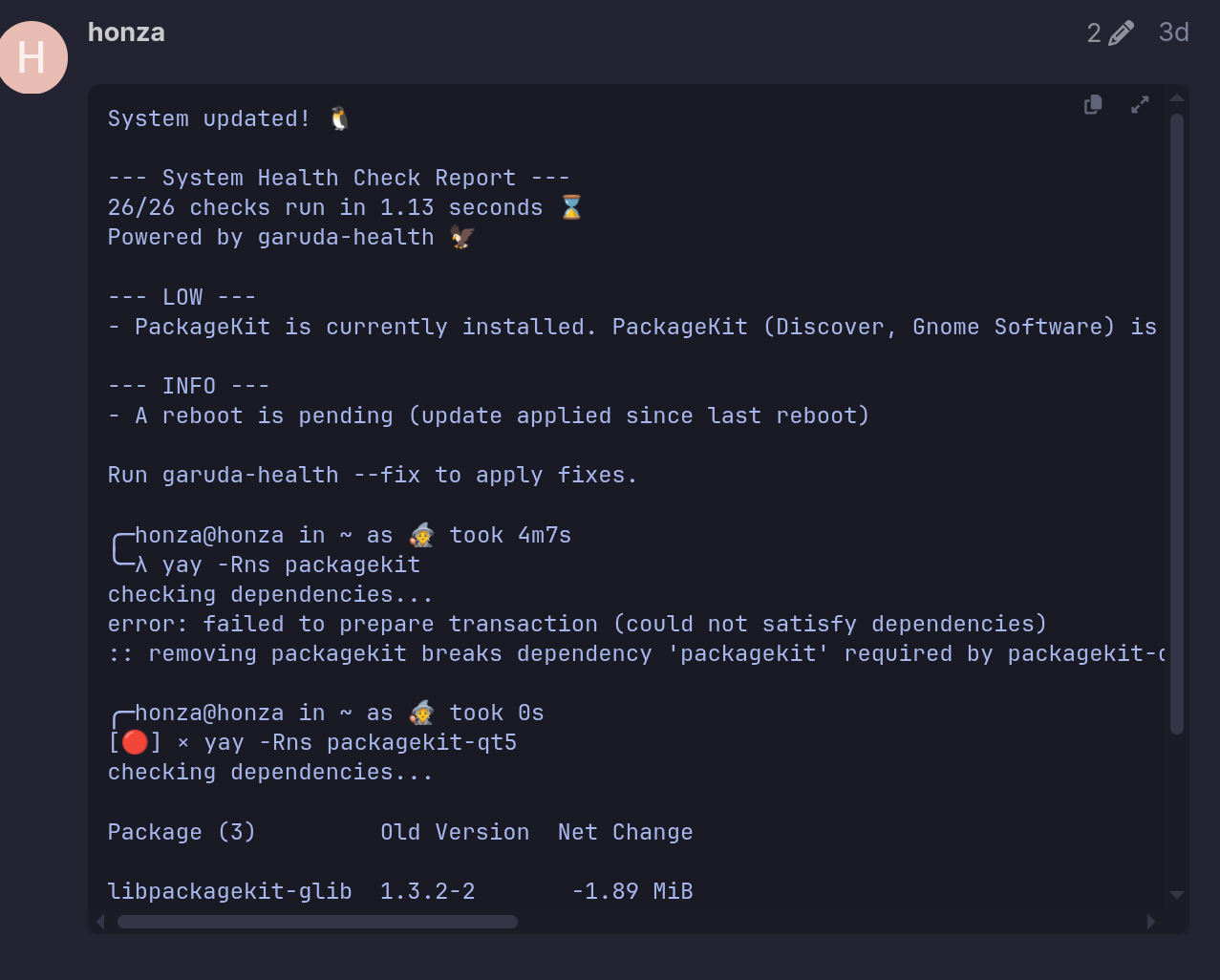
it just made the black background, but like, only for the lines, not the whole paragraph like before. Also I could click it before and it would make tiny tall rectangle, I could then paste the text into it. Weird
now it works I guess it was because my laptop was 1 day in sleep mode
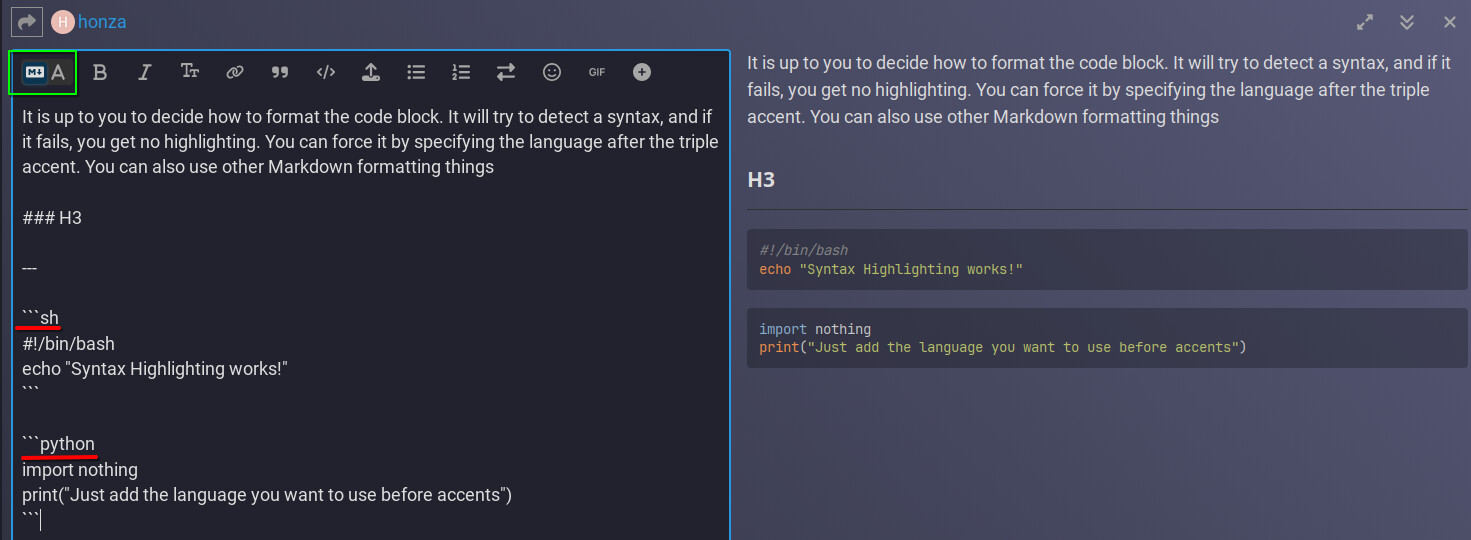
It is up to you to decide how to format the code block. It will try to detect a syntax, and if it fails, you get no highlighting. You can force it by specifying the language after the triple accent. You can also use other Markdown formatting things
3 Likes
Well yes but it just didn’t work one time, instead of black paragraph I got black lines arounf the text with no code select option
1 Like
A post was merged into an existing topic: System update fails to work
This topic was automatically closed 2 days after the last reply. New replies are no longer allowed.