Hello,
Garuda inixi
System:
Kernel: 6.16.8-zen3-1-zen arch: x86_64 bits: 64 compiler: gcc v: 15.2.1
clocksource: tsc avail: hpet,acpi_pm
parameters: BOOT_IMAGE=/@/boot/vmlinuz-linux-zen
root=UUID=da58b7be-731a-48ea-9895-88abd0814fb4 rw rootflags=subvol=@
quiet splash resume=UUID=da58b7be-731a-48ea-9895-88abd0814fb4
resume_offset=4485180 loglevel=3
Desktop: KDE Plasma v: 6.4.5 tk: Qt v: N/A info: frameworks v: 6.18.0
wm: kwin_wayland vt: 1 dm: SDDM Distro: Garuda base: Arch Linux
Machine:
Type: Desktop Mobo: ASUSTeK model: P8Z77-V v: Rev 1.xx
serial: <superuser required> part-nu: SKU uuid: <superuser required>
BIOS: American Megatrends v: 2104 date: 08/13/2013
CPU:
Info: model: Intel Core i7-3770K bits: 64 type: MT MCP arch: Ivy Bridge
gen: core 3 level: v2 built: 2012-15 process: Intel 22nm family: 6
model-id: 0x3A (58) stepping: 9 microcode: 0x21
Topology: cpus: 1x dies: 1 clusters: 4 cores: 4 threads: 8 tpc: 2
smt: enabled cache: L1: 256 KiB desc: d-4x32 KiB; i-4x32 KiB L2: 1024 KiB
desc: 4x256 KiB L3: 8 MiB desc: 1x8 MiB
Speed (MHz): avg: 3900 min/max: 1600/3900 scaling: driver: intel_cpufreq
governor: performance cores: 1: 3900 2: 3900 3: 3900 4: 3900 5: 3900 6: 3900
7: 3900 8: 3900 bogomips: 56161
Flags-basic: avx ht lm nx pae sse sse2 sse3 sse4_1 sse4_2 ssse3 vmx
Vulnerabilities: <filter>
Graphics:
Device-1: Intel IvyBridge GT2 [HD Graphics 4000] vendor: ASUSTeK P8 series
driver: i915 v: kernel arch: Gen-7 process: Intel 22nm built: 2012-13 ports:
active: HDMI-A-1 empty: DP-1, DP-2, DP-3, HDMI-A-2, HDMI-A-3, VGA-1
bus-ID: 00:02.0 chip-ID: 8086:0162 class-ID: 0300
Display: wayland server: X.org v: 1.21.1.18 with: Xwayland v: 24.1.8
compositor: kwin_wayland driver: X: loaded: modesetting
alternate: fbdev,intel,vesa dri: crocus gpu: i915 display-ID: 0
Monitor-1: HDMI-A-1 model: Samsung S24C450 serial: <filter> built: 2013
res: mode: 1920x1200 hz: 60 scale: 100% (1) dpi: 94 gamma: 1.2
size: 518x324mm (20.39x12.76") diag: 611mm (24.1") ratio: 16:10 modes:
max: 1920x1200 min: 640x480
API: EGL v: 1.5 hw: drv: intel crocus platforms: device: 0 drv: crocus
device: 1 drv: swrast gbm: drv: crocus surfaceless: drv: crocus wayland:
drv: crocus x11: drv: crocus
API: OpenGL v: 4.5 compat-v: 4.2 vendor: intel mesa v: 25.2.3-arch1.2
glx-v: 1.4 direct-render: yes renderer: Mesa Intel HD Graphics 4000 (IVB
GT2) device-ID: 8086:0162 memory: 1.46 GiB unified: yes display-ID: :1.0
API: Vulkan v: 1.4.321 layers: 9 device: 0 type: integrated-gpu name: Intel
HD Graphics 4000 (IVB GT2) driver: mesa intel v: 25.2.3-arch1.2
device-ID: 8086:0162 surfaces: N/A device: 1 type: cpu name: llvmpipe
(LLVM 20.1.8 256 bits) driver: mesa llvmpipe v: 25.2.3-arch1.2 (LLVM
20.1.8) device-ID: 10005:0000 surfaces: N/A
Info: Tools: api: clinfo, eglinfo, glxinfo, vulkaninfo
de: kscreen-console,kscreen-doctor gpu: corectrl wl: wayland-info
x11: xdpyinfo, xprop, xrandr
Audio:
Device-1: Intel 7 Series/C216 Family High Definition Audio vendor: ASUSTeK
driver: snd_hda_intel v: kernel bus-ID: 00:1b.0 chip-ID: 8086:1e20
class-ID: 0403
Device-2: JMTek LLC. CMTECK driver: hid-generic,snd-usb-audio,usbhid
type: USB rev: 1.1 speed: 12 Mb/s lanes: 1 mode: 1.1 bus-ID: 1-3:3
chip-ID: 0c76:165f class-ID: 0300 serial: <filter>
API: ALSA v: k6.16.8-zen3-1-zen status: kernel-api with: aoss
type: oss-emulator tools: N/A
Server-1: PipeWire v: 1.4.8 status: active with: 1: pipewire-pulse
status: active 2: wireplumber status: active 3: pipewire-alsa type: plugin
4: pw-jack type: plugin tools: pactl,pw-cat,pw-cli,wpctl
Network:
Device-1: Intel 82579V Gigabit Network vendor: ASUSTeK P8P67 Deluxe
driver: e1000e v: kernel port: f080 bus-ID: 00:19.0 chip-ID: 8086:1503
class-ID: 0200
IF: eno1 state: down mac: <filter>
Device-2: Qualcomm Atheros AR9485 Wireless Network Adapter vendor: ASUSTeK
driver: ath9k v: kernel pcie: gen: 1 speed: 2.5 GT/s lanes: 1
bus-ID: 06:00.0 chip-ID: 168c:0032 class-ID: 0280
IF: wlp6s0 state: up mac: <filter>
Info: services: NetworkManager, systemd-timesyncd, wpa_supplicant
Bluetooth:
Device-1: Realtek Bluetooth 5.1 Radio driver: btusb v: 0.8 type: USB
rev: 1.1 speed: 12 Mb/s lanes: 1 mode: 1.1 bus-ID: 4-1.3:3
chip-ID: 0bda:a725 class-ID: e001 serial: <filter>
Report: btmgmt ID: hci1 rfk-id: 8 state: up address: <filter> bt-v: 5.1
lmp-v: 10 status: discoverable: no pairing: no class-ID: 6c0104
Drives:
Local Storage: total: 2.76 TiB used: 1.07 TiB (38.8%)
SMART Message: Unable to run smartctl. Root privileges required.
ID-1: /dev/sda maj-min: 8:0 vendor: PNY model: CS900 1TB SSD
size: 931.51 GiB block-size: physical: 512 B logical: 512 B speed: 6.0 Gb/s
tech: SSD serial: <filter> fw-rev: 06B5 scheme: MBR
ID-2: /dev/sdb maj-min: 8:16 vendor: Seagate model: Backup+ Hub BK
size: 1.82 TiB block-size: physical: 512 B logical: 512 B type: USB rev: 3.1
spd: 5 Gb/s lanes: 1 mode: 3.2 gen-1x1 tech: N/A serial: <filter>
fw-rev: D781 scheme: MBR
ID-3: /dev/sdc maj-min: 8:32 vendor: SanDisk model: USB 3.2Gen1
size: 28.67 GiB block-size: physical: 512 B logical: 512 B type: USB
rev: 3.2 spd: 5 Gb/s lanes: 1 mode: 3.2 gen-1x1 tech: N/A serial: <filter>
fw-rev: 1.00 scheme: MBR
SMART Message: Unknown USB bridge. Flash drive/Unsupported enclosure?
Partition:
ID-1: / raw-size: 931.51 GiB size: 931.51 GiB (100.00%)
used: 65.83 GiB (7.1%) fs: btrfs dev: /dev/sda1 maj-min: 8:1
ID-2: /home raw-size: 931.51 GiB size: 931.51 GiB (100.00%)
used: 65.83 GiB (7.1%) fs: btrfs dev: /dev/sda1 maj-min: 8:1
ID-3: /var/log raw-size: 931.51 GiB size: 931.51 GiB (100.00%)
used: 65.83 GiB (7.1%) fs: btrfs dev: /dev/sda1 maj-min: 8:1
ID-4: /var/tmp raw-size: 931.51 GiB size: 931.51 GiB (100.00%)
used: 65.83 GiB (7.1%) fs: btrfs dev: /dev/sda1 maj-min: 8:1
Swap:
Kernel: swappiness: 133 (default 60) cache-pressure: 100 (default) zswap: no
ID-1: swap-1 type: file size: 34.37 GiB used: 0 KiB (0.0%) priority: -2
file: /swp/swapfile
ID-2: swap-2 type: zram size: 31.03 GiB used: 0 KiB (0.0%) priority: 100
comp: zstd avail: lzo-rle,lzo,lz4,lz4hc,deflate,842 dev: /dev/zram0
Sensors:
System Temperatures: cpu: 36.0 C mobo: N/A
Fan Speeds (rpm): N/A
Info:
Memory: total: 32 GiB note: est. available: 31.03 GiB used: 3.97 GiB (12.8%)
Processes: 294 Power: uptime: 33m states: freeze,mem,disk suspend: deep
avail: s2idle wakeups: 0 hibernate: platform avail: shutdown, reboot,
suspend, test_resume image: 12.38 GiB services: org_kde_powerdevil,
power-profiles-daemon, upowerd Init: systemd v: 258 default: graphical
tool: systemctl
Packages: pm: pacman pkgs: 1952 libs: 563 tools: octopi,paru Compilers:
clang: 20.1.8 gcc: 15.2.1 Shell: Bash v: 5.3.3 default: fish v: 4.0.8
running-in: konsole inxi: 3.3.39
Garuda (2.8.3-2):
System install date:     2025-09-16
Garuda release:          250907
Last full system update: 2025-09-28
Is partially upgraded:   Yes
Relevant software:       snapper NetworkManager dracut
Windows dual boot:       <superuser required>
Failed units:
--- System Health Check Report ---
22/24 checks run in 1.04 seconds ⌛
Powered by garuda-health
First of all I’d like to clarify that my bluetooth device (earbuds) are working fine, the issue is on cold booting the PC and happens randomly this happens but I only have one pair of earbuds:
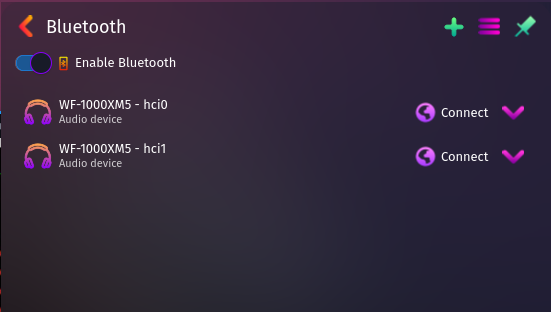
Once the earbuds are connected hci1 one is the one that’s active, hci0 is a ghost that comes and goes randomly on reboots. How do I get rid of it completely. The other issue I’m facing is that once the earbuds connect sound comes from them as expected but onece disconnected, sound is not restored to the PC speakers until I reboot the PC, it won’t matter if I change up the “line out” options listed in the devices section.
So I ran the journal command then this shows up on terminal:-
Oct 04 15:18:09 C4zrxh bluetoothd[851]: Failed to add UUID: Authentication Failed (0x05)
Oct 04 15:18:09 C4zrxh kernel: Bluetooth: hci0: Opcode 0x0c24 failed: -110
Oct 04 15:18:09 C4zrxh kernel: Bluetooth: hci0: command 0x0c24 tx timeout
Oct 04 15:18:09 C4zrxh kernel: Bluetooth: hci0: Resetting usb device.
Oct 04 15:18:09 C4zrxh kernel: Bluetooth: hci0: urb 00000000166a4b79 failed to resubmit (2)
Oct 04 15:18:11 C4zrxh bluetoothd[851]: Failed to add UUID: Authentication Failed (0x05)
Oct 04 15:18:11 C4zrxh kernel: Bluetooth: hci0: Opcode 0x0c24 failed: -110
Oct 04 15:18:11 C4zrxh kernel: Bluetooth: hci0: command 0x0c24 tx timeout
Oct 04 15:18:11 C4zrxh kernel: Bluetooth: hci0: Resetting usb device.
Oct 04 15:18:11 C4zrxh kernel: Bluetooth: hci1: urb 000000005150ec88 failed to resubmit (2)
Oct 04 15:18:13 C4zrxh kernel: Bluetooth: hci1: command 0xfc61 tx timeout
Oct 04 15:18:13 C4zrxh kernel: Bluetooth: hci1: RTL: RTL: Read reg16 failed (-110)
Oct 04 15:18:13 C4zrxh kernel: Bluetooth: hci1: RTL: Failed to generate devcoredump
Oct 04 15:18:13 C4zrxh kernel: Bluetooth: hci1: Resetting usb device.
Oct 04 15:18:13 C4zrxh kernel: Bluetooth: hci1: urb 00000000381e6d22 failed to resubmit (2)
Oct 04 15:18:15 C4zrxh kernel: Bluetooth: hci1: command 0xfc61 tx timeout
Oct 04 15:18:15 C4zrxh kernel: Bluetooth: hci1: RTL: Failed to generate devcoredump
Oct 04 15:18:15 C4zrxh kernel: Bluetooth: hci1: Resetting usb device.
Oct 04 15:18:15 C4zrxh kernel: Bluetooth: hci1: RTL: RTL: Read reg16 failed (-110)
Oct 04 15:18:15 C4zrxh kernel: Bluetooth: hci1: urb 00000000542a620f failed to resubmit (2)
Oct 04 15:18:17 C4zrxh kernel: Bluetooth: hci1: command 0xfc61 tx timeout
Oct 04 15:18:17 C4zrxh kernel: Bluetooth: hci1: RTL: Failed to generate devcoredump
Oct 04 15:18:17 C4zrxh kernel: Bluetooth: hci1: Resetting usb device.
Oct 04 15:18:17 C4zrxh kernel: Bluetooth: hci1: RTL: RTL: Read reg16 failed (-110)
Oct 04 15:18:17 C4zrxh kernel: Bluetooth: hci1: urb 0000000003b40960 failed to resubmit (2)
Oct 04 15:18:19 C4zrxh kernel: Bluetooth: hci1: command 0x1001 tx timeout
Oct 04 15:18:19 C4zrxh kernel: Bluetooth: hci1: RTL: Failed to generate devcoredump
Oct 04 15:18:19 C4zrxh kernel: Bluetooth: hci1: Resetting usb device.
Oct 04 15:18:19 C4zrxh kernel: Bluetooth: hci1: RTL: HCI_OP_READ_LOCAL_VERSION failed (-110)
Oct 04 15:18:19 C4zrxh kernel: Bluetooth: hci1: urb 00000000eecfb313 failed to resubmit (2)
Oct 04 15:18:21 C4zrxh kernel: Bluetooth: hci1: command 0xfc61 tx timeout
Oct 04 15:18:21 C4zrxh kernel: Bluetooth: hci1: RTL: Failed to generate devcoredump
Oct 04 15:18:21 C4zrxh kernel: Bluetooth: hci1: Resetting usb device.
Oct 04 15:18:21 C4zrxh kernel: Bluetooth: hci1: RTL: RTL: Read reg16 failed (-110)
Oct 04 15:18:22 C4zrxh kernel: Bluetooth: hci1: urb 0000000078917aab submission failed (2)
Oct 04 15:18:22 C4zrxh kernel: Bluetooth: hci1: unexpected event for opcode 0x1001
Oct 04 15:18:22 C4zrxh kernel: Bluetooth: hci1: unexpected event for opcode 0xfc61
So how do I get my sound back after disconnecting the earbuds without rebooting the PC?
Could this be caused by sudden power loss to the PC (power outage)?
Is there a way to repair & restore files in Garuda Btrfs like the way chkdsk does for windows?
 I’ll do it and get back