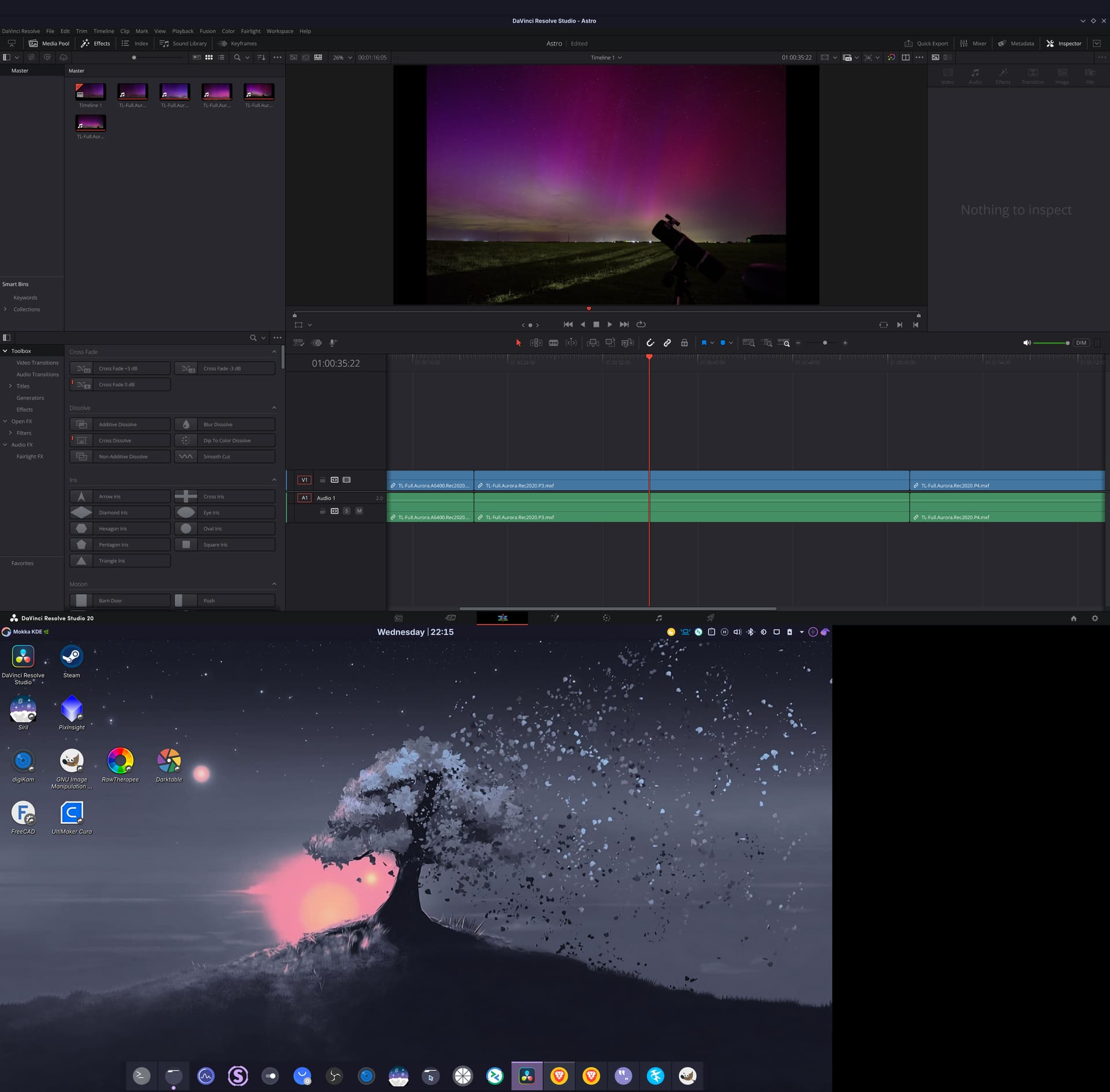
(screenshot of DaVinci Resolve Studio on an external 4k screen and my desktop on the laptop’s integrated 4k screen)
Hello everyone!
I’ve been using Garuda for a few weeks as my daily driver and so far I’m quite happy!
I do recommend it even for newbies, it’s mostly easy to install and it’s really cool. I use the “Mokka KDE” edition.
For the past 1-2 months or so I’ve been trying various distros because I wanted to completely stop using Windows.
Copilot was the final straw for me. No matter how many times I uninstalled it, it kept coming back.
Now luckily I don’t have a copilot-ready laptop with the AI hardware, so I’m guessing copilot wasn’t doing much on my laptop.
A lot of other stuff made me want to quit windows, here’s just a few of them:
- Ads in the start menu
- All sorts of popups and telemetry services.
- Couldn’t uninstall photoshop util I updated it and then I had to download an install the Adobe Cleaner or whatever the separate uninstall software is called.
- Whenever I downloaded a PDF file, Adobe Acrobat was starting and opening up that PDF. I tried all possible settings but I couldn’t get it to stop. I only wanted to download the PDF, not open it.
- “Preparing to configure Windows. Don’t turn off your computer”. Yes this has been better lately, but still I don’t want my computer to just start updating randomly when I turn it on or off.
- Difficult to even install Windows without an online account. Thankfully it’s still at least possible.
Advantages of Garuda Linux:
It’s a rolling distro so you always get the latest stuff.
Disadvantages of Garuda Linux:
It’s a rolling distro so things might break every now and then.
A little background
Ever since I had my first computer I was on Windows & DOS, then to very little Windows 3.1 and 95 in school, 98, 98SE, Millenium, XP, Vista, 7, a bit of 8, then 10 and 11. All in all it’s 27 years or so.
I still remember swapping mp3s on diskettes with friends, it’s how we shared music back then. Winamp was always on on everyone’s computer back then.
For the past 5 years I’ve also been on Mac for my software development job. Not sure why but it was company policy that everyone worked on Macs.
In the past I’ve also been on Fedora, openSUSE and Ubuntu for both personal computers and work. This was for about 3-4 years at some point in the past.
For almost the entire time I’ve been working with centOS and then ubuntu server for my server and admin stuff, related to web software development.
I compiled a list of software that I use the most and how well it works, here it is:
Video
- DaVinci Resolve Studio: Great, but tricky configuration.
- Initially it worked out of the box. I installed it with the official .run file because I didn’t know it was possible via Yay.
- Con: Over time after various updates I had to find creative ways to make it work more reliably. It’s not a big deal, just some stuff in the .desktop file. I’ve documented everything on the garuda forums, for example here: DaVinci Resolve issues after update (and some workarounds).
- Pro: Also the Speed Editor works great over USB cable. It also works over bluetooth but not very reliably
- My current exec line in the .desktop file:
env -u XDG_RUNTIME_DIR -u DBUS_SESSION_BUS_ADDRESS LIBVA_DRIVER_NAME=nvidia QT_AUTO_SCREEN_SCALE_FACTOR=1 QT_QPA_PLATFORM=xcb QT_IM_MODULE=xim LD_PRELOAD=/usr/lib64/libglib-2.0.so:/usr/lib64/libgdk_pixbuf-2.0.so.0:/usr/lib64/libgio-2.0.so:/usr/lib64/libgmodule-2.0.so /opt/resolve/bin/resolve
- OBS: Perfect.
- MPV: Perfect.
Photo
- GIMP: Perfect.
- digiKam: Perfect.
- RawTherapee: Perfect.
- I’m just testing it. Not happy with the picture quality though
- Darktable: Perfect.
- I’m just testing it, but works ok. Not happy with its UI though, very clunky and cumbersome. Bummer because darktable has great functionality, just the UI makes it unusable for me.
Astrophotography
- PixInsight: Perfect.
- SiriL: Perfect.
- GraXpert: Mostly OK
- available via Yay.
- works ok but the scaling is broken.
- scaling is broken even with
env QT_AUTO_SCREEN_SCALE_FACTOR=1 DEVICE_PIXEL_RATIO=2 QT_STYLE_OVERRIDE=gtk /usr/bin/graxpert-bin
3D Print and CAD
- FreeCad: Perfect.
- Ultimaker Cura: Perfect.
Gaming
- Steam (Runtime): Perfect.
- Known issue with gaming on Linux, some anticheat software doesn’t work because the game devs don’t integrate its linux binaries. Because of this some titles are not available on linux at this time.
- I’m mostly playing Elite Dangerous these days and I only had to do 1 special setting because of my 4k high-dpi laptop screen. That’s to set the “RGB Range” to “Limited” in the Display Settings. I only do this while gaming though because the desktop is a bit washed out with this setting. Wrote about it here: Game is too dark, but works if RGB Range is set to Limited
Misc
- Remmina: Perfect.
- I connect to a remote Windows VM over RDP to work in CaptureOne Pro and Affinity Photo.
- Moonlight: Perfect.
- I connect to the same Windows VM to work in CaptureOne Pro and Affinity Photo. Found Remmina to be better for my needs though. Still testing.
- Acrobat Reader DC in PlayOnLinux: OK-ish.
- I use it because I need a pdf reader that supports XFA Forms. The included
Okulardoes not support these forms, they’re very broken. - It works well but PlayOnLinux installs a version from 2015. It’s enough for my needs though.
- I use it because I need a pdf reader that supports XFA Forms. The included
- Brave Browser: Great, except for hardware video decoding.
- 1080p works great but 1440p or 4k can drop a lot of frames if you have something else using the gpu, like another 4k video playing on another screen. Think DaVinci Resolve for example.
- For 4k I had to come up with a way to click a button on the video page to open the video in MPV and play it there. Clunky but it works. If you need it it’s on github. userscript-youtube-play-in-mpv/user-script.js at main · dariusmihai/userscript-youtube-play-in-mpv · GitHub
- I have to start it with a bunch of env vars and arguments to get decent video playback, here’s the exec line in the .desktop file:
Exec=env LIBVA_DRIVER_NAME=nvidia MOZ_DISABLE_RDD_SANDBOX=1 VDPAU_DRIVER=nvidia GBM_BACKEND=nvidia-drm __GLX_VENDOR_LIBRARY_NAME=nvidia XDG_SESSION_TYPE=wayland GDK_BACKEND=wayland GTK_IM_MODULE=wayland QT_IM_MODULE=wayland XMODIFIERS= /opt/brave-bin/brave --enable-features=WaylandWindowDecorations,VaapiVideoDecoder,VaapiVideoEncoder,UseOzonePlatform --ozone-platform=wayland --ignore-gpu-blocklist --enable-zero-copy --disable-features=UseChromeOSDirectVideoDecoder %U
- Librewolf: Great, but same issues as Brave
- Chromium, Google Chrome: Great, but I’m not using them, just tested both. They do have the same video issues though.
- Bluetooth headphones, Hesh Anc: Perfect.
- Bluetooth mouse, Logitech MX Ergo trackball: Perfect.
- NFS: works well, mounting with systemd .mount files.
- Using it to access files on Synology and Truenas NASes.
- Syncthing: works perfectly
- I use it to sync files between my laptop, the NASes and a Windows VM.
Software development
- Visual Studio Code (Code OSS): Perfect.
- Rancher Desktop: Perfect.
Not installed yet, but somewhat optimistic:
- Jetbrains CLion
- Jetbrains Rider
- ItelliJ Idea maybe. For web It’s better than WebStorm.
- QT Creator
- Android Studio
- Unreal Engine
- Starnet++
- Kdenlive, very excited about this video editor.
Overall thoughts
Garuda Linux is great and I’m very very happy with it.
Installation process for the OS:
Easy but a bit more difficult than Windows if you want to do manual partitioning with encryption. Eventually I gave up and just did a whole-disk setup, worked great.
Drivers
Almost everything worked right out of the box.
I’ve only had issues with:
- Sound on the integrated speakers of the laptop. Still doesn’t work but it’s the same on other distros too. It only works on Windows, weird.
- GPU. For my RTX 3080 I had to uninstall the included nvidia drivers and install the
nvidia-open-dkmsand some other packages. The entire issue is here, you can go directly to the solution: Sluggish system on i9-11900H and RTX3080M - #54 - DaVinci Speed Editor over bluetooth, but this is not a Garuda-only issue either.
Software
Installing software is pretty easy, same as on Windows, no big issues mostly. Only DaVinci Resolve had various issues, but I fixed them all and it works flawlessly now. I did install it using the official .run file. I’m wondering if it would be easier with yay.
** All the software that I mentioned above, where I say “Perfect” it works better than on Windows**. Startup times are much much faster, almost instant. I can’t believe how fast GIMP starts for example, or Resolve, or PixInsight.
Issues
Well I’ve already mentioned most of the issues that I had, but there’s something else to be said.
So far Garuda is the distro that suits me the best, but if you’re switching from Windows to Linux it does depend on your use case. For almost everything it’s great and the experience is hassle-free.
However for more specialized use cases like videography or photography, it might require some tinkering.
Issues: Videography:
DaVinci Resolve, although it works flawlessly for me now, I did have to tinker with it quite a bit. See my other post here for my current .desktop file: DaVinci Resolve issues after update (and some workarounds)
Issues: Photography
For photography, there’s absolutely no production-ready software available on Linux. You have 2 big options:
- RawTherapee: Looks good, works good but I’ve found the image quality to be quite bad. Not sure what libraries it’s using behind the scenes, but i couldn’t get good results with it. Could be my mistake though, I’m willing to try again.
- Darktable: This one is strange. It has amazing features and it’s really really great at processing images.
- But it has a big problem, the UI. It’s very very clunky, it’s like it’s meant to be used by photographers that are also very technically savvy with computers.
- Too many buttons and options and modules and dropdowns. If I take the time to dig through the clunky UI, I can get result that are as good as CaptureOne or Lightroom. But to get there I need to spend 10x the amount of time, it’s just not feasible.
- It also uses very very technical words and expressions. And they’re not photography-technical. They’re computer-imaging-technical. For example “Scene-Referred”. Come on…
- As a photographer why would I need to work with linear data all the time? Yes, I do it for astrophotography but I have PixInsight and SiriL for that. For my non-astro photography work I don’t need to work with linear data and I don’t need to get very technical. I need the software to just apply basic transformations to already make the photo usable and give me the best possible starting point so I’m able to edit the photo and export it.
I am however using a third options, which is a remote Windows VM where I run CaptureOne and Affinity. I connect to it using Remmina or Moonlight. But this works only while I’m home because the VM is on my local network. Connectiong from remote places is not always possible, so I still keep a small laptop with Windows and CaptureOne on it.
Issues: Astrophotography
Garuda and Linux in general are perfect for the processing side of astrophotography because the industry-standard PixInsight and SiriL work very well here.
However, the aquisition side of imaging is a bit more in a a grey area.
It’s much better than with photography. Here we at least have tried-and-tested tools like EKOS, KStars, INDI, SkyChart (Cartes du ciel), PHD2 and many many more.
Just to be clear, I’m talking here mostly about controlling the telescope’s mount for GoTo and guiding, and controlling and the cameras.
So I’d say it’s usable but it’s more of a headache than on Windows where you can just install N.I.N.A, ASCAP, Stellarium, ASCOM, native camera drivers like Touptek or ZWO.
Most notably it’s about N.I.N.A and camera drivers.
My setup is that I’m using a mini-pc on each of my 2 mounts and I connect remotely to them. Both are MeLe Overclock 4C and they run Windows 11 with N.I.N.A. I’m not sure if I’d ever want to convert those to Linux, at least not this summer. I need to be able to rely on them to just work, I can’t be fiddling with the OS in the middle of the night on a field. I tried EKOS and KStars and I kinda gave up, very not-intuitive compared to N.I.N.A
Isues: General
I haven’t had any Garuda-specific issues, just Linux in general. It’s perfect for daily use only if you don’t mind getting into the terminal every now and then and on the forums to look for solutions. I don’t mind so I’m fine with it.
But would I recommend it to people that really dont like or don’t want to mess with the OS? Not sure. Maybe an atomic distro is better in that case, I don’t know. I mean I’d recommend it for someone that is not into photography. If they’re into videography I’d help with setting up DaVinci Resolve but I’d probably recommend Kdenlive because it’s more reliable and doesn’t break randomly. Keep Resolve only for color and perhaps multicam.
My conclusion
I really like Garuda Linux. A very big THANK YOU to the Garuda team.
Garuda helped me finally get rid of Windows on my daily use laptop and it also made it faster!