I have recently installed Garuda linux and faces some problems like remote acess.
I need to acess my own other computers so that i can acess to them.
I havetried to install chrome remote desktop nad anydesk also but they all are not working.
please help me in this mattter
hello Bibekkundu87,
please post your garuda-inxi output from the terminal.
Do you want use only graphical access did you try with ssh ?
i have anydesk and teamviewer running both. Did you updated and reboot the System?
3 Likes
As @Duke187 already mentioned, your garuda-inxi is missing, which was also requested in the template of your post. You want help? Then also help the helpers by posting your garuda-inxi.
Unless you want to access via ssh, Anydesk and Teamviewer were yesterday.
sudo pacman -S rustdesk-bin
3 Likes
I have done all of these but stillcant access anydesk
please help me in this matter
Without garuda-inxi this request will be moved to 4xx Client Error > 412 Precondition Failed
3 Likes
This is not an error description but a case for the  . What is happening and what error messages are there? Have you checked your firewall rules and set them correctly?
2 Likes
what is garuda inx
how to get it
Please use the forum search, this has already been explained umpteen times. Open a terminal and enter this:
garuda-inxi
then copy the output and paste it here as a code block.
4 Likes
see the pic below:
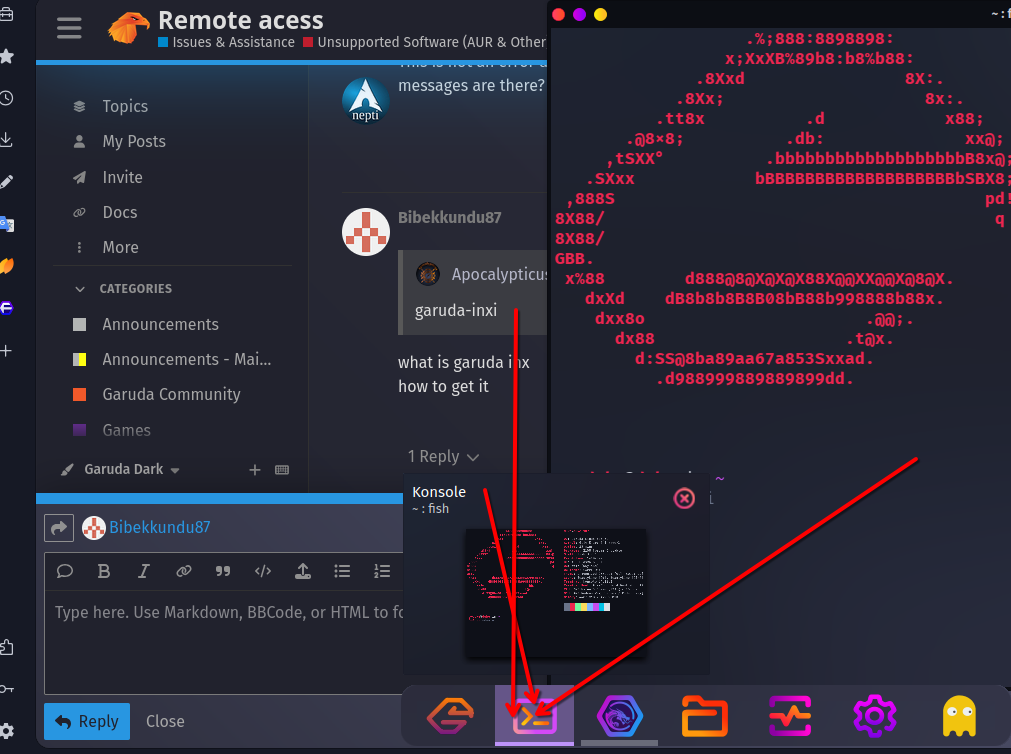
type this command here and press enter
the following output you mark and copy and paste it here in a message 
OS Garuda Linux x86_64
├ Kernel Linux 6.14.7-zen2-1-zen
├ Packages 2012 (pacman)[stable], 43 (flatpak)
└ Shell fish 4.0.2
DE KDE Plasma 6.3.5
├ Window Manager KWin (Wayland)
├ Login Manager sddm 0.21.0 (Wayland)
├ WM Theme Sweet-Dark
├ Color Themes Dr460nized (Sweet) [Qt], Sweet-Dark [GTK2/3/4]
├ System Icons BeautyLine [Qt], BeautyLine [GTK2/3/4]
├ System Fonts Fira Sans (10pt) [Qt], Fira Sans (10pt) [GTK2/3/4]
└ Terminal konsole 25.4.1
PC Desktop (Ver:5.02)
├ CPU Intel(R) Core(TM) i5-6500TE (4) @ 3.30 GHz
├ GPU Intel HD Graphics 530 @ 1.00 GHz [Integrated]
├ Vulkan 1.4.311 - Intel open-source Mesa driver [Mesa 25.1.1-arch1.1]
└ Display(s) 1920x1080 @ 100 Hz in 24" [External]
╭
╰─λ garuda-inxi
System:
Kernel: 6.14.7-zen2-1-zen arch: x86_64 bits: 64 compiler: gcc v: 15.1.1
clocksource: tsc avail: hpet,acpi_pm
parameters: BOOT_IMAGE=/@/boot/vmlinuz-linux-zen
root=UUID=b33c525b-d1ac-46f8-8437-dad4e820a467 rw rootflags=subvol=@
quiet loglevel=3 ibt=off
Desktop: KDE Plasma v: 6.3.5 tk: Qt v: N/A info: frameworks v: 6.14.0
wm: kwin_wayland vt: 1 dm: SDDM Distro: Garuda base: Arch Linux
Machine:
Type: Desktop Mobo: ZEBRONICS model: H110 v: Ver:5.02
serial: <superuser required> uuid: <superuser required>
UEFI: American Megatrends v: 5.12 date: 06/14/2024
CPU:
Info: model: Intel Core i5-6500TE bits: 64 type: MCP arch: Skylake-S
gen: core 6 level: v3 note: check built: 2015 process: Intel 14nm family: 6
model-id: 0x5E (94) stepping: 3 microcode: 0xF0
Topology: cpus: 1x dies: 1 clusters: 4 cores: 4 smt: <unsupported> cache:
L1: 256 KiB desc: d-4x32 KiB; i-4x32 KiB L2: 1024 KiB desc: 4x256 KiB
L3: 6 MiB desc: 1x6 MiB
Speed (MHz): avg: 2800 min/max: 800/3300 scaling: driver: intel_pstate
governor: powersave cores: 1: 2800 2: 2800 3: 2800 4: 2800 bogomips: 18399
Flags: avx avx2 ht lm nx pae sse sse2 sse3 sse4_1 sse4_2 ssse3 vmx
Vulnerabilities: <filter>
Graphics:
Device-1: Intel HD Graphics 530 driver: i915 v: kernel arch: Gen-9
process: Intel 14n built: 2015-16 ports: active: HDMI-A-2 empty: DP-1,
DP-2, HDMI-A-1, HDMI-A-3 bus-ID: 00:02.0 chip-ID: 8086:1912 class-ID: 0300
Display: wayland server: X.org v: 1.21.1.16 with: Xwayland v: 24.1.6
compositor: kwin_wayland driver: X: loaded: modesetting
alternate: fbdev,intel,vesa dri: iris gpu: i915 display-ID: 0
Monitor-1: HDMI-A-2 model: AOC 24B30HM serial: <filter> built: 2024 res:
mode: 1920x1080 hz: 100 scale: 100% (1) dpi: 93 gamma: 1.2
size: 527x296mm (20.75x11.65") diag: 604mm (23.8") ratio: 16:9 modes:
max: 1920x1080 min: 720x400
API: EGL v: 1.5 hw: drv: intel iris platforms: device: 0 drv: iris
device: 1 drv: swrast gbm: drv: iris surfaceless: drv: iris wayland:
drv: iris x11: drv: iris
API: OpenGL v: 4.6 compat-v: 4.5 vendor: intel mesa v: 25.1.1-arch1.1
glx-v: 1.4 direct-render: yes renderer: Mesa Intel HD Graphics 530 (SKL GT2)
device-ID: 8086:1912 memory: 15.16 GiB unified: yes display-ID: :1.0
API: Vulkan v: 1.4.313 layers: 9 device: 0 type: integrated-gpu name: Intel
HD Graphics 530 (SKL GT2) driver: mesa intel v: 25.1.1-arch1.1
device-ID: 8086:1912 surfaces: N/A device: 1 type: cpu name: llvmpipe
(LLVM 19.1.7 256 bits) driver: mesa llvmpipe v: 25.1.1-arch1.1 (LLVM
19.1.7) device-ID: 10005:0000 surfaces: N/A
Info: Tools: api: clinfo, eglinfo, glxinfo, vulkaninfo
de: kscreen-console,kscreen-doctor wl: wayland-info
x11: xdpyinfo, xprop, xrandr
Audio:
Device-1: Intel 100 Series/C230 Series Family HD Audio driver: snd_hda_intel
v: kernel alternate: snd_soc_avs bus-ID: 00:1f.3 chip-ID: 8086:a170
class-ID: 0403
API: ALSA v: k6.14.7-zen2-1-zen status: kernel-api tools: N/A
Server-1: PipeWire v: 1.4.2 status: active with: 1: pipewire-pulse
status: active 2: wireplumber status: active 3: pipewire-alsa type: plugin
4: pw-jack type: plugin tools: pactl,pw-cat,pw-cli,wpctl
Network:
Device-1: Realtek RTL8111/8168/8211/8411 PCI Express Gigabit Ethernet
driver: r8169 v: kernel pcie: gen: 1 speed: 2.5 GT/s lanes: 1 port: e000
bus-ID: 02:00.0 chip-ID: 10ec:8168 class-ID: 0200
IF: enp2s0 state: down mac: <filter>
IF-ID-1: enp0s20f0u2 state: unknown speed: -1 duplex: half mac: <filter>
Info: services: NetworkManager, smbd, sshd, systemd-timesyncd
Bluetooth:
Device-1: OPPO CROW-QRD_CID:0457_SN:153596D2 driver: rndis_host,usbfs
type: USB rev: 2.0 speed: 480 Mb/s lanes: 1 mode: 2.0 bus-ID: 1-2:2
chip-ID: 22d9:2766 class-ID: 0a00 serial: <filter>
Device-2: Cambridge Silicon Radio Bluetooth Dongle (HCI mode)
driver: btusb v: 0.8 type: USB rev: 2.0 speed: 12 Mb/s lanes: 1 mode: 1.1
bus-ID: 1-6:3 chip-ID: 0a12:0001 class-ID: e001
Report: ID: hci0 rfk-id: 0 state: up address: <filter> bt-v: 5.3 lmp-v: 12
status: discoverable: no pairing: no class-ID: 6c0104
Drives:
Local Storage: total: 238.47 GiB used: 69.14 GiB (29.0%)
SMART Message: Unable to run smartctl. Root privileges required.
ID-1: /dev/nvme0n1 maj-min: 259:0 model: ESSENCORE NVME GEN3 SSD
size: 238.47 GiB block-size: physical: 512 B logical: 512 B speed: 31.6 Gb/s
lanes: 4 tech: SSD serial: <filter> fw-rev: VC3S5007 temp: 50.9 C
scheme: GPT
Partition:
ID-1: / raw-size: 238.17 GiB size: 238.17 GiB (100.00%)
used: 69.14 GiB (29.0%) fs: btrfs dev: /dev/nvme0n1p2 maj-min: 259:2
ID-2: /boot/efi raw-size: 300 MiB size: 299.4 MiB (99.80%)
used: 616 KiB (0.2%) fs: vfat dev: /dev/nvme0n1p1 maj-min: 259:1
ID-3: /home raw-size: 238.17 GiB size: 238.17 GiB (100.00%)
used: 69.14 GiB (29.0%) fs: btrfs dev: /dev/nvme0n1p2 maj-min: 259:2
ID-4: /var/log raw-size: 238.17 GiB size: 238.17 GiB (100.00%)
used: 69.14 GiB (29.0%) fs: btrfs dev: /dev/nvme0n1p2 maj-min: 259:2
ID-5: /var/tmp raw-size: 238.17 GiB size: 238.17 GiB (100.00%)
used: 69.14 GiB (29.0%) fs: btrfs dev: /dev/nvme0n1p2 maj-min: 259:2
Swap:
Kernel: swappiness: 133 (default 60) cache-pressure: 100 (default) zswap: no
ID-1: swap-1 type: zram size: 15.53 GiB used: 0 KiB (0.0%) priority: 100
comp: zstd avail: lzo-rle,lzo,lz4,lz4hc,deflate,842 max-streams: 4
dev: /dev/zram0
Sensors:
System Temperatures: cpu: 39.0 C pch: 43.0 C mobo: N/A
Fan Speeds (rpm): N/A
Info:
Memory: total: 16 GiB available: 15.53 GiB used: 5 GiB (32.2%)
Processes: 241 Power: uptime: 23m states: freeze,mem,disk suspend: s2idle
wakeups: 0 hibernate: platform avail: shutdown, reboot, suspend, test_resume
image: 6.19 GiB services: org_kde_powerdevil, power-profiles-daemon,
upowerd Init: systemd v: 257 default: graphical tool: systemctl
Packages: 2055 pm: pacman pkgs: 2012 libs: 491 tools: octopi,paru,yay
pm: flatpak pkgs: 43 Compilers: clang: 19.1.7 gcc: 15.1.1 Shell: garuda-inxi
default: fish v: 4.0.2 running-in: konsole inxi: 3.3.38
Garuda (2.7.2-1):
System install date:     2025-04-06
Last full system update: 2025-05-26
Is partially upgraded:   No
Relevant software:       snapper NetworkManager dracut
Windows dual boot:       Probably (Run as root to verify)
Failed units:
This topic was automatically closed 14 days after the last reply. New replies are no longer allowed.