Terminal applications are great. One of my favourite things about Garuda is Rani which serves as a hub to do almost everything you could want. It doesn’t matter if those actions are GUI or terminal. In fact the terminal would be easier to implement, and the GUI hub to navigate. <3
Got it, will be pushing a fix for this shortly, thanks for the report.
5 Likes
All seems fine after the update
sudo garuda-health
--- System Health Check Report ---
21/21 checks run in 0.90 seconds ⌛
Powered by garuda-health 🦅

✅ System health check passed. No issues found.
Thanks for the tool
3 Likes
I’m still getting the warning about having <5gb free space on the root disk when I currently have 11.8gb. When I first got the message it was correct (<5gb) but soon after I got up to 20gb free and down to 10gb free but still getting the message.
I have the latest version from repo that I just downloaded prior to testing it.
--- System Health Check Report ---
21/21 checks run in 1.39 seconds ⌛
Powered by garuda-health 🦅

--- HIGH ---
- Root Btrfs filesystem has less than 5GB free space

--- LOW ---
- Failed systemd services found: memory_monitor.service
Filesystem      Size  Used Avail Use% Mounted on
/dev/nvme0n1p3   90G   76G   12G  87% /
I don’t know what the memory_monitor.service is all about but it’s LOW so I guess not bad.
The output of df is not equivalent to the actual free space available on the drive. garuda-health uses btrfs tooling itself to determine how much actual free space is available.
3 Likes
hi,
i like it 
just i got a message for my older manual snapshots i wont delete it 
-– LOW —
- Old Btrfs snapshots found that can be deleted (fix available)
good work
2 Likes
The tool would ask for root privileges everytime, which I will grant to get such output. Running it with sudo makes no difference whatsoever.
The thing is I don´t have smartmontools installed though  , and no warning it’s missing appears (maybe that would be a nice addition, or have it as an optional dependency if it’s optional indeed). A curiosity, after installing it the tool would run without asking for root privileges
  . Anyway, now all tests are running
I’ve added 2 new checks to garuda-health that will check if all kernels are installed in /boot and also check if all kernels have compiled nvidia modules ready for the next reboot.
Done.
8 Likes
Is there, perhaps a command-line argument that could be added when running garuda-health manually that will display all the checks it does? I understand not needing it for regular/scripted (i.e., garuda-update) usage, but perhaps like a --verbose or -v argument that displays each of the checks? Maybe with multiple -vv will display the output of each check as well? Just thinking out loud…I love this tool, it’s great, but my curiosity has me wanting to see everything lol.
3 Likes
Unfortunately, the way it’s currently coded, the checks themselves are not assigned any names.
I’d offer to help, but I’m no coder/scripter so my utility is limited. It’s just a “nice to have” - so if you have the time/inclination, I’m sure I and others would appreciate it, but it’s certainly no deal breaker. Thanks for the hard work on this already! It’s a great tool!
1 Like
I like it.
Though I was a bit confused about it pretending there was something wrong with my perfectly-fine-working nvidia-dkms just to get me to switch to open. Feels a bit like the overly intrusive Windows 11 upgrade advice that got me into Garuda.
Some things that come to mind for future features:
- Maybe it could do some baseline security checks, like whether a firewall is installed, working, and somewhat plausibly configured. Maybe other people know some other things that really should or shouldn’t be configured from a security perspective.
- Maybe it could remove orphans automatically.
- Maybe it could merge .pacnew files automatically – at least for some, like the mirror lists, where it usually doesn’t make sense to copy individual entries anyway.
- Maybe it could do some kind of system cleanup, like clearing old files from caches and temporary folders.
- Maybe it could warn users running a bad kernel for their system. I’ve seen forum posts where people where confused about znver2/3/4 and picked the wrong one.
- Maybe it could warn users running sub-optimal resolution or refresh rate for their display, using integrated graphics when dedicated is available, having HDR not enabled when supported, or still using X11 sessions. I realize some of these are debatable, so…
- Maybe there could be a way to disable specific checks users disagree with and don’t want to see every time. Similarily, would be good, if multiple issues were found, to be able to select which fixes should be applied and which not.
Cheers
That’s why it didn’t pretend there was something wrong! You would’ve seen it was classified as an “info” issue, which means any intervention is 100% optional.
I do not believe that is within the scope of garuda-health. Having or not having a firewall installed does not necessarily improve security.
Handling this without being too nag-y is something I’ve not quite figured out yet.
This is probably one for garuda-update or garuda-hooks.
Garuda-health is not a “system cleanup” utility. System cleanup utilities are usually snake oil anyway, sooooooo
Excellent idea!
This is not currently possible with the way the program was designed.
Garuda-health asks for confirmation before applying any fix.
5 Likes
Garuda/Linux is not Windows. Most users are behind a router, which almost always has an integrated firewall. The main reason for using a firewall in Windows is to see and prevent unwanted data traffic from Windows and programs.
After restarting Garuda, 4-5 connections are established that are related to update queries. These connections are closed after a short time. If I leave the desktop idle, I could wait for 24 hours there is exactly one active connection remaining — the one to my router.
Removing orphans automatically is already implemented in Rani.
Merging .pacnew files automatically could be trigger big fails. Individual entries may also continue to be valid in the mirror list.
The resolution setting is mainly automated by the system and should correspond to the optimal value.
In my opinion, refresh rates and HDR are individual settings that everyone can adjust to their liking. I don’t necessarily need to use the maximum refresh rate. The same goes for HDR. There are certainly plenty of people who aren’t interested in this, but in my opinion, it drives up power consumption more than the slight visual improvement it provides and it reduces the lifespan of the display lights.
Giving users the possibility to enable/disable functions would certainly require a lot of work. One should also not forget what garuda-health was designed for and not disregard the KISS principle. It is easy to create a monstrosity that many users do not want.
7 Likes
I for one do not want to see any app do the above.
So called orphan files are not always orphans no matter what the system claims.
.pacnew files should be compared by the user not just merged with the new file.
Auto cleaning is never a good idea cause you don’t get to review them first to make sure you aren’t removing something you actually want to keep.
8 Likes
I’m now getting the correct information about my free space. I actually had >10gb when previously it was telling me <5gb. Now it’s correct I have 9.1gb. 
--- System Health Check Report ---
23/23 checks run in 1.46 seconds ⌛
Powered by garuda-health 🦅

--- LOW ---
- Root Btrfs filesystem has less than 10GB free space
- Failed systemd services found: memory_monitor.service

--- INFO ---
- A reboot is pending (update applied since last reboot)
2 Likes
I believe I simply have a different understanding of what “health” tools (should) than others. I’ve always considered them to be advisors that simply point out things you might have overlooked – like potential security vulnerabilities, garbage piling up, disabled features that would be available, and so on. The more ideas they give you, the better. And then you can choose what you agree with.
If it’s plain obvious that something should be done or configured in exactly one way, I would expect that to be the default configuration and/or built into the core tools to be applied automatically without even asking → garuda-update.
@Apocalypticus Sorry for triggering you by mentioning the unspeakable. But you are absolutely right, cleaning up orphans is already a feature in RANI. I completely forgot that.
PS: And I just noticed that the “cleanup snake-oil”, as @TNE called it, is also already built into Garuda. Out of nowhere, it asked me to delete old snapshots today. Had not seen that before.
Whilst we are on the subject of the Garuda-Health app, I think its a great idea but I have one small comment. Do we need a ‘Restart’ message after every update run? Whilst I agree restarts are sometimes needed surely not every time. I also use CachyOS, that has a restart reminder but only when core files and apps are updated. Could we look to implementing the same in the Garuda-health app.
Thanks all for your time and efforts.
Hey @TNE love the tool. Just installed Garuda on a new PC NUC I got, and was pleasantly surprised at the new Garuda Health tool.
I’m just running into one snag. After the last update/upgrade, I rebooted, and then when running garuda-health again, it’s still telling me a reboot is pending even though I just rebooted. Any chance you might know why it’s constantly telling me a reboot is pending? Checked through this thread and didn’t see anything there, but maybe I missed a post?
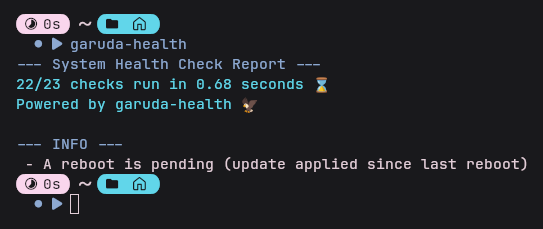
Heya! The way that check works is by comparing /var/lib/garuda/last_update and /proc (their modification times). Are you able to see any abnormalities in any of those files?